
Android笔记之自定义PopupWindow
效果图
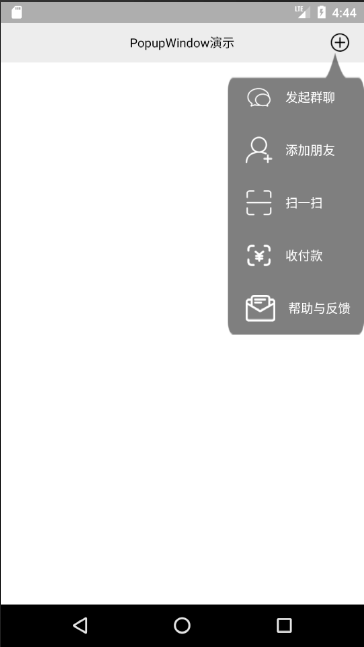
popup_window_addition.xml
<?xml version="1.0" encoding="utf-8"?>

<LinearLayout xmlns:android="http://schemas.android.com/apk/res/android"

    android:layout_width="wrap_content"

    android:layout_height="wrap_content"

    android:background="@mipmap/addition_popup_window_background"

    android:orientation="vertical"

    android:paddingLeft="20dp"

    android:paddingTop="15dp"

    android:paddingRight="15dp">

    <TextView

        android:layout_width="wrap_content"

        android:layout_height="wrap_content"

        android:layout_marginTop="20dp"

        android:layout_marginBottom="15dp"

        android:drawableLeft="@mipmap/ic_chat"

        android:drawablePadding="15dp"

        android:gravity="center"

        android:text="发起群聊"

        android:textColor="@android:color/white" />

    <TextView

        android:layout_width="wrap_content"

        android:layout_height="wrap_content"

        android:layout_marginTop="15dp"

        android:layout_marginBottom="15dp"

        android:drawableLeft="@mipmap/ic_add_friend"

        android:drawablePadding="15dp"

        android:gravity="center"

        android:text="添加朋友"

        android:textColor="@android:color/white" />

    <TextView

        android:layout_width="wrap_content"

        android:layout_height="wrap_content"

        android:layout_marginTop="15dp"

        android:layout_marginBottom="15dp"

        android:drawableLeft="@mipmap/ic_scan"

        android:drawablePadding="15dp"

        android:gravity="center"

        android:text="扫一扫"

        android:textColor="@android:color/white" />

    <TextView

        android:layout_width="wrap_content"

        android:layout_height="wrap_content"

        android:layout_marginTop="15dp"

        android:layout_marginBottom="15dp"

        android:drawableLeft="@mipmap/ic_receive_pay"

        android:drawablePadding="15dp"

        android:gravity="center"

        android:text="收付款"

        android:textColor="@android:color/white" />

    <TextView

        android:layout_width="wrap_content"

        android:layout_height="wrap_content"

        android:layout_marginTop="15dp"

        android:layout_marginBottom="15dp"

        android:drawableLeft="@mipmap/ic_feedback"

        android:drawablePadding="15dp"

        android:gravity="center"

        android:text="帮助与反馈"

        android:textColor="@android:color/white" />

</LinearLayout>
AdditionPopupWindow.java
package com.bu_ish.popup_window_example;

import android.content.Context;

import android.graphics.drawable.ColorDrawable;

import android.view.LayoutInflater;

import android.view.View;

import android.widget.LinearLayout;

import android.widget.PopupWindow;

public class AdditionPopupWindow extends PopupWindow {

    public AdditionPopupWindow(Context context) {

        setWidth(LinearLayout.LayoutParams.WRAP_CONTENT);

        setHeight(LinearLayout.LayoutParams.WRAP_CONTENT);

        setBackgroundDrawable(new ColorDrawable());

        setOutsideTouchable(true);

        View view = LayoutInflater.from(context).inflate(R.layout.popup_window_addition, null);

        setContentView(view);

    }

}
MainActivity.java
package com.bu_ish.popup_window_example;

import android.support.v7.app.AppCompatActivity;

import android.os.Bundle;

import android.view.View;

public class MainActivity extends AppCompatActivity {

    @Override

    protected void onCreate(Bundle savedInstanceState) {

        super.onCreate(savedInstanceState);

        setContentView(R.layout.activity_main);

        findViewById(R.id.addImageView).setOnClickListener(new View.OnClickListener() {

            @Override

            public void onClick(View v) {

                AdditionPopupWindow popupWindow = new AdditionPopupWindow(MainActivity.this);

                popupWindow.showAsDropDown(v);

            }

        });

    }

}
注意
要想点击外部关闭PopupWindow,必须调用setBackgroundDrawable(Drawable)和setOutsideTouchable(boolean)
完整Demo链接:https://pan.baidu.com/s/1NF5-SUaOyHOWRWCFKfTWCA,提取码:c59o
Android笔记之自定义PopupWindow的更多相关文章
- Android笔记之自定义对话框
效果如下图 对话框布局 dialog_uninstallation_confirmation.xml <?xml version="1.0" encoding="u ...
- Android笔记之自定义的RadioGroup、RadioButton,以及View实例状态的保存与恢复
效果图 activity_main.xml <?xml version="1.0" encoding="utf-8"?> <LinearLay ...
- Android 自定义PopupWindow动画效果
public class RollActivity extends Activity { private View view; private Button btn; private PopupWin ...
- Android学习笔记_34_自定义窗口标题
1.建好项目之后在它的layout文件夹下创建一个title.xml文件,作为自定义窗口标题的文件. <?xml version="1.0" encoding="u ...
- 自定义PopupWindow弹出框(带有动画)
使用PopupWindow来实现弹出框,并且带有动画效果 首先自定义PopupWindow public class LostPopupWindow extends PopupWindow { pub ...
- Android笔记:触摸事件的分析与总结----TouchEvent处理机制
原创作品,允许转载,转载时请务必以超链接形式标明文章 原始出处 .作者信息和本声明.否则将追究法律责任.http://glblong.blog.51cto.com/3058613/1559320 ...
- 自定义PopupWindow动画效果
public class RollActivity extends Activity { private View view; private Button btn; private PopupWin ...
- 我的Android进阶之旅------>Android如何通过自定义SeekBar来实现视频播放进度条
首先来看一下效果图,如下所示: 其中进度条如下: 接下来说一说我的思路,上面的进度拖动条有自定义的Thumb,在Thumb正上方有一个PopupWindow窗口,窗口里面显示当前的播放时间.在Seek ...
- Android笔记--View绘制流程源码分析(一)
Android笔记--View绘制流程源码分析 View绘制之前框架流程分析 View绘制的分析始终是离不开Activity及其内部的Window的.在Activity的源码启动流程中,一并包含 着A ...
随机推荐
- C++ 回调函数的简单例子(转)
原文转自 http://blog.csdn.net/wnlwcg/article/details/6930990# 1.调用端 // 下面的这个_stdcall很重要的 void _stdcall T ...
- 電池的標稱電壓 與 power consumption 量測
電池標稱電壓 定義如下圖, 以25度為例,20度再往上點, 4V 放一下電就往下掉, 3V 放一下電就往下掉, 假設 3.8V 是擁有最多 capacity 可以 discharge 的電壓,放電放了 ...
- 快充 IC BQ25896 如何判斷 手機插著 adapter 充電器時,adapter Iout 大於限制,adapter Vout 小於 限制,導致 battery 不但沒充電且還需放電。
若電池在 放電時,ICHGR 為0. 若電池在 充電時,ICHGR有變化. 下面有寫到 charge current 所以不是 discharge current 狀況: ...
- [AI开发]深度学习如何选择GPU?
机器推理在深度学习的影响下,准确性越来越高.速度越来越快.深度学习对人工智能行业发展的贡献巨大,这得益于现阶段硬件计算能力的提升.互联网海量训练数据的出现.本篇文章主要介绍深度学习过程中如何选择合适的 ...
- python使用Queue进行进程间通信
1.Process之间有时需要通信,操作系统提供了很多机制来实现进程间的通信. 可以使用multiprocessing模块的Queue实现多进程之间的数据传递, Queue本身是一个消息列队程序: f ...
- android-samples-mvp
Model–view–presenter (MVP)介绍 mvp在wiki上的介绍为 Model 定义用户界面所需要被显示的数据模型,一个模型包含着相关的业务逻辑 View View不应该处理业务 ...
- Codeforces Gym 100338H High Speed Trains 组合数学+dp+高精度
原题链接:http://codeforces.com/gym/100338/attachments/download/2136/20062007-winter-petrozavodsk-camp-an ...
- Java---详解方法传值问题
过程解析: 1.首先执行int[] arr={3,5,6,1,7,9,0},遇到数组先执行等式右边的,{3,5,6,1,7,9,0}会在堆内存中开辟一块空间,分成7小块,下标分别从0~6,先进行系统初 ...
- Excel文件处理Demo
1.BLL业务逻辑代码 /// <summary> /// 处理“店铺竞品销售数据”导入文件 /// </summary> /// <param name="f ...
- "visual studio 2012 安装引擎拒绝访问" 错误的解决
首先,我们看一下错误的具体提示,如下图所示: 这个错误,是我安装了那么多年Visual Studio的经历中,第一次遇到.太恶心了,昨天一直安装失败,导致后续其它软件的安装一再拖延.目前网上的解决方案 ...