
后台任务hangfire
Installation
There are a couple of packages for Hangfire available on NuGet. To install Hangfire into your ASP.NET application withSQL Server storage, type the following command into the Package Manager Console window:
PM> Install-Package Hangfire
Configuration
After installing the package, add or update the OWIN Startup class with the following lines:
using Hangfire;

// ...

public void Configuration(IAppBuilder app)

{

    GlobalConfiguration.Configuration.UseSqlServerStorage("<connection string or its name>");

    app.UseHangfireDashboard();

    app.UseHangfireServer();

}
Authorization configuration required
By default only local access is permitted to the Hangfire Dashboard. Dashboard authorization must be configured in order to allow remote access.
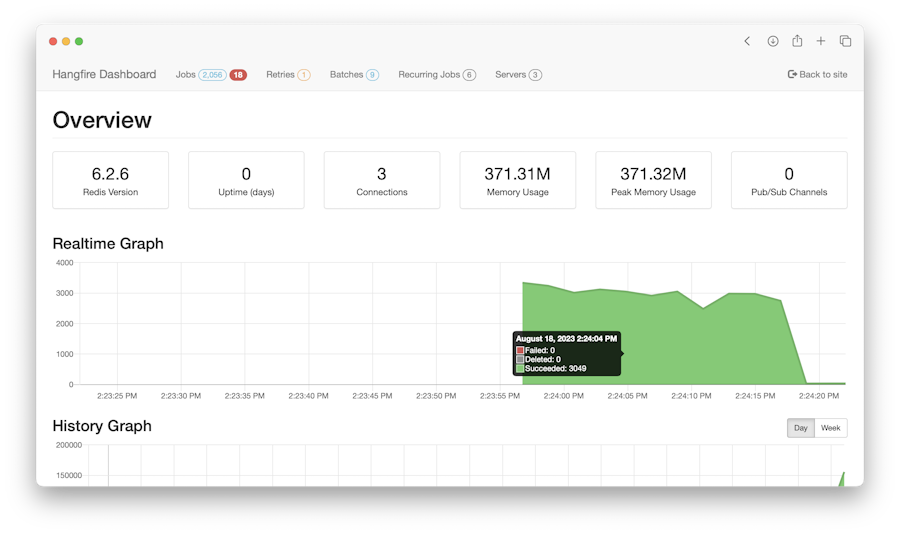
Then open the Hangfire Dashboard to test your configuration. Please, build the project and open the following URL in a browser:
Usage
Add a job…
Hangfire handles different types of background jobs, and all of them are invoked on a separate execution context.
Fire-and-forget
This is the main background job type, persistent message queues are used to handle it. Once you create a fire-and-forget job, it is saved to its queue ("default" by default, but multiple queues supported). The queue is listened by a couple of dedicated workers that fetch a job and perform it.
BackgroundJob.Enqueue(() => Console.WriteLine("Fire-and-forget"));
Delayed
If you want to delay the method invocation for a certain type, call the following method. After the given delay the job will be put to its queue and invoked as a regular fire-and-forget job.
BackgroundJob.Schedule(() => Console.WriteLine("Delayed"), TimeSpan.FromDays(1));
Recurring
To call a method on a recurrent basis (hourly, daily, etc), use the RecurringJob class. You are able to specify the schedule using CRON expressions to handle more complex scenarios.
RecurringJob.AddOrUpdate(() => Console.WriteLine("Daily Job"), Cron.Daily);
Continuations
Continuations allow you to define complex workflows by chaining multiple background jobs together.
var id = BackgroundJob.Enqueue(() => Console.WriteLine("Hello, "));

BackgroundJob.ContinueWith(id, () => Console.WriteLine("world!"));

http://docs.hangfire.io/en/latest/quick-start.html#installation
后台任务hangfire的更多相关文章
- ASP.NET Core开发-后台任务利器Hangfire使用
ASP.NET Core开发系列之后台任务利器Hangfire 使用. Hangfire 是一款强大的.NET开源后台任务利器,无需Windows服务/任务计划程序. 可以使用于ASP.NET 应用也 ...
- 执行后台任务的利器——Hangfire
今年1月31日,在微软的MVP 2015社区大讲堂上,我给大家分享了一个演讲:在ASP.NET应用中执行后台任务.其中介绍了三种技术的应用:QueueBackgroundWorkItem.Hangfi ...
- Core开发-后台任务利器Hangfire使用
Core开发-后台任务利器Hangfire使用 ASP.NET Core开发系列之后台任务利器Hangfire 使用. Hangfire 是一款强大的.NET开源后台任务利器,无需Windows服务/ ...
- .NET Core开源组件:后台任务利器之Hangfire
一.简述 Hangfire作为一款高人气且容易上手的分布式后台执行服务,支持多种数据库.在.net core的环境中,由Core自带的DI管理着生命周期,免去了在NF4.X环境中配置always ru ...
- mvc中使用Hangfire处理后台任务
考虑下如下代码,在数据保存后,需要发送邮件,发送邮件是个耗时的工作. 我们的目的是,数据保存成功后,就可以返回响应了,发送邮件不重要,不需要等待邮件发送成功 [HttpPost] public Act ...
- 执行后台任务的利器——Hangfire
Hangfire是一个开源且商业免费使用的工具函数库.可以让你非常容易地在ASP.NET应用(也可以不在ASP.NET应用)中执行多种类型的后台任务,而无需自行定制开发和管理基于Windows Ser ...
- 后台任务利器之Hangfire
后台任务利器之Hangfire 一.简述 Hangfire作为一款高人气且容易上手的分布式后台执行服务,支持多种数据库.在.net core的环境中,由Core自带的DI管理着生命周期,免去了在NF4 ...
- ASP.NET Core-组件-后台任务:Hangfire
ylbtech-ASP.NET Core-组件-后台任务:Hangfire Hangfire作为一款高人气且容易上手的分布式后台执行服务,支持多种数据库.在.net core的环境中,由Core自带的 ...
- .NET Core开源组件:后台任务利器之Hangfire 转载 https://www.cnblogs.com/chenug/p/6655636.html
.NET Core开源组件:后台任务利器之Hangfire 一.简述 Hangfire作为一款高人气且容易上手的分布式后台执行服务,支持多种数据库.在.net core的环境中,由Core自带的D ...
随机推荐
- 使用Struts,实现简单的登录
一.新建项目Struts 1.右键 new————Web Project 2.点击项目——右键——myeclipse——add Struts Capabilities.....——选择struts2. ...
- 多版本并发控制(MVCC)
可以认为MVCC是行级锁的一个变种,但是它在很多情况下避免了加锁操作,因此开销更低. 虽然实现机制有所不同,但大都实现了非阻塞的读操作,写操作也只锁定必要的行. MVCC的实现是通过保存数据在某个时间 ...
- Django的auto_now=True没有自动更新
auto_now=True自动更新,有一个条件,就是要通过django的model层. 如create或是save方法. 如果是filter之后update方法,则直接调用的是sql,不会通过mode ...
- POJ 2393 Yogurt factory【贪心】
POJ 2393 题意: 每周可以生产牛奶,每周生产的价格为Ci,每周需要上交的牛奶量Yi,你可以选择本周生产牛奶,也可选择提前几周生产出存储在仓库中(仓库无限大,而且保质期不考虑),每一周存仓库牛奶 ...
- Flink(三)Flink开发IDEA环境搭建与测试
一.IDEA开发环境 1.pom文件设置 <properties> <maven.compiler.source>1.8</maven.compiler.source&g ...
- #10 //I [HNOI/AHOI2018]毒瘤
题解: 80分做法还是听简单的 对于非树边枚举一下端点状态 然而我也不知道为什么就多t了一个点 具体实现上 最暴力的是3^n次 但是我们可以发现对于i不取,j取 i不取,j不取是可以等效成i不取,j没 ...
- BZOJ2243 洛谷2486 [SDOI2011]染色 树链剖分
欢迎访问~原文出处——博客园-zhouzhendong 去博客园看该题解 题目传送门 - BZOJ2243 题目传送门 - 洛谷2486 题意概括 一棵树,共n个节点. 让你支持以下两种操作,共m次操 ...
- 097实战 关于ETL的几种运行方式
一:代码部分 1.新建maven项目 2.添加需要的java代码 3.书写mapper类 4.书写runner类 二:运行方式 1.本地运行 2.集群运行 3.本地提交集群运行 三:本地运行方式 1. ...
- PHP 随笔记
SQL插入数据并返回刚插入数据行的主键ID INSERT INTO `peoplespublic`.`demo` (`id`, `name`, `content`, `time`, `file`) V ...
- DNS信息收集命令nslookup
DNS信息收集--NSLOOKUP 前面文章我介绍了dig命令,NSLOOKUP命令用法差不多 简单查询 语法:nslookup domain [dns-server] nslookup www.si ...