
【netcore入门】在Windows IIS上部署.NET Core 2.1项目
部署之前先检查下面2个先决条件是否满足
1、安装了 IIS 模块
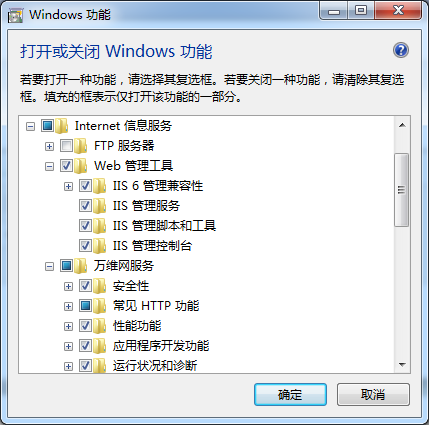
win7
在 控制面板→程序和功能→打开或关闭Windows功能→勾选Internet 信息服务(Internet Information Services)安装IIS功能
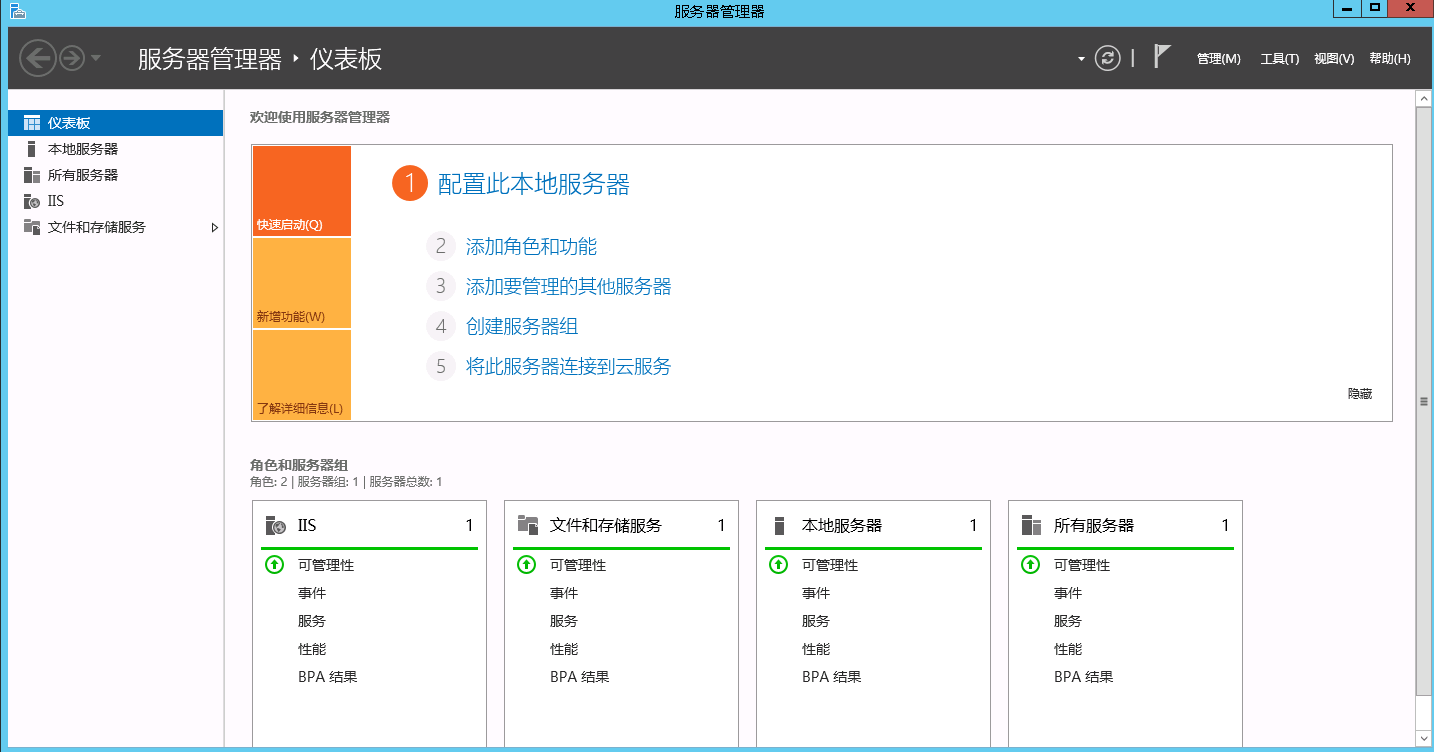
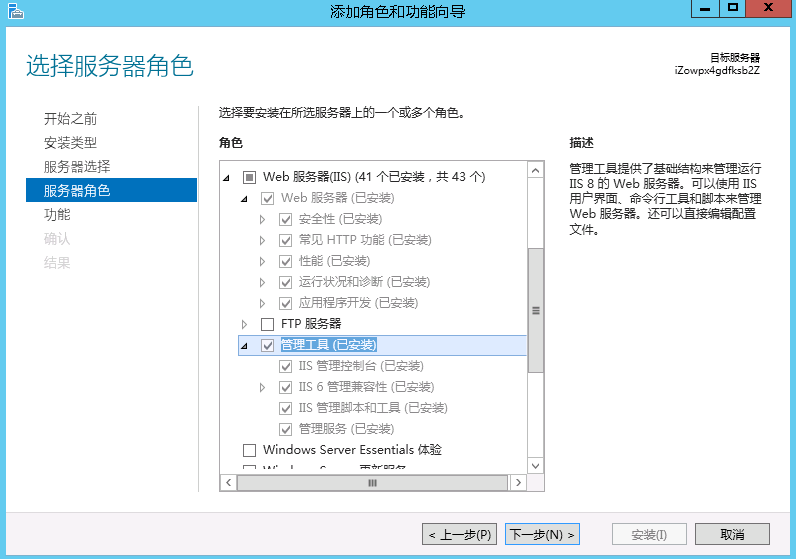
win server
控制面板→程序和功能→打开或关闭Windows功能→添加角色和功能→下一步选择web服务器(IIS)→勾选安装即可
2、安装了 AspNetCoreModule 托管模块
检查 Internet 信息服务(IIS)管理器 服务器的模块里面有没有 托管模块
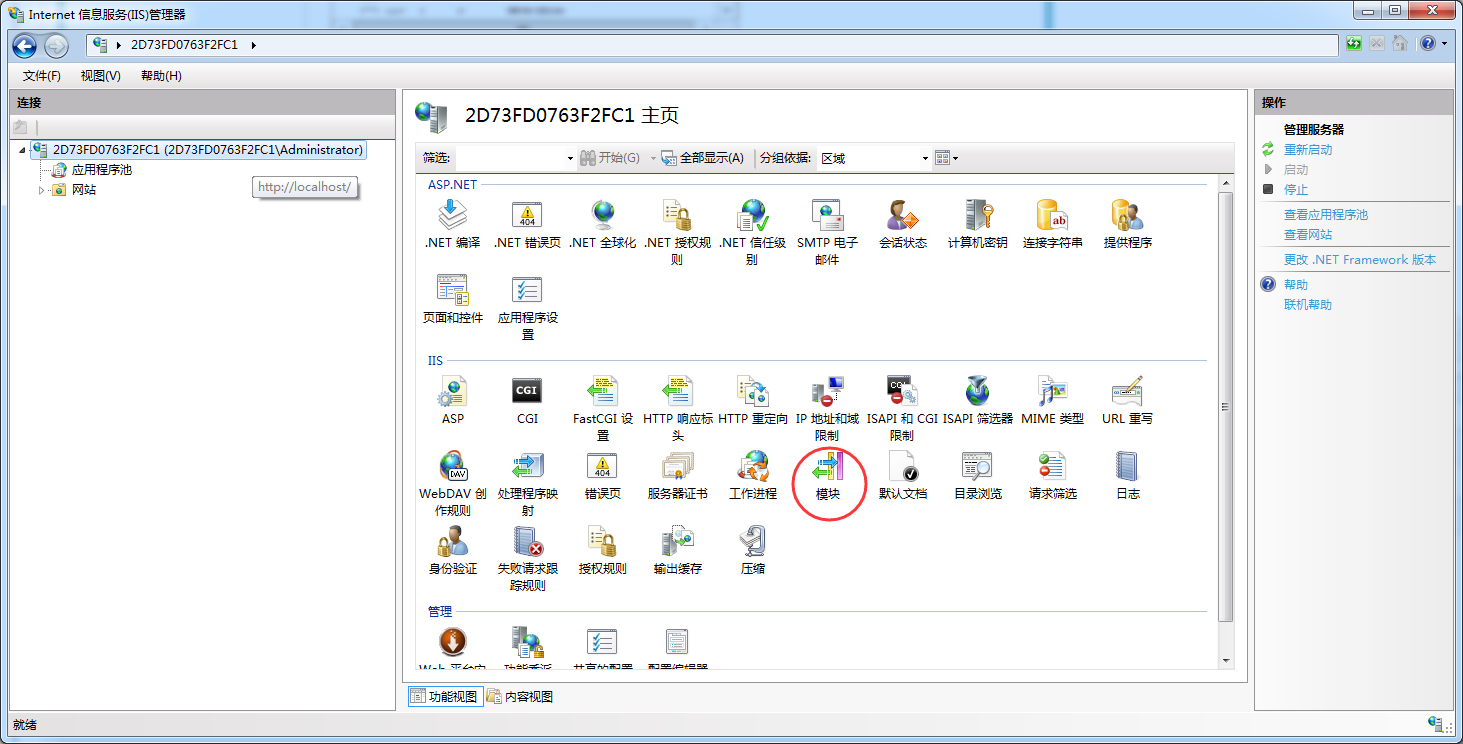
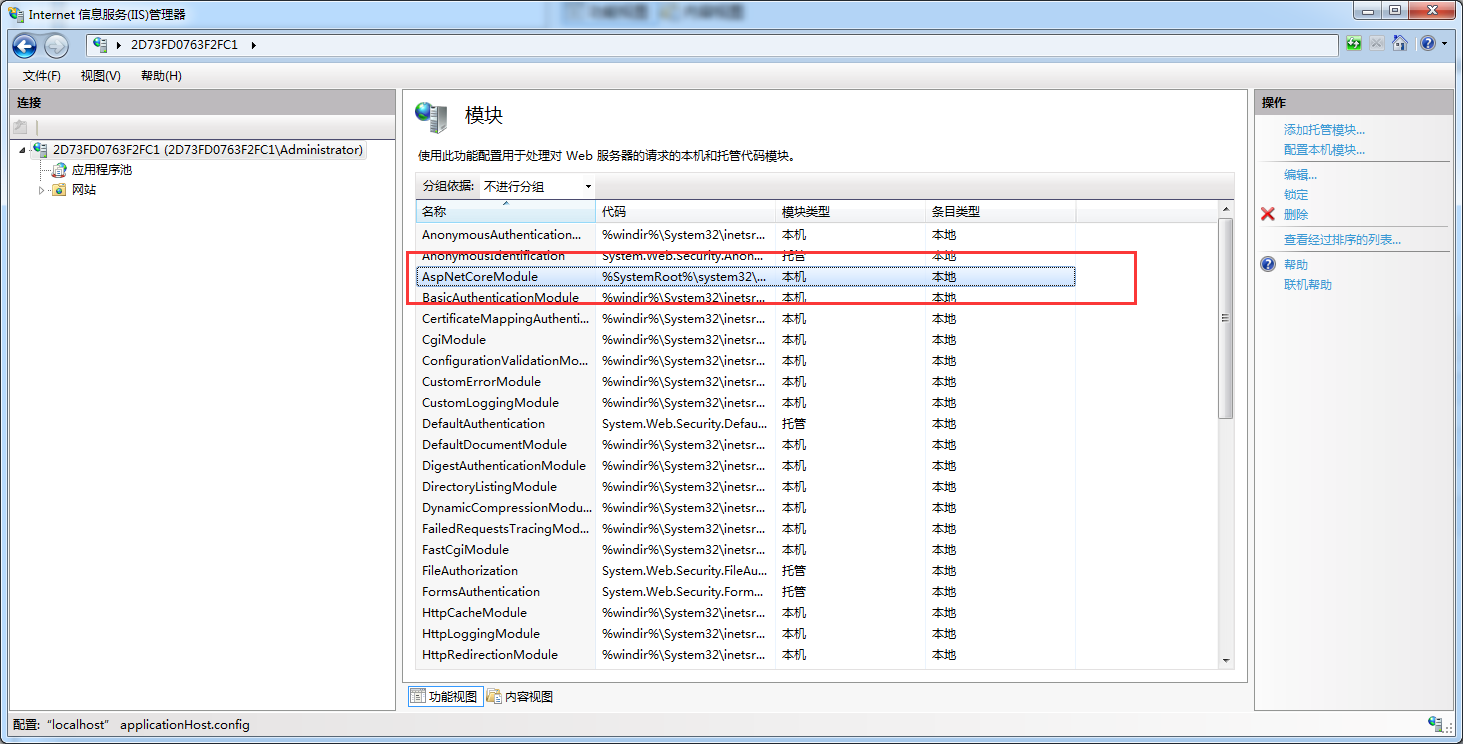
如果没有点击下面的链接下载安装
这个是netcore2.1版本
https://pan.baidu.com/s/1AUWntFGHlFYqaWa7aNi9YA
安装完之后最好重启一下系统
3、前两个条件都满足之后,就可以部署IIS站点了,跟平时部署站点的唯一区别就是 应用程序池,选择【无托管代码】,其他基本和 .net 一模一样
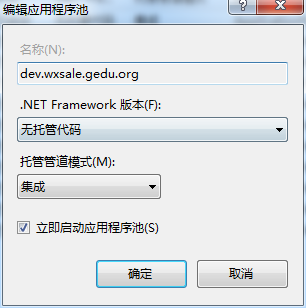
解决方案的发布就不再描述了
按照上面两步操作之后依然不能正常访问的话
可以配置下 web.config 里的日志输出目录,跟踪日志查找原因
这里有一个坑需要注意一下,就是日志输出的目录默认是 logs 文件夹下面的,但是它又不会自动创建这个logs目录,简直就是sb操作
所以修改下目录为程序当前目录(.\)即可,然后将目录开关(stdoutLogEnabled)设置成 true
参考下面黄色标注的部分
<?xml version="1.0" encoding="utf-8"?>

<configuration>

  <location path="." inheritInChildApplications="false">

    <system.webServer>

      <handlers>

        <add name="aspNetCore" path="*" verb="*" modules="AspNetCoreModule" resourceType="Unspecified" />

      </handlers>

      <aspNetCore processPath="dotnet" arguments=".\GeduDistributionApi.dll" stdoutLogEnabled="true" stdoutLogFile=".\" />

    </system.webServer>

  </location>

</configuration>

<!--ProjectGuid: 92985990-0187-402f-a970-e6c36b29150d-->
这个时候如果网站访问成功就会看到目录下有 .log 文件
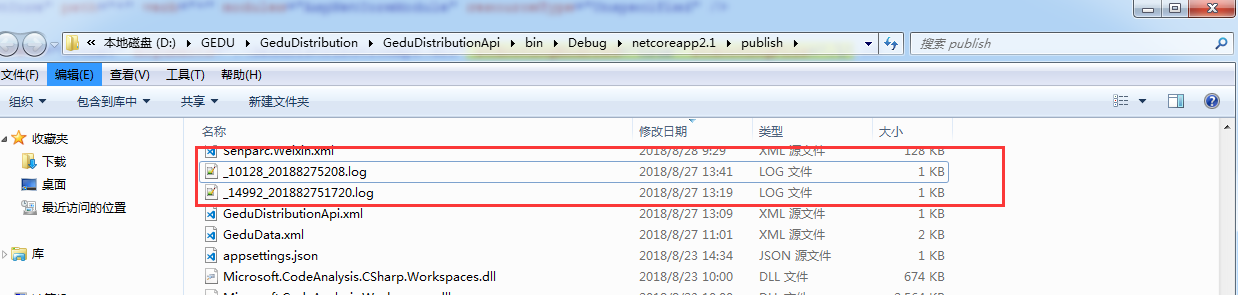
查看内容,说明网站已经成功启动,并没有报错信息
warn: Microsoft.AspNetCore.DataProtection.Repositories.EphemeralXmlRepository[]

      Using an in-memory repository. Keys will not be persisted to storage.

warn: Microsoft.AspNetCore.DataProtection.KeyManagement.XmlKeyManager[]

      Neither user profile nor HKLM registry available. Using an ephemeral key repository. Protected data will be unavailable when application exits.

warn: Microsoft.AspNetCore.DataProtection.KeyManagement.XmlKeyManager[]

      No XML encryptor configured. Key {137dd630-fe50---e5952434ffd3} may be persisted to storage in unencrypted form.

Hosting environment: Production

Content root path: E:\websites\test.wxsale.gedu.org

Now listening on: http://127.0.0.1:16972

Application started. Press Ctrl+C to shut down.

warn: Microsoft.AspNetCore.HttpsPolicy.HttpsRedirectionMiddleware[]

      Failed to determine the https port for redirect.
下面是一个报错异常的日志信息,根据日志错误,可以很容易定位到相应的错误,从而修正即可
warn: Microsoft.AspNetCore.DataProtection.Repositories.EphemeralXmlRepository[]

      Using an in-memory repository. Keys will not be persisted to storage.

warn: Microsoft.AspNetCore.DataProtection.KeyManagement.XmlKeyManager[]

      Neither user profile nor HKLM registry available. Using an ephemeral key repository. Protected data will be unavailable when application exits.

warn: Microsoft.AspNetCore.DataProtection.KeyManagement.XmlKeyManager[]

      No XML encryptor configured. Key {fe302a7d-9d8e--a310-08d71c0eee32} may be persisted to storage in unencrypted form.

Hosting environment: Production

Content root path: E:\websites\test.wxsale.gedu.org

Now listening on: http://127.0.0.1:15387

Application started. Press Ctrl+C to shut down.

warn: Microsoft.AspNetCore.HttpsPolicy.HttpsRedirectionMiddleware[]

      Failed to determine the https port for redirect.

fail: Microsoft.AspNetCore.Server.Kestrel[]

      Connection id "0HLGBS6R1PEIL", Request id "0HLGBS6R1PEIL:0000000A": An unhandled exception was thrown by the application.

System.NotSupportedException: Ambiguous HTTP method for action - GeduDistributionApi.Controllers.IndexController.Index (GeduDistributionApi). Actions require an explicit HttpMethod binding for Swagger 2.0

   at Swashbuckle.AspNetCore.SwaggerGen.SwaggerGenerator.CreatePathItem(IEnumerable` apiDescriptions, ISchemaRegistry schemaRegistry)

   at System.Linq.Enumerable.ToDictionary[TSource,TKey,TElement](IEnumerable` source, Func` keySelector, Func` elementSelector, IEqualityComparer` comparer)

   at Swashbuckle.AspNetCore.SwaggerGen.SwaggerGenerator.GetSwagger(String documentName, String host, String basePath, String[] schemes)

   at Swashbuckle.AspNetCore.Swagger.SwaggerMiddleware.Invoke(HttpContext httpContext)

   at Microsoft.AspNetCore.Builder.RouterMiddleware.Invoke(HttpContext httpContext)

   at Microsoft.AspNetCore.Server.IISIntegration.IISMiddleware.Invoke(HttpContext httpContext)

   at Microsoft.AspNetCore.Server.Kestrel.Core.Internal.Http.HttpProtocol.ProcessRequests[TContext](IHttpApplication` application)

fail: Microsoft.AspNetCore.Server.Kestrel[]

      Connection id "0HLGBS6R1PEIL", Request id "0HLGBS6R1PEIL:0000000B": An unhandled exception was thrown by the application.

System.NotSupportedException: Ambiguous HTTP method for action - GeduDistributionApi.Controllers.IndexController.Index (GeduDistributionApi). Actions require an explicit HttpMethod binding for Swagger 2.0

   at Swashbuckle.AspNetCore.SwaggerGen.SwaggerGenerator.CreatePathItem(IEnumerable` apiDescriptions, ISchemaRegistry schemaRegistry)

   at System.Linq.Enumerable.ToDictionary[TSource,TKey,TElement](IEnumerable` source, Func` keySelector, Func` elementSelector, IEqualityComparer` comparer)

   at Swashbuckle.AspNetCore.SwaggerGen.SwaggerGenerator.GetSwagger(String documentName, String host, String basePath, String[] schemes)

   at Swashbuckle.AspNetCore.Swagger.SwaggerMiddleware.Invoke(HttpContext httpContext)

   at Microsoft.AspNetCore.Builder.RouterMiddleware.Invoke(HttpContext httpContext)

   at Microsoft.AspNetCore.Server.IISIntegration.IISMiddleware.Invoke(HttpContext httpContext)

   at Microsoft.AspNetCore.Server.Kestrel.Core.Internal.Http.HttpProtocol.ProcessRequests[TContext](IHttpApplication` application)

fail: Microsoft.AspNetCore.Server.Kestrel[]

      Connection id "0HLGBS6R1PEIM", Request id "0HLGBS6R1PEIM:00000003": An unhandled exception was thrown by the application.

System.NotSupportedException: Ambiguous HTTP method for action - GeduDistributionApi.Controllers.IndexController.Index (GeduDistributionApi). Actions require an explicit HttpMethod binding for Swagger 2.0

   at Swashbuckle.AspNetCore.SwaggerGen.SwaggerGenerator.CreatePathItem(IEnumerable` apiDescriptions, ISchemaRegistry schemaRegistry)

   at System.Linq.Enumerable.ToDictionary[TSource,TKey,TElement](IEnumerable` source, Func` keySelector, Func` elementSelector, IEqualityComparer` comparer)

   at Swashbuckle.AspNetCore.SwaggerGen.SwaggerGenerator.GetSwagger(String documentName, String host, String basePath, String[] schemes)

   at Swashbuckle.AspNetCore.Swagger.SwaggerMiddleware.Invoke(HttpContext httpContext)

   at Microsoft.AspNetCore.Builder.RouterMiddleware.Invoke(HttpContext httpContext)

   at Microsoft.AspNetCore.Server.IISIntegration.IISMiddleware.Invoke(HttpContext httpContext)

   at Microsoft.AspNetCore.Server.Kestrel.Core.Internal.Http.HttpProtocol.ProcessRequests[TContext](IHttpApplication` application)

Application is shutting down...
上面的报错信息说明,mvc api接口里的方法必须指明请求方式,get或者post等,所以在方法前面加上 [HttpGet] 即可。
warn: Microsoft.AspNetCore.DataProtection.Repositories.EphemeralXmlRepository[]

      Using an in-memory repository. Keys will not be persisted to storage.

warn: Microsoft.AspNetCore.DataProtection.KeyManagement.XmlKeyManager[]

      Neither user profile nor HKLM registry available. Using an ephemeral key repository. Protected data will be unavailable when application exits.

warn: Microsoft.AspNetCore.DataProtection.KeyManagement.XmlKeyManager[]

      No XML encryptor configured. Key {de634586----c2137c9f0db1} may be persisted to storage in unencrypted form.

Application startup exception: Autofac.Core.DependencyResolutionException: An error occurred during the activation of a particular registration. See the inner exception for details. Registration: Activator = JobStorage (DelegateActivator), Services = [Hangfire.JobStorage], Lifetime = Autofac.Core.Lifetime.RootScopeLifetime, Sharing = Shared, Ownership = OwnedByLifetimeScope ---> A network-related or instance-specific error occurred while establishing a connection to SQL Server. The server was not found or was not accessible. Verify that the instance name is correct and that SQL Server is configured to allow remote connections. (provider: Named Pipes Provider, error:  - Could not open a connection to SQL Server) (See inner exception for details.) ---> System.Data.SqlClient.SqlException: A network-related or instance-specific error occurred while establishing a connection to SQL Server. The server was not found or was not accessible. Verify that the instance name is correct and that SQL Server is configured to allow remote connections. (provider: Named Pipes Provider, error:  - Could not open a connection to SQL Server) ---> System.ComponentModel.Win32Exception: 找不到网络路径。

   --- End of inner exception stack trace ---

   at System.Data.SqlClient.SqlInternalConnectionTds..ctor(DbConnectionPoolIdentity identity, SqlConnectionString connectionOptions, SqlCredential credential, Object providerInfo, String newPassword, SecureString newSecurePassword, Boolean redirectedUserInstance, SqlConnectionString userConnectionOptions, SessionData reconnectSessionData, Boolean applyTransientFaultHandling)

   at System.Data.SqlClient.SqlConnectionFactory.CreateConnection(DbConnectionOptions options, DbConnectionPoolKey poolKey, Object poolGroupProviderInfo, DbConnectionPool pool, DbConnection owningConnection, DbConnectionOptions userOptions)

   at System.Data.ProviderBase.DbConnectionFactory.CreatePooledConnection(DbConnectionPool pool, DbConnection owningObject, DbConnectionOptions options, DbConnectionPoolKey poolKey, DbConnectionOptions userOptions)

   at System.Data.ProviderBase.DbConnectionPool.CreateObject(DbConnection owningObject, DbConnectionOptions userOptions, DbConnectionInternal oldConnection)

   at System.Data.ProviderBase.DbConnectionPool.UserCreateRequest(DbConnection owningObject, DbConnectionOptions userOptions, DbConnectionInternal oldConnection)

   at System.Data.ProviderBase.DbConnectionPool.TryGetConnection(DbConnection owningObject, UInt32 waitForMultipleObjectsTimeout, Boolean allowCreate, Boolean onlyOneCheckConnection, DbConnectionOptions userOptions, DbConnectionInternal& connection)

   at System.Data.ProviderBase.DbConnectionPool.TryGetConnection(DbConnection owningObject, TaskCompletionSource` retry, DbConnectionOptions userOptions, DbConnectionInternal& connection)

   at System.Data.ProviderBase.DbConnectionFactory.TryGetConnection(DbConnection owningConnection, TaskCompletionSource` retry, DbConnectionOptions userOptions, DbConnectionInternal oldConnection, DbConnectionInternal& connection)

   at System.Data.ProviderBase.DbConnectionInternal.TryOpenConnectionInternal(DbConnection outerConnection, DbConnectionFactory connectionFactory, TaskCompletionSource` retry, DbConnectionOptions userOptions)

   at System.Data.ProviderBase.DbConnectionClosed.TryOpenConnection(DbConnection outerConnection, DbConnectionFactory connectionFactory, TaskCompletionSource` retry, DbConnectionOptions userOptions)

   at System.Data.SqlClient.SqlConnection.TryOpen(TaskCompletionSource` retry)

   at System.Data.SqlClient.SqlConnection.Open()

   at Hangfire.SqlServer.SqlServerStorage.CreateAndOpenConnection()

   at Hangfire.SqlServer.SqlServerStorage.UseConnection[T](DbConnection dedicatedConnection, Func` func)

   at Hangfire.SqlServer.SqlServerStorage.UseConnection(DbConnection dedicatedConnection, Action` action)

   at Hangfire.SqlServer.SqlServerStorage.Initialize()

   at Hangfire.SqlServerStorageExtensions.UseSqlServerStorage(IGlobalConfiguration configuration, String nameOrConnectionString)

   at GeduDistributionApi.Startup.<>c__DisplayClass8_0.<ConfigureServices>b__1(IGlobalConfiguration configuration) in D:\GEDU\GeduDistribution\GeduDistributionApi\Startup.cs:line

   at Hangfire.HangfireServiceCollectionExtensions.GetInitializedJobStorage(IServiceProvider serviceProvider)

   at Autofac.Core.Activators.Delegate.DelegateActivator.ActivateInstance(IComponentContext context, IEnumerable` parameters)

   at Autofac.Core.Resolving.InstanceLookup.Activate(IEnumerable` parameters)

   --- End of inner exception stack trace ---

   at Autofac.Core.Resolving.InstanceLookup.Activate(IEnumerable` parameters)

   at Autofac.Core.Lifetime.LifetimeScope.GetOrCreateAndShare(Guid id, Func` creator)

   at Autofac.Core.Resolving.InstanceLookup.Execute()

   at Autofac.Core.Resolving.ResolveOperation.GetOrCreateInstance(ISharingLifetimeScope currentOperationScope, IComponentRegistration registration, IEnumerable` parameters)

   at Autofac.Core.Resolving.ResolveOperation.Execute(IComponentRegistration registration, IEnumerable` parameters)

   at Autofac.ResolutionExtensions.TryResolveService(IComponentContext context, Service service, IEnumerable` parameters, Object& instance)

   at Autofac.ResolutionExtensions.ResolveService(IComponentContext context, Service service, IEnumerable` parameters)

   at Microsoft.Extensions.DependencyInjection.ServiceProviderServiceExtensions.GetRequiredService(IServiceProvider provider, Type serviceType)

   at Microsoft.Extensions.DependencyInjection.ServiceProviderServiceExtensions.GetRequiredService[T](IServiceProvider provider)

   at Hangfire.HangfireApplicationBuilderExtensions.UseHangfireServer(IApplicationBuilder app, BackgroundJobServerOptions options, IEnumerable` additionalProcesses, JobStorage storage)

   at GeduDistributionApi.Startup.Configure(IApplicationBuilder app, IHostingEnvironment env) in D:\GEDU\GeduDistribution\GeduDistributionApi\Startup.cs:line

--- End of stack trace from previous location where exception was thrown ---

   at Microsoft.AspNetCore.Hosting.ConventionBasedStartup.Configure(IApplicationBuilder app)

   at Microsoft.AspNetCore.Server.IISIntegration.IISSetupFilter.<>c__DisplayClass4_0.<Configure>b__0(IApplicationBuilder app)

   at Microsoft.AspNetCore.HostFilteringStartupFilter.<>c__DisplayClass0_0.<Configure>b__0(IApplicationBuilder app)

   at Microsoft.AspNetCore.Hosting.Internal.AutoRequestServicesStartupFilter.<>c__DisplayClass0_0.<Configure>b__0(IApplicationBuilder builder)

   at Microsoft.AspNetCore.Hosting.Internal.WebHost.BuildApplication()

crit: Microsoft.AspNetCore.Hosting.Internal.WebHost[]

      Application startup exception

Autofac.Core.DependencyResolutionException: An error occurred during the activation of a particular registration. See the inner exception for details. Registration: Activator = JobStorage (DelegateActivator), Services = [Hangfire.JobStorage], Lifetime = Autofac.Core.Lifetime.RootScopeLifetime, Sharing = Shared, Ownership = OwnedByLifetimeScope ---> A network-related or instance-specific error occurred while establishing a connection to SQL Server. The server was not found or was not accessible. Verify that the instance name is correct and that SQL Server is configured to allow remote connections. (provider: Named Pipes Provider, error:  - Could not open a connection to SQL Server) (See inner exception for details.) ---> System.Data.SqlClient.SqlException: A network-related or instance-specific error occurred while establishing a connection to SQL Server. The server was not found or was not accessible. Verify that the instance name is correct and that SQL Server is configured to allow remote connections. (provider: Named Pipes Provider, error:  - Could not open a connection to SQL Server) ---> System.ComponentModel.Win32Exception: 找不到网络路径。

   --- End of inner exception stack trace ---

   at System.Data.SqlClient.SqlInternalConnectionTds..ctor(DbConnectionPoolIdentity identity, SqlConnectionString connectionOptions, SqlCredential credential, Object providerInfo, String newPassword, SecureString newSecurePassword, Boolean redirectedUserInstance, SqlConnectionString userConnectionOptions, SessionData reconnectSessionData, Boolean applyTransientFaultHandling)

   at System.Data.SqlClient.SqlConnectionFactory.CreateConnection(DbConnectionOptions options, DbConnectionPoolKey poolKey, Object poolGroupProviderInfo, DbConnectionPool pool, DbConnection owningConnection, DbConnectionOptions userOptions)

   at System.Data.ProviderBase.DbConnectionFactory.CreatePooledConnection(DbConnectionPool pool, DbConnection owningObject, DbConnectionOptions options, DbConnectionPoolKey poolKey, DbConnectionOptions userOptions)

   at System.Data.ProviderBase.DbConnectionPool.CreateObject(DbConnection owningObject, DbConnectionOptions userOptions, DbConnectionInternal oldConnection)

   at System.Data.ProviderBase.DbConnectionPool.UserCreateRequest(DbConnection owningObject, DbConnectionOptions userOptions, DbConnectionInternal oldConnection)

   at System.Data.ProviderBase.DbConnectionPool.TryGetConnection(DbConnection owningObject, UInt32 waitForMultipleObjectsTimeout, Boolean allowCreate, Boolean onlyOneCheckConnection, DbConnectionOptions userOptions, DbConnectionInternal& connection)

   at System.Data.ProviderBase.DbConnectionPool.TryGetConnection(DbConnection owningObject, TaskCompletionSource` retry, DbConnectionOptions userOptions, DbConnectionInternal& connection)

   at System.Data.ProviderBase.DbConnectionFactory.TryGetConnection(DbConnection owningConnection, TaskCompletionSource` retry, DbConnectionOptions userOptions, DbConnectionInternal oldConnection, DbConnectionInternal& connection)

   at System.Data.ProviderBase.DbConnectionInternal.TryOpenConnectionInternal(DbConnection outerConnection, DbConnectionFactory connectionFactory, TaskCompletionSource` retry, DbConnectionOptions userOptions)

   at System.Data.ProviderBase.DbConnectionClosed.TryOpenConnection(DbConnection outerConnection, DbConnectionFactory connectionFactory, TaskCompletionSource` retry, DbConnectionOptions userOptions)

   at System.Data.SqlClient.SqlConnection.TryOpen(TaskCompletionSource` retry)

   at System.Data.SqlClient.SqlConnection.Open()

   at Hangfire.SqlServer.SqlServerStorage.CreateAndOpenConnection()

   at Hangfire.SqlServer.SqlServerStorage.UseConnection[T](DbConnection dedicatedConnection, Func` func)

   at Hangfire.SqlServer.SqlServerStorage.UseConnection(DbConnection dedicatedConnection, Action` action)

   at Hangfire.SqlServer.SqlServerStorage.Initialize()

   at Hangfire.SqlServerStorageExtensions.UseSqlServerStorage(IGlobalConfiguration configuration, String nameOrConnectionString)

   at GeduDistributionApi.Startup.<>c__DisplayClass8_0.<ConfigureServices>b__1(IGlobalConfiguration configuration) in D:\GEDU\GeduDistribution\GeduDistributionApi\Startup.cs:line

   at Hangfire.HangfireServiceCollectionExtensions.GetInitializedJobStorage(IServiceProvider serviceProvider)

   at Autofac.Core.Activators.Delegate.DelegateActivator.ActivateInstance(IComponentContext context, IEnumerable` parameters)

   at Autofac.Core.Resolving.InstanceLookup.Activate(IEnumerable` parameters)

   --- End of inner exception stack trace ---

   at Autofac.Core.Resolving.InstanceLookup.Activate(IEnumerable` parameters)

   at Autofac.Core.Lifetime.LifetimeScope.GetOrCreateAndShare(Guid id, Func` creator)

   at Autofac.Core.Resolving.InstanceLookup.Execute()

   at Autofac.Core.Resolving.ResolveOperation.GetOrCreateInstance(ISharingLifetimeScope currentOperationScope, IComponentRegistration registration, IEnumerable` parameters)

   at Autofac.Core.Resolving.ResolveOperation.Execute(IComponentRegistration registration, IEnumerable` parameters)

   at Autofac.ResolutionExtensions.TryResolveService(IComponentContext context, Service service, IEnumerable` parameters, Object& instance)

   at Autofac.ResolutionExtensions.ResolveService(IComponentContext context, Service service, IEnumerable` parameters)

   at Microsoft.Extensions.DependencyInjection.ServiceProviderServiceExtensions.GetRequiredService(IServiceProvider provider, Type serviceType)

   at Microsoft.Extensions.DependencyInjection.ServiceProviderServiceExtensions.GetRequiredService[T](IServiceProvider provider)

   at Hangfire.HangfireApplicationBuilderExtensions.UseHangfireServer(IApplicationBuilder app, BackgroundJobServerOptions options, IEnumerable` additionalProcesses, JobStorage storage)

   at GeduDistributionApi.Startup.Configure(IApplicationBuilder app, IHostingEnvironment env) in D:\GEDU\GeduDistribution\GeduDistributionApi\Startup.cs:line

--- End of stack trace from previous location where exception was thrown ---

   at Microsoft.AspNetCore.Hosting.ConventionBasedStartup.Configure(IApplicationBuilder app)

   at Microsoft.AspNetCore.Server.IISIntegration.IISSetupFilter.<>c__DisplayClass4_0.<Configure>b__0(IApplicationBuilder app)

   at Microsoft.AspNetCore.HostFilteringStartupFilter.<>c__DisplayClass0_0.<Configure>b__0(IApplicationBuilder app)

   at Microsoft.AspNetCore.Hosting.Internal.AutoRequestServicesStartupFilter.<>c__DisplayClass0_0.<Configure>b__0(IApplicationBuilder builder)

   at Microsoft.AspNetCore.Hosting.Internal.WebHost.BuildApplication()

Hosting environment: Production

Content root path: E:\websites\test.wxsale.gedu.org\api

Now listening on: http://127.0.0.1:9374

Application started. Press Ctrl+C to shut down.
上面是连接不上数据库的错误日志提示
【netcore入门】在Windows IIS上部署.NET Core 2.1项目的更多相关文章
- 在IIS上部署 .Net Core 3.0 项目踩坑实录
在IIS上部署 .Net Core 3.0 项目的主要流程有: 安装并启用IIS 安装AspNetCoreModuleV2 添加.配置网站 设置应用程序池 通过VS发布 一.安装并启用IIS: 安装了 ...
- 在IIS上部署.net core的webapi项目 以及502.5错误的两种解决方法
首先要在服务器上面安装.net core https://github.com/dotnet/core/tree/master/release-notes/download-archives 这里面有 ...
- IIS上部署Net.Core
部署: 1.安装vc_redist.x64vc_redist.x64 2.安装DotNetCore.1.0.0.RC2-WindowsHosting 3.安装DotNetCore.1.0.0-SDK. ...
- Express在windows IIS上部署详解
最近公司在用Express+angularjs+wcf开发系统,让我在windows上部署系统,遇到不少问题,不过最后还是解决了,在IIS上部署系统, 首先windows需安装以下软件: 1.node ...
- 在IIs上部署asp.net core2.1项目
转自:https://www.cnblogs.com/jasonduan/p/9193702.html 在IIS上部署你的ASP.NET Core 2.1项目 1.在控制面板→程序→启用或关闭Wi ...
- IIS上部署DotNet Core程序
1.安装托管捆绑包 https://docs.microsoft.com/zh-cn/aspnet/core/host-and-deploy/iis/index?view=aspnetcore-2.1 ...
- 在阿里云Windows Server 上部署ASP .NET CORE2.0项目
近期使用ASP.NET Core2.0对博客进行了重写,在部署到服务器时遇到了一些问题,来记录一下留用. 配置环境 安装 .Net Framework3.5 在IIS管理器上直接开启,这里总是失败,上 ...
- 如何在Visual Studio 2017中使用C# 7+语法 构建NetCore应用框架之实战篇(二):BitAdminCore框架定位及架构 构建NetCore应用框架之实战篇系列 构建NetCore应用框架之实战篇(一):什么是框架,如何设计一个框架 NetCore入门篇:(十二)在IIS中部署Net Core程序
如何在Visual Studio 2017中使用C# 7+语法 前言 之前不知看过哪位前辈的博文有点印象C# 7控制台开始支持执行异步方法,然后闲来无事,搞着,搞着没搞出来,然后就写了这篇博文,不 ...
- 如何在IIS上发布网站 在阿里云服务器windows server2012r iis上部署.net网站
如何在IIS上发布网站 本片博客记录一下怎么用IIS发布一个网站,以我自己电脑上一个已经开发完成的网站为例: 1.打开项目 这是我电脑上的一个项目,现在我记录一下将这个项目发布到iis上的整个过程 ...
随机推荐
- Unity Shader-后处理:简单的颜色调整(亮度,饱和度,对比度)
好久没坚持写blog了,是时候开始撸一波新博文了!学习Unity有一段时间了,关于Shader的书也看了几本<Unity Shader入门精要>,<Unity 3D ShaderLa ...
- bugly中批量隐藏版本
App项目使用Bugly的内测分发功能进行整包的测试,但日积月累之后,版本就会特别多.而线上同时跑的版本可能不过三个左右,那么多版本会干扰到查看崩溃.选择版本,如何隐藏呢? 右上角,更多 –> ...
- 移动基于Percona XTRADB Cluster的大数据解决方式
移动基于Percona XTRADB Cluster的大数据解决方式 一.移动的去IOE之旅 近期由于"棱镜门"事件的曝光.引起了国家对信息安全问题的注 ...
- Gson 与 fastJson 在使用上的差异(fastJson的优点)
一.android 常用的json解析方式 Android 开发上常用的json解析方式有:Gson, fastJson,jackson. 因为jackjson jar包会比较大点(700+k),Gs ...
- request.getParameter(“xxx”)的参数的取值
request.getParameter(“xxx”)的参数的取值的几种可能: 1. Html中form表单中标签的name属性: <form name="form" met ...
- haproxy负载均衡的安装配置
haproxy是一款可靠,高性能的并且可以支持TCP/HTTP的负载均衡器,和前面说过的nginx负载均衡类似,这里haproxy对于负载均衡来说更专业,支持的配置选项更多,稳定性也很强,甚至只需要一 ...
- SQLSERVER 2012 之 “代理 XP”组件已作为此服务器安全配置的一部分被关闭
新建维护计划的时候遇到下图的报错信息 标题: Microsoft SQL Server Management Studio ------------------------------ “代理 XP” ...
- 关于html,body{height:100%}的解释
来源:https://www.cnblogs.com/QianBoy/p/8571682.html 今天看到一个CSS样式:html,body{height:100%},第一次看到,感觉挺奇怪,为什么 ...
- MATLAB 统计数据并画出统计直方图
统计FilmTrust(0.5-4.0分).CiaoDVD(1-5分).MovieLens(1-5分) 等 rating 数据集分值的分布: 以 统计FilmTrust(0.5-4.0分) 为例: ...
- 解决ScrollView嵌套RecyclerView出现item显示不全的问题
问题:ScrollView嵌套RecyclerView时,RecyclerView的item显示不全 出现问题不要慌,耐心解决才是王道,哈哈.首先说下出现这个问题的情景吧,首先声明这个问题在23版 ...