
Restful framework【第八篇】频率组件
基本使用
频率:

	-限制每个ip地址一分钟访问10次

	-写一个类

	from rest_framework.throttling import SimpleRateThrottle

	class VisitThrottle(SimpleRateThrottle):

		scope = 'xx' #一定要写它

		# 必须重写这个方法,返回什么,就以什么作为访问频率限制的东西,

		def get_cache_key(self, request, view):

			# return self.get_ident(request)

			return request.META.get('REMOTE_ADDR')

	-在setting中配置:

		'DEFAULT_THROTTLE_RATES': {

			#这个key跟scope对应,value值3/m  3/h    4/d

			'xx': '3/m'

		}

	-使用:

		-局部使用:

				throttle_classes = [VisitThrottle]

		-全局使用:

				"DEFAULT_THROTTLE_CLASSES":["app01.auth.VisitThrottle"],

		-问题?如果网站所有的接口都是一分钟访问10次,但是单独有一个接口要一分钟访问2次,如何做?
自定义频率类,自定义频率规则
自定义的逻辑
(1)取出访问者ip

(2)判断当前ip不在访问字典里,添加进去,并且直接返回True,表示第一次访问,在字典里,继续往下走

(3)循环判断当前ip的列表,有值,并且当前时间减去列表的最后一个时间大于60s,把这种数据pop掉,这样列表中只有60s以内的访问时间,

(4)判断,当列表小于3,说明一分钟以内访问不足三次,把当前时间插入到列表第一个位置,返回True,顺利通过

(5)当大于等于3,说明一分钟内访问超过三次,返回False验证失败
代码实现
class MyThrottles():

    VISIT_RECORD = {}

    def __init__(self):

        self.history=None

    def allow_request(self,request, view):

        #(1)取出访问者ip

        # print(request.META)

        ip=request.META.get('REMOTE_ADDR')

        import time

        ctime=time.time()

        # (2)判断当前ip不在访问字典里,添加进去,并且直接返回True,表示第一次访问

        if ip not in self.VISIT_RECORD:

            self.VISIT_RECORD[ip]=[ctime,]

            return True

        self.history=self.VISIT_RECORD.get(ip)

        # (3)循环判断当前ip的列表,有值,并且当前时间减去列表的最后一个时间大于60s,把这种数据pop掉,这样列表中只有60s以内的访问时间,

        while self.history and ctime-self.history[-1]>60:

            self.history.pop()

        # (4)判断,当列表小于3,说明一分钟以内访问不足三次,把当前时间插入到列表第一个位置,返回True,顺利通过

        # (5)当大于等于3,说明一分钟内访问超过三次,返回False验证失败

        if len(self.history)<3:

            self.history.insert(0,ctime)

            return True

        else:

            return False

    def wait(self):

        import time

        ctime=time.time()

        return 60-(ctime-self.history[-1])
内置频率类及局部使用
写一个类,继承自SimpleRateThrottle,(根据ip限制)问:要根据用户现在怎么写
from rest_framework.throttling import SimpleRateThrottle

class VisitThrottle(SimpleRateThrottle):

    scope = 'luffy'

    def get_cache_key(self, request, view):

        return self.get_ident(request)
在setting里配置:(一分钟访问三次)
REST_FRAMEWORK = {

    'DEFAULT_THROTTLE_RATES':{

        'luffy':'3/m'

    }

}
在视图类里使用
throttle_classes = [MyThrottles,]
错误信息的中文提示
class Course(APIView):

    authentication_classes = [TokenAuth, ]

    permission_classes = [UserPermission, ]

    throttle_classes = [MyThrottles,]

    def get(self, request):

        return HttpResponse('get')

    def post(self, request):

        return HttpResponse('post')

    def throttled(self, request, wait):

        from rest_framework.exceptions import Throttled

        class MyThrottled(Throttled):

            default_detail = '傻逼啊'

            extra_detail_singular = '还有 {wait} second.'

            extra_detail_plural = '出了 {wait} seconds.'

        raise MyThrottled(wait)
内置频率限制类:
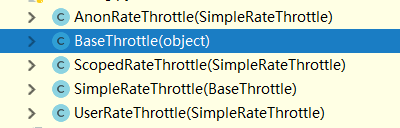
BaseThrottle是所有类的基类:方法:def get_ident(self, request)获取标识,其实就是获取ip,自定义的需要继承它
AnonRateThrottle:未登录用户ip限制,需要配合auth模块用
SimpleRateThrottle:重写此方法,可以实现频率现在,不需要咱们手写上面自定义的逻辑
UserRateThrottle:登录用户频率限制,这个得配合auth模块来用
ScopedRateThrottle:应用在局部视图上的(忽略)
内置频率类及全局使用
REST_FRAMEWORK = {

    'DEFAULT_THROTTLE_CLASSES':['app01.utils.VisitThrottle',],

    'DEFAULT_THROTTLE_RATES':{

        'luffy':'3/m'

    }

}
源码分析
def check_throttles(self, request):

        for throttle in self.get_throttles():

            if not throttle.allow_request(request, self):

                self.throttled(request, throttle.wait())

def throttled(self, request, wait):

        #抛异常,可以自定义异常,实现错误信息的中文显示

        raise exceptions.Throttled(wait)
SimpleRateThrottle源码分析
class SimpleRateThrottle(BaseThrottle):

    # 咱自己写的放在了全局变量,他的在django的缓存中

    cache = default_cache

    # 获取当前时间,跟咱写的一样

    timer = time.time

    # 做了一个字符串格式化,

    cache_format = 'throttle_%(scope)s_%(ident)s'

    scope = None

    # 从配置文件中取DEFAULT_THROTTLE_RATES,所以咱配置文件中应该配置,否则报错

    THROTTLE_RATES = api_settings.DEFAULT_THROTTLE_RATES

    def __init__(self):

        if not getattr(self, 'rate', None):

            # 从配置文件中找出scope配置的名字对应的值,比如咱写的‘3/m’,他取出来

            self.rate = self.get_rate()

        #     解析'3/m',解析成 3      m

        self.num_requests, self.duration = self.parse_rate(self.rate)

    # 这个方法需要重写

    def get_cache_key(self, request, view):

        """

        Should return a unique cache-key which can be used for throttling.

        Must be overridden.

        May return `None` if the request should not be throttled.

        """

        raise NotImplementedError('.get_cache_key() must be overridden')

    def get_rate(self):

        if not getattr(self, 'scope', None):

            msg = ("You must set either `.scope` or `.rate` for '%s' throttle" %

                   self.__class__.__name__)

            raise ImproperlyConfigured(msg)

        try:

            # 获取在setting里配置的字典中的之,self.scope是 咱写的luffy

            return self.THROTTLE_RATES[self.scope]

        except KeyError:

            msg = "No default throttle rate set for '%s' scope" % self.scope

            raise ImproperlyConfigured(msg)

    # 解析 3/m这种传参

    def parse_rate(self, rate):

        """

        Given the request rate string, return a two tuple of:

        <allowed number of requests>, <period of time in seconds>

        """

        if rate is None:

            return (None, None)

        num, period = rate.split('/')

        num_requests = int(num)

        # 只取了第一位,也就是 3/mimmmmmmm也是代表一分钟

        duration = {'s': 1, 'm': 60, 'h': 3600, 'd': 86400}[period[0]]

        return (num_requests, duration)

    # 逻辑跟咱自定义的相同

    def allow_request(self, request, view):

        """

        Implement the check to see if the request should be throttled.

        On success calls `throttle_success`.

        On failure calls `throttle_failure`.

        """

        if self.rate is None:

            return True

        self.key = self.get_cache_key(request, view)

        if self.key is None:

            return True

        self.history = self.cache.get(self.key, [])

        self.now = self.timer()

        # Drop any requests from the history which have now passed the

        # throttle duration

        while self.history and self.history[-1] <= self.now - self.duration:

            self.history.pop()

        if len(self.history) >= self.num_requests:

            return self.throttle_failure()

        return self.throttle_success()

    # 成功返回true,并且插入到缓存中

    def throttle_success(self):

        """

        Inserts the current request's timestamp along with the key

        into the cache.

        """

        self.history.insert(0, self.now)

        self.cache.set(self.key, self.history, self.duration)

        return True

    # 失败返回false

    def throttle_failure(self):

        """

        Called when a request to the API has failed due to throttling.

        """

        return False

    def wait(self):

        """

        Returns the recommended next request time in seconds.

        """

        if self.history:

            remaining_duration = self.duration - (self.now - self.history[-1])

        else:

            remaining_duration = self.duration

        available_requests = self.num_requests - len(self.history) + 1

        if available_requests <= 0:

            return None

        return remaining_duration / float(available_requests)
Restful framework【第八篇】频率组件的更多相关文章
- Restful framework【第二篇】APIView
安装djangorestframework 方式一:pip3 install djangorestframework 方式二:pycharm图形化界面安装 方式三:pycharm命令行下安装(装在当前 ...
- Restful framework【第一篇】RESTful 规范
什么是RESTful REST与技术无关,代表的是一种软件架构风格,REST是Representational State Transfer的简称,中文翻译为“表征状态转移” REST从资源的角度类审 ...
- 第十八篇 admin组件
admin组件 admin组件使用 admin源码解析 admin组件使用 Django 提供了基于 web 的管理工具. Django 自动管理工具是 django.contrib 的一部分.你可以 ...
- Entity Framework 第八篇 结构优化
在之前的文章里,业务层直接调用一个包装的仓储类入口,忽略了DAL层,在业务层绕过DAL直接调用仓储类似乎也没什么大的问题,但是这样做有一个很大的弊端,就是无法做到DAL层的原子操作的复用.假如多个业务 ...
- Restful framework【第九篇】分页器
基本使用 分页 -简单分页 page_size = api_settings.PAGE_SIZE :每页显示条数 page_query_param = 'page' :查询的页码数 page_size ...
- RESTful源码笔记之RESTful Framework的基本组件
快速实例 Quickstart 序列化 创建一个序列化类 简单使用 开发我们的Web API的第一件事是为我们的Web API提供一种将代码片段实例序列化和反序列化为诸如json之类的表示形式的方式. ...
- Restful 4 -- 认证组件、权限组件、频率组件、url注册器、响应器、分页器
一.认证组件.权限组件.频率组件总结: 只有认证通过的用户才能访问指定的url地址,比如:查询课程信息,需要登录之后才能查看,没有登录,就不能查看,这时候需要用到认证组件 1.认证组件格式 写一个认 ...
- RESTful-rest_framework认证组件、权限组件、频率组件-第五篇
认证组件.权限组件.频率组件总结: 认证组件格式: 1 写一个认证类 from rest_framework.authentication import BaseAuthentication cla ...
- 基于Django的Rest Framework框架的频率组件
0|1一.频率组件的作用 在我们平常浏览网站的时候会发现,一个功能你点击很多次后,系统会让你休息会在点击,这其实就是频率控制,主要作用是限制你在一定时间内提交请求的次数,减少服务器的压力. modle ...
- Python之路【第十八篇】:Web框架们
Python之路[第十八篇]:Web框架们 Python的WEB框架 Bottle Bottle是一个快速.简洁.轻量级的基于WSIG的微型Web框架,此框架只由一个 .py 文件,除了Pytho ...
随机推荐
- mac快捷键留存查看
基本的快捷键 Command是Mac里最重要的修饰键,在大多数情况下相当于Windows下的Ctrl.所以以下最基本操作很好理解: Command-Z 撤销 Command-X 剪切 Command- ...
- 准备spring
下载对应版本:http://repo.spring.io/libs-release-local/org/springframework/spring/ Spring下载:https://spring. ...
- maven工程的common模块jar上传至仓库并被其它模块依赖
.parent pom和common pom 都需要添加 <distributionManagement> <repository> <id>nexus</i ...
- CocoaPod 问题(I)
问题一 报错:_OBJC_CLASS_$_ 方案:https://blog.csdn.net/duxinfeng2010/article/details/8265273 问题二: [!] Oh no, ...
- STL容器vector应用注意事项
[1]提前分配足够空间以免不必要的重新分配和复制代价 关于vector容器重新分配和复制及析构释放的代价,请参见随笔<STL容器之vector>. 应用示例对比代码如下: #include ...
- flask 处理表单数据
处理表单数据 表单数据的处理涉及很多内容,从获取数据到保存数据大致有以下步骤: 1. 解析请求,获取表单数据 2. 对数据进行必要的转换,比如讲勾选框的值转换成python的布尔值 3. 验证数 ...
- Linux基础命令---显示登录用户logname
logname 显示当前登录的用户名称.此命令的适用范围:RedHat.RHEL.Ubuntu.CentOS.SUSE.openSUSE.Fedora. 1.语法 logname 2 ...
- mac电脑设置USB键盘按键方法,设置多显示屏镜像显示器的方法
mac电脑设置USB键盘按键方法,设置多显示屏镜像显示器的方法 设置多显示屏镜像显示器的方法 ==================== mac电脑复制粘贴使用command+c command+v - ...
- bzoj4445 小凸想跑步
题目链接 半平面交,注意直线方向!!! 对于凸包上任意一条边$LINE(p_i,p_{i+1})$都有$S_{\Delta{p_i} {p_{i + 1}}p} < S_{\Delta{p_0} ...
- 单例设计模式 --c#
单例设计模式:在单例设计模式中我们要保持对象始终是唯一的 参考代码: class SingleObject { private SingleObject() { } private static Si ...