
Restful framework【第二篇】APIView
安装djangorestframework
方式一:pip3 install djangorestframework
方式二:pycharm图形化界面安装
方式三:pycharm命令行下安装(装在当前工程所用的解释器下)
djangorestframework的APIView分析
as_view方法
 @classmethod

    def as_view(cls, **initkwargs):

        """

        Store the original class on the view function.

        This allows us to discover information about the view when we do URL

        reverse lookups.  Used for breadcrumb generation.

        """

        if isinstance(getattr(cls, 'queryset', None), models.query.QuerySet):

            def force_evaluation():

                raise RuntimeError(

                    'Do not evaluate the `.queryset` attribute directly, '

                    'as the result will be cached and reused between requests. '

                    'Use `.all()` or call `.get_queryset()` instead.'

                )

            cls.queryset._fetch_all = force_evaluation

        view = super(APIView, cls).as_view(**initkwargs)

        view.cls = cls

        view.initkwargs = initkwargs

        # Note: session based authentication is explicitly CSRF validated,

        # all other authentication is CSRF exempt.

        return csrf_exempt(view)
dispatch
def dispatch(self, request, *args, **kwargs):

        """

        `.dispatch()` is pretty much the same as Django's regular dispatch,

        but with extra hooks for startup, finalize, and exception handling.

        """

        self.args = args

        self.kwargs = kwargs

        request = self.initialize_request(request, *args, **kwargs)

        self.request = request

        self.headers = self.default_response_headers  # deprecate?

        try:

            self.initial(request, *args, **kwargs)

            # Get the appropriate handler method

            if request.method.lower() in self.http_method_names:

                handler = getattr(self, request.method.lower(),

                                  self.http_method_not_allowed)

            else:

                handler = self.http_method_not_allowed

            response = handler(request, *args, **kwargs)

        except Exception as exc:

            response = self.handle_exception(exc)

        self.response = self.finalize_response(request, response, *args, **kwargs)

        return self.response
initialize_request
def initialize_request(self, request, *args, **kwargs):

        """

        Returns the initial request object.

        """

        parser_context = self.get_parser_context(request)

        return Request(

            request,

            parsers=self.get_parsers(),

            authenticators=self.get_authenticators(),

            negotiator=self.get_content_negotiator(),

            parser_context=parser_context

        )
initial方法(内部调用认证,权限和频率)
 def initial(self, request, *args, **kwargs):

        """

        Runs anything that needs to occur prior to calling the method handler.

        """

        self.format_kwarg = self.get_format_suffix(**kwargs)

        # Perform content negotiation and store the accepted info on the request

        neg = self.perform_content_negotiation(request)

        request.accepted_renderer, request.accepted_media_type = neg

        # Determine the API version, if versioning is in use.

        version, scheme = self.determine_version(request, *args, **kwargs)

        request.version, request.versioning_scheme = version, scheme

        # Ensure that the incoming request is permitted

        self.perform_authentication(request)

        self.check_permissions(request)

        self.check_throttles(request)
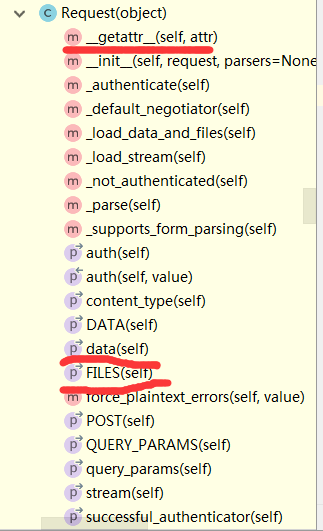
djangorestframework的Request对象简单介绍
Restful framework【第二篇】APIView的更多相关文章
- Entity Framework 第二篇 事务
Entity Framework 事务 结合第一篇的代码 public class BaseRepository : ITransaction, IDisposable { private XFDb ...
- [转]Android开源项目第二篇——工具库篇
本文为那些不错的Android开源项目第二篇--开发工具库篇,主要介绍常用的开发库,包括依赖注入框架.图片缓存.网络相关.数据库ORM建模.Android公共库.Android 高版本向低版本兼容.多 ...
- Android开源项目第二篇——工具库篇
本文为那些不错的Android开源项目第二篇——开发工具库篇,**主要介绍常用的开发库,包括依赖注入框架.图片缓存.网络相关.数据库ORM建模.Android公共库.Android 高版本向低版本兼容 ...
- [原创].NET 分布式架构开发实战五 Framework改进篇
原文:[原创].NET 分布式架构开发实战五 Framework改进篇 .NET 分布式架构开发实战五 Framework改进篇 前言:本来打算这篇文章来写DAL的重构的,现在计划有点改变.之前的文章 ...
- shell第二篇
第二篇知道shell是什么,再来了解一下shell的分类及相关历史 参考百度百科:shell 1.shell概念(计算机壳层) 在计算机科学中,Shell俗称壳(用来区别于核),是指"提供使 ...
- ElasticSearch入门 第二篇:集群配置
这是ElasticSearch 2.4 版本系列的第二篇: ElasticSearch入门 第一篇:Windows下安装ElasticSearch ElasticSearch入门 第二篇:集群配置 E ...
- 第二篇 界面开发 (Android学习笔记)
第二篇 界面开发 第5章 探索界面UI元素 ●The Android View Class ●△Widget设计步骤 需要修改三个XML,以及一个class: 1)第一个xml是布局XML文件 ...
- 在django restful framework中设置django model的property
众所周知,在django的model中,可以某些字段设置@property和setter deleter getter,这样就可以在存入数据的时候进行一些操作,具体原理请参见廖雪峰大神的博客https ...
- 使用wepy开发微信小程序商城第二篇:路由配置和页面结构
使用wepy开发微信小程序商城 第二篇:路由配置和页面结构 前言: 最近公司在做一个微信小程序的项目,用的是类似于vue的wepy框架.我也借此机会学习和实践一下. 小程序官方文档:https://d ...
- EnjoyingSoft之Mule ESB开发教程第二篇:Mule ESB基本概念
目录 1. 使用Anypoint Studio开发 2. Mule ESB Application Structure - Mule ESB应用程序结构 3. Mule ESB Application ...
随机推荐
- Eclipse 在Debug调试中用到的快捷键
作用域 功能 快捷键 全局 单步返回 F7 全局 单步跳过 F6 全局 单步跳入 F5 全局 单步跳入选择 Ctrl+F5 全局 调试上次启动 F11 全局 继续 F8 全局 使用过滤器单步执行 Sh ...
- java outterLoop跳出多重循环用法以及详解
List<CommResultMsg> listresult=new ArrayList<CommResultMsg>(); outterLoop :for (int i = ...
- 域名重新绑定ip时访问地址NotFount404
情形描述:部署在A服务器IIS上的asp.net程序,搬迁到B服务器上,重新绑定域名和ip后.再访问网址时有些电脑能正常访问,而有些电脑报404 not found错误. 经分析发现是个人电脑网络设置 ...
- Unity shader学习之Forward Rendering Path
Forward rendering path shader如下: // Upgrade NOTE: replaced 'mul(UNITY_MATRIX_MVP,*)' with 'UnityObje ...
- django 静态css js文件配置
参考:http://blog.csdn.net/liqiancao/article/details/66151287
- js切换背景颜色
我将全部的代码上传到了github,你可以下载查看 <!-------change the background color--------------> <script> f ...
- C#回调浅析(委托、接口回调)
https://wenku.baidu.com/view/ed724173bd64783e08122b2f.html
- kali长时间未使用导致数字签名过期无法更新源解决办法
kali长时间未使用,数字签名会过期,从而导致无法更新源. apt-get update:从源(Source)服务器那里下载最新的软件包列: apt-get upgrade:对已经安装的软件包本身进行 ...
- tft屏图像文字一起显示
2010-05-04 21:06:00 M16内部flash只有16k,要做数码相框,只能用usart通信了.明天继续研究.
- 课堂测试代码(未完全实现,部分代码有bug,仅供参考)
//信1705-3 20173507 周龙海package account; public class account { private String accountID; private Stri ...