
hive的jdbc使用
①新建maven项目,加载依赖包
在pom.xml中添加
<dependency>
<groupId>jdk.tools</groupId>
<artifactId>jdk.tools</artifactId>
<version>1.8</version>
<scope>system</scope>
<systemPath>${JAVA_HOME}/lib/tools.jar</systemPath>
</dependency>
<dependency>
<groupId>junit</groupId>
<artifactId>junit</artifactId>
<version>3.8.1</version>
<scope>test</scope>
</dependency>
<dependency>
<groupId>org.apache.hive</groupId>
<artifactId>hive-exec</artifactId>
<version>2.1.1</version>
</dependency>
<dependency>
<groupId>org.apache.hive</groupId>
<artifactId>hive-jdbc</artifactId>
<version>2.1.1</version>
</dependency>
<dependency>
<groupId>org.apache.hadoop</groupId>
<artifactId>hadoop-common</artifactId>
<version>2.6.1</version>
</dependency>
②启动hive的service,启动集群
(hive1.2.1版本以后需要使用hiveserver2启动)
hive –-service hiveserver2 –-hiveconf hive.server2.thrift.port=11111(开启服务并设置端口号)
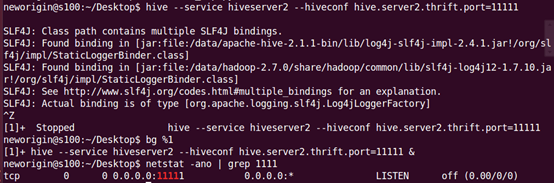
③配置core-xite.xml
<property>
<name>hadoop.proxyuser.neworigin.groups</name>
<value>*</value>
<description>Allow the superuser oozie to impersonate any members of the group group1 and group2</description>
</property>
<property>
<name>hadoop.proxyuser.neworigin.hosts</name>
<value>*</value>
<description>The superuser can connect only from host1 and host2 to impersonate a user</description>
</property>
④编写java代码
package com.neworigin.HiveTest1;

import java.sql.Connection;

import java.sql.DriverManager;

import java.sql.SQLException;

import java.sql.Statement;

public class JDBCUtil {

static String DriverName="org.apache.hive.jdbc.HiveDriver";

static String url="jdbc:hive2://s100:11111/myhive";

static String user="neworigin";

static String pass="123";

//创建连接

public static Connection getConn() throws Exception{

    Class.forName(DriverName);

    Connection conn = DriverManager.getConnection(url,user,pass);

    return conn;

}

//创建命令

public static Statement getStmt(Connection conn) throws SQLException{

    return conn.createStatement();

}

public void closeFunc(Connection conn,Statement stmt) throws SQLException

{

    stmt.close();

    conn.close();

    }

}

package com.neworigin.HiveTest1;

import java.sql.Connection;

import java.sql.ResultSet;

import java.sql.ResultSetMetaData;

import java.sql.Statement;

public class JDBCTest {

public static void main(String[] args) throws Exception {

    Connection conn = JDBCUtil.getConn();//创建连接

    Statement stmt=JDBCUtil.getStmt(conn);//创建执行对象

    String sql="select * from myhive.employee";//执行sql语句

    String sql2="create table jdbctest(id int,name string)";

    ResultSet set = stmt.executeQuery(sql);//返回执行的结果集

    ResultSetMetaData meta = set.getMetaData();//获取字段

    while(set.next())

    {

        for(int i=1;i<=meta.getColumnCount();i++)

        {

            System.out.print(set.getString(i)+" ");

        }

        System.out.println();

    }

    System.out.println("第一条sql语句执行完毕");

    boolean b = stmt.execute(sql2);

    if(b)

    {

        System.out.println("成功");

    }

}

}
hive的jdbc使用的更多相关文章
- Hive的JDBC使用&并把JDBC放置后台运行
使用JDBC访问HIVE: 首先启动hive的JDBC服务. 进入hive的bin目录: 这样启动是启动到前台.如果 要想启动到后台需要用到Linux的相关命令. 我们先把其放到前台看下效果,之后再把 ...
- [Hive_5] Hive 的 JDBC 编程
0. 说明 Hive 的 JDBC 编程 1. hiveserver2 介绍 hiveserver2 是 Hive 的 JDBC 接口,用户可以连接此端口来连接 Hive 服务器 JDBC 驱动类为 ...
- Hive的JDBC
Hive 的JDBC 包含例子 https://cwiki.apache.org/confluence/display/Hive/HiveClient#HiveClient-JDBC HiveServ ...
- hive安装 jdbc链接hive
1. 下载hive安装包 2. 进入 conf 中 : cp hive-default.xml.template hive-site.xml, vi hive-site.xml 1)首行添加: ...
- Hive和Jdbc示例
重要:在使用 JDBC 开发 Hive 程序时, 必须首先开启 Hive 的远程服务接口.使用下面命令进行开启:hive -service hiveserver & 1). 测试数据 user ...
- SPARK_sql加载,hive以及jdbc使用
sql加载 格式 或者下面这种直接json加载 或者下面这种spark的text加载 以及rdd的加载 上述记得配置文件加入.mastrt("local")或者spark://m ...
- Hive的JDBC访问
实现hive查询源码: String driverName = "org.apache.hive.jdbc.HiveDriver"; try { Class.forName(dri ...
- Hive:JDBC示例
1)本地目录/home/hadoop/test下的test4.txt文件内容(每行数据之间用tab键隔开)如下所示: [hadoop@master test]$ sudo vim test4.txt ...
- Hive的JDBC连接
首相要安装好hive 1.首先修改配置文件文件为hive 路径下的 conf/hive-sit.xml 将内容增加 <property> <name>hive.server2 ...
随机推荐
- AT2442 フェーン現象 (Foehn Phenomena)
题目地址 原题地址 题解 其实就是一个区间加,单点查询的问题 当然可以线段树/树状数组做,但是这两个做法要分类讨论所以代码会比较多 我们考虑一种更简便的做法 差分! 因为温度只和海拔差有关,这相当于题 ...
- HIHOcoder 1449 后缀自动机三·重复旋律6
思路 显然endpos的大小就对应了对应子串的出现次数,所以快速求出endpos的大小,然后用它更新对应子串长度(minlen[i]~maxlen[i])的答案即可 endpos的大小可以拓扑排序求出 ...
- (转) How a Kalman filter works, in pictures
How a Kalman filter works, in pictures I have to tell you about the Kalman filter, because what it d ...
- mysql分区分表讲解
为什么要分表和分区? 日常开发中我们经常会遇到大表的情况,所谓的大表是指存储了百万级乃至千万级条记录的表.这样的表过于庞大,导致数据库在查询和插入的时候耗时太长,性能低下,如果涉及联合查询的情况,性能 ...
- 传输SO10 (SO10 Transport)
传输SO10 (SO10 Transport) 方法一. 手工添加到请求里面,格式为: R3TR TEXT text object, name, ID, language 方法二.使用程序:R ...
- toggle 1.9 以后就被删除了
toggle 1.9 以后就被删除了, 1.8.x 以前可用. $(function(){ $(".p_title").toggle( function(){ $(this).n ...
- HttpDns原理
什么是 DNS DNS(Domain Name System,域名系统),DNS 服务用于在网络请求时,将域名转为 IP 地址.能够使用户更方便的访问互联网,而不用去记住能够被机器直接读取的 IP 数 ...
- pc网页中嵌入百度地图
pc网页中嵌入百度地图 1 打开百度地图生成器: http://api.map.baidu.com/lbsapi/creatmap/ 2 设置好了之后,点击获取代码,将代码粘贴到文件中保存为html文 ...
- 【BZOJ】3139: [Hnoi2013]比赛
题目链接:http://www.lydsy.com/JudgeOnline/problem.php?id=3139 可以发现,答案之和得分的序列有关,而且和序列中每个元素的顺序无关.考虑HASH所有的 ...
- Intellij Idea修改css文件即时更新生成效果
用来Idea也有一段时间了,觉得还是有很多地方没有用到,今天遇到了一个问题,百度了解决方法,正好在这里做一个小记录 主要问题是我在idea的项目里面修改了css文件,然后运行web文件,发现并没有做到 ...