
我的vim插件配置
set nocompatible              " be iMproved, required

filetype off                  " required

" set the runtime path to include Vundle and initialize

set rtp+=~/.vim/bundle/Vundle.vim

call vundle#begin()

" alternatively, pass a path where Vundle should install plugins

"call vundle#begin('~/some/path/here')

" let Vundle manage Vundle, required

Plugin 'VundleVim/Vundle.vim'

Plugin 'scrooloose/nerdtree'

Plugin 'jistr/vim-nerdtree-tabs'

Plugin 'Xuyuanp/nerdtree-git-plugin'

Plugin 'majutsushi/tagbar'

Plugin 'scrooloose/syntastic'

Plugin 'vim-airline/vim-airline'

Plugin 'vim-airline/vim-airline-themes'

Plugin 'jiangmiao/auto-pairs'

Plugin 'Valloric/YouCompleteMe'

Plugin 'tpope/vim-fugitive'

Plugin 'rstacruz/sparkup', {'rtp': 'vim/'}

" The following are examples of different formats supported.

" Keep Plugin commands between vundle#begin/end.

" plugin on GitHub repo

" Plugin 'tpope/vim-fugitive'

" plugin from http://vim-scripts.org/vim/scripts.html

" Plugin 'L9'

" Git plugin not hosted on GitHub

" Plugin 'git://git.wincent.com/command-t.git'

" git repos on your local machine (i.e. when working on your own plugin)

" Plugin 'file:///home/gmarik/path/to/plugin'

" The sparkup vim script is in a subdirectory of this repo called vim.

" Pass the path to set the runtimepath properly.

" Plugin 'rstacruz/sparkup', {'rtp': 'vim/'}

" Avoid a name conflict with L9

" Plugin 'user/L9', {'name': 'newL9'}

" All of your Plugins must be added before the following line

call vundle#end()            " required

filetype plugin indent on    " required

" To ignore plugin indent changes, instead use:

"filetype plugin on

"

" Brief help

" :PluginList       - lists configured plugins

" :PluginInstall    - installs plugins; append `!` to update or just :PluginUpdate

" :PluginSearch foo - searches for foo; append `!` to refresh local cache

" :PluginClean      - confirms removal of unused plugins; append `!` to auto-approve removal

"

" see :h vundle for more details or wiki for FAQ

" Put your non-Plugin stuff after this line

" airline

"设置打开vim的时候默认打开目录树"

let g:nerdtree_tabs_open_on_console_startup=

" 关闭NERDTree快捷键

map <C-t> :NERDTreeToggle<CR>

""当NERDTree为剩下的唯一窗口时自动关闭

autocmd bufenter * if (winnr("$") ==  && exists("b:NERDTree") && b:NERDTree.isTabTree()) | q | endif

let g:NERDTreeDirArrowExpandable = '►'

let g:NERDTreeDirArrowCollapsible = '▼'

let NERDTreeAutoCenter=

" 是否显示隐藏文件

let NERDTreeShowHidden=

" 设置宽度

let NERDTreeWinSize=

"let g:NERDTreeIndicatorMapCustom = {

"    \ "Modified"  : "✹",

"    \ "Staged"    : "✚",

"    \ "Untracked" : "✭",

"    \ "Renamed"   : "➜",

"    \ "Unmerged"  : "═",

"    \ "Deleted"   : "✖",

"    \ "Dirty"     : "✗",

"    \ "Clean"     : "✔︎",

"    \ "Ignored"   : "☒'",

"    \ "Unknown"   : "?"

"    \ }

"""""""""""""""""""""""""""""""""""""""

let g:airline_powerline_fonts =

set t_Co=

set laststatus=

" ycm

let g:ycm_python_binary_path='/usr/bin/python'

let g:ycm_confirm_extra_conf=

let g:ycm_server_python_interpreter='/usr/bin/python'

"let g:ycm_global_ycm_extra_conf='~/.vim/.ycm_extra_conf.py'

let g:ycm_global_ycm_extra_conf='/home/ubuntu/.vim/.ycm_extra_conf.py'

let g:clang_use_library=

let g:ycm_collect_identifiers_from_tags_files =  "tag complete

let g:ycm_seed_identifiers_with_syntax =         "yu yi complete

set completeopt-=preview

let g:ycm_complete_in_comments=                 "comment of complete

syntax on

set number

set cindent

set autoindent

set expandtab

set smarttab

" set mouse=a

set shiftwidth=

set softtabstop=

set hls

set bg=dark
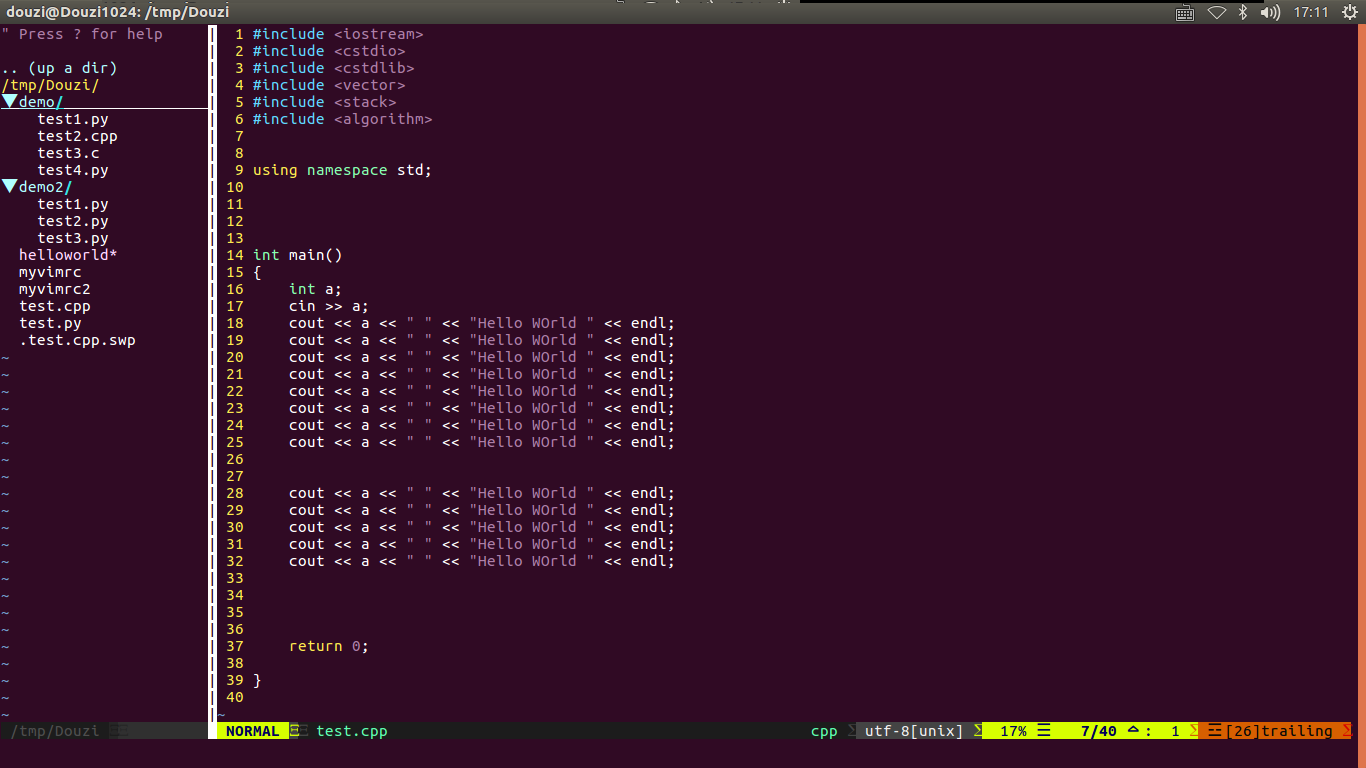
编辑文件: vim ~/.vimrc
在shell命令行输入:vim +PluginInstall +qall 安装相关插件
里面代码补全插件:YouCompleteMe比较难装,参考 https://github.com/Valloric/YouCompleteMe/wiki/Building-Vim-from-source
我的vim插件配置的更多相关文章
- 「个人vim插件+配置」
2016.10.4 filetype indent on syntax on set nu ai ci si set sw= ts= set autochdir set backspace= colo ...
- DoxygenToolKit.vim 插件配置
如何才能既享受 Doxygen 的强大功能,同时又避免大量的重复性的注释内容? 解决思路: 让编辑器来替我们写那些格式和内容固定的部分,我们只负责写真正的有效内容. 所以,答案就是:Vim + Dox ...
- vim 插件配置博客记录
本来打算自己写下各种经常使用vim的插件安装方法, 可是搜索了下, 发现别人都写过了, 在写一遍也没有意思, 特此记录. Vim 经常使用命令 http://blog.csdn.net/hittata ...
- vim插件配置
OS:kali linux tool:vim 上图: 0x00 需要用到的插件及其下载地址 左边的一栏显示文件目录结构的用到的插件为 NERDTree 下载地址:https://github.com/ ...
- vim插件配置(一)
vim代码自动显示提示代码插件:AutoComplPop: 代码(普通变量函数) c/c++代码(类的 . , ->, :: 操作符)的自动补全插件: OmniCppComplete
- 常用VIM插件配置
airline 状态栏美化 除了airline本体还要下airline主题 和打过powerline补丁的字体 常用设置: set laststatus=2 " 总是显示状态栏 set no ...
- vim学习、各类插件配置与安装
vim学习.各类插件配置与安装 vim 插件 配置 1. vim学习 vim基础学习:根据网上流行基础文章<简明Vim练级攻略>,进阶书籍<vim实用技巧>.注:进阶书籍可以在 ...
- vim插件和配置
vim插件和配置 插件 pathogen 可以方便地管理vim插件 在没有pathogen的情况下,vim插件的文件全部都放在.vim目录,卸载插件很麻烦,pathogen可以将不同的插件放在一个单独 ...
- vim学习、各类插件配置与安装【转】
转自:https://www.cnblogs.com/forest-wow/p/6916531.html 1. vim学习 vim基础学习:根据网上流行基础文章<简明Vim练级攻略>,进阶 ...
随机推荐
- Linux CentOS虚拟机网卡配置
最近在VMware安装CentOS6.5之后,每次从宿主机访问虚拟机的Oracle时,都要修改IP地址,因为没有设置虚拟机的IP,所以每次开机之后虚拟机的IP地址都是随机的,于是研究了下给虚拟机配置静 ...
- [转帖]以Windows服务方式运行.NET Core程序
以Windows服务方式运行.NET Core程序 原作者blog:https://www.cnblogs.com/guogangj/p/10093102.html 里面使用了NSSM 工具 但是自己 ...
- spark中saveAsTextFile的错误
写了很简单的一段spark代码,将结果保存为windows本地文件,执行之后总是报错NullPointerException 查询之后 发现是本地缺少hadoop需要的一个文件所致 如果本地已经安装了 ...
- hive数据导入load导入命令
LOCAL 指的是操作系统的文件路径,否则默认为HDFS的文件路径 1.向t2和t3的数据表中导入数据 2.导入操作系统的一下三个文件 执行导入命令 3.将HDFS文件中的数据导入到t3中 4.导入 ...
- 使用vscode 编写Markdown文件
markdown简单语法参考下面简单事例: # 一级标题 1. 有序列表1 >1. 有序列表1 >>- *test1* >>- **test2** >>- * ...
- Docker报错总结
[Docker push镜像报错] The push refers to a repository [192.168.200.103:5000/rancher/server]Get https://1 ...
- git pull报“unable to update local ref”解决方案
使用git pull拉取代码的时候,无法拉取最新代码,报"unable to update local ref"错误. 除了重新clone一份代码外,还可以使用如下解决方案: 1. ...
- 【BZOJ2142】礼物(拓展卢卡斯定理)
[BZOJ2142]礼物(拓展卢卡斯定理) 题面 BZOJ 洛谷 题解 显然如果\(\sum w_i>n\)无解. 否则答案就是:\(\displaystyle \prod_{i=1}^m{n- ...
- 【BZOJ2427】[HAOI2010]软件安装(动态规划,Tarjan)
[BZOJ2427][HAOI2010]软件安装(动态规划,Tarjan) 题面 BZOJ 洛谷 题解 看到这类题目就应该要意识到依赖关系显然是可以成环的. 注意到这样一个性质,依赖关系最多只有一个, ...
- NOI 笔试题库(我背不住的部分)
吐槽 为什么C++选手要会编译Pascall啊!为什么Emacs选手要会使用Vim啊! Linux 中为文件改名使用的命令是:mv 在Linux 中删除当前目录下的test 目录的命令是:rm -r ...