
Ruby入坑指南
1.1 简介
Ruby语言是由松本行弘(Matz)设计,是一门通用的、面向对象的、解释型语言。
1.2 Ruby?RUBY?ruby?
1.Ruby:用来表示编程的语言
2.ruby:是指一个计算机程序,特指Ruby的解释器
3.RUBY:准确来说没有这种写法,一般是简写,例如WTO.
1.3. 安装方式
方式1 brew
brew install ruby
方式2 rvm
rvm install 2.2.4
更多rvm可以参考:rvm入门篇-安装和使用
1.4 工具
1.irb:交互式Ruby控制台程序。
2.rvm: Ruby Version Manager
3.VSCode
4.gem:一套Ruby库和应用程序包管理实用工具
5.rake:Ruby的make工具,一套任务管理实用工具
6.rdoc和ri:Ruby文档工具
1.5 ruby解释器命令
执行ruby文件
ruby basic.rb
语法检查而不运行程序:
ruby -cw basic.rb
它会读取文件并指出语法是否有错。更多类似-cw的解释器开关参见文末:解释器的命令行开关。
2 Ruby语言基础
2.1 变量
局部变量
局部变量以小写字母或者下划线开头,包含字母、下划线或数字。Ruby不是使用的驼峰命名,而是使用下划线将多个单词拼接。例如:
✅first_name

❎firstName
实例变量
实例变量通常以一个单独的@开头,后面字符和局部变量命名规则一致。例如:
class Person

    def initialize(temp_name,temp_age)

        @name = temp_name

    end

    def printn

        return @name

    end

end

# 实例变量

p1 = Person.new("zhangsan",24)

p p1.printn

#输出结果为:zhangsan
类变量
类变量命名规则与实例变量一致,但是它以@@符号开头:
class Person

    @@person_number = 0

    def initialize(temp_name,temp_age)

        @name = temp_name

        @@person_number = @@person_number + 1

    end

    def print_person_number

        return @@person_number

    end

end

# 实例变量

p1 = Person.new("zhangsan",24)

p p1.print_person_number

输出结果:1
全局变量
以$开头,它就是一个全局变量,例如:
$FIRST_NAME $population
2.2 常量
常量以大写字母开头,如果遇到命名多词组合常量,可以使用驼峰命名法,也可以使用下划线分割且所有字母大写。
A String FirstName FIRST_NAME
2.3 方法
方法名
Ruby中的方法名遵从与局部变量相同的规则和约定。例如:
def get_first_name

   return @first_name

end
方法调用
方法调用使用.运算符。例如:
p1.get_name   #方法调用

p1.name    #属性调用
2.4 引用ruby文件
可以使用$:查看加载路径。
这里主要介绍三种引用方式:load、require、require_relative。
load
load命令总是会加载所请求的文件,不论这个文件是否已经加载过。假如一个文件在几次加载过程中发生改变,那么最新版本的文件将优先使用并覆盖之前加载的版本。尤其是在irb会话中,当在编辑器中修改一个文件时,想要立即测试修改的效果,使用load非常有用。
require
经常会使用的一个技术,用于请求Ruby扩展或库,不论是标准库还是三方库。
requrire就算调用多次也不会重新加载已经加载过的文件。Ruby会持续追踪已经被请求的那些文件而不会重复加载它们。
require不能辨识出当前的工作目录(.)。用户可以显式地指定它。例如:
require "./loadee.rb"

or

$: << "." #把当前目录添加到加载路径当中。

require "loadee.rb"
require_relative
这个命令会搜索相对于所在文件的目录来加载功能。这个不用把当前目录添加到加载路径中。
2.5 数据结构
查看某个属性或者变量是什么类型,可以使用.class方法。
2.5.1 字符串
字符串插值:
name = "zhangsan"

age = "20"

person_desc = "my name is #{name},age is #{age}"

puts person_desc
bang方法:
Ruby的方法可以以惊叹号(!)结尾,这样的方法称为bang方法。有惊叹号的方法被标记为危险的。因为他可能会改变原有数据的值。例如:
str = "Hello World"

p str.upcase!

p str

#----------------------

p str.upcase

p str
更多字符串方法参见:https://ruby-doc.org/core-2.2.0/String.html
2.5.2 集合
Set不是Ruby的核心类,它是一个标准库类,所以使用的时候需要require "set"。它的对象是唯一的。
构造一个集合:
require 'set'

s = [1,2,3,4,5,6,7,8,9,124,45,6,4,1]

set = Set.new(s)

p set
集合没有字面构造器。
2.5.3 数组
数组的创建:
#中括号创建

["zhangsan","lisi","wangwu"]
注意%W 和%w的区别:
name = "Tim"

students = %W{zhangsan lisi wangwu #{name}}

students = %w{zhangsan lisi wangwu #{name}}
%w:创建字符串数组的特殊方式
%W:如果想要对字符串进行解析,使用W
数组遍历:
[1,2,3,4,5,8].each {|item| puts item+"!"}
更多数组方法参见:https://docs.ruby-lang.org/en/2.0.0/Array.html
2.5.4 散列
散列在其他语言中有时被称为:字典或者Map。散列由键值组成。例如:
state_hash = {"January" => "Jan","February" => "Feb","March" => "Mar"}

state_hash["April"] = "Apr"

puts state_hash["April"]   #Result is Apr

puts state_hash.class #Result is Hash
2.5.5 符号
符号是Ruby内置类Symbol的实例。它有一个字面构造器:冒号引导符。可以通过这个记号,从字面航辨认出符号与字符串、变量名、方法名或者其他的区别。
符号的特点:
- 不变性。符号是不可变的。符号不能添加字符,一旦它存在,就不能修改
- 唯一性。符号是唯一的。无论何时看到:abc,看到的都是同一个对象
实践
符号最常用的用法:方法参数和散列键:
#方法参数

puts "abc".send(:upcase)   #等价于puts "abc".send(upcase.to_sym)

#输出结果:ABC

#--------------------

#散列键

d_hash = {:name => "zhangsan", :age => 25}

puts d_hash[:age]

#输出结果:25
使用符号的好处:
1.Ruby处理符号更快,因此如果要大量处理散列的查找,就会节省一些时间。如果需要性能上的优化,使用符号作为散列键则可能是个好办法。
2.Ruby允许一种特殊的符号表现形式在散列键的位置出现,它可以在符号之后使用冒号,同事可以替代散列的分割箭头符,例如:
d_hash = {name: "zhangsan",age: 23}

#等价于

d_hash = {"name" => "zhangsan","age" => 23}
2.6 类和对象
2.6.1 创建类
class Student

    attr_accessor :s_name,:s_age, :s_class

    def initialize(name,age,t_class)

        @s_name =  name

        @s_age = age

        @s_class = t_class

    end

    def study

        puts "study"

    end

end

s1 = Student.new("zhangsan",15,"1年级")

p s1.s_name

s1.study
2.6.2 类的继承
Ruby语言遵从单继承原则,无法继承多个类,也就意味着它只是一个超类。
class Student < People

end
2.6.3 给类添加属性
原始添加方法:
class Ticket

   def initialize(ve,date)

      @venue = ve

      @date = date

   end

   def price=(pr)

      @price = pr

   end

   def venue

      @venue

   end

   def date

      @date

   end

   def price

      @price

   end

end
attr_reader & attr_writer
class Ticket

   attr_reader :venue, :date, :price   #读取方法

   attr_writer :venue, :date, :price   #写方法

   def initialize(ve,date)

      @venue = ve

      @date = date

   end

end

ti = Ticket.new("北京大学","2019-09-01")

ti.venue = "sdfsdfd"

puts ti.venue
attr_accessor
class Ticket

    attr_accessor :price,:venue,:date

    def initialize(ve,date)

        @venue = ve

        @date = date

    end

end

ti = Ticket.new("北京大学","2019-09-01")

ti.price = 200

puts ti.price
区别于attr,attr: price只生成了reader,attr: price,true会生成getter和setter。
2.7 模块
Ruby鼓励读者进行模块化设计:将大的组件分解为小的,并可以混合(mixin)和匹配对象的行为。和类一样,模块是一组方法和常量的集合。
模块是使用混合到类的方式。
模块没有实例
创建模块使用module关键字:
module Category

    def say_hello

        puts "Category's Hello"

    end

end

class Student

    include Category    #引用模块

    def initialize

    end

end

st = Student.new

st.say_hello
2.7.1 include vs prepend
module ModuleGoOne

    def go

        puts "ModuleGoOne's go"

    end

end

module ModuleGoTwo

    def go

        puts "ModuleGoTwo's go"

    end

end

class Student < Person

    include ModuleGoOne

    prepend ModuleGoTwo

    def go

        puts "Student's go"

    end

end

st = Student.new

st.goto

# Result is ModuleGoTwo's go
方法查找规则
module ModuleGoOne

    def go

        puts "ModuleGoOne's go"

    end

end

module ModuleGoTwo

    def go

        puts "ModuleGoTwo's go"

    end

end

class Person

    def go

        puts "Person's go"

    end

end

class Student < Person

    include ModuleGoOne

    prepend ModuleGoTwo

    def go

        puts "Student's go"

    end

end

st = Student.new

st.go
方法查找规则:
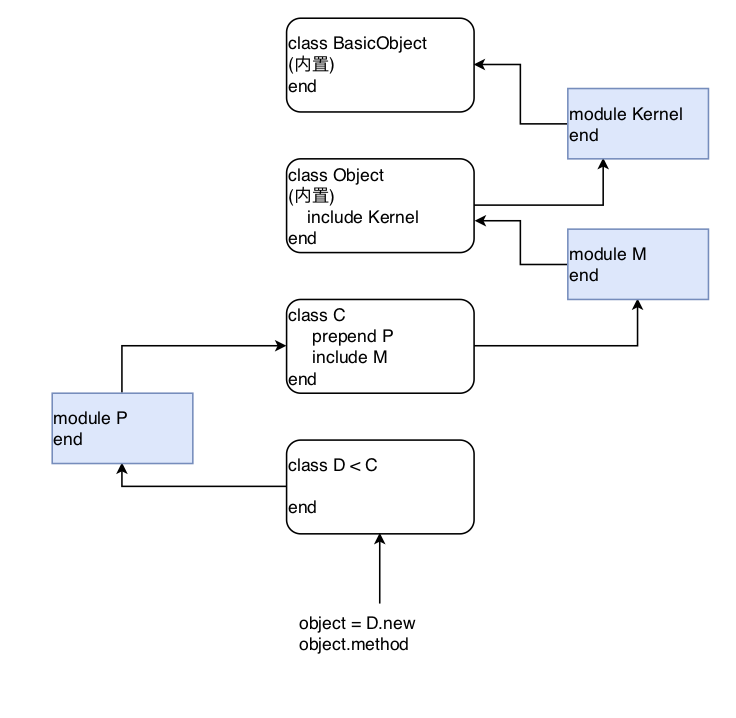
1.先查找当前类中是否有该方法,如果有,则直接调用,执行完毕;
2.查找module中是否有该方法,如果有,则调用,执行完毕;
3.查找父类中是否有该方法,父类中是否有module,如果有prepend模块,则先调用,没有的话如果有在类中定义,则调用;
4.所属的超类
5.内置Kernel模块
6.BasicObject
7.method_missing NoMethodError
2.8 Ruby块yield
块由大量代码组成。
块中的代码总是包含在大括号内
块的调用:需要与其相同名称的方法调用
可以使用yield语句来调用块
每个Ruby源文件可以声明当文件被加载时要运行的代码块(BEGIN),以及程序完成执行后要运行的代码块(END)。
BEGIN {

    puts "BEGIN..."

}

END {

    puts "END......."

}

def test

    yield

end

test {puts "Hello"}

=begin

def test

    puts "在test方法内"

    yield

    puts "又回到了test方法"

    yield

end

test {puts "你在块内"}

=end

=begin

def test

    puts "在test方法内"

    yield 10

    puts "又回到了test方法"

    yield 20

end

test {|i| puts "你在块内#{i}"}

=end
3 iTools
3.1 介绍
它是一个指令集,里面包含了一些比较实用的命令,可以方便用户的一些操作,例如:查找无用图片、查找无用类、在某个文件或者文件夹中查找某个字符串、查找某个文件等。
链接:https://rubygems.org/gems/itools
3.2 安装
gem install itools
3.3 使用
NAME

    itools - a collection of tools for ios developer

SYNOPSIS

    itools [global options] command [command options] [arguments...]

VERSION

    0.4.7

GLOBAL OPTIONS

    --help    - Show this message

    --version - Display the program version

COMMANDS

    count_code_line    - count lines of code

    find               - search unuse image

    help               - Shows a list of commands or help for one command

    parse              - Analyze the memory footprint of each part or component in Xcode project

    pre_commit         - 通过执行该命令,hook 本地commit,然后进行规范化

    search             - search str(or strs) in some file(or folder's file)

    search_file        - search File in folder

    search_unuse_class - search unuse class

    size_for           - calculate the memory footprint of file or folder(contain file)
更多参见:https://github.com/ScottZg/itools
4 推荐
4.1 网站
1.gems:https://rubygems.org/
2.官方文档:https://docs.ruby-lang.org/en/
4.2 书籍
5 附
5.1 预定义全局变量表
Pre-defined variables

$!         The exception information message set by 'raise'.

$@         Array of backtrace of the last exception thrown.

$&         The string matched by the last successful match.

$`         The string to the left  of the last successful match.

$'         The string to the right of the last successful match.

$+         The highest group matched by the last successful match.

$1         The Nth group of the last successful match. May be > 1.

$~         The information about the last match in the current scopke.

$=         The flag for case insensitive, nil by default.

$/         The input record separator, newline by default.

$\         The output record separator for the print and IO#write. Default is nil.

$,         The output field separator for the print and Array#join.

$;         The default separator for String#split.

$.         The current input line number of the last file that was read.

$<         The virtual concatenation file of the files given on command line (or from $stdin if no files were given).

$>         The default output for print, printf. $stdout by default.

$_         The last input line of string by gets or readline.

$0         Contains the name of the script being executed. May be assignable.

$*         Command line arguments given for the script sans args.

$$         The process number of the Ruby running this script.

$?         The status of the last executed child process.

$:         Load path for scripts and binary modules by load or require.

$"         The array contains the module names loaded by require.

$DEBUG     The status of the -d switch.

$FILENAME  Current input file from $<. Same as $<.filename.

$LOAD_PATH The alias to the $:.

$stderr    The current standard error output.

$stdin     The current standard input.

$stdout    The current standard output.

$VERBOSE   The verbose flag, which is set by the -v switch.

$-0        The alias to $/.

$-a        True if option -a is set. Read-only variable.

$-d        The alias to $DEBUG.

$-F        The alias to $;.

$-i        In in-place-edit mode, this variable holds the extension, otherwise nil.

$-I        The alias to $:.

$-l        True if option -l is set. Read-only variable.

$-p        True if option -p is set. Read-only variable.

$-v        The alias to $VERBOSE.

$    -w        True if option -w is set.
5.2 解释器的命令行开关
Usage: ruby [switches] [--] [programfile] [arguments]

  -0[octal]       specify record separator (\0, if no argument)

  -a              autosplit mode with -n or -p (splits $_ into $F)

  -c              check syntax only

  -Cdirectory     cd to directory before executing your script

  -d              set debugging flags (set $DEBUG to true)

  -e 'command'    one line of script. Several -e's allowed. Omit [programfile]

  -Eex[:in]       specify the default external and internal character encodings

  -Fpattern       split() pattern for autosplit (-a)

  -i[extension]   edit ARGV files in place (make backup if extension supplied)

  -Idirectory     specify $LOAD_PATH directory (may be used more than once)

  -l              enable line ending processing

  -n              assume 'while gets(); ... end' loop around your script

  -p              assume loop like -n but print line also like sed

  -rlibrary       require the library before executing your script

  -s              enable some switch parsing for switches after script name

  -S              look for the script using PATH environment variable

  -T[level=1]     turn on tainting checks

  -v              print version number, then turn on verbose mode

  -w              turn warnings on for your script

  -W[level=2]     set warning level; 0=silence, 1=medium, 2=verbose

  -x[directory]   strip off text before #!ruby line and perhaps cd to directory

  -h              show this message, --help for more info
转载请注明出处:https://www.cnblogs.com/zhanggui/p/10276339.html
Ruby入坑指南的更多相关文章
- electron入坑指南
electron入坑指南 简介 electron 实际集成chrome浏览器和node环境, 运行你写的网页 app 基本目录结构 index.html 名称可以不是index, 这个文件与普通网页的 ...
- C语言入坑指南-被遗忘的初始化
前言 什么是初始化?为什么要初始化?静态变量和局部变量的初始化又有什么区别?实际应用中应该怎么做?本文将一一回答这些问题. 什么是初始化 初始化指的是对数据对象或者变量赋予初始值.例如: int va ...
- Elasticsearch入坑指南之RESTful API
Elasticsearch入坑指南之RESTful API Tags:Elasticsearch ES为开发者提供了非常丰富的基于Http协议的Rest API,通过简单的Rest请求,就可以实现非常 ...
- ElasticSearch入坑指南之概述及安装
---恢复内容开始--- ElasticSearch入坑指南之概述及安装 了解ElasticSearch ElasticSearch(简称ES)基于Lucene的分布式全文检索引擎.使用ES可以实现近 ...
- eclipse中导入外部包却无法查看对应源码或Javadoc的入坑指南
eclipse中导入外部包却无法查看对应源码或Javadoc的 入坑指南 出现这个错误的原因是,你虽然导入了.jar包,但没有配置对应的Javadoc或源码路径,所以在编辑器中无法查看源 码和对应AP ...
- Rust入坑指南:核心概念
如果说前面的坑我们一直在用小铲子挖的话,那么今天的坑就是用挖掘机挖的. 今天要介绍的是Rust的一个核心概念:Ownership.全文将分为什么是Ownership以及Ownership的传递类型两部 ...
- Rust入坑指南:鳞次栉比
很久没有挖Rust的坑啦,今天来挖一些排列整齐的坑.没错,就是要介绍一些集合类型的数据类型."鳞次栉比"这个标题是不是显得很有文化? 在Rust入坑指南:常规套路一文中我们已经介绍 ...
- Rust入坑指南:亡羊补牢
如果你已经开始学习Rust,相信你已经体会过Rust编译器的强大.它可以帮助你避免程序中的大部分错误,但是编译器也不是万能的,如果程序写的不恰当,还是会发生错误,让程序崩溃.所以今天我们就来聊一聊Ru ...
- Rust入坑指南:朝生暮死
今天想和大家一起把我们之前挖的坑再刨深一些.在Java中,一个对象能存活多久全靠JVM来决定,程序员并不需要去关心对象的生命周期,但是在Rust中就大不相同,一个对象从生到死我们都需要掌握的很清楚. ...
随机推荐
- LNMP shell
#!/bin/bash #set -x #date: 2018-12-13 #Description: 一键安装LNMP环境 or LAMP 环境 #Version: 0.4 #Author: sim ...
- NumPy的基本用法
NumPy简介:NumPy是高性能科学计算和数据分析的基础包.是pandas等其他各种工具的基础NumPy主要功能:ndarray,一个多维数组结构,高效且节省空间无需循环对数组数据进行快速运算的数学 ...
- 量化投资技术分析工具---ipython使用
量化投资实际上就是分析数据从而做出决策的过程python数据处理相关模块NumPy:数组批量计算pandas:灵活的表计算Matplotlib:数据可视化 学习目标:用NumPy+pandas+Mat ...
- redis缓存类
<?php class Redis_model{ public $redis = null; public function __construct() { $hosts = $this-> ...
- break、continue以及return的区别
break.continue以及return的区别如下: 1.break break用于完全结束一个循环,跳出循环体,不再执行下面的代码.对于多层循环嵌套,如果break语句出现在嵌套循环中的内循环时 ...
- ASP.NET Core 实战:将 .NET Core 2.0 项目升级到 .NET Core 2.1
一.前言 最近一两个星期,加班,然后回去后弄自己的博客,把自己的电脑从 Windows 10 改到 Ubuntu 18.10 又弄回 Windows 10,原本计划的学习 Vue 中生命周期的相关知 ...
- ASP.NET Core中使用GraphQL - 第一章 Hello World
前言 你是否已经厌倦了REST风格的API? 让我们来聊一下GraphQL. GraphQL提供了一种声明式的方式从服务器拉取数据.你可以从GraphQL官网中了解到GraphQL的所有优点.在这一系 ...
- dmidecode的Python解析
#!/usr/bin/env python # -*- coding: utf-8 -*- """ 解析dmidecode命令输出结果,返回JSON格式数据 测试服务器D ...
- 基于MongoDB.Driver的扩展
由于MongoDB.Driver中的Find方法也支持表达式写法,结合[通用查询设计思想]这篇文章中的查询思想,个人基于MongoDB扩展了一些常用的方法. 首先我们从常用的查询开始,由于MongoD ...
- CentOS 7 最小化安装配置以及网络服务器搭建、配置与管理
一.环境介绍: 运行软件:VMware Workstation Pro 系统环境:CentOS-7-x86_64-1810 系统网络运行模式:NAT模式 二.操作配置: 1.配置动态获取IP 1) 修 ...