
Spring Cloud 系列之 Eureka 实现服务注册与发现
如果你对 Spring Cloud 体系还不是很了解,可以先读一下 Spring Cloud 都有哪些模块
Eureka 是 Netflix 开源的服务注册发现组件,服务发现可以说是微服务架构的核心功能了,微服务部署之后,一定要有服务注册和发现的能力,Eureka 就是担任这个角色的。如果你用过 dubbo 的话,那一定知道 dubbo 中服务注册和发现的功能是用 zookeeper 来实现的。
Eureka 目前是 2.x 版本,并且官方已经宣布不再维护更新。不过其实 Eureka 已经很稳定了,当做注册中心完全没有问题。Spring Cloud 集成了 Eureka ,并做了完善的封装。方便我们使用 Spring boot 开发的时候简单配置就可以使用。
微服务框架中有三类角色,分别是注册中心、服务提供者、服务消费者,注册中心就是今天要说的主角 Eureka,这篇文章简单说明 Spring Cloud Eureka 的使用,模拟实现单点和高可用注册中心,并简单介绍服务提供者和服务消费者如何使用 Eureka 提供的服务注册和发现功能。
版本说明
Java : 1.8
Spring Boot : 2.1.3.RELEASE
Spring Cloud: Finchley.SR2
之说以要说一下版本,因为 Finchley.SR2 版本较之前的版本包名有变化,所以在引用 maven 包的时候要注意。
单点注册中心
创建 Eureka 注册中心
1、引用 maven 包,其中
<dependencyManagement>

  <dependencies>

    <dependency>

      <groupId>org.springframework.cloud</groupId>

      <artifactId>spring-cloud-dependencies</artifactId>

      <version>Finchley.SR2</version>

      <type>pom</type>

      <scope>import</scope>

    </dependency>

  </dependencies>

</dependencyManagement>

<!-- 最新版的 eureka 服务端包 -->

<dependency>

  <groupId>org.springframework.cloud</groupId>

  <artifactId>spring-cloud-starter-netflix-eureka-server</artifactId>

</dependency>

<!-- 监控管理 -->

<dependency>

  <groupId>org.springframework.boot</groupId>

  <artifactId>spring-boot-starter-actuator</artifactId>

</dependency>
2、新建 bootstrap.yml,并配置 Spring cloud 参数
spring:

  application:

    name: kite-eureka-center

  cloud:

    inetutils: ## 网卡设置

      ignoredInterfaces:  ## 忽略的网卡

        - docker0

        - veth.*

        - VM.*

      preferredNetworks:  ## 优先的网段

        - 192.168
3、新建 application.yml ,并配置参数
server:

  port: 3000

eureka:

  instance:

    hostname: eureka-center

    appname: 注册中心

  client:

    registerWithEureka: false # 单点的时候设置为 false 禁止注册自身

    fetchRegistry: false

    serviceUrl:

      defaultZone: http://localhost:3000/eureka

  server:

    enableSelfPreservation: false

    evictionIntervalTimerInMs: 4000
bootstrap.yml 和 application.yml 的区别:
bootstrap.yml 在 application.yml 之前启动;
bootstrap.yml 配置 application 的 name、spring.cloud.config.server.git.uri、一些encryption/decryption(加密/解密)信息;
application.yml 的信息会覆盖 bootstrap.yml 中的内容,当遇到相同的配置的时候;
4、新建 Application.java 启动文件
@EnableEurekaServer

@SpringBootApplication

public class Application {

    public static void main(String[] args) {

        SpringApplication.run(Application.class, args);

    }

}
@EnableEurekaServer 表示使用 Eureka Server 端功能,也就是启动为一个注册中心节点。
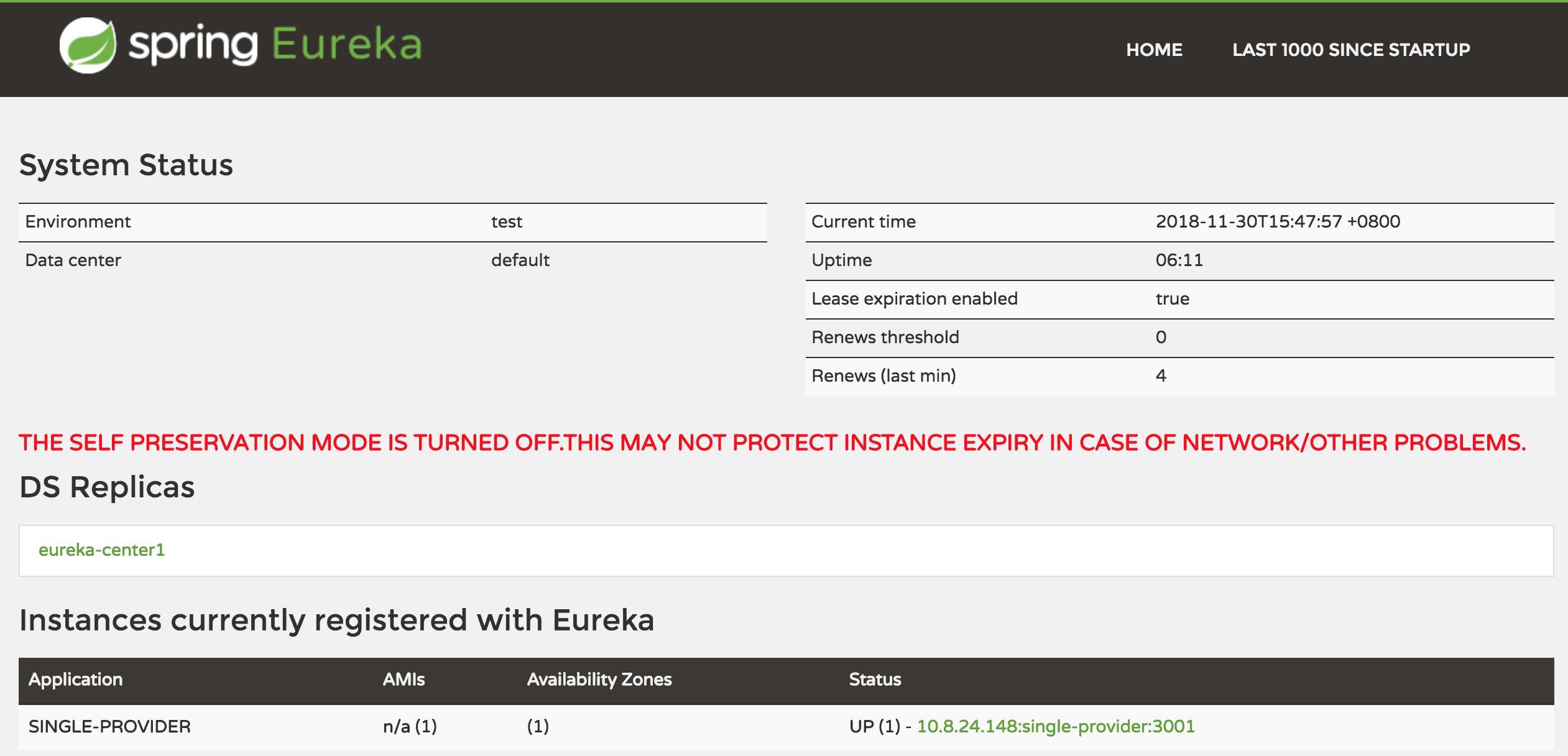
5、运行 Application.java ,访问 http://localhost:3000 即可看到 Eureka 提供的 ui 控制台。
创建一个服务提供者
接下来创建一个服务提供者,并注册到上面创建的 Eureka 注册中心。
1、添加 maven 依赖包
<dependency>

    <groupId>org.springframework.boot</groupId>

    <artifactId>spring-boot-starter-web</artifactId>

</dependency>

<!-- eureka 客户端 -->

<dependency>

    <groupId>org.springframework.cloud</groupId>

    <artifactId>spring-cloud-starter-netflix-eureka-client</artifactId>

</dependency>
2、配置 application.yml
server:

  port: 3001

eureka:

  instance:

    preferIpAddress: true

  client:

    serviceUrl:

      defaultZone: http://localhost:3000/eureka  ## 注册到 eureka

spring:

  application:

    name: single-provider  ## 应用程序名称,后面会在消费者中用到
3、创建一个简单的 RESTful 接口 controller
@Slf4j

@RestController

public class ProviderController {

    @Autowired

    private DiscoveryClient discoveryClient;

    @RequestMapping(value = "/hello")

    public String hello(){

        List<String> services = discoveryClient.getServices();

        for(String s : services){

            log.info(s);

        }

        return "hello spring cloud!";

    }

    @RequestMapping(value = "/nice")

    public String nice(){

        List<String> services = discoveryClient.getServices();

        for(String s : services){

            log.info("gogogo" + s);

        }

        return "nice to meet you!";

    }

}
4、创建 spring boot 启动类
@EnableEurekaClient

@SpringBootApplication

public class SingleProviderApplication {

    public static void main(String[] args) {

        SpringApplication.run(SingleProviderApplication.class, args);

    }

}
@EnableEurekaClient 修饰,表示要注册到注册中心。
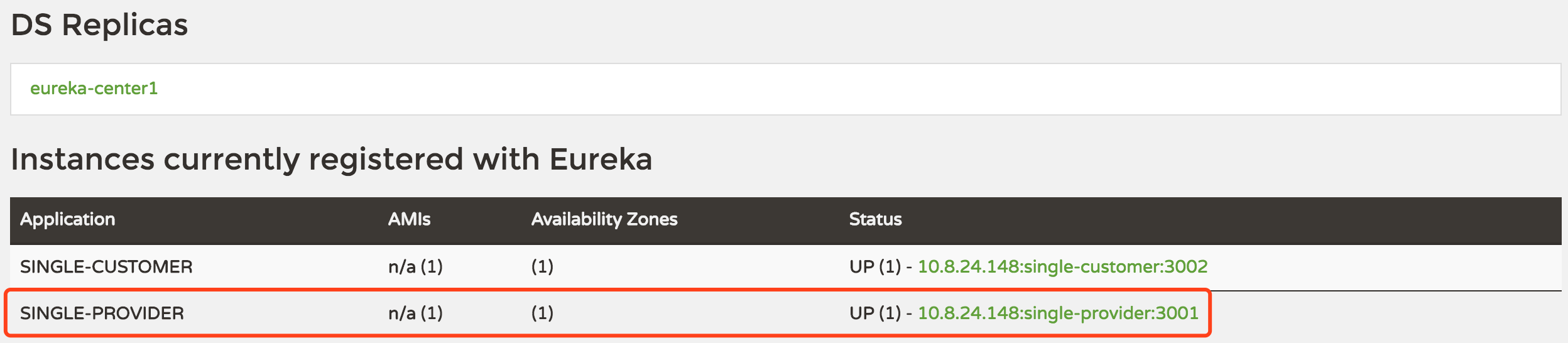
5、启动项目,正常情况下就注册到了 Eureka 注册中心,打开 Eureka 控制台,会看到已经出现了这个服务
创建一个服务消费者
有了服务提供者,接下来创建一个消费者来消费一下
1、引用 maven 包
<dependency>

    <groupId>org.springframework.cloud</groupId>

    <artifactId>spring-cloud-starter-netflix-eureka-client</artifactId>

</dependency>

<dependency>

    <groupId>org.springframework.boot</groupId>

    <artifactId>spring-boot-starter-web</artifactId>

</dependency>

<dependency>

    <groupId>org.springframework.cloud</groupId>

    <artifactId>spring-cloud-starter-openfeign</artifactId>

</dependency>

<dependency>

    <groupId>org.springframework.boot</groupId>

    <artifactId>spring-boot-starter-actuator</artifactId>

</dependency>
2、配置 application.yml
server:

  port: 3002

eureka:

  client:

    serviceUrl:

      defaultZone: http://127.0.0.1:3000/eureka  ## 注册到 eureka

  instance:

    preferIpAddress: true

spring:

  application:

    name: single-customer
3、开始消费提供者提供的服务接口,这里演示了两种消费方法,一种是用 RestTemplate ,另外一种是用 FeignClient,Feign 同样是 Netflix 开源,并被 Spring Cloud 封装到 spring-cloud-starter-openfeign 包中。
创建启动类,并添加相关注解
@SpringBootApplication

@EnableEurekaClient

@EnableFeignClients

public class SingleCustomerApplication {

    /**

     * 注入 RestTemplate

     * 并用 @LoadBalanced 注解,用负载均衡策略请求服务提供者

     * 这是 Spring Ribbon 的提供的能力

     * @return

     */

    @LoadBalanced

    @Bean

    public RestTemplate restTemplate() {

        return new RestTemplate();

    }

    public static void main(String[] args) {

        SpringApplication.run(SingleCustomerApplication.class, args);

    }

}
@EnableEurekaClient 声明此项目为一个 eureka 客户端,@EnableFeignClients 声明此项目可以使用 Feign。
4、创建一个服务接口类,这是 Feign 的使用方式,详细的用法可以查一下 Spring Cloud Feign 相关文档
/**

 * IHelloService

 * 配置服务提供者:single-provider 是服务提供者的 application.name

 */

@FeignClient("single-provider")

public interface IHelloService {

    @RequestMapping(value = "/hello")

    String hello();

    @RequestMapping(value = "nice")

    String nice();

}
@FeignClient 注解的 value 为服务提供者的 appplication.name 。
5、创建一个 Controller 用于调用服务
@RestController

public class ConsumerController {

    @Autowired

    private RestTemplate restTemplate;

    @Autowired

    private IHelloService helloService;

    private static final String applicationName = "single-provider";

    @RequestMapping(value = "feignRequest")

    public Object feignRequest(){

        String s = helloService.nice();

        return s;

    }

    @RequestMapping(value = "commonRequest")

    public Object commonRequest(){

        String url = "http://"+ applicationName +"/hello";

        String s = restTemplate.getForObject(url,String.class);

        return s;

    }

}
其中 feignRequest 方法是使用了 Feign 的方式调用服务接口;
commonRequest 方法是用 RestTemplate 提供的方法调用服务接口;
6、最后,启动服务,访问地址:http://localhost:3002/commonRequest 和 http://localhost:3002/feignRequest
如果你觉得写的还可以的话,请点个「推荐」吧
欢迎关注,不定期更新本系列和其他文章
古时的风筝 ,进入公众号可以加入交流群

Spring Cloud 系列之 Eureka 实现服务注册与发现的更多相关文章
- Spring Cloud(二):服务注册与发现 Eureka【Finchley 版】
Spring Cloud(二):服务注册与发现 Eureka[Finchley 版] 发表于 2018-04-15 | 更新于 2018-05-07 | 上一篇主要介绍了相关理论,这一篇开始我们 ...
- Alibaba Nacos 学习(三):Spring Cloud Nacos Discovery - FeignClient,Nacos 服务注册与发现
Alibaba Nacos 学习(一):Nacos介绍与安装 Alibaba Nacos 学习(二):Spring Cloud Nacos Config Alibaba Nacos 学习(三):Spr ...
- Spring Cloud Alibaba 实战 之 Nacos 服务注册和发现
服务注册与发现,服务发现主要用于实现各个微服务实例的自动化注册与发现,是微服务治理的核心,学习 Spring Cloud Alibaba,首先要了解框架中的服务注册和发现组件——Nacos. 一.Sp ...
- 【Spring Cloud学习之二】服务注册和发现
环境 eclipse 4.7 jdk 1.8 Spring Boot 1.5.2 Spring Cloud 1.2 一.EurekaEureka是Netflix开源的一个RESTful服务,主要用于服 ...
- Spring Cloud 之 Consul 知识点:服务注册与发现(类似工具:Eureka、ZooKeeper、Etcd)
资料 网址 springcloud(十三):注册中心 Consul 使用详解 http://ityouknow.com/springcloud/2018/07/20/spring-cloud-cons ...
- Spring Cloud(一):服务注册中心Eureka
Spring Cloud 基于 Netflix 的几个开源项目进行了封装,提供包括服务注册与发现(Eureka),智能路由(Zuul),熔断器(Hystrix),客户端负载均衡(Ribbon)等在内的 ...
- Spring Cloud Eureka 实现服务注册与发现
微服务 是一种架构模式,跟具体的语言实现无关,微服务架构将业务逻辑分散到了各个服务当中,服务间通过网络层进行通信共同协作:这样一个应用就可以划分为多个服务单独来维护发布.构建一个可靠微服务系统是需要具 ...
- 服务注册发现Eureka之一:Spring Cloud Eureka的服务注册与发现
Spring Cloud简介 Spring Cloud是一个基于Spring Boot实现的云应用开发工具,它为基于JVM的云应用开发中的配置管理.服务发现.断路器.智能路由.微代理.控制总线.全局锁 ...
- Spring Cloud 系列之 Alibaba Sentinel 服务哨兵
前文中我们提到 Netflix 中多项开源产品已进入维护阶段,不再开发新的版本,就目前来看是没有什么问题的.但是从长远角度出发,我们还是需要考虑是否有可替代产品使用.比如本文中要介绍的 Alibaba ...
随机推荐
- 【毕业原版】-《贝德福特大学毕业证书》Bedfordhire一模一样原件
☞贝德福特大学毕业证书[微/Q:865121257◆WeChat:CC6669834]UC毕业证书/联系人Alice[查看点击百度快照查看][留信网学历认证&博士&硕士&海归& ...
- AMBA总线协议AHB、APB
一.什么是AMBA总线 AMBA总线规范是ARM公司提出的总线规范,被大多数SoC设计采用,它规定了AHB (Advanced High-performance Bus).ASB (Advanced ...
- 开发 chrome 扩展 GitHub-Remarks 的一些想法以及遗憾
前文 对于单页应用中如何监听 URL 变化的思考 说到我在开发 chrome 扩展 GitHub Remarks 中遇到的一个问题,本文来聊聊开发这个扩展的前后心路历程. 为什么开发这个扩展?前文说到 ...
- Vue.js 牛刀小试(持续更新~~~)
一.前言 这个系列的文章开始于今年9月从上一家公司辞职后,在找工作的过程中,觉得自己应该学习一些新的东西,从前几章的更新日期也可以看出,中间隔了很长的时间,自己也经历了一些事情,既然现在已经稳定了,就 ...
- 『线段树 Segment Tree』
更新了基础部分 更新了\(lazytag\)标记的讲解 线段树 Segment Tree 今天来讲一下经典的线段树. 线段树是一种二叉搜索树,与区间树相似,它将一个区间划分成一些单元区间,每个单元区间 ...
- MTCNN算法与代码理解—人脸检测和人脸对齐联合学习
目录 写在前面 算法Pipeline详解 如何训练 损失函数 训练数据准备 多任务学习与在线困难样本挖掘 预测过程 参考 博客:blog.shinelee.me | 博客园 | CSDN 写在前面 主 ...
- Visual Studio动态生成版权信息
Visual Studio动态生成版权信息 VS2008 1.1,类文件模板:在安装目录打开CS模板文件夹(D:\Program Files (x86)\Microsoft Visual Studio ...
- HTML5将footer置于页面最底部的方法(CSS+JS)
JavaScript: <script type="text/javascript"> $(function(){ function footerPosition(){ ...
- 使用StackExchange.Redis 连接redis的pipeline命令使用
这几天公司老项目用到了这个组件,需要设置初始化ID,发现这个组件没有pipeline命令的方法,去官方文档去瞅了一波,发现也没有给出对应的解决方案,后面自己发现组件里面其实有 其实就是这个接口的一个方 ...
- SQL Server统计信息偏差影响表联结方式案例浅析
我们知道数据库中的统计信息的准确性是非常重要的.它会影响执行计划.一直想写一篇关于统计信息影响执行计划的相关博客,但是都卡在如何构造一个合适的例子上,所以一直拖着没有写.巧合,最近在生产环境中遇到 ...