
CoordinatorLayout
CoordinatorLayout作为“super-powered FrameLayout”基本实现两个功能:
1、作为顶层布局
2、调度协调子布局
CoordinatorLayout使用新的思路通过协调调度子布局的形式实现触摸影响布局的形式产生动画效果。CoordinatorLayout通过设置子View的 Behaviors来调度子View。系统(Support V7)提供了AppBarLayout.Behavior, AppBarLayout.ScrollingViewBehavior, FloatingActionButton.Behavior, SwipeDismissBehavior<V extends View> 等。
使用CoordinatorLayout需要在Gradle加入Support Design Library:
<code class="language-java hljs has-numbering" style="display: block; padding: 0px; color: inherit; box-sizing: border-box; font-family: 'Source Code Pro', monospace;font-size:undefined; white-space: pre; border-radius: 0px; word-wrap: normal; background: transparent;">compile <span class="hljs-string" style="color: rgb(0, 136, 0); box-sizing: border-box;">'com.android.support:design:22.2.1'</span></code><ul class="pre-numbering" style="box-sizing: border-box; position: absolute; width: 50px; top: 0px; left: 0px; margin: 0px; padding: 6px 0px 40px; border-right-width: 1px; border-right-style: solid; border-right-color: rgb(221, 221, 221); list-style: none; text-align: right; background-color: rgb(238, 238, 238);"><li style="box-sizing: border-box; padding: 0px 5px;">1</li></ul>
定义布局文件,下面是创建工程的时候系统给我们的例子:
<code class="language-xml hljs  has-numbering" style="display: block; padding: 0px; color: inherit; box-sizing: border-box; font-family: 'Source Code Pro', monospace;font-size:undefined; white-space: pre; border-radius: 0px; word-wrap: normal; background: transparent;"><span class="hljs-pi" style="color: rgb(0, 102, 102); box-sizing: border-box;"><?xml version="1.0" encoding="utf-8"?></span>
<span class="hljs-tag" style="color: rgb(0, 102, 102); box-sizing: border-box;"><<span class="hljs-title" style="box-sizing: border-box; color: rgb(0, 0, 136);">android.support.design.widget.CoordinatorLayout
</span>    <span class="hljs-attribute" style="box-sizing: border-box; color: rgb(102, 0, 102);">xmlns:android</span>=<span class="hljs-value" style="box-sizing: border-box; color: rgb(0, 136, 0);">"http://schemas.android.com/apk/res/android"</span>
    <span class="hljs-attribute" style="box-sizing: border-box; color: rgb(102, 0, 102);">xmlns:app</span>=<span class="hljs-value" style="box-sizing: border-box; color: rgb(0, 136, 0);">"http://schemas.android.com/apk/res-auto"</span>
    <span class="hljs-attribute" style="box-sizing: border-box; color: rgb(102, 0, 102);">android:layout_width</span>=<span class="hljs-value" style="box-sizing: border-box; color: rgb(0, 136, 0);">"match_parent"</span>
    <span class="hljs-attribute" style="box-sizing: border-box; color: rgb(102, 0, 102);">android:layout_height</span>=<span class="hljs-value" style="box-sizing: border-box; color: rgb(0, 136, 0);">"match_parent"</span>></span>

    <span class="hljs-tag" style="color: rgb(0, 102, 102); box-sizing: border-box;"><<span class="hljs-title" style="box-sizing: border-box; color: rgb(0, 0, 136);">android.support.design.widget.FloatingActionButton
</span>        <span class="hljs-attribute" style="box-sizing: border-box; color: rgb(102, 0, 102);">android:id</span>=<span class="hljs-value" style="box-sizing: border-box; color: rgb(0, 136, 0);">"@+id/fab"</span>
        <span class="hljs-attribute" style="box-sizing: border-box; color: rgb(102, 0, 102);">android:layout_width</span>=<span class="hljs-value" style="box-sizing: border-box; color: rgb(0, 136, 0);">"wrap_content"</span>
        <span class="hljs-attribute" style="box-sizing: border-box; color: rgb(102, 0, 102);">android:layout_height</span>=<span class="hljs-value" style="box-sizing: border-box; color: rgb(0, 136, 0);">"wrap_content"</span>
        <span class="hljs-attribute" style="box-sizing: border-box; color: rgb(102, 0, 102);">android:layout_gravity</span>=<span class="hljs-value" style="box-sizing: border-box; color: rgb(0, 136, 0);">"end|bottom"</span>
        <span class="hljs-attribute" style="box-sizing: border-box; color: rgb(102, 0, 102);">android:layout_margin</span>=<span class="hljs-value" style="box-sizing: border-box; color: rgb(0, 136, 0);">"16dp"</span>
        <span class="hljs-attribute" style="box-sizing: border-box; color: rgb(102, 0, 102);">android:src</span>=<span class="hljs-value" style="box-sizing: border-box; color: rgb(0, 136, 0);">"@drawable/ic_done"</span> /></span>

<span class="hljs-tag" style="color: rgb(0, 102, 102); box-sizing: border-box;"></<span class="hljs-title" style="box-sizing: border-box; color: rgb(0, 0, 136);">android.support.design.widget.CoordinatorLayout</span>></span></code><ul class="pre-numbering" style="box-sizing: border-box; position: absolute; width: 50px; top: 0px; left: 0px; margin: 0px; padding: 6px 0px 40px; border-right-width: 1px; border-right-style: solid; border-right-color: rgb(221, 221, 221); list-style: none; text-align: right; background-color: rgb(238, 238, 238);"><li style="box-sizing: border-box; padding: 0px 5px;">1</li><li style="box-sizing: border-box; padding: 0px 5px;">2</li><li style="box-sizing: border-box; padding: 0px 5px;">3</li><li style="box-sizing: border-box; padding: 0px 5px;">4</li><li style="box-sizing: border-box; padding: 0px 5px;">5</li><li style="box-sizing: border-box; padding: 0px 5px;">6</li><li style="box-sizing: border-box; padding: 0px 5px;">7</li><li style="box-sizing: border-box; padding: 0px 5px;">8</li><li style="box-sizing: border-box; padding: 0px 5px;">9</li><li style="box-sizing: border-box; padding: 0px 5px;">10</li><li style="box-sizing: border-box; padding: 0px 5px;">11</li><li style="box-sizing: border-box; padding: 0px 5px;">12</li><li style="box-sizing: border-box; padding: 0px 5px;">13</li><li style="box-sizing: border-box; padding: 0px 5px;">14</li><li style="box-sizing: border-box; padding: 0px 5px;">15</li><li style="box-sizing: border-box; padding: 0px 5px;">16</li><li style="box-sizing: border-box; padding: 0px 5px;">17</li></ul>
CoordinatorLayout作为“super-powered FrameLayout”,设置子视图的android:layout_gravity属性控制位置。
Activity:
<code class="language-java hljs  has-numbering" style="display: block; padding: 0px; color: inherit; box-sizing: border-box; font-family: 'Source Code Pro', monospace;font-size:undefined; white-space: pre; border-radius: 0px; word-wrap: normal; background: transparent;"><span class="hljs-keyword" style="color: rgb(0, 0, 136); box-sizing: border-box;">public</span> <span class="hljs-class" style="box-sizing: border-box;"><span class="hljs-keyword" style="color: rgb(0, 0, 136); box-sizing: border-box;">class</span> <span class="hljs-title" style="box-sizing: border-box; color: rgb(102, 0, 102);">MainActivity</span> <span class="hljs-keyword" style="color: rgb(0, 0, 136); box-sizing: border-box;">extends</span> <span class="hljs-title" style="box-sizing: border-box; color: rgb(102, 0, 102);">AppCompatActivity</span> {</span>

    <span class="hljs-annotation" style="color: rgb(155, 133, 157); box-sizing: border-box;">@Override</span>
    <span class="hljs-keyword" style="color: rgb(0, 0, 136); box-sizing: border-box;">protected</span> <span class="hljs-keyword" style="color: rgb(0, 0, 136); box-sizing: border-box;">void</span> <span class="hljs-title" style="box-sizing: border-box;">onCreate</span>(Bundle savedInstanceState) {
        <span class="hljs-keyword" style="color: rgb(0, 0, 136); box-sizing: border-box;">super</span>.onCreate(savedInstanceState);
        setContentView(R.layout.activity_main);
        findViewById(R.id.fab).setOnClickListener(<span class="hljs-keyword" style="color: rgb(0, 0, 136); box-sizing: border-box;">new</span> View.OnClickListener() {
            <span class="hljs-annotation" style="color: rgb(155, 133, 157); box-sizing: border-box;">@Override</span>
            <span class="hljs-keyword" style="color: rgb(0, 0, 136); box-sizing: border-box;">public</span> <span class="hljs-keyword" style="color: rgb(0, 0, 136); box-sizing: border-box;">void</span> <span class="hljs-title" style="box-sizing: border-box;">onClick</span>(View view) {

                Snackbar.make(view,<span class="hljs-string" style="color: rgb(0, 136, 0); box-sizing: border-box;">"FAB"</span>,Snackbar.LENGTH_LONG)
                        .setAction(<span class="hljs-string" style="color: rgb(0, 136, 0); box-sizing: border-box;">"cancel"</span>, <span class="hljs-keyword" style="color: rgb(0, 0, 136); box-sizing: border-box;">new</span> View.OnClickListener() {
                            <span class="hljs-annotation" style="color: rgb(155, 133, 157); box-sizing: border-box;">@Override</span>
                            <span class="hljs-keyword" style="color: rgb(0, 0, 136); box-sizing: border-box;">public</span> <span class="hljs-keyword" style="color: rgb(0, 0, 136); box-sizing: border-box;">void</span> <span class="hljs-title" style="box-sizing: border-box;">onClick</span>(View v) {
                                <span class="hljs-comment" style="color: rgb(136, 0, 0); box-sizing: border-box;">//这里的单击事件代表点击消除Action后的响应事件</span>

                            }
                        })
                        .show();
            }
        });
    }
}</code><ul class="pre-numbering" style="box-sizing: border-box; position: absolute; width: 50px; top: 0px; left: 0px; margin: 0px; padding: 6px 0px 40px; border-right-width: 1px; border-right-style: solid; border-right-color: rgb(221, 221, 221); list-style: none; text-align: right; background-color: rgb(238, 238, 238);"><li style="box-sizing: border-box; padding: 0px 5px;">1</li><li style="box-sizing: border-box; padding: 0px 5px;">2</li><li style="box-sizing: border-box; padding: 0px 5px;">3</li><li style="box-sizing: border-box; padding: 0px 5px;">4</li><li style="box-sizing: border-box; padding: 0px 5px;">5</li><li style="box-sizing: border-box; padding: 0px 5px;">6</li><li style="box-sizing: border-box; padding: 0px 5px;">7</li><li style="box-sizing: border-box; padding: 0px 5px;">8</li><li style="box-sizing: border-box; padding: 0px 5px;">9</li><li style="box-sizing: border-box; padding: 0px 5px;">10</li><li style="box-sizing: border-box; padding: 0px 5px;">11</li><li style="box-sizing: border-box; padding: 0px 5px;">12</li><li style="box-sizing: border-box; padding: 0px 5px;">13</li><li style="box-sizing: border-box; padding: 0px 5px;">14</li><li style="box-sizing: border-box; padding: 0px 5px;">15</li><li style="box-sizing: border-box; padding: 0px 5px;">16</li><li style="box-sizing: border-box; padding: 0px 5px;">17</li><li style="box-sizing: border-box; padding: 0px 5px;">18</li><li style="box-sizing: border-box; padding: 0px 5px;">19</li><li style="box-sizing: border-box; padding: 0px 5px;">20</li><li style="box-sizing: border-box; padding: 0px 5px;">21</li><li style="box-sizing: border-box; padding: 0px 5px;">22</li><li style="box-sizing: border-box; padding: 0px 5px;">23</li></ul>
效果:
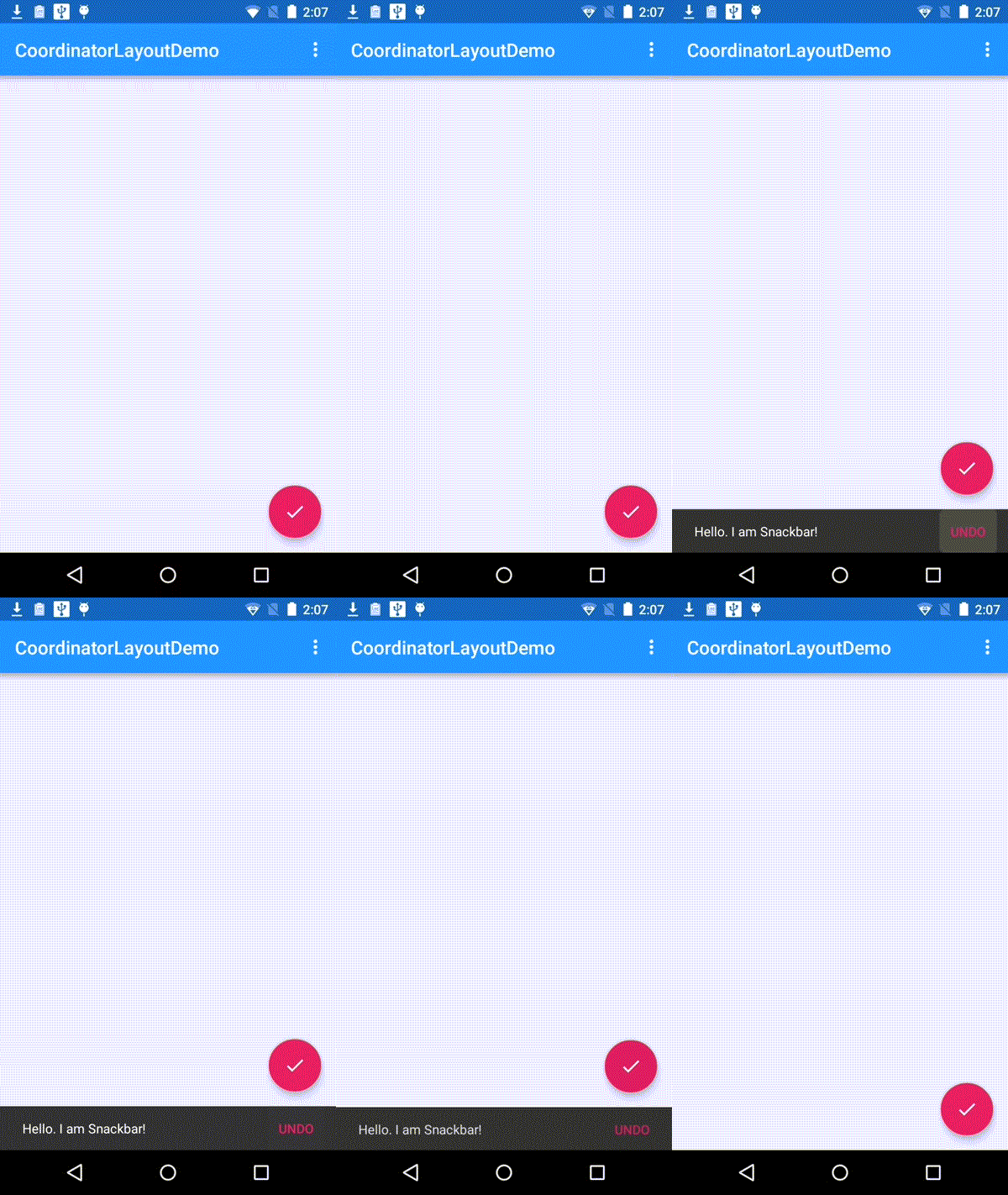
FloatingActionButton是最简单的使用CoordinatorLayout的例子,FloatingActionButton默认使用FloatingActionButton.Behavior。<h2 id="三coordinatorlayout与appbarlayout" style="margin: 0.8em 0px; padding: 0px; box-sizing: border-box; font-weight: 100; font-family: 'microsoft yahei'; line-height: 26px;">三、CoordinatorLayout与AppBarLayout</h2><h3 id="31-appbarlayout嵌套tablayout" style="margin: 0.8em 0px; padding: 0px; box-sizing: border-box; font-weight: 100; font-family: 'microsoft yahei'; line-height: 26px;"><a target=_blank name="t3" style="color: rgb(202, 0, 0); box-sizing: border-box;"></a>3.1 AppBarLayout嵌套TabLayout</h3><p style="margin-top: 0px; margin-bottom: 1.1em; padding-top: 0px; padding-bottom: 0px; box-sizing: border-box; font-family: 'microsoft yahei'; font-size: 14px; line-height: 26px;">布局文件代码:</p><pre class="prettyprint" name="code" style="white-space: nowrap; word-wrap: break-word; box-sizing: border-box; margin-top: 0px; margin-bottom: 1.1em; font-family: 'Source Code Pro', monospace; padding: 5px 5px 5px 60px; font-size: 14px; line-height: 1.45; word-break: break-all; color: rgb(51, 51, 51); border: 1px solid rgba(128, 128, 128, 0.0745098); border-radius: 0px; position: relative; overflow-y: hidden; overflow-x: auto; background-color: rgba(128, 128, 128, 0.0470588);"><code class="language-xml hljs has-numbering" style="display: block; padding: 0px; color: inherit; box-sizing: border-box; font-family: 'Source Code Pro', monospace;font-size:undefined; white-space: pre; border-radius: 0px; word-wrap: normal; background: transparent;">
<span class="hljs-tag" style="color: rgb(0, 102, 102); box-sizing: border-box;"><<span class="hljs-title" style="box-sizing: border-box; color: rgb(0, 0, 136);">android.support.design.widget.CoordinatorLayout</span> <span class="hljs-attribute" style="box-sizing: border-box; color: rgb(102, 0, 102);">xmlns:android</span>=<span class="hljs-value" style="box-sizing: border-box; color: rgb(0, 136, 0);">"http://schemas.android.com/apk/res/android"</span>
<span class="hljs-attribute" style="box-sizing: border-box; color: rgb(102, 0, 102);">xmlns:app</span>=<span class="hljs-value" style="box-sizing: border-box; color: rgb(0, 136, 0);">"http://schemas.android.com/apk/res-auto"</span>
<span class="hljs-attribute" style="box-sizing: border-box; color: rgb(102, 0, 102);">android:id</span>=<span class="hljs-value" style="box-sizing: border-box; color: rgb(0, 136, 0);">"@+id/main_content"</span>
<span class="hljs-attribute" style="box-sizing: border-box; color: rgb(102, 0, 102);">android:layout_width</span>=<span class="hljs-value" style="box-sizing: border-box; color: rgb(0, 136, 0);">"match_parent"</span>
<span class="hljs-attribute" style="box-sizing: border-box; color: rgb(102, 0, 102);">android:layout_height</span>=<span class="hljs-value" style="box-sizing: border-box; color: rgb(0, 136, 0);">"match_parent"</span>></span>
<span class="hljs-tag" style="color: rgb(0, 102, 102); box-sizing: border-box;"><<span class="hljs-title" style="box-sizing: border-box; color: rgb(0, 0, 136);">android.support.design.widget.AppBarLayout
</span> <span class="hljs-attribute" style="box-sizing: border-box; color: rgb(102, 0, 102);">android:id</span>=<span class="hljs-value" style="box-sizing: border-box; color: rgb(0, 136, 0);">"@+id/appbar"</span>
<span class="hljs-attribute" style="box-sizing: border-box; color: rgb(102, 0, 102);">android:layout_width</span>=<span class="hljs-value" style="box-sizing: border-box; color: rgb(0, 136, 0);">"match_parent"</span>
<span class="hljs-attribute" style="box-sizing: border-box; color: rgb(102, 0, 102);">android:layout_height</span>=<span class="hljs-value" style="box-sizing: border-box; color: rgb(0, 136, 0);">"wrap_content"</span>
<span class="hljs-attribute" style="box-sizing: border-box; color: rgb(102, 0, 102);">android:theme</span>=<span class="hljs-value" style="box-sizing: border-box; color: rgb(0, 136, 0);">"@style/ThemeOverlay.AppCompat.Dark.ActionBar"</span>></span>
<span class="hljs-tag" style="color: rgb(0, 102, 102); box-sizing: border-box;"><<span class="hljs-title" style="box-sizing: border-box; color: rgb(0, 0, 136);">android.support.v7.widget.Toolbar
</span> <span class="hljs-attribute" style="box-sizing: border-box; color: rgb(102, 0, 102);">android:id</span>=<span class="hljs-value" style="box-sizing: border-box; color: rgb(0, 136, 0);">"@+id/toolbar"</span>
<span class="hljs-attribute" style="box-sizing: border-box; color: rgb(102, 0, 102);">android:layout_width</span>=<span class="hljs-value" style="box-sizing: border-box; color: rgb(0, 136, 0);">"match_parent"</span>
<span class="hljs-attribute" style="box-sizing: border-box; color: rgb(102, 0, 102);">android:layout_height</span>=<span class="hljs-value" style="box-sizing: border-box; color: rgb(0, 136, 0);">"?attr/actionBarSize"</span>
<span class="hljs-attribute" style="box-sizing: border-box; color: rgb(102, 0, 102);">android:background</span>=<span class="hljs-value" style="box-sizing: border-box; color: rgb(0, 136, 0);">"?attr/colorPrimary"</span>
<span class="hljs-attribute" style="box-sizing: border-box; color: rgb(102, 0, 102);">app:popupTheme</span>=<span class="hljs-value" style="box-sizing: border-box; color: rgb(0, 136, 0);">"@style/ThemeOverlay.AppCompat.Light"</span>
<span class="hljs-attribute" style="box-sizing: border-box; color: rgb(102, 0, 102);">app:layout_scrollFlags</span>=<span class="hljs-value" style="box-sizing: border-box; color: rgb(0, 136, 0);">"scroll|enterAlways"</span> /></span>
<span class="hljs-tag" style="color: rgb(0, 102, 102); box-sizing: border-box;"><<span class="hljs-title" style="box-sizing: border-box; color: rgb(0, 0, 136);">android.support.design.widget.TabLayout
</span> <span class="hljs-attribute" style="box-sizing: border-box; color: rgb(102, 0, 102);">android:id</span>=<span class="hljs-value" style="box-sizing: border-box; color: rgb(0, 136, 0);">"@+id/tabs"</span>
<span class="hljs-attribute" style="box-sizing: border-box; color: rgb(102, 0, 102);">android:layout_width</span>=<span class="hljs-value" style="box-sizing: border-box; color: rgb(0, 136, 0);">"match_parent"</span>
<span class="hljs-attribute" style="box-sizing: border-box; color: rgb(102, 0, 102);">android:layout_height</span>=<span class="hljs-value" style="box-sizing: border-box; color: rgb(0, 136, 0);">"wrap_content"</span> /></span>
<span class="hljs-tag" style="color: rgb(0, 102, 102); box-sizing: border-box;"></<span class="hljs-title" style="box-sizing: border-box; color: rgb(0, 0, 136);">android.support.design.widget.AppBarLayout</span>></span>
<span class="hljs-tag" style="color: rgb(0, 102, 102); box-sizing: border-box;"><<span class="hljs-title" style="box-sizing: border-box; color: rgb(0, 0, 136);">android.support.v4.view.ViewPager
</span> <span class="hljs-attribute" style="box-sizing: border-box; color: rgb(102, 0, 102);">android:id</span>=<span class="hljs-value" style="box-sizing: border-box; color: rgb(0, 136, 0);">"@+id/viewpager"</span>
<span class="hljs-attribute" style="box-sizing: border-box; color: rgb(102, 0, 102);">android:layout_width</span>=<span class="hljs-value" style="box-sizing: border-box; color: rgb(0, 136, 0);">"match_parent"</span>
<span class="hljs-attribute" style="box-sizing: border-box; color: rgb(102, 0, 102);">android:layout_height</span>=<span class="hljs-value" style="box-sizing: border-box; color: rgb(0, 136, 0);">"match_parent"</span>
<span class="hljs-attribute" style="box-sizing: border-box; color: rgb(102, 0, 102);">app:layout_behavior</span>=<span class="hljs-value" style="box-sizing: border-box; color: rgb(0, 136, 0);">"@string/appbar_scrolling_view_behavior"</span> /></span>
<span class="hljs-tag" style="color: rgb(0, 102, 102); box-sizing: border-box;"><<span class="hljs-title" style="box-sizing: border-box; color: rgb(0, 0, 136);">android.support.design.widget.FloatingActionButton
</span> <span class="hljs-attribute" style="box-sizing: border-box; color: rgb(102, 0, 102);">android:id</span>=<span class="hljs-value" style="box-sizing: border-box; color: rgb(0, 136, 0);">"@+id/fab"</span>
<span class="hljs-attribute" style="box-sizing: border-box; color: rgb(102, 0, 102);">android:layout_width</span>=<span class="hljs-value" style="box-sizing: border-box; color: rgb(0, 136, 0);">"wrap_content"</span>
<span class="hljs-attribute" style="box-sizing: border-box; color: rgb(102, 0, 102);">android:layout_height</span>=<span class="hljs-value" style="box-sizing: border-box; color: rgb(0, 136, 0);">"wrap_content"</span>
<span class="hljs-attribute" style="box-sizing: border-box; color: rgb(102, 0, 102);">android:layout_gravity</span>=<span class="hljs-value" style="box-sizing: border-box; color: rgb(0, 136, 0);">"end|bottom"</span>
<span class="hljs-attribute" style="box-sizing: border-box; color: rgb(102, 0, 102);">android:layout_margin</span>=<span class="hljs-value" style="box-sizing: border-box; color: rgb(0, 136, 0);">"@dimen/fab_margin"</span>
<span class="hljs-attribute" style="box-sizing: border-box; color: rgb(102, 0, 102);">android:src</span>=<span class="hljs-value" style="box-sizing: border-box; color: rgb(0, 136, 0);">"@drawable/ic_done"</span> /></span>
<span class="hljs-tag" style="color: rgb(0, 102, 102); box-sizing: border-box;"></<span class="hljs-title" style="box-sizing: border-box; color: rgb(0, 0, 136);">android.support.design.widget.CoordinatorLayout</span>></span></code><ul class="pre-numbering" style="box-sizing: border-box; position: absolute; width: 50px; top: 0px; left: 0px; margin: 0px; padding: 6px 0px 40px; border-right-width: 1px; border-right-style: solid; border-right-color: rgb(221, 221, 221); list-style: none; text-align: right; background-color: rgb(238, 238, 238);"><li style="box-sizing: border-box; padding: 0px 5px;">1</li><li style="box-sizing: border-box; padding: 0px 5px;">2</li><li style="box-sizing: border-box; padding: 0px 5px;">3</li><li style="box-sizing: border-box; padding: 0px 5px;">4</li><li style="box-sizing: border-box; padding: 0px 5px;">5</li><li style="box-sizing: border-box; padding: 0px 5px;">6</li><li style="box-sizing: border-box; padding: 0px 5px;">7</li><li style="box-sizing: border-box; padding: 0px 5px;">8</li><li style="box-sizing: border-box; padding: 0px 5px;">9</li><li style="box-sizing: border-box; padding: 0px 5px;">10</li><li style="box-sizing: border-box; padding: 0px 5px;">11</li><li style="box-sizing: border-box; padding: 0px 5px;">12</li><li style="box-sizing: border-box; padding: 0px 5px;">13</li><li style="box-sizing: border-box; padding: 0px 5px;">14</li><li style="box-sizing: border-box; padding: 0px 5px;">15</li><li style="box-sizing: border-box; padding: 0px 5px;">16</li><li style="box-sizing: border-box; padding: 0px 5px;">17</li><li style="box-sizing: border-box; padding: 0px 5px;">18</li><li style="box-sizing: border-box; padding: 0px 5px;">19</li><li style="box-sizing: border-box; padding: 0px 5px;">20</li><li style="box-sizing: border-box; padding: 0px 5px;">21</li><li style="box-sizing: border-box; padding: 0px 5px;">22</li><li style="box-sizing: border-box; padding: 0px 5px;">23</li><li style="box-sizing: border-box; padding: 0px 5px;">24</li><li style="box-sizing: border-box; padding: 0px 5px;">25</li><li style="box-sizing: border-box; padding: 0px 5px;">26</li><li style="box-sizing: border-box; padding: 0px 5px;">27</li><li style="box-sizing: border-box; padding: 0px 5px;">28</li><li style="box-sizing: border-box; padding: 0px 5px;">29</li><li style="box-sizing: border-box; padding: 0px 5px;">30</li><li style="box-sizing: border-box; padding: 0px 5px;">31</li><li style="box-sizing: border-box; padding: 0px 5px;">32</li><li style="box-sizing: border-box; padding: 0px 5px;">33</li><li style="box-sizing: border-box; padding: 0px 5px;">34</li><li style="box-sizing: border-box; padding: 0px 5px;">35</li><li style="box-sizing: border-box; padding: 0px 5px;">36</li><li style="box-sizing: border-box; padding: 0px 5px;">37</li><li style="box-sizing: border-box; padding: 0px 5px;">38</li><li style="box-sizing: border-box; padding: 0px 5px;">39</li><li style="box-sizing: border-box; padding: 0px 5px;">40</li><li style="box-sizing: border-box; padding: 0px 5px;">41</li><li style="box-sizing: border-box; padding: 0px 5px;">42</li><li style="box-sizing: border-box; padding: 0px 5px;">43</li></ul>
效果:
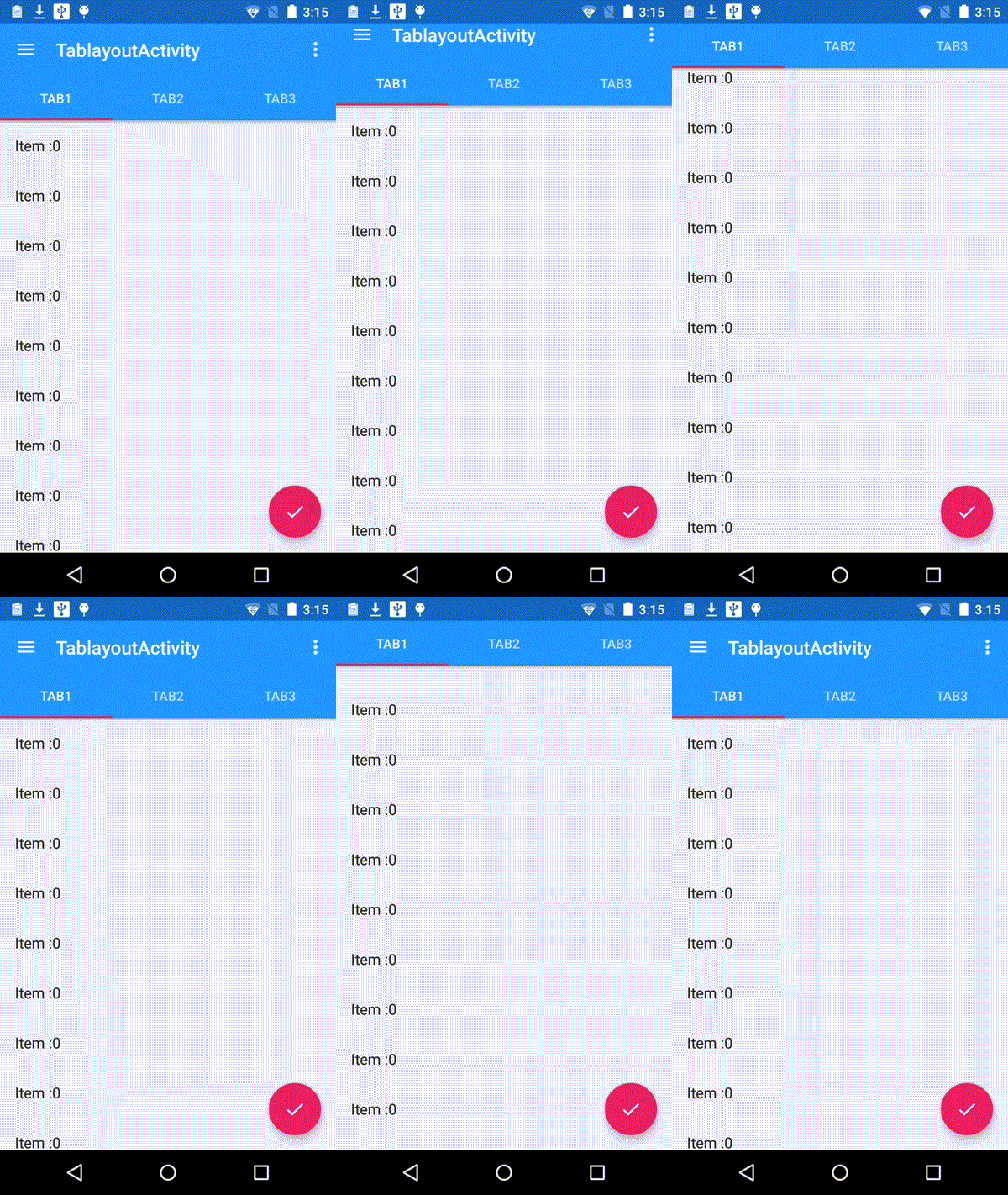
效果显示,视图滚动时,Toolbar会隐藏,这个效果是Android Support Library里面,新增的CoordinatorLayout, AppBarLayout实现的。通过AppBarLayout的子视图的属性控制。观察AppBarLayout的子布局,Toobar有app:layout_scrollFlags属性,这就是控制滑动时视图效果的属性。app:layout_scrollFlags有四个值:
- scroll: 所有想滚动出屏幕的view都需要设置这个flag, 没有设置这个flag的view将被固定在屏幕顶部。例如,TabLayout 没有设置这个值,将会停留在屏幕顶部。
- enterAlways: 设置这个flag时,向下的滚动都会导致该view变为可见,启用快速“返回模式”。
- enterAlwaysCollapsed: 当你的视图已经设置minHeight属性又使用此标志时,你的视图只能已最小高度进入,只有当滚动视图到达顶部时才扩大到完整高度。
- exitUntilCollapsed: 滚动退出屏幕,最后折叠在顶端。
为了ToolBar可以滚动,CoordinatorLayout里面,放一个带有可滚动的View.如上的例子,放的是ViewPager,而ViewPager里面是放了RecylerView的,即是可以滚动的View。CoordinatorLayout包含的子视图中带有滚动属性的View需要设置app:layout_behavior属性。例如,示例中Viewpager设置了此属性。
<code class="language-xml hljs has-numbering" style="display: block; padding: 0px; color: inherit; box-sizing: border-box; font-family: 'Source Code Pro', monospace;font-size:undefined; white-space: pre; border-radius: 0px; word-wrap: normal; background: transparent;">app:layout_behavior="@string/appbar_scrolling_view_behavior"</code><ul class="pre-numbering" style="box-sizing: border-box; position: absolute; width: 50px; top: 0px; left: 0px; margin: 0px; padding: 6px 0px 40px; border-right-width: 1px; border-right-style: solid; border-right-color: rgb(221, 221, 221); list-style: none; text-align: right; background-color: rgb(238, 238, 238);"><li style="box-sizing: border-box; padding: 0px 5px;">1</li></ul>
为了使得Toolbar有滑动效果,必须做到如下三点:
1. CoordinatorLayout作为布局的父布局容器。
2. 给需要滑动的组件设置 app:layout_scrollFlags=”scroll|enterAlways” 属性。
3. 给滑动的组件设置app:layout_behavior属性
3.2 AppBarLayout嵌套CollapsingToolbarLayout
<code class="language-xml hljs  has-numbering" style="display: block; padding: 0px; color: inherit; box-sizing: border-box; font-family: 'Source Code Pro', monospace;font-size:undefined; white-space: pre; border-radius: 0px; word-wrap: normal; background: transparent;"><span class="hljs-pi" style="color: rgb(0, 102, 102); box-sizing: border-box;"><?xml version="1.0" encoding="utf-8"?></span>
<span class="hljs-tag" style="color: rgb(0, 102, 102); box-sizing: border-box;"><<span class="hljs-title" style="box-sizing: border-box; color: rgb(0, 0, 136);">android.support.design.widget.CoordinatorLayout</span> <span class="hljs-attribute" style="box-sizing: border-box; color: rgb(102, 0, 102);">xmlns:android</span>=<span class="hljs-value" style="box-sizing: border-box; color: rgb(0, 136, 0);">"http://schemas.android.com/apk/res/android"</span>
    <span class="hljs-attribute" style="box-sizing: border-box; color: rgb(102, 0, 102);">xmlns:app</span>=<span class="hljs-value" style="box-sizing: border-box; color: rgb(0, 136, 0);">"http://schemas.android.com/apk/res-auto"</span>
    <span class="hljs-attribute" style="box-sizing: border-box; color: rgb(102, 0, 102);">android:id</span>=<span class="hljs-value" style="box-sizing: border-box; color: rgb(0, 136, 0);">"@+id/main_content"</span>
    <span class="hljs-attribute" style="box-sizing: border-box; color: rgb(102, 0, 102);">android:layout_width</span>=<span class="hljs-value" style="box-sizing: border-box; color: rgb(0, 136, 0);">"match_parent"</span>
    <span class="hljs-attribute" style="box-sizing: border-box; color: rgb(102, 0, 102);">android:layout_height</span>=<span class="hljs-value" style="box-sizing: border-box; color: rgb(0, 136, 0);">"match_parent"</span>
    <span class="hljs-attribute" style="box-sizing: border-box; color: rgb(102, 0, 102);">android:fitsSystemWindows</span>=<span class="hljs-value" style="box-sizing: border-box; color: rgb(0, 136, 0);">"true"</span>></span>

    <span class="hljs-tag" style="color: rgb(0, 102, 102); box-sizing: border-box;"><<span class="hljs-title" style="box-sizing: border-box; color: rgb(0, 0, 136);">android.support.design.widget.AppBarLayout
</span>        <span class="hljs-attribute" style="box-sizing: border-box; color: rgb(102, 0, 102);">android:id</span>=<span class="hljs-value" style="box-sizing: border-box; color: rgb(0, 136, 0);">"@+id/appbar"</span>
        <span class="hljs-attribute" style="box-sizing: border-box; color: rgb(102, 0, 102);">android:layout_width</span>=<span class="hljs-value" style="box-sizing: border-box; color: rgb(0, 136, 0);">"match_parent"</span>
        <span class="hljs-attribute" style="box-sizing: border-box; color: rgb(102, 0, 102);">android:layout_height</span>=<span class="hljs-value" style="box-sizing: border-box; color: rgb(0, 136, 0);">"256dp"</span>
        <span class="hljs-attribute" style="box-sizing: border-box; color: rgb(102, 0, 102);">android:theme</span>=<span class="hljs-value" style="box-sizing: border-box; color: rgb(0, 136, 0);">"@style/ThemeOverlay.AppCompat.Dark.ActionBar"</span>
        <span class="hljs-attribute" style="box-sizing: border-box; color: rgb(102, 0, 102);">android:fitsSystemWindows</span>=<span class="hljs-value" style="box-sizing: border-box; color: rgb(0, 136, 0);">"true"</span>></span>

        <span class="hljs-tag" style="color: rgb(0, 102, 102); box-sizing: border-box;"><<span class="hljs-title" style="box-sizing: border-box; color: rgb(0, 0, 136);">android.support.design.widget.CollapsingToolbarLayout
</span>            <span class="hljs-attribute" style="box-sizing: border-box; color: rgb(102, 0, 102);">android:id</span>=<span class="hljs-value" style="box-sizing: border-box; color: rgb(0, 136, 0);">"@+id/collapsing_toolbar"</span>
            <span class="hljs-attribute" style="box-sizing: border-box; color: rgb(102, 0, 102);">android:layout_width</span>=<span class="hljs-value" style="box-sizing: border-box; color: rgb(0, 136, 0);">"match_parent"</span>
            <span class="hljs-attribute" style="box-sizing: border-box; color: rgb(102, 0, 102);">android:layout_height</span>=<span class="hljs-value" style="box-sizing: border-box; color: rgb(0, 136, 0);">"match_parent"</span>
            <span class="hljs-attribute" style="box-sizing: border-box; color: rgb(102, 0, 102);">app:layout_scrollFlags</span>=<span class="hljs-value" style="box-sizing: border-box; color: rgb(0, 136, 0);">"scroll|exitUntilCollapsed"</span>
            <span class="hljs-attribute" style="box-sizing: border-box; color: rgb(102, 0, 102);">android:fitsSystemWindows</span>=<span class="hljs-value" style="box-sizing: border-box; color: rgb(0, 136, 0);">"true"</span>
            <span class="hljs-attribute" style="box-sizing: border-box; color: rgb(102, 0, 102);">app:contentScrim</span>=<span class="hljs-value" style="box-sizing: border-box; color: rgb(0, 136, 0);">"?attr/colorPrimary"</span>
            <span class="hljs-attribute" style="box-sizing: border-box; color: rgb(102, 0, 102);">app:expandedTitleMarginStart</span>=<span class="hljs-value" style="box-sizing: border-box; color: rgb(0, 136, 0);">"48dp"</span>
            <span class="hljs-attribute" style="box-sizing: border-box; color: rgb(102, 0, 102);">app:expandedTitleMarginEnd</span>=<span class="hljs-value" style="box-sizing: border-box; color: rgb(0, 136, 0);">"64dp"</span>></span>

            <span class="hljs-tag" style="color: rgb(0, 102, 102); box-sizing: border-box;"><<span class="hljs-title" style="box-sizing: border-box; color: rgb(0, 0, 136);">ImageView
</span>                <span class="hljs-attribute" style="box-sizing: border-box; color: rgb(102, 0, 102);">android:id</span>=<span class="hljs-value" style="box-sizing: border-box; color: rgb(0, 136, 0);">"@+id/backdrop"</span>
                <span class="hljs-attribute" style="box-sizing: border-box; color: rgb(102, 0, 102);">android:layout_width</span>=<span class="hljs-value" style="box-sizing: border-box; color: rgb(0, 136, 0);">"match_parent"</span>
                <span class="hljs-attribute" style="box-sizing: border-box; color: rgb(102, 0, 102);">android:layout_height</span>=<span class="hljs-value" style="box-sizing: border-box; color: rgb(0, 136, 0);">"match_parent"</span>
                <span class="hljs-attribute" style="box-sizing: border-box; color: rgb(102, 0, 102);">android:scaleType</span>=<span class="hljs-value" style="box-sizing: border-box; color: rgb(0, 136, 0);">"centerCrop"</span>
                <span class="hljs-attribute" style="box-sizing: border-box; color: rgb(102, 0, 102);">android:fitsSystemWindows</span>=<span class="hljs-value" style="box-sizing: border-box; color: rgb(0, 136, 0);">"true"</span>
                <span class="hljs-attribute" style="box-sizing: border-box; color: rgb(102, 0, 102);">android:src</span>=<span class="hljs-value" style="box-sizing: border-box; color: rgb(0, 136, 0);">"@drawable/header"</span>
                <span class="hljs-attribute" style="box-sizing: border-box; color: rgb(102, 0, 102);">app:layout_collapseMode</span>=<span class="hljs-value" style="box-sizing: border-box; color: rgb(0, 136, 0);">"parallax"</span>
                /></span>

            <span class="hljs-tag" style="color: rgb(0, 102, 102); box-sizing: border-box;"><<span class="hljs-title" style="box-sizing: border-box; color: rgb(0, 0, 136);">android.support.v7.widget.Toolbar
</span>                <span class="hljs-attribute" style="box-sizing: border-box; color: rgb(102, 0, 102);">android:id</span>=<span class="hljs-value" style="box-sizing: border-box; color: rgb(0, 136, 0);">"@+id/toolbar"</span>
                <span class="hljs-attribute" style="box-sizing: border-box; color: rgb(102, 0, 102);">android:layout_width</span>=<span class="hljs-value" style="box-sizing: border-box; color: rgb(0, 136, 0);">"match_parent"</span>
                <span class="hljs-attribute" style="box-sizing: border-box; color: rgb(102, 0, 102);">android:layout_height</span>=<span class="hljs-value" style="box-sizing: border-box; color: rgb(0, 136, 0);">"?attr/actionBarSize"</span>
                <span class="hljs-attribute" style="box-sizing: border-box; color: rgb(102, 0, 102);">app:popupTheme</span>=<span class="hljs-value" style="box-sizing: border-box; color: rgb(0, 136, 0);">"@style/ThemeOverlay.AppCompat.Light"</span>
                <span class="hljs-attribute" style="box-sizing: border-box; color: rgb(102, 0, 102);">app:layout_collapseMode</span>=<span class="hljs-value" style="box-sizing: border-box; color: rgb(0, 136, 0);">"pin"</span> /></span>

        <span class="hljs-tag" style="color: rgb(0, 102, 102); box-sizing: border-box;"></<span class="hljs-title" style="box-sizing: border-box; color: rgb(0, 0, 136);">android.support.design.widget.CollapsingToolbarLayout</span>></span>

    <span class="hljs-tag" style="color: rgb(0, 102, 102); box-sizing: border-box;"></<span class="hljs-title" style="box-sizing: border-box; color: rgb(0, 0, 136);">android.support.design.widget.AppBarLayout</span>></span>

    <span class="hljs-tag" style="color: rgb(0, 102, 102); box-sizing: border-box;"><<span class="hljs-title" style="box-sizing: border-box; color: rgb(0, 0, 136);">android.support.v4.widget.NestedScrollView
</span>        <span class="hljs-attribute" style="box-sizing: border-box; color: rgb(102, 0, 102);">android:layout_width</span>=<span class="hljs-value" style="box-sizing: border-box; color: rgb(0, 136, 0);">"match_parent"</span>
        <span class="hljs-attribute" style="box-sizing: border-box; color: rgb(102, 0, 102);">android:layout_height</span>=<span class="hljs-value" style="box-sizing: border-box; color: rgb(0, 136, 0);">"match_parent"</span>
        <span class="hljs-attribute" style="box-sizing: border-box; color: rgb(102, 0, 102);">app:layout_behavior</span>=<span class="hljs-value" style="box-sizing: border-box; color: rgb(0, 136, 0);">"@string/appbar_scrolling_view_behavior"</span>></span>

        <span class="hljs-tag" style="color: rgb(0, 102, 102); box-sizing: border-box;"><<span class="hljs-title" style="box-sizing: border-box; color: rgb(0, 0, 136);">LinearLayout
</span>            <span class="hljs-attribute" style="box-sizing: border-box; color: rgb(102, 0, 102);">android:layout_width</span>=<span class="hljs-value" style="box-sizing: border-box; color: rgb(0, 136, 0);">"match_parent"</span>
            <span class="hljs-attribute" style="box-sizing: border-box; color: rgb(102, 0, 102);">android:layout_height</span>=<span class="hljs-value" style="box-sizing: border-box; color: rgb(0, 136, 0);">"match_parent"</span>
            <span class="hljs-attribute" style="box-sizing: border-box; color: rgb(102, 0, 102);">android:orientation</span>=<span class="hljs-value" style="box-sizing: border-box; color: rgb(0, 136, 0);">"vertical"</span>
            <span class="hljs-attribute" style="box-sizing: border-box; color: rgb(102, 0, 102);">android:paddingTop</span>=<span class="hljs-value" style="box-sizing: border-box; color: rgb(0, 136, 0);">"24dp"</span>></span>

            <span class="hljs-tag" style="color: rgb(0, 102, 102); box-sizing: border-box;"><<span class="hljs-title" style="box-sizing: border-box; color: rgb(0, 0, 136);">android.support.v7.widget.CardView
</span>                <span class="hljs-attribute" style="box-sizing: border-box; color: rgb(102, 0, 102);">android:layout_width</span>=<span class="hljs-value" style="box-sizing: border-box; color: rgb(0, 136, 0);">"match_parent"</span>
                <span class="hljs-attribute" style="box-sizing: border-box; color: rgb(102, 0, 102);">android:layout_height</span>=<span class="hljs-value" style="box-sizing: border-box; color: rgb(0, 136, 0);">"wrap_content"</span>
                <span class="hljs-attribute" style="box-sizing: border-box; color: rgb(102, 0, 102);">android:layout_margin</span>=<span class="hljs-value" style="box-sizing: border-box; color: rgb(0, 136, 0);">"16dp"</span>></span>

                <span class="hljs-tag" style="color: rgb(0, 102, 102); box-sizing: border-box;"><<span class="hljs-title" style="box-sizing: border-box; color: rgb(0, 0, 136);">LinearLayout
</span>                    <span class="hljs-attribute" style="box-sizing: border-box; color: rgb(102, 0, 102);">style</span>=<span class="hljs-value" style="box-sizing: border-box; color: rgb(0, 136, 0);">"@style/Widget.CardContent"</span>
                    <span class="hljs-attribute" style="box-sizing: border-box; color: rgb(102, 0, 102);">android:layout_width</span>=<span class="hljs-value" style="box-sizing: border-box; color: rgb(0, 136, 0);">"match_parent"</span>
                    <span class="hljs-attribute" style="box-sizing: border-box; color: rgb(102, 0, 102);">android:layout_height</span>=<span class="hljs-value" style="box-sizing: border-box; color: rgb(0, 136, 0);">"wrap_content"</span>></span>

                    <span class="hljs-tag" style="color: rgb(0, 102, 102); box-sizing: border-box;"><<span class="hljs-title" style="box-sizing: border-box; color: rgb(0, 0, 136);">TextView
</span>                        <span class="hljs-attribute" style="box-sizing: border-box; color: rgb(102, 0, 102);">android:layout_width</span>=<span class="hljs-value" style="box-sizing: border-box; color: rgb(0, 136, 0);">"match_parent"</span>
                        <span class="hljs-attribute" style="box-sizing: border-box; color: rgb(102, 0, 102);">android:layout_height</span>=<span class="hljs-value" style="box-sizing: border-box; color: rgb(0, 136, 0);">"wrap_content"</span>
                        <span class="hljs-attribute" style="box-sizing: border-box; color: rgb(102, 0, 102);">android:text</span>=<span class="hljs-value" style="box-sizing: border-box; color: rgb(0, 136, 0);">"CardView"</span>
                        <span class="hljs-attribute" style="box-sizing: border-box; color: rgb(102, 0, 102);">android:textAppearance</span>=<span class="hljs-value" style="box-sizing: border-box; color: rgb(0, 136, 0);">"@style/TextAppearance.AppCompat.Title"</span> /></span>

                    <span class="hljs-tag" style="color: rgb(0, 102, 102); box-sizing: border-box;"><<span class="hljs-title" style="box-sizing: border-box; color: rgb(0, 0, 136);">TextView
</span>                        <span class="hljs-attribute" style="box-sizing: border-box; color: rgb(102, 0, 102);">android:layout_width</span>=<span class="hljs-value" style="box-sizing: border-box; color: rgb(0, 136, 0);">"match_parent"</span>
                        <span class="hljs-attribute" style="box-sizing: border-box; color: rgb(102, 0, 102);">android:layout_height</span>=<span class="hljs-value" style="box-sizing: border-box; color: rgb(0, 136, 0);">"wrap_content"</span>
                        <span class="hljs-attribute" style="box-sizing: border-box; color: rgb(102, 0, 102);">android:text</span>=<span class="hljs-value" style="box-sizing: border-box; color: rgb(0, 136, 0);">"@string/card_string"</span> /></span>

                <span class="hljs-tag" style="color: rgb(0, 102, 102); box-sizing: border-box;"></<span class="hljs-title" style="box-sizing: border-box; color: rgb(0, 0, 136);">LinearLayout</span>></span>

            <span class="hljs-tag" style="color: rgb(0, 102, 102); box-sizing: border-box;"></<span class="hljs-title" style="box-sizing: border-box; color: rgb(0, 0, 136);">android.support.v7.widget.CardView</span>></span>
          ……
        <span class="hljs-tag" style="color: rgb(0, 102, 102); box-sizing: border-box;"></<span class="hljs-title" style="box-sizing: border-box; color: rgb(0, 0, 136);">LinearLayout</span>></span>

    <span class="hljs-tag" style="color: rgb(0, 102, 102); box-sizing: border-box;"></<span class="hljs-title" style="box-sizing: border-box; color: rgb(0, 0, 136);">android.support.v4.widget.NestedScrollView</span>></span>

    <span class="hljs-tag" style="color: rgb(0, 102, 102); box-sizing: border-box;"><<span class="hljs-title" style="box-sizing: border-box; color: rgb(0, 0, 136);">android.support.design.widget.FloatingActionButton
</span>        <span class="hljs-attribute" style="box-sizing: border-box; color: rgb(102, 0, 102);">android:layout_height</span>=<span class="hljs-value" style="box-sizing: border-box; color: rgb(0, 136, 0);">"wrap_content"</span>
        <span class="hljs-attribute" style="box-sizing: border-box; color: rgb(102, 0, 102);">android:layout_width</span>=<span class="hljs-value" style="box-sizing: border-box; color: rgb(0, 136, 0);">"wrap_content"</span>
        <span class="hljs-attribute" style="box-sizing: border-box; color: rgb(102, 0, 102);">app:layout_anchor</span>=<span class="hljs-value" style="box-sizing: border-box; color: rgb(0, 136, 0);">"@id/appbar"</span>
        <span class="hljs-attribute" style="box-sizing: border-box; color: rgb(102, 0, 102);">app:layout_anchorGravity</span>=<span class="hljs-value" style="box-sizing: border-box; color: rgb(0, 136, 0);">"bottom|right|end"</span>
        <span class="hljs-attribute" style="box-sizing: border-box; color: rgb(102, 0, 102);">android:src</span>=<span class="hljs-value" style="box-sizing: border-box; color: rgb(0, 136, 0);">"@drawable/ic_done"</span>
        <span class="hljs-attribute" style="box-sizing: border-box; color: rgb(102, 0, 102);">android:layout_margin</span>=<span class="hljs-value" style="box-sizing: border-box; color: rgb(0, 136, 0);">"@dimen/fab_margin"</span>
        <span class="hljs-attribute" style="box-sizing: border-box; color: rgb(102, 0, 102);">android:clickable</span>=<span class="hljs-value" style="box-sizing: border-box; color: rgb(0, 136, 0);">"true"</span>/></span>

<span class="hljs-tag" style="color: rgb(0, 102, 102); box-sizing: border-box;"></<span class="hljs-title" style="box-sizing: border-box; color: rgb(0, 0, 136);">android.support.design.widget.CoordinatorLayout</span>></span></code>
CoordinatorLayout的更多相关文章
- 【知识必备】一文让你搞懂design设计的CoordinatorLayout和AppbarLayout联动,让Design设计更简单~
一.写在前面 其实博主在之前已经对design包的各个控件都做了博文说明,无奈个人觉得理解不够深入,所以有了这篇更加深入的介绍,希望各位看官拍砖~ 二.从是什么开始 1.首先我们得知道Coordina ...
- 安卓Design包之超强控件CoordinatorLayout与SnackBar的简单使用
在前面的Design中,学习使用了TabLayout,NavigationView与DrawerLayout实现的神奇效果,今天就带来本次Design包中我认为最有意义的控件CoordinatorLa ...
- CoordinatorLayout, AppBarLayout, CollapsingToolbarLayout使用
本文介绍Design Support Library中CoordinatorLayout, AppBarLayout, CollapsingToolbarLayout的使用. 先列出了Design S ...
- 使用 CoordinatorLayout 出错 inflating class android.support.design.widget.CoordinatorLayout
ava.lang.RuntimeException: Unable to start activity ComponentInfo{com.czr.ianpu/com.czr.ianpu.MainAc ...
- 协调者布局:CoordinatorLayout
layout_scrollFlag属性: scroll:需要哪个View滚动就需要设置该属性: exitUntilCollapsed:向上推动屏幕的时候滑动的部分折叠起来,只有下滑到最低端的时候折叠部 ...
- 使用 CoordinatorLayout 实现复杂联动效果
GitHub 地址已更新: unixzii / android-FancyBehaviorDemo CoordinatorLayout 是 Google 在 Design Support 包中提供的一 ...
- CoordinatorLayout+TabLayout+ViewPager
<?xml version="1.0" encoding="utf-8"?> <android.support.design.widget.C ...
- Android开发学习之路-Android Design Support Library使用(CoordinatorLayout的使用)
效果图: 上面的这个图有两个效果是,一个是顶部的图片,在上滑之后会隐藏起来并且显示出一个ToolBar(ToolBar类似于ActionBar,但是只有ToolBar是兼容Material Desig ...
- CoordinatorLayout自定义Bahavior特效及其源码分析
@[CoordinatorLayout, Bahavior] CoordinatorLayout是android support design包中可以算是最重要的一个东西,运用它可以做出一些不错的特效 ...
- 自定义CoordinatorLayout Behavior 隐藏Footer View
在用新的控件中,我们可以用Toolbar与CoordinatorLayout实现 向上滚动隐藏的效果,可是官方并没有找到向上隐藏底部导航的功能,有一些第三方的框架实现了. 在Android M,Coo ...
随机推荐
- Web Service进阶(三)HTTP-GET, HTTP-POST and SOAP的比较
XML Web Service支持三种协议来与用户交流数据.这三种协议分别是: 1.SOAP:Simple Object Access Protocol 2.HTTP-GET 3.HTTP-POST ...
- 在Windows Service 2012上安装IIS 8.0 IIS 6
我的目的是在服务器上安装IIS6 ,但是受到这边文章的启发和按照他的步骤,看到了"IIS 6管理兼容性",我的问题就决解了,我这里是因为要安装vss 2005 和u8等比较早期的软 ...
- Java基本语法-----java进制的转换
进制: 进制是一种记数方式 ,可以用有限的数字符号代表所有的数值.由特定的数值组成. 1整型的表现形式 1.十进制: 都是以0-9这九个数字组成,不能以0开头. 2.二进制: 由0和1两个数字组成. ...
- 在O(1)时间内删除单链表结点
给定单链表的一个结点的指针,同时该结点不是尾结点,此外没有指向其它任何结点的指针,请在O(1)时间内删除该结点. int deleteNode(LNode **head, LNode **node) ...
- 13 SQLiteOpenHelper SQLiteDatabase详解
创建数据库: 1. 创建一个类继承SQLiteOpenHelper 2. 创建继承对象 new SQLiteOpenHelper() 3. 用创建的对象获取可写或者可读的SQLiteDatabase ...
- UNIX网络编程——原始套接字的魔力【上】
基于原始套接字编程 在开发面向连接的TCP和面向无连接的UDP程序时,我们所关心的核心问题在于数据收发层面,数据的传输特性由TCP或UDP来保证: 也就是说,对于TCP或UDP的程序开发,焦点在Dat ...
- (九十六)借助APNS实现远程通知、后台任务
APNS全称为Apple Push Notification Service,可以实现在app不启动时也能通过服务器推送到iOS端特定设备的功能. APNS的实现原理为先发送设备的UDID和应用的Bu ...
- redhat安装vsftpd
一个小问题 rpm -qa|ftp 但是出现3个ftp 只安装了一个 关于网卡ip 首先,我们看到 网卡上面有个x 说明网络是有问题的 我们双击,看到 我们先把connected和connect at ...
- 【一天一道LeetCode】#103. Binary Tree Zigzag Level Order Traversal
一天一道LeetCode 本系列文章已全部上传至我的github,地址:ZeeCoder's Github 欢迎大家关注我的新浪微博,我的新浪微博 欢迎转载,转载请注明出处 (一)题目 来源: htt ...
- Android官方命令深入分析之虚拟机
Android SDK包含了一个运行在计算机上的移动设备虚拟机.这个虚拟机可以允许你在没有物理设备的情况下开发和测试Android应用. 键盘命令 虚拟设备按键 对应键盘按键 Home HOME 菜单 ...