
Nginx配置Https
1.申请证书:
https://console.qcloud.com/ssl?utm_source=yingyongbao&utm_medium=ssl&utm_campaign=qcloud
2.将证书导入服务器,xftp或者FileZilla都可以:
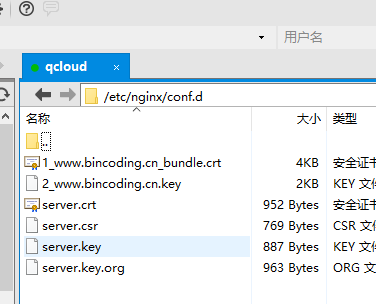
3.修改Nginx,我的Nginx位于/etc/nginx/ :

Nginx自带ssl配置,删掉注释,修改证书位置就好了。

80端口配置:
server {

        listen        default_server;

        listen       [::]: default_server;

        server_name  _;

        #root         /usr/share/nginx/html;
     #注意添加下面这行代码,用于重定向

        rewrite ^(.*) https://$server_name$1 permanent;

        # Load configuration files for the default server block.

        include /etc/nginx/default.d/*.conf;

        location / {

        }

        error_page 404 /404.html;

            location = /40x.html {

        }

        error_page 500 502 503 504 /50x.html;

            location = /50x.html {

        }

   }
443端口设置:
server {

        listen        ssl http2 default_server;

        listen       [::]: ssl http2 default_server;

        server_name  _;

        root         /usr/share/nginx/html;

#        ssl_certificate "/etc/pki/nginx/server.crt";

#        ssl_certificate_key "/etc/pki/nginx/private/server.key";

        ssl_certificate /etc/nginx/conf.d/1_www.bincoding.cn_bundle.crt;

        ssl_certificate_key /etc/nginx/conf.d/2_www.bincoding.cn.key;

        ssl_session_cache shared:SSL:1m;

        ssl_session_timeout  10m;

        ssl_ciphers HIGH:!aNULL:!MD5;

        ssl_prefer_server_ciphers on;

        # Load configuration files for the default server block.

        include /etc/nginx/default.d/*.conf;

        location / {

        }

        error_page 404 /404.html;

            location = /40x.html {

        }

        error_page 500 502 503 504 /50x.html;

            location = /50x.html {

        }

    }
最后记得重启Nginx : service nginx restart
参考:
nginx配置https https://www.v2ex.com/t/309382
常用服务器配置 https://mozilla.github.io/server-side-tls/ssl-config-generator/
Nginx配置Https的更多相关文章
- 【转】Linux下nginx配置https协议访问的方法
一.配置nginx支持https协议访问,需要在编译安装nginx的时候添加相应的模块--with-http_ssl_module 查看nginx编译参数:/usr/local/nginx/sbin/ ...
- nginx配置https双向验证(ca机构证书+自签证书)
nginx配置https双向验证 服务端验证(ca机构证书) 客户端验证(服务器自签证书) 本文用的阿里云签发的免费证书实验,下载nginx安装ssl,文件夹有两个文件 这两个文件用于做服务器http ...
- Nginx 配置https 服务
一.HTTPS 服务 为什么需要HTTPS? 原因:HTTP不安全 1.传输数据被中间人盗用.信息泄露 2.数据内容劫持.篡改 HTTPS协议的实现 对传输内容进行加密以及身份验证 HTTPS加密校验 ...
- nginx配置https转发到tomcat(使用自签名的证书)
一.使用openSSL生成自签名的证书 1.生成RSA私钥 命令:openssl genrsa -des3 -out server.key 1024 说明:生成rsa私钥,des3算法,1024强度, ...
- RedHat 6.6下安装nginx,配置HTTPS
1.安装依赖包 yum -y install pcre-devel openssl-devel zlib-devel 2.下载nginx安装包到服务器上,当前使用版本nginx-1.15.5.tar. ...
- nginx 配置https并自签名证书
2016-10-28 转载请注明出处:http://daodaoliang.com/ 作者: daodaoliang 版本: V1.0.1 邮箱: daodaoliang@yeah.net 参考链接: ...
- [记录]NGINX配置HTTPS性能优化方案一则
NGINX配置HTTPS性能优化方案一则: 1)HSTS的合理使用 2)会话恢复的合理使用 3)Ocsp stapling的合理使用 4)TLS协议的合理配置 5)False Start的合理使用 6 ...
- 购买https证书以及nginx配置https
文章来源 运维公会:购买https证书以及nginx配置https 1.https的作用 https的全名是安全超文本传输协议,是在http的基础上增加了ssl加密协议.在信息传输的过程中,信息有可能 ...
- Nginx 配置 HTTPS(多域名)
平常开发要求比较低, 依然在用 HTTP, 但到了微信小程序就不行了, 腾讯和苹果都对 API 提出了 HTTPS 的要求. 尤其是苹果, 不仅要求 HTTPS, 还要求 TLS 协议版本要在 1.2 ...
随机推荐
- 精彩 JavaScript 代码片段
1. 根据给定的条件在原有的数组上,得到所需要的新数组. ——<JavaScript 王者归来> var a = [-1,-1,1,2,-2,-2,-3,-3,3,-3]; functio ...
- js第三方
1.0 https://github.com/aui/artDialog 2.0 前端开发仓库 http://code.ciaoca.com/ 3.0 打赏 https://github.com/gr ...
- [C1] C1ComboBox 的非编辑状态优化
一.前言 先看看 WPF 自带的 ComboBox 在非编辑状态,自定义 ItemTemplate 的情况下,效果如下图所示: 其当前选中的项(红框内)与自定义的 ItemTemplate 一样: 但 ...
- MongoDB 存储引擎和数据模型设计
标签: MongoDB NoSQL MongoDB 存储引擎和数据模型设计 1. 存储引擎 1.1 存储引擎是什么 1.2 MongoDB中的默认存储引擎 2. 数据模型设计 2.1 内嵌和引用 2. ...
- 【手记】为windows2008建个睡眠快捷方式
----------------201607041343更新---------------- 在另一台电脑上SetSystemPowerState又不好使了,执行了根本没反应.又回头来试SetSusp ...
- sql 修改字段默认值
1.查出该字段的约束名称 SELECT c.name FROM sysconstraints a INNER JOIN syscolumns b on a.colid=b.colid INNER JO ...
- Go语言开发
Go语言圣经(中文版) Go编程语言规范 搭建Go开发及调试环境(LiteIDE + GoClipse) -- Windows篇 Go开发工具 Go命令行操作命令详细介绍 ...
- Error:Execution failed for task ':app:clean'.
运行时出现 Error:Execution failed for task ':app:clean'. 错误,Builld->Clean Project即可.
- GJM :Unity集成Leap Motion
Demo演示视频
- SSH框架使用注解简化代码
注释的优势: 1.最简单直接的优势就是减少了配置文件的代码量. 2.注释和Java代码位于一个文件中,而XML 配置采用独立的配置文件.配置信息和 Java 代码放在一起,有助于增强程序的内聚性.而采 ...