
8. 使用ueditor添加文章
ueditor是一个很好用的html编辑器,不仅提供了格式化编辑文本的功能,还提供了自动上传图片的功能,现在就使用该编辑器来实现博客文章的编辑功能。
1. 使用ueditor过程中会请求一个后台js文件作为语言文件,不加处理的话中文会乱码,所以要修改http的编码方式,即在application.properties中添加如下配置:
spring.http.encoding.force=true
spring.http.encoding.charset=UTF-8
spring.http.encoding.enabled=true
server.tomcat.uri-encoding=UTF-8
2. 将ueditor的整个资源放在static目录下;
3. 因为下载的时jsp版本的ueditor,而这个版本是依赖一个jsp文件运行的,所以这儿需要对ueditor的ueditor.config.js文件做修改,以使请求指向到指定的动作上,修改如下
//, serverUrl: URL + "jsp/controller.jsp"
, serverUrl:"/admin/config"
4. 在AdminController中添加config动作
 @RequestMapping(value="/config")

 @ResponseBody

 public String config(String action, HttpServletRequest request, HttpServletResponse response) throws Exception {

     if("config".equals(action)) {

         File resource = ResourceUtils.getFile("classpath:config.json");

         String str = StringUtil.ReadFile(resource, "GB2312");

         return str;

     } else if("uploadimage".equals(action)) {

         StandardMultipartHttpServletRequest multipartRequest = (StandardMultipartHttpServletRequest)request;

         if(multipartRequest != null) {

             MultipartFile file = multipartRequest.getFile("upfile");

             UploadState state = new UploadState();

             String url = UploadUtil.imgUpLoad(file);

             state.setUrl(url);

             state.setState("SUCCESS");

             state.setOriginal(file.getName());

             state.setType(url.substring(url.lastIndexOf('.')));

             return JsonUtil.toJson(state);

         }

     }

     return "";

 }
AdminController
因为这儿主要是用到了ueditor的图片上传功能,而这样也就只用关心ueditor的配置请求和上传图片请求,所以根据action参数的值,如果是config就表示ueditor请求获取配置信息,这样就直接从后台读取config.json的内容返回给前台即可;如果是uploadimage,则是上传请求,这样就要处理文件的上传,然后返回UploadState对象对应的json即可,如此就完成了ueditor的配置和上传图片的功能;
5. 添加ArticleController,响应文件上传:
 package com.lvniao.blog.admin.controller;

 import java.util.Date;

 import javax.servlet.http.HttpSession;

 import org.springframework.beans.factory.annotation.Autowired;

 import org.springframework.stereotype.Controller;

 import org.springframework.ui.Model;

 import org.springframework.web.bind.annotation.RequestMapping;

 import org.springframework.web.bind.annotation.ResponseBody;

 import com.lvniao.blog.mapper.ArticleMapper;

 import com.lvniao.blog.model.Article;

 import com.lvniao.blog.model.User;

 import com.lvniao.blog.util.Constant;

 import com.lvniao.blog.util.JsonUtil;

 @Controller

 @RequestMapping("/article")

 public class ArticleController {

     @Autowired

     private ArticleMapper articleMapper;

     @RequestMapping("/")

     public String index(Model model) {

         return "article/index";

     }

     @RequestMapping("/add")

     public String add() {

         return "article/add";

     }

     @RequestMapping("/addarticle")

     public String addArticle(Article article, HttpSession session) {

         article.setCreateTime(new Date());

         article.setAuthor((User)session.getAttribute(Constant.CurrentUser));

         articleMapper.insertArticle(article);

         return "article/add";

     }

     @RequestMapping(value="/category", produces="application/json;charset=utf-8")

     @ResponseBody

     public String category() {

         return JsonUtil.toJson(articleMapper.getCategorys());

     }

 }
ArticleController
6 添加文件上传页面
 <!DOCTYPE html>

 <html lang="zh_CN" xmlns:th="http://www.thymeleaf.org"

       xmlns:shiro="http://www.pollix.at/thymeleaf/shiro">

 <head>

     <title>riddle</title>

     <meta http-equiv="Content-Type" content="text/html;charset=utf-8"/>

     <link rel="stylesheet" th:href="@{/css/base.css}"/>

     <link rel="stylesheet" th:href="@{/css/font-awesome.css}"/>

     <link rel="stylesheet" th:href="@{/css/login.css}"/>

     <link rel="stylesheet" th:href="@{/css/form.css}"/>

     <script th:src="@{/js/jquery-3.2.1.js}"></script>

     <script type="text/javascript" th:src="@{/layui/layui.js}"></script>

     <script type="text/javascript" th:src="@{/layui/layui.all.js}"></script>

     <script type="text/javascript" th:src="@{/js/form.js}"></script>

     <script>

         $(function(){

             $.ajax({

                 url:'/article/category',

                 success:function(data){

                     $("#category").html("");

                     for(var i in data){

                         var content = '<option value="' + data[i].id + '">' + data[i].name + '</option>';

                         $("#category").append(content);

                     }

                 }

             })

             $("#btnOk").click(function(){

                 var content = UE.getEditor('editor').getContent();

                 $.ajax({

                     url:'/article/addarticle',

                     type:"post",

                     data:getArticleData(),

                     success:function(data){

                         close();

                     }

                 })

             })

         });

         function getArticleData(){

             var res = {};

             res.name = $("#name").val();

             res.content = UE.getEditor('editor').getContent();

             res.summary = UE.getEditor('editor').getContentTxt().substr(0, 500);

             var radio = $("input[name='first']:checked");

             if(radio.length > 0){

                 res.first = $("input[name='first']:checked").val();

             } else {

                 res.first = false;

             }

             radio = $("input[name='publiz']:checked");

             if(radio.length > 0){

                 res.publiz = $("input[name='publiz']:checked").val();

             } else {

                 res.publiz = false;

             }

             res["category.id"] = $("#category").val();

             return res;

         }

     </script>

     <script th:src="@{/js/jquery-3.2.1.js}"></script>

     <script type="text/javascript" charset="gbk" th:src="@{/ueditor/ueditor.config.js}"></script>

     <script type="text/javascript" charset="gbk" th:src="@{/ueditor/ueditor.all.min.js}"> </script>

     <script type="text/javascript" charset="gbk" th:src="@{/ueditor/lang/zh-cn/zh-cn.js}"></script>

 </head>

 <body>

     <div class="lv-form-container">

         <div class="lv-control-row">

             <div class="lv-label">标题</div>

             <input type="text" id="name" class="lv-control"/>

         </div>

     </div>

     <div>

         <script id="editor" type="text/plain" style="width:95%;height:450px;margin:0 auto;"></script>

     </div>

     <div class="lv-control-row">

         <div class="lv-label">是否公开</div>

         <input type="radio" name="publiz" class="lv-control" style="width:25px;" value="true"/><span>公开</span>

         <input type="radio" name="publiz" class="lv-control" style="width:25px;"  value="false"/><span>私密</span>

     </div>

     <div class="lv-control-row">

         <div class="lv-label">是否优先</div>

         <input type="radio" name="first" class="lv-control" style="width:25px;" value="true"/><span>是</span>

         <input type="radio" name="first" class="lv-control" style="width:25px;"  value="false"/><span>否</span>

     </div>

     <div class="lv-control-row">

             <div class="lv-label">文章类别</div>

             <select class="lv-control" id="category">

             </select>

         </div>

     <div class="lv-form-container" style="margin-bottom:10px;" id="btns">

         <div class="lv-control-row">

             <div class="lv-btn" id="btnCancel">取消</div>

             <div class="lv-btn" id="btnOk">发布</div>

         </div>

     </div>

 <script type="text/javascript">

     var ue = UE.getEditor('editor');

 </script>

 </body>

 </html>
add.html
7. 验证上传

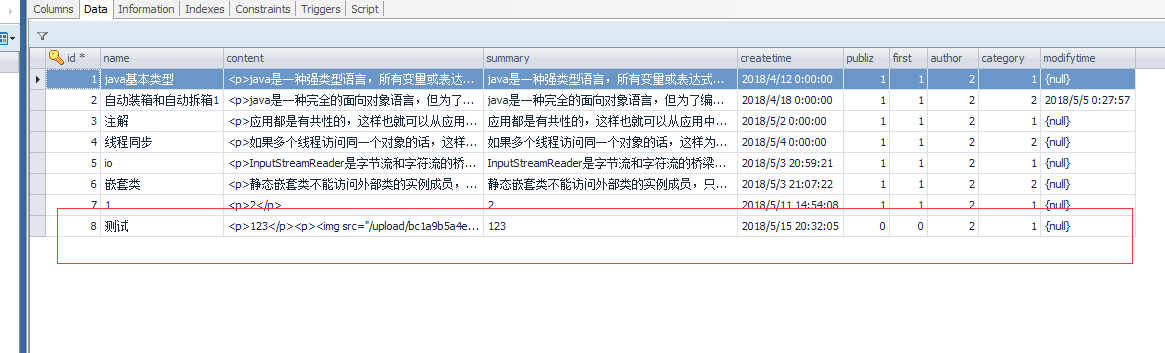
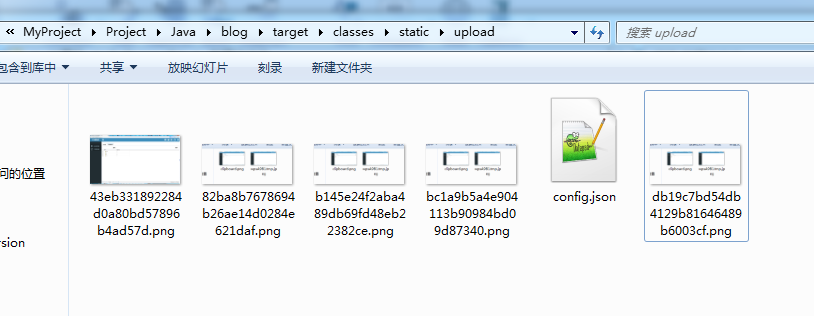
如上边完成了文件上传功能。其中为实现ueditor上传功能添加了写代码,下载路径为:https://pan.baidu.com/s/1x0L1hB5v6XOpQaB8zZL59Q,密码:l7q9。
8. 使用ueditor添加文章的更多相关文章
- ASP.NET MVC5 网站开发实践(二) Member区域 - 添加文章
上次把架构做好了,这次做添加文章.添加文章涉及附件的上传管理及富文本编辑器的使用,早添加文章时一并实现. 要点: 富文本编辑器采用KindEditor.功能很强大,国人开发,LGPL开源,自己人的好东 ...
- ECShop 添加文章时作者默认为当前登录用户
打开admin\article.php文件 查找代码 $article['is_open'] = 1; 在下边添加代码 $article['author'] = $_SESSION['admin_na ...
- WordPress主题制作教程10:添加文章类型插件Custom Post Type UI
下载 Custom Post Type UI>> 用Custom Post Type UI添加自定义文章类型对于新手来说最简单不过了,下载安装后,在插件栏启用一下,就可以开始添加文章类型了 ...
- ueditor编辑文章时候,复制粘贴内容,原来的图片不能显示
ueditor编辑文章时候.当现有文章有图片的时候, 再复制粘贴文本进去的时候.里面的图片就不能显示了, 编辑器查看文章Html代码,图片路径显示为:src="http://localhos ...
- Django:(博客系统)添加文章(中文)出现UnicodeEncodeError乱码
添加文章时出现了一个UnicodeEncodeError乱码问题 在添加文章时,抛出了异常: 解决方案,修改manage.py(添加import sys reload(sys) sys.setdefa ...
- dedecms添加文章时提示标题为空,编辑文章时编辑器空白的解决办法
dedecms添加文章时提示标题为空,编辑文章时编辑器空白的解决办法 dedecms出现这个问题与代码无关,主要是和PHP的版本有关,用的PHP5.4,更换成PHP5.2之后就不会有这个问题了. 问题 ...
- 用 Markdown 写作(一)——添加文章页内导航
Markdown 可以用更简化的标记来写文章,基本的语法可以参考Markdown 语法说明 (简体中文版). 我平时很少按照论文的写法去写博客,说来忏愧,因为很少写技术性的文章,最近看到百度百科和很多 ...
- [python][django学习篇][11]后台admin用户登录博客,添加文章---这一章和博客首页设计没有关系
1 如果没有创建超级管理员账号,先要创建python manage.py createsuperuser 2 在admin后台注册模型(如果没有这一步,登录http://127.0.0.1:8000/ ...
- DTCMS,添加文章时,内容中第一张图片作缩略图,并且等比例缩放图片
DTCMS,添加文章时,内容中第一张图片作缩略图 admin/article/article_edit.aspx.cs 导入: using System.Drawing;using System.Dr ...
随机推荐
- ubuntu下搭建gtk+编程环境
首先gtk+项目主页为: http://www.gtk.org/ gtk+现在有2和3两种版本,使用 sudo apt-get install gnome-core-devel 可以一次性安装2个版本 ...
- SharePoint 查找字段内部名称的小方法
今天逛博客园,偶然看到了下面的文章,介绍不用工具查看SharePoint字段内部名称,也介绍下自己的小方法. http://www.cnblogs.com/sunjunlin/archive/2012 ...
- jQuery鼠标移入移出(冒泡版和无冒泡版)
带冒泡事件的鼠标移入移出(默认的):mouseover和mouseout事件 没有冒泡事件的鼠标移入移出:mouseenter和mouseleave事件
- ORACLE 博客文章目录
从接触ORACLE到深入学习,已有好几年了,虽然写的博客不多,质量也参差不齐,但是,它却是成长的历程的点点滴滴的一个见证,见证了我在这条路上的寻寻觅觅,朝圣的心路历程,现在将ORACLE方面的博客整理 ...
- sublime使用技巧之集成VI
熟悉开发工具,减少多余的操作流程有助于提高开发效率,而Sublime Text 2是sublime产品的经典版本,因此本文基于Sublime Text 2讲解sublime的使用技巧. VI的主要作用 ...
- sql server求分组最大值,最小值,最大值对应时间,和最小值对应时间
先创建数据库 CREATE TABLE [dbo].[Students]( [Id] [int] IDENTITY(1,1) NOT NULL, [age] [int] NULL, [name] [n ...
- 【计算机视觉】深度相机(一)--TOF总结
http://www.voidcn.com/blog/lg1259156776/article/p-6302915.html 1.1 TOF初探 TOF是Time of flight的简写,直译为飞行 ...
- [ASP.NET MVC] Controlle中的Aciton方法数据接收方式
POST数据接收方式包括: 1.request.Form:(逐个获取表单提交的数据); FormCollection: [HttpPost]public async Task<string> ...
- Java基础:内存模型
1. 引言 2. Java内存模型 3. 内存间的交互操作 1. 引言 考虑到计算机组成的内容: 原始的计算机是CPU用于计算+硬盘用于存储,由于CPU的高速发展和硬盘的缓慢发展,高速的存储需要持续供 ...
- 【热身】github的使用
GitHub 可以托管各种Git版本库,并提供一个web界面,但与其它像 SourceForge或Google Code这样的服务不同,GitHub的独特卖点在于从另外一个项目进行分支的简易性.为一个 ...