
iOS开发拓展篇—UIDynamic(重力行为+碰撞检测)
iOS开发拓展篇—UIDynamic(重力行为+碰撞检测)
一、重力行为
说明:给定重力方向、加速度,让物体朝着重力方向掉落
1.方法
(1)UIGravityBehavior的初始化
- (instancetype)initWithItems:(NSArray *)items;
item参数 :里面存放着物理仿真元素
(2)UIGravityBehavior常见方法
- (void)addItem:(id <UIDynamicItem>)item;
添加1个物理仿真元素
- (void)removeItem:(id <UIDynamicItem>)item;
移除1个物理仿真元素
2.UIGravityBehavior常见属性
@property (nonatomic, readonly, copy) NSArray* items;
添加到重力行为中的所有物理仿真元素
@property (readwrite, nonatomic) CGVector gravityDirection;
重力方向(是一个二维向量)
@property (readwrite, nonatomic) CGFloat angle;
重力方向(是一个角度,以x轴正方向为0°,顺时针正数,逆时针负数)
@property (readwrite, nonatomic) CGFloat magnitude;
量级(用来控制加速度,1.0代表加速度是1000 points /second²)
二、碰撞行为
1.简介
说明:可以让物体之间实现碰撞效果
可以通过添加边界(boundary),让物理碰撞局限在某个空间中
2.UICollisionBehavior边界相关的方法
- (void)addBoundaryWithIdentifier:(id <NSCopying>)identifier forPath:(UIBezierPath*)bezierPath;
- (void)addBoundaryWithIdentifier:(id <NSCopying>)identifier fromPoint:(CGPoint)p1 toPoint:(CGPoint)p2;
- (UIBezierPath*)boundaryWithIdentifier:(id <NSCopying>)identifier;
- (void)removeBoundaryWithIdentifier:(id <NSCopying>)identifier;
@property (nonatomic, readonly, copy) NSArray* boundaryIdentifiers;
- (void)removeAllBoundaries;
3.UICollisionBehavior常见用法
@property (nonatomic, readwrite) BOOL translatesReferenceBoundsIntoBoundary;
是否以参照视图的bounds为边界
- (void)setTranslatesReferenceBoundsIntoBoundaryWithInsets:(UIEdgeInsets)insets;
设置参照视图的bounds为边界,并且设置内边距
@property (nonatomic, readwrite) UICollisionBehaviorMode collisionMode;
碰撞模式(分为3种,元素碰撞、边界碰撞、全体碰撞)
@property (nonatomic, assign, readwrite) id <UICollisionBehaviorDelegate> collisionDelegate;
代理对象(可以监听元素的碰撞过程)
三、代码示例
在storyboard中拖拽几个控件,用于测试。
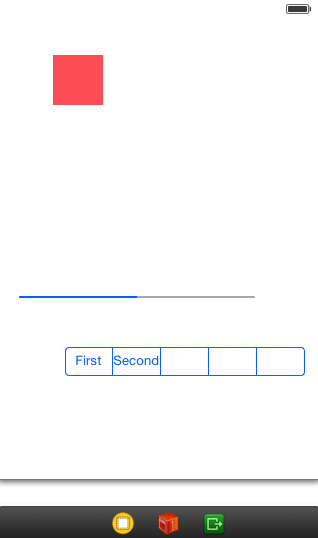
测试代码:
YYViewController.m文件
 //

 //  YYViewController.m

 //  12-重力行为和碰撞行为

 //

 //  Created by apple on 14-8-6.

 //  Copyright (c) 2014年 yangyong. All rights reserved.

 //

 #import "YYViewController.h"

 @interface YYViewController ()

 @property (weak, nonatomic) IBOutlet UIView *redView;

 @property (weak, nonatomic) IBOutlet UIProgressView *block1;

 @property (weak, nonatomic) IBOutlet UISegmentedControl *block2;

 @property(nonatomic,strong)UIDynamicAnimator *animator;

 @end

 @implementation YYViewController

 -(UIDynamicAnimator *)animator

 {

     if (_animator==nil) {

         //创建物理仿真器(ReferenceView:参照视图,设置仿真范围)

         self.animator=[[UIDynamicAnimator alloc]initWithReferenceView:self.view];

     }

     return _animator;

 }

 - (void)viewDidLoad

 {

     [super viewDidLoad];

     //设置红色view的角度

     self.redView.transform=CGAffineTransformMakeRotation(M_PI_4);

 }

 -(void)touchesBegan:(NSSet *)touches withEvent:(UIEvent *)event

 {

     //1.重力行为

 //    [self testGravity];

     //2.重力行为+碰撞检测

 //    [self testGravityAndCollsion];

     //3.测试重力的一些属性

     [self testGravityAndCollsion2];

     //用2根线作为边界

 //    [self testGravityAndCollision3];

     //4.用圆作为边界

 //    [self testGravityAndCollision4];

 }

 /**

  *  重力行为

  */

 -(void)testGravity

 {

     //1.创建仿真行为(进行怎样的仿真效果?)

     //重力行为

     UIGravityBehavior *gravity=[[UIGravityBehavior alloc]init];

     //2.添加物理仿真元素

     [gravity addItem:self.redView];

     //3.执行仿真,让物理仿真元素执行仿真行为

     [self.animator addBehavior:gravity];

 }

 /**

  *  重力行为+碰撞检测

  */

 -(void)testGravityAndCollsion

 {

     //1.重力行为

     UIGravityBehavior *gravity=[[UIGravityBehavior alloc]init];

     [gravity addItem:self.redView];

     //2碰撞检测行为

     UICollisionBehavior *collision=[[UICollisionBehavior alloc]init];

     [collision addItem:self.redView];

     [collision addItem:self.block1];

     [collision addItem:self.block2];

     //让参照视图的边框成为碰撞检测的边界

     collision.translatesReferenceBoundsIntoBoundary=YES;

     //3.执行仿真

     [self.animator addBehavior:gravity];

     [self.animator addBehavior:collision];

 }

 /**

  *  测试重力行为的属性

  */

 -(void)testGravityAndCollsion2

 {

     //1.重力行为

     UIGravityBehavior *gravity=[[UIGravityBehavior alloc]init];

     //(1)设置重力的方向(是一个角度)

 //    gravity.angle=(M_PI_2-M_PI_4);

     //(2)设置重力的加速度,重力的加速度越大,碰撞就越厉害

     gravity.magnitude=;

     //(3)设置重力的方向(是一个二维向量)

     gravity.gravityDirection=CGVectorMake(, );

     [gravity addItem:self.redView];

     //2碰撞检测行为

     UICollisionBehavior *collision=[[UICollisionBehavior alloc]init];

     [collision addItem:self.redView];

     [collision addItem:self.block1];

     [collision addItem:self.block2];

     //让参照视图的边框成为碰撞检测的边界

     collision.translatesReferenceBoundsIntoBoundary=YES;

     //3.执行仿真

     [self.animator addBehavior:gravity];

     [self.animator addBehavior:collision];

 }

 /**

  *  用圆作为边界

  */

 - (void)testGravityAndCollision4

 {

     // 1.重力行为

     UIGravityBehavior *gravity = [[UIGravityBehavior alloc] init];

     [gravity addItem:self.redView];

     // 2.碰撞检测行为

     UICollisionBehavior *collision = [[UICollisionBehavior alloc] init];

     [collision addItem:self.redView];

     // 添加一个椭圆为碰撞边界

     UIBezierPath *path = [UIBezierPath bezierPathWithOvalInRect:CGRectMake(, , , )];

     [collision addBoundaryWithIdentifier:@"circle" forPath:path];

     // 3.开始仿真

     [self.animator addBehavior:gravity];

     [self.animator addBehavior:collision];

 }

 /**

  *  用2根线作为边界

  */

 - (void)testGravityAndCollision3

 {

     // 1.重力行为

     UIGravityBehavior *gravity = [[UIGravityBehavior alloc] init];

     [gravity addItem:self.redView];

     // 2.碰撞检测行为

     UICollisionBehavior *collision = [[UICollisionBehavior alloc] init];

     [collision addItem:self.redView];

     CGPoint startP = CGPointMake(, );

     CGPoint endP = CGPointMake(, );

     [collision addBoundaryWithIdentifier:@"line1" fromPoint:startP toPoint:endP];

     CGPoint startP1 = CGPointMake(, );

     [collision addBoundaryWithIdentifier:@"line2" fromPoint:startP1 toPoint:endP];

 //    collision.translatesReferenceBoundsIntoBoundary = YES;

     // 3.开始仿真

     [self.animator addBehavior:gravity];

     [self.animator addBehavior:collision];

 }

 @end
一些测试效果:
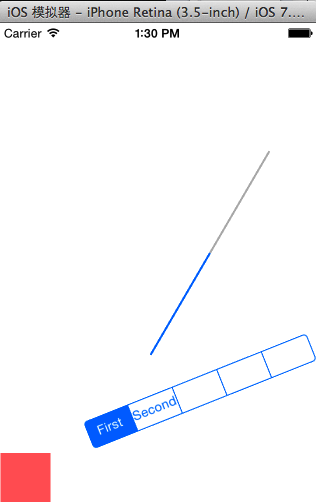
代码补充说明:
(1)加速度
速度:point/s
加速度:point/s²
1\2 * 加速度 * t²
gravity.magnitude = 1000; // 重力加速度越大,碰撞越厉害
(2)重力的方向
坐标如下:
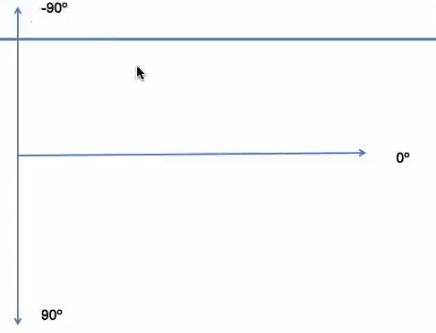
重力方向(二维向量)
说明:给定坐标平面内的一个点。然后用原点(0,0)来连接它,就构成了一个向量。
注意:在IOS中以左上角为坐标原点,向右x增加,向下Y越大。

     //(3)设置重力的方向(是一个二维向量)

     gravity.gravityDirection=CGVectorMake(-, );
重力方向为左下角(西南)方向
(3)碰撞检测行为
  UICollisionBehavior *collision = [[UICollisionBehavior alloc] init];

     [collision addItem:self.redView];

     CGPoint startP = CGPointMake(, );

     CGPoint endP = CGPointMake(, );

     [collision addBoundaryWithIdentifier:@"line1" fromPoint:startP toPoint:endP];

     CGPoint startP1 = CGPointMake(, );

     [collision addBoundaryWithIdentifier:@"line2" fromPoint:startP1 toPoint:endP];
注意:标识符不能写空。可以写字符串,因为需要标识符需要遵守NSCopying协议,而字符串满足要求。
(4)贝赛尔曲线

提示:这里的path是一个圆,设置宽高不一样,那么得出来的就是一个椭圆。
iOS开发拓展篇—UIDynamic(重力行为+碰撞检测)的更多相关文章
- 李洪强iOS开发拓展篇—UIDynamic(重力行为+碰撞检测)
iOS开发拓展篇—UIDynamic(重力行为+碰撞检测) 一.重力行为 说明:给定重力方向.加速度,让物体朝着重力方向掉落 1.方法 (1)UIGravityBehavior的初始化 - (inst ...
- iOS开发拓展篇—UIDynamic(简单介绍)
iOS开发拓展篇—UIDynamic(简单介绍) 一.简单介绍 1.什么是UIDynamic UIDynamic是从iOS 7开始引入的一种新技术,隶属于UIKit框架 可以认为是一种物理引擎,能模拟 ...
- iOS开发拓展篇—UIDynamic(捕捉行为)
iOS开发拓展篇—UIDynamic(捕捉行为) 一.简介 可以让物体迅速冲到某个位置(捕捉位置),捕捉到位置之后会带有一定的震动 UISnapBehavior的初始化 - (instancetype ...
- iOS开发拓展篇—静态库
iOS开发拓展篇—静态库 一.简单介绍 1.什么是库? 库是程序代码的集合,是共享程序代码的一种方式 2.库的分类 根据源代码的公开情况,库可以分为2种类型 (1)开源库 公开源代码,能看到具体实现 ...
- iOS开发拓展篇—音效的播放
iOS开发拓展篇—音效的播放 一.简单介绍 简单来说,音频可以分为2种 (1)音效 又称“短音频”,通常在程序中的播放时长为1~2秒 在应用程序中起到点缀效果,提升整体用户体验 (2)音乐 比如游戏中 ...
- iOS开发拓展篇—音乐的播放
iOS开发拓展篇—音乐的播放 一.简单说明 音乐播放用到一个叫做AVAudioPlayer的类,这个类可以用于播放手机本地的音乐文件. 注意: (1)该类(AVAudioPlayer)只能用于播放本地 ...
- iOS开发拓展篇—封装音频文件播放工具类
iOS开发拓展篇—封装音频文件播放工具类 一.简单说明 1.关于音乐播放的简单说明 (1)音乐播放用到一个叫做AVAudioPlayer的类 (2)AVAudioPlayer常用方法 加载音乐文件 - ...
- iOS开发拓展篇—CoreLocation简单介绍
iOS开发拓展篇—CoreLocation简单介绍 一.简介 1.在移动互联网时代,移动app能解决用户的很多生活琐事,比如 (1)导航:去任意陌生的地方 (2)周边:找餐馆.找酒店.找银行.找电影院 ...
- iOS开发拓展篇—CoreLocation定位服务
iOS开发拓展篇—CoreLocation定位服务 一.简单说明 1.CLLocationManager CLLocationManager的常用操作和属性 开始用户定位- (void)startUp ...
随机推荐
- Android 实例子源代码文件下载地址380个合集
android 城市列表特效 - 触摸查找源码 .rar: http://www.t00y.com/file/64337887 android 日记系统源码(数据库的基本操作) .rar: htt ...
- UCenter整合登陆时出现’Authorization has expired’错误(2014-03-13记)
原因之可能是两台机子的时间不一致导致.
- Date类型,Boolean类型,Number类型
1.Date类型: 1)创建Date对象: var date=new Date(); //Date对象会把当前日期和时间保存为其初始值 2)Date对象的方法: --这些得到的都是数字 ...
- zigbee学习之路(四):按键控制(中断方式)
一.前言 通过上次的学习,我们学习了如何用按键控制led,但是在实际应用中,这种查询方式占用了cpu的时间,如果通过中断控制就可以解决这个问题,我们今天就来学习按键控制的中断方式. 二.原理分析 传统 ...
- Intellij IDEA debug介绍
先编译好要调试的程序. 1.设置断点 选定要设置断点的代码行,在行号的区域后面单击鼠标左键即可. 2.开启调试会话 点击红色箭头指向的小虫子,开始进入调试. IDE下方出现Debug视图,红色的箭头指 ...
- CSS 盒子模型概述
一.简介 CSS 盒子模型(元素框)由元素内容(content).内边距(padding).边框(border).外边距(margin)组成. 盒子模型,最里面的部分是实际内容:直接包围内 ...
- UVA10561 Treblecross 组合游戏/SG定理
Treblecross is a two player gamewhere the goal is to get three X in a row on a one-dimensional board ...
- Excel公式错误提示啥意思?
1.#####!返回的结果超出了单元格的宽度:或者单元格的日期时间公式产生了一个负值. 2.#VALUE!使用了错误的参数或运算对象类型. 3.#DIV/O!当公式被零除时产生此错误. 4.#NAME ...
- ZooKeeper 编程(一)
Zookeeper的节点都是存放在内存中的,所以读写速度很快.更新日志被记录到了磁盘中,以便用于恢复数据.在更新内在中节点数之前,会先序列化到磁盘中. 为避免单点失效,zookeeper的数据是在多个 ...
- $.ajax()常用方法详解(推荐)
AJAX 是一种与服务器交换数据的技术,可以在补充在整个页面的情况下更新网页的一部分.接下来通过本文给大家介绍ajax一些常用方法,大家有需要可以一起学习. 1.url: 要求为String类型的参数 ...