
深入刨析tomcat 之---第12篇 how tomcat works( 第17章 ) 解析catalina.bat 梳理启动流程
我们如何启动tomcat呢? 答案是双击startup.bat文件,这个文件在bin目录下
@echo off 不显示批处理命令
rem Licensed to the Apache Software Foundation (ASF) under one or more
rem contributor license agreements. See the NOTICE file distributed with
rem this work for additional information regarding copyright ownership.
rem The ASF licenses this file to You under the Apache License, Version 2.0
rem (the "License"); you may not use this file except in compliance with
rem the License. You may obtain a copy of the License at
rem
rem http://www.apache.org/licenses/LICENSE-2.0
rem
rem Unless required by applicable law or agreed to in writing, software
rem distributed under the License is distributed on an "AS IS" BASIS,
rem WITHOUT WARRANTIES OR CONDITIONS OF ANY KIND, either express or implied.
rem See the License for the specific language governing permissions and
rem limitations under the License.
if "%OS%" == "Windows_NT" setlocal
rem ---------------------------------------------------------------------------
rem Start script for the CATALINA Server
rem
rem $Id: startup.bat 743401 2009-02-11 17:01:58Z markt $
rem ---------------------------------------------------------------------------
rem Guess CATALINA_HOME if not defined
if not "%CATALINA_HOME%" == "" goto gotHome
set CATALINA_HOME=.
if exist "%CATALINA_HOME%\bin\catalina.bat" goto okHome
set CATALINA_HOME=..
:gotHome
if exist "%CATALINA_HOME%\bin\catalina.bat" goto okHome
echo The CATALINA_HOME environment variable is not defined correctly
echo This environment variable is needed to run this program
goto end
:okHome
set EXECUTABLE=%CATALINA_HOME%\bin\catalina.bat
rem Check that target executable exists
if exist "%EXECUTABLE%" goto okExec
echo Cannot find %EXECUTABLE%
echo This file is needed to run this program
goto end
:okExec
rem Get remaining unshifted command line arguments and save them in the
set CMD_LINE_ARGS=
:setArgs
if ""%1""=="""" goto doneSetArgs //如果第一个参数为" ",就是 在命令行敲入startup 命令;如果让%1不得"""" ,那么就这样输入 startup start
set CMD_LINE_ARGS=%CMD_LINE_ARGS% %1 如果有参数CMD_LINE_ARGS 变量的值为 参数1的值
shift
goto setArgs
:doneSetArgs
call "%EXECUTABLE%" start %CMD_LINE_ARGS% 最终的命令为 bin\catalina.bat start
:end
以上批处理文件执行完成就变为了一句话,就是 在cmd 窗口中打 bin\catalina.bat start
那么接着执行catalina 批处理
set CATALINA_OPTS=%CATALINA_OPTS% -Dsun.io.useCanonCaches=false
rem Guess CATALINA_HOME if not defined
if not "%CATALINA_HOME%" == "" goto gotHome
set CATALINA_HOME=.
if exist "%CATALINA_HOME%\bin\catalina.bat" goto okHome
set CATALINA_HOME=..
:gotHome
if exist "%CATALINA_HOME%\bin\catalina.bat" goto okHome
echo The CATALINA_HOME environment variable is not defined correctly
echo This environment variable is needed to run this program
goto end
:okHome
rem Get standard environment variables
if exist "%CATALINA_HOME%\bin\setenv.bat" call "%CATALINA_HOME%\bin\setenv.bat"
rem Get standard Java environment variables
if exist "%CATALINA_HOME%\bin\setclasspath.bat" goto okSetclasspath
echo Cannot find %CATALINA_HOME%\bin\setclasspath.bat
echo This file is needed to run this program
goto end
:okSetclasspath
set BASEDIR=%CATALINA_HOME%
call "%CATALINA_HOME%\bin\setclasspath.bat"
rem Add on extra jar files to CLASSPATH
if "%JSSE_HOME%" == "" goto noJsse
set CLASSPATH=%CLASSPATH%;%JSSE_HOME%\lib\jcert.jar;%JSSE_HOME%\lib\jnet.jar;%JSSE_HOME%\lib\jsse.jar
:noJsse
set CLASSPATH=%CLASSPATH%;%CATALINA_HOME%\bin\bootstrap.jar
if not "%CATALINA_BASE%" == "" goto gotBase
set CATALINA_BASE=%CATALINA_HOME%
:gotBase
if not "%CATALINA_TMPDIR%" == "" goto gotTmpdir
set CATALINA_TMPDIR=%CATALINA_BASE%\temp
:gotTmpdir
rem ----- Execute The Requested Command ---------------------------------------
echo Using CATALINA_BASE: %CATALINA_BASE%
echo Using CATALINA_HOME: %CATALINA_HOME%
echo Using CATALINA_TMPDIR: %CATALINA_TMPDIR%
echo Using JAVA_HOME: %JAVA_HOME%
set _EXECJAVA=%_RUNJAVA%
set MAINCLASS=org.apache.catalina.startup.Bootstrap
set ACTION=start
set SECURITY_POLICY_FILE=
set DEBUG_OPTS=
set JPDA=
echo Using _EXECJAVA %_EXECJAVA%
if not ""%1"" == ""jpda"" goto noJpda
set JPDA=jpda
if not "%JPDA_TRANSPORT%" == "" goto gotJpdaTransport
set JPDA_TRANSPORT=dt_shmem
:gotJpdaTransport
if not "%JPDA_ADDRESS%" == "" goto gotJpdaAddress
set JPDA_ADDRESS=jdbconn
:gotJpdaAddress
shift
:noJpda
echo print 参数1 ""%1""
if ""%1"" == ""debug"" goto doDebug
if ""%1"" == ""embedded"" goto doEmbedded
if ""%1"" == ""run"" goto doRun
if ""%1"" == ""start"" goto doStart
if ""%1"" == ""stop"" goto doStop
echo Usage: catalina ( commands ... )
echo commands:
echo debug Start Catalina in a debugger
echo debug -security Debug Catalina with a security manager
echo embedded Start Catalina in embedded mode
echo jpda start Start Catalina under JPDA debugger
echo run Start Catalina in the current window
echo run -security Start in the current window with security manager
echo start Start Catalina in a separate window
echo start -security Start in a separate window with security manager
echo stop Stop Catalina
goto end
:doDebug
shift
set _EXECJAVA=%_RUNJDB%
set DEBUG_OPTS=-sourcepath "%CATALINA_HOME%\..\..\jakarta-tomcat-4.0\catalina\src\share"
if not ""%1"" == ""-security"" goto execCmd
shift
echo Using Security Manager
set SECURITY_POLICY_FILE=%CATALINA_BASE%\conf\catalina.policy
goto execCmd
:doEmbedded
shift
set MAINCLASS=org.apache.catalina.startup.Embedded
goto execCmd
:doRun
shift
if not ""%1"" == ""-security"" goto execCmd
shift
echo Using Security Manager
set SECURITY_POLICY_FILE=%CATALINA_BASE%\conf\catalina.policy
goto execCmd
:doStart
shift
if not "%OS%" == "Windows_NT" goto noTitle
set _EXECJAVA=start "Tomcat" %_RUNJAVA%
echo Print _EXECJAVA %_EXECJAVA%
goto gotTitle
:noTitle
set _EXECJAVA=start %_RUNJAVA%
:gotTitle
if not ""%1"" == ""-security"" goto execCmd
shift
echo Using Security Manager
set SECURITY_POLICY_FILE=%CATALINA_BASE%\conf\catalina.policy
goto execCmd
:doStop
shift
set ACTION=stop
goto execCmd
:execCmd
rem Get remaining unshifted command line arguments and save them in the
set CMD_LINE_ARGS=
:setArgs
if ""%1""=="""" goto doneSetArgs
set CMD_LINE_ARGS=%CMD_LINE_ARGS% %1
shift
goto setArgs
:doneSetArgs
rem Execute Java with the applicable properties
if not "%JPDA%" == "" goto doJpda
if not "%SECURITY_POLICY_FILE%" == "" goto doSecurity
%_EXECJAVA% %JAVA_OPTS% %CATALINA_OPTS% %DEBUG_OPTS% -Djava.endorsed.dirs="%JAVA_ENDORSED_DIRS%" -classpath "%CLASSPATH%" -Dcatalina.base="%CATALINA_BASE%" -Dcatalina.home="%CATALINA_HOME%" -Djava.io.tmpdir="%CATALINA_TMPDIR%" %MAINCLASS% %CMD_LINE_ARGS% %ACTION%
echo lastword %_EXECJAVA% %JAVA_OPTS% %CATALINA_OPTS% %DEBUG_OPTS% -Djava.endorsed.dirs="%JAVA_ENDORSED_DIRS%" -classpath "%CLASSPATH%" -Dcatalina.base="%CATALINA_BASE%" -Dcatalina.home="%CATALINA_HOME%" -Djava.io.tmpdir="%CATALINA_TMPDIR%" %MAINCLASS% %CMD_LINE_ARGS% %ACTION%
goto end
:doSecurity
%_EXECJAVA% %JAVA_OPTS% %CATALINA_OPTS% %DEBUG_OPTS% -Djava.endorsed.dirs="%JAVA_ENDORSED_DIRS%" -classpath "%CLASSPATH%" -Djava.security.manager -Djava.security.policy=="%SECURITY_POLICY_FILE%" -Dcatalina.base="%CATALINA_BASE%" -Dcatalina.home="%CATALINA_HOME%" -Djava.io.tmpdir="%CATALINA_TMPDIR%" %MAINCLASS% %CMD_LINE_ARGS% %ACTION%
goto end
:doJpda
if not "%SECURITY_POLICY_FILE%" == "" goto doSecurityJpda
%_EXECJAVA% %JAVA_OPTS% %CATALINA_OPTS% -Xdebug -Xrunjdwp:transport=%JPDA_TRANSPORT%,address=%JPDA_ADDRESS%,server=y,suspend=n %DEBUG_OPTS% -Djava.endorsed.dirs="%JAVA_ENDORSED_DIRS%" -classpath "%CLASSPATH%" -Dcatalina.base="%CATALINA_BASE%" -Dcatalina.home="%CATALINA_HOME%" -Djava.io.tmpdir="%CATALINA_TMPDIR%" %MAINCLASS% %CMD_LINE_ARGS% %ACTION%
goto end
:doSecurityJpda
%_EXECJAVA% %JAVA_OPTS% %CATALINA_OPTS% -Xrunjdwp:transport=%JPDA_TRANSPORT%,address=%JPDA_ADDRESS%,server=y,suspend=n %DEBUG_OPTS% -Djava.endorsed.dirs="%JAVA_ENDORSED_DIRS%" -classpath "%CLASSPATH%" -Djava.security.manager -Djava.security.policy=="%SECURITY_POLICY_FILE%" -Dcatalina.base="%CATALINA_BASE%" -Dcatalina.home="%CATALINA_HOME%" -Djava.io.tmpdir="%CATALINA_TMPDIR%" %MAINCLASS% %CMD_LINE_ARGS% %ACTION%
goto end
:end
最后打印的内容为
D:\dev\apache-tomcat-4.1.40\bin>catalina.bat start
Using CATALINA_BASE: ..
Using CATALINA_HOME: ..
Using CATALINA_TMPDIR: ..\temp
Using JAVA_HOME: D:\dev\JDK8
Using _EXECJAVA "D:\dev\JDK8\bin\java"
print 鍙傛暟1 ""start""
Print _EXECJAVA start "Tomcat" "D:\dev\JDK8\bin\java"
最终指令::==> start "Tomcat" "D:\dev\JDK8\bin\java" -Dsun.io.useCanonCaches=false -Djava.endorsed.dirs="..\common\endorsed" -classpath "D:\dev\JDK8\lib\tools.jar;..\bin\bootstrap.jar" -Dcatalina.base=".." -Dcatalina.home=".." -Djava.io.tmpdir="..\temp" org.apache.catalina.startup.Bootstrap start
start "Tomcat" 是启动一个新cmd 窗口命名为"Tomcat",那么最后的只看指令就是java -classpath ..\bin\bootstrap.jar" org.apache.catalina.startup.Bootstrap start
那么类路径在bin下面有一个 bootstrap.jar文件,如果你打开看就是
org.apache.catalina.startup.Bootstrap类
    public static void main(String args[]) {

        // Set the debug flag appropriately

        for (int i = 0; i < args.length; i++)  {

            if ("-debug".equals(args[i]))

                debug = 1;

        }

        // Configure catalina.base from catalina.home if not yet set

        if (System.getProperty("catalina.base") == null)

            System.setProperty("catalina.base", getCatalinaHome());

        // Construct the class loaders we will need

        ClassLoader commonLoader = null;

        ClassLoader catalinaLoader = null;

        ClassLoader sharedLoader = null;

        try {

            File unpacked[] = new File[1];

            File packed[] = new File[1];

            File packed2[] = new File[2];

            ClassLoaderFactory.setDebug(debug);

            unpacked[0] = new File(getCatalinaHome(),

                                   "common" + File.separator + "classes");

            packed2[0] = new File(getCatalinaHome(),

                                  "common" + File.separator + "endorsed");

            packed2[1] = new File(getCatalinaHome(),

                                  "common" + File.separator + "lib");

            commonLoader =

                ClassLoaderFactory.createClassLoader(unpacked, packed2, null);

            unpacked[0] = new File(getCatalinaHome(),

                                   "server" + File.separator + "classes");

            packed[0] = new File(getCatalinaHome(),

                                 "server" + File.separator + "lib");

            catalinaLoader =

                ClassLoaderFactory.createClassLoader(unpacked, packed,

                                                     commonLoader);

            unpacked[0] = new File(getCatalinaBase(),

                                   "shared" + File.separator + "classes");

            packed[0] = new File(getCatalinaBase(),

                                 "shared" + File.separator + "lib");

            sharedLoader =

                ClassLoaderFactory.createClassLoader(unpacked, packed,

                                                     commonLoader);

        } catch (Throwable t) {

            log("Class loader creation threw exception", t);

            System.exit(1);

        }

        Thread.currentThread().setContextClassLoader(catalinaLoader);

        // Load our startup class and call its process() method

        try {

            SecurityClassLoad.securityClassLoad(catalinaLoader);

            // Instantiate a startup class instance

            if (debug >= 1)

                log("Loading startup class");

            Class startupClass =

                catalinaLoader.loadClass

                ("org.apache.catalina.startup.Catalina");

            Object startupInstance = startupClass.newInstance();

            // Set the shared extensions class loader

            if (debug >= 1)

                log("Setting startup class properties");

            String methodName = "setParentClassLoader";

            Class paramTypes[] = new Class[1];

            paramTypes[0] = Class.forName("java.lang.ClassLoader");

            Object paramValues[] = new Object[1];

            paramValues[0] = sharedLoader;

            Method method =

                startupInstance.getClass().getMethod(methodName, paramTypes);

            method.invoke(startupInstance, paramValues);

            // Call the process() method

            if (debug >= 1)

                log("Calling startup class process() method");

            methodName = "process";

            paramTypes = new Class[1];

            paramTypes[0] = args.getClass();

            paramValues = new Object[1];

            paramValues[0] = args;

            method =

                startupInstance.getClass().getMethod(methodName, paramTypes);

            method.invoke(startupInstance, paramValues);

        } catch (Exception e) {

            System.out.println("Exception during startup processing");

            e.printStackTrace(System.out);

            System.exit(2);

        }

    }
那么执行这个mian 方法,那么tomcat 的源码在哪里呢?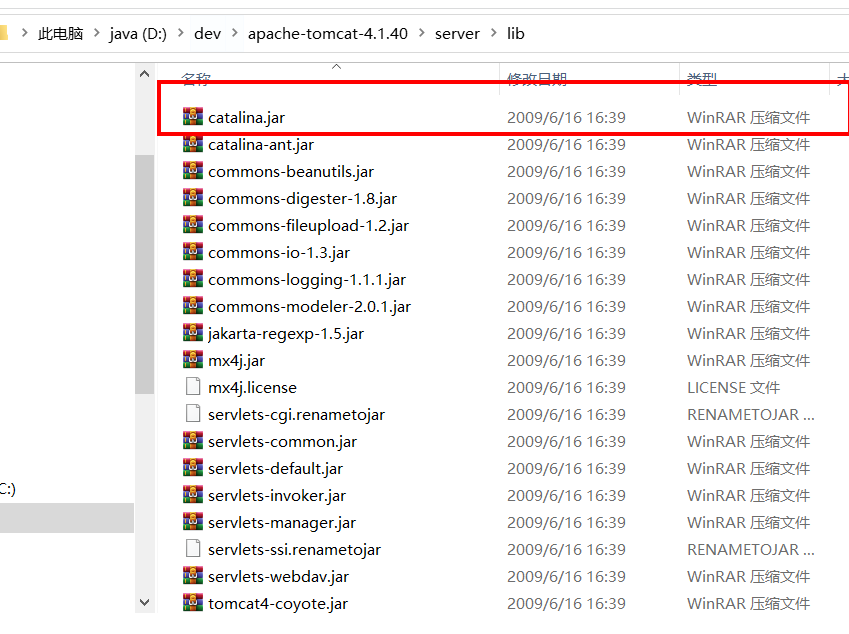
具体为什么在这里,那么就要分析他的编译过程,下一篇就写下这个吧
深入刨析tomcat 之---第12篇 how tomcat works( 第17章 ) 解析catalina.bat 梳理启动流程的更多相关文章
- 深入刨析tomcat 之---第8篇 how tomcat works 第11章 11.9应用程序,自定义Filter,及注册
writed by 张艳涛, 标签:全网独一份, 自定义一个Filter 起因:在学习深入刨析tomcat的学习中,第11章,说了调用过滤链的原理,但没有给出实例来,自己经过分析,给出来了一个Filt ...
- 深入刨析tomcat 之---第11篇 how tomcat works( 第15章 ) 如何解析web.xml 文件
writedby 张艳涛 记得当年是学习jsp的时候,写过web.xml中的标签.在之后的springmvc中也是有关于配置mvc 过滤器 和dispatchServlet的标签,之前是看不懂呢!看到 ...
- 深入刨析tomcat 之---第10篇 how tomcat works 第13章,Response 发送错误信息 sendError
writedby 张艳涛 在浏览器中发送一个错误应用url 那么tomcat是如何发送错误的呢? 基本上是发送http 的response协议,分为两部分一部分是response设置头信息, 那么先分 ...
- 深入刨析tomcat 之---第9篇 how tomcat works 第9章,Session的实现 关于request.setContext(context)
writedby 张艳涛,在学第9章session的时候,做了个实验在给的demo代码中添加了 package com.zyt.tomcat.ex09.core; public class Simpl ...
- 深入刨析tomcat 之---第6篇 how tomcat works 第5章 容器实现原理
writedby 张艳涛
- [Tomcat 源码分析系列] (二) : Tomcat 启动脚本-catalina.bat
概述 Tomcat 的三个最重要的启动脚本: startup.bat catalina.bat setclasspath.bat 上一篇咱们分析了 startup.bat 脚本 这一篇咱们来分析 ca ...
- 查看tomcat启动文件都干点啥---catalina.bat
在上一次查看tomcat启动文件都干点啥一文中,我们总结出,startup.bat文件的作用就是找到catalina.bat文件,然后把参数传递给它,在startup.bat中,调用catalina. ...
- 深入刨析tomcat 之---第2篇,解决第3章bug 页面不显示内容http://localhost:8080/servlet/ModernServlet?userName=zhangyantao&password=1234
writedby 张艳涛7月2日, 在学习第4张的过程中,发现了前一篇文章写的是关于1,2张的bug不用设置response响应头,需要在servlet的service()方法里面写是错误想 serv ...
- 30s源码刨析系列之函数篇
前言 由浅入深.逐个击破 30SecondsOfCode 中函数系列所有源码片段,带你领略源码之美. 本系列是对名库 30SecondsOfCode 的深入刨析. 本篇是其中的函数篇,可以在极短的时间 ...
随机推荐
- 题解 P3232 [HNOI2013]游走
洛谷P3232[NOI2013]游走 题目描述 给定一个 n 个点 m 条边的无向连通图,顶点从 1 编号到 n,边从 1 编号到 m. 小 Z 在该图上进行随机游走,初始时小 Z 在 1 号顶点,每 ...
- Mysql优化(出自官方文档) - 第十篇(优化InnoDB表篇)
Mysql优化(出自官方文档) - 第十篇(优化InnoDB表篇) 目录 Mysql优化(出自官方文档) - 第十篇(优化InnoDB表篇) 1 Optimizing Storage Layout f ...
- ES6中的Module与Interator
小编今天在用Vue做项目的时候,发现组件中有import和export,刚好今天看到相关的语法介绍和一些实例,下面小编就和大家一起进步.对于模块化规范,在es6出现之前,有以下三种规范,分别是Comm ...
- QTreeView 使用 QStandardItemModel
QTreeView 使用 QStandardItemModel @ 目录 QTreeView 使用 QStandardItemModel 前言 一.直接上图 二.添加同级结点项 1.思路 2.实现 二 ...
- js笔记19 事件对象
1.常用的事件 onmouseover onmouseout onmousedown onmousemove onmouseup onclick onchange onfocus o ...
- 流程自动化RPA,Power Automate Desktop系列 - 发布文档中心
一.背景 内网中有一个基于VuePress搭建的静态文档中心,但是每次修改后都需要重新Build一次才行,之前都是手动执行命令,现在可以基于Power Automate Desktop来创建任务了. ...
- Linux基础 -01
01Linux快速入门 1.计算机组成原理 1.1什么是计算机 计算机一般被称为"电脑",即通电的大脑 电脑二字蕴含了人类对计算机的终极期望; 希望它能像人脑一样为我们工作,从而取 ...
- SpringCloud:Feign调用接口不稳定问题以及如何设置超时
1. Feign调用接口不稳定报错 Caused by: java.net.SocketException: Software caused connection abort: recv failed ...
- mysql大量数据分页查询优化-延迟关联
所有的php初学者都应该知道,mysql的分页语句写法如下: 1 select * from a limit (page-1)*page_size,page_size 而当这语句分页到一定程度时,例如 ...
- Python装饰器、迭代器&生成器、re正则表达式、字符串格式化
Python装饰器.迭代器&生成器.re正则表达式.字符串格式化 本章内容: 装饰器 迭代器 & 生成器 re 正则表达式 字符串格式化 装饰器 装饰器是一个很著名的设计模式,经常被用 ...