
Django:bootstrap table自定义查询实现
参考:https://jalena.bcsytv.com/archives/tag/bootstrap
背景:
bootstrap table在客户端分页方式下,自带有简易的搜索功能,但是功能太单一,需要定制化组合搜索

前端:
注意前端的加大加粗的部分,就是为了自定义查询新增的
{% load staticfiles %}

<!DOCTYPE html>

<html lang="en">

 <head>

        <meta charset="UTF-8" />

        <title>项目列表</title>

        <script src="https://cdn.bootcss.com/jquery/3.2.1/jquery.min.js"></script>

        <link href="https://cdn.bootcss.com/bootstrap/3.3.7/css/bootstrap.min.css" rel="stylesheet">

        <script src="https://cdn.bootcss.com/bootstrap/3.3.7/js/bootstrap.min.js"></script>

        <link href="https://cdn.bootcss.com/bootstrap-table/1.11.1/bootstrap-table.min.css" rel="stylesheet">

        <script src="https://cdn.bootcss.com/bootstrap-table/1.11.1/bootstrap-table.min.js"></script>

        <script src="https://cdn.bootcss.com/bootstrap-table/1.11.1/locale/bootstrap-table-zh-CN.min.js"></script>

 </head>

    <body>

{#        自定义搜索条件区域#}

        <div>

            <input id="search-keyword" placeholder="请输入编号查询">

            <button id="search-button">查询</button>

        </div>

{#        bootstrap table自动渲染区域#}

        <table id="mytab" class="table table-hover"></table>

    </body><script type="text/javascript">

                    $('#mytab').bootstrapTable({

                        {#全部参数#}

                        {#url: "{% static 'guchen_obj.json' %}",     //请求后台的URL(*)或者外部json文件,json内容若为json数组[{"id": 0,"name": "Item 0","price": "$0"},{"id": 1,"name": "Item 1","price": "$1"}],#}

                                                                        //且键的名字必须与下方columns的field值一样,同时sidePagination需要设置为client或者直接注释掉,这样前台才能读取到数据,且分页正常。

                                    //当json文件内容为json对象时:{"total": 2,"rows": [{"id": 0,"name": "Item 0","price": "$0"},{"id": 1,"name": "Item 1","price": "$1"}]},

                                    //分页要写为server,但是server如果没有处理的话,会在第一页显示所有的数据,分页插件不会起作用

                        url:"/getdata",                     //从后台获取数据时,可以是json数组,也可以是json对象

                        dataType: "json",

                        method: 'get',                      //请求方式(*)

                        toolbar: '#toolbar',                //工具按钮用哪个容器

                        striped: true,                      //是否显示行间隔色

                        cache: false,                       //是否使用缓存,默认为true,所以一般情况下需要设置一下这个属性(*)

                        pagination: true,                   //是否显示分页(*)

                        sortable: true,                     //是否启用排序

                        sortOrder: "asc",                   //排序方式

                        {#queryParams: oTableInit.queryParams,//传递参数(*)#}

                        {#sidePagination: "server",           //分页方式:client客户端分页,server服务端分页(*),数据为json数组时写client,json对象时(有total和rows时)这里要为server方式,写client列表无数据#}

                        pageNumber: 1,                       //初始化加载第一页,默认第一页

                        pageSize: 10,                       //每页的记录行数(*)

                        pageList: [10, 25, 50, 100],        //可供选择的每页的行数(*)

                        search: true,                       //是否显示表格搜索,此搜索是客户端搜索,不会进服务端,所以,个人感觉意义不大

                        strictSearch: true,

                        showColumns: true,                  //是否显示所有的列

                        showRefresh: true,                  //是否显示刷新按钮

                        minimumCountColumns: 2,             //最少允许的列数

                        clickToSelect: true,                //是否启用点击选中行

                        {#height: 500,                        //行高,如果没有设置height属性,表格自动根据记录条数觉得表格高度#}

                        uniqueId: "ID",                     //每一行的唯一标识,一般为主键列

                        showToggle: false,                    //是否显示详细视图和列表视图的切换按钮

                        cardView: false,                    //是否显示详细视图

                        detailView: false,                   //是否显示父子表

                        //得到查询的参数

                        queryParams: function (params) {

                            //这里的键的名字和控制器的变量名必须一直,这边改动,控制器也需要改成一样的

                            var query_params = {

                                rows: params.limit,                         //页面大小

                                page: (params.offset / params.limit) + 1,   //页码

                                sort: params.sort,      //排序列名

                                sortOrder: params.order, //排位命令(desc,asc)

                                //查询框中的参数传递给后台

                                search_kw: $('#search-keyword').val(), // 请求时向服务端传递的参数

                            };

                            return query_params;

                        },

                        columns: [

                            {

                                checkbox:true  //第一列显示复选框

                            },

                            {

                                field: 'id',  //返回数据rows数组中的每个字典的键名与此处的field值要保持一致

                                title: '构建序号'

                            },

                            {

                                field: 'name',

                                title: '用例总数'

                            },

                            {

                                field: 'price',

                                title: '通过率'

                            },

                            {

                                field: 'operate',

                                title: '操作',

                                width: 120,

                                align: 'center',

                                valign: 'middle',

                                formatter: actionFormatter,

                             },

                        ],

                    });

                //操作栏的格式化

                function actionFormatter(value, row, index) {

                    var id = value;

                    var result = "";

                    result += "<a href='javascript:;' class='btn btn-xs green' onclick=\"EditViewById('" + id + "', view='view')\" title='查看'><span class='glyphicon glyphicon-search'></span></a>";

                    result += "<a href='javascript:;' class='btn btn-xs blue' onclick=\"EditViewById('" + id + "')\" title='编辑'><span class='glyphicon glyphicon-pencil'></span></a>";

                    result += "<a href='javascript:;' class='btn btn-xs red' onclick=\"DeleteByIds('" + id + "')\" title='删除'><span class='glyphicon glyphicon-remove'></span></a>";

                    return result;

                }

                // 搜索查询按钮触发事件

                $(function() {

                    $("#search-button").click(function () {

                        $('#mytab').bootstrapTable(('refresh')); // 很重要的一步,刷新url!

                        $('#search-keyword').val()

                    })

                })

        </script>

</html>
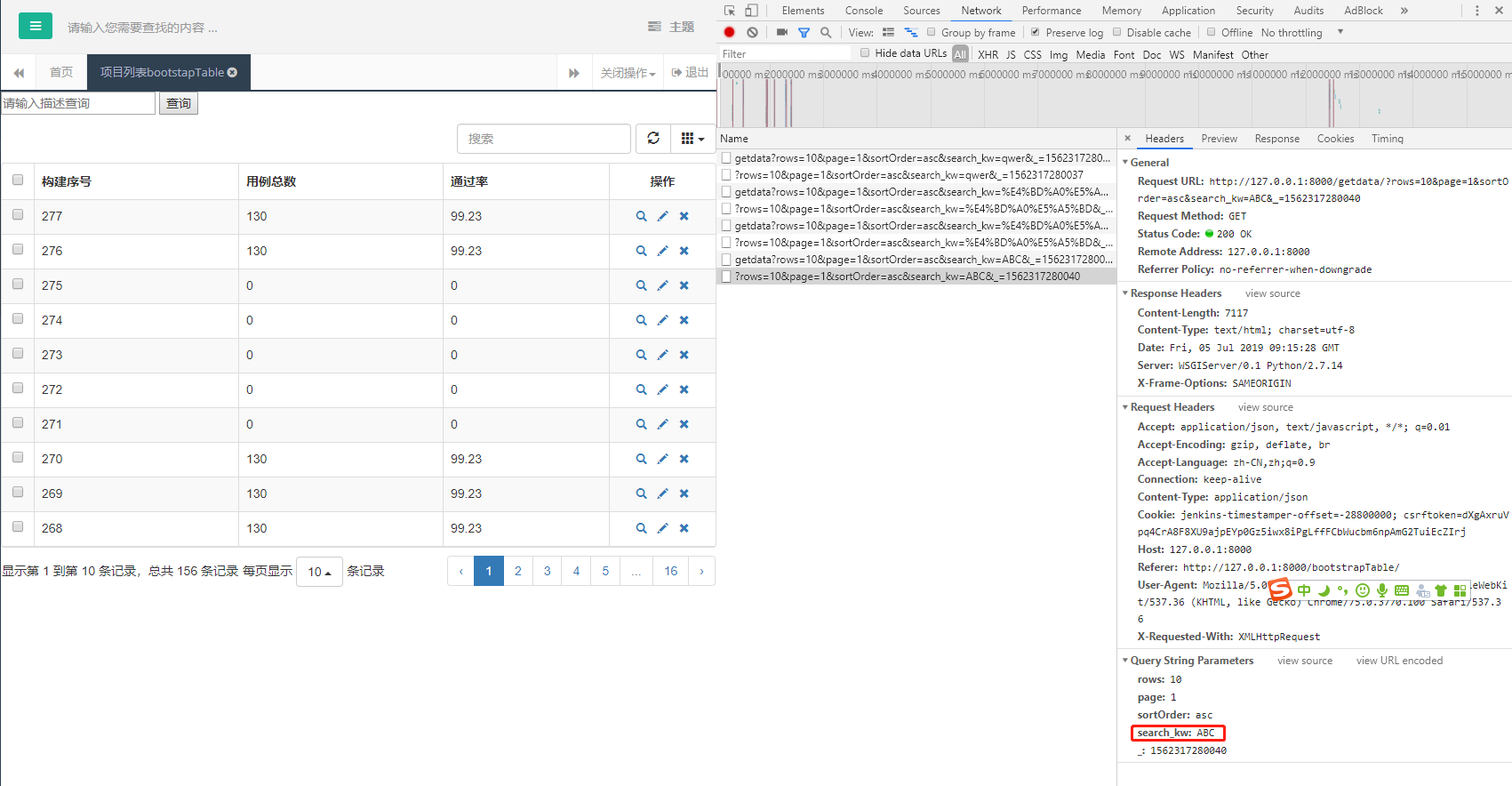
F12抓包:可以看到搜索的关键词“ABC”已经作为参数发送到服务端了,下来只要服务端接收该参数,并查询对应sql返回
后端:
def getdata(request):

    # 接收url传递来的search_kw参数值

    search_kw = request.GET.get('search_kw')

    print 'search_kw的值为:%s' % search_kw

    db = pymysql.connect("192.168.207.160", "root", "123qwe!@#", "autotest", charset='utf8')

    cursor = db.cursor()

    rows = []

    # 根据是否存在搜索关键字执行不同sql,用来返回符合条件的数据

    if search_kw:

        saasCount = "select id,total,succ,fail,percent from saas where id like '%%%s%%'" % search_kw

    else:

        saasCount = "select id,total,succ,fail,percent from saas"

    cursor.execute(saasCount)

    saas_results = cursor.fetchall()

    print list(saas_results)

    for i in list(saas_results):

        print i

        # 将数组中的每个元素提取出来拼接为rows的内容

        rows.append({"id": i[0], "name": i[1], "price": i[4]})

    print rows

    # rows返回为json数组

    return HttpResponse(json.dumps(rows))
页面:
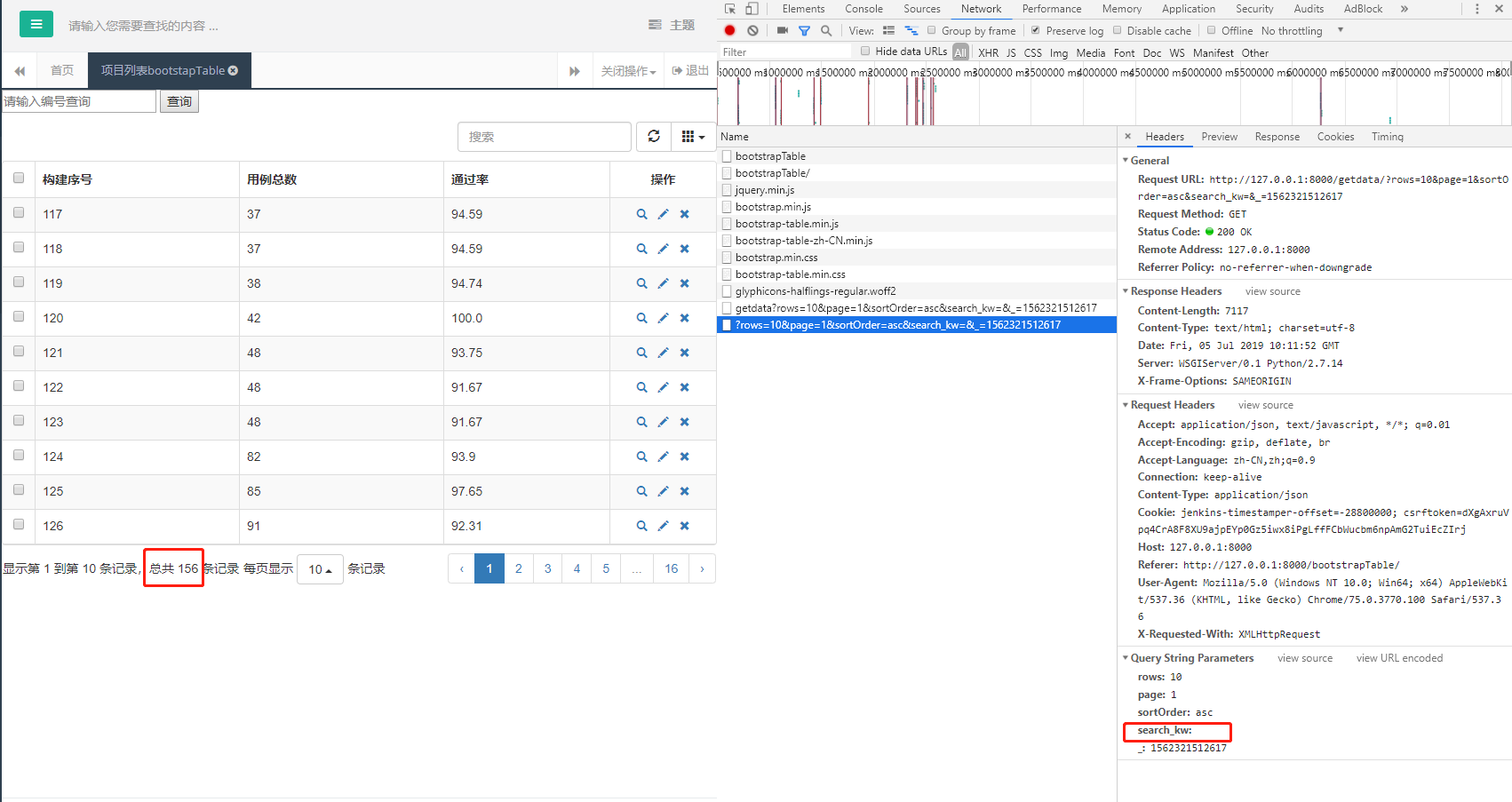
首次进入菜单,由于search_kw为空,所以显示全部数据
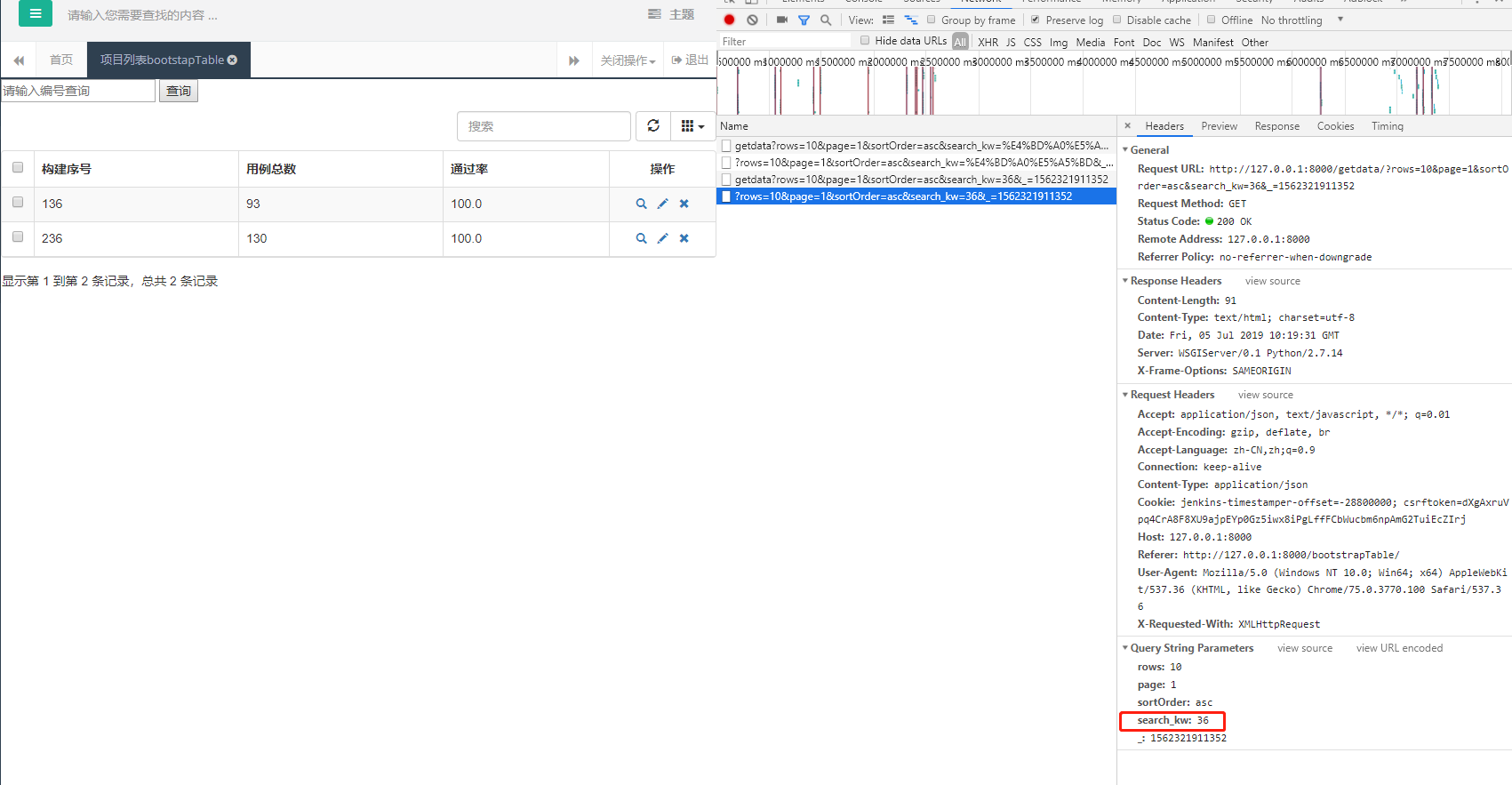
当关键词为36时,模糊搜索
Django:bootstrap table自定义查询实现的更多相关文章
- bootstrap table 自定义checkbox样式
//css <style> .checkbox-custom { position: relative; padding: 0 15px 0 25px; margin-bottom: 7p ...
- 如何将自定义的搜索参数便捷的添加到js方式的bootstrap table的参数中
页面: <div> <form id="exp_form"> 查询参数... <button type="button" oncl ...
- 自定义 Azure Table storage 查询过滤条件
本文是在Azure Table storage 基本用法一文的基础上,介绍如何自定义 Azure Table storage 的查询过滤条件.如果您还不太清楚 Azure Table storage ...
- Azure 基础:自定义 Table storage 查询条件
本文是在 <Azure 基础:Table storage> 一文的基础上介绍如何自定义 Azure Table storage 的查询过滤条件.如果您还不太清楚 Azure Table s ...
- bootstrap table分页,重新数据查询时页码为当前页问题
问题描述: 使用bootstrap table时遇到一个小问题,第一次查询数据未5页,翻页到第5页后,选中条件再次查询数据时,传到后端页码仍旧为5,而此时数据量小于5页,表格显示为未查询到数据. 处理 ...
- bootstrap Table动态绑定数据并自定义字段显示值
第一步:我们在官网下载了bootstrap 的文档,并在项目中引入bootstrap table相关js文件,当然,也要记得引入jquery文件 大概如图: 第二步:定义一个table控件 第三步:j ...
- django:bootstrap table加载django返回的数据
bootstrap table加载表格数据有两类方式: 一种通过data属性的方式配置,一种是javascipt方式配置 这里看js配置方式: 1.当数据源为.json文件时 url参数写上json文 ...
- 轻量级表格插件Bootstrap Table。拥有强大的支持固定表头、单/复选、排序、分页、搜索及自定义表头等功能。
Bootstrap Table是轻量级的和功能丰富的以表格的形式显示的数据,支持单选,复选框,排序,分页,显示/隐藏列,固定标题滚动表,响应式设计,Ajax加载JSON数据,点击排序的列,卡片视图等. ...
- 161222、Bootstrap table 服务器端分页示例
bootstrap版本 为 3.X bootstrap-table.min.css bootstrap-table-zh-CN.min.js bootstrap-table.min.js 前端boot ...
随机推荐
- 搭建使用PHPstorm环境
本周学习内容: 1.学习PHP: 2.复习技能表: 3.学习正则表达式: 实验内容: 1.安装PHPstorm环境,破解PHPstorm: 2.PHPstorm运行PHP代码 3.PHPstorm安装 ...
- am335x system upgrade kernel gpio(九)
1 Hardware Overview gpio interface,pin map: AM335X_I2C0_W_C----------------------MCASP0_AXR1 /* ...
- (26)打鸡儿教你Vue.js
weex框架的使用 1.weex开发入门 2.weex开发环境搭建 3.掌握部分weex组件模块 4.了解一些vue基本常见语法 5.制作一个接近原生应用体验的app weex介绍 安装开发环境 We ...
- sql语句之where与having的区别
where条件查询: 使用 where 可以将表中符合条件的数据筛选出来后,得到查询结果. 语法: select 字段名,……,字段名 from 表名 where 条件表达式; 例: 注意:在条件表达 ...
- Pytest权威教程20-日志
目录 记录日志 caplog Fixture方法 实时日志 版本改动记录 Pytest3.4中不向后兼容的更改 返回: Pytest权威教程 记录日志 Pytest默认捕获WARNING以上日志消息, ...
- OpenFOAM设置监测点(探针)
首先准备好我们自己的平常算例文件,本次我们以圆柱绕流的算例来说明用法 然后我们在/opt/openfoam4/etc/caseDicts/postProcessing/probes文件夹下找到prob ...
- spring boot 之登录拦截
登录拦截,请求的session里面有username者判断为登录状态 @Configuration public class WebSecurityConfig extends WebMvcConfi ...
- 制作基于软盘的Linux系统
制作基于软盘的Linux系统(张宏伟.欧阳平平 2001年07月26日 11:22) 嵌入式Linux由一个几百KB的kernel(内核)和一些根据需要进行定制的系统模块组成.由于Linux是开放源代 ...
- springlcoud中使用consul作为注册中心
好久没写博客了,从今天开始重新杨帆起航............................................ springlcoud中使用consul作为注册中心. 我们先对比下注册 ...
- 在Oracle Sql Developer中查看oracle版本
输入select * from v$version; 执行即可. --END-- 2019-11-29 12:34