
am335x system upgrade kernel gpio(九)
1 Hardware Overview
gpio interface,pin map:
AM335X_I2C0_W_C----------------------MCASP0_AXR1
/*4g-power*/
AM335X_MMC2_DAT0------------------GPMC_A1
/*4g-reset*/
AM335X_MMC2_DAT2------------------GPMC_A3
/*wifi-led*/
AM335X_WIFI------------------------------GPMC_A2
/*system-led*/
AM335X_XDMA_EVENT_INTR1------XDMA_EVENT_INTR1
/*key2 button*/
AM335X_SPI0_CS1-----------------------SPI0_CS1
2 GPIO DRIVER Overview
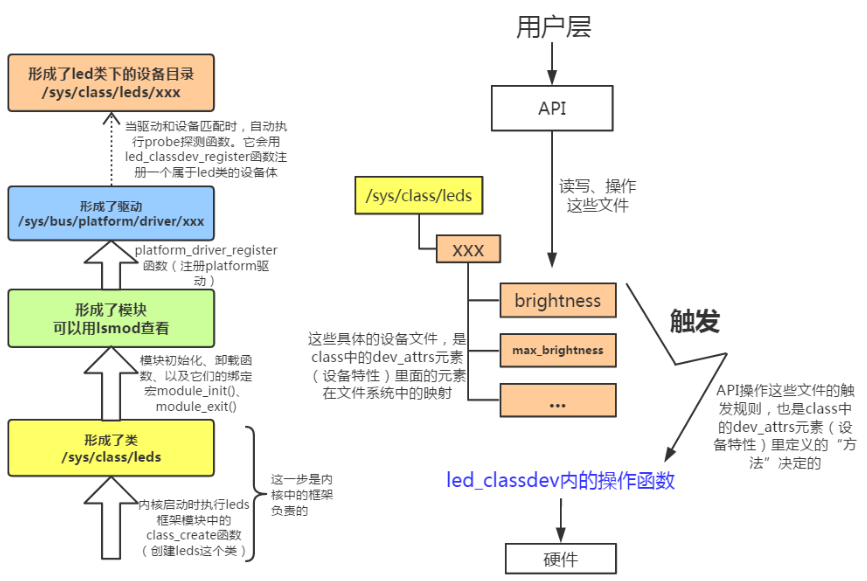
The gpio-leds driver provide userspace access gpio interface, for example: /sys/class/leds/4g-reset dir, under the dir have brightness、trigger, led trigger mode current triggers are:
"backlight" - LED will act as a back-light, controlled by the framebuffer system
"default-on" - LED will turn on (but for leds-gpio see "default-state"
property in Documentation/devicetree/bindings/gpio/led.txt)
"heartbeat" - LED "double" flashes at a load average based rate
"disk-activity" - LED indicates disk activity
"ide-disk" - LED indicates IDE disk activity (deprecated),in new implementations use "disk-activity"
"timer" - LED flashes at a fixed, configurable rate

The gpio driver can be used to pullup/pulldown led(io) from the User interface as shown by the below diagram..
3 Kernel GPIO porting
PIN MUX
user_leds_s0: user_leds_s0 {
pinctrl-single,pins = <
AM33XX_IOPAD(0x9a8, PIN_OUTPUT_PULLUP | MUX_MODE7) /* mcasp0_axr1.gpio3_20 ----> eeprom_write_control*/
AM33XX_IOPAD(0x844, PIN_OUTPUT_PULLUP | MUX_MODE7) /* gpmc_a1.gpio1_17 ----> 4g-power*/
AM33XX_IOPAD(0x84c, PIN_OUTPUT_PULLUP | MUX_MODE7) /* gpmc_a3.gpio1_19 ---->4g-reset*/
AM33XX_IOPAD(0x848, PIN_OUTPUT_PULLUP | MUX_MODE7) /* gpmc_a2.gpio1_18 ---->wifi-led*/
AM33XX_IOPAD(0x9b4, PIN_OUTPUT_PULLUP | MUX_MODE7) /* xdma_event_intr1.gpio0_20 ---->system-led*/
AM33XX_IOPAD(0x960, PIN_INPUT_PULLUP | MUX_MODE7) /* spi0_cs1.gpio0_6 ----> button */
>;
};
GPIO DTS NODE
leds {
pinctrl-names = "default";
pinctrl-0 = <&user_leds_s0>;
compatible = "gpio-leds";
led1 {
label = "heartbeat";
gpios = <&gpio0 20 GPIO_ACTIVE_HIGH>;
linux,default-trigger = "heartbeat";
};
led2 {
label = "eeprom-write-control";
gpios = <&gpio3 20 GPIO_ACTIVE_HIGH>;
default-state = "off";
};
led3 {
label = "4g-power";
gpios = <&gpio1 17 GPIO_ACTIVE_HIGH>;
default-state = "on";
};
led4 {
label = "4g-reset";
gpios = <&gpio1 19 GPIO_ACTIVE_HIGH>;
default-state = "off";
};
led5 {
label = "wif-led";
gpios = <&gpio1 18 GPIO_ACTIVE_HIGH>;
linux,default-trigger = "heartbeat";
default-state = "off";
};
};
4 User Space Interface
root@am335x-evm:/sys/class/leds/4g-reset# ls
brightness device max_brightness power subsystem trigger uevent
am335x system upgrade kernel gpio(九)的更多相关文章
- am335x system upgrade kernel tf(五)
1 Scope of Document This document describes TF hardware design 2 Requiremen 2.1 Functi ...
- am335x system upgrade kernel ethernet(四)
1 Scope of Document This document describes ethernet hardware design and porting KZS8081 to ubo ...
- am335x system upgrade kernel can(八)
1 Scope of Document This document describes can bus hardware design and can bus driver developm ...
- am335x system upgrade kernel uart(七)
1 Scope of Document This document describes UART hardware design, uart driver porting 2 Re ...
- am335x system upgrade kernel i2c rtc eeprom(六)
1 Scope of Document This document describes i2c bus hardware design and support i2c-devices: ee ...
- am335x system upgrade kernel ec20 simcom7600ce(十一)
1 Scope of Document This document describes 4G hardware design, support quectel ec20 4G module/ ...
- am335x system upgrade kernel usb stroage(十)
1 Scope of Document This document describes USB hardware design, support stardard usb2.0 port o ...
- am335x system upgrade kernel f-ram fm25l16b(十六)
1 Scope of Document This document describes SPI F-RAM hardware design 2 Requiremen 2.1 ...
- am335x system upgrade kernel emmc(十八)
1 Scope of Document This document describes EMMC hardware design 2 Requiremen 2.1 Func ...
随机推荐
- FIFO形成3x3矩阵
Verilog生成矩阵一般是使用shift_ip核,但其实用两个FIFO也行.最近刚好学到这种方法,把原理总结一下. 要求 现在有10x5的数据和对应数据有效指示信号,数据为0~49,要用FPGA对其 ...
- 全栈项目|小书架|服务器开发-Koa2 参数校验处理
为什么需要做参数校验 在开发中,无论是App开发还是服务器接口开发, 我们无法去预测用户传入的数据,因此参数(数据)校验是开发中不可或缺的一环. 例如像App的注册登录表单提交页面,就要做好多层的判断 ...
- sql语句将图片插入image类型的字段中
update table set photo=(SELECT * FROM OPENROWSET(BULK N'D:\no.png', SINGLE_BLOB) as Photo) From:h ...
- String字符串创建方法
String字符串的创建方法我们总结为3+1,3是一共有3种构造方法,1是有一种特殊的创建方法. 首先来看3种构造方法: 1.new String() 无参构造 用该方法创建的字符串是一个空字符串, ...
- kubernetes第六章--如何访问pod
- JavaPoet的基本使用
原文:https://blog.csdn.net/crazy1235/article/details/51876192 JavaPoet JavaPoet 是一个用来生成 .java源文件的Java ...
- zubax_gnss移植到STM32F407
源码下载:https://github.com/Zubax/zubax_gnss.git 源码默认支持STM32F107芯片 STM32 HAL库测试:zubax_gnss\bootloader\zu ...
- iOS编程——Objective-C KVO/KVC机制
来源:http://blog.sina.com.cn/s/blog_b0c59541010151s0.html 这两天在看和这个相关的的内容,全部推翻重写一个版本,这是公司内做技术分享的文档总结,对结 ...
- buffer和cache区别?
写入数据到内存里,这个数据的内存空间称为缓冲区(buffer) 从内存读取数据,这个存储数据的内存空间称为缓存区(cache) 由于大部分网站以读取为主,写入为辅,所以并发写入一般不是问题.
- golang基础归纳
1. hello-world package main import "fmt" func main(){ fmt.Println("Hello world, Go Go ...