
创建实体数据模型【Create Entity Data Model】(EF基础系列5)
现在我要来为上面一节末尾给出的数据库(SchoolDB)创建实体数据模型;
SchoolDB数据库的脚本我已经写好了,如下:
USE master
GO
IF EXISTS(SELECT * FROM sys.sysdatabases WHERE name='SchoolDB')
DROP DATABASE SchoolDB;
GO
CREATE DATABASE SchoolDB
GO
USE SchoolDB;

GO
--创建Standard表
IF EXISTS (SELECT * FROM sysobjects WHERE name='Standard')
DROP TABLE [Standard];
GO
CREATE TABLE  [Standard]
(
StandardID INT PRIMARY KEY ,
StandardName NVARCHAR(),
[Description] NVARCHAR()
);

GO

--创建Student表
IF EXISTS (SELECT * FROM sysobjects WHERE name='Student')
DROP TABLE Student;
GO
CREATE TABLE  Student
(
StudentID INT PRIMARY KEY,
StudentName NVARCHAR() NOT NULL,
StandardID INT  REFERENCES [Standard](StandardID),
[RowVersion] NVARCHAR()

);

GO

--创建StudentAddress表
IF EXISTS (SELECT * FROM sysobjects WHERE name='StudentAddress')
DROP TABLE StudentAddress;
GO
CREATE TABLE  StudentAddress
(
StudentID INT PRIMARY KEY,
Address1 NVARCHAR() ,
Address2 NVARCHAR(),
City NVARCHAR(),
[State] NVARCHAR(),
CONSTRAINT StudentID_FK FOREIGN KEY(StudentID) REFERENCES dbo.Student(StudentID)
);

GO

--创建Teacher表
IF EXISTS (SELECT * FROM sysobjects WHERE name='Teacher')
DROP TABLE Teacher;
GO
CREATE TABLE  Teacher
(
TeacherID INT PRIMARY KEY ,
TeacherName NVARCHAR(),
StandardID INT  REFERENCES [Standard](StandardID),
TeacherType NVARCHAR ()

);
GO

--创建Course表
IF EXISTS (SELECT * FROM sysobjects WHERE name='Course')
DROP TABLE Course;
GO
CREATE TABLE  Course
(
CourseID INT PRIMARY KEY ,
CourseName NVARCHAR(),
Location NVARCHAR(),
TeacherID INT REFERENCES dbo.Teacher(TeacherID)

);

GO

--创建StudentCourse表
IF EXISTS (SELECT * FROM sysobjects WHERE name='StudentCourse')
DROP TABLE StudentCourse;
GO
CREATE TABLE  StudentCourse
(
StudentID INT  REFERENCES Student(StudentID),
CourseID INT  REFERENCES dbo.Course(CourseID),
CONSTRAINT StudentID_CourseID PRIMARY KEY(StudentID,CourseID),

);

GO
首先我们打开上面一节创建的项目,选中“项目名称”,右键选择”属性“,我们要确保使用的.NET framework版本是4.5;

接下来,就是创建实体数据模型了:选中项目名称:

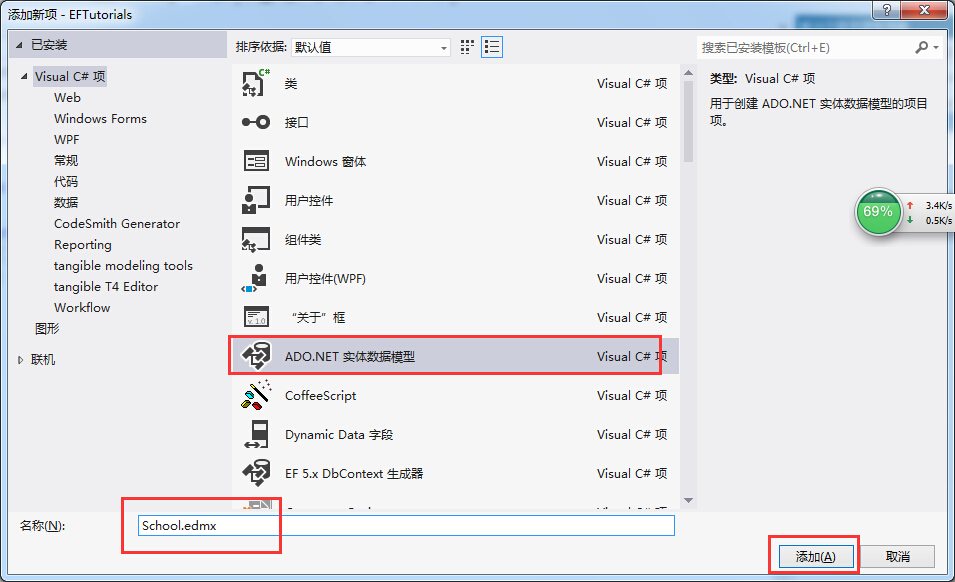


Note:
Pluralize or singularize generated object names checkbox singularizes an entityset name, if the table name in the database is plural. For example, if SchoolDB has Students table name then entityset would be singular Student. Similarly, relationships between the models will be pluralized if the table has one-to-many or many-to-many relationship with other tables. For example, Student has many-to-many relationship with Course table so Student entity set will have plural property name 'Courses' for the collection of courses.
The second checkbox, Include foreign key columns in the model, includes foreign key property explicitly to represent the foreign key. For example, Student table has one-to-many relationship with Standard table. So every student is associated with only one standard. To represent this in the model, Student entityset includes StandardId property with Standard navigation property. If this checkbox is unchecked then it will only include the Standard property, but not the StandardId in the Student entityset.
The third checkbox, Import selected stored procedures and functions into entity model, automatically creates Function Imports for the stored procedures and functions. You don't need to manually import this, as was necessary prior to Entity Framework 5.0.
7. After clicking on 'Finish', a School.edmx file will be added into your project.
Open EDM designer by double clicking on School.edmx. This displays all the entities for selected tables and the relationships between them as shown below:

现在我们以XML编译器的方式打开EDMX文件看看:

这篇没什么用,纯属扯淡的。可以略过。。。
创建实体数据模型【Create Entity Data Model】(EF基础系列5)的更多相关文章
- EntityFramework 学习 一 创建实体数据模型 Create Entity Data Model
1.用vs2012创建控制台程序 2.设置项目的.net 版本 3.创建Ado.net实体数据模型 3.打开实体数据模型向导Entity Framework有四种模型选择 来自数据库的EF设计器(Da ...
- Entity Framework Tutorial Basics(5):Create Entity Data Model
Create Entity Data Model: Here, we are going to create an Entity Data Model (EDM) for SchoolDB datab ...
- Create Entity Data Model
http://www.entityframeworktutorial.net/EntityFramework5/create-dbcontext-in-entity-framework5.aspx 官 ...
- EF中的实体类型【Types of Entity in Entity】(EF基础系列篇8)
We created EDM for existing database in the previous section. As you have learned in the previous se ...
- 3.翻译:EF基础系列--EF怎么工作的?
原文链接:http://www.entityframeworktutorial.net/basics/how-entity-framework-works.aspx 这里,你将会大概了解到EF是怎么工 ...
- 实体之间的关系【Entity Relationships】(EF基础系列篇9)
Here, you will learn how entity framework manages the relationships between entities. Entity framewo ...
- 1.翻译:EF基础系列--什么是Entity Framework?
大家好,好久不见,EF系列之前落下了,还是打算重新整理一下. 先说说目前的打算:先简单了解一下EF基础系列-->然后就是EF 6 Code-First系列-->接着就是EF 6 DB-Fi ...
- 数据上下文【 DnContext】【EF基础系列7】
DBContext: As you have seen in the previous Create Entity Data Model section, EDM generates the Scho ...
- Entity Framework 教程——创建实体数据模型
创建实体数据模型: 本文将带你创建实体数据模型(EDM)SchoolDB数据库和理解基础建设模块. 实体数据模型(EDM)是用于描述实体之间关系的一种模型,以下将使用Visual Studio 201 ...
随机推荐
- 【实战Java高并发程序设计 3】带有时间戳的对象引用:AtomicStampedReference
[实战Java高并发程序设计 1]Java中的指针:Unsafe类 [实战Java高并发程序设计 2]无锁的对象引用:AtomicReference AtomicReference无法解决上述问题的根 ...
- adb 无法启动问题
一.情况描述: 我们在使用eclipse开发有时候会出现adb连接异常中,有时候控制台会打印出来 adb connect异常 比如会出现下面这样 : [2014-12-18 16:18:26 - ] ...
- DotNet Core 介绍
前言 asp.net core rtm 6月底即将发布,自己也想着为社区做点共享,刚好最近不太忙,看到社区的小伙伴们都在为dotnet core的推广而贡献力量,项目中刚好在用rc2版本,就多写些文章 ...
- c#开源消息队列中间件EQueue 教程
一.简介 EQueue是一个参照RocketMQ实现的开源消息队列中间件,兼容Mono,具体可以参看作者的文章<分享一个c#写的开源分布式消息队列equeue>.项目开源地址:https: ...
- Curator Framework的基本使用方法
Curator Framework提供了简化使用zookeeper更高级的API接口.它包涵很多优秀的特性,主要包括以下三点: 自动连接管理:自动处理zookeeper的连接和重试存在一些潜在的问题: ...
- Tomcat7基于Redis的Session共享实战二
目前,为了使web能适应大规模的访问,需要实现应用的集群部署.集群最有效的方案就是负载均衡,而实现负载均衡用户每一个请求都有可能被分配到不固定的服务器上,这样我们首先要解决session的统一来保证无 ...
- Elasticsearch 5.0 —— Head插件部署指南
使用ES的基本都会使用过head,但是版本升级到5.0后,head插件就不好使了.下面就看看如何在5.0中启动Head插件吧! 官方粗略教程 Running with built in server ...
- Security3: Schema 和 Permission
Schema是Object的容器,授予对Schema访问的权限,就是授予对Schema下所有object的访问权限. 一,Schema 是object的container The new schema ...
- 【WP8.1开发】用手机来控制电脑的多媒体播放
为了用电脑看电影时方便控制,我就突发其想,做一个手机app来通过无线网络远程调节电脑上的音量.后来进行尝试成功后,我就想,光是调音量似乎单调了些,就把播放/暂停,上一首,下一首,等多媒体控制功能也加上 ...
- OpenCASCADE Curve Length Calculation
OpenCASCADE Curve Length Calculation eryar@163.com Abstract. The natural parametric equations of a c ...