
创建实体数据模型【Create Entity Data Model】(EF基础系列5)
现在我要来为上面一节末尾给出的数据库(SchoolDB)创建实体数据模型;
SchoolDB数据库的脚本我已经写好了,如下:
USE master
GO
IF EXISTS(SELECT * FROM sys.sysdatabases WHERE name='SchoolDB')
DROP DATABASE SchoolDB;
GO
CREATE DATABASE SchoolDB
GO
USE SchoolDB;

GO
--创建Standard表
IF EXISTS (SELECT * FROM sysobjects WHERE name='Standard')
DROP TABLE [Standard];
GO
CREATE TABLE  [Standard]
(
StandardID INT PRIMARY KEY ,
StandardName NVARCHAR(),
[Description] NVARCHAR()
);

GO

--创建Student表
IF EXISTS (SELECT * FROM sysobjects WHERE name='Student')
DROP TABLE Student;
GO
CREATE TABLE  Student
(
StudentID INT PRIMARY KEY,
StudentName NVARCHAR() NOT NULL,
StandardID INT  REFERENCES [Standard](StandardID),
[RowVersion] NVARCHAR()

);

GO

--创建StudentAddress表
IF EXISTS (SELECT * FROM sysobjects WHERE name='StudentAddress')
DROP TABLE StudentAddress;
GO
CREATE TABLE  StudentAddress
(
StudentID INT PRIMARY KEY,
Address1 NVARCHAR() ,
Address2 NVARCHAR(),
City NVARCHAR(),
[State] NVARCHAR(),
CONSTRAINT StudentID_FK FOREIGN KEY(StudentID) REFERENCES dbo.Student(StudentID)
);

GO

--创建Teacher表
IF EXISTS (SELECT * FROM sysobjects WHERE name='Teacher')
DROP TABLE Teacher;
GO
CREATE TABLE  Teacher
(
TeacherID INT PRIMARY KEY ,
TeacherName NVARCHAR(),
StandardID INT  REFERENCES [Standard](StandardID),
TeacherType NVARCHAR ()

);
GO

--创建Course表
IF EXISTS (SELECT * FROM sysobjects WHERE name='Course')
DROP TABLE Course;
GO
CREATE TABLE  Course
(
CourseID INT PRIMARY KEY ,
CourseName NVARCHAR(),
Location NVARCHAR(),
TeacherID INT REFERENCES dbo.Teacher(TeacherID)

);

GO

--创建StudentCourse表
IF EXISTS (SELECT * FROM sysobjects WHERE name='StudentCourse')
DROP TABLE StudentCourse;
GO
CREATE TABLE  StudentCourse
(
StudentID INT  REFERENCES Student(StudentID),
CourseID INT  REFERENCES dbo.Course(CourseID),
CONSTRAINT StudentID_CourseID PRIMARY KEY(StudentID,CourseID),

);

GO
首先我们打开上面一节创建的项目,选中“项目名称”,右键选择”属性“,我们要确保使用的.NET framework版本是4.5;

接下来,就是创建实体数据模型了:选中项目名称:

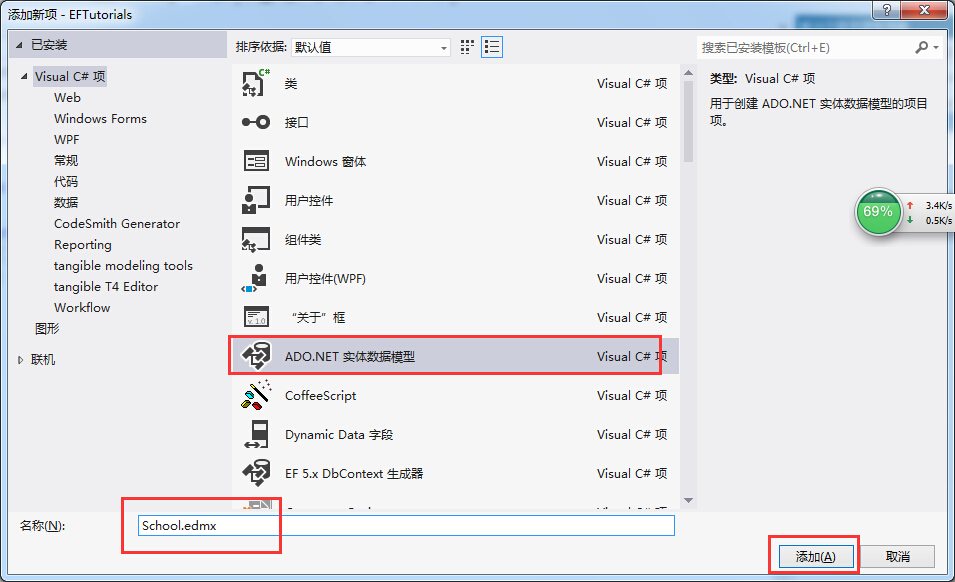


Note:
Pluralize or singularize generated object names checkbox singularizes an entityset name, if the table name in the database is plural. For example, if SchoolDB has Students table name then entityset would be singular Student. Similarly, relationships between the models will be pluralized if the table has one-to-many or many-to-many relationship with other tables. For example, Student has many-to-many relationship with Course table so Student entity set will have plural property name 'Courses' for the collection of courses.
The second checkbox, Include foreign key columns in the model, includes foreign key property explicitly to represent the foreign key. For example, Student table has one-to-many relationship with Standard table. So every student is associated with only one standard. To represent this in the model, Student entityset includes StandardId property with Standard navigation property. If this checkbox is unchecked then it will only include the Standard property, but not the StandardId in the Student entityset.
The third checkbox, Import selected stored procedures and functions into entity model, automatically creates Function Imports for the stored procedures and functions. You don't need to manually import this, as was necessary prior to Entity Framework 5.0.
7. After clicking on 'Finish', a School.edmx file will be added into your project.
Open EDM designer by double clicking on School.edmx. This displays all the entities for selected tables and the relationships between them as shown below:

现在我们以XML编译器的方式打开EDMX文件看看:

这篇没什么用,纯属扯淡的。可以略过。。。
创建实体数据模型【Create Entity Data Model】(EF基础系列5)的更多相关文章
- EntityFramework 学习 一 创建实体数据模型 Create Entity Data Model
1.用vs2012创建控制台程序 2.设置项目的.net 版本 3.创建Ado.net实体数据模型 3.打开实体数据模型向导Entity Framework有四种模型选择 来自数据库的EF设计器(Da ...
- Entity Framework Tutorial Basics(5):Create Entity Data Model
Create Entity Data Model: Here, we are going to create an Entity Data Model (EDM) for SchoolDB datab ...
- Create Entity Data Model
http://www.entityframeworktutorial.net/EntityFramework5/create-dbcontext-in-entity-framework5.aspx 官 ...
- EF中的实体类型【Types of Entity in Entity】(EF基础系列篇8)
We created EDM for existing database in the previous section. As you have learned in the previous se ...
- 3.翻译:EF基础系列--EF怎么工作的?
原文链接:http://www.entityframeworktutorial.net/basics/how-entity-framework-works.aspx 这里,你将会大概了解到EF是怎么工 ...
- 实体之间的关系【Entity Relationships】(EF基础系列篇9)
Here, you will learn how entity framework manages the relationships between entities. Entity framewo ...
- 1.翻译:EF基础系列--什么是Entity Framework?
大家好,好久不见,EF系列之前落下了,还是打算重新整理一下. 先说说目前的打算:先简单了解一下EF基础系列-->然后就是EF 6 Code-First系列-->接着就是EF 6 DB-Fi ...
- 数据上下文【 DnContext】【EF基础系列7】
DBContext: As you have seen in the previous Create Entity Data Model section, EDM generates the Scho ...
- Entity Framework 教程——创建实体数据模型
创建实体数据模型: 本文将带你创建实体数据模型(EDM)SchoolDB数据库和理解基础建设模块. 实体数据模型(EDM)是用于描述实体之间关系的一种模型,以下将使用Visual Studio 201 ...
随机推荐
- 探索c#之递归APS和CPS
接上篇探索c#之尾递归编译器优化 累加器传递模式(APS) CPS函数 CPS变换 CPS尾递归 总结 累加器传递模式(Accumulator passing style) 尾递归优化在于使堆栈可以不 ...
- 新浪计数业务之Redis
今天听一个同事说新浪使用的是Redis,于是自己将研究的过程整理出来以备后用. 我们都知道微博这玩意儿现在很火,新浪作为国内最早使用redis,并且是国内最大的redis使用者,当然备受人们关注.新浪 ...
- WCF basicHttpBinding之Message Security Mode
原创地址:http://www.cnblogs.com/jfzhu/p/4067873.html 转载请注明出处 前面的文章<WCF Security基本概念>介绍了WCF的securit ...
- Sublime Text3 Package Control 在菜单栏中不显示
前言 最近由于在 Sublime Text3 下配置了React 开发环境,最近也更新了Sublime Text3 的版本,由此装上了很多的插件.今天打开Sublime 想要通过 `Package C ...
- SQL分页
--第一种分页(TOP方式)-- select * from T_Sys_User where User_Id in ( User_Id from T_Sys_User where User_Id n ...
- AngularJS移动开发中的各种坑
捂脸,辛酸泪ing...... 本文主要涉及部分在移动设备上特有的问题. 相对来说,Jquery侧重DOM操作,AngularJS是以视图模型和双向绑定为核心的. DOM操作的问题 避免使用 jQue ...
- 学用MVC4做网站六后台管理:6.1.1管理员登录、6.1.2退出
1.管理员登录 在6.1中已添加控制器[AdministratorController] 在控制器中添加[Login()]action,用来显示登录页面 /// <summary> /// ...
- 基于Fragment的百度地图框架的使用
博客:http://blog.csdn.net/developer_jiangqq (一)基本介绍(Fragment和SupportMapFragment): Fragment的使用现在安卓APP开发 ...
- ueditor的配置和使用
ueditor下载好之后直接复制到项目的WebContent目录下,并将ueditor\jsp\lib下的jar包复制或者剪切到项目的lib目录下.先看一下效果,如下: 1.文件的上传 首先在uedi ...
- 创建第二个 vlan network "vlan101" - 每天5分钟玩转 OpenStack(96)
前面我们创建了 vlan100,并部署了 instance,今天将继续创建第二个 vlan network "vlan101". subnet IP 地址为 172.16.101. ...