
使用consul实现分布式服务注册和发现--redis篇
安装consul client

consul 客户端检脚本

=============================================================================================

在192.168.56.122服务器上

=============================================================================================

1、安装redis

yum intstall redis -y

2、配置redis  为主

cat >/etc/redis.conf<<EOF

bind 192.168.56.122 127.0.0.1

protected-mode yes

port 6379

tcp-backlog 511

timeout 0

tcp-keepalive 300

daemonize yes

supervised no

pidfile /var/run/redis_6379.pid

loglevel notice

logfile /var/log/redis/redis.log

databases 16

save 900 1

save 300 10

save 60 10000

stop-writes-on-bgsave-error yes

rdbcompression yes

rdbchecksum yes

dbfilename dump.rdb

dir /var/lib/redis

slave-serve-stale-data yes

slave-read-only yes

repl-diskless-sync no

repl-diskless-sync-delay 5

repl-disable-tcp-nodelay no

slave-priority 100

requirepass password

appendonly no

appendfilename "appendonly.aof"

appendfsync everysec

no-appendfsync-on-rewrite no

auto-aof-rewrite-percentage 100

auto-aof-rewrite-min-size 64mb

aof-load-truncated yes

lua-time-limit 5000

slowlog-log-slower-than 10000

slowlog-max-len 128

latency-monitor-threshold 0

notify-keyspace-events ""

hash-max-ziplist-entries 512

hash-max-ziplist-value 64

list-max-ziplist-size -2

list-compress-depth 0

set-max-intset-entries 512

zset-max-ziplist-entries 128

zset-max-ziplist-value 64

hll-sparse-max-bytes 3000

activerehashing yes

client-output-buffer-limit normal 0 0 0

client-output-buffer-limit slave 256mb 64mb 60

client-output-buffer-limit pubsub 32mb 8mb 60

hz 10

aof-rewrite-incremental-fsync yes

EOF

3、启动redis

service redis start

4、配置consul服务

[root@MySQL-slave /etc/consul]# cat >redis-master.json<<EOF

{

  "service": [

  {

    "name": "6379-redis-m",

    "tags": ["master"],

    "address": "192.168.56.132",

    "port": 6379,

    "checks": [

      {

        "args": ["/data/consul/check_master.sh","0"],

        "interval": "5s"

      }

    ]

  }

 ]

}

EOF

[root@MySQL-slave /etc/consul]# cat >redis-slave.json<<EOF

{

  "service": [

  {

    "name": "6379-redis-s",

    "tags": ["slave"],

    "address": "192.168.56.132",

    "port": 6379,

    "checks": [

      {

        "args": ["/data/consul/check_slave.sh","0"],

        "interval": "5s"

      }

    ]

  }

 ]

}

EOF

5、主从检测脚本

[root@tomcat103 17:30:04 consul]/#cat  >/data/consul/check_master.sh<<EOF

#!/bin/bash

/usr/bin/redis-cli -h 127.0.0.1 -p 6379 -a password info | grep role:master

a=$?

if [ $a == 1 ];then

  exit 2

fi

EOF

[root@tomcat103 17:30:18 consul]/#cat >/data/consul/check_slave.sh<<EOF

#!/bin/bash

/usr/bin/redis-cli -h 127.0.0.1 -p 6379 -a password info | grep role:slave

a=$?

if [ $a == 1 ];then

  exit 2

fi

EOF

更改启动命令

nohup /usr/local/bin/consul agent -config-dir=/etc/consul -rejoin -enable-script-checks=true &

====================================================================

在192.168.56.122服务器上

====================================================================

1、安装redis

yum intstall redis -y

2、配置192.168.56.132上为192.168.56.122 redis的从

cat >/etc/redis.conf<<EOF

bind 192.168.56.132 127.0.0.1

protected-mode yes

port 6379

tcp-backlog 511

timeout 0

tcp-keepalive 300

daemonize yes

supervised no

pidfile /var/run/redis_6379.pid

loglevel notice

logfile /var/log/redis/redis.log

databases 16

save 900 1

save 300 10

save 60 10000

stop-writes-on-bgsave-error yes

rdbcompression yes

rdbchecksum yes

dbfilename dump.rdb

dir /var/lib/redis

slaveof 192.168.56.122 6379

masterauth password

slave-serve-stale-data yes

slave-read-only yes

repl-diskless-sync no

repl-diskless-sync-delay 5

repl-disable-tcp-nodelay no

slave-priority 100

requirepass password

appendonly no

appendfilename "appendonly.aof"

appendfsync everysec

no-appendfsync-on-rewrite no

auto-aof-rewrite-percentage 100

auto-aof-rewrite-min-size 64mb

aof-load-truncated yes

lua-time-limit 5000

slowlog-log-slower-than 10000

slowlog-max-len 128

latency-monitor-threshold 0

notify-keyspace-events ""

hash-max-ziplist-entries 512

hash-max-ziplist-value 64

list-max-ziplist-size -2

list-compress-depth 0

set-max-intset-entries 512

zset-max-ziplist-entries 128

zset-max-ziplist-value 64

hll-sparse-max-bytes 3000

activerehashing yes

client-output-buffer-limit normal 0 0 0

client-output-buffer-limit slave 256mb 64mb 60

client-output-buffer-limit pubsub 32mb 8mb 60

hz 10

aof-rewrite-incremental-fsync yes

EOF


3、配置consul服务

主从检测脚本

[root@tomcat103 17:30:04 consul]/#cat  >/data/consul/check_master.sh<<EOF

#!/bin/bash

/usr/bin/redis-cli -h 127.0.0.1 -p 6379 -a password info | grep role:master

a=$?

if [ $a == 1 ];then

  exit 2

fi

EOF

[root@tomcat103 17:30:18 consul]/#cat >/data/consul/check_slave.sh<<EOF

#!/bin/bash

/usr/bin/redis-cli -h 127.0.0.1 -p 6379 -a password info | grep role:slave

a=$?

if [ $a == 1 ];then

  exit 2

fi

EOF

4、consul配置文件

[root@MySQL-slave /etc/consul]# cat >/etc/consul/consul_config.json<<EOF

{

    "advertise_addr": "192.168.56.132",

    "bind_addr": "192.168.56.132",

    "domain": "consul",

    "datacenter": "consul-cluster",

    "data_dir": "/data/consul/data",

    "enable_syslog": true,

    "performance": {

      "raft_multiplier": 1

    },

    "dns_config": {

        "allow_stale": true,

        "max_stale": "15s"

    },

    "retry_join": [

        "192.168.56.120",

        "192.168.56.121",

        "192.168.56.122"

    ],

    "retry_interval": "10s",

    "skip_leave_on_interrupt": true,

    "leave_on_terminate": false,

    "ports": {

        "dns": 53,

        "http": 80

    },

    "rejoin_after_leave": true,

    "addresses": {

        "http": "0.0.0.0",

        "dns": "0.0.0.0"

    }

}

EOF

[root@MySQL-slave /etc/consul]# cat >/etc/consul/redis-master.json<<EOF

{

  "service": [

  {

    "name": "6379-redis-m",

    "tags": ["master"],

    "address": "192.168.56.132",

    "port": 6379,

    "checks": [

      {

        "args": ["/data/consul/check_master.sh","0"],

        "interval": "5s"

      }

    ]

  }

 ]

}

EOF

[root@MySQL-slave /etc/consul]# cat >/etc/consul/redis-slave.json<<EOF

{

  "service": [

  {

    "name": "6379-redis-s",

    "tags": ["slave"],

    "address": "192.168.56.132",

    "port": 6379,

    "checks": [

      {

        "args": ["/data/consul/check_slave.sh","0"],

        "interval": "5s"

      }

    ]

  }

 ]

}

EOF

5、启动consul客户端服务

 nohup consul agent -config-dir /etc/consul/ -data-dir /data/consul/data -enable-script-checks=true -ui &


6、 在122服务器上ping 域名

测试高可用性

ping 6379-redis-m.service.consul

ping 6379-redis-s.service.consul

(推荐使用dig @192.168.56.120 -p 53 6379-redis-m.service.consul 命令测试 )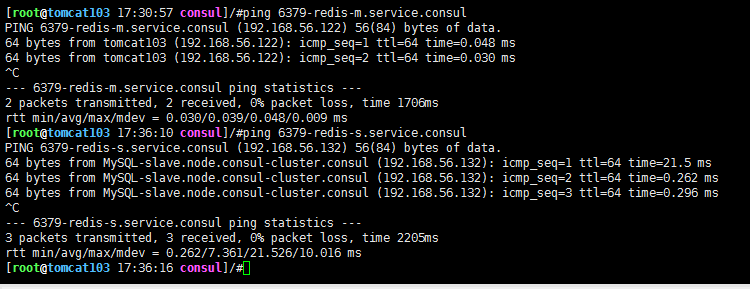
==================================================================================

更改两个服务器redis配置

 互换主从角色

在122上打开着两行注释

slaveof 192.168.56.132 6379

masterauth password

重启redis

service redis restart

在132上

#slaveof 192.168.56.122 6379

#masterauth password

重启服务

service redis restart


重新测试域名对应的数据库主从地址

 ping 6379-redis-m.service.consul

 ping 6379-redis-s.service.consul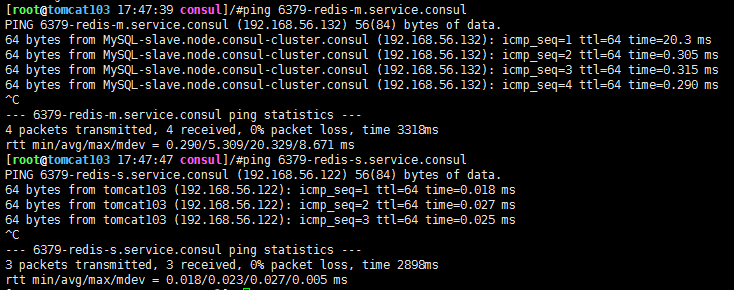
至此consul通过脚本自动发现redis主从高可用完成
使用consul实现分布式服务注册和发现--redis篇的更多相关文章
- 分布式服务注册和发现consul 简要介绍
Consul是HashiCorp公司推出的开源工具,用于实现分布式系统的服务发现与配置.与其他分布式服务注册与发现的方案,Consul的方案更"一站式",内置了服务注册与发现框 架 ...
- Docker+Consul+Registrator 实现服务注册与发现
Docker+Consul+Registrator实现服务注册与发现 逻辑图 实现nginx节点自动化加入容器IP代理 1.三台Consul agent server作为高可用通过Consul Tem ...
- 温故知新,.Net Core遇见Consul(HashiCorp),实践分布式服务注册与发现
什么是Consul 参考 https://www.consul.io https://www.hashicorp.com 使用Consul做服务发现的若干姿势 ASP.NET Core 发布之后通过命 ...
- .Net Core 商城微服务项目系列(二):使用Ocelot + Consul构建具备服务注册和发现功能的网关
1.服务注册 在上一篇的鉴权和登录服务中分别通过NuGet引用Consul这个包,同时新增AppBuilderExtensions类: public static class AppBuilderEx ...
- SpringCloud核心教程 | 第三篇:服务注册与发现 Eureka篇
Spring Cloud简介 Spring Cloud是一个基于Spring Boot实现的云应用开发工具,它为基于JVM的云应用开发中涉及的配置管理.服务发现.断路器.智能路由.微代理.控制总线.全 ...
- Consul之:服务注册与发现
一.服务的管理(注册与发现)有三种方式: 1:通过配置文件的方式静态注册2:通过HTTP API接口来动态注册(spring cloud使用方式,spring cloud中使用的是consul api ...
- Spring Cloud 之 Consul 知识点:服务注册与发现(类似工具:Eureka、ZooKeeper、Etcd)
资料 网址 springcloud(十三):注册中心 Consul 使用详解 http://ityouknow.com/springcloud/2018/07/20/spring-cloud-cons ...
- Spring Boot + Spring Cloud 构建微服务系统(一):服务注册和发现(Consul)
使用Consul提供注册和发现服务 什么是 Consul Consul 是 HashiCorp 公司推出的开源工具,用于实现分布式系统的服务发现与配置.与其它分布式服务注册与发现的方案,Consul ...
- 服务注册和发现(Consul)
使用Consul提供注册和发现服务 什么是 Consul Consul 是 HashiCorp 公司推出的开源工具,用于实现分布式系统的服务发现与配置.与其它分布式服务注册与发现的方案,Consul ...
随机推荐
- 微信小程序~上拉加载onReachBottom
代码: //页面上拉触底事件的处理函数 onReachBottom(e) { console.log("底部")// 滚动到页面执行 该 方法 wx.showToast({ tit ...
- .pro文件部分命令详解
#引入c++11 CONFIG += C++11 # 引入头文件的路径 INCLUDEPATH += D:\opencv\opencv3.2\configure\install\include # 引 ...
- 题解 洛谷P1236 【算24点】
不得不说,个人认为许多大佬们把程序想复杂了,所以码量很长,但是实际上这题并不要这么复杂... 可以考虑用一个\(dfs\)维护一个状态\(f(n)[a_1,a_2--a_n]\) 接下来我们暴力枚举两 ...
- PHP——file_put_contents()函数
前言 作为PHP的一个内置函数,他的作用就是将一个字符串写入文件 简介 使用 换行和追加写入 file_put_contents('./relation/bind.txt', $val['id'].' ...
- 2019.12.11 java程序中几种常见的异常以及出现此异常的原因
1.java.lang.NullpointerException(空指针异常) 原因:这个异常经常遇到,异常的原因是程序中有空指针,即程序中调用了未经初始化的对象或者是不存在的对象. 经常出现在创建对 ...
- 计蒜客 39268.Tasks-签到 (The 2019 ACM-ICPC China Shannxi Provincial Programming Contest A.) 2019ICPC西安邀请赛现场赛重现赛
Tasks It's too late now, but you still have too much work to do. There are nn tasks on your list. Th ...
- mysql 去除字符串中的空格
mysql> select " ddd dddee "; +--------------+ | ddd dddee | +--------------+ | ddd ddde ...
- Eclipse安装jbpm插件
1.1 eclipse mar 和neon有什么区别? Eclipse 是一个开放源代码的.基于Java的可扩展开发平台.就其本身而言,它只是一个框架和一组服务,用于通过插件组件构建开发环境. . ...
- 安装与配置HSDIS与JITWatch
本作者的系统: 操作系统版本及位数可通过uname -a命令查看,如下: Linux ubuntu 3.13.0-32-generic #57~precise1-Ubuntu SMP Tue Jul ...
- Monkey框架(基础知识篇) - monkey事件介绍
Monkey所执行的随机事件流中包含11大事件,分别是触摸事件.手势事件.二指缩放事件.轨迹事件.屏幕旋转事件.基本导航事件.主要导航事件.系统按键事件.启动Activity事件.键盘事件.其他类型事 ...