
Consul之:服务注册与发现
一、服务的管理(注册与发现)有三种方式:
1:通过配置文件的方式静态注册
2:通过HTTP API接口来动态注册(spring cloud使用方式,spring cloud中使用的是consul api)
3:使用consul client或consul api(程序)实现服务的注册和发现(Java非spring boot,cloud项目)
1.1、通过配置文件的方式静态注册
1.1.1、创建文件夹/etc/consul.d,
说明:.d表示一系列配置文件的存放目录(directory)

1.1.2、创建服务并写入上述文件夹中的一个文件

说明:
- 一个服务我们会配置为json格式:比如上述的单引号之间的形式
- 一个服务会写在一个json文件中
注意:如果上述文件夹没有权限进行操作,先改变文件夹权限,
我在window上,演示:
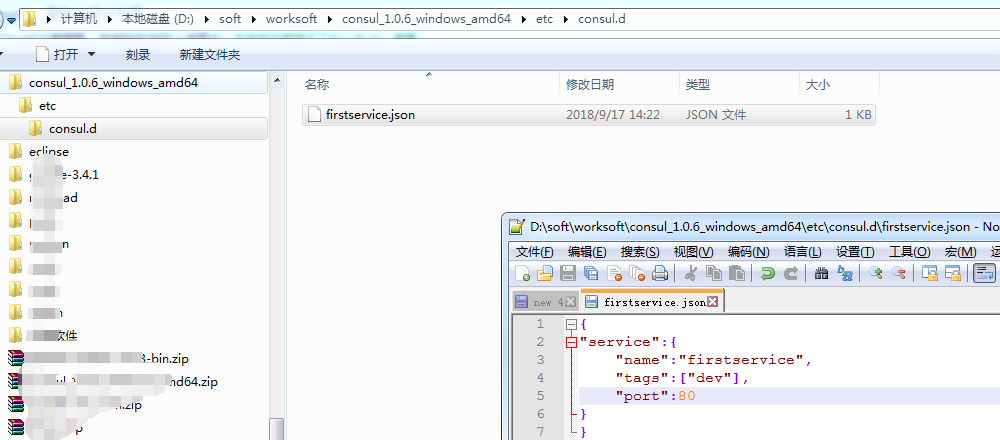
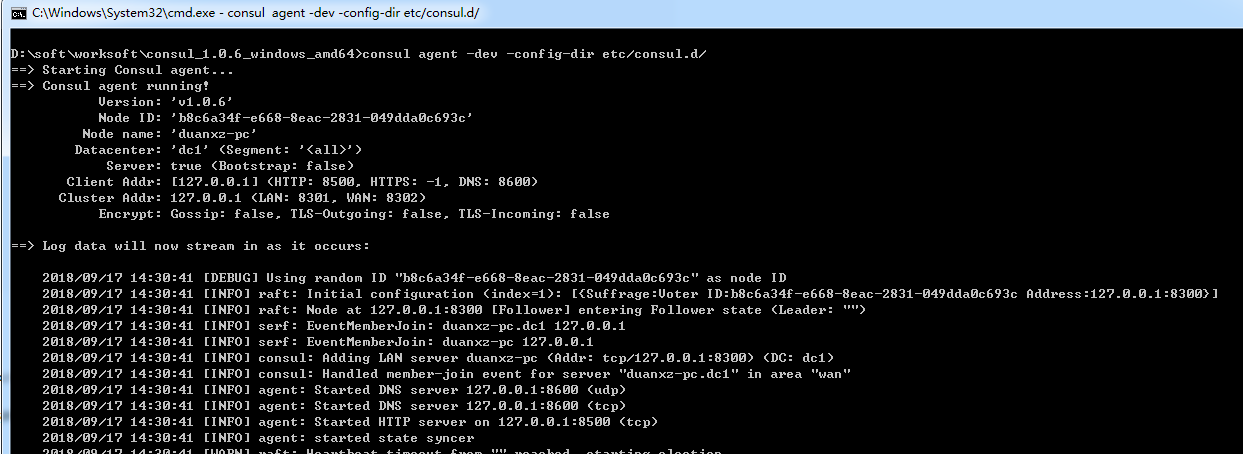
1.1.3、先启动consul进程,带上config-dir参数
切换屏幕-->
window上:D:\soft\worksoft\consul_1.0.6_windows_amd64>consul agent -dev -config-dir etc/consul.d/
说明:
- 根据-config-dir指定根据服务注册的目录中的文件来启动服务。
1.2:通过HTTP API接口来动态注册
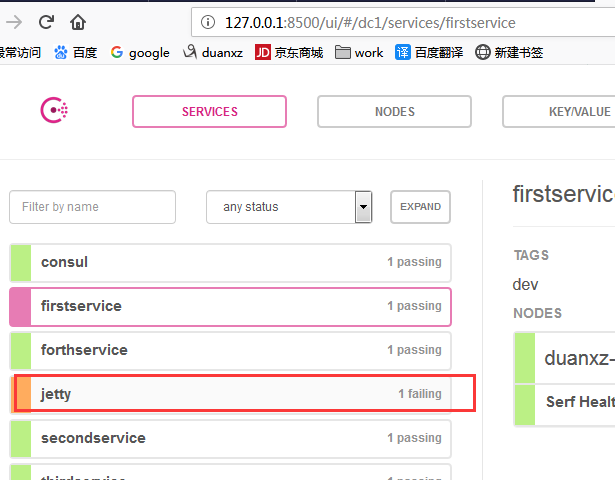
直接调用/v1/agent/service/register接口注册即可,需要注意的是:http method为PUT提交方式
如:
curl -X PUT -d '{"id": "jetty","name": "jetty","address": "192.168.1.200","port": 8080,"tags": ["dev"],"checks": [{"http": "http://192.168.1.104:9020/health","interval": "5s"}]}' http://192.168.1.100:8500/v1/agent/service/register
注意,这种方式,和上面的注册方式有一点不一样,body的参数,是上面service的值,这点需要注意。
结果:
1.3:使用Consul client或Consul api实现服务的注册和发现(Java非spring boot,spring cloud项目)
1.3.1、使用Consul Client
首先加入consul client的依赖
<dependency>

    <groupId>com.orbitz.consul</groupId>

    <artifactId>consul-client</artifactId>

    <version>0.15.1</version>

</dependency>
主类:ConsulClientDemo.java
package com.dxz.Consul_client;

import java.util.List;

import com.google.common.net.HostAndPort;

import com.orbitz.consul.AgentClient;

import com.orbitz.consul.Consul;

import com.orbitz.consul.HealthClient;

import com.orbitz.consul.model.agent.ImmutableRegCheck;

import com.orbitz.consul.model.agent.ImmutableRegistration;

import com.orbitz.consul.model.health.ServiceHealth;

public class ConsulClientDemo {

    static Consul consul = Consul.builder().withHostAndPort(HostAndPort.fromString("localhost:8500")).withPing(false).build();

    /**

     * 服务注册

     */

    public static void serviceRegister() {

        AgentClient agent = consul.agentClient();

        //健康检测

        ImmutableRegCheck check = ImmutableRegCheck.builder().http("http://localhost:9020/health").interval("5s").build();

        ImmutableRegistration.Builder builder = ImmutableRegistration.builder();

        builder.id("consul-server3").name("consul-server").addTags("v1").address("localhost").port(8080).addChecks(check);

        agent.register(builder.build());

    }

    /**

     * 服务获取

     */

    public static void serviceGet() {

        HealthClient client = consul.healthClient();

        String name = "consul-server";

        //获取所有服务

        System.out.println(client.getAllServiceInstances(name).getResponse().size());

        //获取所有正常的服务(健康检测通过的)

        List<ServiceHealth> responses = client.getHealthyServiceInstances(name).getResponse();

        for(ServiceHealth sh : responses ) {

            System.out.println(sh.getService());

        }

    }

    public static void main(String[] args) {

        serviceRegister();

        serviceGet();

        System.exit(0);

    }

}
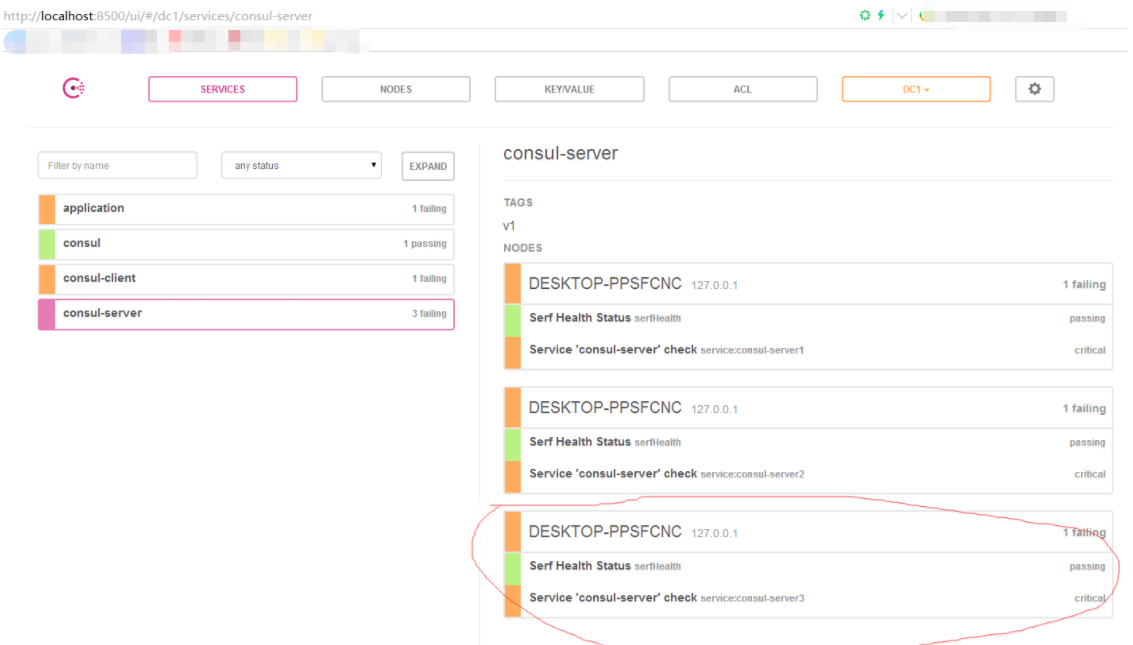
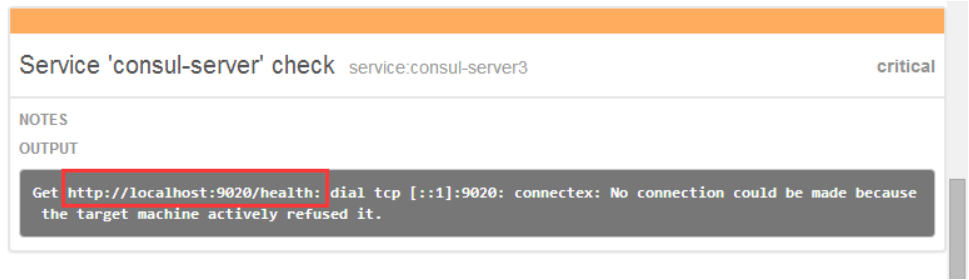
上面的注册后,看consul控制台如下:
1.3.2、使用Consul API
当然了,还可以使用如下consul api
        <dependency>

            <groupId>com.ecwid.consul</groupId>

            <artifactId>consul-api</artifactId>

            <version>1.2.2</version>

        </dependency>
主类:ConsulApiDemo.java

package com.dxz.Consul_client;

import java.util.List;

import java.util.Map;

import com.ecwid.consul.v1.ConsulClient;

import com.ecwid.consul.v1.ConsulRawClient;

import com.ecwid.consul.v1.agent.model.Service;

import com.ecwid.consul.v1.health.model.HealthService;

public class ConsulApiDemo {

    public static void serviceApiGet() {

         ConsulRawClient client = new ConsulRawClient("localhost", 8500);

         ConsulClient consul = new ConsulClient(client);

         //获取所有服务

         Map<String, Service> map = consul.getAgentServices().getValue();

         List<HealthService> list = consul.getHealthServices("consul-server", false, null).getValue();

         System.out.println(map.size()+"," +map);

         System.out.println("list" + list);

    }

    public static void main(String[] args) {

        serviceApiGet();

        System.exit(0);

    }

}
启动时的日志片段:
6,map={application=Service{id='application', service='application', tags=[], address='192.168.5.6', port=8080}, consul=Service{id='consul', service='consul', tags=[], address='', port=8300}, consul-client1=Service{id='consul-client1', service='consul-client', tags=[], address='DESKTOP-PPSFCNC', port=8501}, consul-server1=Service{id='consul-server1', service='consul-server', tags=[], address='DESKTOP-PPSFCNC', port=8503}, consul-server2=Service{id='consul-server2', service='consul-server', tags=[], address='DESKTOP-PPSFCNC', port=8504}, consul-server3=Service{id='consul-server3', service='consul-server', tags=[v1], address='localhost', port=8080}}

3,list=[HealthService{node=Node{node='DESKTOP-PPSFCNC', address='127.0.0.1'}, service=Service{id='consul-server1', service='consul-server', tags=[], address='DESKTOP-PPSFCNC', port=8503}, checks=[Node{node='DESKTOP-PPSFCNC', checkId='serfHealth', name='Serf Health Status', status=PASSING, notes='', output='Agent alive and reachable', serviceId='', serviceName=''}, Node{node='DESKTOP-PPSFCNC', checkId='service:consul-server1', name='Service 'consul-server' check', status=CRITICAL, notes='', output='parse http://DESKTOP-PPSFCNC:8503${management.contextPath}/health: invalid character "{" in host name', serviceId='consul-server1', serviceName='consul-server'}]}, HealthService{node=Node{node='DESKTOP-PPSFCNC', address='127.0.0.1'}, service=Service{id='consul-server2', service='consul-server', tags=[], address='DESKTOP-PPSFCNC', port=8504}, checks=[Node{node='DESKTOP-PPSFCNC', checkId='serfHealth', name='Serf Health Status', status=PASSING, notes='', output='Agent alive and reachable', serviceId='', serviceName=''}, Node{node='DESKTOP-PPSFCNC', checkId='service:consul-server2', name='Service 'consul-server' check', status=CRITICAL, notes='', output='parse http://DESKTOP-PPSFCNC:8504${management.contextPath}/health: invalid character "{" in host name', serviceId='consul-server2', serviceName='consul-server'}]}, HealthService{node=Node{node='DESKTOP-PPSFCNC', address='127.0.0.1'}, service=Service{id='consul-server3', service='consul-server', tags=[v1], address='localhost', port=8080}, checks=[Node{node='DESKTOP-PPSFCNC', checkId='serfHealth', name='Serf Health Status', status=PASSING, notes='', output='Agent alive and reachable', serviceId='', serviceName=''}, Node{node='DESKTOP-PPSFCNC', checkId='service:consul-server3', name='Service 'consul-server' check', status=CRITICAL, notes='', output='Get http://localhost:9020/health: dial tcp [::1]:9020: connectex: No connection could be made because the target machine actively refused it.', serviceId='consul-server3', serviceName='consul-server'}]}]
其中,spring cloud 使用的就是第二种consul api。
二、服务查询
两种查询方式:DNS和HTTP
2.1、DNS:

访问的服务名字:
- tag.servicename.service.consul tag和servicename都是创建服务的时候配置的
- DNS访问的端口是8600
2.2、HTTP:
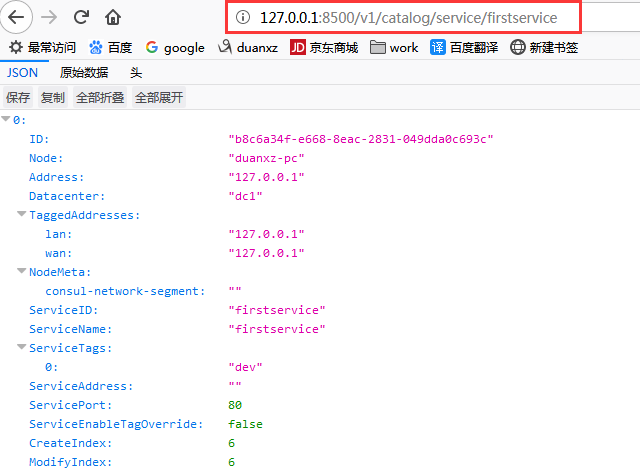
说明:
- 访问的路径:host:port/版本号/catalog/service/服务名
- Address:用于指定一个特定service的IP地址,默认情况下,使用的是该service使用的agent。
consul client的命令行演示
一、启动consul server
在安装好consul的ubuntu虚拟机上启动consul server,以server方式启动:
D:\soft\worksoft\consul_1.0.6_windows_amd64>consul agent -ui -server -data-dir=/data -bootstrap-expect 1 -bind 10.200.110.100
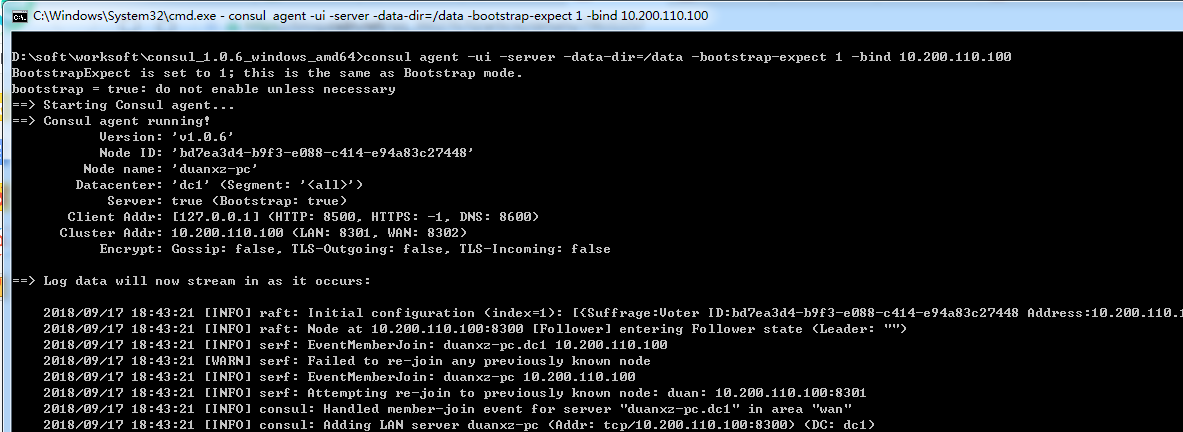
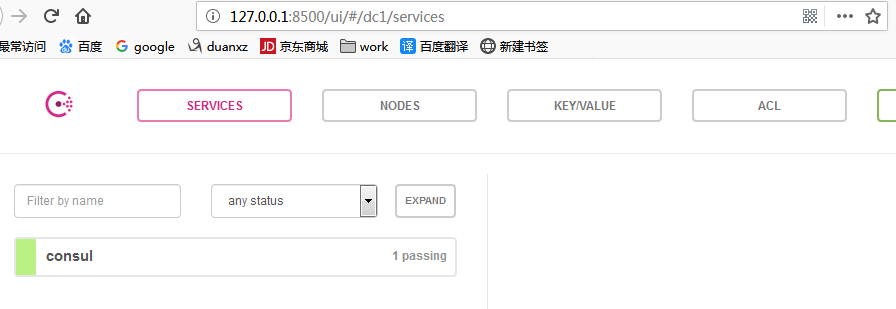
使用-ui参数启动server成功后,可以在浏览器中输入:http://localhost:8500/ui 看到如下界面
二、启动consul client
在本机上启动consul client
consul agent -data-dir /data -node=duan -advertise=10.200.110.13 -join=10.200.110.100
加入server节点成功后的截图如下
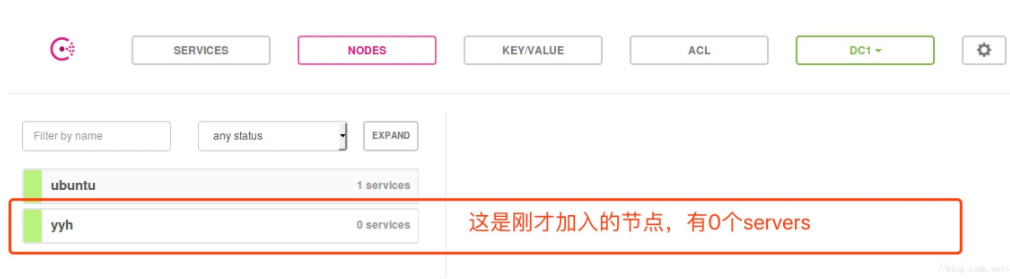
此时在web ui中查看节点,会发现多了一个节点,但是没有任何服务
示例:多个服务注册的情况
4.1、每一个服务注册到一个文件
假设现在又创建了一个secondservice服务,我会将该服务写入secondservice.json文件中去,如下:

使用http去访问:

说明:按照服务名去访问。
4.2、多个服务写在同一个json文件中

说明:
- 放在services中而不是service里(上边的单文件单服务是放在service里的)
- 多个服务放在一个数组里边
使用http去访问:

说明:按照服务名去访问。
注意:在实际开发中,微服务数量众多,
如果每个文件都放在一个文件里,文件会非常多,不好!
如果所有微服务都放在一个文件里,文件太大,也不好!
所以,需要二者结合。例如,假设有100个微服务,放在10个json文件中去,每个json文件存放10个服务。
Consul之:服务注册与发现的更多相关文章
- .netcore consul实现服务注册与发现-集群完整版
原文:.netcore consul实现服务注册与发现-集群完整版 一.Consul的集群介绍 Consul Agent有两种运行模式:Server和Client.这里的Server和Clien ...
- .netcore consul实现服务注册与发现-单节点部署
原文:.netcore consul实现服务注册与发现-单节点部署 一.Consul的基础介绍 Consul是HashiCorp公司推出的开源工具,用于实现分布式系统的服务发现与配置.与其他分 ...
- .netcore consul实现服务注册与发现-集群部署
一.Consul的集群介绍 Consul Agent有两种运行模式:Server和Client.这里的Server和Client只是Consul集群层面的区分,与搭建在Cluster之上的应用服务无关 ...
- Spring Cloud Consul 实现服务注册和发现
Spring Cloud 是一个基于 Spring Boot 实现的云应用开发工具,它为基于 JVM 的云应用开发中涉及的配置管理.服务发现.断路器.智能路由.微代理.控制总线.全局锁.决策竞选.分布 ...
- Consul初探-服务注册和发现
前言 经过上一篇的学习,现在已经来到了服务注册发现环节:Consul 的核心功能就是服务注册和发现,Consul 客户端通过将自己注册到 Consul 服务器集群,然后等待调用方去发现服务,实现代理转 ...
- 一个故事,一段代码告诉你如何使用不同语言(Golang&C#)提供相同的能力基于Consul做服务注册与发现
目录 引言 什么是微服务 传统服务 微服务 什么是服务注册与服务发现 为什么要使用不同的语言提供相同的服务能力 服务协调器 服务注册 Golang C#(.NetCore3.1) 服务发现 通过Htt ...
- 简单RPC框架-基于Consul的服务注册与发现
*:first-child { margin-top: 0 !important; } body>*:last-child { margin-bottom: 0 !important; } /* ...
- Spring Cloud Consul使用——服务注册与发现(注册中心)
整理自该文章 一.Consul 服务端接下来我们开发 Consul 的服务端,创建一个 spring-cloud-consul-producer 项目 1.添加依赖包 <dependencies ...
- spring boot2X整合Consul一服务注册与发现
Consul 是HashiCorp公司推出的开源工具,用于实现分布式系统的服务发现与配置. 关键特性: 服务注册/发现 数据强一致性保证 多数据中心 健康检查 key/value存储 1.下载 htt ...
- python使用consul进行服务注册和发现
阅读目录 一.安装启动consul 二.python服务注册 三.golang服务注册 四.通过API的方式获取信息 回到顶部 一.安装启动consul 1.通过docker快速安装 #获取docke ...
随机推荐
- tensorflow world language model
上文提到了pytorch里的world language model,那么怎么能不说tensorflow的实现呢,还是以tensorflow ptb的代码为例说说. 地址: https://githu ...
- restful : 面向资源架构
restful 规范 1. API与用户的通信协议,https协议 2. 域名 https://api.example.com 尽量将API部署在专用域名 https://example.org/ap ...
- Docker创建Tomcat镜像
1.创建Dockerfile文件 vi Dockerfile Dockerfile内容 FROM debian ADD ./jdk-8u191-linux-x64.tar.gz /usr/local/ ...
- python之路-----多线程与多进程
一.进程和线程的概念 1.进程(最小的资源单位): 进程:就是一个程序在一个数据集上的一次动态执行过程.进程一般由程序.数据集.进程控制块三部分组成. 程序:我们编写的程序用来描述进程要完成哪些功能以 ...
- 四:(之七_如何与运行中容器交互)Dockerfile语法梳理和实践
1.指定网络连接方式:--net=”” (bridge/host/none/container: 四种类型) 注:192.168.33.18 此IP是在vagrantfile中指定的虚拟机IP:c ...
- web在线智能四则运算挑战赛
本网站主要针对小学生,是一个智能在线学习和测试平台,平台有精美炫酷的网页,和可靠的数据,主要特色,自动出题.验证码机制.非空检测.正则匹配不同年级同学而出不同难度的题目,在线结算.时间控制,时间一到自 ...
- java中的Iterator和ListIterator的区别
(一)iterator迭代器 Collection的iterator方法返回一个实现了一个Iterator接口的对象 Iterator接口中包含三个方法: 1)E next() 2)boolean h ...
- Xcodebuild ipa shell
命令行下打包iOS App工程: #!/bin/sh # # How To Build ? #http://www.jianshu.com/p/3f43370437d2 #http://www.jia ...
- 爬虫案例(js动态生成数据)
需求:爬取https://www.xuexi.cn/f997e76a890b0e5a053c57b19f468436/018d244441062d8916dd472a4c6a0a0b.html页面中的 ...
- 排序算法练习--JAVA(:内部排序:插入、选择、冒泡、快速排序)
排序算法是数据结构中的经典算法知识点,也是笔试面试中经常考察的问题,平常学的不扎实笔试时候容易出洋相,回来恶补,尤其是碰到递归很可能被问到怎么用非递归实现... 内部排序: 插入排序:直接插入排序 选 ...