
setInterval定时器停止后,再重新启动
1.数据自动滚动显示(动态添加)
<li>

    <div class="FULeTi">

        <div class="SLeName">省份名称</div>

        <div class="SLeOne">三级</div>

        <div class="SLeTwo">四级</div>

        <div class="SLeThr">五级</div>

    </div>

    <div class="LeContent mouseStop01">

             <div class="LeConW LeSubFront01"></div>

     </div>

</li>
function initleftdiv(datas){

    $(".LeSubFront01").empty();

    $.each(datas,function(i,p){

        if(i < 22){

            $(".LeSubFront01").append('<div class="LeConSubOne"><div class="LeSub01">'+

                    p.QQLATN_NAME+'</div><div class="LeSub03">'+

                    p.QQ30+'</div><div class="LeSub03"><span>'+

                    p.QQ40+'</span></div><div class="LeSub03"><span>'+

                    p.QQ50+'</span></div></div>');

        }

    });

        var count = 21;//目前显示的最后一个元素下标

        var ivou = setInterval(function moveSet(){

    //            删除第一个元素把数组最后一个元素放到倒数第一个

                if(++count == datas.length){

                    count = -1;

                    return;

                }

                $(".LeSubFront01 .LeConSubOne:eq(0)").remove();

                var tmp = datas[count];

                $(".LeSubFront01").append('<div class="LeConSubOne"><div class="LeSub01">'+

                        tmp.QQLATN_NAME+'</div><div class="LeSub03">'+

                        tmp.QQ30+'</div><div class="LeSub03"><span>'+

                        tmp.QQ40+'</span></div><div class="LeSub03"><span>'+

                        tmp.QQ50+'</span></div></div>');

        }, 1000);

}
2.需求:鼠标移入,定时器停止滚动。鼠标移出,恢复自动滚动。
①设置一个全局变量等于true。
var mouseoverStop = true;
②在setInterval定时器中加一个if判断
if(mouseoverStop == true ){}
③鼠标移入移出时,进行mouseoverStop判断。mouseoverStop == true时启动定时器。mouseoverStop == false时关闭定时器
$(".mouseStop01").mouseover(function(){

        mouseoverStop = false;

    }).mouseout(function(){

        if(mouseoverStop == false){

            mouseoverStop = true;

        }

 });
此时,定时器的关闭与启动问题解决了。
3.但出现了一个bug,鼠标移入class="mouseStop01"区域时,定时器看似停止,但mouseover时鼠标在这个区域中,还是不停的判断mouseoverStop。如下
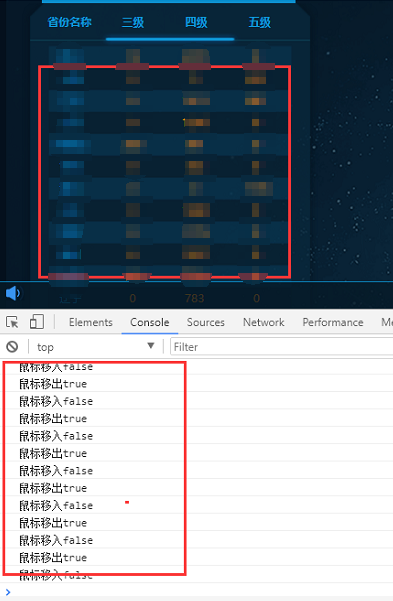
原因:setInterval每隔1s钟会进行一次if(mouseoverStop == true ){ }的判断。
解决方案:mouseover时,mouseoverStop == false,添加一个遮罩层。mouseout时,遮罩层隐藏。
if(mouseoverStop == false){ $(".mouseStop02").show();}
附全文代码:
html
<li>

    <div class="FULeTi">

        <div class="SLeName">省份名称</div>

        <div class="SLeOne">三级</div>

        <div class="SLeTwo">四级</div>

        <div class="SLeThr">五级</div>

    </div>

    <div class="LeContent mouseStop01">

        <div class="LeConW LeSubFront01"></div>

        <div class="mouseStop02"></div>

    </div>

</li>
css
.mouseStop01{    display: block;}

.mouseStop02{  width: 99%;  height: 45rem;  display: none;     position: absolute;    z-index:;    background-color: rgba(0,0,0,0);
js
var mouseoverStop = true;

function initleftdiv(datas){

    $(".LeSubFront01").empty();

    $.each(datas,function(i,p){

        if(i < 22){

            $(".LeSubFront01").append('<div class="LeConSubOne"><div class="LeSub01">'+

                    p.QQLATN_NAME+'</div><div class="LeSub03">'+

                    p.QQ30+'</div><div class="LeSub03"><span>'+

                    p.QQ40+'</span></div><div class="LeSub03"><span>'+

                    p.QQ50+'</span></div></div>');

        }

    });

        var count = 21;//目前显示的最后一个元素下标

        var ivou = setInterval(function moveSet(){

    //            删除第一个元素把数组最后一个元素放到倒数第一个

            if(mouseoverStop == true ){

                if(++count == datas.length){

                    count = -1;

                    return;

                }

                $(".LeSubFront01 .LeConSubOne:eq(0)").remove();

                var tmp = datas[count];

                $(".LeSubFront01").append('<div class="LeConSubOne"><div class="LeSub01">'+

                        tmp.QQLATN_NAME+'</div><div class="LeSub03">'+

                        tmp.QQ30+'</div><div class="LeSub03"><span>'+

                        tmp.QQ40+'</span></div><div class="LeSub03"><span>'+

                        tmp.QQ50+'</span></div></div>');

            }

        }, 1000);

    $(".mouseStop01").mouseover(function(){

        mouseoverStop = false;

        if(mouseoverStop == false){    $(".mouseStop02").show();}

    }).mouseout(function(){

        if(mouseoverStop == false){

            mouseoverStop = true;

           $(".mouseStop02").hide();

        }

    });

}
setInterval定时器停止后,再重新启动的更多相关文章
- 前端开发:setTimeout与setInterval 定时器与异步循环数组
前端开发:setTimeout与setInterval 定时器与异步循环数组 前言: 开通博客园三个月以来,随笔记录了工作中遇到的大大小小的难题,也看过无数篇令人启发的文章,我觉得这样的环境是极好的, ...
- setInterval的停止与启动
最近写代码,需要停止interval之后再重新启动,开始使用代码如下,发现无法重新启动 function func(){console.log("print")} //定时任务 v ...
- [转载] mysql5.6 删除之前的ibdata1文件后再重新生成,遇到[Warning] Info table is not ready to be used. Table 'mysql.slave_master_info' cannot be opened.问题
[转载] mysql5.6 删除之前的ibdata1文件后再重新生成,遇到[Warning] Info table is not ready to be used. Table 'mysql.slav ...
- supervisor更改某项目配置后 需要重新启动才有效
在linux服务器上部署了node项目,使用supervisor进行管理,supervisor是个好工具,具体介绍见这里about supervisor 梗概了该项目对的某些配置后,重新启动项目,发现 ...
- Windows已遇到关键问题,将在一分钟后自动重新启动,请立即保存工作
Windows已遇到关键问题,将在一分钟后自动重新启动,请立即保存工作 1. 把电脑右下角网络断开 2.同时按 "WIN+R" 打开“运行”命令窗口 输入“cmd”命令,按回车键“ ...
- vue_过滤器: 对要显示的数据进行特定格式化后再显示
过滤器 对要显示的数据进行特定格式化后再显示 并未改变原本的数据,可是产生新的对应的数据 <!DOCTYPE html> <html lang="en"> ...
- Win7系统出现提示: “Windows已遇到关键问题,将在一分钟后自动重新启动。”
1. 若用户在使用Win7系统时,遇到上述系统故障,建议重启电脑.等电脑开机自检一过,马上按键盘上的F8键,选择进入安全模式.在安全模式下,进行系统还原.其他的解决方法见下. 1.或者,在安全模式下, ...
- MySQL服务正在启动或停止中,请稍候片刻后再试一次【解决方案】
相信有些小伙伴在使用数据库的过程中会经常频繁的启动和停止MySQL服务,有时候会出现“服务正在启动或停止中,请稍候片刻后再试一次.”这样的提示,如下图所示. 于是乎想办法去解决这个问题,但是发现连强制 ...
- 个人学习记录1:二维数组保存到cookie后再读取
二维数组保存到cookie后再读取 var heartsArray = [[0,0,0,0,0,0,0,0,0,0,0,0,0,0,0,0],[0,0,0,0,0,0,0,0,0,0,0],[0,0, ...
随机推荐
- LeetCode 449. Serialize and Deserialize BST
原题链接在这里:https://leetcode.com/problems/serialize-and-deserialize-bst/description/ 题目: Serialization i ...
- 定量变量和定性变量的转换(Transform of Quantitative & Qualitative Variables)
定量变量(Quantitative Variables):也称为数值型变量(Numerical Variables),可以用连续值或离散值表示.比如:气温(连续值),学生人数(离散值). 为什么要对定 ...
- .getCellType()的几种类型值
CellType 类型 值 CELL_TYPE_NUMERIC 数值型 0 CELL_TYPE_STRING 字符串型 1 CELL_TYPE_FORMULA 公式型 2 CEL ...
- 拉格朗日插值法(c++)
已给sin0.32=0.314567,sin0.34=0.333487,sin0.36=0.352274,计算sin0.3367的值 #include <iostream> #includ ...
- var a = function(){}和var a = function(){}();的区别
var a = function(){ ... ... ... } 声明方法. var a = function(){ ... ... ... }(); 声明方法并执行 demo: var u = f ...
- [BUAA软工]团队任务拆解
团队任务分解 本次博客为项目alpha的任务拆解 WBS 任务估计 任务 时长(h) 语音模块:监听部分 5h 语音模块:消息处理:api 4h 语音模块:消息处理:内部数据结构 3h 语音模块:消息 ...
- semi-join子查询优化 -- Duplicate Weedout策略
duplicate weedout是执行semi-join子查询的一种策略. 将semi-join作为一个常规的inner join.然后使用一个临时表,将重复的记录排除. 假设,你有一个查询,你在寻 ...
- windows10 dos窗口输出卡住
https://blog.csdn.net/u013866090/article/details/82790864 原本每间隔一秒就会输出一次数据,但是当鼠标点击窗口的其他区域后输出就停止了,在点击键 ...
- (6)Flask项目之会员注册页面
一.添加注册页面的路由 修改app/home/views.py内容,追加注册("/regist/")页面的路由: # coding:utf8 from . import home ...
- python带参数的类装饰器
# -*- coding: utf-8 -*- # author:baoshan # 带参数的类装饰器(和不带参数的类装饰器有很大的不同) # 类装饰器的实现,必须实现__call__和__init_ ...