
jupytext library using in jupyter notebook

1. jupytext features
Jupytext can save Jupyter notebooks as
Markdown and R Markdown documents,
Julia, Python, R, Bash, Scheme, Clojure, Matlab, Octave, C++ and q/kdb+ scripts.
2. Way of using
There are multiple ways to use jupytext:
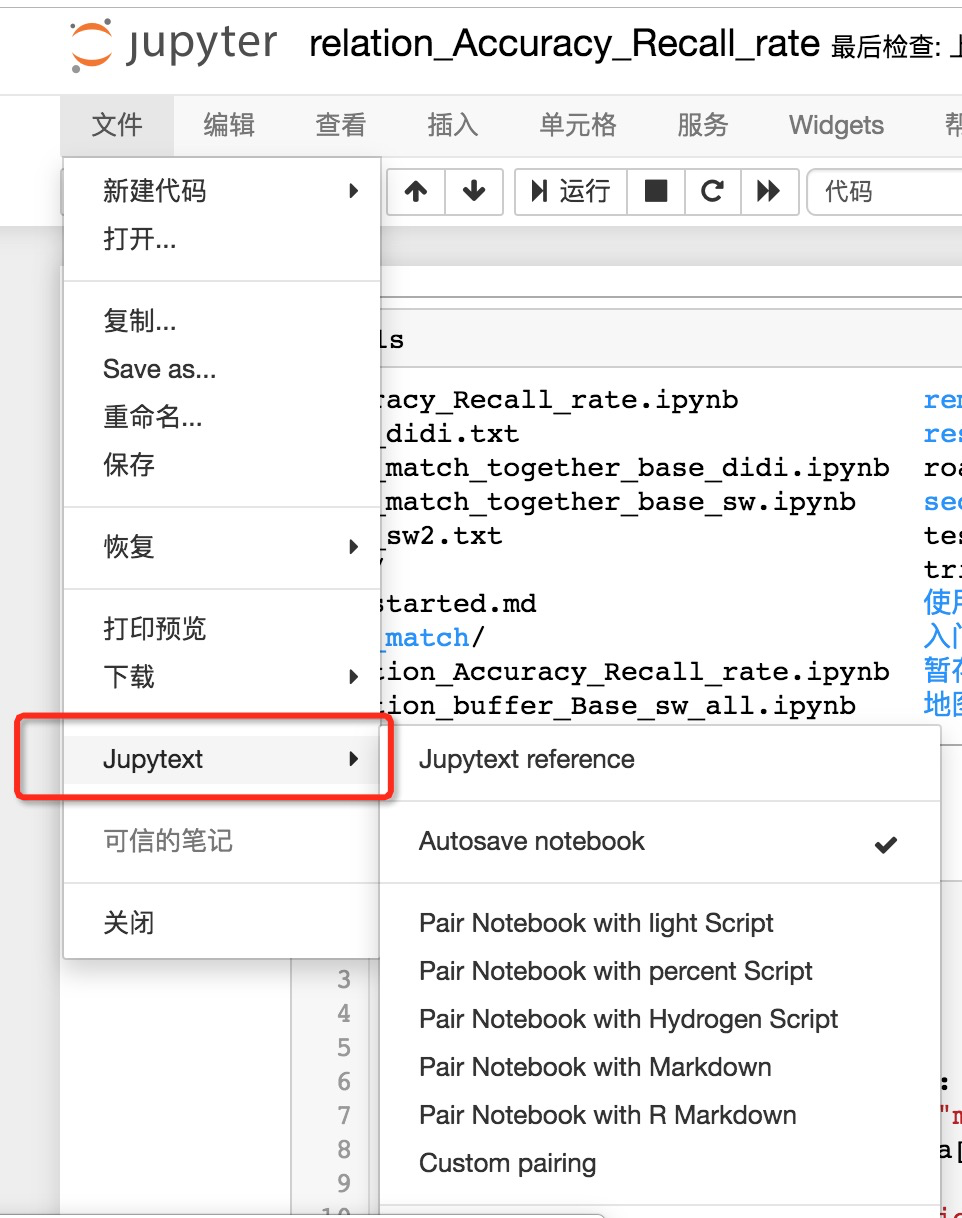
Directly from Jupyter Notebook or JupyterLab. Jupytext provides a contents manager that allows Jupyter to save your notebook to your favorite format (.py, .R, .jl, .md, .Rmd...) in addition to (or in place of) the traditional .ipynb file. The text representation can be edited in your favorite editor. When you're done, refresh the notebook in Jupyter: inputs cells are loaded from the text file, while output cells are reloaded from the .ipynb file if present. Refreshing preserves kernel variables, so you can resume your work in the notebook and run the modified cells without having to rerun the notebook in full.
On the command line. jupytext converts Jupyter notebooks to their text representation, and back. The command line tool can act on notebooks in many ways. It can synchronize multiple representations of a notebook, pipe a notebook into a reformatting tool like black, etc... It can also work as a pre-commit hook if you wish to automatically update the text representation when you commit the .ipynb file.
in Vim: edit your Jupyter notebooks, represented as a Markdown document, or a Python script, with jupytext.vim.
3. usage
- Writing notebooks as plain text
- Collaborating on Jupyter Notebooks
- Code refactoring

4. installation
pip install jupytext --upgrade
conda install -c conda-forge jupytext
- c: channel, conda-forge is a github organization containing repositories of conda recipes. Thanks to some awesome continuous integration providers (AppVeyor, CircleCI and TravisCI), each repository, also known as a feedstock, automatically builds its own recipe in a clean and repeatable way on Windows, Linux and OSX.
reference: https://github.com/mwouts/jupytext#per-notebook-configuration
jupytext library using in jupyter notebook的更多相关文章
- Jupyter Notebook 27绝技——27 Jupyter Notebook tips, tricks and shortcuts
转载自:https://www.dataquest.io/blog/jupyter-notebook-tips-tricks-shortcuts/ Jupyter notebook, formerly ...
- 27个Jupyter Notebook使用技巧及快捷键(翻译版)
Jupyter Notebook Jupyter Notebook 以前被称为IPython notebook.Jupyter Notebook是一款能集各种分析包括代码.图片.注释.公式及自己画的图 ...
- jupyter notebook的架构
最近项目需要改写jupyter notebook的内核,由于内功不够,英语过差,读文档真的是心痛,然后各种搜索找到了一篇不错的讲解. 转自:http://blog.just4fun.site/jupy ...
- Jupyter Notebook不能在系统命令行里全局启动
Anaconda安装好Juypyter Notebook之后,只能在base环境里启动,在系统的命令行里要全局启动Jupyter NoteBook失败了 C:\Users\HP>jupyter ...
- Jupyter Notebook 介绍 安装和使用技巧
Jupyter Notebook介绍.安装及使用教程 原文链接:https://www.jianshu.com/p/91365f343585 目录一.什么是Jupyter Notebook? 1. 简 ...
- linux安装python3 ,安装IPython ,安装jupyter notebook
安装python3 下载到 /opt/中 1.下载python3源码,选择3.6.7因为ipython依赖于>3.6的python环境wget https://www.python.org ...
- windows10 下安装tensorflow 并且在jupyter notebook 上使用tensorflow
一.安装jupyter notebook并配置环境 首先建议大家安装anaconda,最新版本请到官网下载(点击下载连接),没错,直接点击下载python3.6版本的(当然选择做自己电脑相应的位数,我 ...
- 在jupyter notebook中运行R语言
要想在jupyter notebook中运行R语言其实非常简单,按顺序安装下面扩展包即可: install.package('repr','IRdisplay','evaluate','crayon' ...
- Ubuntu18.04 + CUDA9.0 + cuDNN7.3 + Tensorflow-gpu-1.12 + Jupyter Notebook深度学习环境配置
目录 一.Ubuntu18.04 LTS系统的安装 1. 安装文件下载 2. 制作U盘安装镜像文件 3. 开始安装 二.设置软件源的国内镜像 1. 设置方法 2.关于ubuntu镜像的小知识 三.Nv ...
随机推荐
- public interface ICloneable
using System.Runtime.InteropServices; namespace System{ // // 摘要: // 支持克隆,即用与现有实例相同的值创建类的新实例. [ComVi ...
- [转帖]Linux企业运维人员最常用150个命令汇总
Linux企业运维人员最常用150个命令汇总 https://clsn.io/clsn/lx998.html 基本上都用过了. 命令 功能说明 线上查询及帮助命令(2个) man 查看命令帮助,命令的 ...
- SQL——LIKE操作符
一.LIKE操作符的基本用法 LIKE操作符用于在WHERE子句中,搜索相似.类似的数据. LIKE操作符语法: SELECT 列名1,列名2... FROM 表名 WHERE 列名 LIKE xxx ...
- PAT(B) 1040 有几个PAT(Java)
题目链接:1040 有几个PAT (25 point(s)) 题目描述 字符串 APPAPT 中包含了两个单词 PAT,其中第一个 PAT 是第 2 位§,第 4 位(A),第 6 位(T):第二个 ...
- Go语言 (指针)
区别于C/C++中的指针,Go语言中的指针不能进行偏移和运算,是安全指针. 要搞明白Go语言中的指针需要先知道3个概念:指针地址.指针类型和指针取值. Go语言中的指针 Go语言中的函数传参都是值拷贝 ...
- 面试题:在一个文件中有 10G 个整数,乱序排列,要求找出中位数(内存限制为2G)
假设整数为32bit,4个字节存储 这种题目,首先想到的是分而治之.将文件中数字分组.然后遍历文件中的数字,按分组进行计数.最后找到中位数所在的分组区间 1.如果10G个整数都为同一个,那么10G整数 ...
- python 获取mysql数据库列表以及用户权限
一.需求分析 需要统计出当前数据库的所有数据库名,以及每个用户的授权信息. 获取所有数据库 在mysql里面,使用命令: show databases 就可以获取所有数据库了 获取所有用户 执行命令: ...
- 树卷积神经网络Tree-CNN: A Deep Convolutional Neural Network for Lifelong Learning
树卷积神经网络Tree-CNN: A Deep Convolutional Neural Network for Lifelong Learning 2018-04-17 08:32:39 看_这是一 ...
- go 基本IO接口
package main import ( "fmt" "io" "strings" ) func ReadFrom(reader io.R ...
- [高清·非影印]Spring实战+SpringBoot实战+Spring微服务实战+SpringCloud微服务实战(全4本)
------ 郑重声明 --------- 资源来自网络,纯粹共享交流, 如果喜欢,请您务必支持正版!! --------------------------------------------- 下 ...