
Python模块:configparser、hashlib、(subprocess)
configparser模块:
此模块用于生成和修改常见配置文档。
一个常见配置文件(.ini的后缀名)格式如下:
[DEFAULT]    #  DEFAULT 是指后面的字典里都会默认有的内容

ServerAliveInterval = 45

Compression = yes

CompressionLevel = 9

ForwardX11 = yes

[bitbucket.org]

User = hg

[topsecret.server.com]

Port = 50022

ForwardX11 = no
解析配置文件:
>>> import configparser

>>> config = configparser.ConfigParser()   # 开始解析配置文件  # 生成ConfigParser的一个对象config

>>> config.sections()  # 返回配置文件中的key

[]       # 没有read之前 config.sections()是个空列表

>>> config.read('example.ini')   #  read之后, config这个变量就变成了类似字典的数据类型,用法跟字典差不多  # read()之后,就往config这个对象里面添加了 配置文件中的信息

['example.ini']

>>> config.sections()    # read之后就得到了配置文件中的keys

['bitbucket.org', 'topsecret.server.com']

# 判断是否存在某个key

>>> 'bitbucket.org' in config

True

>>> 'bytebong.com' in config

False

>>> config['bitbucket.org']['User']

'hg'

>>> config['DEFAULT']['Compression']

'yes'

>>> topsecret = config['topsecret.server.com']

>>> topsecret['ForwardX11']

'no'

>>> topsecret['Port']

''

>>> for key in config['bitbucket.org']: print(key)    # 循环某个key下的value  # 由于DEFAULT是每个里面都有的 ,所以也会打印出DEFAULT里面的内容

...

user

compressionlevel

serveraliveinterval

compression

forwardx11

>>> config['bitbucket.org']['ForwardX11']

'yes'
增删改查语法:
配置文件如下:
[group1]

k1 = v1

k2:v2

[group2]

k1 = v1
对上面的配置文件增删改查(以Python2为例):(和字典的增删改查类似)
import ConfigParser

config = ConfigParser.ConfigParser()  # 在Python3中改成了小写 configparser

config.read('i.cfg')

# ########## 读 ##########

secs = config.sections()

print secs

options = config.options('group2')

print options

item_list = config.items('group2')

print item_list

val = config.get('group1','key')

val = config.getint('group1','key')

# ########## 改写 ##########

sec = config.remove_section('group1')

config.write(open('i.cfg', "w"))

sec = config.has_section('wupeiqi')

sec = config.add_section('wupeiqi')

config.write(open('i.cfg', "w"))

config.set('group2','k1',11111)

config.write(open('i.cfg', "w"))

config.remove_option('group2','age')

config.write(open('i.cfg', "w"))
hashlib加密模块:
同一个内容经过 MD5加密后得到结果永远都是唯一的。而且经过MD5处理后的结果是不可逆的, 由密文无法反推明文,只能够利用撞库的方式去尝试反解,所以密码尽量设置的没有规律、复杂一点。
import hashlib

m = hashlib.md5()

m.update(b'hello')   # 如下面关于update的解释, update括号里面必须是二进制格式的bytes,只有这种形式才是可编译的数据类型

m.update(b'neo')

print(m.digest())

print(m.hexdigest())  # digest()和hexdigest()的区别看下面的解释

# 打印结果:

# b'\xad\xf1\x11\xe0&\x80;\xda\x00\xd6\xfc\xb6 \xf0&\x9c'

# adf111e026803bda00d6fcb620f0269c

'''

hash.update(arg)

Update the hash object with the object arg, which must be interpretable as a buffer of bytes. Repeated calls are equivalent to a single call with the concatenation of all the arguments: m.update(a); m.update(b) is equivalent to m.update(a+b).

hash.digest()

Return the digest of the data passed to the update() method so far. This is a bytes object of size digest_size( the size of the resulting hash in bytes. ) which may contain bytes in the whole range from 0 to 255.

hash.hexdigest()

Like digest() except the digest is returned as a string object of double length, containing only hexadecimal digits. This may be used to exchange the value safely in email or other non-binary environments.

'''
字符串转成bytes的方法:
一:
a = "abc"

b = bytes(a,encoding="utf-8")   #  利用bytes()把变量a转换成bytes类型
二:
>>> s = "abc"

>>> b = s.encode("utf-8")
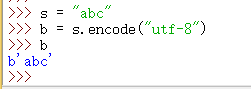
.encode()用法:

subprocess模块:
标准写法:
subprocess.run(['df','-h'],stderr=subprocess.PIPE,stdout=subprocess.PIPE,check=True)
涉及到管道|的命令需要这样写:
subprocess.run('df -h|grep disk1',shell=True) #shell=True的意思是这条命令直接交给系统去执行,不需要python负责解析
Popen()方法
常用参数:
- args:shell命令,可以是字符串或者序列类型(如:list,元组)
- stdin, stdout, stderr:分别表示程序的标准输入、输出、错误句柄
- preexec_fn:只在Unix平台下有效,用于指定一个可执行对象(callable object),它将在子进程运行之前被调用
- shell:同上
- cwd:用于设置子进程的当前目录
- env:用于指定子进程的环境变量。如果env = None,子进程的环境变量将从父进程中继承。
Popen会在发起命令后立刻返回,而不等命令执行结果。
剩下的。。。真的憋不出该怎么写了,,, 以后慢慢学吧
Python模块:configparser、hashlib、(subprocess)的更多相关文章
- python 常用模块 time random os模块 sys模块 json & pickle shelve模块 xml模块 configparser hashlib subprocess logging re正则
python 常用模块 time random os模块 sys模块 json & pickle shelve模块 xml模块 configparser hashlib subprocess ...
- python3之xml&ConfigParser&hashlib&Subprocess&logging模块
1.xml模块 XML 指可扩展标记语言(eXtensible Markup Language),标准通用标记语言的子集,是一种用于标记电子文件使其具有结构性的标记语言. XML 被设计用来传输和存储 ...
- python基础-7.3模块 configparser logging subprocess os.system shutil
1. configparser模块 configparser用于处理特定格式的文件,其本质上是利用open来操作文件. 继承至2版本 ConfigParser,实现了更多智能特征,实现更有可预见性,新 ...
- python 模块之-hashlib
python 模块hashlib import hashlib m=hashlib.md5() # 生成MD5加密对象 m.update('jiami-string'.encode(' ...
- python 模块之hashlib
Hashlib模块 Python里面的hashlib模块提供了很多加密的算法,这里介绍一下hashlib的简单使用事例,用hashlib的md5算法加密数据,其他的所有加密算法使用方式上基本类似. h ...
- Python模块之OS,subprocess
1.os 模块 简述: os 表示操作系统 该模块主要用来处理与系统相关操作 最常用的是文件操作 打开 获取 写入 删除 复制 重命名 常用操作 os.getcwd() : 返回当前文件所在文件夹路径 ...
- python模块 os&sys&subprocess&hashlib模块
os模块 # os模块可根据带不带path分为两类 # 不带path print(os.getcwd()) # 得到当前工作目录 print(os.name) # 指定你正在使用的操作系统,windo ...
- json/pickle/shelve/xml/configparser/hashlib/subprocess - 总结
序列化:序列化指把内存里的数据类型转成字符串,以使其能存储到硬盘或通过网络传输到远程,因为硬盘或网络传输时只能接受bytes为什么要序列化:可以直接把内存数据(eg:10个列表,3个嵌套字典)存到硬盘 ...
- 常用模块之hashlib,subprocess,logging,re,collections
hashlib 什么是hashlib 什么叫hash:hash是一种算法(3.x里代替了md5模块和sha模块,主要提供 SHA1, SHA224, SHA256, SHA384, SHA512 ,M ...
- python模块学习 hashlib
一.hashlib概述 涉及加密服务:14. Cryptographic Services 其中 hashlib是涉及安全散列和消息摘要,提供多个不同的加密算法借口,如SHA1.SHA224.SHA2 ...
随机推荐
- zoj3699Dakar Rally
链接 开两个队列 一个维护价格从大到小用来每次更新买油的价格 让每次都加满 如果当前价格比队列里的某价格低的话就更新 另开以优先队列维护价格由小到大 来更新此时用的油是什么油价的 并减掉 #inclu ...
- [转]asp.net 跨域单点登录
本文转自:http://tech.e800.com.cn/articles/2009/814/1250212319986_1.html 单点登录(Single Sign On),简称为 SSO,是目前 ...
- AJPFX对equals()方法和==异同的比较
equals()方法是Object类的方法,所有的类都集成了此方法,还有部分类重写了这个方法,我们看一下Object类中关于该方法的的源码: public boolean equals(Object ...
- SceneAction$$FastClassByCGLIB$$7330f7b9.invoke(int, Object, Object[]) line: not available
现象:在调试状态下,断点可以进入ACTION ,当调用service的时候,发现无法进入service中的断点,就报了题目中的错误. 过程:1.降低JDK.因为本工程是用JDK1.6编译的,maven ...
- Asp.Net控件的客户端命名
我们在用ASP.NET写出来的网页,用浏览器来查看生成的客户端代码的时候经常看到这样的代码:GridView1_ctl101_WebUserControl1_webuserControlButton, ...
- [Windows Server 2008] PHP安装Memcached
★ 欢迎来到[护卫神·V课堂],网站地址:http://v.huweishen.com★ 护卫神·V课堂 是护卫神旗下专业提供服务器教学视频的网站,每周更新视频.★ 本节我们将带领大家:Windows ...
- [转] 随机数是骗人的,.Net、Java、C为我作证
(转自:随机数是骗人的,.Net.Java.C为我作证 - 杨中科 原文日期:2014.05.12) 几乎所有编程语言中都提供了"生成一个随机数"的方法,也就是调用这个方法会生 ...
- OpenMP入门教程(一)
什么是OpenMP Open Multi-Processing的缩写,是一个应用程序接口(API),可用于显式指导多线程.共享内存的并行性. 在项目程序已经完成好的情况下不需要大幅度的修改源代码,只需 ...
- webgl 的空间变换(下):空间变换
在网上看了很多关于在三维世界中怎么把一个顶点经过一步步变化,最终呈现在我们的屏幕上的. 其实很多博客或者书籍已经讲的很清楚了,那为什么我还要特别再写一次博客来阐述自己观点呢?(这里只针对那些学习web ...
- iview构建 初始化的时候不要装ESlint 太烦人了
iview构建 Node.js Vue(全局安装) npm install -g vue-cli npm install vue-cli 问题:发现如果不全局安装VUE-cli,\n在它初始化的时候, ...