
<Spring Cloud>入门二 Eureka Client
1.搭建一个通用工程
1.1 pom 文件
<?xml version="1.0" encoding="UTF-8"?>

<project xmlns="http://maven.apache.org/POM/4.0.0"

         xmlns:xsi="http://www.w3.org/2001/XMLSchema-instance"

         xsi:schemaLocation="http://maven.apache.org/POM/4.0.0 http://maven.apache.org/xsd/maven-4.0.0.xsd">

    <parent>

        <artifactId>spring-cloud-learning</artifactId>

        <groupId>org.maple</groupId>

        <version>0.0.1-SNAPSHOT</version>

    </parent>

    <modelVersion>4.0.0</modelVersion>

    <artifactId>ms-common-api</artifactId>

    <dependencies>

        <dependency>

            <groupId>org.projectlombok</groupId>

            <artifactId>lombok</artifactId>

        </dependency>

    </dependencies>

</project>
1.2 数据库表
Create Table

CREATE TABLE `dept` (

  `deptno` bigint(20) NOT NULL AUTO_INCREMENT,

  `dname` varchar(60) DEFAULT NULL,

  `db_source` varchar(60) DEFAULT NULL,

  PRIMARY KEY (`deptno`)

) ENGINE=InnoDB AUTO_INCREMENT=6 DEFAULT CHARSET=utf8
1.3 实体类
此处使用了 lombok,省去了getter/setter 等编写
package org.maple.entity;

import lombok.AllArgsConstructor;

import lombok.Data;

import lombok.NoArgsConstructor;

import lombok.experimental.Accessors;

import java.io.Serializable;

/**

 * @author mapleins

 * @Date 2019-01-08 21:35

 * @Desc 部门实体类

 **/

@AllArgsConstructor

@NoArgsConstructor

@Data

@Accessors(chain = true) //可以链式编程

public class Dept implements Serializable {

    private Long deptNo;

    private String dName;

    private String db_source;//来自哪个数据库

//    public static void main(String[] args) {

//        Dept dept = new Dept();

//        dept.setDeptNo(11l).setDName("技术部").setDb_source("dept"); //链式编程

//        System.out.println(dept);

//    }

}
2. 创建一个Department 的提供方,并且注册服务到 eureka server 上
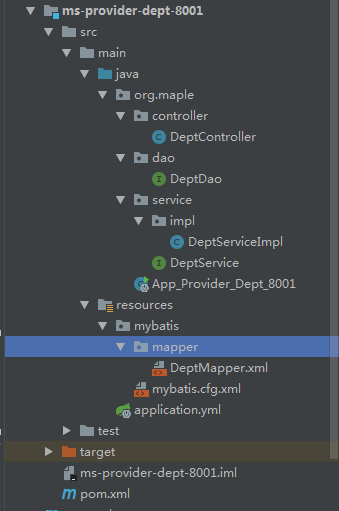
实现了查找一个部门,查找所有部门,添加一个部门的接口
项目结构:
2.1 pom 文件
<?xml version="1.0" encoding="UTF-8"?>

<project xmlns="http://maven.apache.org/POM/4.0.0"

         xmlns:xsi="http://www.w3.org/2001/XMLSchema-instance"

         xsi:schemaLocation="http://maven.apache.org/POM/4.0.0 http://maven.apache.org/xsd/maven-4.0.0.xsd">

    <parent>

        <artifactId>spring-cloud-learning</artifactId>

        <groupId>org.maple</groupId>

        <version>0.0.1-SNAPSHOT</version>

    </parent>

    <modelVersion>4.0.0</modelVersion>

    <artifactId>ms-provider-dept-8001</artifactId>

    <dependencies>

        <dependency>

            <groupId>org.maple</groupId>

            <artifactId>ms-common-api</artifactId>

            <version>0.0.1-SNAPSHOT</version>

        </dependency>

        <dependency>

            <groupId>org.springframework.cloud</groupId>

            <artifactId>spring-cloud-starter-netflix-eureka-client</artifactId>

        </dependency>

        <dependency>

            <groupId>org.springframework.boot</groupId>

            <artifactId>spring-boot-starter-web</artifactId>

        </dependency>

        <dependency>

            <groupId>junit</groupId>

            <artifactId>junit</artifactId>

        </dependency>

        <dependency>

            <groupId>mysql</groupId>

            <artifactId>mysql-connector-java</artifactId>

        </dependency>

        <dependency>

            <groupId>com.alibaba</groupId>

            <artifactId>druid</artifactId>

        </dependency>

        <dependency>

            <groupId>ch.qos.logback</groupId>

            <artifactId>logback-core</artifactId>

        </dependency>

        <dependency>

            <groupId>org.mybatis.spring.boot</groupId>

            <artifactId>mybatis-spring-boot-starter</artifactId>

        </dependency>

        <dependency>

            <groupId>org.springframework.boot</groupId>

            <artifactId>spring-boot-starter-web</artifactId>

        </dependency>

        <dependency>

            <groupId>org.springframework.boot</groupId>

            <artifactId>spring-boot-starter-test</artifactId>

        </dependency>

    </dependencies>

</project>
2.2 编写 application.yml 文件
defaultZone 标识 注册到哪个 Eureka Server 上
server:

  port: 8001

eureka:

  client:

    service-url:

      defaultZone: http://eureka-server01:8761/eureka/,http://eureka-server02:8762/eureka/

mybatis:

  config-location: classpath:mybatis/mybatis.cfg.xml

  type-aliases-package: org.maple.entity

  mapper-locations: classpath:mybatis/mapper/**/*.xml

spring:

  application:

    name: ms-provider-dept

  datasource:

    type: com.alibaba.druid.pool.DruidDataSource

    driver-class-name: com.mysql.jdbc.Driver

    url: jdbc:mysql://localhost:3306/cloudDB01

    username: root

    password: root

    dbcp2:

      min-idle: 5

      initial-size: 5

      max-total: 5

      max-wait-millis: 200
2.3 编写 mybatis 配置文件,由于和spring整合后会将配置内容转移到 Spring 配置文件中,此处只是写出来
<?xml version="1.0" encoding="UTF-8" ?>

<!DOCTYPE configuration PUBLIC "-//mybatis.org//DTD Config 3.0//EN" "http://mybatis.org/dtd/mybatis-3-config.dtd">

<configuration>

    <settings>

        <setting name="cacheEnabled" value="true"/>

    </settings>

</configuration>
2.4 编写Dao层以及映射文件mapper
package org.maple.dao;

import org.apache.ibatis.annotations.Mapper;

import org.maple.entity.Dept;

import java.util.List;

/**

 * @author mapleins

 * @Date 2019-01-08 22:31

 * @Desc

 **/

@Mapper

public interface DeptDao {

    boolean addDept(Dept dept);

    Dept findById(Long deptNo);

    List<Dept> findAll();

}
<?xml version="1.0" encoding="UTF-8" ?>

<!DOCTYPE mapper PUBLIC "-//mybatis.org//DTD Mapper 3.0//EN" "http://mybatis.org/dtd/mybatis-3-mapper.dtd">

<!--namespace 名称空间

         作用:用于绑定接口,即使用namespace将映射文件和接口绑定,就不需要写实现类了

-->

<mapper namespace="org.maple.dao.DeptDao">

    <select id="findById" resultType="org.maple.entity.Dept">

        SELECT deptno deptNo,dname dName,db_source

        FROM dept

        WHERE deptno = #{deptNo}

    </select>

    <select id="findAll" resultType="org.maple.entity.Dept">

        SELECT deptno deptNo,dname dName,db_source

        FROM dept

    </select>

    <insert id="addDept">

        insert into dept(dname,db_source) VALUES (${dName},DATABASE());

    </insert>

</mapper>
2.5 编写Service层
package org.maple.service;

import org.maple.entity.Dept;

import java.util.List;

/**

 * @author mapleins

 * @Date 2019-01-08 22:41

 * @Desc

 **/

public interface DeptService {

    boolean add(Dept dept);

    Dept find(Long deptNo);

    List<Dept> list();

}
package org.maple.service.impl;

import org.maple.dao.DeptDao;

import org.maple.entity.Dept;

import org.maple.service.DeptService;

import org.springframework.beans.factory.annotation.Autowired;

import org.springframework.stereotype.Service;

import java.util.List;

/**

 * @author mapleins

 * @Date 2019-01-08 22:42

 * @Desc

 **/

@Service

public class DeptServiceImpl implements DeptService {

    @Autowired

    private DeptDao deptDao;

    @Override

    public boolean add(Dept dept) {

        return deptDao.addDept(dept);

    }

    @Override

    public Dept find(Long deptNo) {

        return deptDao.findById(deptNo);

    }

    @Override

    public List<Dept> list() {

        return deptDao.findAll();

    }

}
2.6 编写controller 层
package org.maple.controller;

import org.maple.entity.Dept;

import org.maple.service.DeptService;

import org.springframework.beans.factory.annotation.Autowired;import org.springframework.web.bind.annotation.*;

import java.util.List;

/**

 * @author mapleins

 * @Date 2019-01-08 22:45

 * @Desc

 **/

@RestController

public class DeptController {

    @Autowired

    private DeptService service;

    @PostMapping("/dept/add")

    public boolean add(@RequestBody Dept dept){

        return service.add(dept);

    }

    @GetMapping("/dept/get/{id}")

    public Dept get(@PathVariable("id") Long id){

        return service.find(id);

    }

    @GetMapping("/dept/list")

    public List<Dept> list(){

        return service.list();

    }

}
2.7 编写启动类
此处添加 @EnableEurekaClient ,说明这是一个Eureka的客户端,并将这个工程注册到 Eureka注册中心上
package org.maple;

import org.springframework.boot.SpringApplication;

import org.springframework.boot.autoconfigure.SpringBootApplication;import org.springframework.cloud.netflix.eureka.EnableEurekaClient;

/**

 * @author mapleins

 * @Date 2019-01-12 17:13

 * @Desc

 **/

@SpringBootApplication

@EnableEurekaClient

public class App_Provider_Dept_8001 {

    public static void main(String[] args) {

        SpringApplication.run(App_Provider_Dept_8001.class,args);

    }

}
2.8 启动工程
我们可以看到 eureka 注册中心出现了该服务的名字,说明注册成功

服务的自己调自己也是成功的

3. 服务的发现
3.1 在 Controller 层 注入 @DiscoveryClient ,就可以显示服务信息
    /**

     * 获取服务信息

     */

    @Autowired

    private DiscoveryClient client;

    @GetMapping("/dept/discovery")

    public Object discovery(){

        List<String> services = client.getServices();

        System.out.println("所有服务信息:"+services);

        List<ServiceInstance> instances = client.getInstances("ms-provider-dept");

        for (ServiceInstance instance : instances) {

            System.out.println("===========serviceId:"+instance.getServiceId());

            System.out.println("===========host:"+instance.getHost());

            System.out.println("===========port:"+instance.getPort());

            System.out.println("===========uri:"+instance.getUri());

        }

        return this.client;

    }

控制台输出

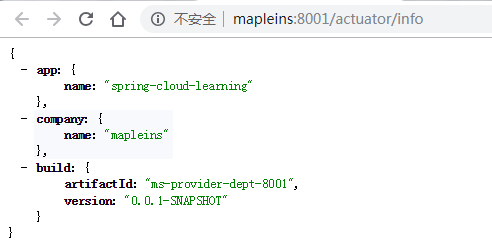
4. 配置 eureka info 中的信息
4.1 父工程pom配置
添加maven插件,将所有以 $[ ] 过滤
    <build>

        <!--设置info下的信息-->

        <resources>

            <resource>

                <directory>src\main\resources</directory>

                <filtering>true</filtering>

            </resource>

        </resources>

        <plugins>

            <plugin>

                <groupId>org.apache.maven.plugins</groupId>

                <artifactId>maven-resources-plugin</artifactId>

                <configuration>

                    <delimiters>

                        <delimiter>$[*]</delimiter>

                    </delimiters>

                </configuration>

            </plugin>

        </plugins>

    </build>
4.2 在当前服务添加依赖
        <!--管理监控-->

        <dependency>

            <groupId>org.springframework.boot</groupId>

            <artifactId>spring-boot-starter-actuator</artifactId>

        </dependency>
4.3 修改application.yml
info:

  app.name: spring-cloud-learning

  company.name: mapleins

  build.artifactId: $[project.artifactId]

  build.version: $[project.version]
4.4 点进eureka界面的下列位置后

出现如下:
5. 搭建一个消费者 来消费Department 的服务
工程结构:

5.1 pom文件
<?xml version="1.0" encoding="UTF-8"?>

<project xmlns="http://maven.apache.org/POM/4.0.0"

         xmlns:xsi="http://www.w3.org/2001/XMLSchema-instance"

         xsi:schemaLocation="http://maven.apache.org/POM/4.0.0 http://maven.apache.org/xsd/maven-4.0.0.xsd">

    <parent>

        <artifactId>spring-cloud-learning</artifactId>

        <groupId>org.maple</groupId>

        <version>0.0.1-SNAPSHOT</version>

    </parent>

    <modelVersion>4.0.0</modelVersion>

    <artifactId>ms-consumer-dept-80</artifactId>

    <dependencies>

        <dependency>

            <groupId>org.maple</groupId>

            <artifactId>ms-common-api</artifactId>

            <version>0.0.1-SNAPSHOT</version>

        </dependency>

        <dependency>

            <groupId>org.springframework.boot</groupId>

            <artifactId>spring-boot-starter-web</artifactId>

        </dependency>

    </dependencies>

</project>
5.2 编写yml文件
server:

  port: 80
5.3 配置config
@Configuration 代替了以前的 application.xml
注入一个 RestTemplate 来实现restful 调用
package org.maple.cfgbean;

import org.springframework.context.annotation.Bean;

import org.springframework.context.annotation.Configuration;

import org.springframework.web.client.RestTemplate;

/**

 * @author mapleins

 * @Date 2019-01-09 20:07

 * @Desc spring application.xml -> @Configuration

 **/

@Configuration

public class ConfigBean {

    @Bean

    public RestTemplate getRestTemplate(){

        return new RestTemplate();

    }

}
5.4 编写controller层
package org.maple.controller;

import org.maple.entity.Dept;

import org.springframework.beans.factory.annotation.Autowired;

import org.springframework.web.bind.annotation.PathVariable;

import org.springframework.web.bind.annotation.RequestMapping;

import org.springframework.web.bind.annotation.RestController;

import org.springframework.web.client.RestTemplate;

import java.util.List;

/**

 * @author mapleins

 * @Date 2019-01-09 20:10

 * @Desc

 **/

@RestController

public class DeptController_Consumer {

    private static final String REST_URL_PREFIX= "http://localhost:8001";

    /**

     * 类似httpclient (url,requestMap,ResponseBean.class)

     * 请求地址,请求参数,http响应转换的对象类型

     */

    @Autowired

    private RestTemplate restTemplate;

    @RequestMapping("/consumer/dept/add")

    public boolean add(Dept dept){

        return restTemplate.postForObject(REST_URL_PREFIX+"/dept/add",dept,Boolean.class);

    }

    @RequestMapping("/consumer/dept/get/{id}")

    public Dept get(@PathVariable("id") Long id){

        return restTemplate.getForObject(REST_URL_PREFIX+"/dept/get/"+id,Dept.class);

    }

    @RequestMapping("/consumer/dept/list")

    @SuppressWarnings("unchecked")

    public List<Dept> list(){

        return restTemplate.getForObject(REST_URL_PREFIX+"/dept/list",List.class);

    }

    @RequestMapping("/consumer/dept/discovery")

    public Object discovery(){

        return restTemplate.getForObject(REST_URL_PREFIX+"/dept/discovery",Object.class);

    }

}
5.5 编写启动类 并启动
package org.maple;

import org.springframework.boot.SpringApplication;

import org.springframework.boot.autoconfigure.SpringBootApplication;

/**

 * @author mapleins

 * @Date 2019-01-09 20:26

 * @Desc

 **/

@SpringBootApplication

public class App_Consumer_Dept_80 {

    public static void main(String[] args) {

        SpringApplication.run(App_Consumer_Dept_80.class, args);

    }

}
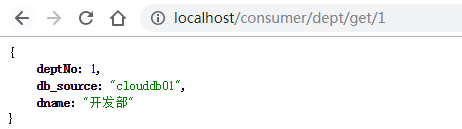
页面调用:
<Spring Cloud>入门二 Eureka Client的更多相关文章
- Spring Cloud 入门 之 Eureka 篇(一)
原文地址:Spring Cloud 入门 之 Eureka 篇(一) 博客地址:http://www.extlight.com 一.前言 Spring Cloud 是一系列框架的有序集合.它利用 Sp ...
- Spring Cloud 入门教程 - Eureka服务注册与发现
简介 在微服务中,服务注册与发现对管理各个微服务子系统起着关键作用.随着系统水平扩展的越来越多,系统拆分为微服务的数量也会相应增加,那么管理和获取这些微服务的URL就会变得十分棘手,如果我们每新加一个 ...
- <Spring Cloud>入门一 Eureka Server
1.搭建父工程 主要是添加版本依赖,此处版本是: spring-boot : 2.0.8.RELEASE spring-cloud : Finchley.SR2 <?xml version=& ...
- Spring Cloud 入门 之 Ribbon 篇(二)
原文地址:Spring Cloud 入门 之 Ribbon 篇(二) 博客地址:http://www.extlight.com 一.前言 上一篇<Spring Cloud 入门 之 Eureka ...
- Spring Cloud 入门 之 Config 篇(六)
原文地址:Spring Cloud 入门 之 Config 篇(六) 博客地址:http://www.extlight.com 一.前言 随着业务的扩展,为了方便开发和维护项目,我们通常会将大项目拆分 ...
- spring cloud 入门系列二:使用Eureka 进行服务治理
服务治理可以说是微服务架构中最为核心和基础的模块,它主要用来实现各个微服务实例的自动化注册和发现. Spring Cloud Eureka是Spring Cloud Netflix 微服务套件的一部分 ...
- Spring Cloud 入门教程(二): 配置管理
使用Config Server,您可以在所有环境中管理应用程序的外部属性.客户端和服务器上的概念映射与Spring Environment和PropertySource抽象相同,因此它们与Spring ...
- Spring Cloud(二):服务注册与发现 Eureka【Finchley 版】
Spring Cloud(二):服务注册与发现 Eureka[Finchley 版] 发表于 2018-04-15 | 更新于 2018-05-07 | 上一篇主要介绍了相关理论,这一篇开始我们 ...
- Spring Cloud(二):Eureka 服务注册中心
前言 服务治理 随着业务的发展,微服务应用也随之增加,这些服务的管理和治理会越来越难,并且集群规模.服务位置.服务命名都会发生变化,手动维护的方式极易发生错误或是命名冲突等问题.而服务治理正是为了解决 ...
随机推荐
- 基于FBX SDK的FBX模型解析与加载 -(四)
8. 骨骼蒙皮动画 骨骼蒙皮动画是当前游戏引擎中最常用的一种动画方式,关于其基本原理网络上的资料较多,关于到涉及的其它较复杂操作,如插值.融合等在这里也就先不再讨论了,而且其实现方式也与具体引擎的动作 ...
- bzoj 1814: Ural 1519 Formula 1【插头dp】
设f[i][j][s]为轮廓线推到格子(i,j),状态为s的方案数 括号表示一段线的左端和右端,表示成左括号和右括号,状压的时候用1和2表示,0表示已经闭合 下面的蓝线是黄色格子的轮廓线,dp转移要把 ...
- ipset 学习总结
用途:当机器受到网络攻击时,使用 iptables 封 IP,有时候可能会封禁成千上万个 IP,如果添加成千上万条规则, 在一台注重性能的服务器或者本身性能就很差的设备上就不在适用了.ipset 就是 ...
- springMVC validator验证的使用
http://blog.csdn.net/miketom155/article/details/45058195 1. 实现Validator接口,对数据进行校验 @RequestMapping(va ...
- 优先队列 HDOJ 5437 Alisha's Party
题目传送门 题意:一人过生日,很多人排着队送礼物.排队顺序是礼物价值大的优先,如果相等先来的优先.有m次开门,当t个人到了会开门让p个人进门.最后一次让门外的所有人按顺序进门.有q次询问,问第x个进门 ...
- 学习JavaScript数据结构与算法 (二)
学习JavaScript数据结构与算法 的笔记 包含第四章队列, 第五章链表 本人所有文章首发在博客园: http://www.cnblogs.com/zhangrunhao/ 04队列 实现基本队列 ...
- php 缩略图
<!DOCTYPE html><!-- HTML5表单 --><form method="post" action="" enct ...
- session共享方法
session数据保存在memcached,redis这种内存数据库内 memcache比较简单,使用的场景比较多.redis支持的数据类型多.而且数据具有期限,和session和期限可以配合使用 通 ...
- 类似QQ在线离线好友界面
把头像设置成圆形的代码如下: package com.example.lesson6_11_id19; import android.content.Context; import android.c ...
- NSValue的个人想法
通过下面的代码,又可以将NSValue转换成CGRect,CGPoint等类型的数值. CGRect imageRect = [[self.lockImageRectArray objectAtInd ...