
弥补学生时代的遗憾~C#注册表情缘
记得当时刚接触C#的时候,喜欢编写各种小软件,而注册表系列和网络系列被当时的我认为大牛的必备技能。直到我研究注册表前一天我都感觉他是那么的高深。
今天正好有空,于是就研究了下注册表系列的操作,也随手封装了一个注册表帮助类。简单记一下,当饭后娱乐
完整Demo研究:https://github.com/dunitian/LoTCodeBase/tree/master/NetCode/0.知识拓展/02.注册表系
这个是一些常用的方法和属性(不全,只是列出了比较常用的一些)【OpenSubKey(string name,bool b)当b为true则表示开了可写权限】

//RegistryKey
//属性:
// ValueCount 检索项中值的计数
// SubKeyCount 获取子项个数//方法:
// OpenSubKey(string name,bool b) 获取子项 RegistryKey,b为true时代表可写
// GetSubKeyNames() 获取所有子项名称的字符串数组
// GetValueNames() 检索包含与此项关联的所有值名称的字符串数组
// GetValue(string name) 获取指定名称,不存在名称/值对,则返回 null
// CreateSubKey(string subkey) 创建或者打开子项的名称或路径
// SetValue(string name,object value) 创建或者打开子项的名称或路径
// DeleteSubKeyTree(string subkey) 递归删除指定目录,不存在则抛异常
// DeleteSubKey(string subkey,bool b) 删除子项,b为false则当子项不存在时不抛异常
// DeleteValue(string name,bool b) 删除指定的键值,b为false则当子项不存在时不抛异常
先举个简单的案例:

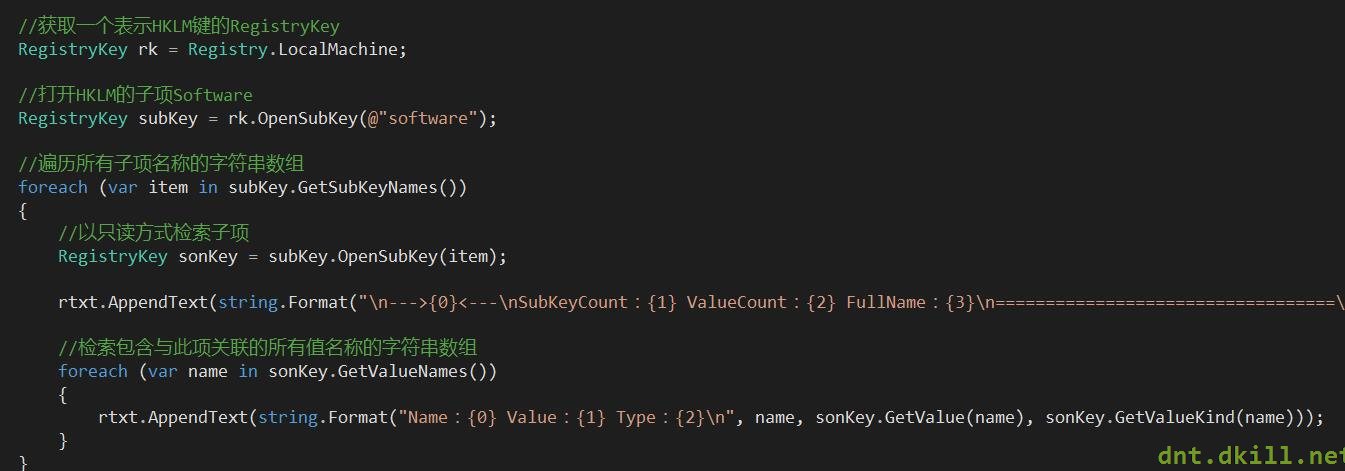
代码如下:
//获取一个表示HKLM键的RegistryKey

            RegistryKey rk = Registry.LocalMachine;

            //打开HKLM的子项Software

            RegistryKey subKey = rk.OpenSubKey(@"software");

            //遍历所有子项名称的字符串数组

            foreach (var item in subKey.GetSubKeyNames())

            {

                //以只读方式检索子项

                RegistryKey sonKey = subKey.OpenSubKey(item);

                rtxt.AppendText(string.Format("\n--->{0}<---\nSubKeyCount:{1} ValueCount:{2} FullName:{3}\n==================================\n", item, sonKey.SubKeyCount, sonKey.ValueCount, sonKey.Name));

                //检索包含与此项关联的所有值名称的字符串数组

                foreach (var name in sonKey.GetValueNames())

                {

                    rtxt.AppendText(string.Format("Name:{0} Value:{1} Type:{2}\n", name, sonKey.GetValue(name), sonKey.GetValueKind(name)));

                }

            }
做个综合的案例:
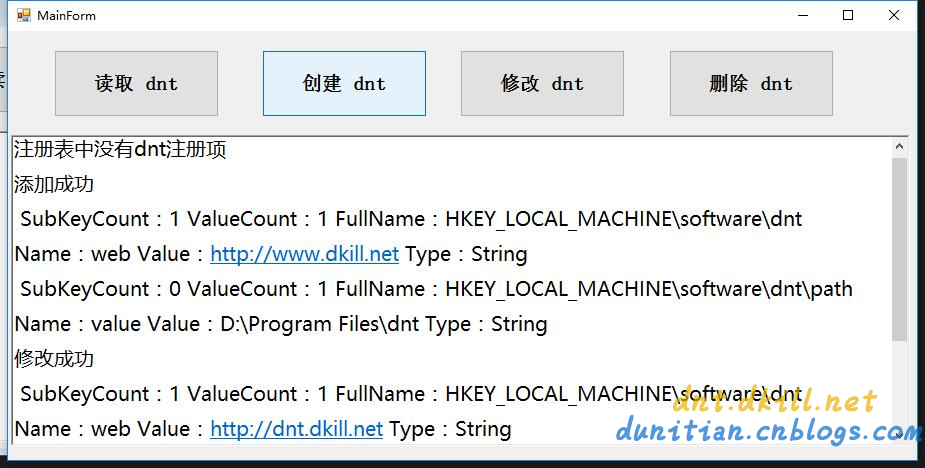
代码如下:
public partial class MainForm : Form

    {

        public RegistryKey Reg { get; set; }

        public MainForm()

        {

            InitializeComponent();

            //初始化

            var rootReg = Registry.LocalMachine;

            Reg = rootReg.OpenSubKey("software", true);//开权限

        }

        #region 公用方法

        /// <summary>

        /// 检验是否为空

        /// </summary>

        /// <param name="dntReg"></param>

        private bool KeyIsNull(RegistryKey dntReg)

        {

            if (dntReg == null)

            {

                rtxt.AppendText("注册表中没有dnt注册项\n");

                return true;

            }

            return false;

        }

        /// <summary>

        /// 遍历Key的Value

        /// </summary>

        /// <param name="reg"></param>

        private void ForeachRegKeys(RegistryKey reg)

        {

            rtxt.AppendText(string.Format("\n SubKeyCount:{0} ValueCount:{1} FullName:{2}\n", reg.SubKeyCount, reg.ValueCount, reg.Name));

            foreach (var name in reg.GetValueNames())

            {

                rtxt.AppendText(string.Format("Name:{0} Value:{1} Type:{2}\n", name, reg.GetValue(name), reg.GetValueKind(name)));

            }

        }

        #endregion

        //查

        private void btn1_Click(object sender, EventArgs e)

        {

            var dntReg = Reg.OpenSubKey("dnt");

            if (KeyIsNull(dntReg)) return;

            ForeachRegKeys(dntReg);

            foreach (var item in dntReg.GetSubKeyNames())

            {

                //以只读方式检索子项

                RegistryKey sonKey = dntReg.OpenSubKey(item);

                ForeachRegKeys(sonKey);

            }

        }

        //增

        private void btn2_Click(object sender, EventArgs e)

        {

            var dntReg = Reg.CreateSubKey("dnt");

            dntReg.SetValue("web", "http://www.dkill.net");

            var sonReg = dntReg.CreateSubKey("path");

            sonReg.SetValue("value", "D:\\Program Files\\dnt");

            rtxt.AppendText("添加成功\n");

        }

        //改

        private void btn3_Click(object sender, EventArgs e)

        {

            var dntReg = Reg.OpenSubKey("dnt", true);

            if (KeyIsNull(dntReg)) return;

            dntReg.SetValue("web", "http://dnt.dkill.net");

            rtxt.AppendText("修改成功\n");

        }

        //删

        private void btn4_Click(object sender, EventArgs e)

        {

            try

            {

                #region 删除某个值

                //var dntReg = Reg.OpenSubKey("dnt", true);

                //if (KeyIsNull(dntReg)) return;

                //dntReg.DeleteValue("web", false);

                #endregion

                Reg.DeleteSubKeyTree("dnt", false);

                rtxt.AppendText("删除成功\n");

            }

            catch (ArgumentException ex)

            {

                rtxt.AppendText(ex.ToString());

            }

        }

        private void clearlog_Click(object sender, EventArgs e)

        {

            rtxt.Clear();

        }

    }
Helper类综合实战:(有其他演示,有的电脑会出现权限问题)

using Microsoft.Win32;

using System.Collections.Generic;

public static partial class RegistryHelper

{

    #region 节点

    /// <summary>

    /// HKEY_LOCAL_MACHINE 节点

    /// </summary>

    public static RegistryKey RootReg = Registry.LocalMachine;

    /// <summary>

    /// HKEY_LOCAL_MACHINE 下 Software 节点

    /// </summary>

    public static RegistryKey SoftReg = Registry.LocalMachine.OpenSubKey("software", true);

    /// <summary>

    /// 包含有关当前用户首选项的信息。该字段读取 Windows 注册表基项 HKEY_CURRENT_USER

    /// </summary>

    public static RegistryKey CurrentUser = Registry.CurrentUser;

    /// <summary>

    /// HKEY_CURRENT_USER 下 Software 节点

    /// </summary>

    public static RegistryKey UserSoftReg = Registry.CurrentUser.OpenSubKey("software", true);

    #endregion

    #region 查询

    /// <summary>

    /// 根据名称查找Key,有则返回RegistryKey对象,没有则返回null

    /// </summary>

    /// <param name="name">要打开的子项的名称或路径</param>

    /// <param name="b">如果不需要写入权限请选择false</param>

    /// <returns></returns>

    public static RegistryKey FindKey(this RegistryKey reg, string name, bool b = true)

    {

        return reg.OpenSubKey(name, b);

    }

    /// <summary>

    /// 获取(name,value)字典,没有则返回null

    /// </summary>

    /// <param name="reg">当前RegistryKey</param>

    /// <returns></returns>

    public static IDictionary<string, object> GetKeyValueDic(this RegistryKey reg)

    {

        var dic = new Dictionary<string, object>();

        if (reg.ValueCount == 0) { return null; }

        ForeachRegKeys(reg, ref dic);

        return dic;

    }

    /// <summary>

    /// 获取子项(name,value)字典,没有则返回null

    /// </summary>

    /// <param name="reg">当前RegistryKey</param>

    /// <returns></returns>

    public static IDictionary<string, object> GetSubKeyValueDic(this RegistryKey reg)

    {

        var dic = new Dictionary<string, object>();

        if (reg.SubKeyCount == 0) { return null; }

        foreach (var item in reg.GetSubKeyNames())

        {

            //以只读方式检索子项

            var sonKey = reg.OpenSubKey(item);

            ForeachRegKeys(sonKey, ref dic);

        }

        return dic;

    }

    /// <summary>

    /// 遍历RegistryKey

    /// </summary>

    /// <param name="reg"></param>

    /// <param name="dic"></param>

    private static void ForeachRegKeys(RegistryKey reg, ref Dictionary<string, object> dic)

    {

        foreach (var name in reg.GetValueNames())

        {

            dic.Add(name, reg.GetValue(name));

        }

    }

    #endregion

    #region 添加

    /// <summary>

    /// 添加一个子项

    /// </summary>

    /// <param name="name"></param>

    /// <returns></returns>

    public static RegistryKey AddSubItem(this RegistryKey reg, string name)

    {

        return reg.CreateSubKey(name);

    }

    /// <summary>

    /// 添加key-value,异常则RegistryKey对象返回null

    /// </summary>

    /// <param name="reg"></param>

    /// <param name="key"></param>

    /// <param name="value"></param>

    /// <returns></returns>

    public static RegistryKey AddKeyValue(this RegistryKey reg, string key, object value)

    {

        reg.SetValue(key, value);

        return reg;

    }

    #endregion

    #region 修改

    /// <summary>

    /// 修改key-value,异常则RegistryKey对象返回null

    /// </summary>

    /// <param name="reg"></param>

    /// <param name="key"></param>

    /// <param name="value"></param>

    /// <returns></returns>

    public static RegistryKey UpdateKeyValue(this RegistryKey reg, string key, object value)

    {

        return reg.AddKeyValue(key, value);

    }

    #endregion

    #region 删除

    /// <summary>

    /// 根据Key删除项

    /// </summary>

    /// <param name="reg"></param>

    /// <param name="key"></param>

    /// <returns></returns>

    public static RegistryKey DeleteKeyValue(this RegistryKey reg, string key)

    {

        reg.DeleteValue(key, false);

        return reg;

    }

    /// <summary>

    /// 删除子项所有内容

    /// </summary>

    /// <param name="reg"></param>

    /// <param name="key"></param>

    /// <returns></returns>

    public static RegistryKey ClearSubAll(this RegistryKey reg, string key)

    {

        reg.DeleteSubKeyTree(key, false);

        return reg;

    }

    #endregion

}
弥补学生时代的遗憾~C#注册表情缘的更多相关文章
- 10#Windows注册表的那些事儿
引言 用了多年的Windows系统,其实并没有对Windows系统进行过深入的了解,也正是由于Windows系统不用深入了解就可以简单上手所以才有这么多人去使用.笔者是做软件开发的,使用的基本都是Wi ...
- C#注册表
C#注册表情缘 记得当时刚接触C#的时候,喜欢编写各种小软件,而注册表系列和网络系列被当时的我认为大牛的必备技能.直到我研究注册表前一天我都感觉他是那么的高深. 今天正好有空,于是就研究了下注册表 ...
- [转]Windows系统注册表知识完全揭密
来源:http://www.jb51.net/article/3328.htm Windows注册表是帮助Windows控制硬件.软件.用户环境和Windows界面的一套数据文件,注册表包含在Wind ...
- 注册表与盘符(转victor888文章 )
转自: http://blog.csdn.net/loulou_ff/article/details/3769479 写点东西,把这阶段的研究内容记录下来,同时也给研究相关内容的同志提供参考, ...
- 64位WINDOWS系统环境下应用软件开发的兼容性问题(CPU 注册表 目录)
应用软件开发的64 位WINDOWS 系统环境兼容性 1. 64 位CPU 硬件 目前的64位CPU分为两类:x64和IA64.x64的全称是x86-64,从名字上也可以看出来它和 x86是兼容的,原 ...
- 【转】如何打开注册表编辑器中存储用户信息的SAM文件?
sam文件怎么打开 (Security Accounts Manager安全帐户管理器)负责SAM数据库的控制和维护.SAM数据库位于注册表HKLM\SAM\SAM下,受到ACL保护,可以使用rege ...
- python测试开发django-35.xadmin注册表信息
前言 xadmin后台如果要对表的内容增删改查,跟之前的admin.py文件里面写注册表信息一样,需在admin.py同一级目录新建一个adminx.py的文件. 然后在adminx.py文件控制页面 ...
- Dll注入技术之注册表注入
DLL注入技术之REG注入 DLL注入技术指的是将一个DLL文件强行加载到EXE文件中,并成为EXE文件中的一部分,这样做的目的在于方便我们通过这个DLL读写EXE文件内存数据,(例如 HOOK EX ...
- cmd中删除、添加、修改注册表命令
转自:http://www.jb51.net/article/30586.htm regedit的运行参数 REGEDIT [/L:system] [/R:user] filename1 REGEDI ...
随机推荐
- org.openqa.selenium.remote.SessionNotFoundException: Unexpected error launch IE
1.在启动ie浏览器前先加入属性设置一项: DesiredCapabilities ie = DesiredCapabilities.internetExplorer(); ie.setCapabil ...
- ECF R9(632E) & DP
Description: 给你$n$个数可以任取$k$个(可重复取),输出所有可能的和. $n \leq 1000,a_i \leq 1000$ Solution: 好神的DP,我们排序后把每个数都减 ...
- pyqt 过滤事件
# 过滤鼠标滚轮事件 class stepItem(QWidget): def __init__(self, parent=None): QWidget.__init__(self, parent) ...
- CodeSimth-.NetFrameworkDataProvider可能没有安装。解决方法
原文地址:http://www.haogongju.net/art/2561889 1.下载System.Data.SQLite驱动:注意:根据自己的CPU选择是32位还是64位的驱动.建议选择4.0 ...
- lua 时间戳和时间互转
1.时间戳转换成时间 local t = 1412753621000 function getTimeStamp(t) return os.date("%Y%m%d%H", ...
- iOS中push视图的时候,屏幕中间会出现一条灰色的粗线的解决方案
因为执行动画需要时间,所以在动画未完成又执行另一个切换动画,容易产生异常.所以在一个方法连续push不同的VC是没有问题的,但是不小心push同一个VC,并且animated为YES,可能多次跳转了 ...
- (转)为什么需要正则表达式 by 王珢
为什么需要正则表达式 by 王垠 学习Unix最开头,大家都学过正则表达式(regexp).可是有没有人考虑过我们为什么需要正则表达式? 正则表达式本来的初衷是用来从无结构的字符串中提取信息,殊不知这 ...
- phpcms 服务器安全认证错误
本人将图片的js.images.css路径转移到CDN上了,上传附件的时候就出现了 “服务器安全认证错误”的提示. 找到文件 D:\wamp\www\phpcms\phpcms\modules\a ...
- HDU2159 二维完全背包
FATE Time Limit: 2000/1000 MS (Java/Others) Memory Limit: 32768/32768 K (Java/Others)Total Submis ...
- Unity自动寻路Navmesh之入门
实例 我们要实现一个功能:点击场景中的一个位置,角色可以自动寻路过去.角色会绕过各种复杂的障碍,找到一条理论上”最短路径“. 步骤 1.创建地形 2.添加角色 3.创建多个障碍物,尽量摆的复杂一点,来 ...