
定位权限授权 - iOS
关于介入地图相关功能后会遇到类似定位的子功能,由此引来了此定位权限授权相关.
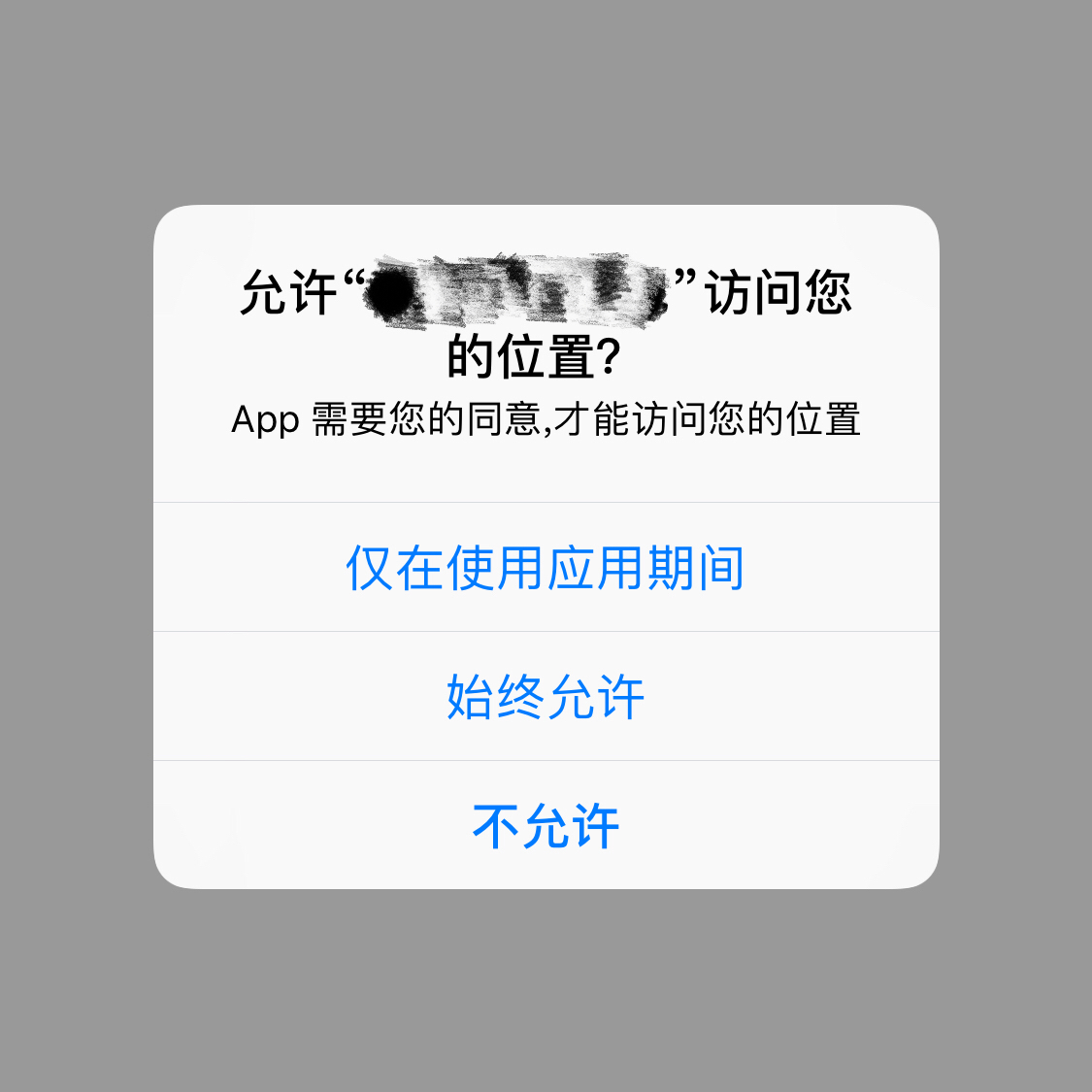
首先,需要导入 CoreLocation 的框架并创建管理对象从而实现后续的相关操作;
#import <CoreLocation/CoreLocation.h>
其中里面会包含一些参数属性方法等,例如:
1)是否开启位置服务
/*

 *  locationServicesEnabled

 *

 *  Discussion:

 *      Determines whether the user has location services enabled.

 *      If NO, and you proceed to call other CoreLocation API, user will be prompted with the warning

 *      dialog. You may want to check this property and use location services only when explicitly requested by the user.

 */

+ (BOOL)locationServicesEnabled API_AVAILABLE(ios(4.0), macos(10.7));
2)设置定位所期望的精准度,其中会有响应的枚举值可供选择,但精准度越高所消耗的设备电源性能也会随之受其影响,例如:导航模式
/*

 *  desiredAccuracy

 *

 *  Discussion:

 *      The desired location accuracy. The location service will try its best to achieve

 *      your desired accuracy. However, it is not guaranteed. To optimize

 *      power performance, be sure to specify an appropriate accuracy for your usage scenario (eg,

 *      use a large accuracy value when only a coarse location is needed). Use kCLLocationAccuracyBest to

 *      achieve the best possible accuracy. Use kCLLocationAccuracyBestForNavigation for navigation.

 *      The default value varies by platform.

 */

@property(assign, nonatomic) CLLocationAccuracy desiredAccuracy;

精准度 desiredAccuracy 所对应的枚举值相关:

/*

 *  kCLLocationAccuracy<x>

 *

 *  Discussion:

 *    Used to specify the accuracy level desired. The location service will try its best to achieve

 *    your desired accuracy. However, it is not guaranteed. To optimize

 *    power performance, be sure to specify an appropriate accuracy for your usage scenario (eg,

 *    use a large accuracy value when only a coarse location is needed).

 */

extern const CLLocationAccuracy kCLLocationAccuracyBestForNavigation API_AVAILABLE(ios(4.0), macos(10.7));// 最近

extern const CLLocationAccuracy kCLLocationAccuracyBest;// 最优

extern const CLLocationAccuracy kCLLocationAccuracyNearestTenMeters;// 十米

extern const CLLocationAccuracy kCLLocationAccuracyHundredMeters;// 百米

extern const CLLocationAccuracy kCLLocationAccuracyKilometer;// 千米

extern const CLLocationAccuracy kCLLocationAccuracyThreeKilometers;// 三千米
3)设置定位距离过滤的参数,若此次与上次定位所产生的距离差值大于或等于此设定值时则会调用代理方法
/*

 *  distanceFilter

 *

 *  Discussion:

 *      Specifies the minimum update distance in meters. Client will not be notified of movements of less

 *      than the stated value, unless the accuracy has improved. Pass in kCLDistanceFilterNone to be

 *      notified of all movements. By default, kCLDistanceFilterNone is used.

 */

@property(assign, nonatomic) CLLocationDistance distanceFilter;
4)开始 & 停止位置的更新
/*

 *  startUpdatingLocation

 *

 *  Discussion:

 *      Start updating locations.

 */

- (void)startUpdatingLocation API_AVAILABLE(watchos(3.0)) API_UNAVAILABLE(tvos);

/*

 *  stopUpdatingLocation

 *

 *  Discussion:

 *      Stop updating locations.

 */

- (void)stopUpdatingLocation;
5)设置代理(delegate)后的一些常用代理方法
locationManager.delegate = self;

- (void)locationManager:(CLLocationManager *)manager didUpdateLocations:(NSArray<CLLocation *> *)locations {

    NSLog(@"获取定位信息 --- 成功");

}

- (void)locationManager:(CLLocationManager *)manager didFailWithError:(NSError *)error {

    NSLog(@"获取定位信息 --- 失败");

}
其次,声明全局的变量 CLLocationManager,此处需要注意若使用局部变量的方式会调用授权方法失败;
/** 位置管理*/

CLLocationManager *locationManager;
再其次,初始化设置代理并配置系统位置权限授权操作相关
注:此处需要判断一下系统的版本号,避免异常闪退,因属性是在系统8.0基础之上才可以使用
#pragma mark - ****************************** 获取位置验证权限

/**

 获取位置验证权限(作用域: 地图 & 定位相关)

 @param vc 当前视图控件

 */

- (void)YHGetLocationPermissionVerifcationWithController:(UIViewController *)vc {

    BOOL enable = [CLLocationManager locationServicesEnabled];

    NSInteger state = [CLLocationManager authorizationStatus];

    if (!enable ||  > state) {// 尚未授权位置权限

        if ( <= [[UIDevice currentDevice].systemVersion floatValue]) {

            NSLog(@"系统位置权限授权弹窗");

            // 系统位置权限授权弹窗

            locationManager = [[CLLocationManager alloc] init];

            locationManager.delegate = self;

            [locationManager requestAlwaysAuthorization];

            [locationManager requestWhenInUseAuthorization];

        }

    }

    else {

        if (state == kCLAuthorizationStatusDenied) {// 授权位置权限被拒绝

            NSLog(@"授权位置权限被拒绝");

            UIAlertController *alertCon = [UIAlertController alertControllerWithTitle:@"提示"

                                                                              message:@"访问位置权限暂未授权"

                                                                       preferredStyle:UIAlertControllerStyleAlert];

            [alertCon addAction:[UIAlertAction actionWithTitle:@"暂不设置" style:UIAlertActionStyleCancel handler:^(UIAlertAction * _Nonnull action) {

            }]];

            [alertCon addAction:[UIAlertAction actionWithTitle:@"设置" style:UIAlertActionStyleDefault handler:^(UIAlertAction * _Nonnull action) {

                dispatch_after(0.2, dispatch_get_main_queue(), ^{

                    NSURL *url = [[NSURL alloc] initWithString:UIApplicationOpenSettingsURLString];// 跳转至系统定位授权

                    if( [[UIApplication sharedApplication] canOpenURL:url]) {

                        [[UIApplication sharedApplication] openURL:url];

                    }

                });

            }]];

            [vc presentViewController:alertCon animated:YES completion:^{

            }];

        }

    }

}
GitHub: https://github.com/survivorsfyh/YHTools/tree/master/YHAccessAuthorization
______
以上便是此次内容小结,项目中用到的功能不多没有深挖,还有很多可拓展的地方,有什么不足还望多多指点!
定位权限授权 - iOS的更多相关文章
- 高德定位腾讯定位在APP上无法开启定位权限的解决方案
[备注]公司项目中遇到的问题,如果你在团队工作其中定有不少配合方面的问题,其中的思路是可以借鉴的,因为这也许正是你们现在遇到的问题,总结的不好的地方还请多多指教 因为项目需求的确定,定位成了必不可少的 ...
- iOS 8以后 定位手动授权问题
ios8以后 都是手动授权定位权限 不过不处理这块 在ios8以后的系统就会默认永不授权 即关闭了定位权限 处理办法如下 .导入框架头文件 #import <CoreLocation/CoreL ...
- iOS~判断应用是否有定位权限
在特定场景下我们需要判断用户是否允许应用获取定位权限 1.导入类库: #import <CoreLocation/CLLocationManager.h> 2.判断用户手机是否开启了定位服 ...
- iOS定位权限请求时易犯的错误小结
起因 用户群反馈app可能请求了不合适的定位权限:始终定位. 看到这个截图,根据经验判断可能是后台定位功能导致可能不得不请求始终定位权限.再加上之前提交审核时,苹果要求在plist文件中新增NSLoc ...
- 小程序调用wx.chooseLocation接口的时候无法获取权限(ios)
ios手机小程序调用wx.chooseLocation接口的时候,获取权限的时候报authorize:fail:require permission desc这样子的错误,这是由于苹果的安全机制导致需 ...
- 解决在iOS8环境下,当用户关闭定位服务总开关时,无法将APP定位子选项加入定位权限列表的问题
关键点:- (void)locationManager:(CLLocationManager *)manager didChangeAuthorizationStatus:(CLAuthorizati ...
- ArcGIS Runtime SDK for Android 定位权限(GPS定位\网络定位)
ACCESS_COARSE_LOCATION和ACCESS_FINE_LOCATION: android.permission.ACCESS_COARSE_LOCATION:是基站定位,即基于无线网络 ...
- 构建ASP.NET MVC4+EF5+EasyUI+Unity2.x注入的后台管理系统(24)-权限管理系统-将权限授权给角色
系列目录 过了个年回来,回顾一下,我们上次讲了角色管理,我们这一次来讲将权限授权给角色,这一节也是大家比较关心的.因为我们已经跑通了整个系统,知道权限的流转,我们先来看一张图 这张图主要分要3块,角色 ...
- Android填坑系列:在小米系列等机型上放开定位权限后的定位请求弹框
背景: 近期因实际项目需要,在特定操作下触发定位请求,取到用户位置及附近位置. 问题: 经初步选型,最终决定接入百度定位,按照百度定位SDK Android文档,接入过程相对顺利.但随后发现,在小米系 ...
随机推荐
- angular ng指令
1.指令 ng-app,ng- 都是angular的指令系统ng-app: ng-app是angular的初始化,一个页面只能有一个ng-app,位置不限制.在页面上加入了这个执行,那么从当前的元素以 ...
- Java 开源博客 Solo 1.4.0 发布 - 简化
Solo 1.4.0 正式发布了!这个版本主要是简化了配置项,修复了一些缺陷并改进了很多细节体验,感谢一直以来关注和支持我们的朋友! 只需一个命令即可启动(不需要安装数据库.部署容器):也可以通过 w ...
- 仿照jQuery进行一些简单的框架封装(欢迎指教~)
(function(window,undefined){ var arr = [], push = arr.push, slice = arr.slice; //首先要做的就是封装一个parseHtm ...
- Mysql存储Emoji表情[为何utf8不能存储以及如何使Mysql能够存储Emoji表情]
https://segmentfault.com/a/1190000008533577
- SQL Server ->> Computed Column(计算列)
Computed Column(计算列)是自SQL Server 2005开始就有的特性.计算列的定义是一个表达式.表达式可以是非计算列,常量,函数间的组合.但是不可以是子查询. 计算列数据固化 默认 ...
- SQL Server ->> OFFSET & FETCH子句
SQL Server 2012引入OFFSET + FETCH字句.它俩出现在SELECT .... ORDER BY ...后面.作用是告诉SQL Server在结果集中忽略前N行然后取前M行出来. ...
- Python文件夹与文件的操作 ZZ
最近在写的程序频繁地与文件操作打交道,这块比较弱,还好在百度上找到一篇不错的文章,这是原文传送门,我对原文稍做了些改动. 有关文件夹与文件的查找,删除等功能 在 os 模块中实现.使用时需先导入这个模 ...
- 24点-code1
#include <iostream> #include <string> #include <cstdlib> #include <cmath> us ...
- jquery实用技巧之输入框提示语句
我们在编写网页的时候不可避免的会遇到输入框,那么怎么设计输入框才能更加优雅呢?不同的人会有不同的答案,下面分享一个比较不错的设计. 效果图 细节 这个效果主要是通过JQuery来实现,我的思路如下: ...
- 记账本app(一)
计划开发一款小程序应用,主要来记录自己的财务账目. 通过使用SpringBoot开发后端应用,提供接口,对应前端使用微信小程序来实现. 功能模块(用户信息,账本.账目列表,新增一笔账,修改一笔账,删除 ...