
CoreThink开发(十)把官方首页轮播替换成HTML5-3D轮播
效果:
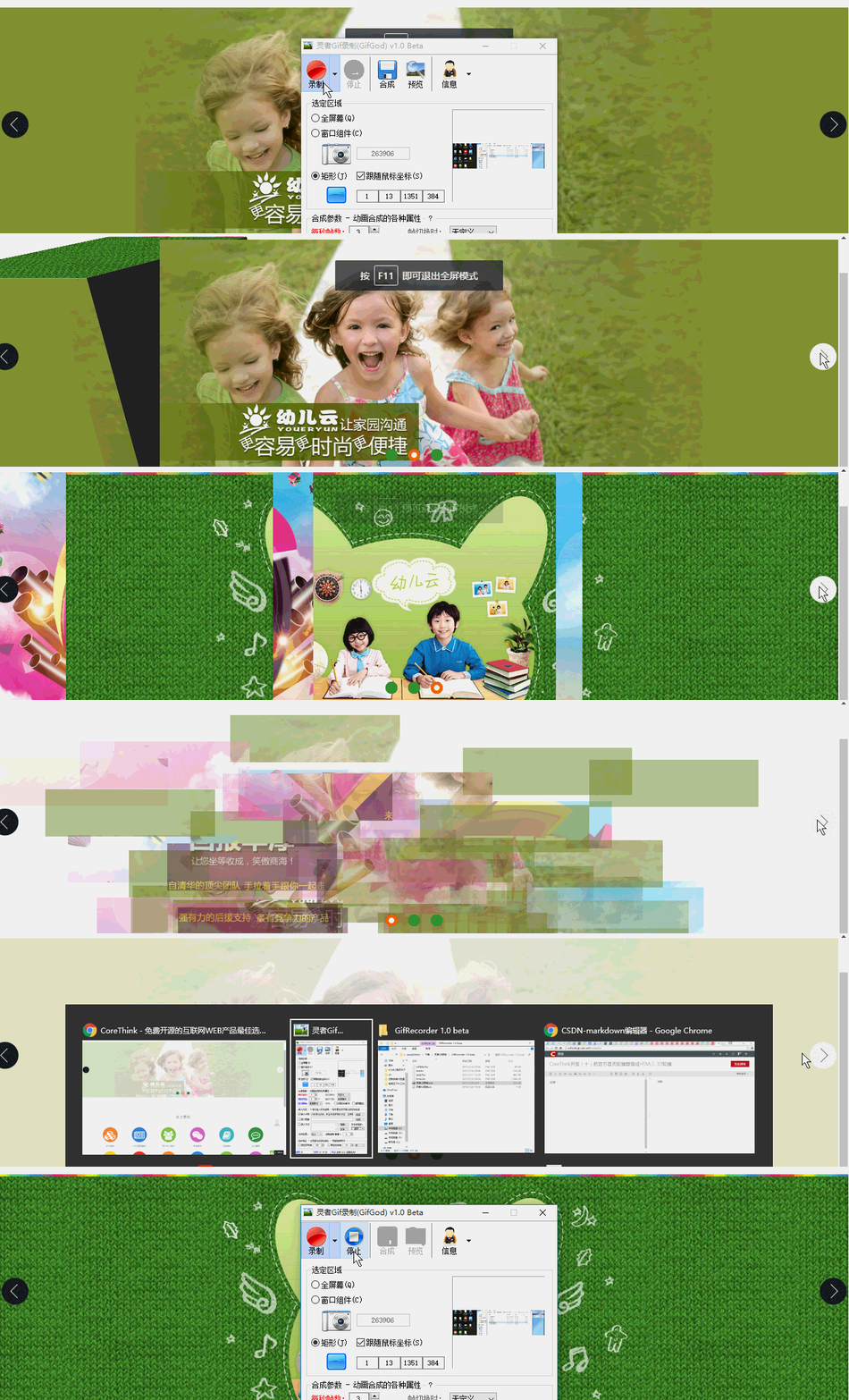
资源已经上传到我的下载里边。
http://download.csdn.net/detail/u012995856/9587206
1.复制资源文件到CoreThink项目中
corethink\Application\Home\View\Public
2.写模板代码
引入js
<block name="script">

  <script src="__HOME_JS__/jquery-1.7.2.min.js"></script>

    <script src="__HOME_JS__/html5zoo.js"></script>

    <script src="__HOME_JS__/lovelygallery.js"></script>

</block>
把官方的轮播替换成这样
<block name="jumbotron">

    <!-- 轮播图 -->

       <div class="pics_wrap">

           <div id="html5zoo-1">

               <ul class="html5zoo-slides" style="display: none;">

                 <cms:slider_list name="sl">

                       <li>

                           <a href="{$sl.url}" target="_blank">

                               <img src="{$sl.cover|get_cover}"/>

                           </a>

                       </li>

                   </cms:slider_list>

               </ul>

           </div>

       </div>

       <!-- 轮播图结束 -->

</block>
注:
官方轮播后台幻灯片什么的都很完善了,只是前台模板没动态显示
corethink\Application\Home\View\Index\index.html
<extend name="$_home_public_layout"/>
<block name="title"><title>{:C('WEB_SITE_TITLE')}-{:C('WEB_SITE_SLOGAN')}</title></block>
<block name="style">
<style type="text/css">
/* 首页幻灯片 */
#index-carousel .jumbotron {
height: 500px;
padding: 20px 0;
}
#index-carousel .carousel-indicators {
bottom: 35px;
}
/* 幻灯片01 简介 */
.opencmf .title {
margin-top: 60px;
}
.opencmf .abstract {
margin: 30px 0 70px;
}
.opencmf .action .btn-default {
color: #fff;
border-color: #fff;
background: none;
}
.opencmf .action .btn-default:hover,
.opencmf .action .btn-default.active {
color: #3EA9F5;
background: #fff;
}
/* 幻灯片02 特性 */
.section-feature-slider h3 {
color: #fff;
}
.section-feature-slider .feature-list .thumbnail {
background: none;
border: 0;
}
.section-feature-slider .feature-list .thumbnail .cover {
text-align: center;
vertical-align: middle;
padding: 20px;
margin: auto;
overflow: hidden;
}
.section-feature-slider .feature-list .thumbnail .fa {
font-size: 60px;
margin-top: 15px;
color: #fff;
}
.section-feature-slider .feature-list .thumbnail .caption {
height: 60px;
}
.section-feature-slider .feature-list .thumbnail .caption h4 {
color: #fff;
cursor: pointer;
font-size: 14px;
}
/* section */
.section {
padding: 20px 0;
}
.section h3 {
margin-bottom: 50px;
}
/* 官方模块 */
.section-module .module-list .thumbnail {
background: none;
border: 1px solid transparent;
}
.section-module .module-list .thumbnail:hover {
background: none;
border: 1px solid #ddd;
cursor: pointer;
}
.section-module .module-list .thumbnail .cover {
width: 100px;
height: 100px;
text-align: center;
vertical-align: middle;
padding: 10px;
border-radius: 50%;
background: #eee;
margin: auto;
overflow: hidden;
}
.section-module .module-list .thumbnail .fa {
font-size: 60px;
margin-top: 15px;
color: #fff;
}
.section-module .module-list .thumbnail .caption {
height: 32px;
}
.section-module .module-list .thumbnail .caption h4 {
color: #727F8C;
transition: all 1s;
font-size: 14px;
}
@media (max-width: 768px) {
/* 幻灯切换 */
#index-carousel .carousel-indicators {
bottom: 10px;
}
.opencmf .title {
margin-top: 10px;
font-size: 20px;
}
.opencmf .abstract {
margin: 10px 0;
font-size: 12px;
}
.opencmf .action .btn {
font-size: 12px;
}
/* 特性 */
#index-carousel .jumbotron {
height: 220px;
padding: 10px 0;
}
.section-feature-slider h3 {
font-size: 14px;
}
.section-feature-slider .feature-list .thumbnail {
margin-bottom: 5px;
}
.section-feature-slider .feature-list .thumbnail .cover {
padding: 10px 0 0 0;
}
.section-feature-slider .feature-list .thumbnail .fa {
font-size: 20px;
margin-top: 0px;
color: #fff;
}
.section-feature-slider .feature-list .thumbnail .caption {
height: 10px;
}
.section-feature-slider .feature-list .thumbnail .caption h4 {
color: #fff;
cursor: pointer;
font-size: 12px;
display: none;
}
/* 官方模块 */
.section-module .module-list .thumbnail .cover {
width: 80px;
height: 80px;
padding: 10px;
}
.section-module .module-list .thumbnail .fa {
font-size: 30px;
margin-top: 15px;
color: #fff;
}
/* section */
.section {
padding: 0px 0;
}
.section h3 {
margin-bottom: 15px;
}
}
</style>
</block>
<block name="jumbotron">
<!-- 轮播图 -->
<div class="pics_wrap">
<div id="html5zoo-1">
<ul class="html5zoo-slides" style="display: none;">
<cms:slider_list name="sl">
<li>
<a href="{$sl.url}" target="_blank">
<img src="{$sl.cover|get_cover}"/>
</a>
</li>
</cms:slider_list>
</ul>
</div>
</div>
<!-- 轮播图结束 -->
</block>
<block name="main">
<div class="section section-module">
<div class="container">
<h3 class="text-center">官方模块</h3>
<div class="row module-list">
<div class="col-xs-4 col-sm-4 col-md-2">
<div class="thumbnail text-center">
<div class="cover cover1" style="background: #F68A3A;"><span class="fa fa-cubes fa-5x"><span></div>
<div class="caption">
<h4 class="text-center">核心模块</h4>
</div>
</div>
</div>
<div class="col-xs-4 col-sm-4 col-md-2">
<div class="thumbnail text-center">
<div class="cover cover2" style="background: #398CD2;"><span class="fa fa-newspaper-o fa-5x"><span></div>
<div class="caption">
<h4 class="text-center">CMS通用模块</h4>
</div>
</div>
</div>
<div class="col-xs-4 col-sm-4 col-md-2">
<div class="thumbnail text-center">
<div class="cover cover3" style="background: #80C243;"><span class="fa fa-users fa-5x"><span></div>
<div class="caption">
<h4 class="text-center">用户中心模块</h4>
</div>
</div>
</div>
<div class="col-xs-4 col-sm-4 col-md-2">
<div class="thumbnail text-center">
<div class="cover cover4" style="background: #DC6AC6;"><span class="fa fa-weixin fa-5x"><span></div>
<div class="caption">
<h4 class="text-center">微信模块</h4>
</div>
</div>
</div>
<div class="col-xs-4 col-sm-4 col-md-2">
<div class="thumbnail text-center">
<div class="cover cover5" style="background: #45BEC3;"><span class="fa fa-book fa-5x"><span></div>
<div class="caption">
<h4 class="text-center">手册模块</h4>
</div>
</div>
</div>
<div class="col-xs-4 col-sm-4 col-md-2">
<div class="thumbnail text-center">
<div class="cover cover6" style="background: #3C9746;"><span class="fa fa-commenting-o fa-5x"><span></div>
<div class="caption">
<h4 class="text-center">论坛模块</h4>
</div>
</div>
</div>
<div class="col-xs-4 col-sm-4 col-md-2">
<div class="thumbnail text-center">
<div class="cover cover7" style="background: #FED825;"><span class="fa fa-money fa-5x"><span></div>
<div class="caption">
<h4 class="text-center">充值模块</h4>
</div>
</div>
</div>
<div class="col-xs-4 col-sm-4 col-md-2">
<div class="thumbnail text-center">
<div class="cover cover8" style="background: #E83A2C;"><span class="fa fa-gavel fa-5x"><span></div>
<div class="caption">
<h4 class="text-center">跳蚤市场</h4>
</div>
</div>
</div>
<div class="col-xs-4 col-sm-4 col-md-2">
<div class="thumbnail text-center">
<div class="cover cover1" style="background: #F68A3A;"><span class="fa fa-history fa-5x"><span></div>
<div class="caption">
<h4 class="text-center">创业项目</h4>
</div>
</div>
</div>
<div class="col-xs-4 col-sm-4 col-md-2">
<div class="thumbnail text-center">
<div class="cover cover2" style="background: #398CD2;"><span class="fa fa-user fa-5x"><span></div>
<div class="caption">
<h4 class="text-center">投资人</h4>
</div>
</div>
</div>
<div class="col-xs-4 col-sm-4 col-md-2">
<div class="thumbnail text-center">
<div class="cover cover3" style="background: #80C243;"><span class="fa fa-home fa-5x"><span></div>
<div class="caption">
<h4 class="text-center">租房房源</h4>
</div>
</div>
</div>
<div class="col-xs-4 col-sm-4 col-md-2">
<div class="thumbnail text-center">
<div class="cover cover4" style="background: #DC6AC6;"><span class="fa fa-calendar-check-o fa-5x"><span></div>
<div class="caption">
<h4 class="text-center">工单模块</h4>
</div>
</div>
</div>
<div class="col-xs-4 col-sm-4 col-md-2">
<div class="thumbnail text-center">
<div class="cover cover5" style="background: #45BEC3;"><span class="fa fa-send-o fa-5x"><span></div>
<div class="caption">
<h4 class="text-center">软件发布</h4>
</div>
</div>
</div>
<div class="col-xs-4 col-sm-4 col-md-2">
<div class="thumbnail text-center">
<div class="cover cover6" style="background: #3C9746;"><span class="fa fa-thumbs-o-up fa-5x"><span></div>
<div class="caption">
<h4 class="text-center">捐赠模块</h4>
</div>
</div>
</div>
<div class="col-xs-4 col-sm-4 col-md-2">
<div class="thumbnail text-center">
<div class="cover cover7" style="background: #FED825;"><span class="fa fa-coffee fa-5x"><span></div>
<div class="caption">
<h4 class="text-center">开发工具</h4>
</div>
</div>
</div>
</div>
</div>
</div>
</block>
<block name="script">
<script src="__HOME_JS__/jquery-1.7.2.min.js"></script>
<script src="__HOME_JS__/html5zoo.js"></script>
<script src="__HOME_JS__/lovelygallery.js"></script>
</block>
CoreThink开发(十)把官方首页轮播替换成HTML5-3D轮播的更多相关文章
- 小程序实现非swiper组件的自定义伪3D轮播图
效果如下: 我用了很笨的方法实现的,大致就是: 1.当前点击的div(view)如果前后都有内容,那么,当前div(view)就设置到中间,前一个就设置到左边,前一个的前面所有全部设置到最左边,后面一 ...
- vue 3d轮播组件 vue-carousel-3d
开发可视化项目时,需要3d轮播图,找来找去发现这个组件,引用简单,最后实现效果还不错.发现关于这个组件,能搜到的教程不多,就分享一下我的经验. 插件github地址:https://wlada.git ...
- 3D轮播切换特效 源码
这个3D轮播切换特效是我2017年2月份写的 当初我 刚接触HTML不久,现在把源码分享给大家 源码的注释超级清楚 . <!-- 声明文档类型:html 作用:符合w3c统一标准规范 每个浏览器 ...
- 微信小程序之 3d轮播(swiper来实现)
以前写过一篇3d轮播,就是这篇,使用的方法比较笨拙,而且代码不简洁.这次发现swiper也能实现同样的效果.故记录一下. 先看看效果: wxml: <swiper previous-margin ...
- CSS3之3D轮播图
<!DOCTYPE html> <html lang="en"> <head> <meta charset="UTF-8&quo ...
- 微信小程序 - 3d轮播图组件(基础)
<!-- 目前仅支持data数据源来自banner,请看测试案例 ################ 以上三种形式轮播: 1. basic 2. 3d 3. book basic即普通轮播 3d即 ...
- 第一次用写一个3d轮播
2016-07-11gallery 3d html <!doctype html><html lang="en"><head> <met ...
- 01.轮播图之一 :scrollView 轮播
接触的每个项目,都会用到轮播图的部分,轮播图都写了好多次,用过各种各样的方式写: 这篇总结的博客,我将分为几个篇幅写,希望写完这几篇博客之后,我能总结出自己写这个轮播的优缺和不同之处 scrollvi ...
- Taro -- Swiper的图片由小变大3d轮播效果
Swiper的图片由小变大3d轮播效果 this.state = ({ nowIdx:, swiperH:'', imgList:[ {img:'../../assets/12.jpg'}, {img ...
随机推荐
- springboot2.0 fastjson 日期格式化不生效解决
网上有很多介绍,主要有两种. 1.在启动类中注入bean /** * 集成fastjson * * @return */ @Bean public HttpMessageConverters fast ...
- Unix系统编程()open,read,write和lseek的综合练习
需求:程序的第一个命令行参数为将要打开的文件名称,余下的参数则指定了文件上执行的输入输出操作.每个表示操作的参数都以一个字母开头,紧跟以相关值(中间无空格分隔). soffet:从文件开始检索到off ...
- UVALive 7721 K - 2-ME Set 集合dp,所有数的位或来表示状态。
/** 题目:UVALive 7721 K - 2-ME Set 链接:https://vjudge.net/problem/UVALive-7721 题意:给定n个数,从中取出一个集合,至少包含两个 ...
- 小程序组件与api
通过组合基础组件进行快速开发. 组件是视图层的基本组成单元. 所有组件都有的属性: 属性名 描述 注解 id 组件的唯一标示 保持整个页面唯一 class 组件的样式类 在对应的 WXSS 中定义的样 ...
- Respond.js – 让不懂爱的 IE6-8 支持 CSS3 Media Query
respond.min.js <script src="js/respond.min.js"></script> respond.min.js代码: /*! ...
- 第二百一十一节,jQuery EasyUI,ValidateBox(验证框)组件
jQuery EasyUI,ValidateBox(验证框)组件 学习要点: 1.加载方式 2.属性列表 3.方法列表 4.自定义验证 本节课重点了解 EasyUI 中 ValidateBox(验证框 ...
- 【BZOJ】3297: [USACO2011 Open]forgot(dp)
http://www.lydsy.com/JudgeOnline/problem.php?id=3297 这题拖了很久呢... 很久以前写了个dfs,,但是tle了..... 然后一直想dp想不出来, ...
- landa语法
sg_orm看当前sql信息 db.IsEnableLogEvent = true; db.LogEventStarting = (sql, pa) => { var t = 0; }; //出 ...
- smartJS 0.1 API 讲解 - PromiseEvent
上篇简单的介绍smartjs了一些通用方法的api.这篇介绍基础的PromiseEvent(这个名字一直没想好,以前准备用callbacks的,但避免与jquery混淆,st的命名空间可以直接挂到$上 ...
- 微信 openId
摘要 关于微信开发的话题,例子确实已经有不少,但大部分都是人云亦云,很多小细节或者需要注意的地方却大多没有讲清楚,这令很多刚开始开发的人感觉大很迷茫.而我今天要说的话题,主要着眼于两个方面. 一:如何 ...