
Python基础-小程序练习(跳出多层循环,购物车,多级菜单,用户登录)
一、 从第3层循环直接跳出所有循环
break_flag = False

count = 0

while break_flag == False:

    print("-第一层")

    while break_flag == False:

        print("第二层")

        while break_flag == False:

            count += 1

            if count > 10:

                break_flag = True

            print("第三层")

print("keep going...")
with break_flag

# break_flag = False

count = 0

while count < 3:

    print("-第一层")

    while count < 3:

        print("第二层")

        while count <= 10:

            count += 1

            # if count > 10:

            #     break_flag = True

            print("第三层")

print("keep going...")
without break_flag

二、 购物车程序
goods_list = [['Iphone7',5800],['Coffee',30],['Book',99],['Bike',199],['Vivi X9',2499]]     #商品列表

shopping_cart = []      #用户购物车列表

salary = int(input('input your salary:'))       #用户薪水

m = salary

k = 0

while True:

    index = 0

    for goods in goods_list:        #打印商品列表

        print(index,goods)

        index += 1

    choice = input('>>>:').strip()

    if choice.isdigit():

        choice = int(choice)

        if choice >= 0 and choice < len(goods_list):

            goods = goods_list[choice]

            if goods[1] <= salary:      #判断用户是否带了足够的钱来支付所选商品

                shopping_cart.append(goods)

                salary -= goods[1]

                print('Add goods '+str(goods[0])+' into shopping cart! Your current balance:'+str(salary))

            else:

                print('No enough money!The price is:'+str(goods[1])+'! Need more:'+str(goods[1]-salary))

        else:

            print('Have no this goods!')

    elif choice == 'q':

        print('----------Your shopping cart----------')

        print('ID   goods   quantity    price   total')

        for i in range(len(goods_list)):

            j = shopping_cart.count(goods_list[i])

            if j > 0 :

                k += 1

                print(k,'\t',goods_list[i][0],'\t',j,'\t\t',goods_list[i][1],'\t',j * goods_list[i][1])

        print('Total price is:',m - salary)

        break

    else:

        print('Have no this goods')
购物车程序
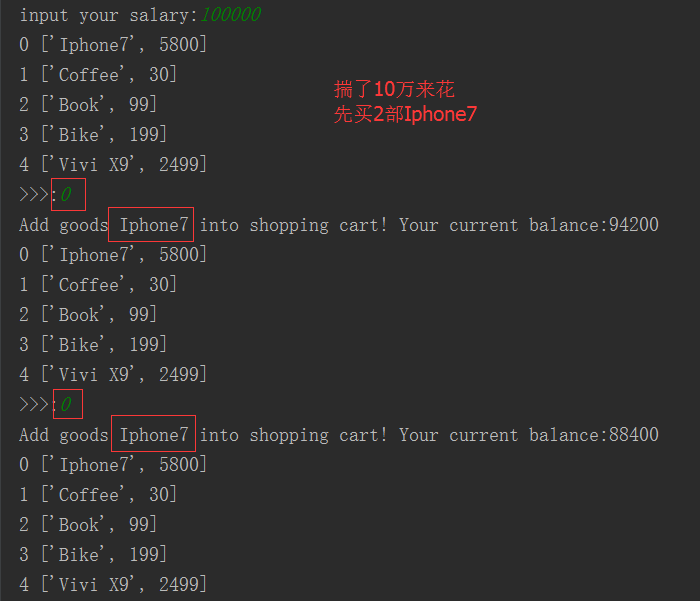


goods_list = [['Iphone7',5800],['Coffee',30],['Book',99],['Bike',199],['Vivi X9',2499]]  # 商品列表

shopping_cart = {}  # 用户购物车列表从列表变为字典

salary = int(input('input your salary:'))  # 用户薪水

# m = salary #不需要此项

# k = 0 #用户购物车商品打印ID,移动位置至打印循环外

while True:

    index = 0

    for goods in goods_list:  # 打印商品列表

        print(index, goods)

        index += 1

    choice = input('>>>:').strip()

    if choice.isdigit():  # 判断是否为数字

        choice = int(choice)

        if choice >= 0 and choice < len(goods_list):  # 商品存在

            goods = goods_list[choice]

            if goods[1] <= salary:  # 判断用户是否带了足够的钱来支付所选商品

                if goods[0] in shopping_cart:  # 之前买过

                    shopping_cart[goods[0]][1] += 1  # 购物数量加1

                else:

                    shopping_cart[goods[0]] = [goods[1], 1]  # 创建一条新增商品的购买记录

                salary -= goods[1]  # 扣钱

                print('Add goods ' + str(goods[0]) + ' into shopping cart! Your current balance:' + str(salary))

            else:

                print('No enough money!The price is:' + str(goods[1]) + '! Need more:' + str(goods[1] - salary))

        else:

            print('Have no this goods!')

    elif choice == 'q':

        id_counter = 1  # 初始化商品ID

        total_cost = 0  # 初始化商品总花费

        print('----------Your shopping cart----------')

        print('ID   goods     quantity    price     total')

        for i in shopping_cart:

            print("%-5s%-10s%-12s%-10s%-s"

                  % (

                      id_counter, i, shopping_cart[i][1], shopping_cart[i][0],

                      shopping_cart[i][0] * shopping_cart[i][1]))

            id_counter += 1  # 商品ID自加1

            total_cost += shopping_cart[i][0] * shopping_cart[i][1]  # 用户已购商品总花费

        print('Total price is:', total_cost)

        break

    else:

        print('Have no this goods')
购物车程序优化,使用字典
三、多级菜单
要求:
- 打印省、市、县三级菜单
- 可返回上一级(b,返回)
- 可随时退出程序(q,退出)
menu = {

    '北京':{

        '海淀':{

            '五道口':{

                'soho':{},

                '网易':{},

                'google':{}

            },

            '中关村':{

                '爱奇艺':{},

                '汽车之家':{},

                'youku':{},

            },

            '上地':{

                '百度':{},

            },

        },

        '昌平':{

            '沙河':{

                '老男孩':{},

                '北航':{},

            },

            '天通苑':{},

            '回龙观':{},

        },

        '朝阳':{},

        '东城':{},

    },

    '上海':{

        '闵行':{

            "人民广场":{

                '炸鸡店':{}

            }

        },

        '闸北':{

            '火车战':{

                '携程':{}

            }

        },

        '浦东':{},

    },

    '山东':{},

}

exit_flag = False

current_layer = menu

layers = [menu]

while not exit_flag:

    for k in current_layer:

        print(k)

    choice = input(">>:").strip()

    if choice == "b":

        current_layer = layers[-1]

        #print("change to laster", current_layer)

        layers.pop()

    elif choice == 'q':

        break

    elif choice not in current_layer:

        continue

    else:

        layers.append(current_layer)

        current_layer = current_layer[choice]
四、用户登陆程序
需求:
- 最多允许用户尝试登陆3次
- 当同一用户名3次密码均不正确时,锁定该用户
 with open('account',encoding='utf8') as f_account, open('lockedlist', 'a+') as f_locked:

     l = []                  #定义用户名验证列表,存放黑名单数据

     f_locked.seek(0)        #"a+"模式打开后,文件位置位于末尾,要遍历文件内容,需要将指针移至文件起始位置

     for locked_info in f_locked.readlines():    #遍历黑名单

         l.append(locked_info.strip())                   #将黑名单数据添加进列表,注意:需要将文件中的换行符脱掉

     c = []                  #定义用户登录名列表,存储用户尝试的登录名

     count = 1               #登陆次数计数器

     flag = True             #登陆循环控制开关

     while flag and count < 4:

         user = input('Please input username:')      #输入用户名

         pwd = input('Please input password:')       #输入用户密码

         if user in l:                 #用户名在黑名单中

             print("This user is in blacklist,can't log in!")    #打印提示信息

             continue

         c.append(user)

         for info in f_account:                  #用户名不在黑名单中,遍历用户登陆文件

             user_name, user_pwd = info.strip().split(',')       #将文件中的用户名和登陆密码赋值给判定变量

             if user == user_name:               #用户名符合

                 if pwd == user_pwd:             #对应密码符合

                     print('Welcome %s' % user)  #打印登陆成功信息

                     flag = False               #登陆成功,跳出登陆程序

                     break

                 count += 1                      #对应密码不符合,while循环计数器加1

                 break

             count += 1                          #用户名不符合,while循环计数器加1

             break

     if count == 4:                              #如果不同用户名密码输错3次,关闭程序

         print('More than 3 times wrong!')       #打印提示信息

     if len(c) == 3 and c[0] == c[1] == c[2]:    #如果相同用户名密码输错3次,将该用户名加入黑名单,限制登陆

         print('This user has been locked!')

         f_locked.write(user+'\n')               #将错误3次的用户名写入黑名单,注意,加换行符
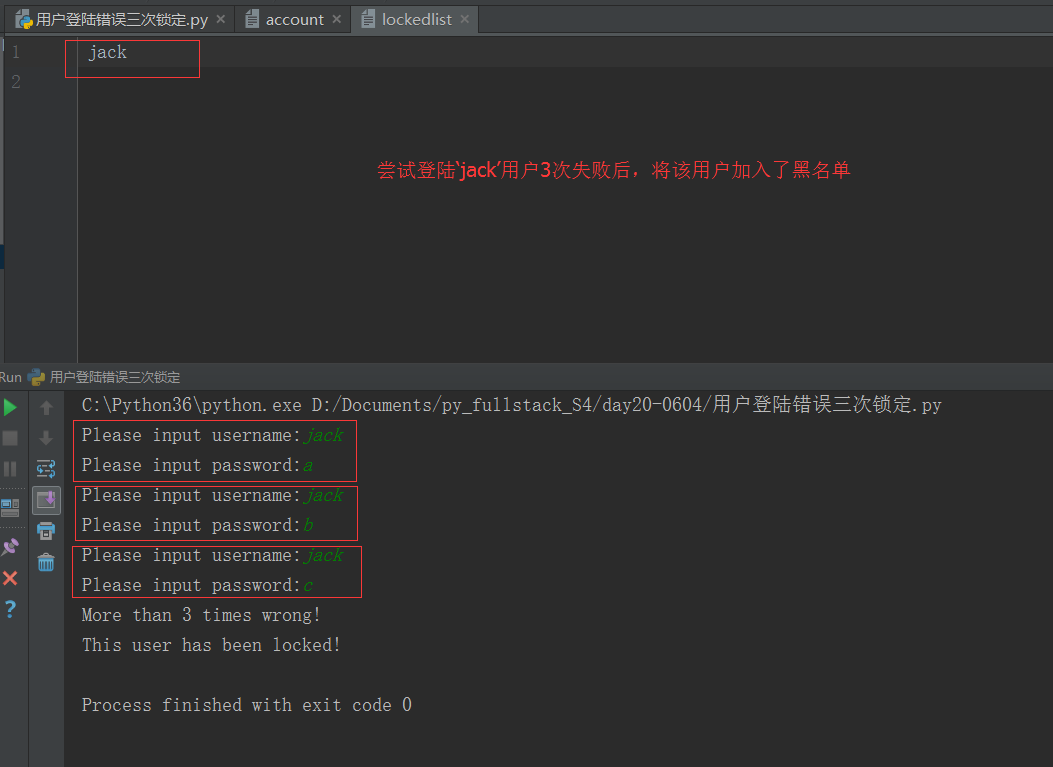
用户登陆程序



Python基础-小程序练习(跳出多层循环,购物车,多级菜单,用户登录)的更多相关文章
- python中从内部循环直接跳出多层循环
学习循环的时候碰到一道题,需要从内部循环中直接跳出所有循环,想了很久终于想到一种好办法(小白认知) 题目为:使用while循环输出100-50,从大到小,到50时,再循环输出0-50,从小到大. ex ...
- 关于微信小程序如何解决多层循环嵌套
http://www.jianshu.com/p/87cdf985b2b9 附加:小程序里面一些功能示例 http://blog.csdn.net/column/details/13721.html
- python基础代码(猜年龄、从最内层跳出多层循环、简单的购物车程序)
1.猜年龄 , 可以让用户最多猜三次! age = 55 i=0 while i<3: user_guess = int (input ("input your guess:" ...
- python练习-跳出多层循环和购物车
跳出多层循环:三层循环,最里层直接跳出3层 在Python中,函数运行到return这一句就会停止,因此可以利用这一特性,将功能写成函数,终止多重循环 def work(): for i in ran ...
- python(3)- 循环语句:从最内层跳出多层循环
跳出多层循环:三层循环,最里层直接跳出3层 方法一: 在Python中,函数运行到return这一句就会停止,因此可以利用这一特性,将功能写成函数,终止多重循环 def work(): #定义函数 f ...
- 微信小程序-列表渲染多层嵌套循环
微信小程序-列表渲染多层嵌套循环 入门教程之列表渲染多层嵌套循环,目前官方的文档里,主要是一维数组列表渲染的案例,还是比较简单单一,给刚入门的童鞋还是无从入手的感觉. <view wx:for= ...
- Python基本小程序
目录 Python基本小程序 一.筛选从1-100所有的奇数 二.筛选从0-100所有的偶数 三.求1-100之间所有的偶数和,奇数和 四.三个数由小到大输出 五.四个数字重复数字的三位数 Pytho ...
- 一个python爬虫小程序
起因 深夜忽然想下载一点电子书来扩充一下kindle,就想起来python学得太浅,什么“装饰器”啊.“多线程”啊都没有学到. 想到廖雪峰大神的python教程很经典.很著名.就想找找有木有pdf版的 ...
- java的break跳出多层循环
记得大一的时候,语言学的不好,碰到了需要跳出双层循环的时候,就没有了办法.因为老师讲了goto然后说不要用goto... 自己就一直感觉这种跳出多层循环的想法是不可取的(好蠢) 下面用java代码的 ...
随机推荐
- 多个tomcat一起运行
1.默认为:8005 2.在D:\apache-tomcat-7.0.85\bin目录下,找到startup.bat,打开并修改. 3.在D:\apache-tomcat-7.0.85\bin目录下, ...
- maven 打包 源代码
<plugin> <groupId>org.apache.maven.plugins</groupId> <artifactId>maven-sourc ...
- Angular material mat-icon 资源参考_Device
ul,li>ol { margin-bottom: 0 } dt { font-weight: 700 } dd { margin: 0 1.5em 1.5em } img { height: ...
- UUID生成工具
public class UUIDUtils { private static SecureRandom SEEDER_STATIC = null; private static byte[] ADD ...
- Stirng,Stringbuffer,Stringbuild的区别浅淡
String 1,Stirng是对象不是基本数据类型 2,String是final类,不能被继承.是不可变对象,一旦创建,就不能修改它的值. 3,对于已经存在的Stirng对象,修改它的值,就是重新创 ...
- Tomcat与Nginx的整合
Tomcat与Nginx的整合 环境 操作系统:ubuntu 14.04.4 LTS 安装Nginx 有两种方式,一种是使用apt-get命令来安装二进制版本,另外一种是下载源码后自己编译. 二进制安 ...
- 存储器的保护(三)——《x86汇编语言:从实模式到保护模式》读书笔记20
存储器的保护(三) 修改本章代码清单,使之可以检测1MB以上的内存空间(从地址0x0010_0000开始,不考虑高速缓存的影响).要求:对内存的读写按双字的长度进行,并在检测的同时显示已检测的内存数量 ...
- KMeans实现
KMeans实现 符号 \(K\): 聚类的个数 \(x^{(i)}\): 第i个样本 \(\mu_{1},\mu_{2},...\mu_{K}\): K个中心节点 \(c^{(i)}\): 第i个样 ...
- 下面我将随机抽取一名幸运女生,XXXXX
个人在经过长久以来(约等于4小时)的奋战,终于实现了一个上课老师提问并抽奖的小程序.希望这个程序变得非常非常实用 课程的理解:在我的项目开始之前,先学习了一下UML项目类图的画法,和类与类之间的关系. ...
- 获取URL中某个参数的值
JS代码: function getQueryString(name){ var reg = new RegExp("(^|&)" + name + "=([^& ...