
Openresty + nginx-upload-module支持文件上传
0. 说明
这种方式其实复杂,麻烦!建议通过这个方式搭建Openresty文件上传和下载服务器:http://www.cnblogs.com/lujiango/p/9056680.html
1. 包下载
openresty-1.13.6.1下载地址 https://openresty.org/download/openresty-1.13.6.1.tar.gz
nginx-upload-module-2.2由于原作者已经很长时间不更新了,本来从原作者github下载的时候,编译openresty的时候报错:ngx_http_upload_module.c:14:17: fatal error: md5.h: No such file or directory
2. 编译
(1)分别解压openresty-1.13.6.1.tar.gz和nginx-upload-module-2.2.zip
(2)执行/sdf/slb/openresty-1.13.6.1# ./configure --prefix=/sdf/slb/openresty --add-module=/sdf/slb/nginx_upload_module-2.2.0
3. 配置
3.1 nginx.conf
需要配置upload_pass作为文件上传之后的返回处理。
worker_processes  20;

error_log  logs/error.log notice;

events {

    worker_connections  1024;

}

http {

    include       mime.types;

    default_type  application/octet-stream;

    server {

        listen       8081;

        client_max_body_size 100m;

        # Upload form should be submitted to this location

        location /upload {文件上传的action

            # Pass altered request body to this location

            upload_pass /success;文件上传之后的返回

            # Store files to this directory

            # The directory is hashed, subdirectories 0 1 2 3 4 5 6 7 8 9 should exist

            upload_store /sdf/slb/store 1;文件存储的路径,要先手动创建0 1 2 3 4 5 6 7 8 9一共10个文件夹

            # Allow uploaded files to be read only by user

            upload_store_access user:rw;

            # Set specified fields in request body

            upload_set_form_field "${upload_field_name}_name" $upload_file_name;

            upload_set_form_field "${upload_field_name}_content_type" $upload_content_type;

            upload_set_form_field "${upload_field_name}_path" $upload_tmp_path;

            # Inform backend about hash and size of a file

            upload_aggregate_form_field "${upload_field_name}_md5" $upload_file_md5;

            upload_aggregate_form_field "${upload_field_name}_size" $upload_file_size;

            upload_pass_form_field "^submit$|^description$";

        }

        # Pass altered request body to a backend

        location /success {

            content_by_lua 'ngx.say("upload success!")';

        }

        location /site {

            root   html;

            index  upload.html;支持文件上传的静态页面

        }

    }

}
3.2 配置静态页面访问,作为文件上传的入口
搭建openresty静态页面访问,请参考http://www.cnblogs.com/lujiango/p/9001006.html#_lab2_4_0
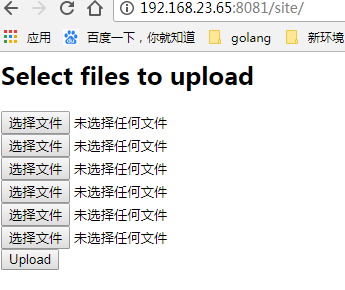
upload.html的文件内容如下:请注意其中的action="/upload",与nginx.conf里面的location /upload{}是对应的。
<html>

<head>

<title>Test upload</title>

</head>

<body>

<h2>Select files to upload</h2>

<form enctype="multipart/form-data" action="/upload" method="post">

<input type="file" name="file1"><br>

<input type="file" name="file2"><br>

<input type="file" name="file3"><br>

<input type="file" name="file4"><br>

<input type="file" name="file5"><br>

<input type="file" name="file6"><br>

<input type="submit" name="submit" value="Upload">

<input type="hidden" name="test" value="value">

</form>

</body>

</html>
页面如下:
3.3 文件上传
访问http:192.168.25.84:8081/site或http:192.168.25.84:8081/site/upload.html
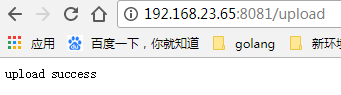
可以进入文件上传的入口页面,选择文件上传即可,如下是文件上传成功。
此时,在nginx.conf配置的文件存储位置有如下文件:
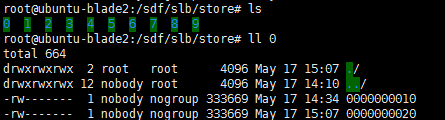
其中的0000000010和0000000020就是上传的文件。
注:在上传文件的时候报错:/sdf/slb/store/6/0000000006" for "89629.log" (13: Permission denied),这个是nginx权限的问题,可以参考https://www.ruby-forum.com/topic/1379755
x. 参考资料
https://www.ruby-forum.com/topic/1379755
http://www.grid.net.ru/nginx/upload.en.html
https://github.com/Austinb/nginx-upload-module/blob/2.2/nginx.conf
Openresty + nginx-upload-module支持文件上传的更多相关文章
- WordPress NextGEN Gallery ‘upload.php’任意文件上传漏洞
漏洞名称: WordPress NextGEN Gallery ‘upload.php’任意文件上传漏洞 CNNVD编号: CNNVD-201306-259 发布时间: 2013-06-20 更新时间 ...
- RPC基于http协议通过netty支持文件上传下载
本人在中间件研发组(主要开发RPC),近期遇到一个需求:RPC基于http协议通过netty支持文件上传下载 经过一系列的资料查找学习,终于实现了该功能 通过netty实现文件上传下载,主要在编解码时 ...
- java nio 写一个完整的http服务器 支持文件上传 chunk传输 gzip 压缩 使用过程 和servlet差不多
java nio 写一个完整的http服务器 支持文件上传 chunk传输 gzip 压缩 也仿照着 netty处理了NIO的空轮询BUG 本项目并不复杂 代码不多 ...
- 让nginx支持文件上传的几种模式
文件上传的几种不同语言和不同方法的总结. 第一种模式 : PHP 语言来处理 这个模式比较简单, 用的人也是最多的, 类似的还有用 .net 来实现, jsp来实现, 都是处理表单.只有语言的差别, ...
- Asp.net core 学习笔记 ( upload/download files 文件上传与下载 )
更新 : 2018-01-22 之前漏掉了一个 image 优化, 就是 progressive jpg refer : http://techslides.com/demos/progressi ...
- 启动一个支持文件上传的HTTP-Server
Python实现,源码来自网络,代码内部有作者信息. HTTP方式共享文件,对于不需要用户名和密码验证的系统非常方便.通过浏览器就可以实现文件上传和下载.非常适合用作测试系统的脚手架. 对于系统使用c ...
- .net core3.1 webapi + element-ui upload组件实现文件上传
首先,先看我个人的的项目结构. 这个webapi项目是专门用来做图片上传,其中分为两个控制器:单图片上传和多图片上传.而我接下来主要讲的还是单文件上传,对于多文件的上传,我暂且尚未研究成功. 其中pi ...
- 测试平台系列(92) 让http请求支持文件上传
大家好~我是米洛! 我正在从0到1打造一个开源的接口测试平台, 也在编写一套与之对应的教程,希望大家多多支持. 欢迎关注我的公众号米洛的测开日记,获取最新文章教程! 回顾 上一节呢,我们编写了oss的 ...
- springmvc学习笔记--支持文件上传和阿里云OSS API简介
前言: Web开发中图片上传的功能很常见, 本篇博客来讲述下springmvc如何实现图片上传的功能. 主要讲述依赖包引入, 配置项, 本地存储和云存储方案(阿里云的OSS服务). 铺垫: 文件上传是 ...
随机推荐
- GG同步到sqlserver报错一例 Invalid date format
在将Oracle表同步到sqlserver时,在sqlserver端应用数据时,可能会遇到这个报错. 2014-05-17 17:20:24 WARNING OGG-01154 SQL error - ...
- winform窗体MaximizeBox
如果MaximizeBox为false会导致Form2窗体底部不显示. =>解决办法TopMost属性为true. Form2 _frm2 = new Form2(); _frm2.Maximi ...
- JavaScript 开发的45个技巧2
http://mp.weixin.qq.com/s?src=3×tamp=1474692926&ver=1&signature=agI3W5rKmVC6GgbdTXh ...
- jQuery: on()特别的几种用法
jQuery大家肯定用得非常的熟练了,没什么好讲的,今天为什么要写关于on这个事件绑定的API?主要还是因为看了大神的博文:web移动端浮层滚动阻止window窗体滚动JS/CSS处理;其中对于on用 ...
- Thunderbird for Ubuntu
转自:http://www.cnblogs.com/slave_wc/archive/2011/05/02/2034529.html 装好ubuntu 的一般基本配置见本博客另一篇文章: Ubun ...
- 利用Nodejs & Cheerio & Request抓取Lofter美女图片
还是参考了这篇文章: http://cnodejs.org/topic/54bdaac4514ea9146862abee 另外有上面文章 nodejs抓取网易公开课的一些经验. 代码如下,注意其中用到 ...
- 一步一步学RenderMonkey(3)——改良Phong光照模型 【转】
转载请注明出处: http://blog.csdn.net/tianhai110 改良后的Phong光照模型: 上一节实现的phong镜面光照模型,如果固定光源,移动视点(及matView 关联为ma ...
- Vmware 14.0 版本中安装Ubuntu 17.10版本无法调整分辨率的问题
装完ubuntu后发现在vmware中选择了查看-自动调整大小-自适应客户机,虚拟机也无法随着窗口大小来切换分辨率,其实是因为WAYLAND限制了. 1. 先安装vim sudo apt-get in ...
- 使用JEECG过程中的问题汇总(持续更新)
1.首次启动Tomcat服务时,控制台信息提示请使用SQL Server 2005或更高版本. <dependency> <groupId>org.jeecgframework ...
- HDU4667(有错)
正规的做法是找切点.三角形三个顶点分别对圆作切线,然后求切点(2个).两圆之间也要求切点(4个). 扯淡了这就..麻烦的要命.. 下面是写了一半的代码.. void process_circle(po ...