
今天遇到的一些关于vsftp的坑!!!
起因:最近在捣鼓Linux,配置vsftp的时候发现权限问题很坑,头疼了一天,发现了一点小问题
常见的身份验证方式:
1.使用系统的用户认证
例如vsftp这种软件,如果想建立一个可以登录FTP的用户我们建议不要给予该用户可以登录系统shell的权限
useradd -s /sbin/nologin xxx

使用段代码我们可以指定该用户没有登录系统shell的权限但是他可以作为一个用户登录FTP,默认情况下该用户登录到FTP服务器的目录实在自己的家目录下,那我们如果想给用户指定他登录到FTP服务所在的固定目录,那我们可以在新建用户的时候加入-d参数指定用户的家目录就可以实现
2.使用软件本身的身份验证机制
例如samba这样的软件,他虽然也需要在Linux系统建立用户但是真正的身份验证服务是由samba本身提供的,我们只需要在系统上建立账户然后使用smbpasswd -a给新建的用户创建密码
3.使用有公信力的第三方机构
例如Kerberos这样的认证服务器,也可以提供身份认证
接下来说我遇到的坑
放上小弟的配置文件
# Example config file /etc/vsftpd/vsftpd.conf

#

# The default compiled in settings are fairly paranoid. This sample file

# loosens things up a bit, to make the ftp daemon more usable.

# Please see vsftpd.conf. for all compiled in defaults.

#

# READ THIS: This example file is NOT an exhaustive list of vsftpd options.

# Please read the vsftpd.conf. manual page to get a full idea of vsftpd's

# capabilities.

#

# Allow anonymous FTP? (Beware - allowed by default if you comment this out).

anonymous_enable=NO

allow_writeable_chroot=YES

# Uncomment this to allow local users to log in.

# When SELinux is enforcing check for SE bool ftp_home_dir

local_enable=YES

#

# Uncomment this to enable any form of FTP write command.

write_enable=YES

#

# Default umask for local users is . You may wish to change this to ,

# if your users expect that ( is used by most other ftpd's)

local_umask=

#

# Uncomment this to allow the anonymous FTP user to upload files. This only

# has an effect if the above global write enable is activated. Also, you will

# obviously need to create a directory writable by the FTP user.

# When SELinux is enforcing check for SE bool allow_ftpd_anon_write, allow_ftpd_full_access

anon_upload_enable=YES

#

# Uncomment this if you want the anonymous FTP user to be able to create

# new directories.

anon_mkdir_write_enable=YES

#

# Activate directory messages - messages given to remote users when they

# go into a certain directory.

dirmessage_enable=YES

#

# Activate logging of uploads/downloads.

xferlog_enable=YES

#

# Make sure PORT transfer connections originate from port  (ftp-data).

connect_from_port_20=YES

#

# If you want, you can arrange for uploaded anonymous files to be owned by

# a different user. Note! Using "root" for uploaded files is not

# recommended!

# chown_uploads=YES

# chown_username=whoever

#

# You may override where the log file goes if you like. The default is shown

# below.

xferlog_file=/var/log/xferlog

#

# If you want, you can have your log file in standard ftpd xferlog format.

# Note that the default log file location is /var/log/xferlog in this case.

xferlog_std_format=YES

#

# You may change the default value for timing out an idle session.

#idle_session_timeout=

#

# You may change the default value for timing out a data connection.

#data_connection_timeout=

#

# It is recommended that you define on your system a unique user which the

# ftp server can use as a totally isolated and unprivileged user.

#nopriv_user=ftpsecure

#

# Enable this and the server will recognise asynchronous ABOR requests. Not

# recommended for security (the code is non-trivial). Not enabling it,

# however, may confuse older FTP clients.

#async_abor_enable=YES

#

# By default the server will pretend to allow ASCII mode but in fact ignore

# the request. Turn on the below options to have the server actually do ASCII

# mangling on files when in ASCII mode. The vsftpd.conf() man page explains

# the behaviour when these options are disabled.

# Beware that on some FTP servers, ASCII support allows a denial of service

# attack (DoS) via the command "SIZE /big/file" in ASCII mode. vsftpd

# predicted this attack and has always been safe, reporting the size of the

# raw file.

# ASCII mangling is a horrible feature of the protocol.

#ascii_upload_enable=YES

#ascii_download_enable=YES

#

# You may fully customise the login banner string:

#ftpd_banner=Welcome to blah FTP service.

#

# You may specify a file of disallowed anonymous e-mail addresses. Apparently

# useful for combatting certain DoS attacks.

#deny_email_enable=YES

# (default follows)

#banned_email_file=/etc/vsftpd/banned_emails

#

# You may specify an explicit list of local users to chroot() to their home

# directory. If chroot_local_user is YES, then this list becomes a list of

# users to NOT chroot().

# (Warning! chroot'ing can be very dangerous. If using chroot, make sure that

# the user does not have write access to the top level directory within the

# chroot)

chroot_local_user=YES

local_root=/var/ftp

#chroot_list_enable=YES

# (default follows)

#chroot_list_file=/etc/vsftpd/chroot_list

#

# You may activate the "-R" option to the builtin ls. This is disabled by

# default to avoid remote users being able to cause excessive I/O on large

# sites. However, some broken FTP clients such as "ncftp" and "mirror" assume

# the presence of the "-R" option, so there is a strong case for enabling it.

#ls_recurse_enable=YES

#

# When "listen" directive is enabled, vsftpd runs in standalone mode and

# listens on IPv4 sockets. This directive cannot be used in conjunction

# with the listen_ipv6 directive.

listen=NO

#

# This directive enables listening on IPv6 sockets. By default, listening

# on the IPv6 "any" address (::) will accept connections from both IPv6

# and IPv4 clients. It is not necessary to listen on *both* IPv4 and IPv6

# sockets. If you want that (perhaps because you want to listen on specific

# addresses) then you must run two copies of vsftpd with two configuration

# files.

# Make sure, that one of the listen options is commented !!

listen_ipv6=YES

pam_service_name=vsftpd

userlist_enable=NO

tcp_wrappers=YES
关于文件夹的属主和属组

本人实测的两个Linux系统,Ubuntu16.04和redhat7.6
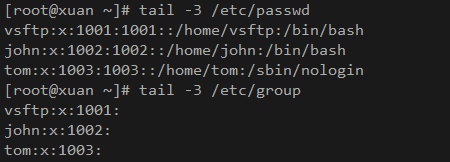
在Ubuntu里面安装vsftp成功之后默认创建的用户和组都是ftp
而Redhat默认创建的用户和组是vsftp

Ubuntu
Redhat
本人一直觉得不能因为方便就把selinux关了,所以经过测试,只有打开ftpd_full_access的bool值设置为on的时候可以实现正常的ftp功能,如果要允许任意用户上传文件的话需要打开ftpd_anon_write,如果要使用FTP的被动模式需要打开ftpd_use_passive_mode
打开的语句可以参照
setsebool -P ftpd_full_access

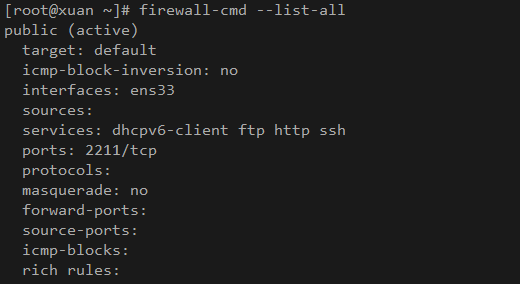
同理我们也要在防火墙上放行FTP这个服务
命令参考
firewall-cmd --add-service=ftp

firewall-cmd --add-service=ftp --permanent

firewall-cmd --reload
如上第一条是临时放行FTP服务,重启之后失效,第二条是写进底层,重启之后任然生效但是必须重启才可以生效,所以一二条搭配使用,或者执行二三条也可以达到同样的效果
然后就是关于目录的文件夹权限设置,在Redhat上推荐把/var/ftp目录的权限设置为755,属主和属组设置成vsftp
本地用户上传的文件权限一般为644,文件夹一般为755,这是因为配置文件中默认的权限掩码umask=022的作用
暂时就这些,大佬们多多指正

今天遇到的一些关于vsftp的坑!!!的更多相关文章
- 记一次搭建vsftp服务器坑
避免踩坑,特此记录... yum -y install vsftpd useradd -d /www -s /sbin/nologin sui # 修改vsftpd配置文件/etc/vsftpd/vs ...
- vsftp新建用户及目录时遇到的坑
1.有关vsftp配置及用户权限设置,请参考: http://blog.sina.com.cn/s/blog_3edc5e2e0102vzv8.html 2.需求:公司另一部门要求单独建一目录,来存在 ...
- asp.net core 简单部署之FTP配置(CentOS 7.0安装配置Vsftp服务器)
配置过程原文地址:http://www.osyunwei.com/archives/9006.html 坑和结果 正确的跟着这个内容走,是靠谱的. 我自己给自己踩了个坑,请参照文章的朋友注意第七条:七 ...
- 记一次ftp服务器搭建走过的坑
记一次ftp服务器搭建走过的坑 1.安装 ①下载 wget https://security.appspot.com/downloads/vsftpd-3.0.3.tar.gz #要FQ ②解压 ta ...
- centos7之vsftp安装和使用
日常用作中,我们常用的是windows的共享,但是我们都知道windows运行不稳定.原来我们用的是centos6.5上的vsftpd,最近决定把centos6.*上的服务都移植到centos7上,好 ...
- linux与ubuntu下vsftp的安装使用
vsftp工具是linux与类linux系统上常用的ftp传输工具,按百度上的说法,它的不同点与好处有九点,不明觉厉,有兴趣的可以深入验证: 一.它是一个安全.高速.稳定的FTP服务器: 二.它可以做 ...
- linux入门系列15--文件传输之vsftp服务
前面的系列文章基本讲完了linux管理相关的基础知识,从本篇开始讲解centos7中服务程序的部署和配置,以便为外部提供各种服务. 日常工作和娱乐中,我们所需的各种资源都离不开网络以及各种服务,我们通 ...
- 如何一步一步用DDD设计一个电商网站(九)—— 小心陷入值对象持久化的坑
阅读目录 前言 场景1的思考 场景2的思考 避坑方式 实践 结语 一.前言 在上一篇中(如何一步一步用DDD设计一个电商网站(八)—— 会员价的集成),有一行注释的代码: public interfa ...
- 多线程爬坑之路-Thread和Runable源码解析之基本方法的运用实例
前面的文章:多线程爬坑之路-学习多线程需要来了解哪些东西?(concurrent并发包的数据结构和线程池,Locks锁,Atomic原子类) 多线程爬坑之路-Thread和Runable源码解析 前面 ...
随机推荐
- kafka官方的kafka-server-start.sh不能关闭kafka进程解决办法
vi kafka-server-stop.sh 把PIDS=$(ps ax | grep -i 'kafka\.Kafka' | grep java | grep -v grep | awk '{pr ...
- 2753:走迷宫(dfs+初剪)//可以说是很水了。。。
总时间限制: 1000ms 内存限制: 65536kB 描述 一个迷宫由R行C列格子组成,有的格子里有障碍物,不能走:有的格子是空地,可以走.给定一个迷宫,求从左上角走到右下角最少需要走多少步(数 ...
- 【Android - IPC】之AIDL简介
参考资料: 1.<Android开发艺术探索>第二章2.4.4 2.Android AIDL Binder框架解析:http://blog.csdn.net/lmj623565791/ar ...
- centos 7 MysSQL 5.7.23 二进制安装
MySQL 5.7.23 二进制安装 CentOS 7 将默认数据库MySQL替换成了Mariadb. 这里会从系统的环境准备开始一步一步安装. 环境准备 系统版本 内核版本 IP地址 Centos ...
- 图库网站Unsplash高清原图爬虫【华为云技术分享】
[摘要] 写博客的好工具,快速获得高清图片 在百度图片爬虫小助手里,我开发了一个爬虫,来节约我写博客时搜集图片的时间. 但是,也出现了一些问题,主要有以下几点: 百度图片上的质量参差不齐,大部分图片质 ...
- 你真的了解JMM吗?
引言 在现代计算机中,cpu的指令速度远超内存的存取速度,由于计算机的存储设备与处理器的运算速度有几个数量级的差距,所以现代计算机系统都不得不加入一层读写速度尽可能接近处理器运算速度的高速缓存(Cac ...
- 自然语言处理(NLP) - 数学基础(1) - 总述
正如我在<2019年总结>里说提到的, 我将开始一系列自然语言处理(NLP)的笔记. 很多人都说, AI并不难啊, 调现有库和云的API就可以啦. 然而实际上并不是这样的. 首先, AI这 ...
- [TimLinux] myblog 创建第一个app
1. 项目结构 项目地址:https://github.com/timscm/myblog.git 2. 启动项目 通过pycharm启动项目,进入调试模式: "D:\Program Fil ...
- nbuoj2780 旅游问题
题目:http://www.nbuoj.com/v8.83/Problems/Problem.php?pid=2780 题意:莫得题意 原以为是道究极蠢的贪心,但是被一发wa打脸,给上wa点,还是太年 ...
- 基于iCamera测试500w摄像头-mt9p001,mt9p031,mt9p001模块小结 续2
本次使用单色版本,镜头使用近焦镜头,拍摄大约30cm以内的物体和图像 更多原始图像效果,请关注百度云盘 http://pan.baidu.com/s/1cumqia