
使用Typescript重构axios(十一)——接口扩展
0. 系列文章
1.使用Typescript重构axios(一)——写在最前面
2.使用Typescript重构axios(二)——项目起手,跑通流程
3.使用Typescript重构axios(三)——实现基础功能:处理get请求url参数
4.使用Typescript重构axios(四)——实现基础功能:处理post请求参数
5.使用Typescript重构axios(五)——实现基础功能:处理请求的header
6.使用Typescript重构axios(六)——实现基础功能:获取响应数据
7.使用Typescript重构axios(七)——实现基础功能:处理响应header
8.使用Typescript重构axios(八)——实现基础功能:处理响应data
9.使用Typescript重构axios(九)——异常处理:基础版
10.使用Typescript重构axios(十)——异常处理:增强版
11.使用Typescript重构axios(十一)——接口扩展
12.使用Typescript重构axios(十二)——增加参数
13.使用Typescript重构axios(十三)——让响应数据支持泛型
14.使用Typescript重构axios(十四)——实现拦截器
15.使用Typescript重构axios(十五)——默认配置
16.使用Typescript重构axios(十六)——请求和响应数据配置化
17.使用Typescript重构axios(十七)——增加axios.create
18.使用Typescript重构axios(十八)——请求取消功能:总体思路
19.使用Typescript重构axios(十九)——请求取消功能:实现第二种使用方式
20.使用Typescript重构axios(二十)——请求取消功能:实现第一种使用方式
21.使用Typescript重构axios(二十一)——请求取消功能:添加axios.isCancel接口
22.使用Typescript重构axios(二十二)——请求取消功能:收尾
23.使用Typescript重构axios(二十三)——添加withCredentials属性
24.使用Typescript重构axios(二十四)——防御XSRF攻击
25.使用Typescript重构axios(二十五)——文件上传下载进度监控
26.使用Typescript重构axios(二十六)——添加HTTP授权auth属性
27.使用Typescript重构axios(二十七)——添加请求状态码合法性校验
28.使用Typescript重构axios(二十八)——自定义序列化请求参数
29.使用Typescript重构axios(二十九)——添加baseURL
30.使用Typescript重构axios(三十)——添加axios.getUri方法
31.使用Typescript重构axios(三十一)——添加axios.all和axios.spread方法
32.使用Typescript重构axios(三十二)——写在最后面(总结)
1. 前言
虽然我们目前已经实现了axios的所有基础功能以及异常情况的处理,但是我们实现的axios在使用起来好像只能向函数调用一样使用:
axios({

  method: 'post',

  url: '/base/post',

  data: {

    a: 1,

    b: 2

  }

})
而官方的axios不但可以这样使用,它还对外提供了很多接口,如:
- axios.request(config)
- axios.get(url[, config])
- axios.delete(url[, config])
- axios.head(url[, config])
- axios.options(url[, config])
- axios.post(url[, data[, config]])
- axios.put(url[, data[, config]])
- axios.patch(url[, data[, config]])
有了这些接口,就可以让我们省去一些配置,能够很方便的使用。那么我们接下来也要来实现这些接口。
2. 前置知识:混合对象
通过上面分析,我们发现:我们可以把axios对象当函数一样调用,也可以从它身上点出来一系列方法调用。这种设计使得axios更像是一个混合对象,本身是一个方法,内部又有很多方法属性。
所谓混合对象,我们可以看下面这段代码:
function getCounter() {

  let counter = function (num) { console.log(num) }

  counter.interval = 123

  counter.reset = function () { console.log('reset')}

  return counter

}

let c = getCounter()

c(10)                  // 10

c.reset()              // reset

c.interval = 5.0

console.log(c.interval)    // 5
getCounter函数内部返回了一个函数counter,并且在counter上面挂载了一些属性,这就使得counter函数变成了一个混合对象,它既能够当函数一样调用,本身又有了很多方法属性。
3. 实现思路
仿照上面这个例子,我们接下来扩展axios接口就可以这样做:
我们先创建一个
axios类,在类内部实现我们要的所有的接口,包括request、get、post、delete等等;然后我们创建一个类似于
getCounter的getAxios的函数;function getAxios() {
let axios = function () { } //之前创建的axios方法
axios.reuqest = ''
axios.get = ''
axios.post = ''
// ...
return axios
}
在
getAxios函数内部给之前创建的axios方法上挂载我们要的接口,然后把axios返回;这样我们在外面就能把
axios既能当函数用,又能点出来其他的接口方法属性。
OK,这就是实现思路,话不多说,开干!。
4. 定义Axios类类型接口
定义Axios类之前,我们先在src/types/index.ts中定义一下它的类型接口,如下:
export interface Axios {

  request(config: AxiosRequestConfig): AxiosPromise

  get(url: string, config?: AxiosRequestConfig): AxiosPromise

  delete(url: string, config?: AxiosRequestConfig): AxiosPromise

  head(url: string, config?: AxiosRequestConfig): AxiosPromise

  options(url: string, config?: AxiosRequestConfig): AxiosPromise

  // 以下三个与上面三个多了data参数

  post(url: string, data?: any, config?: AxiosRequestConfig): AxiosPromise

  put(url: string, data?: any, config?: AxiosRequestConfig): AxiosPromise

  patch(url: string, data?: any, config?: AxiosRequestConfig): AxiosPromise

}
这里有一个问题:
有了这些接口以后,我们将来发get或post请求时,我们只需这样:
axios.get(url,config/*除url、method外的其他配置*/)

axios.post(url,data,config/*除url、method、data外的其他配置*/)
在config中我们就不需要再配置url、method或data了,而在上面的接口定义中,config的类型仍是AxiosRequestConfig,而我们当时定义AxiosRequestConfig接口类型时的url是必选参数,所以我们现在就要将它改成可选参数了,如下:
export interface AxiosRequestConfig {

  url?: string;

  method?: Method;

  headers?: any;

  data?: any;

  params?: any;

  responseType?: XMLHttpRequestResponseType;

  timeout?: number;

}
定义好之后,我们顺便再来定义一下将来的混合对象axios的类型接口:
export interface AxiosInstance extends Axios {

  (config: AxiosRequestConfig): AxiosPromise;

}
OK,接口类型就定义完毕了。
5. 创建Axios类
现在,我们就可以来创建Axios类,在其内部实现我们想要的所有对外接口的方法了。
我们在src下面创建一个core目录,用来存放发送请求核心流程的代码。我们将之前src/xhr.ts和src/index.ts文件一并移入src/core目录内,并且为了区分将来的axios混合对象,我们将之前在src/index.ts中写的axios函数的函数名与文件名改为dispatchRequest和dispatchRequest.ts。改过之后,要将之前所有引用过这几个文件和函数的地方都要做一下更改,建议使用webstorm开发,可以一键自动更改所有引用地方,非常方便。
我们在src/core目录下创建Axios.ts文件,在该文件内创建Axios类:
// src/core/Axios.ts

import { AxiosPromise, AxiosRequestConfig } from "../types";

import dispatchRequest from "./dispatchRequest";

export default class Axios {

  request(config: AxiosRequestConfig): AxiosPromise {

    return dispatchRequest(config);

  }

  get(url: string, config?: AxiosRequestConfig): AxiosPromise {

    return this.request(

      Object.assign(config || {}, {

        method: "get",

        url

      })

    );

  }

  delete(url: string, config?: AxiosRequestConfig): AxiosPromise {

    return this.request(

      Object.assign(config || {}, {

        method: "delete",

        url

      })

    );

  }

  head(url: string, config?: AxiosRequestConfig): AxiosPromise {

    return this.request(

      Object.assign(config || {}, {

        method: "head",

        url

      })

    );

  }

  options(url: string, config?: AxiosRequestConfig): AxiosPromise {

    return this.request(

      Object.assign(config || {}, {

        method: "options",

        url

      })

    );

  }

  post(url: string, data?: any, config?: AxiosRequestConfig): AxiosPromise {

    return this.request(

      Object.assign(config || {}, {

        method: "post",

        url,

        data

      })

    );

  }

  put(url: string, data?: any, config?: AxiosRequestConfig): AxiosPromise {

    return this.request(

      Object.assign(config || {}, {

        method: "put",

        url,

        data

      })

    );

  }

  patch(url: string, data?: any, config?: AxiosRequestConfig): AxiosPromise {

    return this.request(

      Object.assign(config || {}, {

        method: "patch",

        url,

        data

      })

    );

  }

}
写完之后,我们发现:其实get、delete、head、options、post、patch、put 这些接口方法,内部都是通过调用 request 方法实现发送请求,只不过在调用之前将请求方法method和data使用Object.assign合并进 config内。另外,我们还发现:get、delete、head、options这四个方法是不需要data参数的,并且它们内部实现的代码几乎一模一样,而post、patch、put 这三个方法是需要data参数的,而且它们三个内部实现的代码也几乎一样,所以本着面向对象的原则,我们将其分别封装为两个子函数:
_requestMethodWithoutData(method: Method, url: string, config?: AxiosRequestConfig) {

    return this.request(

      Object.assign(config || {}, {

        method,

        url

      })

    )

  }

  _requestMethodWithData(method: Method, url: string, data?: any, config?: AxiosRequestConfig) {

    return this.request(

      Object.assign(config || {}, {

        method,

        url,

        data

      })

    )

  }
然后我们就可以在get、delete、head、options这四个方法里调用_requestMethodWithoutData,在post、patch、put 方法里调用_requestMethodWithData,Axios类改写如下:
import { AxiosPromise, AxiosRequestConfig, Method } from "../types";

import dispatchRequest from "./dispatchRequest";

export default class Axios {

  request(config: AxiosRequestConfig): AxiosPromise {

    return dispatchRequest(config);

  }

  get(url: string, config?: AxiosRequestConfig): AxiosPromise {

    return this._requestMethodWithoutData("get", url, config);

  }

  delete(url: string, config?: AxiosRequestConfig): AxiosPromise {

    return this._requestMethodWithoutData("delete", url, config);

  }

  head(url: string, config?: AxiosRequestConfig): AxiosPromise {

    return this._requestMethodWithoutData("head", url, config);

  }

  options(url: string, config?: AxiosRequestConfig): AxiosPromise {

    return this._requestMethodWithoutData("options", url, config);

  }

  post(url: string, data?: any, config?: AxiosRequestConfig): AxiosPromise {

    return this._requestMethodWithData("post", url, data, config);

  }

  put(url: string, data?: any, config?: AxiosRequestConfig): AxiosPromise {

    return this._requestMethodWithData("put", url, data, config);

  }

  patch(url: string, data?: any, config?: AxiosRequestConfig): AxiosPromise {

    return this._requestMethodWithData("patch", url, data, config);

  }

  _requestMethodWithoutData(

    method: Method,

    url: string,

    config?: AxiosRequestConfig

  ) {

    return this.request(

      Object.assign(config || {}, {

        method,

        url

      })

    );

  }

  _requestMethodWithData(

    method: Method,

    url: string,

    data?: any,

    config?: AxiosRequestConfig

  ) {

    return this.request(

      Object.assign(config || {}, {

        method,

        url,

        data

      })

    );

  }

}
OK,Axios类就已经实现好了。
6. 创建混合对象axios
接下来,我们就可以按照第3步的实现思路来实现这个混合对象axios了。我们在src下新创建一个axios.ts文件(之前的src/axios.ts文件已被移入src/core目录下并改名为dispatchRequest),在该文件内我们来创建混合对象axios,如下:
首先我们先来创建一个类似于第2节的
getCounter的getAxios的函数,它将返回最终的混合对象axios,所以它的返回值类型为之前创建的AxiosInstance;function getAxios(): AxiosInstance { // ... return axios
}接着,我们在
getAxios函数内部创建类似于第2节的counter的axios的函数,这里的axios函数其实就是Axios类中的request方法;function getAxios(): AxiosInstance {
const axios = Axios.prototype.request
// ... return axios
}
这里,我们还需要注意一点,我们需要把
Axios类的实例对象绑定给axios函数的上下文this。这是因为混合对象在axios.get使用时,其实是调用了Axios类中的get方法,而get方法内部是调用了this._requestMethodWithoutData,所以我们需要把Axios类的实例对象绑定给axios函数的上下文this,不然它就找不到this._requestMethodWithoutData。function getAxios(): AxiosInstance {
const context = new Axios()
const axios = Axios.prototype.request.bind(context)
// ... return axios
}
然后,我们就可以给
axios上面挂载我们所需要的所有接口了function getAxios(): AxiosInstance {
const context = new Axios()
const axios = Axios.prototype.request.bind(context)
// 挂载接口
axios.get = Axios.prototype.get.bind(context);
axios.post = Axios.prototype.post.bind(context);
axios.delete = Axios.prototype.delete.bind(context);
axios.put = Axios.prototype.put.bind(context); // ...剩下的所有接口
return axios
}
所有接口挂载好之后,就到最后一步,执行
getAxios函数,返回混合对象axios了;function getAxios(): AxiosInstance {
const context = new Axios();
const axios = Axios.prototype.request.bind(context); // 挂载接口
axios.get = Axios.prototype.get.bind(context);
axios.post = Axios.prototype.post.bind(context);
axios.delete = Axios.prototype.delete.bind(context);
axios.put = Axios.prototype.put.bind(context); // ...剩下的所有接口
return axios as AxiosInstance;
} const axios = getAxios();
export default axios;
这样,我们的混合对象axios 就创建好了,但是你肯定发现,我们在getAxios函数内部挂载接口的时候,写了很多重复的代码,其实我们可以写一个工具函数extand,来帮助我们完成那一堆接口的挂载,所以我们在src/helpers/util.ts文件内创建extend函数,如下:
export function extend<T, U>(to: T, from: U): T & U {

  for (const key in from) {

    (to as T & U)[key] = from[key] as any;

  }

  return to as T & U;

}
extend 方法的实现用到了交叉类型,并且用到了类型断言。extend 的最终目的是把 from 里的属性都扩展到 to 中,包括原型上的属性。
创建好之后,我们就可以在getAxios函数内部使用extend方法了:
import { AxiosInstance } from "./types";

import Axios from "./core/Axios";

import { extend } from "./helpers/util";

function getAxios(): AxiosInstance {

  const context = new Axios();

  const axios = Axios.prototype.request.bind(context);

  extend(axios, context);

  return axios as AxiosInstance;

}

const axios = getAxios();

export default axios;
OK,至此,混合对象axios就已经创建完毕了,当直接调用 axios 方法就相当于执行了 Axios 类的 request 方法发送请求,当然我们也可以调用 axios.get、axios.post 等方法。接下来,我们就可以编写demo来测试下我们的成果。
7. demo编写
在 examples 目录下创建 expandInterface目录,在 expandInterface目录下创建 index.html:
<!DOCTYPE html>

<html lang="en">

  <head>

    <meta charset="UTF-8" />

    <title>expandInterface demo</title>

  </head>

  <body>

    <script src="/__build__/expandInterface.js"></script>

  </body>

</html>
接着再创建 app.ts 作为入口文件:
import axios from "../../src/axios";

axios({

  url: '/api/expandInterface/post',

  method: 'post',

  data: {

    msg: 'hi'

  }

})

axios.request({

  url: '/api/expandInterface/post',

  method: 'post',

  data: {

    msg: 'hello'

  }

})

axios.get('/api/expandInterface/get')

axios.options('/api/expandInterface/options')

axios.delete('/api/expandInterface/delete')

axios.head('/api/expandInterface/head')

axios.post('/api/expandInterface/post', { msg: 'post' })

axios.put('/api/expandInterface/put', { msg: 'put' })

axios.patch('/api/expandInterface/patch', { msg: 'patch' })
接着在 server/server.js 添加新的接口路由:
// 扩展接口

router.get("/api/expandInterface/get", function(req, res) {

  res.json({

    msg: "hello world"

  });

});

router.options("/api/expandInterface/options", function(req, res) {

  res.end();

});

router.delete("/api/expandInterface/delete", function(req, res) {

  res.end();

});

router.head("/api/expandInterface/head", function(req, res) {

  res.end();

});

router.post("/api/expandInterface/post", function(req, res) {

  res.json(req.body);

});

router.put("/api/expandInterface/put", function(req, res) {

  res.json(req.body);

});

router.patch("/api/expandInterface/patch", function(req, res) {

  res.json(req.body);

});
最后在根目录下的index.html中加上启动该demo的入口:
<li><a href="examples/expandInterface">expandInterface</a></li>
OK,我们在命令行中执行:
# 同时开启客户端和服务端

npm run server | npm start
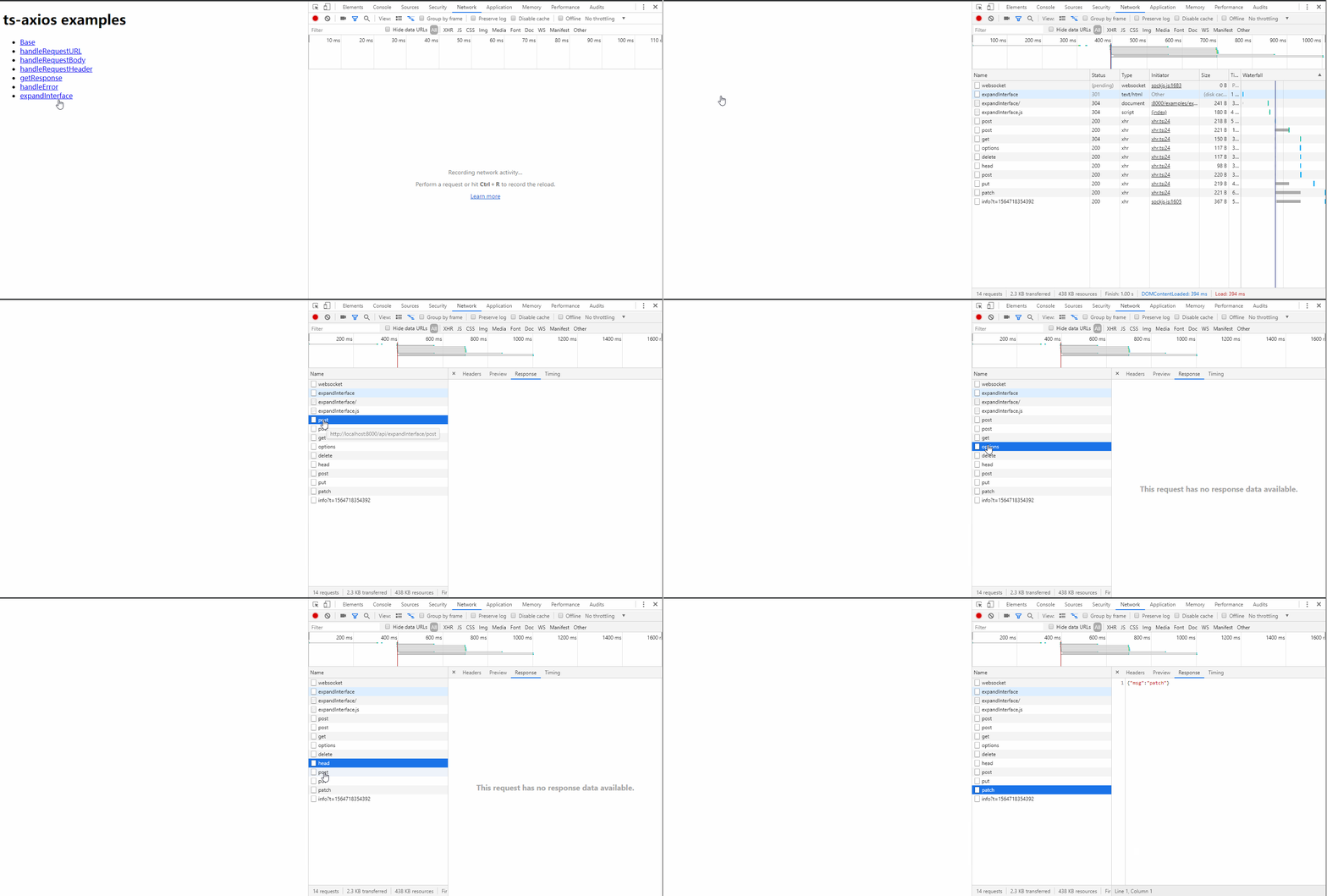
接着我们打开 chrome 浏览器,访问 http://localhost:8000/ 即可访问我们的 demo 了,我们点击 expandInterface,通过F12的 network 部分我们可以看到所有的请求都已正常发出:
OK,接口扩展我们就已经实现了。
(完)
使用Typescript重构axios(十一)——接口扩展的更多相关文章
- 使用Typescript重构axios(二十一)——请求取消功能:添加axios.isCancel接口
0. 系列文章 1.使用Typescript重构axios(一)--写在最前面 2.使用Typescript重构axios(二)--项目起手,跑通流程 3.使用Typescript重构axios(三) ...
- 使用Typescript重构axios(十七)——增加axios.create接口
0. 系列文章 1.使用Typescript重构axios(一)--写在最前面 2.使用Typescript重构axios(二)--项目起手,跑通流程 3.使用Typescript重构axios(三) ...
- 使用Typescript重构axios(三十一)——添加axios.all和axios.spread方法
0. 系列文章 1.使用Typescript重构axios(一)--写在最前面 2.使用Typescript重构axios(二)--项目起手,跑通流程 3.使用Typescript重构axios(三) ...
- 使用Typescript重构axios(一)——写在最前面
0.系列文章 1.使用Typescript重构axios(一)--写在最前面 2.使用Typescript重构axios(二)--项目起手,跑通流程 3.使用Typescript重构axios(三)- ...
- 使用Typescript重构axios(二)——项目起手,跑通流程
0.系列文章 1.使用Typescript重构axios(一)--写在最前面 2.使用Typescript重构axios(二)--项目起手,跑通流程 3.使用Typescript重构axios(三)- ...
- 使用Typescript重构axios(三)——实现基础功能:处理get请求url参数
0. 系列文章 1.使用Typescript重构axios(一)--写在最前面 2.使用Typescript重构axios(二)--项目起手,跑通流程 3.使用Typescript重构axios(三) ...
- 使用Typescript重构axios(四)——实现基础功能:处理post请求参数
0. 系列文章 1.使用Typescript重构axios(一)--写在最前面 2.使用Typescript重构axios(二)--项目起手,跑通流程 3.使用Typescript重构axios(三) ...
- 使用Typescript重构axios(五)——实现基础功能:处理请求的header
0. 系列文章 1.使用Typescript重构axios(一)--写在最前面 2.使用Typescript重构axios(二)--项目起手,跑通流程 3.使用Typescript重构axios(三) ...
- 使用Typescript重构axios(六)——实现基础功能:获取响应数据
0. 系列文章 1.使用Typescript重构axios(一)--写在最前面 2.使用Typescript重构axios(二)--项目起手,跑通流程 3.使用Typescript重构axios(三) ...
随机推荐
- 分库分表(4) ---SpringBoot + ShardingSphere 实现分表
分库分表(4)--- ShardingSphere实现分表 有关分库分表前面写了三篇博客: 1.分库分表(1) --- 理论 2.分库分表(2) --- ShardingSphere(理论) 3.分库 ...
- redis的安装与五种结构的使用
这次我们来说说我们的redis,在我们的redis的认知里,最熟悉的就是用redis作为缓存使用,还有我们的分布式session,其实还有很多redis的使用,还有redis的哨兵模式等等. Redi ...
- 【THE LAST TIME】this:call、apply、bind
前言 The last time, I have learned [THE LAST TIME]一直是我想写的一个系列,旨在厚积薄发,重温前端. 也是给自己的查缺补漏和技术分享. 欢迎大家多多评论指点 ...
- 一篇干货满满的 NFS 文章
目录 NFS 1. 安装 2. 配置 3. 启动并添加到开机自启 4. NFS 客户端挂载 5 报错与解决办法 6. Win 系统安装 NFS client NFS 1. 安装 yum install ...
- RAID 10 配置流程
1.在虚拟机中再添加5块硬盘: 2.fdisk -l 可以查看当前虚拟机中的磁盘情况. 3.使用mdadm命令创建RAID10,名称为”/dev/md0″. -C代表创建操作,-v显示创建过程,-a ...
- .net core gRPC与IdentityServer4集成认证授权
前言 随着.net core3.0的正式发布,gRPC服务被集成到了VS2019.本文主要演示如何对gRPC的服务进行认证授权. 分析 目前.net core使用最广的认证授权组件是基于OAuth2. ...
- 宝塔面板6.x版本前台存储XSS+后台CSRF组合拳Getshell
对于宝塔漏洞复现和练习 0×00 什么是宝塔面板 宝塔面板是一款使用方便,功能强大且终身免费的服务器管理软件,支持Linux 与Windows 系统.一键配置:LAMP / LNMP ,网站,数据库 ...
- React Diff算法一览
前言 diff算法一直是React系统最核心的部分,并且由于演化自传统diff,使得比较方式从O(n^3)降级到O(n),然后又改成了链表方式,可谓是变化万千. 传统Diff算法 传统diff算法需要 ...
- opencv::源码编译
环境:win10.vs2017.cmake .java.python3.7默认安装. opencv源码:opencv-.zip opencv拓展库源码:opencv_contrib-.zip (注意: ...
- linux上war包方式安装Jenkins
我的安装环境:jdk1.8, linux系统为: [root@ipha-dev71-1 nmon]# cat /etc/redhat-release # Linux查看版本当前操作系统发行版信息 Ce ...