
第二篇 Springboot mybatis generate根据数据库表自动生成实体类、Mapper和Mapper.xml
源码链接:https://pan.baidu.com/s/1iP4UguBufHbcIEv4Ux4wDw
提取码:j6z9
目录结构如下:只需增加一个generatorConfig.xml文件和在pom.xml中配置下Mybatis generator代码生成插件即可

pom.xml中增加如下配置:
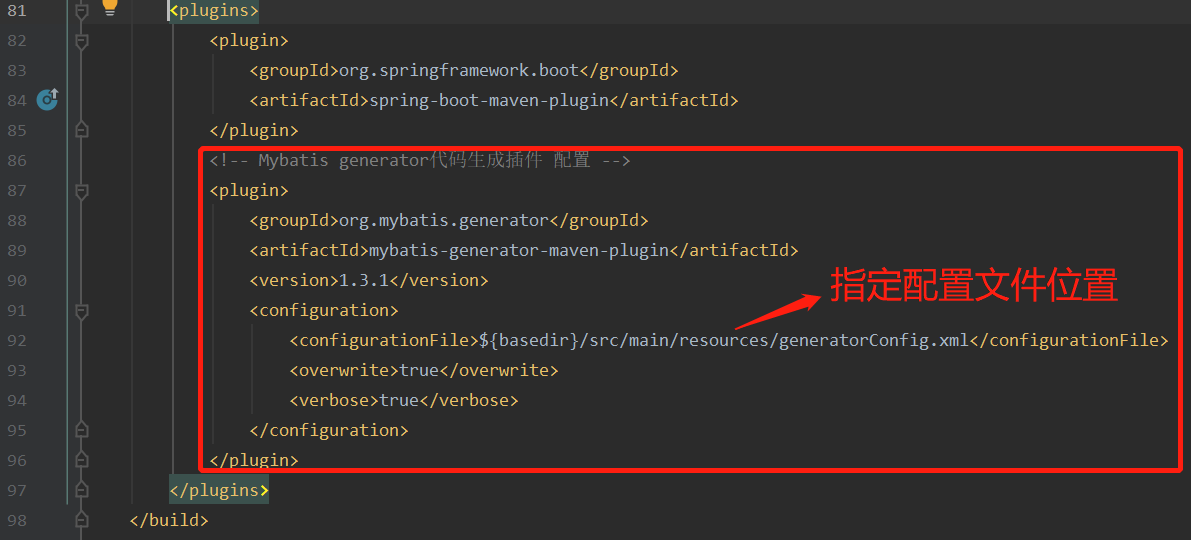
pom.xml中相关依赖及build插件部分代码
<dependencies>

    <dependency>

        <groupId>org.springframework.boot</groupId>

        <artifactId>spring-boot-starter-web</artifactId>

    </dependency>

    <dependency>

        <groupId>org.mybatis.spring.boot</groupId>

        <artifactId>mybatis-spring-boot-starter</artifactId>

        <version>2.1.1</version>

    </dependency>

    <dependency>

        <groupId>mysql</groupId>

        <artifactId>mysql-connector-java</artifactId>

        <scope>runtime</scope>

    </dependency>

    <dependency>

        <groupId>org.springframework.boot</groupId>

        <artifactId>spring-boot-starter-thymeleaf</artifactId>

        <version>2.1.4.RELEASE</version>

    </dependency>

    <dependency>

        <groupId>org.springframework.boot</groupId>

        <artifactId>spring-boot-starter-jdbc</artifactId>

    </dependency>

    <dependency>

        <groupId>org.springframework.boot</groupId>

        <artifactId>spring-boot-starter-test</artifactId>

        <scope>test</scope>

        <exclusions>

            <exclusion>

                <groupId>org.junit.vintage</groupId>

                <artifactId>junit-vintage-engine</artifactId>

            </exclusion>

        </exclusions>

    </dependency>

</dependencies>

<build>

    <!-- maven工程在默认情况下src/main/java目录下的mapper文件是不发布到target目录下的 -->

    <!-- 增加下面resource配置将resources目录下的文件和java目录下的配置文件添加资源映射-->

    <resources>

        <resource>

            <directory>src/main/resources</directory>

            <includes>

                <include>**/*.*</include>

            </includes>

            <filtering>true</filtering>

        </resource>

        <resource>

            <directory>src/main/java</directory>

            <includes>

                <include>**/*.properties</include>

                <include>**/*.xml</include>

            </includes>

            <filtering>false</filtering>

        </resource>

    </resources>

    <plugins>

        <plugin>

            <groupId>org.springframework.boot</groupId>

            <artifactId>spring-boot-maven-plugin</artifactId>

        </plugin>

        <!-- Mybatis generator代码生成插件 配置 -->

        <plugin>

            <groupId>org.mybatis.generator</groupId>

            <artifactId>mybatis-generator-maven-plugin</artifactId>

            <version>1.3.1</version>

            <configuration>

                <configurationFile>${basedir}/src/main/resources/generatorConfig.xml</configurationFile>

                <overwrite>true</overwrite>

                <verbose>true</verbose>

            </configuration>

        </plugin>

    </plugins>

</build>
generatorConfig.xml文件内容如下:
<!--数据库驱动包路径 -->

<classPathEntry location="C:\Users\heave\.m2\repository\mysql\mysql-connector-java\5.1.30\mysql-connector-java-5.1.30.jar"/>

<context id="DB2Tables" targetRuntime="MyBatis3">

    <!--关闭注释 -->

    <commentGenerator>

        <property name="suppressAllComments" value="true"/>

    </commentGenerator>

    <!--数据库连接信息 -->

    <jdbcConnection driverClass="com.mysql.jdbc.Driver" connectionURL="jdbc:mysql://localhost:3306/big_strong?characterEncoding=utf-8"

                    userId="root" password="123456">

    </jdbcConnection>

    <!--生成的model 包路径 -->

    <javaModelGenerator targetPackage="big.strong.disheng.user.model" targetProject="src/main/java">

        <property name="enableSubPackages" value="ture"/>

        <property name="trimStrings" value="false"/>

    </javaModelGenerator>

    <!--生成xml mapper文件 路径 -->

    <sqlMapGenerator targetPackage="big.strong.disheng.user.dao" targetProject="src/main/java">

        <property name="enableSubPackages" value="ture"/>

    </sqlMapGenerator>

    <!-- 生成的Dao接口 的包路径 -->

    <javaClientGenerator type="XMLMAPPER" targetPackage="big.strong.disheng.user.dao" targetProject="src/main/java">

        <property name="enableSubPackages" value="ture"/>

    </javaClientGenerator>

    <!--对应数据库表名 tableName数据库表名称,domainObjectName生成model类的名称 -->

    <table tableName="role" domainObjectName="Role" enableCountByExample="false"

           enableSelectByExample="false" enableUpdateByExample="false" enableDeleteByExample="false">

        <property name="useActualColumnNames" value="true"/>

    </table>

    <table tableName="permission" domainObjectName="Permission" enableCountByExample="false"

           enableSelectByExample="false" enableUpdateByExample="false" enableDeleteByExample="false">

        <property name="useActualColumnNames" value="true"/>

    </table>

    <table tableName="user_role" domainObjectName="UserRole" enableCountByExample="false"

           enableSelectByExample="false" enableUpdateByExample="false" enableDeleteByExample="false">

        <property name="useActualColumnNames" value="true"/>

    </table>

    <table tableName="role_permission" domainObjectName="RolePermission" enableCountByExample="false"

           enableSelectByExample="false" enableUpdateByExample="false" enableDeleteByExample="false">

        <property name="useActualColumnNames" value="true"/>

    </table>

</context>
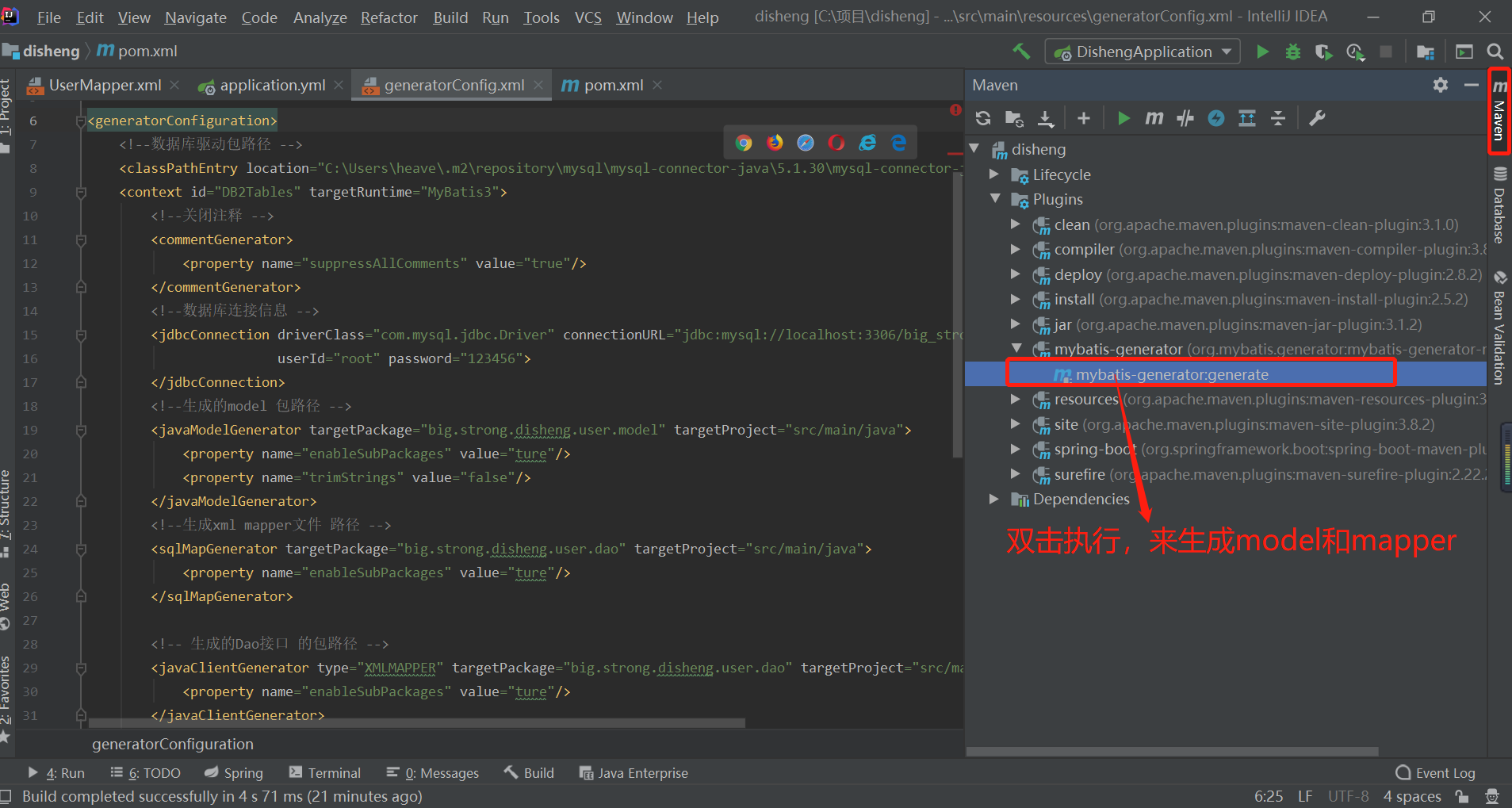
双击之后控制台会输出
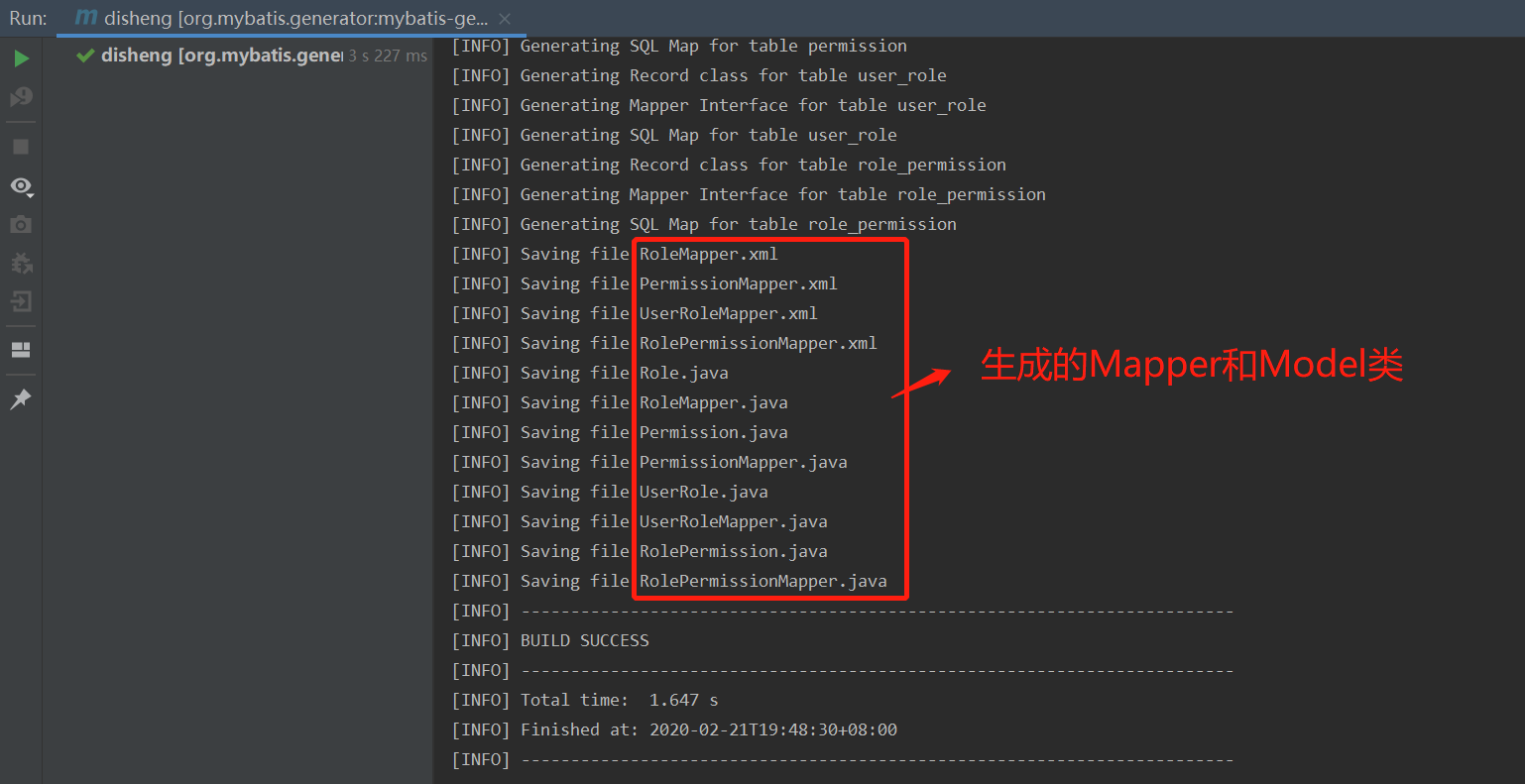
完成
源码链接:https://pan.baidu.com/s/1iP4UguBufHbcIEv4Ux4wDw
提取码:j6z9
第二篇 Springboot mybatis generate根据数据库表自动生成实体类、Mapper和Mapper.xml的更多相关文章
- 根据数据库表自动生成实体类、xml和dao---mybatis
网盘链接: https://pan.baidu.com/s/1AVGz0bDa_Y5zjk7vXa2eHw 提取码: 2gr6 1.记事本打开generatorConfig.xml文件 2(1,2,3 ...
- 使用mybatis-generator-core-1.3.2.jar根据数据库表自动生成实体
1 导入mybatis-generator-core-1.3.2.jar 2配置mbg.xml <?xml version="1.0" encoding="UTF- ...
- MyBatis 逆向工程——根据数据表自动生成model、xml映射文件、mapper接口
MyBatis Generator(MBG)的使用 MBG可以根据数据表生成对应的model.xml映射文件.mapper接口,只是简单的生成,还需要根据需求修改. 1.下载jar包 https:// ...
- mybits根据表自动生成 java类和mapper 文件
mybits根据表自动生成 java类和mapper 文件 我这个脑子啊,每次创建新的工程都会忘记是怎么集成mybits怎么生成mapper文件的,so today , I can't write t ...
- Idea根据表自动生成实体
Idea根据表自动生成实体: 首先说下这种方式有个缺点,就是如果表里面有日期.时间类型,那么需要手动的设置映射类型 第一步:在Idea中配置好数据库: 在Idea窗口右边,点击Database按钮 配 ...
- 使用.net core efcore根据数据库结构自动生成实体类
源码 github,已更新最新代码 https://github.com/leoparddne/GenEntities/ 使用的DB是mysql,所有先nuget一下mysql.data 创建t4模板 ...
- 基于Dapper的开源Lambda扩展,且支持分库分表自动生成实体之基础介绍
LnskyDB LnskyDB是基于Dapper的Lambda扩展,支持按时间分库分表,也可以自定义分库分表方法.而且可以T4生成实体类免去手写实体类的烦恼. 文档地址: https://lining ...
- SpringBoot整合Mybatis 使用generator自动生成实体类代码、Mapper代码、dao层代码
1.新建一个SpringBoot项目,并引入Mybatis和mybatis-generator相关的依赖. <dependency> <groupId>org.springfr ...
- idea 根据数据库表自动创建持久化类
一.点击最右边的Database: 二.点击,再点DataSource选择数据库类型,配置数据库信息: 三.打开项目结构,选择,找到你的项目,点击,添加hibernate: 四.如果有现成的cfg.x ...
随机推荐
- matplotlib 条形图
一.特点 离散数据,数据之间没有直接的关系 二.分类 1.垂直条形图 bar(x, height, width=0.8) # x 为x轴 # height 为y轴 # width 为 条形图的宽度 例 ...
- Oracle GoldenGate to Confluent with Kafka Connect
Confluent is a company founded by the team that built Apache Kafka. It builds a platform around Kafk ...
- C#的JSON数据处理
假设一个Model: public class Person { public int Age { get; set; } public string Name { get; set; } } JSO ...
- Day9-Python3基础-多线程、多进程
1.进程.与线程区别 2.python GIL全局解释器锁 3.线程 语法 join 线程锁之Lock\Rlock\信号量 将线程变为守护进程 Event事件 queue队列 生产者消费者模型 Que ...
- Day4-Python3基础-装饰器、迭代器
今日内容: 1.高阶函数 2.嵌套函数 3.装饰器 4.生成器 5.迭代器 1.高阶函数 定义: a:把一个函数名当作实参传给函数 a:返回值包含函数名(不修改函数的调用方式) import time ...
- ffplay的使用
https://www.cnblogs.com/renhui/p/8458802.html
- php--->php打印格式化
php打印格式化 当我们PHP调试的时候,用var_dump 或 print_r打印json数据或array数组时,html页面没有换行显示,看到的内容一大堆,不好定位.输出前添加html的pre标签 ...
- Fibonacci Nim(斐波那契尼姆)游戏
游戏描述: Fibonacci Nim是Nim游戏的变种,其规则为两名玩家从一堆硬币中交替移除硬币,第一步中,不允许玩家拿走所有硬币,也不允许不取,并且在每次后续移动中,移除的硬币数量最多可以是上一次 ...
- OpenResty学习指南(一)
我的博客: https://www.luozhiyun.com/archives/217 想要学好 OpenResty,你必须理解下面 8 个重点: 同步非阻塞的编程模式: 不同阶段的作用: LuaJ ...
- 【动手学pytorch】softmax回归
一.什么是softmax? 有一个数组S,其元素为Si ,那么vi 的softmax值,就是该元素的指数与所有元素指数和的比值.具体公式表示为: softmax回归本质上也是一种对数据的估计 二.交叉 ...