
Hibernate:对象关系映射(一对一,一对多,多对一,多对多)
如需转载,请说明出处:http://www.cnblogs.com/gudu1/p/6895610.html
Hibernate通过关系映射来表示数据库中表与表之间的关系,关系映射可以通过两种方式:配置文件映射和注解映射,本文主要讲解配置文件映射。
关系映射:
1.单向关联关系,表示只有一方维护关系,而另一方并不知道有这种关系,在解除和删除关联关系的时候也要在有外键方进行,否则会抛出异常,因为有外键的约束。
2.双向关联关系。双方都维护关系,无论在哪一方解除和删除关联关系,Hibernate都能够获知,都能够正确的进行操作。
关系映射中,即使你在类中添加了属性(即相关联的类对象),通过配置inverse属性,也可以设置它是否维护关系,默认为true,可以设置为false表示不维护
一:单向关联
单向多对一:
单向(many-to-one)是最常见的单向关联关系:
<class name="Department" table="department">

        <id name="id" column="id">

            <generator class="native"/>

        </id>

        <property name="uname" column="uname" type="string" length="20"></property>

</class>

 <class name="Employee" table="employee">

        <id name="id" column="id">

            <generator class="native"/>

        </id>

        <property name="uname" type="string" length="20" column="uname"></property>

        <many-to-one name="department" class="Department" column="department_id"></many-to-one>

</class>
下面是对应数据库表

单向一对多:
基于外键关联的单向一对多关联是一种很少见的情况,不推荐使用它。
<class name="Department" table="department">

        <id name="id" column="id">

            <generator class="native"/>

        </id>

        <property name="uname" column="uname" type="string" length="20"></property>

        <set name="employeeSet">

            <key column="employee_id"></key>

            <one-to-many class="Employee" />

        </set>

</class>

<class name="Employee" table="employee">

        <id name="id" column="id">

            <generator class="native"/>

        </id>

        <property name="uname" type="string" length="20" column="uname"></property>

</class>
下面是对应数据库表,可以看出跟上面是一样的

单向一对一:
基于外键关联的单向一对一关联和单向多对一关联几乎是一样的。唯一的不同就是单向一对一关联中的外键字段具有唯一性约束(unique)。
<class name="Department" table="department">

        <id name="id" column="id">

            <generator class="native"/>

        </id>

        <property name="uname" column="uname" type="string" length="20"></property>

</class>

<class name="Employee" table="employee">

        <id name="id" column="id">

            <generator class="native"/>

        </id>

        <property name="uname" type="string" length="20" column="uname"></property>

        <many-to-one name="department" column="department_id" class="Department" unique="true"></many-to-one>

</class>
看图好像和(一对多|多对一)结构一样,确实是一样的,你可以插几条数据试一下,因为是一对一关系,有可能会出错的哦!

二:使用连接表单向关联
单向一对多:
基于连接表的单向一对多关联 应该优先被采用。请注意,通过指定unique="true",我们可以把多样性从多对多改变为一对多。
<class name="Department" table="department">

        <id name="id" column="id">

            <generator class="native"/>

        </id>

        <property name="uname" column="uname" type="string" length="20"></property>

        <set name="employeeSet" table="empl_depa">

            <key column="department_id"></key>

            <many-to-many column="employee_id" class="Employee" unique="true"></many-to-many>

        </set>

</class>

<class name="Employee" table="employee">

        <id name="id" column="id">

            <generator class="native"/>

        </id>

        <property name="uname" type="string" length="20" column="uname"></property>

</class>

单向多对一:
基于连接表的单向多对一关联在关联关系可选的情况下应用也很普遍。
<class name="Employee" table="employee">

        <id name="id" column="id">

            <generator class="native"/>

        </id>

        <property name="uname" type="string" length="20" column="uname"></property>

        <join table="emplo_depa">

            <key column="employee_id"></key>

            <many-to-one name="department" class="Department" column="department_id"></many-to-one>

        </join>

</class>

<class name="Department" table="department">

        <id name="id" column="id">

            <generator class="native"/>

        </id>

        <property name="uname" column="uname" type="string" length="20"></property>

</class>

单向一对一:
基于连接表的单向一对一关联也是可行的,但非常少见。
<class name="Department" table="department">

        <id name="id" column="id">

            <generator class="native"/>

        </id>

        <property name="uname" column="uname" type="string" length="20"></property>

</class>

<class name="Employee" table="employee">

        <id name="id" column="id">

            <generator class="native"/>

        </id>

        <property name="uname" type="string" length="20" column="uname"></property>

        <join table="emplo_depa">

            <key column="employee_id"></key>

            <many-to-one name="department" class="Department" column="department_id" unique="true"></many-to-one>

        </join>

</class>

单向多对多:
<class name="Department" table="department">

        <id name="id" column="id">

            <generator class="native"/>

        </id>

        <property name="uname" column="uname" type="string" length="20"></property>

        <set name="employeeSet" table="emplo_depa">

            <key column="department_id"></key>

            <many-to-many class="Employee" column="employee_id"></many-to-many>

        </set>

</class>

<class name="Employee" table="employee">

        <id name="id" column="id">

            <generator class="native"/>

        </id>

        <property name="uname" type="string" length="20" column="uname"></property>

</class>
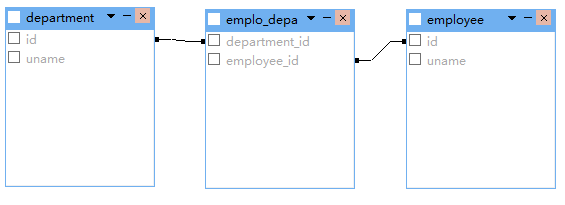
三:双向关联
一对一双向关联
<class name="Department" table="department">

        <id name="id" column="id">

            <generator class="native"/>

        </id>

        <property name="uname" column="uname" type="string" length="20"></property>

        <one-to-one name="employee" class="Employee" property-ref="department"></one-to-one>

</class>

<class name="Employee" table="employee">

        <id name="id" column="id">

            <generator class="native"/>

        </id>

        <property name="uname" type="string" length="20" column="uname"></property>

        <many-to-one name="department" class="Department" unique="true"></many-to-one>

</class>
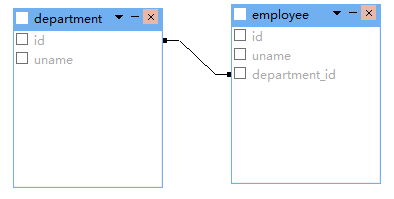
一对多双向关联
<class name="Department" table="department">

        <id name="id" column="id">

            <generator class="native"/>

        </id>

        <property name="uname" column="uname" type="string" length="20"></property>

        <set name="employeeSet">

            <key column="department_id"></key>

            <one-to-many class="Employee" />

        </set>

</class>

<class name="Employee" table="employee">

        <id name="id" column="id">

            <generator class="native"/>

        </id>

        <property name="uname" type="string" length="20" column="uname"></property>

        <many-to-one name="department" class="Department" column="department_id"></many-to-one>

</class>
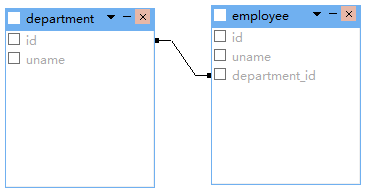
双向多对一关联把上面权限反转一下就好,这里就不贴代码了。
四:使用连接表双向关联
一对一双向关联
<class name="Department" table="department">

        <id name="id" column="id">

            <generator class="native"/>

        </id>

        <property name="uname" column="uname" type="string" length="20"></property>

        <join table="emplo_depa" inverse="true" optional="true">

            <key column="department_id" unique="true"></key>

            <many-to-one name="employee" unique="true" column="employee_id"></many-to-one>

        </join>

</class>

<class name="Employee" table="employee">

        <id name="id" column="id">

            <generator class="native"/>

        </id>

        <property name="uname" type="string" length="20" column="uname"></property>

        <join table="emplo_depa" optional="true">

            <key column="employee_id" unique="true"></key>

            <many-to-one name="department" unique="true" column="department_id"></many-to-one>

        </join>

</class>
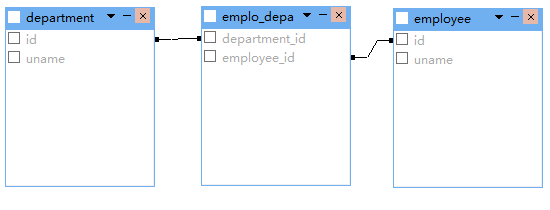
多对多双向关联
<class name="Department" table="department">

        <id name="id" column="id">

            <generator class="native"/>

        </id>

        <property name="uname" column="uname" type="string" length="20"></property>

        <set name="employeeSet" table="emplo_depa" inverse="true">

            <key column="department_id"></key>

            <many-to-many class="Employee" column="employee_id" ></many-to-many>

        </set>

</class>

<class name="Employee" table="employee">

        <id name="id" column="id">

            <generator class="native"/>

        </id>

        <property name="uname" type="string" length="20" column="uname"></property>

        <set name="departmentSet" table="emplo_depa">

            <key column="employee_id"></key>

            <many-to-many class="Department" column="department_id"></many-to-many>

        </set>

</class>

一对多双向关联
<class name="Department" table="department">

        <id name="id" column="id">

            <generator class="native"/>

        </id>

        <property name="uname" column="uname" type="string" length="20"></property>

        <set name="employeeSet" inverse="true" table="emplo_depa">

            <key column="department_id"></key>

            <many-to-many unique="true" class="Employee" column="employee_id"></many-to-many>

        </set>

</class>

<class name="Employee" table="employee">

        <id name="id" column="id">

            <generator class="native"/>

        </id>

        <property name="uname" type="string" length="20" column="uname"></property>

        <join table="emplo_depa">

            <key column="employee_id"></key>

            <many-to-one name="department" column="department_id" class="Department"></many-to-one>

        </join>

</class>

除此之外,还有更多映射配置(继承映射,组件映射),本篇就不写那么多了,希望读者能够查阅文件学习。每天一小步,人生一大步。
Hibernate:对象关系映射(一对一,一对多,多对一,多对多)的更多相关文章
- Hibernate 对象关系映射文件
简介: POJO 类和关系型数据库之间的映射可以用一个 XML 文档来定义 通过 POJO 类的数据库映射文件,Hibernate 可以理解持久化类和数据表之间的对应关系,也可以理解持久化类属性与数据 ...
- hibernate对象关系映射( 一对一,一对多,多对一,多对多的单向,双向映射 ——)
对象之间的关系: 关系映射之间的关系只的是对象之间的关系,并不指数据库表的关系(外键关系)这儿解决的问题是当对象之间的关系之一时,数据库表该如何映射,编程上如何对待. 一对一(主键关联,和单向的外键关 ...
- hibernate对象关系实现(一)一对多
hibernate是对jdk一个封装工具,实现对象和数据库之间数据映射.使用时涉及到四个问题:a.对象之间的关系在类中的体现:b,对象关系对应的数据库中表之间体现:c.实现a,b在hibernate的 ...
- hibernate对象关系映射的配置
一对一主键关联单双向 <?xml version="1.0" encoding="UTF-8"?> <!DOCTYPE hibernate-m ...
- Hibernate -- 对象关系映射基础
- Hibernate学习笔记三:对象关系映射(一对一,一对多,多对一,多对多)
如需转载,请说明出处:http://www.cnblogs.com/gudu1/p/6895610.html Hibernate通过关系映射来表示数据库中表与表之间的关系,关系映射可以通过两种方式:配 ...
- MyBatis加强(1)~myBatis对象关系映射(多对一关系、一对多关系)、延迟/懒加载
一.myBatis对象关系映射(多对一关系.一对多关系) 1.多对一关系: ---例子:多个员工同属于一个部门. (1)myBatis发送 额外SQL: ■ 案例:员工表通过 dept_id 关联 部 ...
- Hibernate (开源对象关系映射框架)
一.基本介绍1.它对JDBC进行了非常轻量级的对象封装,它将POJO与数据库表建立映射关系,是一个全自动的orm(对象关系映射)框架,hibernate可以自动生成SQL语句,自动执行: Hibern ...
- Hibernate映射--基本类映射和对象关系映射(转)
原文地址:http://blog.csdn.net/lovesummerforever/article/details/20901011 尊重原创,请访问原网址 回想一些我们在没有学习ssh的时候 ...
随机推荐
- 源码编译安装python2/3版本
1- 源码编译安装python2.7版本 1.1- 下载源码包 wget https://www.python.org/ftp/python/2.7.14/Python-2.7.14.tgz 1.2- ...
- vscode侧边栏字体大小修改
1.找到安装路径下,workbench.desktop.main.css 文件 C:\z_my_install\Microsoft VS Code\resources\app\out\vs\workb ...
- cf1242B
题意简述:给出一个n个点的完全图,边权要么是1要么是0,输入只给出权值的是1的那些边,求解最小生成树的权值 解答:边很多,我们考虑使用prim算法,prim算法的过程中维护了一个dis数组,这里我们可 ...
- 取Cookie值
string url_Login_Group = "http://ui.ptlogin2.qq.com/cgi-bin/login?appid=549000912&daid=5&am ...
- P2048 [NOI2010]超级钢琴 [堆+st表]
考虑只能取长度为 [L,R] 的,然后不难想到用堆搞. 搞个前缀和的st表,里面维护的是一个 最大值的位置 struct rmq { int mx[N][20] ; void qwq(int n) { ...
- STL与基本数据结构
目录 Vector list -- 链表 Stack -- 栈 queue -- 队列 优先队列 -- priority_ queue set -- 集合 multiset map 这是我第一次用Ma ...
- stun/turn服务器部署
目录: 一.简介 二.安装 三.配置与运行 四.运行检测 五.答疑环节 一.简介 本文通过在服务器上安装coturn这个软件,实现搭建STUN服务器和TURN服务器. coturn 简介:是一个免费的 ...
- chm文件打开空白无内容
问题描述 chm文件打开空白无内容 解决方案 选中 chm 文件,右键 - 属性- 在弹出的对话框中点击右下方的“接触锁定”,之后点击“应用”,再点击“确定”
- openssl 生成免费证书
原文链接:https://www.cnblogs.com/tugenhua0707/p/10927722.html 一:什么是openssl? 它的作用是?应用场景是什么? 即百度百科说:openss ...
- 一些PC小软件/工具/神器备份
小巧.有用的工具,提升工作效率. 以下所有软件均在吾爱破解可以找到(善用搜索) everything(本机文件搜索神器) 天若OCR文字识别(强无敌) QQ拼音截屏工具(从QQ拼音/QQ中独立拿出来的 ...