
WDA学习(24):Context Menu使用
1.17 UI Element:Context Menu使用
本实例测试创建Context Menu.
1.创建Component,View: V_CONTEXT_MENU;
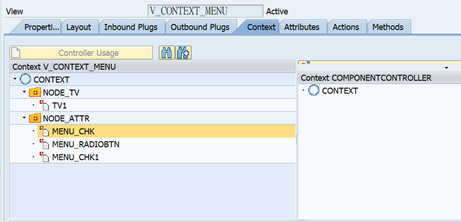
2.创建Context节点;
创建Node:NODE_TV,Cardinality:1..1;
创建Attribute:TV1,类型String;
创建Node:NODE_ATTR,Cardinality:1..1;
创建Attribute:MENU_CHK, 类型WDY_BOOLEAN;
创建Attribute:MENU_RADIOBTN,类型WDR_DEMO_FRUIT;
创建Attribute:MENU_CHK1,类型WDY_BOOLEAN;
3.创建Layout页签;
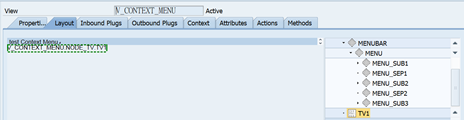
创建UI Element:MenuBar,ID:MENUBAR;
创建UI Element:Menu,ID:MENU;
创建UI Element:Menu,ID:MENU_SUB1;
创建UI Element:MenuActionItem,ID: MENU_CHG,绑定Action: MENU_CHG;
创建UI Element:MenuActionItem,ID: MENU_ADD,绑定Action:MENU_ADD;
创建UI Element:MenuSeparator,ID:MENU_SEP1;
创建UI Element:Menu,ID:MENU_SUB2;
创建UI Element:MenuRadioButton,ID:MENU_BTN,绑定Action: MENU_SEL,selectedKey绑定Context的Attributes: V_CONTEXT_MENU.NODE_ATTR.MENU_RADIOBTN;
创建UI Element:MenuRadioButton,ID:MENU_BTN1,绑定Action:MENU_SEL,selectedKey绑定Context的Attributes: V_CONTEXT_MENU.NODE_ATTR.MENU_RADIOBTN;
创建UI Element:MenuSeparator,ID:MENU_SEP2;
创建UI Element:Menu,ID:MENU_SUB3;
创建UI Element:MenuCheckBox,ID:MENU_CHK,绑定Action:MENU_TOG,checked绑定Context的Attributes: V_CONTEXT_MENU.NODE_ATTR.MENU_CHK;
创建UI Element:MenuCheckBox,ID:MENU_CHK1,绑定Action:MENU_TOG,checked绑定Context的Attributes: V_CONTEXT_MENU.NODE_ATTR.MENU_CHK1;
创建UI Element:TextView,text绑定Context的Attributes: V_CONTEXT_MENU.NODE_TV.TV1;
4.创建Method页签,实现Action方法;
实现Action: MENU_ADD,Menu选择Add;
代码实例:
  DATA:lo_node TYPE REF TO if_wd_context_node.

  DATA:lo_element TYPE REF TO if_wd_context_element.

  lo_node = wd_context->get_child_node( wd_this->wdctx_node_tv ).

  lo_element = lo_node->get_element( ).

  lo_element->set_attribute(

    EXPORTING

      name = 'TV1'

      value = 'Menu:add'

  ).
实现Action:MENU_CHG,Menu选择change;
  DATA:lo_node TYPE REF TO if_wd_context_node.

  DATA:lo_element TYPE REF TO if_wd_context_element.

  lo_node = wd_context->get_child_node( wd_this->wdctx_node_tv ).

  lo_element = lo_node->get_element( ).

  lo_element->set_attribute(

    EXPORTING

      name = 'TV1'

      value = 'Menu:change'

  ).
实现Action:MENU_SEL,Menu选择Radio Button;
代码实例:
  DATA:lo_node TYPE REF TO if_wd_context_node.

  DATA:lo_element TYPE REF TO if_wd_context_element.

  DATA:lo_event TYPE REF TO cl_wd_custom_event.

  DATA:lv_string TYPE string.

  lo_event = wdevent.

  lv_string = lo_event->get_string( name = 'KEY' ).

  lv_string = 'Menu:radio button,' && lv_string.

  lo_node = wd_context->get_child_node( wd_this->wdctx_node_tv ).

  lo_element = lo_node->get_element( ).

  lo_element->set_attribute(

    EXPORTING

      name = 'TV1'

      value = lv_string

  ).
实现Action:MENU_TOG,CheckBox选择事件;
代码实例:
  DATA:lo_node TYPE REF TO if_wd_context_node.

  DATA:lo_element TYPE REF TO if_wd_context_element.

  DATA:lo_event TYPE REF TO cl_wd_custom_event.

  DATA:lv_id TYPE string.

  lo_event = wdevent.

  lv_id = lo_event->get_string( name = 'ID' ).

  lv_id = 'Menu:checkbox' && lv_id.

  lo_node = wd_context->get_child_node( wd_this->wdctx_node_tv ).

  lo_element = lo_node->get_element( ).

  lo_element->set_attribute(

    EXPORTING

      name = 'TV1'

      value = lv_id

  ).
WDA学习(24):Context Menu使用的更多相关文章
- Android -- Options Menu,Context Menu,Popup Menu
Options Menu 创建选项菜单的步骤: 1. ...
- Android Contextual Menus之一:floating context menu
Android Contextual Menus之一:floating context menu 上下文菜单 上下文相关的菜单(contextual menu)用来提供影响UI中特定item或者con ...
- Tree Context Menu
Right click on a node to display context menu. My Documents Photos Program Files Intel Java Micros ...
- android学习笔记37——Menu资源
Menu菜单资源 android应用推荐使用XML来定义菜单,其可提供更好的解耦方式. 菜单资源通常位于res/menu文件夹下,其菜单根元素为<menu.../>,menu元素下可包含子 ...
- create Context Menu in Windows Forms application using C# z
In this article let us see how to create Context Menu in Windows Forms application using C# Introduc ...
- Win7/Win8右键菜单管理工具(Easy Context Menu) v1.5 绿色版
软件名称: Win7/Win8右键菜单管理工具(Easy Context Menu)软件语言: 简体中文授权方式: 免费软件运行环境: Win8 / Win7 / Vista / WinXP软件大小: ...
- Description Resource Path Location Type Project configuration is not up-to-date with pom.xml. Select: Maven->Update Project... from the project context menu or use Quick Fix. spark-MT line 1 Maven Co
1.相信大家新建的maven项目,然后添加好依赖(即修改了pom.xml文件以后就会出现如下所示的错误): Description Resource Path Location Type Projec ...
- sublime text 3-right click context menu
dd a system wide windows explorer button " Edit with Sublime" similar to how Notepad++ doe ...
- 手机浏览器中屏蔽img的系统右键菜单context menu
我们知道通过oncontextmenu事件可以屏蔽浏览器右键菜单 $('img').on("contextmenu",function(E){E.preventDefault(); ...
- Vue 2.0 右键菜单组件 Vue Context Menu
Vue 2.0 右键菜单组件 Vue Context Menu https://juejin.im/entry/5976d14751882507db6e839c
随机推荐
- 【个人笔记】CentOS 修改 SSH 端口, 禁止 ROOT 远程登陆
1. 修改 SSH 端口号, 禁止 ROOT 用户远程登录 # 使用ROOT用户或者其他有权限的用户登录 # 首先新建一个普通用户,避免禁用 ROOT 用户远程登陆后自己也无法登陆, 已有用户可以跳过 ...
- 【Frida】调试js代码
方法一attach启动 js代码动态注入app,app需要保持运行状态 # coding: utf-8 import sys import frida app_name = "猿人学APP& ...
- 安装archlinux系统
archlinux iso文件下载站点这个iso文件需要保证较新,否则其中的比如libcap的验证密钥过时无法在系统里安装软件包.比如2022年10月7日安装0601版本iso无法通过linux等软件 ...
- fastdfs虚拟机单机版搭建
说明:github搭建步骤:https://github.com/happyfish100/fastdfs/wiki#trackermkdir /home/dfs #创建数据存储目录 cd /usr/ ...
- 如何查看mysql版本号
- 图片视频二进制流base64加密
一:读取图片或者视频,转换二进制流,进行Base64加密 @PostMapping("/base64Encoder") public StringBuilder changeIma ...
- 最简spring IOC实现
public class Main { public static void main(String[] args) throws Exception { Class<Address> a ...
- BundleFusion_Ubuntu_Pangolin 安装的一些error
/usr/bin/ld: 找不到 -lEigen3::Eigen 解决方法:find_package(Eigen3 REQUIRED)为list(APPEND CMAKE_INCLUDE_PATH & ...
- jekins 入门
环境安装 gitlab 安装 使用 docker 安装 gitlab docker run -d --name gitlab --restart always --hostname gitlab.zd ...
- PostgreSQL-14 安装配置-wsl_v1_ubuntu22.04
环境准备 pgAdmin: Cisco2022 postgrep数据库: postgres: Postgres_2023 install https://learn.microsoft.com/en- ...