
Dynamics 365新功能:可编辑的网格(行内编辑)
关注本人微信和易信公众号: 微软动态CRM专家罗勇 ,回复238或者20161127可方便获取本文,同时可以在第一间得到我发布的最新的博文信息,follow me!我的网站是 www.luoyong.me 。
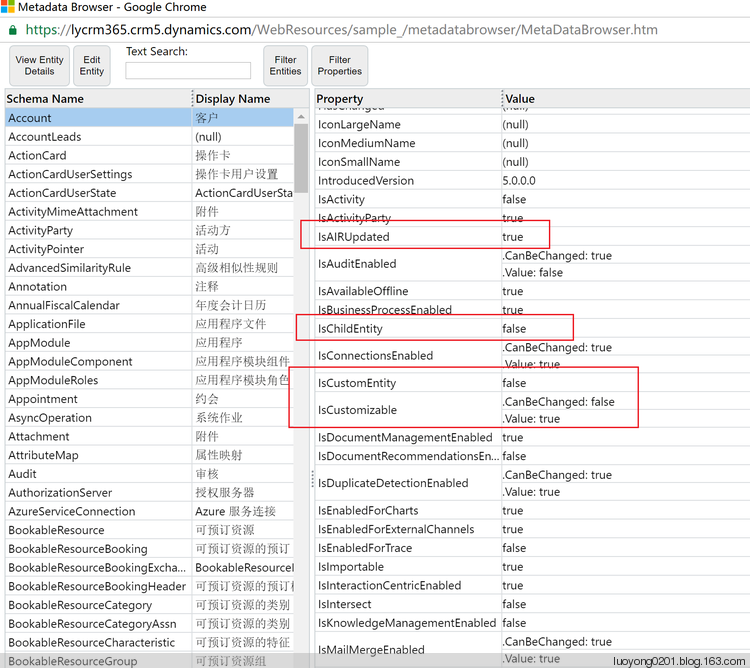
static void Main(string[] args)

{

    try

    {

        var crmSvc = new CrmServiceClient(ConfigurationManager.ConnectionStrings["CRM365"].ConnectionString);

        if (crmSvc.IsReady)

        {

            //<snippetDumpEditableGridEntityInfo1>

            RetrieveAllEntitiesRequest request = new RetrieveAllEntitiesRequest()

            {

                EntityFilters = EntityFilters.Entity,

                RetrieveAsIfPublished = true

            };

            // Retrieve the MetaData.

            RetrieveAllEntitiesResponse response = (RetrieveAllEntitiesResponse)crmSvc.Execute(request);

            // Create an instance of StreamWriter to write text to a file.

            // The using statement also closes the StreamWriter.

            // To view this file, right click the file and choose open with Excel.

            // Excel will figure out the schema and display the information in columns.

            String filename = String.Concat("EditableGridEntityInfo.xml");

            using (StreamWriter sw = new StreamWriter(filename))

            {

                // Create Xml Writer.

                XmlTextWriter metadataWriter = new XmlTextWriter(sw);

                // Start Xml File.

                metadataWriter.WriteStartDocument();

                // Metadata Xml Node.

                metadataWriter.WriteStartElement("Metadata");

                foreach (EntityMetadata currentEntity in response.EntityMetadata)

                {

                    // Start Entity Node

                    metadataWriter.WriteStartElement("Entity");

                    bool canBeDisplayedInSitemap = currentEntity.IsCustomizable.Value;

                    if (canBeDisplayedInSitemap)

                    {

                        metadataWriter.WriteElementString("LogicalName", currentEntity.LogicalName);

                        metadataWriter.WriteElementString("DisplayName", currentEntity.DisplayName.UserLocalizedLabel?.Label);

                        metadataWriter.WriteElementString("CanEnableEditableGridWeb", (!(bool)currentEntity.IsChildEntity && ((bool)currentEntity.IsAIRUpdated || (bool)currentEntity.IsCustomEntity)).ToString());

                        metadataWriter.WriteElementString("CanEnableEditableGridMobile", (currentEntity.IsVisibleInMobileClient.Value || currentEntity.IsVisibleInMobileClient.CanBeChanged).ToString());

                    }

                    // Write the Entity's Information.

                    //End Entity Node

                    metadataWriter.WriteEndElement();

                }

                // End Metadata Xml Node

                metadataWriter.WriteEndElement();

                metadataWriter.WriteEndDocument();

                // Close xml writer.

                Console.WriteLine("Dumped information in the EditableGridEntityInfo.xml file");

            }

        }

        else

        {

            Console.WriteLine("连接CRM出错:" + crmSvc.LastCrmError);

        }

        Console.WriteLine("程序运行完成!");

        Console.ReadKey();

    }

    catch (FaultException ex)

    {

        Console.WriteLine("程序出现异常:ex.Message=" + ex.Message);

        Console.ReadKey();

    }

}

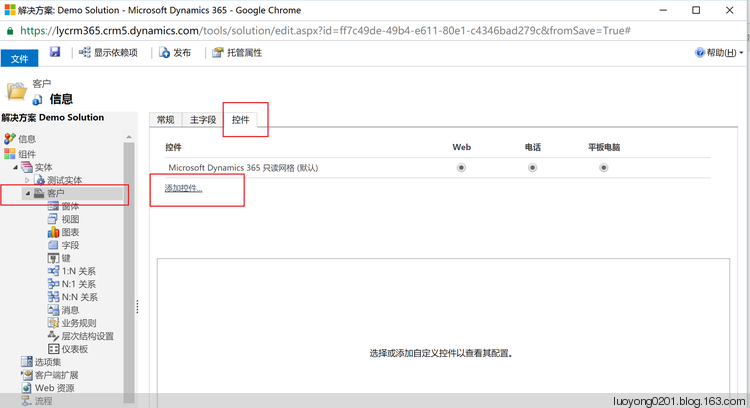
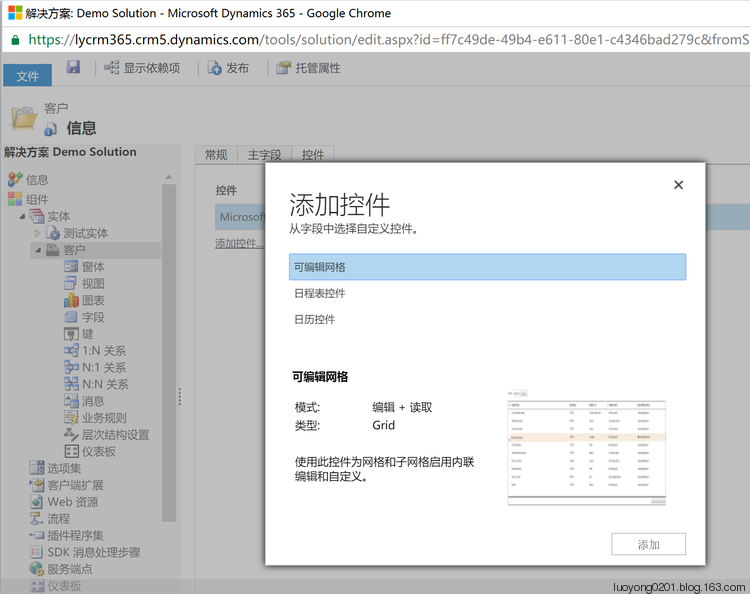
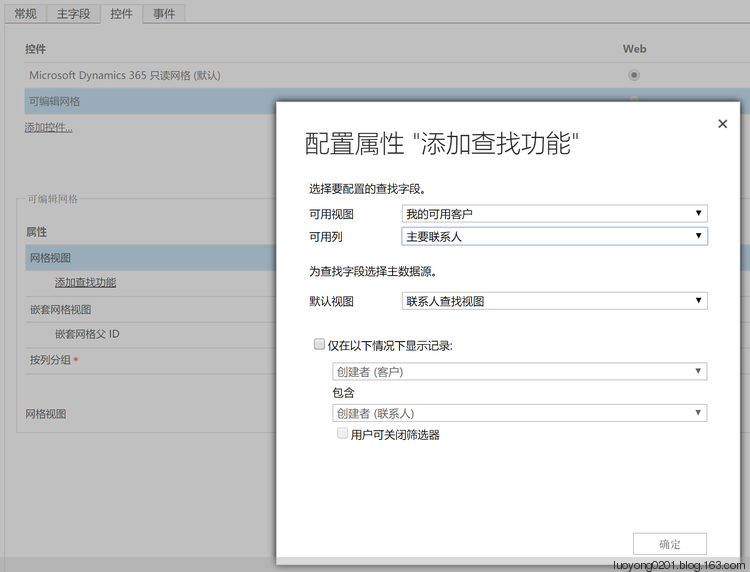
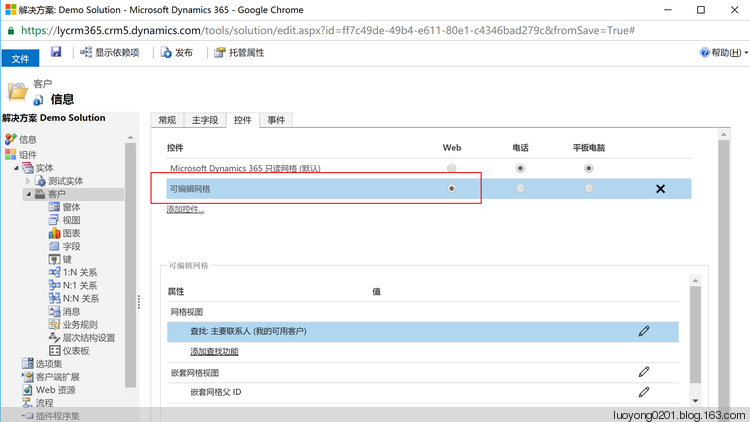
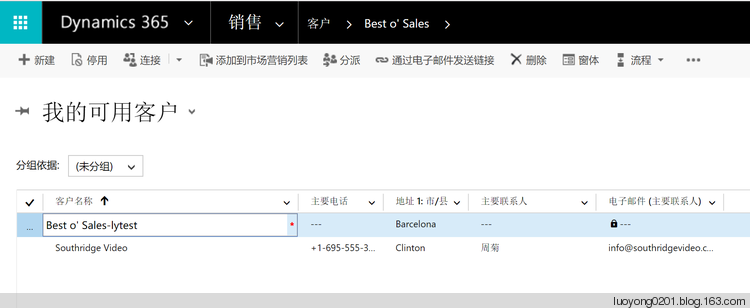
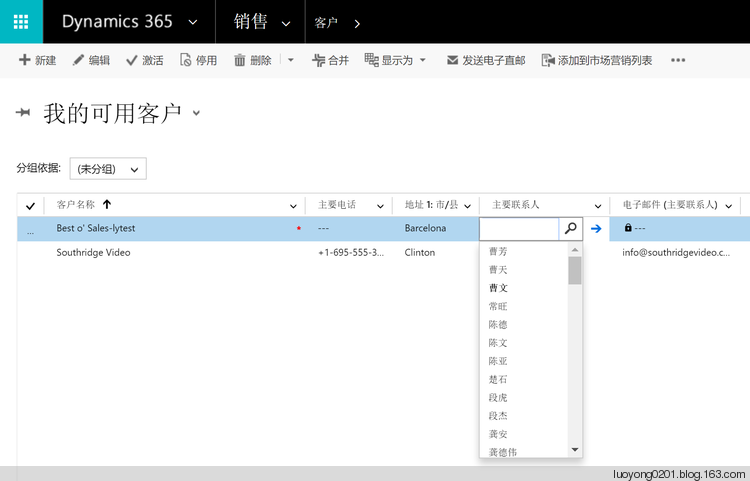
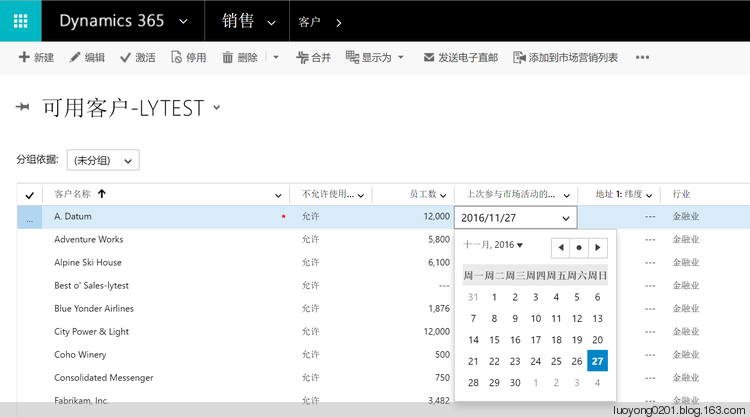
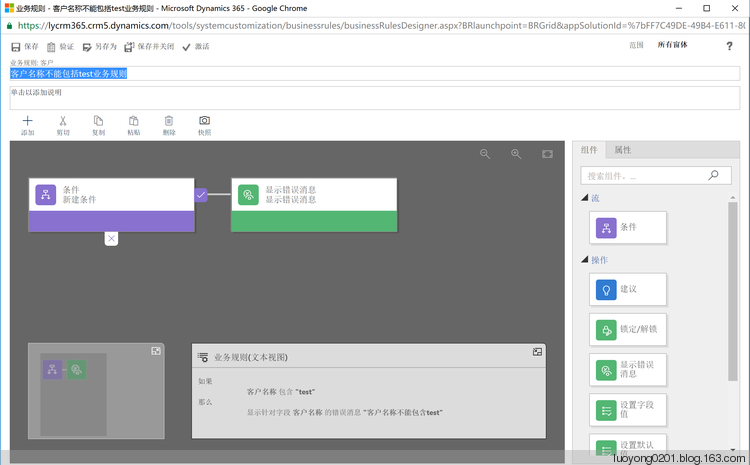
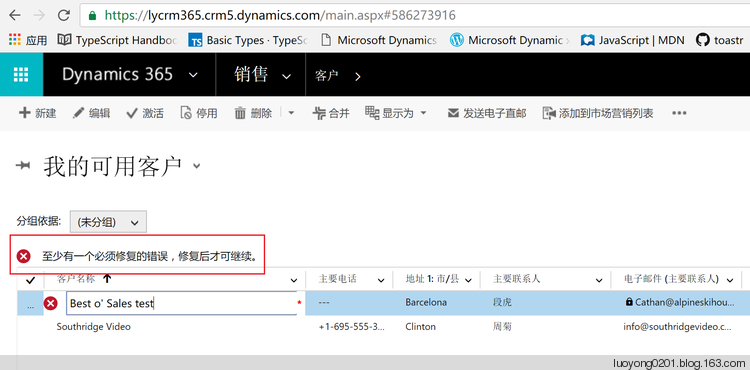
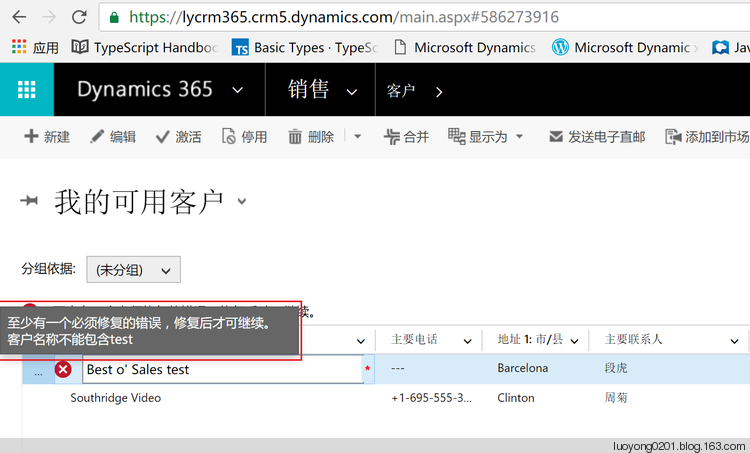
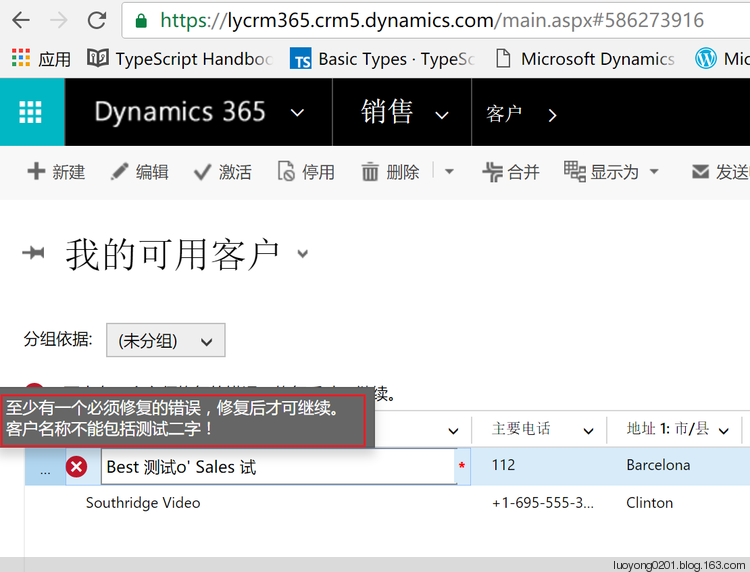
点击客户名称旁边的图标,就会将我在业务规则中设置的消息显示出来:
function accountNameOnchangeHandler(execObject) {

    var entityObject = execObject.getFormContext().data.entity;

    var nameAttr = entityObject.attributes.getByName('name');

    var isNameContainstest = nameAttr.getValue().indexOf('测试') === -1;

    // nameField will be an Xrm.Page control if invoked from a form OnChange event;

    // nameField will be a editable grid GridCell object if invoked from editable grid OnChange event.

    var nameField = nameAttr.controls.getByIndex(0);

    if (!isNameContainstest) {

        nameField.setNotification('客户名称不能包括测试二字!', 'nameNotification');

    }

    else {

        nameField.clearNotification('nameNotification');

    }

}

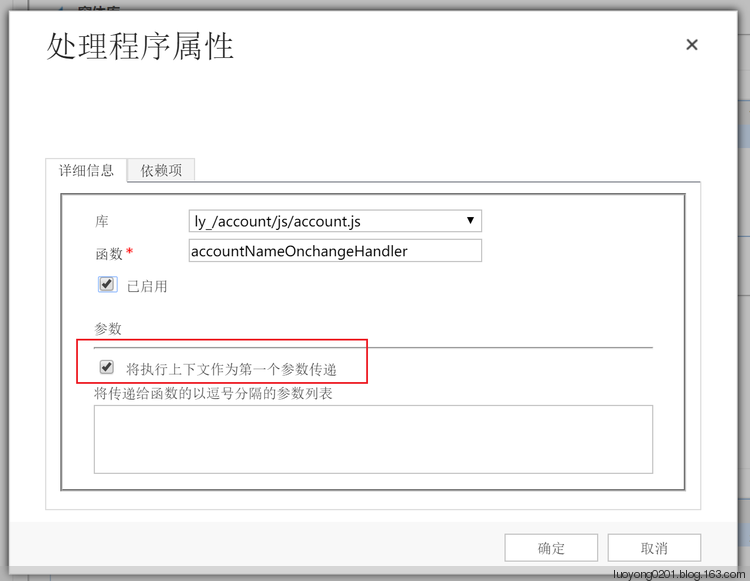
需要注意的是设定客户名称OnChange的时间执行程序的时候需要 将执行上下文作为第一个参数传递 这个选中。
Dynamics 365新功能:可编辑的网格(行内编辑)的更多相关文章
- jQuery EasyUI 数据网格 - 启用行内编辑(转自http://www.runoob.com/jeasyui/jeasyui-datagrid-datagrid12.html)
可编辑的功能是最近添加到数据网格(datagrid)的.它可以使用户添加一个新行到数据网格(datagrid).用户也可以更新一个或多个行.本教程向您展示如何创建一个数据网格(datagrid)和内联 ...
- 雷林鹏分享:jQuery EasyUI 数据网格 - 启用行内编辑
jQuery EasyUI 数据网格 - 启用行内编辑 可编辑的功能是最近添加到数据网格(datagrid)的.它可以使用户添加一个新行到数据网格(datagrid).用户也可以更新一个或多个行. 本 ...
- EasyUI 启用行内编辑
创建数据网格(DataGrid) $(function(){ $('#tt').datagrid({ title:'Editable DataGrid', iconCls:'icon-edit', w ...
- Django项目:CRM(客户关系管理系统)--69--59PerfectCRM实现king_admin行内编辑
#base_admin.py # ————————24PerfectCRM实现King_admin自定义操作数据———————— from django.shortcuts import render ...
- ASP.NET Aries 入门开发教程6:列表数据表格的格式化处理及行内编辑
前言: 为了赶进度,周末也写文了! 前几篇讲完查询框和工具栏,这节讲表格数据相关的操作. 先看一下列表: 接下来我们有很多事情可以做. 1:格式化 - 键值的翻译 对于“启用”列,已经配置了格式化 # ...
- JS组件系列——BootstrapTable 行内编辑解决方案:x-editable
前言:之前介绍bootstrapTable组件的时候有提到它的行内编辑功能,只不过为了展示功能,将此一笔带过了,罪过罪过!最近项目里面还是打算将行内编辑用起来,于是再次研究了下x-editable组件 ...
- ASP.NET MVC5+EF6+EasyUI 后台管理系统(83)-Easyui Datagrid 行内编辑扩展
这次我们要从复杂的交互入手来说明一些用法,这才能让系统做出更加复杂的业务,上一节讲述了Datagird的批量编辑和提交本节主要演示扩展Datagrid行内编辑的属性,下面来看一个例子,我开启编辑行的时 ...
- datatables表格行内编辑的实现
Datatables是一款jquery表格插件,它是一个高度灵活的工具,灵活就意味着很多功能需要自己去实现,比如说行内编辑功能. Datatables自己是没有行内编辑功能的,最简单的是通过modal ...
- [转]JS组件系列——BootstrapTable 行内编辑解决方案:x-editable
本文转自:http://www.cnblogs.com/landeanfen/p/5821192.html 阅读目录 一.x-editable组件介绍 二.bootstrapTable行内编辑初始方案 ...
随机推荐
- Daily Pathtracer!安利下不错的Pathtracer学习资料
0x00 前言 最近看到了我司大网红aras-p(Aras Pranckevičius)的博客开了一个很有趣的新系列<Daily Pathtracer~>,来实现一个简单的ToyPathT ...
- 1.1 What is the plug-in?
A game center, such as Lianzhong in China, supports hundreds of games such as Chess, Bridges, ...
- 利用 python 实现对web服务器的目录探测
一.pythonPython是一种解释型.面向对象.动态数据类型的高级程序设计语言.python 是一门简单易学的语言,并且功能强大也很灵活,在渗透测试中的应用广泛,让我们一起打造属于自己的渗透测试工 ...
- phpcms2008远程代码执行漏洞
phpcms2008远程代码执行漏洞 描述: 近日,互联网爆出PHPCMS2008代码注入漏洞(CVE-2018-19127).攻击者利用该漏洞,可在未授权的情况下实现对网站文件的写入.该漏洞危害程度 ...
- js 生成随机炫彩背景
在浏览 https://ghost.org/xxxx/ 时. 可以使用 background-size: cover; 加上很小的像素图,放大后实现炫彩背景效果. 使用 js canvas 随机生成小 ...
- [Swift]LeetCode7. 反转整数 | Reverse Integer
Given a 32-bit signed integer, reverse digits of an integer. Example 1: Input: 123 Output: 321 Examp ...
- [Swift]LeetCode329. 矩阵中的最长递增路径 | Longest Increasing Path in a Matrix
Given an integer matrix, find the length of the longest increasing path. From each cell, you can eit ...
- [Swift]LeetCode629. K个逆序对数组 | K Inverse Pairs Array
Given two integers n and k, find how many different arrays consist of numbers from 1 to n such that ...
- [Swift]LeetCode928. 尽量减少恶意软件的传播 II | Minimize Malware Spread II
(This problem is the same as Minimize Malware Spread, with the differences bolded.) In a network of ...
- 巡风源码阅读与分析---view.py
巡风xunfeng----巡风源码阅读与分析 巡风是一款适用于企业内网的漏洞快速应急.巡航扫描系统,通过搜索功能可清晰的了解内部网络资产分布情况,并且可指定漏洞插件对搜索结果进行快速漏洞检测并输出结果 ...