
报错信息:The superclass "javax.servlet.http.HttpServlet" was not found on the Java Build Path
用Eclipse创建jsp页面时,提示这个错误
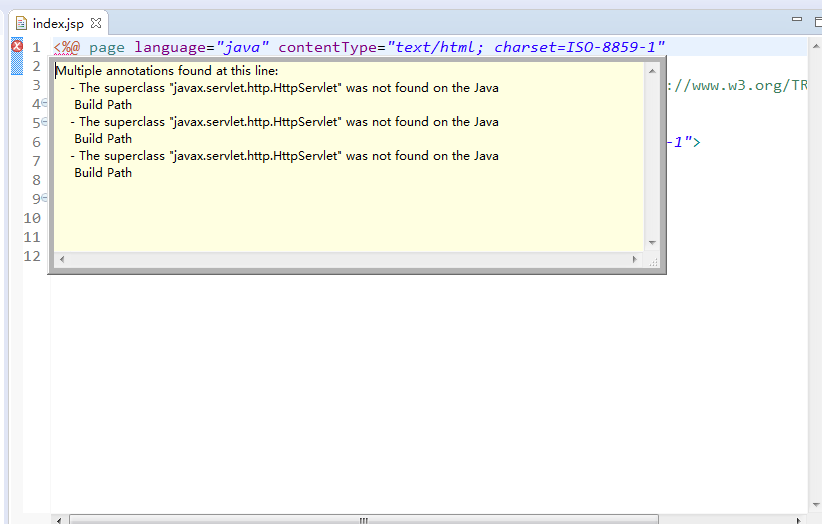
解决的方法是:右键项目,Build Path->Configure Build Path
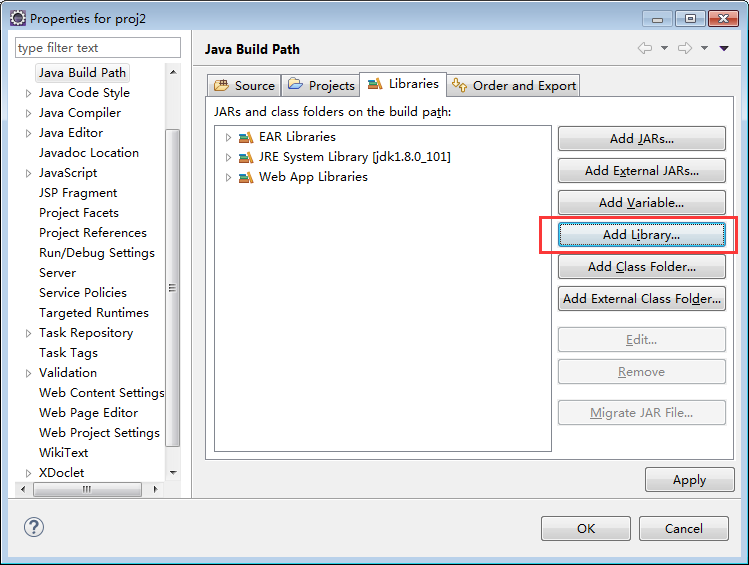
Add Library
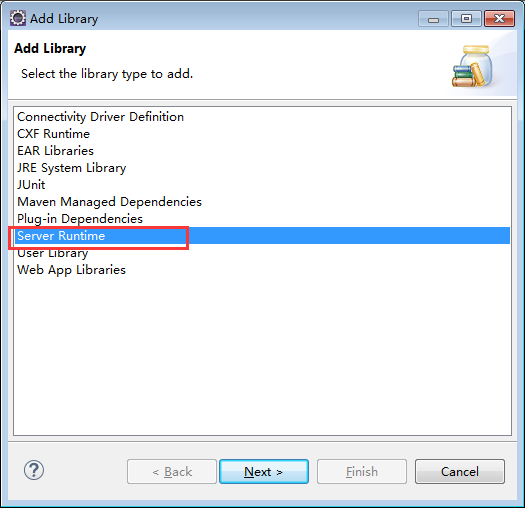
Server Runtime,这里会列出来你之前添加的Server

Finish.这样问题就解决了
报错信息:The superclass "javax.servlet.http.HttpServlet" was not found on the Java Build Path的更多相关文章
- eclipse:报错信息The superclass "javax.servlet.http.HttpServlet" was not found on the Java Build Path
JavaWeb: 报错信息The superclass "javax.servlet.http.HttpServlet" was not found on the Java Bui ...
- eclipse:报错信息The superclass “javax.servlet.http.HttpServlet” was not found on the Java Build Path
JavaWeb: 报错信息The superclass "javax.servlet.http.HttpServlet" was not found on the Java Bui ...
- JavaWeb:报错信息The superclass "javax.servlet.http.HttpServlet" was not found on the Java Build Path
建立了一个Javaweb工程,并在eclipse中配置了Web容器Tomcat.新建的jsp页面,添加一个简单的Java类.可是,JSP页面顶端出现“红色”的报错信息:The superclass & ...
- Java系列:报错信息The superclass "javax.servlet.http.HttpServlet" was not found on the Java Build Path
Javaweb工程类中没有添加Tomcat运行时相关类导致. 下面是具体的解决方法: 1.右击web工程->属性或Build Path->Java Build Path->Libra ...
- Eclipse导入JavaWeb项目报错:The superclass "javax.servlet.http.HttpServlet" was not found on the Java Build Path
JavaWeb项目中写的JSP页面需要Web容器解析处理成HTML才能展示到前端浏览器,解析JSP需要Web容器.JSP页面顶端出现“红色”的报错信息:The superclass "jav ...
- JSP报错:The superclass "javax.servlet.http.HttpServlet" was not found on the Java Build Path
今天使用Eclipse+Maven建立了一个Javaweb工程,并在eclipse中配置了Web容器Jboss eap 6.2.新建jsp页面,添加一个简单 的Java类.可是,JSP页面顶端出现“红 ...
- Eclipse中新建Maven Web项目报错:The superclass "javax.servlet.http.HttpServlet" was not found on the Java Build Path
在maven web项目中的index.jsp中的错误信息如下: The superclass "javax.servlet.http.HttpServlet" was not f ...
- Java Web报错:The superclass "javax.servlet.http.HttpServlet" was not found on the Java Build Path
问题描述: 我们在用Eclipse进行Java web开发时,可能会出现这样的错误:The superclass javax.servlet.http.HttpServlet was not foun ...
- Maven项目报错:The superclass "javax.servlet.http.HttpServlet" was not found on the Java Build Path
刚刚新建完Maven项目,一般都会报这个错误,原因是没有默认添加需要的javax.servelet的jar包,所以打开pom.xml文件添加如下dependency即可: <dependency ...
- Maven工程下报错:The superclass "javax.servlet.http.HttpServlet" was not found on the Java Build Path
Maven工程下,webapp下面新建index.jsp文件,报如下错误. 原因很简单,没有安装如下maven依赖包: <dependencies> <!-- JSP相关 --> ...
随机推荐
- Android的学习之路(三)项目的启动过程和安装过程具体解释
应用的安装和启动过程: 安装:第一步:java的编译器会把这个.java文件编译成.class文件 第二部:Android的SDK提供了一个dx工具,这个工具把.class文件转义 ...
- Android开发 AIDL使用自定义对象作参数或返回值
http://www.pocketdigi.com/20121129/952.html 默认,AIDL支持对象作参数,但需要该对象实现Parcelable接口,且aidl文件应该是该类在同一包下,需要 ...
- 关于面试总结6-SQL经典面试题
前言 用一条SQL 语句查询xuesheng表每门课都大于80 分的学生姓名,这个是面试考sql的一个非常经典的面试题 having和not in 查询 xuesheng表每门课都大于80 分的学生姓 ...
- 通过连接池和字段索引,提升单点登录cas的性能
cas是多个系统的中心认证,认证的过程就是用户的登录信息和数据库中的信息匹对的过程,假设某一时刻登录的人数非常多,须要频繁的读取数据库,数据库连接的管理就是问题. 前天測试评教时无意之中把单点登录的问 ...
- 点击cell动态修改高度动画
点击cell动态修改高度动画 效果 源码 https://github.com/YouXianMing/Animations // // TapCellAnimationController.m // ...
- android应用推荐
脱单宝典: http://file.bmob.cn/M00/D5/1E/oYYBAFR27BOAPu1JACq_bnF_6-E971.apk
- maven 阿里仓库
<settings xmlns="http://maven.apache.org/SETTINGS/1.0.0" xmlns:xsi="http://www.w3. ...
- Kubernetes基础:查看状态、管理服务
目标 了解Kubernetes Pod 了解Kubernetes Node 学习如何调试部署问题 了解如何通过Service暴露应用 Kubernetes Pods 在Kubernetes中创建一个D ...
- protobuf 语法简介
protobuf 语法简介 1.基本语义 在.proto文件中,最基本的数据类型为message,如其定义所示,由message引导,之后是message类型的名字,之后是由{}包含的各个域(fiel ...
- 【已解决】unity4.2.0f4 导出Android工程报错:Error building Player: ArgumentException: Illegal characters in path. [unity导出android工程 报错,路径含有非法字符]
使用unity3D开发的一个客户端,需要导出为Android工程,然后接入一些第三方android SDK. unity版本 操作系统为: OS 名称: Microsoft Windows 7 旗舰版 ...