
Spring AsyncRestTemplate
类说明
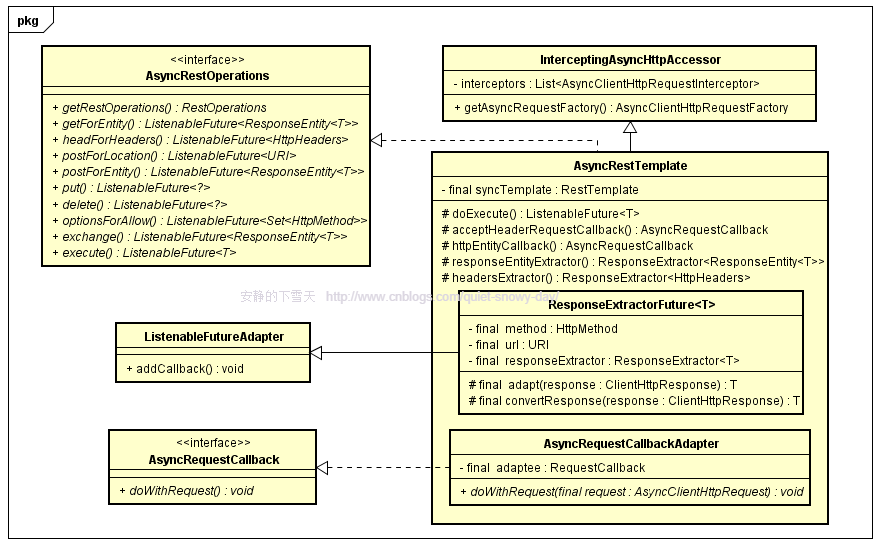
类图
类图中省略了一些参数类型及重载的方法,在不影响理解的情况下,保证各要素在一幅图中展现。
private String result = "";
@Test
public void testAsyncPost() throws Exception {
String posturl = "http://xxxxxx";
String params = "xxxxxx";
MultiValueMap<String, String> headers = new LinkedMultiValueMap<String, String>();
headers.add("Content-Type", "application/x-www-form-urlencoded; charset=UTF-8");
HttpEntity<Object> hpEntity = new HttpEntity<Object>(params, headers);
AsyncRestTemplate asyncRt = new AsyncRestTemplate();
ListenableFuture<ResponseEntity<String>> future = asyncRt.postForEntity(posturl, hpEntity, String.class);
future.addCallback(new ListenableFutureCallback<ResponseEntity<String>>() {
public void onSuccess(ResponseEntity<String> resp) {
result = resp.getBody();
}
public void onFailure(Throwable t) {
System.out.println(t.getMessage());
}
});
System.out.println(result);
}
package com.mlxs.common.server.asyncrest;
import org.apache.log4j.Logger;
import org.springframework.http.ResponseEntity;
import org.springframework.stereotype.Controller;
import org.springframework.util.concurrent.ListenableFuture;
import org.springframework.util.concurrent.ListenableFutureCallback;
import org.springframework.web.bind.annotation.RequestMapping;
import org.springframework.web.bind.annotation.ResponseBody;
import org.springframework.web.client.AsyncRestTemplate;
import org.springframework.web.client.RestTemplate;
/**
* Asyncrest: AsyncRestTemplate 异步发生请求测试
*
* @author mlxs
* @since 2016/8/4
*/
@Controller
@RequestMapping("/async")
public class AsyncrestController {
Logger logger = Logger.getLogger(AsyncrestController.class);
@RequestMapping("/fivetime")
@ResponseBody
public String tenTime(){
try {
Thread.sleep(5000);
} catch (InterruptedException e) {
e.printStackTrace();
}
return "5秒...";
}
/**
* 同步调用
* @return
*/
@RequestMapping("/sync")
@ResponseBody
public String sync(){
//同步调用
RestTemplate template = new RestTemplate();
String url = "http://localhost:8080/async/fivetime";//休眠5秒的服务
String forObject = template.getForObject(url, String.class);
return "同步调用结束, 结果:" + forObject;
}
/**
* 异步调用
* @return
*/
@RequestMapping("/async")
@ResponseBody
public String async(){
AsyncRestTemplate template = new AsyncRestTemplate();
String url = "http://localhost:8080/async/fivetime";//休眠5秒的服务
//调用完后立即返回(没有阻塞)
ListenableFuture<ResponseEntity<String>> forEntity = template.getForEntity(url, String.class);
//异步调用后的回调函数
forEntity.addCallback(new ListenableFutureCallback<ResponseEntity<String>>() {
//调用失败
@Override
public void onFailure(Throwable ex) {
logger.error("=====rest response faliure======");
}
//调用成功
@Override
public void onSuccess(ResponseEntity<String> result) {
logger.info("--->async rest response success----, result = "+result.getBody());
}
});
return "异步调用结束";
}
}
同步请求:
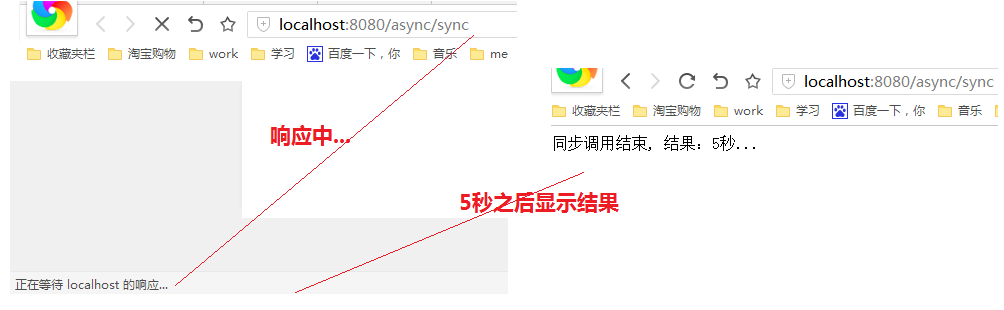
异步请求:

Spring AsyncRestTemplate的更多相关文章
- 使用Spring AsyncRestTemplate对象进行异步请求调用
直接上代码: package com.mlxs.common.server.asyncrest; import org.apache.log4j.Logger; import org.springfr ...
- Spring RestTemplate: 比httpClient更优雅的Restful URL访问, java HttpPost with header
{ "Author": "tomcat and jerry", "url":"http://www.cnblogs.com/tom ...
- Spring4.1新特性——Spring MVC增强
目录 Spring4.1新特性——综述 Spring4.1新特性——Spring核心部分及其他 Spring4.1新特性——Spring缓存框架增强 Spring4.1新特性——异步调用和事件机制的异 ...
- 【Spring-web】AsyncRestTemplate源码学习
2017-01-23 by 安静的下雪天 http://www.cnblogs.com/quiet-snowy-day/p/6343347.html 本篇概要 类说明 类图 简单例子 精辟的内部类 类 ...
- Spring MVC 学习总结(九)——Spring MVC实现RESTful与JSON(Spring MVC为前端提供服务)
很多时候前端都需要调用后台服务实现交互功能,常见的数据交换格式多是JSON或XML,这里主要讲解Spring MVC为前端提供JSON格式的数据并实现与前台交互.RESTful则是一种软件架构风格.设 ...
- Spring官方文档翻译
随笔:有人曾这样评价spring,说它是Java语言的一个巅峰之作,称呼它为Java之美,今天,小编就领大家一起来领略一下spring之美! Spring官方文档:http://docs.spring ...
- 撸一撸Spring Cloud Ribbon的原理
说起负载均衡一般都会想到服务端的负载均衡,常用产品包括LBS硬件或云服务.Nginx等,都是耳熟能详的产品. 而Spring Cloud提供了让服务调用端具备负载均衡能力的Ribbon,通过和Eure ...
- 转:Spring历史版本变迁和如今的生态帝国
Spring历史版本变迁和如今的生态帝国 版权声明:本文为博主原创文章,未经博主允许不得转载. https://blog.csdn.net/bntX2jSQfEHy7/article/deta ...
- Spring官方文档翻译(1~6章)
Spring官方文档翻译(1~6章) 转载至 http://blog.csdn.net/tangtong1/article/details/51326887 Spring官方文档.参考中文文档 一.S ...
随机推荐
- ALGO-7_蓝桥杯_算法训练_逆序对
出处:http://blog.csdn.net/enjoying_science/article/details/44114035 (有难度,以后回来填坑) 阅读代码中: #include<st ...
- bzoj2002 弹飞绵羊
Description 某天,Lostmonkey发明了一种超级弹力装置,为了在他的绵羊朋友面前显摆,他邀请小绵羊一起玩个游戏.游戏一开始,Lostmonkey在地上沿着一条直线摆上n个装置,每个装置 ...
- 神奇的null和undefined
在JavaScript中,有两个特殊的类型存在,它们都只有一个值,分别null和undefined,之所以将它们放在一块,是因为在使用方面它们有很多相似之处. 相同点 在JavaScript中,nul ...
- appium API记录
1,滑动屏幕 driver.swipe(start_x=720, start_y=1000, end_x=0, end_y=1000,duration=1000) ,注意开始坐标不能是最大值 2,获取 ...
- SpringMVC中session的使用
SpringMVC中仍然可以使用传统方式使用session /** * 使用session - 传统方式 */ @RequestMapping("/hello13.action") ...
- ASP.NET Web Pages:目录
ylbtech-.Net-ASP.NET Web Pages:目录 1. 官网返回顶部 1. https://www.asp.net/web-pages 2. https://msdn.microso ...
- [转]将字体嵌入程序资源中 C# Winform
http://social.msdn.microsoft.com/Forums/officeapps/zh-CN/61b717ae-f925-443a-baad-2b85f2564826/cwinfo ...
- CA单向认证和双向认证的区别?
1:单向认证,内容会被串改吗?
- javascript的事件流
事件流包括三个阶段: 1.事件捕获阶段 2.处于目标阶段 3.事件冒泡阶段 1.事件捕获阶段 现在页面中有一个按钮. 如果单击这个按钮的话,在事件捕获过程中,document会首先接收到click事件 ...
- 解决WPF两个图片控件显示相同图片因线程占用,其中一个显示不全的问题
在做项目的过程中遇到这样一个问题,下面提出一种解决方法,主要思想是图片的Copy,如还有其他方法,欢迎交流. 在前端图片控件绑定显示时,使用转换器进行转义绑定 (1)转换器: public cla ...