
RelativeLayout.LayoutParams
通过id设置相对兄弟元素对齐。
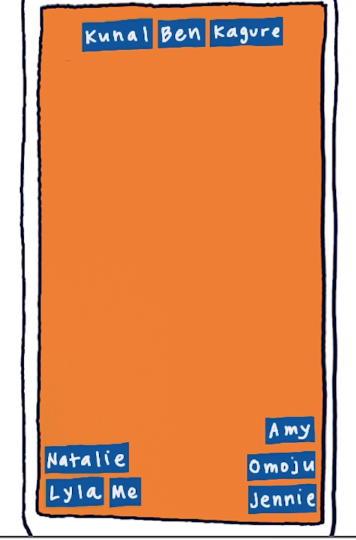
<RelativeLayout

    xmlns:android="http://schemas.android.com/apk/res/android"

    android:layout_width="match_parent"

    android:layout_height="match_parent">

    <TextView

        android:id="@+id/lyla_text_view"

        android:layout_width="wrap_content"

        android:layout_height="wrap_content"

        android:layout_alignParentBottom="true"

        android:layout_alignParentLeft="true"

        android:textSize="24sp"

        android:text="Lyla" />

    <TextView

        android:id="@+id/me_text_view"

        android:layout_width="wrap_content"

        android:layout_height="wrap_content"

        android:layout_alignParentBottom="true"

        android:layout_toRightOf="@id/lyla_text_view"

        android:textSize="24sp"

        android:text="Me" />

    <TextView

        android:id="@+id/natalie_text_view"

        android:layout_width="wrap_content"

        android:layout_height="wrap_content"

        android:layout_above="@id/lyla_text_view"

        android:textSize="24sp"

        android:text="Natalie" />

    <TextView

        android:id="@+id/jennie_text_view"

        android:layout_width="wrap_content"

        android:layout_height="wrap_content"

        android:layout_alignParentBottom="true"

        android:layout_alignParentRight="true"

        android:textSize="24sp"

        android:text="Jennie" />

    <TextView

        android:id="@+id/omoju_text_view"

        android:layout_width="wrap_content"

        android:layout_height="wrap_content"

        android:layout_alignParentRight="true"

        android:layout_above="@id/jennie_text_view"

        android:textSize="24sp"

        android:text="Omoju" />

    <TextView

        android:id="@+id/amy_text_view"

        android:layout_width="wrap_content"

        android:layout_height="wrap_content"

        android:layout_alignParentBottom="true"

        android:layout_above="@id/omoju_text_view"

        android:layout_alignParentRight="true"

        android:textSize="24sp"

        android:text="Amy" />

    <TextView

        android:id="@+id/ben_text_view"

        android:layout_width="wrap_content"

        android:layout_height="wrap_content"

        android:layout_alignParentTop="true"

        android:layout_centerHorizontal="true"

        android:textSize="24sp"

        android:text="Ben" />

    <TextView

        android:id="@+id/kunal_text_view"

        android:layout_width="wrap_content"

        android:layout_height="wrap_content"

        android:layout_alignParentTop="true"

        android:layout_toLeftOf="@id/ben_text_view"

        android:textSize="24sp"

        android:text="Kunal" />

    <TextView

        android:id="@+id/kagure_text_view"

        android:layout_width="wrap_content"

        android:layout_height="wrap_content"

        android:layout_alignParentTop="true"

        android:layout_alignParentRight="true"

        android:layout_toRightOf="@id/ben_text_view"

        android:textSize="24sp"

        android:text="Kagure" />

</RelativeLayout>
相对兄弟节点(id)放置
XML属性 |
|
|---|---|
android:layout_above |
将此视图的下边缘定位在给定锚点视图ID上方。 |
android:layout_alignBaseline |
将此视图的基线定位在给定锚点视图ID的基线上。 |
android:layout_alignBottom |
使此视图的下边缘与给定锚点视图ID的下边缘匹配。 |
android:layout_alignEnd |
使此视图的结束边缘与给定锚点视图ID的结束边缘匹配。 |
android:layout_alignLeft |
使此视图的左边缘与给定锚点视图ID的左边缘匹配。 |
android:layout_alignParentBottom |
如果为true,则使此视图的下边缘与父级的下边缘匹配。 |
android:layout_alignParentEnd |
如果为true,则使此视图的结束边缘与父级的结束边缘匹配。 |
android:layout_alignParentLeft |
如果为true,则使此视图的左边缘与父窗口的左边缘匹配。 |
android:layout_alignParentRight |
如果为true,则使此视图的右边缘与父级的右边缘匹配。 |
android:layout_alignParentStart |
如果为true,则使此视图的起始边缘与父级的起始边缘匹配。 |
android:layout_alignParentTop |
如果为true,则使此视图的上边缘与父级的上边缘匹配。 |
android:layout_alignRight |
使此视图的右边缘与给定锚点视图ID的右边缘匹配。 |
android:layout_alignStart |
使此视图的起始边缘与给定锚点视图ID的起始边缘匹配。 |
android:layout_alignTop |
使此视图的上边缘与给定锚点视图ID的上边缘匹配。 |
android:layout_alignWithParentIfMissing |
如果设置为true,则在无法找到layout_toLeftOf,layout_toRightOf等的锚点时,父项将用作锚点。 |
android:layout_below |
将此视图的上边缘定位在给定锚点视图ID下方。 |
android:layout_centerHorizontal |
如果为true,则将此子项水平居中于其父级。 |
android:layout_centerInParent |
如果为true,则将此子项在其父级中水平和垂直居中。 |
android:layout_centerVertical |
如果为true,则将此子项垂直居中于其父项中。 |
android:layout_toEndOf |
将此视图的起始边缘定位到给定锚点视图ID的末尾。 |
android:layout_toLeftOf |
将此视图的右边缘定位在给定锚点视图ID的左侧。 |
android:layout_toRightOf |
将此视图的左边缘定位到给定锚点视图ID的右侧。 |
android:layout_toStartOf |
将此视图的结束边缘定位到给定锚点视图ID的开头。 |
RelativeLayout.LayoutParams的更多相关文章
- RelativeLayout.LayoutParams.addRule()方法
1.应用场景 在使用RelativeLayout布局的时候,通常在载入布局之前在相关的XML文件中进行静态设置即可.但是,在有些情况下,我们需要动态的设置布局 的属性,在不同条件下设置不同的布局排列方 ...
- Android 动态改变布局属性RelativeLayout.LayoutParams.addRule()
我们知道,在 RelativeLayout 布局中有很多特殊的属性,通常在载入布局之前,在相关的xml文件中进行静态设置即可. 但是,在有些情况下,我们需要动态设置布局的属性,在不同的条件下设置不同的 ...
- 代码中动态改变布局属性RelativeLayout.LayoutParams.addRule()
我们知道,在 RelativeLayout 布局中有很多特殊的属性,通常在载入布局之前,在相关的xml文件中进行静态设置即可. 但是,在有些情况下,我们需要动态设置布局的属性,在不同的条件下设置不同的 ...
- java.lang.ClassCastException: android.widget.RelativeLayout$LayoutParams cannot be cast to android.widget.AbsListView$LayoutParams
java.lang.ClassCastException: android.widget.RelativeLayout$LayoutParams cannot be cast to android.w ...
- java.lang.ClassCastException android.widget.RelativeLayout LayoutParams 异常
1.在xml布局文件如下所示: <RelativeLayout android:layout_width="match_parent" android:layout_heig ...
- 用代码设置 RelativeLayout.LayoutParams
1.注意 不能在RelativeLayout容器本身和他的子元素之间产生循环依赖,比如说,不能将RelativeLayout的高设置成为WRAP_CONTENT的时候将子元素的高设置成为 ALIGN_ ...
- Exception: java.lang.ClassCastException: android.widget.RelativeLayout$LayoutParams
RelativeLayout title_bg = (RelativeLayout)FTU_Bluetooth.this.findViewById(R.id.titlebar); LinearLayo ...
- 为什么relativelayout.layoutParams的width为-1
源码里看下就知道了.. -1不代表宽度,代表MATCH_PARENT常量的值public static final int FILL_PARENT = -1; public static final ...
- java写RelativeLayout 的属性
有时项目需要动态的调整一下布局,需要改变一些view的位置属性等等. 直接下代码 RelativeLayout.LayoutParams params=new RelativeLayout.Layou ...
随机推荐
- ubuntu(14.04) sphinx安装
http://portal.digitser.cn/article-179-1.html
- Sentinel 简介与API订阅发布
Sentinel 简介 Redis 的 Sentinel 系统用于管理多个 redis 服务器(instance), 该系统执行以下三个任务: 监控(Monitoring): Sentinel 会不断 ...
- 【Hibernate】解析hibernate中的缓存
Hibernate中的缓存一共有三种,一级缓存.二级缓存.查询缓存.缓存除了使用Hibernate自带的缓存,还可以使用redis进行缓存,或是MongoDB进行缓存. 所使用的Demo: User. ...
- 【Linux】字符转换命令col
[root@www ~]# col [-xb] 选项与参数: -x :将 tab 键转换成对等的空格键 -b :过滤掉所有的控制字符,包括RLF(Reverse Line Feed)和HRF(Halt ...
- RHEL7 禁用gnome-inital-setup
每次登陆系统后,都会跳出页面gnome-inital-setup 如果觉得讨厌,可以禁止该页面的出现: mkdir ~/.config echo "yes" >> ~/ ...
- /usr 的由来及/usr目录结构 [转]
一直好奇包罗众多程序的usr目录为什么叫usr呢?usr到底是什么的缩写,终于找到比较靠谱的答案了 /usr 的由来及/usr目录结构 作者 AN SHEN| 发布于 2011-11-05 在 lin ...
- python 实验环境
python 实验环境的搭建 刚开始在windows环境下尝试过komodo ,eclispse pydev,swing,spyder甚至limodou的编辑器,之后ipython,安装很多科学计算包 ...
- VC CListCtrl 第一列列宽自适应
原文链接: http://www.cnblogs.com/sephil/archive/2011/04/03/2004384.html 今天用VC写工具的时候用到CListView,并且ListCtr ...
- SharePoint自动化部署,利用SPSD工具包
目录 怎样使用SPSD 配置Environment XML文件 PowerShell激活Feature 上篇博客讲了利用PowerShell导出.导入AD中的Users.这篇介绍简单介绍一下SPSD ...
- MapReduce中,new Text()引发的写入HDFS的输出文件多一列的问题
前段时间业务系统有个模块数据没有了,在排查问题的时候发现中间处理环节出错了,错误日志为文件格式不正确,将数据导出后发现这个处理逻辑的输入文件中每一行都多了一列,而且是一个空列(列分隔符是\t).第一次 ...