
SSH登录启用Google二次身份验证
一般来说,使用ssh远程登录服务器,只需要输入账号和密码,显然这种方式不是很安全。为了安全着想,可以使用GoogleAuthenticator(谷歌身份验证器),以便在账号和密码之间再增加一个验证码,只有输入正确的验证码之后,再输入密码才能登录。这样就增强了ssh登录的安全性。账号、验证码、密码三者缺一个都不能登录,即使账号和密码正确,验证码错误,同样登录失败。其中,验证码是动态验证码,并且是通过手机客户端自动获取(默认每隔30秒失效一次)。
1、Google Authenticator依赖时间与客户端进行校验,因此首先得把服务器时间更新至最新
# ntpdate time.nist.gov
2、安装或更新repo
# yum install epel-release -y
3、安装Google Authenticator
# yum install google-authenticator -y
4、为当前用户开启两步验证
注意:哪个账号需要动态验证码,请切换到该账号下操作。(可以在不同用户下执行这个命令以生成各自的二次验证码)
# google-authenticator
Do you want authentication tokens to be time-based (y/n) y
https://www.google.com/chart?chs=200x200&chld=M|0&cht=qr&chl=otpauth://totp/root@BJLX_NET_TEST-01%3Fsecret%3DCGB5NWP6SABN3TM7
#这个链接只能在FQ条件下才能打开

Your new secret key is: CGB5NWP6SABN3TM7 #如果在手机的谷歌身份验证器上不想通过"扫描条形码"的方式添加,就输入这个key,通过"手动输入验证码的方式"。账号就是服务器主机名。
Your verification code is 730249
Your emergency scratch codes are: #下面会生成5个紧急验证码(当无法获取动态验证码或验证码不能使用使用可以使用这5个)
66151894 #需要注意的是:这5个验证码用一个就会少一个!请保存好!
91475582
37383236
70667696
70522112
Do you want me to update your "/root/.google_authenticator" file (y/n) y #提示是否要更新验证文件,选择y ,以上5个验证码保存在此文件中
Do you want to disallow multiple uses of the same authentication
token? This restricts you to one login about every 30s, but it increases
your chances to notice or even prevent man-in-the-middle attacks (y/n) y #禁止使用相同口令
By default, tokens are good for 30 seconds and in order to compensate for
possible time-skew between the client and the server, we allow an extra
token before and after the current time. If you experience problems with poor
time synchronization, you can increase the window from its default
size of 1:30min to about 4min. Do you want to do so (y/n) n #默认动态验证码在30秒内有效,由于客户端和服务器可能会存在时间差,可将时间增加到最长4分钟,是否要这么做:这里选择是n,继续默认30秒
If the computer that you are logging into isn't hardened against brute-force
login attempts, you can enable rate-limiting for the authentication module.
By default, this limits attackers to no more than 3 login attempts every 30s.
Do you want to enable rate-limiting (y/n) y #是否限制尝试次数,每30秒只能尝试最多3次,这里选择y进行限制
5、修改SSH配置文件来启用两步验证,并重启SSH服务
# vim /etc/pam.d/sshd (增加)
auth required pam_google_authenticator.so
# vim /etc/ssh/sshd_config (修改为yes)
ChallengeResponseAuthentication yes
# systemctl restart sshd
6、手机安装Google身份验证器,通过此工具扫描上一步生成的二维码图形,获取动态验证码。
在App Store或Google Play里直接可以下载Authenticator
7、进行登陆验证
[root@lenovo28 ~]# ssh 10.35.56.58
Verification code:
Password:
成功!
接着在ssh的客户端里设置,如下,设置"Keyboard Interactive"方式登录
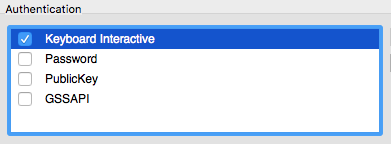
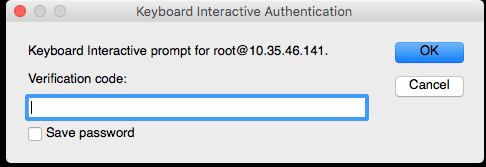
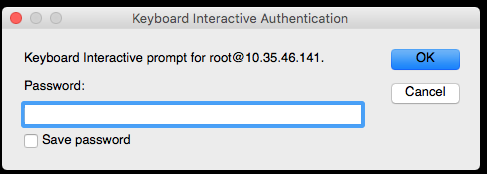
然后再次连接的时候,就会提示先输入二次身份验证码,再输入用户密码。
SSH登录启用Google二次身份验证的更多相关文章
- Linux下部署SSH登录时的二次身份验证环境记录(利用Google Authenticator)
一般来说,使用ssh远程登录服务器,只需要输入账号和密码,显然这种方式不是很安全.为了安全着想,可以使用GoogleAuthenticator(谷歌身份验证器),以便在账号和密码之间再增加一个验证码, ...
- 为Linux服务器的SSH登录启用Google两步验证
对于Linux服务器而言使用密钥登录要比使用密码登录安全的多,毕竟当前网上存在多个脚本到处进行爆破. 这类脚本都是通过扫描IP端的开放端口并使用常见的密码进行登录尝试,因此修改端口号也是非常有必要的. ...
- Google Authenticator(谷歌身份验证器)
<!DOCTYPE html>Google Authenticator(谷歌身份验证器) ] Google Authenticator(谷歌身份验证器) Google Authentica ...
- Shiro笔记(二)身份验证
Shiro笔记(二)身份验证 一.核心代码 @Test public void helloWorldTest(){ IniSecurityManagerFactory factory = new In ...
- Google Authenticator(谷歌身份验证器)C#版
摘要:Google Authenticator(谷歌身份验证器),是谷歌公司推出的一款动态令牌工具,解决账户使用时遭到的一些不安全的操作进行的"二次验证",认证器基于RFC文档中的 ...
- Google authenticator 谷歌身份验证,实现动态口令
Google authenticator 谷歌身份验证,实现动态口令 google authenticator php 服务端 使用PHP类 require_once '../PHPGangsta/G ...
- 给 SSH 启用二次身份验证
转载自:https://mp.weixin.qq.com/s/ssuhFbfaHxxzGmLg6Y2MjA 目前来说,二次验证(这里就不做过多解释了)是比较常用的安全手段,通过设置二次验证(谷歌或其他 ...
- Centos6.5SSH登录使用google二次验证
一般ssh登录服务器,只需要输入账号和密码,但为了更安全,在账号和密码之间再增加一个google的动态验证码.谷歌身份验证器生成的是动态验证码,默认30秒更新 工具/原料 CentOS 6.5 X ...
- 怎样启用SQL SERVER混合身份验证方式
转载:http://jingyan.baidu.com/article/380abd0aa8f2311d90192cd0.html 大家都知道sql server 有两种登录验证方式,即sql ser ...
随机推荐
- wpf-X名称空间Attribute
1.x:class 该属性用于 后台代码与前端xaml代码连接 代码实例如下图 2.x:ClassModifier 该属性用于控制可见级别 public 等 与C#中的可见级别相同 internal ...
- selenium+grid做分布式测试
一.grid介绍 1.本文用的是selenium-server-standalone-3.8.1.jar 2.Firefox用的55版本和对应的驱动 二.grid使用流程说明比如有个A机器,作用是hu ...
- JavaBasic_12
类 抽象:对象的共性 类:产生对象的模板(对于属性来讲,类规定有没有属性以及属性类型,具体的属性值因对象的不同而不同) 数据类型:数据集及基于这个数据集的操作 类:我们自定义类型(定义成员变量,基于数 ...
- XXS level7
(1)输入与第六关相同的Payload:"><A HREF="javascript:alert()"> 查看页面源代码,发现“herf"被过滤 ...
- Arch Linux pacman 与其他发行版操作比较
原文:https://wiki.archlinux.org/index.php/Pacman/Rosettahttps://old-en.opensuse.org/Software_Managemen ...
- WIdo联网代码中文注释
代码如下 /*************************************************** 这是一个例子的dfrobot维多-无线集成物联网建兴传感器和控制节点 *产品页面及更 ...
- java程序连接oracle12c报:java.sql.SQLException: ORA-28040: 没有匹配的验证协议。
报错信息: 2017-09-22 15:17:37,204 WARN [org.hibernate.cfg.SettingsFactory] - Could not obtain connection ...
- 一篇关于CountDownLatch的好文章
CountDownLatch简介 CountDownLatch是一种java.util.concurrent包下一个同步工具类,它允许一个或多个线程等待直到在其他线程操作执行完成. 使用场景: 在开发 ...
- angular引用echarts插件
方法一 1. 命令行下载 npm install echarts --savenpm install ngx-echarts --save 2. angular.json 配置echarts路径. 2 ...
- 列表:remove/del删除方法中的逻辑“误区”
结果: list_1=["A","B","C","D","E","F",&quo ...