
spring-boot-2.0.3之redis缓存实现,不是你想的那样哦!
前言
开心一刻
小白问小明:“你前面有一个5米深的坑,里面没有水,如果你跳进去后该怎样出来了?”小明:“躺着出来呗,还能怎么出来?”小白:“为什么躺着出来?”小明:“5米深的坑,还没有水,跳下去不死就很幸运了,残是肯定会残的,不躺着出来,那能怎么出来?”小白:“假设没死也没残呢?”小明:“你当我超人了? 那也简单,把脑子里的水放出来就可以漂出来了。”小白:“你脑子里有这么多水吗?”小明:“我脑子里没那么多水我跳下去干嘛?”
路漫漫其修远兮,吾将上下而求索!
github:https://github.com/youzhibing
码云(gitee):https://gitee.com/youzhibing
springboot 1.x到2.x变动的内容还是挺多的,而2.x之间也存在细微的差别,本文不讲这些差别(具体差别我也不知道,汗......),只讲1.5.9与2.0.3的redis缓存配置的区别
springboot1.5.9缓存配置
工程实现
1.x系列配置应该都差不多,下面我们看看1.5.9中,springboot集成redis的缓存实现
pom.xml
<?xml version="1.0" encoding="UTF-8"?>

<project xmlns="http://maven.apache.org/POM/4.0.0"

         xmlns:xsi="http://www.w3.org/2001/XMLSchema-instance"

         xsi:schemaLocation="http://maven.apache.org/POM/4.0.0 http://maven.apache.org/xsd/maven-4.0.0.xsd">

    <modelVersion>4.0.0</modelVersion>

    <groupId>com.lee</groupId>

    <artifactId>spring-boot159.cache</artifactId>

    <version>1.0-SNAPSHOT</version>

    <properties>

        <java.version>1.8</java.version>

    </properties>

    <parent>

        <groupId>org.springframework.boot</groupId>

        <artifactId>spring-boot-starter-parent</artifactId>

        <version>1.5.9.RELEASE</version>

    </parent>

    <dependencies>

        <dependency>

            <groupId>org.springframework.boot</groupId>

            <artifactId>spring-boot-starter-web</artifactId>

        </dependency>

        <dependency>

            <groupId>org.springframework.boot</groupId>

            <artifactId>spring-boot-starter-data-redis</artifactId>

        </dependency>

    </dependencies>

</project>
application.yml
server:

  port: 8888

spring:

  #redis配置

  redis:

    database: 0

    host: 127.0.0.1

    port: 6379

    password:

    # 连接超时时间(毫秒)

    timeout: 2000

    pool:

      # 连接池最大连接数(使用负值表示没有限制)

      max-active: 8

      # 连接池最大阻塞等待时间(使用负值表示没有限制)

      max-wait: -1

      # 连接池中的最大空闲连接

      max-idle: 8

      # 连接池中的最小空闲连接

      min-idle: 0

  cache:

    type: redis

cache:

  expire-time: 180
RedisCacheConfig.java
package com.lee.cache.config;

import com.fasterxml.jackson.annotation.JsonAutoDetect;

import com.fasterxml.jackson.annotation.PropertyAccessor;

import com.fasterxml.jackson.databind.ObjectMapper;

import org.springframework.beans.factory.annotation.Value;

import org.springframework.cache.CacheManager;

import org.springframework.cache.annotation.CachingConfigurerSupport;

import org.springframework.cache.annotation.EnableCaching;

import org.springframework.cache.interceptor.KeyGenerator;

import org.springframework.context.annotation.Bean;

import org.springframework.context.annotation.Configuration;

import org.springframework.data.redis.cache.RedisCacheManager;

import org.springframework.data.redis.connection.RedisConnectionFactory;

import org.springframework.data.redis.core.RedisTemplate;

import org.springframework.data.redis.core.StringRedisTemplate;

import org.springframework.data.redis.serializer.Jackson2JsonRedisSerializer;

/**

 *  必须继承CachingConfigurerSupport,不然此类中生成的Bean不会生效(没有替换掉默认生成的,只是一个普通的bean)

 *  springboot默认生成的缓存管理器和redisTemplate支持的类型很有限,根本不满足我们的需求,会抛出如下异常:

 *      org.springframework.cache.interceptor.SimpleKey cannot be cast to java.lang.String

 */

@Configuration

@EnableCaching

public class RedisCacheConfig extends CachingConfigurerSupport {

    @Value("${cache.expire-time:180}")

    private int expireTime;

    // 配置key生成器,作用于缓存管理器管理的所有缓存

    // 如果缓存注解(@Cacheable、@CacheEvict等)中指定key属性,那么会覆盖此key生成器

    @Bean

    public KeyGenerator keyGenerator() {

        return (target, method, params) -> {

            StringBuilder sb = new StringBuilder();

            sb.append(target.getClass().getName());

            sb.append(method.getName());

            for (Object obj : params) {

                sb.append(obj.toString());

            }

            return sb.toString();

        };

    }

    // 缓存管理器管理的缓存都需要有对应的缓存空间,否则抛异常:No cache could be resolved for 'Builder...

    @Bean

    public CacheManager cacheManager(RedisTemplate redisTemplate) {

        RedisCacheManager rcm = new RedisCacheManager(redisTemplate);

        rcm.setDefaultExpiration(expireTime);               //设置缓存管理器管理的缓存的过期时间, 单位:秒

        return rcm;

    }

    @Bean

    public RedisTemplate<String, String> redisTemplate(RedisConnectionFactory factory) {

        StringRedisTemplate template = new StringRedisTemplate(factory);

        Jackson2JsonRedisSerializer jackson2JsonRedisSerializer = new Jackson2JsonRedisSerializer(Object.class);

        ObjectMapper om = new ObjectMapper();

        om.setVisibility(PropertyAccessor.ALL, JsonAutoDetect.Visibility.ANY);

        om.enableDefaultTyping(ObjectMapper.DefaultTyping.NON_FINAL);

        jackson2JsonRedisSerializer.setObjectMapper(om);

        template.setValueSerializer(jackson2JsonRedisSerializer);

        template.afterPropertiesSet();

        return template;

    }

}
CacheServiceImpl.java
package com.lee.cache.service.impl;

import com.lee.cache.model.User;

import com.lee.cache.service.ICacheService;

import org.springframework.beans.factory.annotation.Autowired;

import org.springframework.cache.annotation.Cacheable;

import org.springframework.data.redis.core.RedisTemplate;

import org.springframework.stereotype.Service;

import org.springframework.util.StringUtils;

import java.util.ArrayList;

import java.util.List;

/**

 * 若未配置@CacheConfig(cacheNames = "hello"), 则@Cacheable一定要配置value,相当于指定缓存空间

 * 否则会抛异常:No cache could be resolved for 'Builder...

 *

 * 若@CacheConfig(cacheNames = "hello") 与 @Cacheable(value = "123")都配置了, 则@Cacheable(value = "123")生效

 *

 * 当然@CacheConfig还有一些其他的配置项,Cacheable也有一些其他的配置项

 */

@Service

public class CacheServiceImpl implements ICacheService {

    @Autowired

    private RedisTemplate<String, String> redisTemplate;

    @Override

    @Cacheable(value = "test")                                                    // key用的自定义的KeyGenerator

    public String getName() {

        System.out.println("getName, no cache now...");

        return "brucelee";

    }

    @Override

    @Cacheable(value = "user", key = "methodName + '_' + #p0", unless = "#result.size() <= 0")      // key会覆盖掉KeyGenerator

    public List<User> listUser(int pageNum, int pageSize) {

        System.out.println("listUser no cache now...");

        List<User> users = new ArrayList<>();

        users.add(new User("zhengsan", 22));

        users.add(new User("lisi", 20));

        System.out.println("===========");

        return users;

    }

    /**

     * 缓存不是缓存管理器管理,那么不受缓存管理器的约束

     * 缓存管理器中的配置不适用与此

     * 这里相当于我们平时直接通过redis-cli操作redis

     * @return

     */

    @Override

    public String getUserName() {

        String userName = redisTemplate.opsForValue().get("userName");

        if (!StringUtils.isEmpty(userName)) {

            return userName;

        }

        System.out.println("getUserName, no cache now...");

        redisTemplate.opsForValue().set("userName", "userName");

        return "userName";

    }

}
上述只讲了几个主要的文件,更多详情请点springboot159-cache
redis 怎样保存cache
大家一定要把工程仔细看一遍,不然下面出现的一些名称会让我们感觉不知从哪来的;
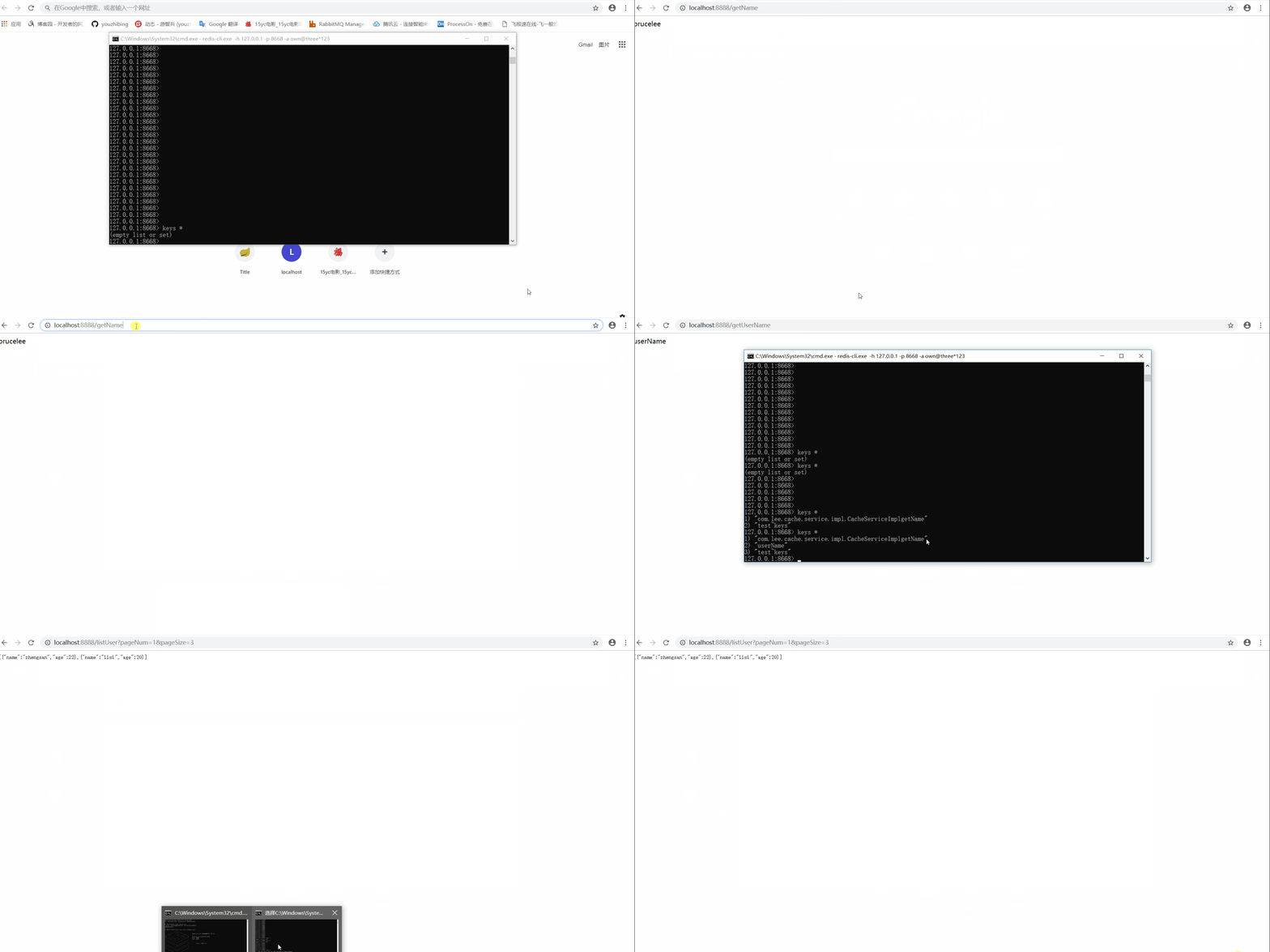
工程中的缓存分两种:缓存管理器管理的缓存(也就是一些列注解实现的缓存)、redisTemplate操作的缓存
缓存管理器管理的缓存
会在redis中增加2条数据,一个是类型为 zset 的 缓存名~keys , 里面存放了该缓存所有的key, 另一个是对应的key,值为序列化后的json;缓存名~keys可以理解成缓存空间,与我们平时所说的具体的缓存是不一样的。另外对缓存管理器的一些设置(全局过期时间等)都会反映到缓存管理器管理的所有缓存上;上图中的http://localhost:8888/getName和http://localhost:8888/listUser?pageNum=1&pageSize=3对应的是缓存管理器管理的缓存。
redisTemplate操作的缓存
会在redis中增加1条记录,key - value键值对,与我们通过redis-cli操作缓存一样;上图中的http://localhost:8888/getUserName对应的是redisTemplate操作的缓存。
spring2.0.3缓存配置
工程实现
pom.xml
<?xml version="1.0" encoding="UTF-8"?>

<project xmlns="http://maven.apache.org/POM/4.0.0"

         xmlns:xsi="http://www.w3.org/2001/XMLSchema-instance"

         xsi:schemaLocation="http://maven.apache.org/POM/4.0.0 http://maven.apache.org/xsd/maven-4.0.0.xsd">

    <modelVersion>4.0.0</modelVersion>

    <groupId>com.lee</groupId>

    <artifactId>spring-boot-cache</artifactId>

    <version>1.0-SNAPSHOT</version>

    <parent>

        <groupId>org.springframework.boot</groupId>

        <artifactId>spring-boot-starter-parent</artifactId>

        <version>2.0.3.RELEASE</version>

    </parent>

    <dependencies>

        <dependency>

            <groupId>org.springframework.boot</groupId>

            <artifactId>spring-boot-starter-web</artifactId>

        </dependency>

        <dependency>

            <groupId>org.springframework.boot</groupId>

            <artifactId>spring-boot-starter-data-redis</artifactId>

        </dependency>

        <dependency>

            <groupId>org.apache.commons</groupId>

            <artifactId>commons-pool2</artifactId>

        </dependency>

        <dependency>

            <groupId>org.apache.commons</groupId>

            <artifactId>commons-lang3</artifactId>

        </dependency>

    </dependencies>

</project>
application.yml
server:

  port: 8889

spring:

  #redis配置

  redis:

    database: 0

    host: 127.0.0.1

    port: 6379

    password:

    lettuce:

      pool:

        # 接池最大连接数(使用负值表示没有限制)

        max-active: 8

        # 连接池最大阻塞等待时间(使用负值表示没有限制)

        max-wait: -1ms

        # 连接池中的最小空闲连接

        max-idle: 8

        # 连接池中的最大空闲连接

        min-idle: 0

    # 连接超时时间

    timeout: 2000ms

  cache:

    type: redis

cache:

  test:

    expire-time: 180

    name: test

  default:

    expire-time: 200
缓存定制:RedisCacheManagerConfig.java
package com.lee.cache.config;

import org.springframework.beans.factory.annotation.Value;

import org.springframework.cache.CacheManager;

import org.springframework.context.annotation.Bean;

import org.springframework.context.annotation.Configuration;

import org.springframework.data.redis.cache.RedisCacheConfiguration;

import org.springframework.data.redis.cache.RedisCacheManager;

import org.springframework.data.redis.connection.RedisConnectionFactory;

import org.springframework.data.redis.serializer.GenericJackson2JsonRedisSerializer;

import org.springframework.data.redis.serializer.RedisSerializationContext;

import org.springframework.data.redis.serializer.StringRedisSerializer;

import java.time.Duration;

import java.util.HashMap;

import java.util.HashSet;

import java.util.Map;

import java.util.Set;

/**

 * 进行缓存管理的定制

 * 可以不配置,采用springboot默认的也行

 */

@Configuration

public class RedisCacheManagerConfig {

    @Value("${cache.default.expire-time:1800}")

    private int defaultExpireTime;

    @Value("${cache.test.expire-time:180}")

    private int testExpireTime;

    @Value("${cache.test.name:test}")

    private String testCacheName;

    //缓存管理器

    @Bean

    public CacheManager cacheManager(RedisConnectionFactory lettuceConnectionFactory) {

        RedisCacheConfiguration defaultCacheConfig = RedisCacheConfiguration.defaultCacheConfig();

        // 设置缓存管理器管理的缓存的默认过期时间

        defaultCacheConfig = defaultCacheConfig.entryTtl(Duration.ofSeconds(defaultExpireTime))

                // 设置 key为string序列化

                .serializeKeysWith(RedisSerializationContext.SerializationPair.fromSerializer(new StringRedisSerializer()))

                // 设置value为json序列化

                .serializeValuesWith(RedisSerializationContext.SerializationPair.fromSerializer(new GenericJackson2JsonRedisSerializer()))

                // 不缓存空值

                .disableCachingNullValues();

        Set<String> cacheNames = new HashSet<>();

        cacheNames.add(testCacheName);

        // 对每个缓存空间应用不同的配置

        Map<String, RedisCacheConfiguration> configMap = new HashMap<>();

        configMap.put(testCacheName, defaultCacheConfig.entryTtl(Duration.ofSeconds(testExpireTime)));

        RedisCacheManager cacheManager = RedisCacheManager.builder(lettuceConnectionFactory)

                .cacheDefaults(defaultCacheConfig)

                .initialCacheNames(cacheNames)

                .withInitialCacheConfigurations(configMap)

                .build();

        return cacheManager;

    }

}
此类可不用配置,就用spring-boot自动配置的缓存管理器也行,只是在缓存的可阅读性上会差一些。有兴趣的朋友可以删除此类试试。
CacheServiceImpl.java
package com.lee.cache.service.impl;

import com.lee.cache.model.User;

import com.lee.cache.service.ICacheService;

import org.apache.commons.lang3.StringUtils;

import org.springframework.beans.factory.annotation.Autowired;

import org.springframework.cache.annotation.CacheConfig;

import org.springframework.cache.annotation.Cacheable;

import org.springframework.data.redis.core.RedisTemplate;

import org.springframework.stereotype.Service;

import java.util.ArrayList;

import java.util.List;

/**

 * 若未配置@CacheConfig(cacheNames = "hello"), 则@Cacheable一定要配置value

 * 若@CacheConfig(cacheNames = "hello") 与 @Cacheable(value = "123")都配置了, 则@Cacheable(value = "123") 生效

 *

 * 当然@CacheConfig还有一些其他的配置项,Cacheable也有一些其他的配置项

 */

@Service

public class CacheServiceImpl implements ICacheService {

    @Autowired

    private RedisTemplate<String, String> redisTemplate;

    @Override

    @Cacheable(value = "test", key = "targetClass + '_' + methodName")

    public String getName() {

        System.out.println("getName, no cache now...");

        return "brucelee";

    }

    @Override

    @Cacheable(value = "user", key = "targetClass + ':' + methodName + '_' + #p0", unless = "#result.size() <= 0")

    public List<User> listUser(int pageNum, int pageSize) {

        System.out.println("listUser no cache now...");

        List<User> users = new ArrayList<>();

        users.add(new User("zhengsan", 22));

        users.add(new User("lisi", 20));

        return users;

    }

    /**

     * 缓存不是缓存管理器管理,那么不受缓存管理器的约束

     * 缓存管理器中的配置不适用与此

     * 这里相当于我们平时直接通过redis-cli操作redis

     * @return

     */

    @Override

    public String getUserName() {

        String userName = redisTemplate.opsForValue().get("userName");

        if (StringUtils.isNotEmpty(userName)) {

            return userName;

        }

        System.out.println("getUserName, no cache now...");

        redisTemplate.opsForValue().set("userName", "userName");

        return "userName";

    }

}
更多详情请点spring-boot-cache
redis 怎样保存cache
我们来看图说话,看看缓存在redis中是如何保存的
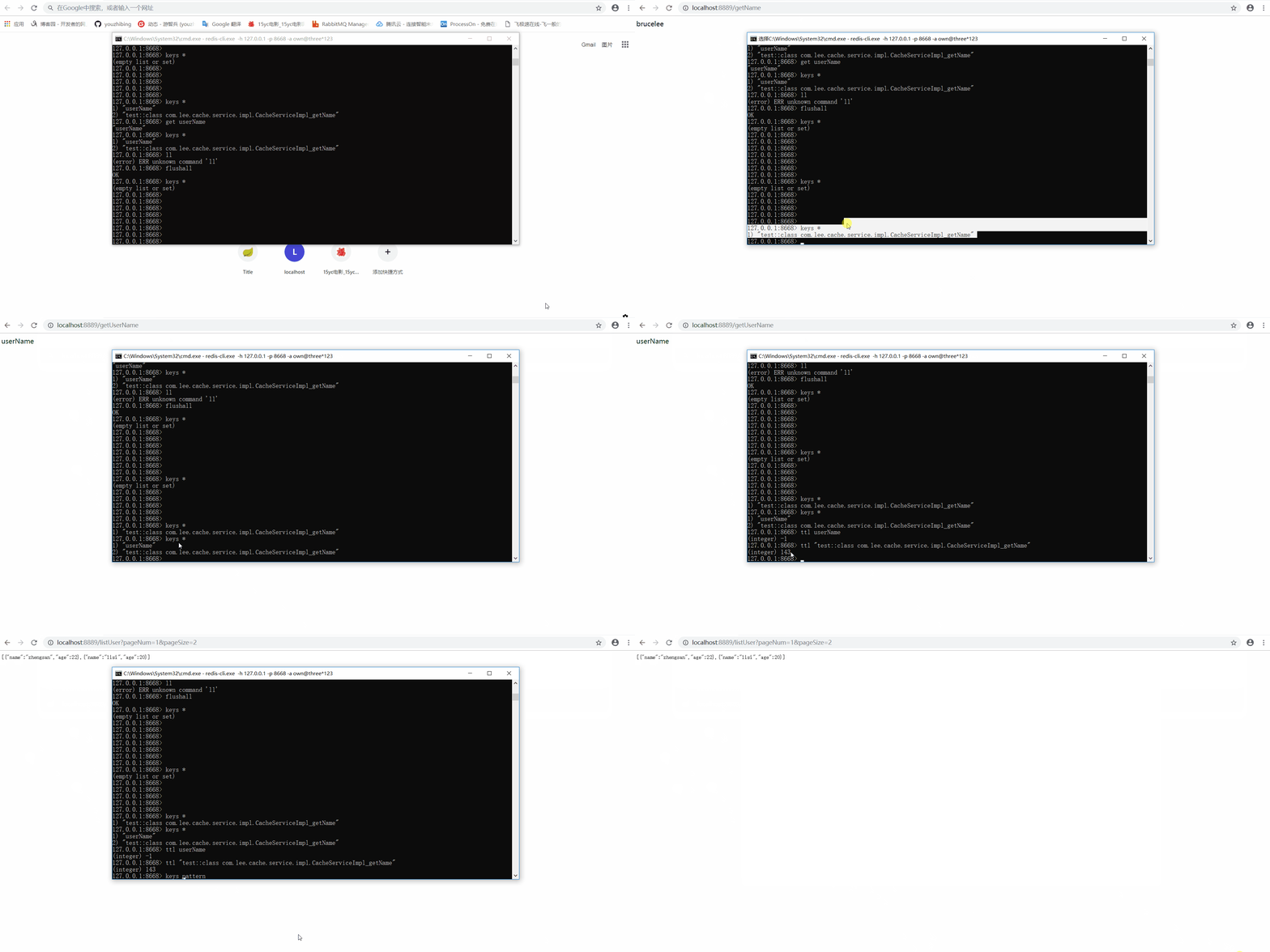
工程中的缓存分两种:缓存管理器管理的缓存(也就是一些列注解实现的缓存)、redisTemplate操作的缓存
缓存管理器管理的缓存
会在redis中增加1条数据,key是以缓存空间开头的字符串(缓存空间名::缓存key),值为序列化后的json;上图中的http://localhost:8889/getName和http://localhost:8889/listUser?pageNum=1&pageSize=3对应的是缓存管理器管理的缓存。
redisTemplate操作的缓存
会在redis中增加1条记录,key - value键值对,与我们通过redis-cli操作缓存一样;上图中的http://localhost:8889/getUserName对应的是redisTemplate操作的缓存。
总结
1、有时候我们引入spring-boot-starter-cache这个starter只是为了快速添加缓存依赖,目的是引入spring-context-support;如果我们的应用中中已经有了spring-context-support,那么我们无需再引入spring-boot-starter-cache,例如我们的应用中依赖了spring-boot-starter-web,而spring-boot-starter-web中又有spring-context-support依赖,所以我们无需再引入spring-boot-starter-cache。
2、Supported Cache Providers,讲了支持的缓存类型以及默认情况下的缓存加载方式,可以通读下。
3、只要我们引入了redis依赖,并将redis的连接信息配置正确,springboot(2.0.3)根据我们的配置会给我们生成默认的缓存管理器和redisTemplate;我们也可以自定义我们自己的缓存管理器来替换掉默认的,只要我们自定义了缓存管理器和redisTemplate,那么springboot的默认生成的会替换成我们自定义的。
4、缓存管理器对缓存的操作也是通过redisTemplate实现的,只是进行了统一的管理,并且能够减少我们的代码量,我们可以将更多的精力放到业务处理上。
5、redis-cli -h 127.0.0.1 -p 6379 -a 123456与redis-cli -a 123456两种方式访问到的数据完全不一致,好像操作不同的库一样! 这个需要注意,有空我回头看看这两者到底有啥区别,有知道的朋友可以留个言。
最后缅怀一下:金庸走了,再无江湖;IG捧杯了,再无LOL!感谢IG成就了我的完美谢幕,让我的青春少了一份遗憾,谢谢!
参考
spring boot(三):Spring Boot中Redis的使用
spring-boot-2.0.3之redis缓存实现,不是你想的那样哦!的更多相关文章
- Spring Boot (五): Redis缓存使用姿势盘点
1. Redis 简介 Redis 是目前业界使用最广泛的内存数据存储.相比 Memcached,Redis 支持更丰富的数据结构,例如 hashes, lists, sets 等,同时支持数据持久化 ...
- 阿里P7级教你如何在Spring Boot应用程序中使用Redis
在Spring Boot应用程序中使用Redis缓存的步骤: 1.要获得Redis连接,我们可以使用Lettuce或Jedis客户端库,Spring Boot 2.0启动程序spring-boot-s ...
- spring boot 2.0.4 Redis缓存配置
spring boot 2 使用RedisTemplate操作redis存取对象时,需要先进行序列化操作 import org.springframework.cache.CacheManager; ...
- spring boot 2.0.0 + shiro + redis实现前后端分离的项目
简介 Apache Shiro是一个强大且易用的Java安全框架,执行身份验证.授权.密码学和会话管理.使用Shiro的易于理解的API,您可以快速.轻松地获得任何应用程序,从最小的移动应用程序到最大 ...
- 详细介绍Spring Boot 2.0的那些新特性与增强
以Java 8 为基准 Spring Boot 2.0 要求Java 版本必须8以上, Java 6 和 7 不再支持. 内嵌容器包结构调整 为了支持reactive使用场景,内嵌的容器包结构被重构了 ...
- Spring Boot 2.0 的快速入门(图文教程)
摘要: 原创出处 https://www.bysocket.com 「公众号:泥瓦匠BYSocket 」欢迎关注和转载,保留摘要,谢谢! Spring Boot 2.0 的快速入门(图文教程) 大家都 ...
- Spring Boot 2.0 新特性和发展方向
以Java 8 为基准 Spring Boot 2.0 要求Java 版本必须8以上, Java 6 和 7 不再支持. 内嵌容器包结构调整 为了支持reactive使用场景,内嵌的容器包结构被重构了 ...
- Spring Boot 2.0 版的开源项目云收藏来了!
给大家聊一聊云收藏从 Spring Boot 1.0 升级到 2.0 所踩的坑 先给大家晒一下云收藏的几个数据,作为一个 Spring Boot 的开源项目(https://github.com/cl ...
- 【2.0新特性】Spring Boot 2.0新特性
以Java 8 为基准 Spring Boot 2.0 要求Java 版本必须8以上, Java 6 和 7 不再支持. 内嵌容器包结构调整 为了支持reactive使用场景,内嵌的容器包结构被重构了 ...
随机推荐
- win7 home 提升 admin, pip
以管理员权限运行cmd cmd 右击‘以管理员身份运行’ 输入net user administrator /active:yes 取消为 net user administrator /acti ...
- zeromq示例代码
http://www.oschina.net/code/snippet_614253_55034 将zeromq代码使用vc集中到一个解决方案中 可编译可调调试 vc2015
- Java多线程系列3 synchronized 关键词
先来看一个线程安全的例子 ,两个线程对count进行累加,共累加10万次. public class AddTest { public static void main(String[] args) ...
- PyCharm选择性忽略PEP8代码风格警告信息
用了几天的PyCharm,发现确实在编写Python代码上非常好用,但有一点体验不太好,就是代码编写时要按照PEP8代码风格编写,不然会有波浪线的警告信息.解决方法如下: 方法一: 将鼠标移到提示的地 ...
- ABP框架系列之三十:(Javascript-API-Javascript-API)
ASP.NET Boilerplate provides a set of objects and functions that are used to make javascript develop ...
- 中标麒麟(linux)下Qt调用python
转自:https://blog.csdn.net/lwlgzy/article/details/83857297 http://www.cnblogs.com/jiaping/p/6321859.ht ...
- 32 bit 与 64 bit 程序(1)如何识别?
一, 怎样判断一个exe可执行程序是32位的还是64位的? 简单的方法: 一般来说在64位的windows7下,打开任务管理器可以知道哪些程序是32位的哪些是64位的,但是因为自己的电脑是64位的wi ...
- C#顺序表 & 单向链表(无头)
C# 顺序表 非常标准的顺序表结构,等同于C#中的List<T>,但是List<T>在排错查询和数据结构替换上存在缺陷,一些情况会考虑使用自己定义的数据结构 1.优化方向 下表 ...
- Python自动化开发 - Python操作Memcached、Redis、RabbitMQ
Memcached Memcached 是一个高性能的分布式内存对象缓存系统,用于动态Web应用以减轻数据库负载. 它通过在内存中缓存数据和对象来减少读取数据库的次数,从而提高动态.数据库驱动网站的速 ...
- Android RxJava zip 操作符
不说话,直接举例 // zip 2 observables Observable.zip(Observable.just(0), Observable.just(0), BiFunction { t1 ...