
springadmin环境搭建
一路走过来都是坑,记录下来以后避免在踩
springboot版本信息2.0.3
admin服务端
maven配置信息
<properties>

        <project.build.sourceEncoding>UTF-</project.build.sourceEncoding>

        <project.reporting.outputEncoding>UTF-</project.reporting.outputEncoding>

        <java.version>1.8</java.version>

        <spring-boot-admin.version>2.0.</spring-boot-admin.version>

        <spring-cloud.version>Finchley.RELEASE</spring-cloud.version>

    </properties>

    <dependencies>

        <dependency>

            <groupId>de.codecentric</groupId>

            <artifactId>spring-boot-admin-starter-server</artifactId>

        </dependency>

        <dependency>

            <groupId>org.springframework.boot</groupId>

            <artifactId>spring-boot-starter-web</artifactId>

        </dependency>

        <dependency>

            <groupId>org.springframework.boot</groupId>

            <artifactId>spring-boot-starter-security</artifactId>

        </dependency>

        <dependency>

            <groupId>org.springframework.boot</groupId>

            <artifactId>spring-boot-starter-actuator</artifactId>

        </dependency>

        <dependency>

            <groupId>org.springframework.cloud</groupId>

            <artifactId>spring-cloud-starter-netflix-eureka-client</artifactId>

        </dependency>

    </dependencies>

    <dependencyManagement>

        <dependencies>

            <dependency>

                <groupId>org.springframework.cloud</groupId>

                <artifactId>spring-cloud-dependencies</artifactId>

                <version>${spring-cloud.version}</version>

                <type>pom</type>

                <scope>import</scope>

            </dependency>

            <dependency>

                <groupId>de.codecentric</groupId>

                <artifactId>spring-boot-admin-dependencies</artifactId>

                <version>${spring-boot-admin.version}</version>

                <type>pom</type>

                <scope>import</scope>

            </dependency>

        </dependencies>

    </dependencyManagement>

    <build>

        <plugins>

            <plugin>

                <groupId>org.springframework.boot</groupId>

                <artifactId>spring-boot-maven-plugin</artifactId>

                <executions>

                    <execution>

                        <goals>

                            <goal>build-info</goal>

                        </goals>

                    </execution>

                </executions>

            </plugin>

        </plugins>

    </build>
yml配置文件
spring:

  application:

    name: claimadmin

  profiles:

    active:

      - secure

# tag::configuration-eureka[]

eureka:   #<>

  instance:

    leaseRenewalIntervalInSeconds:

    health-check-url-path: /actuator/health #.0后actuator的地址发生了变化

  client:

    registryFetchIntervalSeconds:

    serviceUrl:

      defaultZone: ${EUREKA_SERVICE_URL:http://localhost:8091}/eureka/

# .0开始,actuator默认不开放,所以要设置为开发

management:

  endpoints:

    web:

      exposure:

        include: "*"

  endpoint:

    health:

      show-details: ALWAYS

server:

  port:

# end::configuration-eureka[]

---

spring:

  profiles: insecure

---

# admin登录的用户名和密码

spring:

  profiles: secure

  security:

    user:

      name: user

      password:

# 注册给eureka的时候告诉eureka自己的密码

eureka:

  instance:

    metadata-map:

      "user.name": ${spring.security.user.name}         #These two are needed so that the server

      "user.password": ${spring.security.user.password} #can access the protected client endpoints
启动类
@EnableDiscoveryClient

@EnableAdminServer

@SpringBootApplication

public class ClaimadminApplication {

    public static void main(String[] args) {

        SpringApplication.run(ClaimadminApplication.class, args);

    }

    @Profile("insecure")

    @Configuration

    public static class SecurityPermitAllConfig extends WebSecurityConfigurerAdapter {

        @Override

        protected void configure(HttpSecurity http) throws Exception {

            http.authorizeRequests().anyRequest().permitAll()//

                    .and().csrf().disable();

        }

    }

    @Profile("secure")

    @Configuration

    public static class SecuritySecureConfig extends WebSecurityConfigurerAdapter {

        private final String adminContextPath;

        public SecuritySecureConfig(AdminServerProperties adminServerProperties) {

            this.adminContextPath = adminServerProperties.getContextPath();

        }

        @Override

        protected void configure(HttpSecurity http) throws Exception {

            // @formatter:off

            SavedRequestAwareAuthenticationSuccessHandler successHandler = new SavedRequestAwareAuthenticationSuccessHandler();

            successHandler.setTargetUrlParameter("redirectTo");

            http.authorizeRequests()

                    .antMatchers(adminContextPath + "/assets/**").permitAll()

                    .antMatchers(adminContextPath + "/login").permitAll()

                    .anyRequest().authenticated()

                    .and()

                    .formLogin().loginPage(adminContextPath + "/login").successHandler(successHandler)

                    .and()

                    .logout().logoutUrl(adminContextPath + "/logout").and()

                    .httpBasic().and()

                    .csrf().disable();

            // @formatter:on

        }

    }

}
总结下来没有多少东西,按官方文档或者找博客按套路来就行,没有什么高深的东西
admin客户端
添加maven配置
<!--监控平台引用  begin-->

        <dependency>

            <groupId>org.springframework.cloud</groupId>

            <artifactId>spring-cloud-starter</artifactId>

        </dependency>

        <dependency>

            <groupId>de.codecentric</groupId>

            <artifactId>spring-boot-admin-starter-client</artifactId>

        </dependency>

        <dependency>

            <groupId>org.springframework.boot</groupId>

            <artifactId>spring-boot-starter-actuator</artifactId>

        </dependency>

        <dependency>

            <groupId>org.springframework.boot</groupId>

            <artifactId>spring-boot-starter-security</artifactId>

        </dependency>

        <dependency>

            <groupId>org.springframework.boot</groupId>

            <artifactId>spring-boot-devtools</artifactId>

            <scope>runtime</scope>

        </dependency>

        <!--监控平台引用  end-->
properties配置添加
#性能监控 加载所有的端点/默认只加载了 info / health

management.endpoints.web.exposure.include=*

management.endpoint.health.show-details=always

spring.boot.admin.client.url=http://localhost:8181

spring.boot.admin.client.username=user

spring.boot.admin.client.password=

spring.boot.admin.client.instance.prefer-ip=true
特殊说明:
spring.boot.admin.client.url的配置遇到了一个坑,yml下面添加了"",properties使用""监控平台没有信息,原因待查。
启动类添加
@Configuration

    public static class SecurityPermitAllConfig extends WebSecurityConfigurerAdapter {

        @Override

        protected void configure(HttpSecurity http) throws Exception {

            http.authorizeRequests().anyRequest().permitAll()

                    .and().csrf().disable();

        }

    }
到此服务端和客户端全部完成
在浏览器输入http://localhost:8181
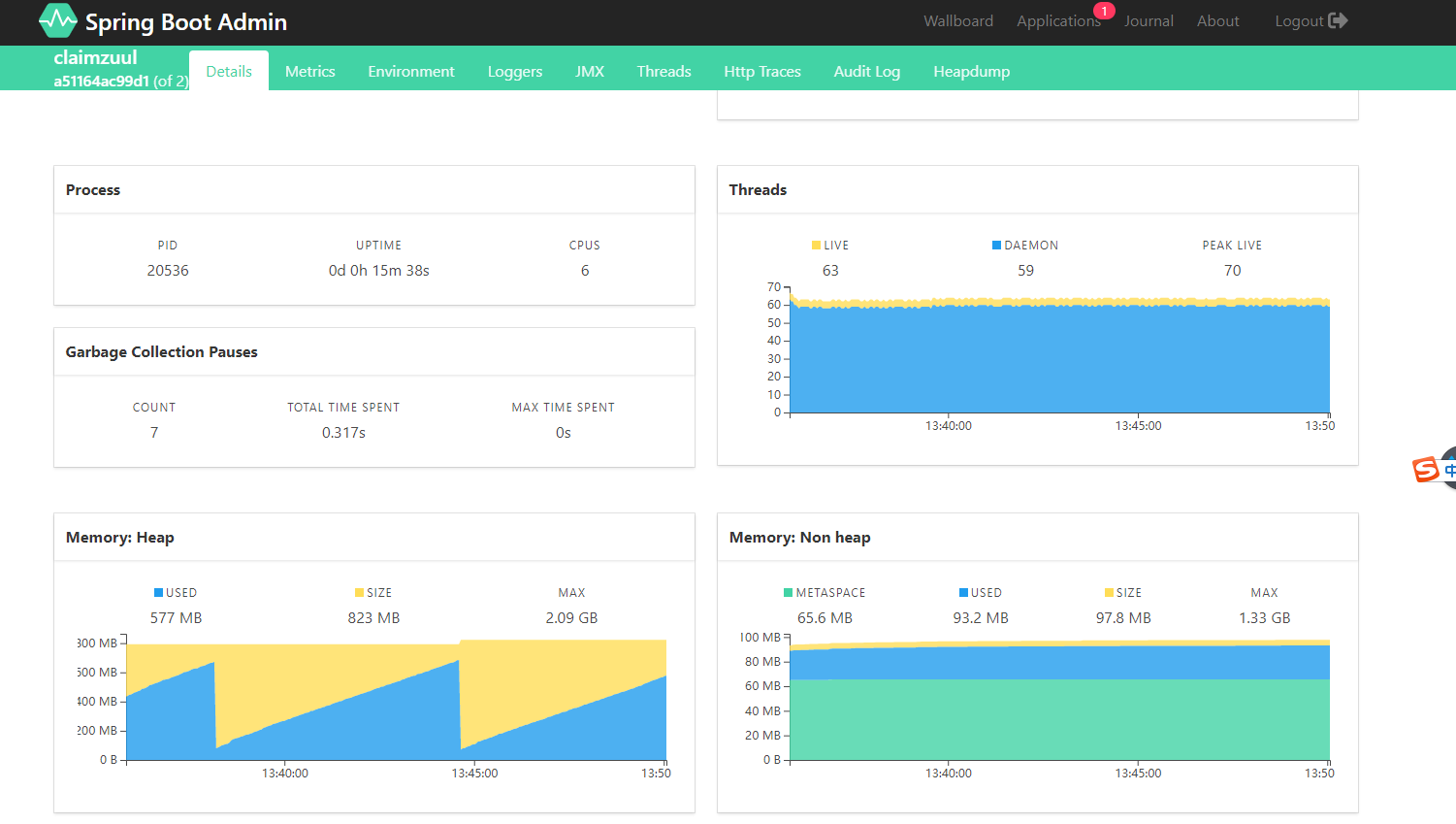
分别显示了磁盘空间,线程数,堆的大小,非堆占用的内存等
springadmin环境搭建的更多相关文章
- .NET Core系列 : 1、.NET Core 环境搭建和命令行CLI入门
2016年6月27日.NET Core & ASP.NET Core 1.0在Redhat峰会上正式发布,社区里涌现了很多文章,我也计划写个系列文章,原因是.NET Core的入门门槛相当高, ...
- Azure Service Fabric 开发环境搭建
微服务体系结构是一种将服务器应用程序构建为一组小型服务的方法,每个服务都按自己的进程运行,并通过 HTTP 和 WebSocket 等协议相互通信.每个微服务都在特定的界定上下文(每服务)中实现特定的 ...
- rnandroid环境搭建
react-native 环境搭建具体步骤这个大家已经玩烂了,这个主要是记录下来自己做win7系统遇到的坑 1.com.android.ddmlib.installexception 遇到这个问题,在 ...
- python开发环境搭建
虽然网上有很多python开发环境搭建的文章,不过重复造轮子还是要的,记录一下过程,方便自己以后配置,也方便正在学习中的同事配置他们的环境. 1.准备好安装包 1)上python官网下载python运 ...
- springMVC初探--环境搭建和第一个HelloWorld简单项目
注:此篇为学习springMVC时,做的笔记整理. MVC框架要做哪些事情? a,将url映射到java类,或者java类的方法上 b,封装用户提交的数据 c,处理请求->调用相关的业务处理—& ...
- 【定有惊喜】android程序员如何做自己的API接口?php与android的良好交互(附环境搭建),让前端数据动起来~
一.写在前面 web开发有前端和后端之分,其实android还是有前端和后端之分.android开发就相当于手机app的前端,一般都是php+android或者jsp+android开发.androi ...
- Nexus(一)环境搭建
昨天,成功搭建了自己的 Maven 环境(详见:Maven(一)环境搭建),今天就来研究和探讨下 Nexus 的搭建! 使用背景: 安装环境:Windows 10 -64位 JDK版本:1.7 Mav ...
- 「译」JUnit 5 系列:环境搭建
原文地址:http://blog.codefx.org/libraries/junit-5-setup/ 原文日期:15, Feb, 2016 译文首发:Linesh 的博客:环境搭建 我的 Gith ...
- appium+robotframework环境搭建
appium+robotframework环境搭建步骤(Windows系统的appium自动化测试,只适用于测试安卓机:ios机需要在mac搭建appium环境后测试) 搭建步骤,共分为3部分: 一. ...
随机推荐
- Java基础——Oracle(二)
一.Oracle 中的几个服务 1.OracleDBConsoleorcl 进程:nmesrvc.exe oem控制台服务进程,dba用.Oracle Enterprise Manager(Oracl ...
- oracle创建用户、授权、导入、导出命令总结
1.创建用户 需要先用system用户登录数据库,因为system用户具有创建其他用户的权限. 语法[创建用户]: create user 用户名 identified by 口令[即密码]: 例子: ...
- 关于scanf与cin哪个快的问题
一开始入c++的时候成天跑cin,cout 直到有一天用cin,cout超时 才知道scanf比cin快的多 但是后来又听说加了ios::sync_with_stdio(false);的cin跟飞一样 ...
- 洛谷P4563 [JXOI2018]守卫(dp)
题意 题目链接 Sol 非常有意思的题目. 我们设\(f[l][r]\)表示区间\([l,r]\)的答案. 显然\(r\)位置一定有一个保镖 同时不难观察到一个性质:拿\([1, n]\)来说,设其观 ...
- 我的Java之旅 第四课 JAVA 语言语法 基础
1 整型 int num = 1_000_000; //从java 7开始支持的语法 ,只是让人更易读,java编绎器会去除 2 字符串 一定不能使用==运算 ...
- 【转】解决CentOS 64位系统vsftpd 530 login incorrect的问题
转自:http://www.centos.bz/2011/12/centos-64-install-vsftpd-530-login-incorredct/ 今天在centos 6 64位测试安装vs ...
- 浅谈 Mysql 中的索引
文章归属:http://feiyan.info/16.html,我想自己去写了,但是发现此君总结的非常详细.直接搬过来了 关于MySQL索引的好处,如果正确合理设计并且使用索引的MySQL是一辆兰博基 ...
- (网页)alert()怎么回事出不来,代码没有写错
1.不报错,请查看浏览器是否禁掉了alter. 2.console.log()输出,避免这种尴尬.
- android recovery代码修改之原生建议
我们都知道recovery升级的时候,是根据升级脚本updater-script里面的函数,去一步步执行的,比如mount,format等相关的操作,有时候我们需要增加一些自己特殊的更新的接口,这时候 ...
- python第四十九天--paramiko模块安装大作战
准备开始学习:paramiko模块,发现这个模块十分难搞 安装不上 搞了半天,win10 64下 pytyon 3.6 的 paramiko模块 死活安不上,在网上不断的找资料,可是没有用,没有用啊 ...