
mschart asp chart 用法,包括前台写法与后台写法,还有click事件,如何触发。
纯后台动态生成aspchart ,这种方式没办法实现chart中click事件。click事件点击没有反应,用第二种可以实现点击事件。
两种方式实现同一种效果图: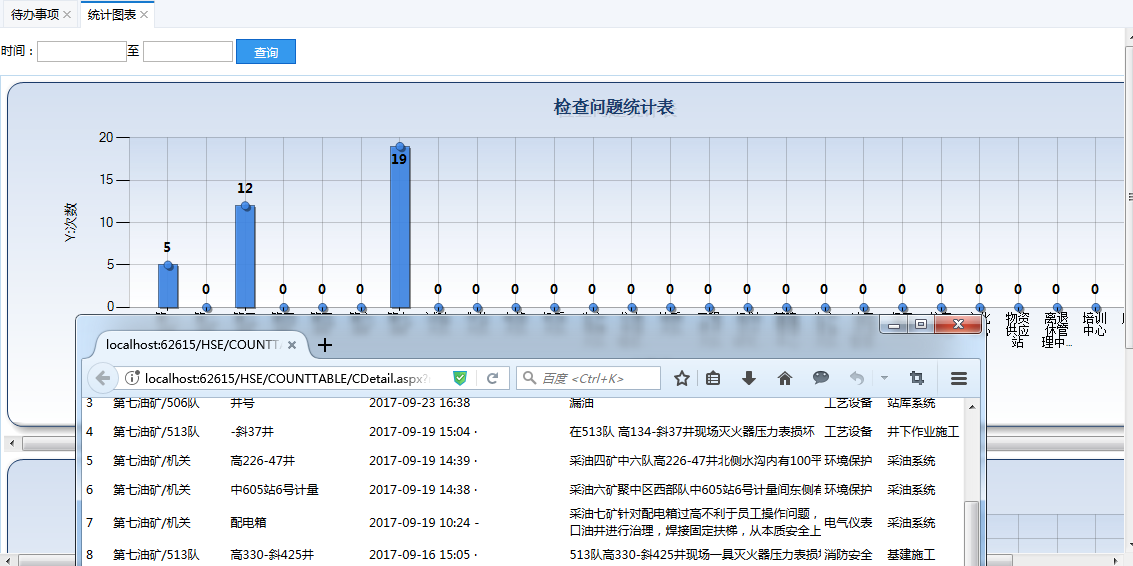
第一种写法:后台动态生成aspchart
前台代码:
<div>
<div class="h_10">
</div>
<table cellpadding="" cellspacing="" border="" width="100%">
<tr>
<td> 时间:<input id="S_BeTime" type="text" class="mycalendar" name="S_BeTime" style="width: 90px;" value="" runat="server" />至
<input id="S_EndTime" type="text" class="mycalendar" name="S_EndTime" style="width: 90px;" value="" runat="server" /> <asp:Button ID="btnSeach" runat="server" Text="查询" OnClick="btnSeach_Click" class="mybutton" Width="60px" /> </td>
</tr>
</table>
<div id="tab" runat="server"></div>
<div class="h_10">
</div>
<table id="tabMain" runat="server" style="width: 100%; height: 700px; text-align: center; vertical-align:text-top; border: 1px solid #BFDAEF;"> </table>
</div>
后台代码:
using System;

using System.Collections.Generic;

using System.Data;

using System.Drawing;

using System.Linq;

using System.Web;

using System.Web.UI;

using System.Web.UI.DataVisualization.Charting;

using System.Web.UI.HtmlControls;

using System.Web.UI.WebControls;

namespace WebForm.HSE.COUNTTABLE

{

    public partial class CIndex : Common.BasePage

    {

        RoadFlow.Platform.Organize mc = new RoadFlow.Platform.Organize();

        RoadFlow.Platform.HSE_VIS_CHECKBLL HSEBLL = new RoadFlow.Platform.HSE_VIS_CHECKBLL();

        private string parentID = "04f12beb-d99d-43df-ac9a-3042957d6bda";//厂的父节点id

        RoadFlow.Platform.Organize ORGBLL = new RoadFlow.Platform.Organize();

        protected void Page_Load(object sender, EventArgs e)

        {

            if (!IsPostBack)

            {

                BindData();

            }

        }

        protected void btnSeach_Click(object sender, EventArgs e)

        {

            BindData();

        }

        private void BindData()

        {

            string strSql = CreateStrWhere();

            DataSet ds = HSEBLL.GetList(strSql);

            DataTable BindCharDtOne = new DataTable();//绑定图表的dt 检查问题明细

            BindCharDtOne.Columns.Add("DeptName");//部门姓名

            BindCharDtOne.Columns.Add("Colum");//数量

            DataTable BindCharDtTwo = new DataTable();//绑定图表的dt 未整改

            BindCharDtTwo.Columns.Add("DeptName");//部门姓名

            BindCharDtTwo.Columns.Add("Colum");//数量

            List<RoadFlow.Data.Model.Organize> ORGModel = ORGBLL.GetChilds(parentID.ToGuid());

            for (int i = ; i < ORGModel.Count; i++)

            {

                string orgid= ORGModel[i].ID.ToString();

                string orgname = ORGModel[i].Name.ToString();

                //检查问题数

                int countOne = SortDataTable(ds.Tables[], " CK_CKORG ='" + orgid + "' and (CK_ISFLOW ='1' or CK_ISFLOW='2')", "CREATETIME Desc", );

                DataRow drOne;

                drOne = BindCharDtOne.NewRow();

                drOne["DeptName"] = orgname;

                drOne["Colum"] = countOne.ToString();

                BindCharDtOne.Rows.Add(drOne);

                //未整改数

                int countTwo = SortDataTable(ds.Tables[], " CK_CKORG ='" + orgid + "' and (CK_ISFLOW ='1' or CK_ISFLOW='2') AND PH_CHECKRELATION ='132ec6dc-7424-4f71-9b79-45b70f000644'", "CREATETIME Desc", );

                DataRow drTwo;

                drTwo = BindCharDtTwo.NewRow();

                drTwo["DeptName"] = orgname;

                drTwo["Colum"] = countTwo.ToString();

                BindCharDtTwo.Rows.Add(drTwo);

            }

            DrawTable(BindCharDtOne,"检查问题统计表",);

            DrawTable(BindCharDtTwo, "未整改问题统计表", );

        }

        //画图

        private void DrawTable(DataTable dt,string name,int j)

        {

            HtmlTableRow tbRow = new HtmlTableRow();

            HtmlTableCell tbCell = new HtmlTableCell();

            tbCell.VAlign = "Top";

            tbCell.Align = "center";

            Chart Chart1 = new Chart();

            Chart1.Click += new ImageMapEventHandler(Chart1_Click);

            Chart1.BackColor = Color.FromArgb(, , );

            Chart1.Height = ;

            Chart1.Width = ;

            Chart1.BorderlineDashStyle = ChartDashStyle.Solid;

            Chart1.BackGradientStyle = GradientStyle.TopBottom;

            Chart1.BorderlineColor = Color.FromArgb(, , );

            Chart1.IsSoftShadows = false;

            BorderSkin bdsk = new BorderSkin();

            bdsk.SkinStyle = BorderSkinStyle.Emboss;

            Chart1.BorderSkin = bdsk;

            Series series = new Series("columSeries");   //实例Series 集合 对象

            series.ChartType = SeriesChartType.Column;

            series.XValueType = ChartValueType.Double;

            //Series的边框颜色

            series.BorderColor = Color.FromArgb(, , , );

            //线条宽度

            series.BorderWidth = ;

            //线条阴影颜色

            series.ShadowColor = Color.Black;

            //阴影宽度

            series.ShadowOffset = ;

            //是否显示数据说明

            series.IsVisibleInLegend = true;

            //线条上数据点上是否有数据显示

            series.IsValueShownAsLabel = true;

            //线条上的数据点标志类型

            series.MarkerStyle = MarkerStyle.Circle;

            //线条数据点的大小

            series.MarkerSize = ;

            //鼠标悬停显示内容

            series.ToolTip = "单位:#AXISLABEL \\n次数:#VAL";

            //设置柱子的宽度

            series.CustomProperties = "PointWidth=0.5";

            Font sf = new Font("微软雅黑", 10F, FontStyle.Bold);

            series.Font = sf;

            //线条颜色

            //线条颜色

            switch (j)

            {

                case :

                    series.Color = Color.FromArgb(, , , );

                    break;

                case :

                    series.Color = Color.FromArgb(, , , );

                    break;

                case :

                    series.Color = Color.FromArgb(, , , );

                    break;

                case :

                    series.Color = Color.FromArgb(, , , );

                    break;

                case :

                    series.Color = Color.FromArgb(, , , );

                    break;

                case :

                    series.Color = Color.FromArgb(, , , );

                    break;

                case :

                    series.Color = Color.FromArgb(, , , );

                    break;

                case :

                    series.Color = Color.FromArgb(, , , );

                    break;

                case :

                    series.Color = Color.FromArgb(, , , );

                    break;

            }

            ////设置图表Y轴对应项

            series.YValueMembers = "Colum";

            ////设置图表X轴对应项

            series.XValueMember = "DeptName";

            series.PostBackValue = "#AXISLABEL";

            Chart1.Series.Add(series);

            ChartArea area = new ChartArea("columArea");   //实例 ChartArea 对象

            //背景色

            area.BackColor = Color.FromArgb(, , , );

            //背景渐变方式

            area.BackGradientStyle = GradientStyle.TopBottom;

            //渐变和阴影的辅助背景色

            area.BackSecondaryColor = Color.White;

            //边框颜色

            area.BorderColor = Color.FromArgb(, , , );

            //阴影颜色

            area.ShadowColor = Color.Transparent;

            //设置X轴和Y轴线条的颜色和宽度

            area.AxisX.LineColor = Color.FromArgb(, , , );

            area.AxisX.LineWidth = ;

            area.AxisY.LineColor = Color.FromArgb(, , , );

            area.AxisY.LineWidth = ;

            //设置X轴和Y轴的标题

            area.AxisX.Title = "X:单位";

            area.AxisY.Title = "Y:次数";

            //设置图表区网格横纵线条的颜色和宽度

            area.AxisX.MajorGrid.LineColor = Color.FromArgb(, , , );

            area.AxisX.MajorGrid.LineWidth = ;

            area.AxisY.MajorGrid.LineColor = Color.FromArgb(, , , );

            area.AxisY.MajorGrid.LineWidth = ;

            area.AxisX.Interval = ;   //设置X轴坐标的间隔为1

            area.AxisX.IntervalOffset = ;  //设置X轴坐标偏移为1

            area.AxisX.LabelStyle.Angle = ;

            area.AxisX.LabelStyle.IsStaggered = false;   //设置是否交错显示,比如数据多的时间分成两行来显示

            area.AxisX.LabelAutoFitStyle = LabelAutoFitStyles.WordWrap;

            //设置X轴文字大小

            area.AxisX.LabelAutoFitMinFontSize = ;

            area.AxisX.TitleFont = new Font("微软雅黑", 10F, FontStyle.Regular);

            area.AxisY.TitleFont = new Font("微软雅黑", 10F, FontStyle.Regular);

            Chart1.ChartAreas.Add(area);   // 将ChartArea 对象添加到chart 对象中

            //添加标题

            Title tile = new Title();

            tile.Text = string.Format("{0} ", name);

            //标题的字体

            tile.Font = new System.Drawing.Font("Microsoft Sans Serif", , FontStyle.Bold);

            //标题字体颜色

            tile.ForeColor = Color.FromArgb(, , );

            //标题阴影颜色

            tile.ShadowColor = Color.FromArgb(, , , );

            //标题阴影偏移量

            tile.ShadowOffset = ;

            Chart1.Titles.Add(tile);

            //------------

            //设置图表的数据源

            Chart1.DataSource = dt;

            //绑定数据

            Chart1.DataBind();

            Panel pan = new Panel();//显示滚动条的panel

            pan.Width = ;

            pan.ScrollBars = ScrollBars.Horizontal;

            pan.Attributes.Add("style", "overflow-y: hidden;");//隐藏Y轴滚动条

            pan.Controls.Add(Chart1);

            tbCell.Controls.Add(pan);

            tbRow.Cells.Add(tbCell);

            this.tabMain.Controls.Add(tbRow);

            this.tab.InnerHtml = "";

        }

        /// <summary>

        /// Handles the Click event of the Chart1 control.

        /// </summary>

        /// <param name="sender">The source of the event.</param>

        /// <param name="e">The <see cref="System.Web.UI.WebControls.ImageMapEventArgs"/> instance containing the event data.</param>

        protected void Chart1_Click(object sender, ImageMapEventArgs e)

        {

            string[] input = e.PostBackValue.Split(':');

        }

        private string CreateStrWhere()

        {

            string strwhere = " 1=1 ";

            string date1 = S_BeTime.Value;

            string date2 = S_EndTime.Value;

            if (date1.IsDateTime())

            {

                strwhere += " AND CK_TIME >=to_date('" + date1.ToDateTime().ToString("yyyy-MM-dd 00:00:00") + "','yyyy-mm-dd hh24:mi:ss')";

            }

            if (date2.IsDateTime())

            {

                strwhere += " AND CK_TIME <=to_date('" + date2.ToDateTime().AddDays().ToString("yyyy-MM-dd 00:00:00") + "','yyyy-mm-dd hh24:mi:ss')";

            }

            strwhere += "  order by createtime  desc ";

            return strwhere;

        }

        #region DataTable筛选,排序返回符合条件行组成的新DataTable或直接用DefaultView按条件返回

        /// <summary>

        /// DataTable筛选,排序返回符合条件行组成的新DataTable或直接用DefaultView按条件返回

        /// eg:SortExprDataTable(dt,"Sex='男'","Time Desc",1)

        /// </summary>

        /// <param name="dt">传入的DataTable</param>

        /// <param name="strExpr">筛选条件</param>

        /// <param name="strSort">排序条件</param>

        /// <param name="mode">1,直接用DefaultView按条件返回,效率较高;2,DataTable筛选,排序返回符合条件行组成的新DataTable</param>

        public int SortDataTable(DataTable dt, string strExpr, string strSort, int mode)

        {

            int Count = ;

            switch (mode)

            {

                case :

                    //方法一 直接用DefaultView按条件返回

                    dt.DefaultView.RowFilter = strExpr;

                    dt.DefaultView.Sort = strSort;

                    Count = dt.Rows.Count;

                    return Count;

                case :

                    //方法二 DataTable筛选,排序返回符合条件行组成的新DataTable

                    DataTable dt1 = new DataTable();

                    DataRow[] GetRows = dt.Select(strExpr, strSort);

                    //复制DataTable dt结构不包含数据

                    dt1 = dt.Clone();

                    foreach (DataRow row in GetRows)

                    {

                        dt1.Rows.Add(row.ItemArray);

                    }

                    Count = dt1.Rows.Count;

                    return Count;

                default:

                    return Count;

            }

        }

        #endregion

    }

}
第二种写法:前台代码编写asp:chart,后台写代码,并实现点击事件Click
前台代码:2个chart
<form id="form1" runat="server">
<div>
<div class="h_10">
</div>
<table cellpadding="" cellspacing="" border="" width="100%">
<tr>
<td>时间:<input id="S_BeTime" type="text" class="mycalendar" name="S_BeTime" style="width: 90px;" value="" runat="server" />至
<input id="S_EndTime" type="text" class="mycalendar" name="S_EndTime" style="width: 90px;" value="" runat="server" /> <asp:Button ID="btnSeach" runat="server" Text="查询" OnClick="btnSeach_Click" class="mybutton" Width="60px" /> </td>
</tr>
</table>
<div id="tab" runat="server"></div>
<div class="h_10">
</div>
<table id="tabMain" runat="server" style="width: 100%; height: 700px; text-align: center; vertical-align: text-top; border: 1px solid #BFDAEF;">
--%>
<tr>
<td>
<asp:Panel runat="server" Width="" ScrollBars="Horizontal " Style="overflow-y: hidden;">
<asp:Chart ID="Chart1" Width="" runat="server" ImageType="Png"
Height="" BorderlineDashStyle="Solid" BorderlineColor="26, 59, 105"
BackGradientStyle="TopBottom" BorderWidth="" BackColor="211, 223, 240" IsSoftShadows="false"
OnClick="Chart1_Click"> <Legends>
<asp:Legend BackColor="Transparent" Alignment="Center" Docking="Bottom" Font="Trebuchet MS, 8.25pt, style=Bold" IsTextAutoFit="False" Name="Default" LegendStyle="Row"></asp:Legend>
</Legends>
<BorderSkin SkinStyle="Emboss"></BorderSkin>
<Series>
<asp:Series Name="Series1" ChartType="Column" XValueType="Double" BorderColor="180, 26, 59, 105"
BorderWidth="" ShadowColor="Black" ShadowOffset="" IsVisibleInLegend="true" IsValueShownAsLabel="true"
MarkerStyle="Circle" MarkerSize="" ToolTip="单位:#AXISLABEL \\n数量:#VAL"
CustomProperties="PointWidth=0.5"
ChartArea="ChartArea1" Color="220, 65, 140, 240"
YValueMembers="Colum" XValueMember="DeptName">
</asp:Series>
</Series>
<ChartAreas>
<asp:ChartArea Name="ChartArea1" BorderColor="64, 64, 64, 64" BackSecondaryColor="White"
BackColor="64, 165, 191, 228" ShadowColor="Transparent" BackGradientStyle="TopBottom">
<AxisX LineColor="64, 64, 64, 64" LineWidth="" Title="X:单位" Interval="" IntervalOffset="" LabelAutoFitStyle="WordWrap">
<MajorGrid LineColor="64, 64, 64, 64" LineWidth="" />
<LabelStyle Angle="" IsStaggered="false" /> </AxisX>
<AxisY LineColor="64, 64, 64, 64" LineWidth="" Title="Y:次数">
<MajorGrid LineColor="64, 64, 64, 64" LineWidth="" />
</AxisY> </asp:ChartArea>
</ChartAreas>
</asp:Chart>
</asp:Panel> </td>
</tr>
<tr>
<td>
<asp:Panel runat="server" Width="" ScrollBars="Horizontal " Style="overflow-y: hidden;">
<asp:Chart ID="Chart2" Width="" runat="server" ImageType="Png"
Height="" BorderlineDashStyle="Solid" BorderlineColor="26, 59, 105"
BackGradientStyle="TopBottom" BorderWidth="" BackColor="211, 223, 240" IsSoftShadows="false"
OnClick="Chart2_Click"> <Legends>
<asp:Legend BackColor="Transparent" Alignment="Center" Docking="Bottom" Font="Trebuchet MS, 8.25pt, style=Bold" IsTextAutoFit="False" Name="Default" LegendStyle="Row"></asp:Legend>
</Legends>
<BorderSkin SkinStyle="Emboss"></BorderSkin>
<Series>
<asp:Series Name="Series2" ChartType="Column" XValueType="Double" BorderColor="180, 26, 59, 105"
BorderWidth="" ShadowColor="Black" ShadowOffset="" IsVisibleInLegend="true" IsValueShownAsLabel="true"
MarkerStyle="Circle" MarkerSize="" ToolTip="单位:#AXISLABEL \\n数量:#VAL"
CustomProperties="PointWidth=0.5"
ChartArea="ChartArea2" Color="220, 65, 140, 240"
YValueMembers="Colum" XValueMember="DeptName">
</asp:Series>
</Series>
<ChartAreas>
<asp:ChartArea Name="ChartArea2" BorderColor="64, 64, 64, 64" BackSecondaryColor="White"
BackColor="64, 165, 191, 228" ShadowColor="Transparent" BackGradientStyle="TopBottom">
<AxisX LineColor="64, 64, 64, 64" LineWidth="" Title="X:单位" Interval="" IntervalOffset="" LabelAutoFitStyle="WordWrap">
<MajorGrid LineColor="64, 64, 64, 64" LineWidth="" />
<LabelStyle Angle="" IsStaggered="false" /> </AxisX>
<AxisY LineColor="64, 64, 64, 64" LineWidth="" Title="Y:次数">
<MajorGrid LineColor="64, 64, 64, 64" LineWidth="" />
</AxisY> </asp:ChartArea>
</ChartAreas>
</asp:Chart>
</asp:Panel> </td>
</tr>
</table>
</div>
</form>
后台代码:
using System;

using System.Collections.Generic;

using System.Data;

using System.Drawing;

using System.Linq;

using System.Web;

using System.Web.UI;

using System.Web.UI.DataVisualization.Charting;

using System.Web.UI.HtmlControls;

using System.Web.UI.WebControls;

namespace WebForm.HSE.COUNTTABLE

{

    public partial class CTest : Common.BasePage

    {

        RoadFlow.Platform.Organize mc = new RoadFlow.Platform.Organize();

        RoadFlow.Platform.HSE_VIS_CHECKBLL HSEBLL = new RoadFlow.Platform.HSE_VIS_CHECKBLL();

        private string parentID = "04f12beb-d99d-43df-ac9a-3042957d6bda";//厂的父节点id

        RoadFlow.Platform.Organize ORGBLL = new RoadFlow.Platform.Organize();

        protected void Page_Load(object sender, EventArgs e)

        {

            this.Chart1.Series["Series1"].PostBackValue = "#AXISLABEL";

            this.Chart2.Series["Series2"].PostBackValue = "#AXISLABEL";

            if (!IsPostBack)

            {

                BindData();

            }

        }

        protected void btnSeach_Click(object sender, EventArgs e)

        {

            BindData();

        }

        private void BindData()

        {

            string strSql = CreateStrWhere();

            DataSet ds = HSEBLL.GetList(strSql);

            DataTable BindCharDtOne = new DataTable();//绑定图表的dt 检查问题明细

            BindCharDtOne.Columns.Add("DeptName");//部门姓名

            BindCharDtOne.Columns.Add("Colum");//数量

            DataTable BindCharDtTwo = new DataTable();//绑定图表的dt 未整改

            BindCharDtTwo.Columns.Add("DeptName");//部门姓名

            BindCharDtTwo.Columns.Add("Colum");//数量

            List<RoadFlow.Data.Model.Organize> ORGModel = ORGBLL.GetChilds(parentID.ToGuid());

            for (int i = ; i < ORGModel.Count; i++)

            {

                string orgid = ORGModel[i].ID.ToString();

                string orgname = ORGModel[i].Name.ToString();

                //检查问题数

                int countOne = SortDataTable(ds.Tables[], " CK_CKORG ='" + orgid + "' and (CK_ISFLOW ='1' or CK_ISFLOW='2')", "CREATETIME Desc", );

                DataRow drOne;

                drOne = BindCharDtOne.NewRow();

                drOne["DeptName"] = orgname;

                drOne["Colum"] = countOne.ToString();

                BindCharDtOne.Rows.Add(drOne);

                //未整改数

                int countTwo = SortDataTable(ds.Tables[], " CK_CKORG ='" + orgid + "' and (CK_ISFLOW ='1' or CK_ISFLOW='2') AND PH_CHECKRELATION ='132ec6dc-7424-4f71-9b79-45b70f000644'", "CREATETIME Desc", );

                DataRow drTwo;

                drTwo = BindCharDtTwo.NewRow();

                drTwo["DeptName"] = orgname;

                drTwo["Colum"] = countTwo.ToString();

                BindCharDtTwo.Rows.Add(drTwo);

            }

            DrawOne(BindCharDtOne, "检查问题统计表", );

            DrawTwo(BindCharDtTwo, "未整改问题统计表", );

        }

        private void DrawOne(DataTable dt, string name, int j)

        {

            double[] yValues = new double[dt.Rows.Count];

            string[] xValues = new string[dt.Rows.Count];

            for (int i = ; i < dt.Rows.Count; i++)

            {

                yValues[i] = Convert.ToDouble(dt.Rows[i]["Colum"]);

                xValues[i] = dt.Rows[i]["DeptName"].ToString();

            }

            Chart1.Series["Series1"].Points.DataBindXY(xValues, yValues);

            Font sf = new Font("微软雅黑", 10F, FontStyle.Bold);

            Chart1.Series["Series1"].Font = sf;

            Chart1.ChartAreas["ChartArea1"].AxisX.TitleFont = new Font("微软雅黑", 10F, FontStyle.Regular);

            Chart1.ChartAreas["ChartArea1"].AxisY.TitleFont = new Font("微软雅黑", 10F, FontStyle.Regular);

            //添加标题

            Title tile = new Title();

            tile.Text = string.Format("{0} ", name);

            //标题的字体

            tile.Font = new System.Drawing.Font("Microsoft Sans Serif", , FontStyle.Bold);

            //标题字体颜色

            tile.ForeColor = Color.FromArgb(, , );

            //标题阴影颜色

            tile.ShadowColor = Color.FromArgb(, , , );

            //标题阴影偏移量

            tile.ShadowOffset = ;

            Chart1.Titles.Add(tile);

        }

        private void DrawTwo(DataTable dt, string name, int j)

        {

            double[] yValues = new double[dt.Rows.Count];

            string[] xValues = new string[dt.Rows.Count];

            for (int i = ; i < dt.Rows.Count; i++)

            {

                yValues[i] = Convert.ToDouble(dt.Rows[i]["Colum"]);

                xValues[i] = dt.Rows[i]["DeptName"].ToString();

            }

            Chart2.Series["Series2"].Points.DataBindXY(xValues, yValues);

            Font sf = new Font("微软雅黑", 10F, FontStyle.Bold);

            Chart2.Series["Series2"].Font = sf;

            Chart2.ChartAreas["ChartArea2"].AxisX.TitleFont = new Font("微软雅黑", 10F, FontStyle.Regular);

            Chart2.ChartAreas["ChartArea2"].AxisY.TitleFont = new Font("微软雅黑", 10F, FontStyle.Regular);

            //添加标题

            Title tile = new Title();

            tile.Text = string.Format("{0} ", name);

            //标题的字体

            tile.Font = new System.Drawing.Font("Microsoft Sans Serif", , FontStyle.Bold);

            //标题字体颜色

            tile.ForeColor = Color.FromArgb(, , );

            //标题阴影颜色

            tile.ShadowColor = Color.FromArgb(, , , );

            //标题阴影偏移量

            tile.ShadowOffset = ;

            Chart2.Titles.Add(tile);

        }

        protected void Chart1_Click(object sender, ImageMapEventArgs e)

        {

            string str = Server.UrlEncode(e.PostBackValue.Split(':')[]);

            string date1 = Server.UrlEncode(S_BeTime.Value);

            string date2 = Server.UrlEncode(S_EndTime.Value);

            BindData();

            Response.Write(" <script   language=javascript> window.open   ( 'CDetail.aspx?name=" + str.ToString() + "&date1=" + date1 + "&date2=" + date2 + "&type=1 ',  '查看详细',   'height=420,   width=900,   top=200,left=270,   toolbar=yes,   menubar=no,   scrollbars=yes,   resizable=no,  location=no,   status=no ') </script> ");

        }

        protected void Chart2_Click(object sender, ImageMapEventArgs e)

        {

            string str = Server.UrlEncode(e.PostBackValue.Split(':')[]);

            string date1 = Server.UrlEncode(S_BeTime.Value);

            string date2 = Server.UrlEncode(S_EndTime.Value);

            BindData();

            Response.Write(" <script   language=javascript> window.open   ( 'CDetail_NoRepair.aspx?name=" + str.ToString() + "&date1=" + date1 + "&date2=" + date2 + "&type=2 ',  '查看详细',   'height=420,   width=1000,   top=200,left=270,   toolbar=no,   menubar=no,   scrollbars=yes,   resizable=no,  location=no,   status=no ') </script> ");

        }

        private string CreateStrWhere()

        {

            string strwhere = " 1=1 ";

            string date1 = S_BeTime.Value;

            string date2 = S_EndTime.Value;

            if (date1.IsDateTime())

            {

                strwhere += " AND CK_TIME >=to_date('" + date1.ToDateTime().ToString("yyyy-MM-dd 00:00:00") + "','yyyy-mm-dd hh24:mi:ss')";

            }

            if (date2.IsDateTime())

            {

                strwhere += " AND CK_TIME <=to_date('" + date2.ToDateTime().AddDays().ToString("yyyy-MM-dd 00:00:00") + "','yyyy-mm-dd hh24:mi:ss')";

            }

            strwhere += "  order by createtime  desc ";

            return strwhere;

        }

        #region DataTable筛选,排序返回符合条件行组成的新DataTable或直接用DefaultView按条件返回

        /// <summary>

        /// DataTable筛选,排序返回符合条件行组成的新DataTable或直接用DefaultView按条件返回

        /// eg:SortExprDataTable(dt,"Sex='男'","Time Desc",1)

        /// </summary>

        /// <param name="dt">传入的DataTable</param>

        /// <param name="strExpr">筛选条件</param>

        /// <param name="strSort">排序条件</param>

        /// <param name="mode">1,直接用DefaultView按条件返回,效率较高;2,DataTable筛选,排序返回符合条件行组成的新DataTable</param>

        public int SortDataTable(DataTable dt, string strExpr, string strSort, int mode)

        {

            int Count = ;

            switch (mode)

            {

                case :

                    //方法一 直接用DefaultView按条件返回

                    dt.DefaultView.RowFilter = strExpr;

                    dt.DefaultView.Sort = strSort;

                    Count = dt.Rows.Count;

                    return Count;

                case :

                    //方法二 DataTable筛选,排序返回符合条件行组成的新DataTable

                    DataTable dt1 = new DataTable();

                    DataRow[] GetRows = dt.Select(strExpr, strSort);

                    //复制DataTable dt结构不包含数据

                    dt1 = dt.Clone();

                    foreach (DataRow row in GetRows)

                    {

                        dt1.Rows.Add(row.ItemArray);

                    }

                    Count = dt1.Rows.Count;

                    return Count;

                default:

                    return Count;

            }

        }

        #endregion

    }

}
注意:
this.Chart1.Series["Series1"].PostBackValue = "#AXISLABEL"; 这句话是实现click事件的关键
mschart asp chart 用法,包括前台写法与后台写法,还有click事件,如何触发。的更多相关文章
- ASP.NET WebForm中前台代码如何绑定后台变量
转载自 http://www.cnblogs.com/lerit/archive/2010/10/22/1858007.html 经常会碰到在前台代码中要使用(或绑定)后台代码中变量值的问题.一般有& ...
- ASP.NET前台代码绑定后台变量方法总结
经常会碰到在前台代码中要使用(或绑定)后台代码中变量值的问题.一般有<%= str%>和<%# str %>两种方式,这里简单总结一下.如有错误或异议之处,敬请各位指教. 一方 ...
- 转:ASP.NET前台代码绑定后台变量方法总结
经常会碰到在前台代码中要使用(或绑定)后台代码中变量值的问题.一般有<%= str%>和<%# str %>两种方式,这里简单总结一下.如有错误或异议之处,敬请各位指教. 一方 ...
- 图表ASP:Chart
ASP:Chart 属性 System.Web.UI.DataVisualization.Charting 命名空间包含用于图表 Web 服务器控件的方法和属性. 详细了解Chart类http:// ...
- [ASP.NET] 前台代码绑定后台变量方法总结 [转]
原文链接:https://www.cnblogs.com/lerit/archive/2010/10/22/1858007.html 经常会碰到在前台代码中要使用(或绑定)后台代码中变量值的问题.一般 ...
- “ASP.default_aspx”并不包括“DropDownList1_SelectedIndexChanged”的定义,其解决方法。
"ASP.default_aspx"并不包括"DropDownList1_SelectedIndexChanged"的定义,其解决方法. 在使用DropDown ...
- Asp.Net Core 2.0 项目实战(10) 基于cookie登录授权认证并实现前台会员、后台管理员同时登录
1.登录的实现 登录功能实现起来有哪些常用的方式,大家首先想到的肯定是cookie或session或cookie+session,当然还有其他模式,今天主要探讨一下在Asp.net core 2.0下 ...
- asp.net 调用前台JS调用后台,后台掉前台JS
C#前台js调用后台代码前台js<script type="text/javascript" language="javascript"> func ...
- ASP.NET前台JS与后台CS函数如何互相调用
摘要: 在实际的Web开发中,我们可能会常常遇到后台调用前台JS代码或者前台JS调用后台代码的情况.今天就把比较实用的前后台相互调用的方法总结出来和大家分享. 在实际的Web开发中,我们可能会常常遇到 ...
随机推荐
- [ 低危 ] mt网CRLF
漏洞: xxx.meituan.com/%0d%0aevilheadername:%20inject_by_whoamisb 原理猜测: 收到xxx二级域名的时候,会location跳转到该域名(这是 ...
- 一个简单需求:HashMap实现相同key存入数据后不被覆盖
做一个积极的人 编码.改bug.提升自己 我有一个乐园,面向编程,春暖花开! 看似是一个简单的问题,其实里面包含很多的东西! 需求: 实现一个在HashMap中存入(任意类型)相同的key值后,key ...
- switch语句以及三种循环语句的总结
1:switch语句(1)格式:switch(表达式) {case 值1:语句体1;break;case 值2:语句体2;break;...default:语句体n+1;break;} 格式解释说明: ...
- 【CRM】Microsoft CRM-QueryExpression 成员
名称 ColumnSet 获取或设置要包含的列. Criteria 获取或设置过滤查询结果的复杂条件和逻辑过滤器表达式. Distinct 获取或设置查询的结果是否包含重复的实体实例. Entit ...
- Alpha(7/10)
鐵鍋燉腯鱻 项目:小鱼记账 团队成员 项目燃尽图 冲刺情况描述 站立式会议照片 各成员情况 团队成员 学号 姓名 git地址 博客地址 031602240 许郁杨 (组长) https://githu ...
- 把存储过程结果集SELECT INTO到临时表
把存储过程结果集SELECT INTO到临时表 在开发过程中,很多时候要把结果集存放到临时表中,常用的方法有两种. 一. SELECT INTO . 使用select into会自动生成临时表,不需要 ...
- Java并发编程(四)-- Java内存模型
Java内存模型 前面讲到了Java线程之间的通信采用的是共享内存模型,这里提到的共享内存模型指的就是Java内存模型(简称JMM),JMM决定一个线程对共享变量的写入何时对另一个线程可见.从抽象的角 ...
- GitHub用法
注意: 在push之前要先git pull origin融合代码使得本地代码版本更新,从而才能进行push!! 详细内容参见->这里 本篇内容转自->这里 作者:知乎用户链接:https: ...
- java里的基本数据类型和引用数据类型
一.基本数据类型: byte:Java中最小的数据类型,在内存中占8位(bit),即1个字节,取值范围-128~127,默认值0 short:短整型,在内存中占16位,即2个字节,取值范围-32768 ...
- 理解Hadoop脚本hadoop-2.5.0/bin/hadoop
1 #!/usr/bin/env bash 此处为什么不是 #!/bin/bash ? 考虑到程序的可移植性,env的作用就是为了找到正确的脚本解释器(这里就是bash),在不同的Linux ...