
python 接口自动化测试二(request.get)
环境搭建好后,接下来我们先来了解一下requests的一些简单使用,主要包括:
- requests常用请求方法使用,包括:get,post
- requests库中的Session、Cookie的使用
- 其它高级部分:认证、代理、证书验证、超时配置、错误异常处理等。
本节首先来了解一下requests库中如何发送get请求:
一、看下方法定义:
1、到官方文档去了下requests.get()方法的定义,如下:
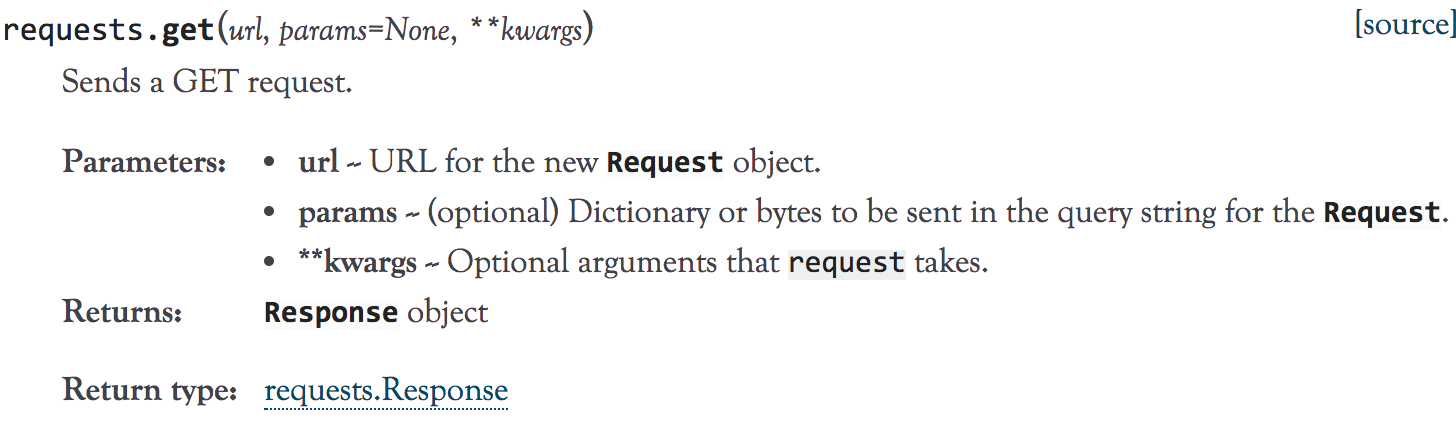
2、点击右上角的【source】,看一下它的源码如下:
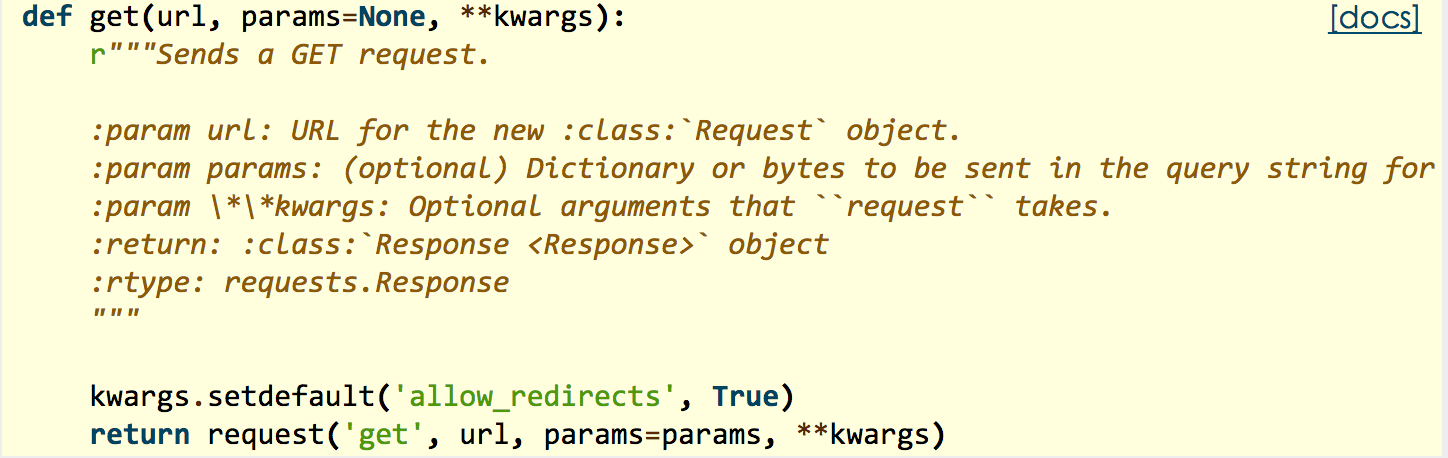
看到最后一行return,get方法最后是通过调用 requests.request 方法实现的,其实在其它的请求方法如post,put,head,delete等方法都是调用的request方法,然后把请求方法的类型传递给request方法第一个参数。
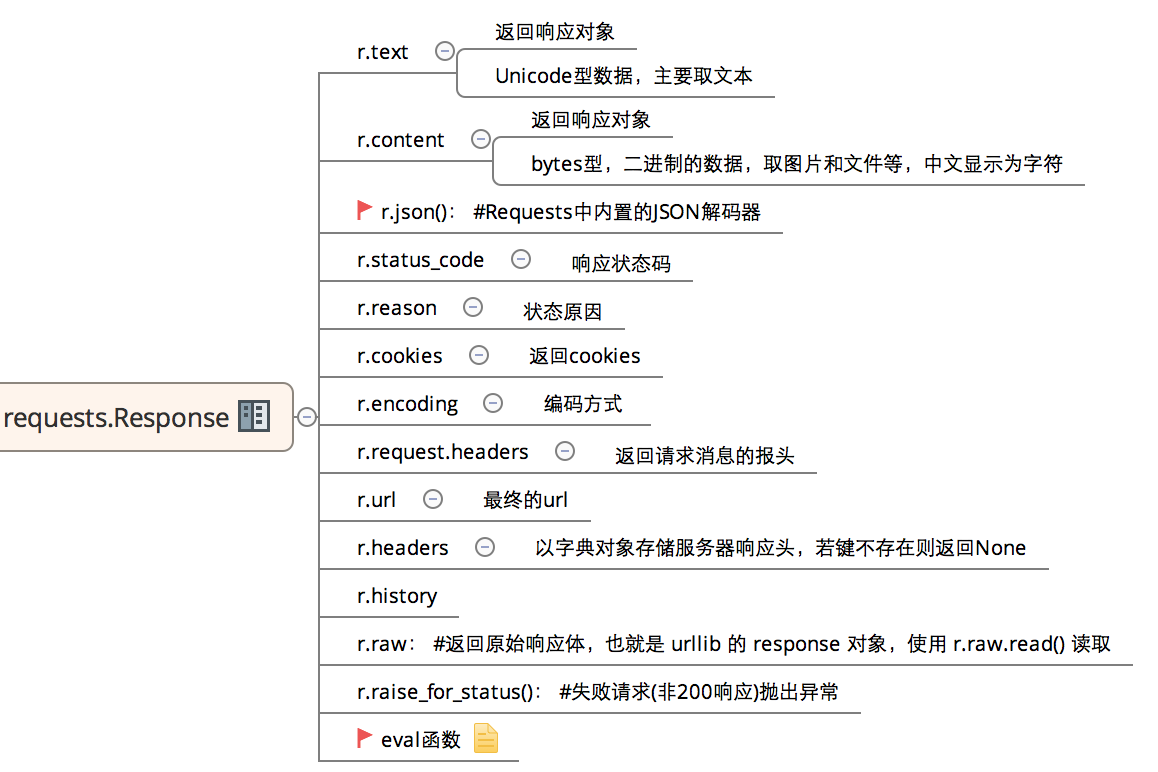
3、HTTP协议是一个基于请求/响应模式的、无状态的,应用层协议。既然有请求,就有响应,来看下resquest中常用的响应信息:
二、get方法简单使用:
1、不带参数的get:

# -*- coding:utf-8 -*-

#不带参数的get

import requests

import json

host = "http://httpbin.org/"

endpoint = "get"

url = ''.join([host,endpoint])

r = requests.get(url)

#response = r.json()

print type(r.text)

print (eval(r.text))
输出:
{

    'origin': '183.14.133.88',

    'headers': {

        'Connection': 'close',

        'Host': 'httpbin.org',

        'Accept-Encoding': 'gzip,

        deflate',

        'Accept': '*/*',

        'User-Agent': 'python-requests/2.18.1'

    },

    'args': {

    },

    'url': 'http: //httpbin.org/get'

}
# -*- coding:utf-8 -*-

#带参数的get

import requests

import json

host = "http://httpbin.org/"

endpoint = "get"

url = ''.join([host,endpoint])

params = {"show_env":"1"}

r = requests.get(url=url,params=params)

print r.url
输出:
http://httpbin.org/get?show_env=1

{

    'origin': '183.14.133.88',

    'headers': {

        'X-Request-Id': 'ebe922b4-c463-4fe9-9faf-49748d682fd7',

        'Accept-Encoding': 'gzip,

        deflate',

        'X-Forwarded-Port': '80',

        'Total-Route-Time': '0',

        'Connection': 'close',

        'Connect-Time': '0',

        'Via': '1.1vegur',

        'X-Forwarded-For': '183.14.133.88',

        'Accept': '*/*',

        'User-Agent': 'python-requests/2.18.1',

        'X-Request-Start': '1504755961007',

        'Host': 'httpbin.org',

        'X-Forwarded-Proto': 'http'

    },

    'args': {

        'show_env': '1'

    },

    'url': 'http: //httpbin.org/get?show_env=1'

}
3、带header的get:
# -*- coding:utf-8 -*-

import requests

import json

host = "http://httpbin.org/"

endpoint = "get"

url = ''.join([host,endpoint])

headers = {"User-Agent":"test request headers"}

r = requests.get(url)

r = requests.get(url,headers=headers)

#response = r.json()

print (eval(r.text))['headers']['User-Agent']
输出:
test request headers
4、同时带参数和header:
# -*- coding:utf-8 -*-

import requests

import json

host = "http://httpbin.org/"

endpoint = "get"

url = ''.join([host,endpoint])

headers = {"User-Agent":"test request headers"}

params = {"show_env":"1"}

r = requests.get(url)

r = requests.get(url,headers=headers,params=params)

#response = r.json()

print (eval(r.text))['headers']['User-Agent']

print r.url
输出:
test request headers

http://httpbin.org/get?show_env=1
python 接口自动化测试二(request.get)的更多相关文章
- python接口自动化测试二十七:密码MD5加密 ''' MD5加密 ''' # 由于MD5模块在python3中被移除 # 在python3中使用hashlib模块进行md5操作 import hashlib # 待加密信息 str = 'asdas89799,.//plrmf' # 创建md5对象 hl = hashlib.md5() # Tips # 此处必须声明encode # 若写法为
python接口自动化测试二十七:密码MD5加密 ''' MD5加密 '''# 由于MD5模块在python3中被移除# 在python3中使用hashlib模块进行md5操作import has ...
- python接口自动化测试(二)-requests.get()
环境搭建好后,接下来我们先来了解一下requests的一些简单使用,主要包括: requests常用请求方法使用,包括:get,post requests库中的Session.Cookie的使用 其它 ...
- python接口自动化测试(一)-request模块
urllib.request模块是python3针对处理url的. 1. 首先导入: from urllib import request 2. 构造url,构造url的headers信息和传参[re ...
- python接口自动化测试二:常用操作
url = '接口地址' r = requests.get(url) # 发送get请求 print(r.status_code) ...
- python接口自动化测试二十三:文件上传
# 以禅道为例: 一.创建一个类,类里面写一个登录方法: import requestsclass LoginZentao(): def __init__(self, s): # 初始化 self.s ...
- python接口自动化测试二十六:使用pymysql模块链接数据库
#!/usr/bin/env python# -*- coding: utf-8 -*-# @Time : 2018/5/28 18:51# @Author : StalloneYang# ...
- python接口自动化测试二十五:执行所有用例,并生成HTML测试报告
import requestsimport unittest class TestQQ(unittest.TestCase): '''测试QQ号接口''' # 此注释将展示到测 ...
- python接口自动化测试二十九:yaml配置文件的写和读
# 先安装ruamel.yaml模块 写入配置文件: import os# 先安装ruamel.yaml模块from ruamel import yaml # 将字典写入到yamldict = { ' ...
- python接口自动化测试二十八:连接SQL sever操作
1.中文乱码问题: (1).文件头加上# -*- coding:utf-8 -*- 或者 #coding=utf8 (2).pymssql.connect连接串中charset是要跟你数据库的编码一样 ...
随机推荐
- 5月25号开学! 第13期《python3自动化测试selenium+接口》课程,python零基础也能学
2019年 第13期<python3自动化测试selenium+接口>课程,5月25号开学! 主讲老师:上海-悠悠 上课方式:QQ群视频在线教学 本期上课时间:5月25号-7月28号,每周 ...
- 对Unity的Resources目录进行改名
项目用的是Unity5.5版本,开发的时候将相关的图集.预制对象资源都放在 Resources 目录下,而真机使用的是 StreamingAssets 目录下的资源. Resources(不分层级)在 ...
- 06、action操作开发实战
1.reduce: 2.collect: 3.count: 4.take: 5.saveAsTextFile: 6.countByKey: 7.foreach: package sparkcore.j ...
- php urlencode vs java URLEncoder.encode
结论:urlencode 先比URLEncoder.encode多编码 “ * ” 符号,其他都保持一致 php urlencode phpversion()>=5.3 will compli ...
- CentOS 7.2编译安装PHP7
原文: https://typecodes.com/web/centos7compilephp7.html?utm_source=tuicool&utm_medium=referralPHP官 ...
- 关于java多线程中异常捕获的理解
在java多线程程序中,所有线程都不允许抛出未捕获的checked exception(比如sleep时的InterruptedException),也就是说各个线程需要自己把自己的checked e ...
- Nginx 学习专栏
Nginx 入门学习教程 译:Centos7 编译安装Nginx 教程
- yaf项目将500错误打印到页面上
一般在yaf项目调试的时候,如果代码有错误,页面只会响应500错误,但看不到哪里报了什么错误,通过开启yaf的一个配置可以将错误信息显示在页面上. 打开项目的index.php入口文件,在开头加入如下 ...
- VS2015 怎么安装RDLC报表模板?
这几天刚好用到微软自带的RDLC报表,但是在VS2015张找了一圈也没找,难道是我VS版本 不支持,在网上查了下,有的人说VS2015社区版,企业版不支持,只有专业版支持,各说不一,想想不科学呀,微软 ...
- vim粘贴和保存