
构建第一个Spring Boot2.0应用之集成mybatis、Druid(七)
一、环境:
IDE:IntelliJ IDEA 2017.1.1
JDK:1.8.0_161
Maven:3.3.9
springboot:2.0.2.RELEASE
二、说明:
本文综合之前的两篇博文,将mybatis、druid同时集成到spring boot框架,展示集成的步骤和效果。
三、步骤方法:
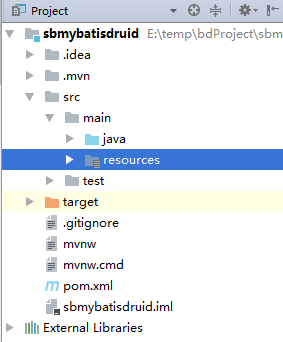
1.使用IntelliJ IDEA创建spring boot项目(过程略),创建后项目工程如下。
2.配置POM.xml
<?xml version="1.0" encoding="UTF-8"?>

<project xmlns="http://maven.apache.org/POM/4.0.0" xmlns:xsi="http://www.w3.org/2001/XMLSchema-instance"

    xsi:schemaLocation="http://maven.apache.org/POM/4.0.0 http://maven.apache.org/xsd/maven-4.0.0.xsd">

    <modelVersion>4.0.0</modelVersion>

    <groupId>com.yy</groupId>

    <artifactId>sbmybatisdruid</artifactId>

    <version>0.0.1-SNAPSHOT</version>

    <packaging>jar</packaging>

    <name>sbmybatisdruid</name>

    <description>Demo project for Spring Boot</description>

    <parent>

        <groupId>org.springframework.boot</groupId>

        <artifactId>spring-boot-starter-parent</artifactId>

        <version>2.0.2.RELEASE</version>

        <relativePath/> <!-- lookup parent from repository -->

    </parent>

    <properties>

        <project.build.sourceEncoding>UTF-8</project.build.sourceEncoding>

        <project.reporting.outputEncoding>UTF-8</project.reporting.outputEncoding>

        <java.version>1.8</java.version>

    </properties>

    <dependencies>

        <dependency>

            <groupId>org.springframework.boot</groupId>

            <artifactId>spring-boot-starter</artifactId>

        </dependency>

        <dependency>

            <groupId>org.springframework.boot</groupId>

            <artifactId>spring-boot-starter-web</artifactId>

            <version>2.0.2.RELEASE</version>

        </dependency>

        <!--mysql-->

        <dependency>

            <groupId>mysql</groupId>

            <artifactId>mysql-connector-java</artifactId>

            <version>5.1.46</version>

        </dependency>

        <!--druid数据库连接池-->

        <dependency>

            <groupId>com.alibaba</groupId>

            <artifactId>druid-spring-boot-starter</artifactId>

            <version>1.1.0</version>

        </dependency>

        <!--mybatis-->

        <dependency>

            <groupId>org.mybatis.spring.boot</groupId>

            <artifactId>mybatis-spring-boot-starter</artifactId>

            <version>1.3.2</version>

        </dependency>

        <!--thymeleaf依赖-->

        <dependency>

            <groupId>org.springframework.boot</groupId>

            <artifactId>spring-boot-starter-thymeleaf</artifactId>

        </dependency>

        <!--热部署依赖-->

        <dependency>

            <groupId>org.springframework.boot</groupId>

            <artifactId>spring-boot-devtools</artifactId>

        </dependency>

        <!-- 加入log4j支持 -->

        <dependency>

            <groupId>log4j</groupId>

            <artifactId>log4j</artifactId>

            <version>RELEASE</version>

        </dependency>

        <dependency>

            <groupId>org.springframework.boot</groupId>

            <artifactId>spring-boot-starter-test</artifactId>

            <scope>test</scope>

        </dependency>

    </dependencies>

    <build>

        <plugins>

            <plugin>

                <groupId>org.springframework.boot</groupId>

                <artifactId>spring-boot-maven-plugin</artifactId>

            </plugin>

            <!-- mybatis generator 自动生成代码插件 -->

            <plugin>

                <groupId>org.mybatis.generator</groupId>

                <artifactId>mybatis-generator-maven-plugin</artifactId>

                <version>1.3.2</version>

                <configuration>

                    <!--<configurationFile>src/main/resources/generatorConfig.xml</configurationFile>-->

                    <overwrite>true</overwrite>

                    <verbose>true</verbose>

                </configuration>

            </plugin>

        </plugins>

    </build>

</project>
3.application.properties
server.port=8888

# 数据库访问配置

spring.datasource.type=com.alibaba.druid.pool.DruidDataSource

spring.datasource.driver-class-name=com.mysql.jdbc.Driver

spring.datasource.url=jdbc:mysql://localhost:3306/test?useUnicode=true&characterEncoding=gbk&zeroDateTimeBehavior=convertToNull&useSSL=false

spring.datasource.username=root

spring.datasource.password=mysql

# 下面为连接池的补充设置,应用到上面所有数据源中

spring.datasource.initialSize=5

spring.datasource.minIdle=5

spring.datasource.maxActive=20

# 配置获取连接等待超时的时间

spring.datasource.maxWait=60000

# 配置间隔多久才进行一次检测,检测需要关闭的空闲连接,单位是毫秒

spring.datasource.timeBetweenEvictionRunsMillis=60000

# 配置一个连接在池中最小生存的时间,单位是毫秒

spring.datasource.minEvictableIdleTimeMillis=300000

spring.datasource.validationQuery=SELECT 1 FROM DUAL

spring.datasource.testWhileIdle=true

spring.datasource.testOnBorrow=false

spring.datasource.testOnReturn=false

# 配置监控统计拦截的filters,去掉后监控界面sql无法统计,'wall'用于防火墙

spring.datasource.filters=stat,wall,log4j

spring.datasource.logSlowSql=true

#设置热部署

#开启热部署

spring.devtools.restart.enabled=true

#重启范围

spring.devtools.restart.additional-paths=src/main/java

#防止Invalid bound statement (not found)

mybatis.mapper-locations= classpath:mapping/*.xml
4.配置mybatis
4.1自动生成generatorConfig.xml
<?xml version="1.0" encoding="UTF-8"?>

<!DOCTYPE generatorConfiguration

        PUBLIC "-//mybatis.org//DTD MyBatis Generator Configuration 1.0//EN"

        "http://mybatis.org/dtd/mybatis-generator-config_1_0.dtd">

<generatorConfiguration>

    <!-- 数据库驱动:选择你的本地硬盘上面的数据库驱动包-->

    <classPathEntry  location="D:\java\mysql-connector-java-5.1.17.jar"/>

    <context id="DB2Tables"  targetRuntime="MyBatis3">

        <commentGenerator>

            <property name="suppressDate" value="true"/>

            <!-- 是否去除自动生成的注释 true:是 : false:否 -->

            <property name="suppressAllComments" value="true"/>

        </commentGenerator>

        <!--数据库链接URL,用户名、密码 -->

        <!-- JDBC连接 -->

        <jdbcConnection

                driverClass="com.mysql.jdbc.Driver"

                connectionURL="jdbc:mysql://localhost:3306/test"

                userId="${spring.datasource.username}"

                password="${spring.datasource.password}">

        </jdbcConnection>

        <javaTypeResolver>

            <property name="forceBigDecimals" value="false"/>

        </javaTypeResolver>

        <!-- 生成模型的包名和位置-->

        <javaModelGenerator targetPackage="com.yy.entity" targetProject="src/main/java">

            <property name="enableSubPackages" value="true"/>

            <property name="trimStrings" value="true"/>

        </javaModelGenerator>

        <!-- 生成映射文件的包名和位置-->

        <sqlMapGenerator targetPackage="mapping" targetProject="src/main/resources">

            <property name="enableSubPackages" value="true"/>

        </sqlMapGenerator>

        <!-- 生成DAO的包名和位置-->

        <javaClientGenerator type="XMLMAPPER" targetPackage="com.yy.mapper" targetProject="src/main/java">

            <property name="enableSubPackages" value="true"/>

        </javaClientGenerator>

        <!-- 要生成的表 tableName是数据库中的表名或视图名 domainObjectName是实体类名-->

        <table tableName="user_info" domainObjectName="UserInfo" enableCountByExample="false" enableUpdateByExample="false" enableDeleteByExample="false" enableSelectByExample="false" selectByExampleQueryId="false"></table>

    </context>

</generatorConfiguration>
4.2配置maven启动
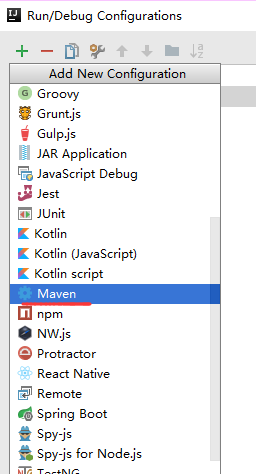
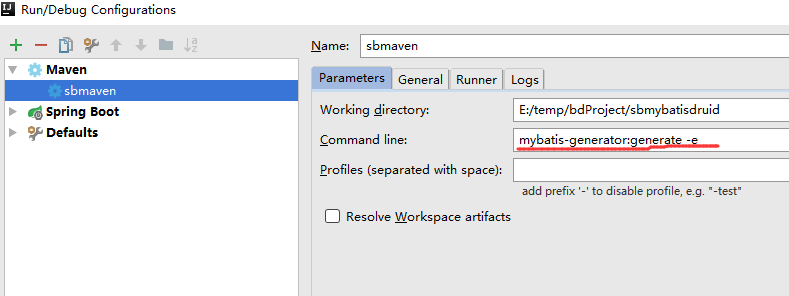
启动mybatis自动生成mapper、model、mapping相关,
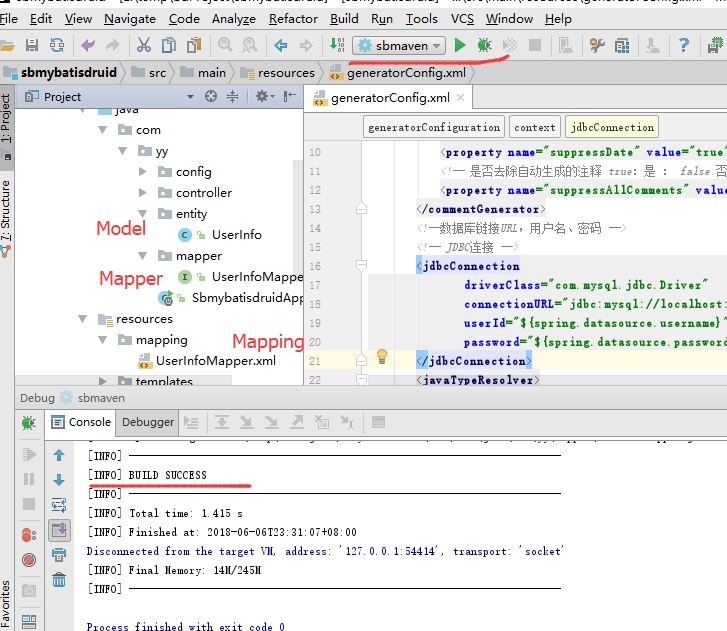
生成的Model(UserInfo.java),如下
package com.yy.entity;

public class UserInfo {

    private Integer id;

    private String name;

    private Integer age;

    private Integer sex;

    private String province;

    private String city;

    private String job;

    public Integer getId() {

        return id;

    }

    public void setId(Integer id) {

        this.id = id;

    }

    public String getName() {

        return name;

    }

    public void setName(String name) {

        this.name = name == null ? null : name.trim();

    }

    public Integer getAge() {

        return age;

    }

    public void setAge(Integer age) {

        this.age = age;

    }

    public Integer getSex() {

        return sex;

    }

    public void setSex(Integer sex) {

        this.sex = sex;

    }

    public String getProvince() {

        return province;

    }

    public void setProvince(String province) {

        this.province = province == null ? null : province.trim();

    }

    public String getCity() {

        return city;

    }

    public void setCity(String city) {

        this.city = city == null ? null : city.trim();

    }

    public String getJob() {

        return job;

    }

    public void setJob(String job) {

        this.job = job == null ? null : job.trim();

    }

}
生成的Mapper(UserInfoMapper),如下
package com.yy.mapper;

import com.yy.entity.UserInfo;

import org.springframework.stereotype.Repository;

@Repository

public interface UserInfoMapper {

    int deleteByPrimaryKey(Integer id);

    int insert(UserInfo record);

    int insertSelective(UserInfo record);

    UserInfo selectByPrimaryKey(Integer id);

    int updateByPrimaryKeySelective(UserInfo record);

    int updateByPrimaryKey(UserInfo record);

}
生成的Mapping(UserInfoMapper.xml)
<?xml version="1.0" encoding="UTF-8" ?>

<!DOCTYPE mapper PUBLIC "-//mybatis.org//DTD Mapper 3.0//EN" "http://mybatis.org/dtd/mybatis-3-mapper.dtd" >

<mapper namespace="com.yy.mapper.UserInfoMapper" >

  <resultMap id="BaseResultMap" type="com.yy.entity.UserInfo" >

    <id column="id" property="id" jdbcType="INTEGER" />

    <result column="name" property="name" jdbcType="VARCHAR" />

    <result column="age" property="age" jdbcType="INTEGER" />

    <result column="sex" property="sex" jdbcType="INTEGER" />

    <result column="province" property="province" jdbcType="VARCHAR" />

    <result column="city" property="city" jdbcType="VARCHAR" />

    <result column="job" property="job" jdbcType="VARCHAR" />

  </resultMap>

  <sql id="Base_Column_List" >

    id, name, age, sex, province, city, job

  </sql>

  <select id="selectByPrimaryKey" resultMap="BaseResultMap" parameterType="java.lang.Integer" >

    select

    <include refid="Base_Column_List" />

    from user_info

    where id = #{id,jdbcType=INTEGER}

  </select>

  <delete id="deleteByPrimaryKey" parameterType="java.lang.Integer" >

    delete from user_info

    where id = #{id,jdbcType=INTEGER}

  </delete>

  <insert id="insert" parameterType="com.yy.entity.UserInfo" >

    insert into user_info (id, name, age,

      sex, province, city,

      job)

    values (#{id,jdbcType=INTEGER}, #{name,jdbcType=VARCHAR}, #{age,jdbcType=INTEGER},

      #{sex,jdbcType=INTEGER}, #{province,jdbcType=VARCHAR}, #{city,jdbcType=VARCHAR},

      #{job,jdbcType=VARCHAR})

  </insert>

  <insert id="insertSelective" parameterType="com.yy.entity.UserInfo" >

    insert into user_info

    <trim prefix="(" suffix=")" suffixOverrides="," >

      <if test="id != null" >

        id,

      </if>

      <if test="name != null" >

        name,

      </if>

      <if test="age != null" >

        age,

      </if>

      <if test="sex != null" >

        sex,

      </if>

      <if test="province != null" >

        province,

      </if>

      <if test="city != null" >

        city,

      </if>

      <if test="job != null" >

        job,

      </if>

    </trim>

    <trim prefix="values (" suffix=")" suffixOverrides="," >

      <if test="id != null" >

        #{id,jdbcType=INTEGER},

      </if>

      <if test="name != null" >

        #{name,jdbcType=VARCHAR},

      </if>

      <if test="age != null" >

        #{age,jdbcType=INTEGER},

      </if>

      <if test="sex != null" >

        #{sex,jdbcType=INTEGER},

      </if>

      <if test="province != null" >

        #{province,jdbcType=VARCHAR},

      </if>

      <if test="city != null" >

        #{city,jdbcType=VARCHAR},

      </if>

      <if test="job != null" >

        #{job,jdbcType=VARCHAR},

      </if>

    </trim>

  </insert>

  <update id="updateByPrimaryKeySelective" parameterType="com.yy.entity.UserInfo" >

    update user_info

    <set >

      <if test="name != null" >

        name = #{name,jdbcType=VARCHAR},

      </if>

      <if test="age != null" >

        age = #{age,jdbcType=INTEGER},

      </if>

      <if test="sex != null" >

        sex = #{sex,jdbcType=INTEGER},

      </if>

      <if test="province != null" >

        province = #{province,jdbcType=VARCHAR},

      </if>

      <if test="city != null" >

        city = #{city,jdbcType=VARCHAR},

      </if>

      <if test="job != null" >

        job = #{job,jdbcType=VARCHAR},

      </if>

    </set>

    where id = #{id,jdbcType=INTEGER}

  </update>

  <update id="updateByPrimaryKey" parameterType="com.yy.entity.UserInfo" >

    update user_info

    set name = #{name,jdbcType=VARCHAR},

      age = #{age,jdbcType=INTEGER},

      sex = #{sex,jdbcType=INTEGER},

      province = #{province,jdbcType=VARCHAR},

      city = #{city,jdbcType=VARCHAR},

      job = #{job,jdbcType=VARCHAR}

    where id = #{id,jdbcType=INTEGER}

  </update>

</mapper>
5.项目启动类,SbmybatisdruidApplication.java
package com.yy;

import org.mybatis.spring.annotation.MapperScan;

import org.springframework.boot.SpringApplication;

import org.springframework.boot.autoconfigure.SpringBootApplication;

import org.springframework.boot.web.servlet.ServletComponentScan;

@SpringBootApplication

//启动类中添加对mapper包扫描@MapperScan

@MapperScan(value = "com.yy.mapper")

public class SbmybatisdruidApplication {

    public static void main(String[] args) {

        SpringApplication.run(SbmybatisdruidApplication.class, args);

    }

}
6.Druid数据源配置(DruidConfig.java)
package com.yy.config;

import com.alibaba.druid.pool.DruidDataSource;

import com.alibaba.druid.support.http.StatViewServlet;

import com.alibaba.druid.support.http.WebStatFilter;

import org.slf4j.Logger;

import org.slf4j.LoggerFactory;

import org.springframework.beans.factory.annotation.Value;

import org.springframework.boot.web.servlet.FilterRegistrationBean;

import org.springframework.boot.web.servlet.ServletRegistrationBean;

import org.springframework.context.annotation.Bean;

import org.springframework.context.annotation.Configuration;

import javax.sql.DataSource;

import java.sql.SQLException;

/**

 * Created by Administrator on 2018-06-06.

 */

@Configuration

public class DruidConfig {

    private Logger logger = LoggerFactory.getLogger(DruidConfig.class);

    @Value("${spring.datasource.url}")

    private String dbUrl;

    @Value("${spring.datasource.username}")

    private String username;

    @Value("${spring.datasource.password}")

    private String password;

    @Value("${spring.datasource.driver-class-name}")

    private String driverClassName;

    @Value("${spring.datasource.initialSize}")

    private int initialSize;

    @Value("${spring.datasource.minIdle}")

    private int minIdle;

    @Value("${spring.datasource.maxActive}")

    private int maxActive;

    @Value("${spring.datasource.maxWait}")

    private int maxWait;

    @Value("${spring.datasource.timeBetweenEvictionRunsMillis}")

    private int timeBetweenEvictionRunsMillis;

    @Value("${spring.datasource.minEvictableIdleTimeMillis}")

    private int minEvictableIdleTimeMillis;

    @Value("${spring.datasource.validationQuery}")

    private String validationQuery;

    @Value("${spring.datasource.testWhileIdle}")

    private boolean testWhileIdle;

    @Value("${spring.datasource.testOnBorrow}")

    private boolean testOnBorrow;

    @Value("${spring.datasource.testOnReturn}")

    private boolean testOnReturn;

    @Value("${spring.datasource.filters}")

    private String filters;

    @Value("${spring.datasource.logSlowSql}")

    private String logSlowSql;

    @Bean

    public ServletRegistrationBean druidServlet() {

        ServletRegistrationBean reg = new ServletRegistrationBean();

        reg.setServlet(new StatViewServlet());

        reg.addUrlMappings("/druid/*");

        reg.addInitParameter("loginUsername", username);

        reg.addInitParameter("loginPassword", password);

        reg.addInitParameter("logSlowSql", logSlowSql);

        return reg;

    }

    @Bean

    public FilterRegistrationBean filterRegistrationBean() {

        FilterRegistrationBean filterRegistrationBean = new FilterRegistrationBean();

        filterRegistrationBean.setFilter(new WebStatFilter());

        filterRegistrationBean.addUrlPatterns("/*");

        filterRegistrationBean.addInitParameter("exclusions", "*.js,*.gif,*.jpg,*.png,*.css,*.ico,/druid/*");

        filterRegistrationBean.addInitParameter("profileEnable", "true");

        return filterRegistrationBean;

    }

    @Bean

    public DataSource druidDataSource() {

        DruidDataSource datasource = new DruidDataSource();

        datasource.setUrl(dbUrl);

        datasource.setUsername(username);

        datasource.setPassword(password);

        datasource.setDriverClassName(driverClassName);

        datasource.setInitialSize(initialSize);

        datasource.setMinIdle(minIdle);

        datasource.setMaxActive(maxActive);

        datasource.setMaxWait(maxWait);

        datasource.setTimeBetweenEvictionRunsMillis(timeBetweenEvictionRunsMillis);

        datasource.setMinEvictableIdleTimeMillis(minEvictableIdleTimeMillis);

        datasource.setValidationQuery(validationQuery);

        datasource.setTestWhileIdle(testWhileIdle);

        datasource.setTestOnBorrow(testOnBorrow);

        datasource.setTestOnReturn(testOnReturn);

        try {

            datasource.setFilters(filters);

        } catch (SQLException e) {

            logger.error("druid configuration initialization filter", e);

        }

        return datasource;

    }

}
三、测试
3.1.编写Controller(HelloController.java)
package com.yy.controller;

import com.yy.entity.UserInfo;

import com.yy.mapper.UserInfoMapper;

import org.springframework.beans.factory.annotation.Autowired;

import org.springframework.web.bind.annotation.PathVariable;

import org.springframework.web.bind.annotation.RequestMapping;

import org.springframework.web.bind.annotation.RestController;

import org.springframework.web.servlet.ModelAndView;

/**

 * Created by Administrator on 2018-06-06.

 */

@RestController

@RequestMapping(value="/users")

public class HelloController {

    @Autowired

    UserInfoMapper userInfoMapper;

    @RequestMapping(value = "/getById/{id}")

    private ModelAndView getUserById(@PathVariable(value="id") Integer Id)

    {

        ModelAndView mv=new ModelAndView();

        UserInfo userInfo= userInfoMapper.selectByPrimaryKey(Id);

        mv.addObject("userinfo",userInfo);

        mv.setViewName("index");

        return mv;

    }

}
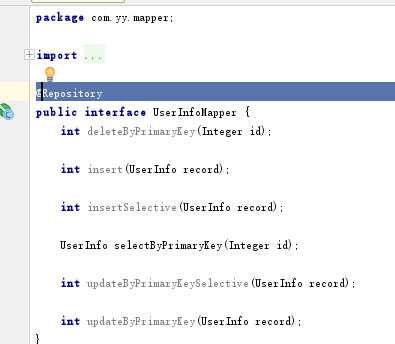
问题一:
出现问题提示:Could not autowire. No beans of 'UserInfoMapper' type found. less... (Ctrl+F1) Checks autowiring problems in a bean class.
解决:UserInfoMapper类添加@Repository注解
问题二:
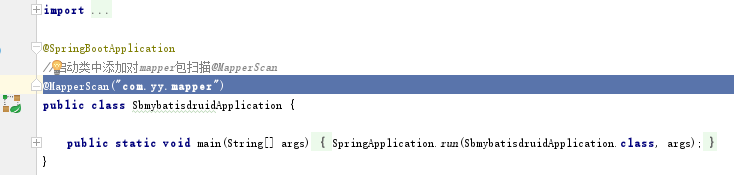
出现问题提示:Field userInfoMapper in com.yy.controller.HelloController required a bean of type 'com.yy.mapper.UserInfoMapper' that could not be found.
在启动类添加@MapperScan("com.yy.mapper")注解
问题三.
问题提示:org.apache.ibatis.binding.BindingException: Invalid bound statement (not found): com.yy.mapper.UserInfoMapper.selectByPrimaryKey
解决:在application.properties中添加生成的xml的位置

3.2运行项目
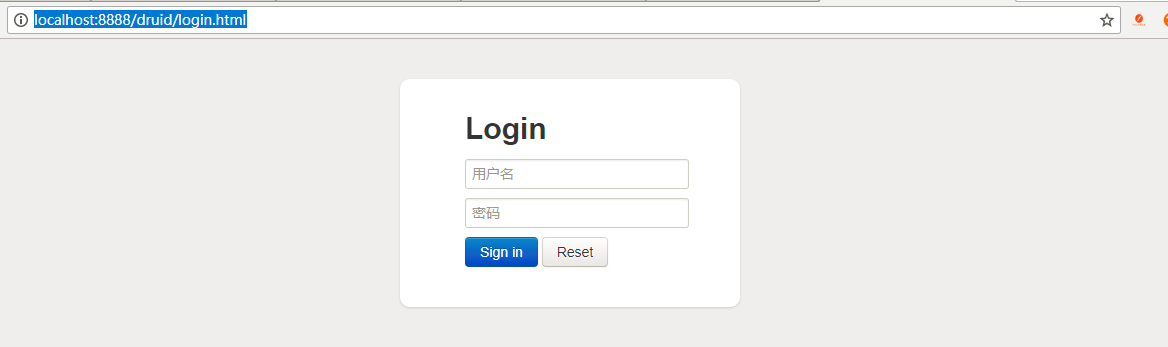
3.2.1 浏览器访问http://localhost:8888/druid/login.html,打开Druid监控页面
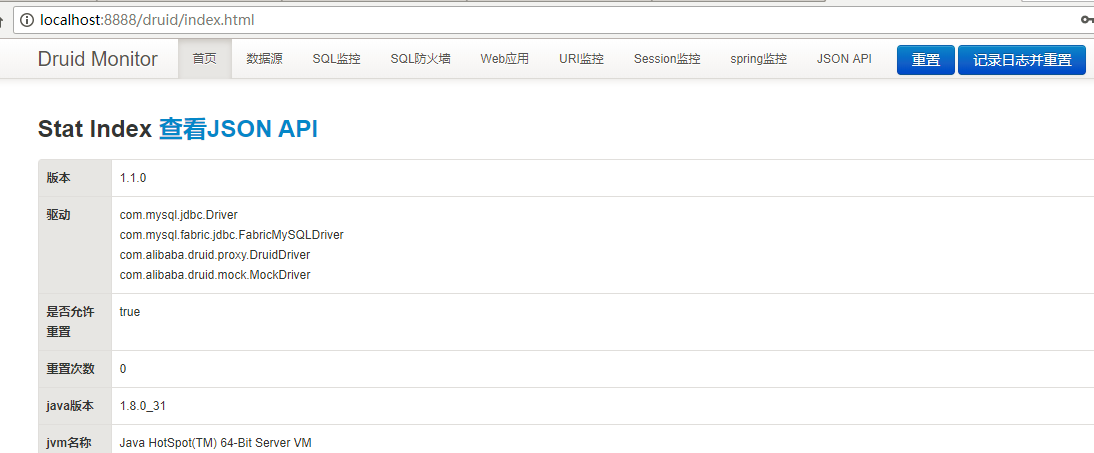
登录后,可查看监控界面如下
3.2.2,访问controler中的getById,http://localhost:8888/users/getById/3
index.html页面模板信息为
<!DOCTYPE html>

<html lang="en" xmlns:th="http://www.w3.org/1999/xhtml">

<head>

    <meta charset="UTF-8">

    <title>Title</title>

</head>

<body>

<h1>spring boot</h1>

   用户信息:<div th:text="${userinfo.name}">姓名</div>

<div th:text="${userinfo.age}">年龄</div>

<div th:text="${userinfo.job}">工作</div>

</body>

</html>
查询id为3的用户信息,查询成功,返回用户信息,并在index.html中显示查询出来的用户信息。
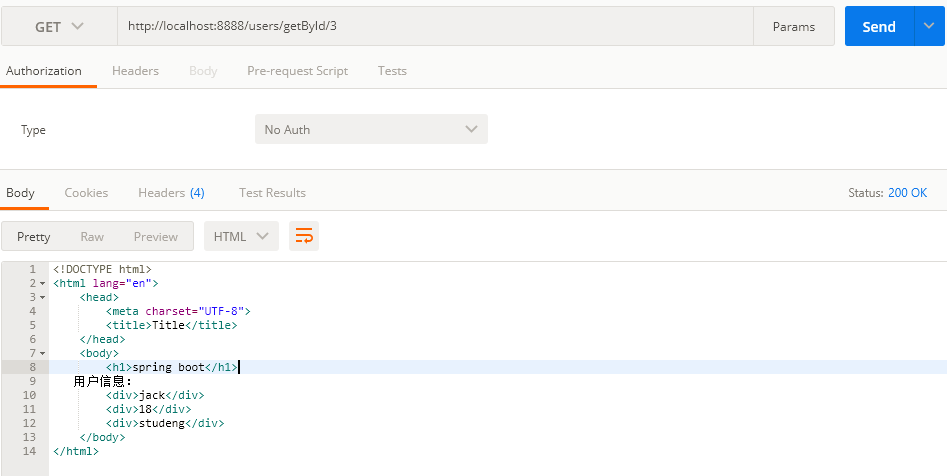
3.2.3 查看数据库访问监控
上面执行一条查询后,在druid监控页面查看监控情况,如下:
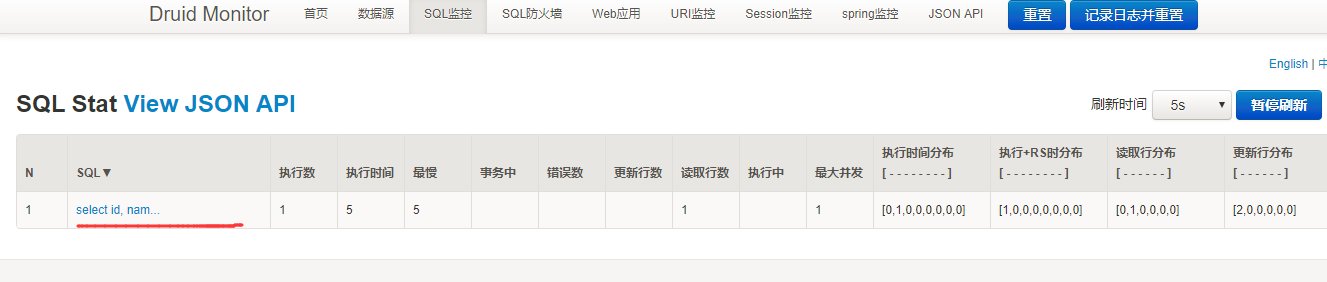
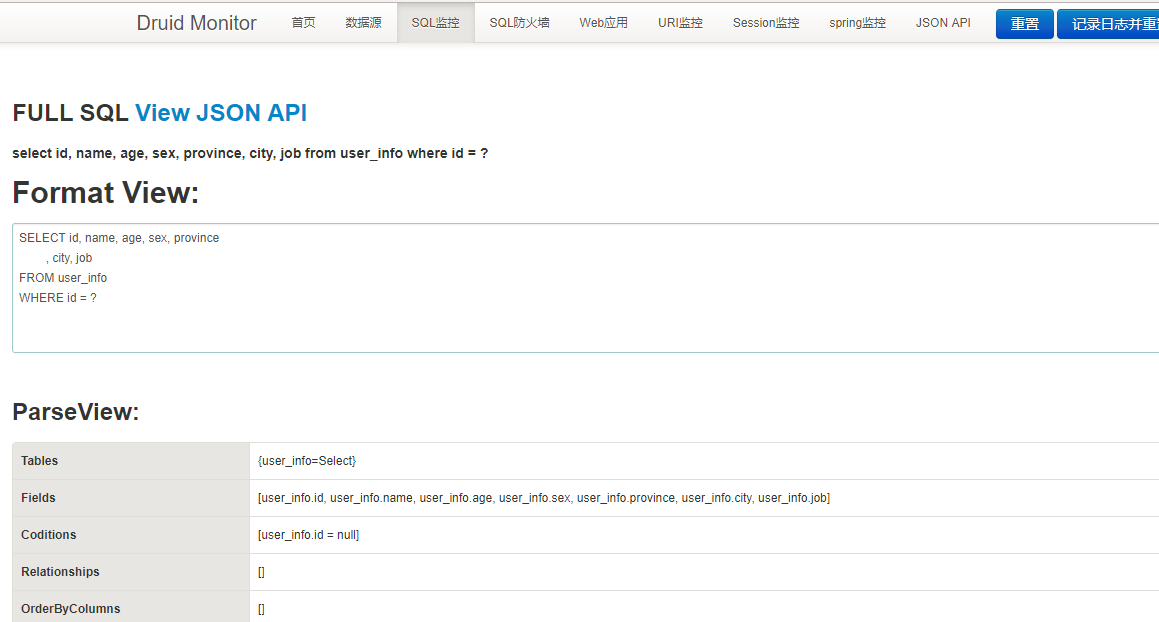
点开上面查询语句,查看详情,
完毕!
构建第一个Spring Boot2.0应用之集成mybatis、Druid(七)的更多相关文章
- 构建第一个Spring Boot2.0应用之集成mybatis(六)
一.环境: IDE:IntelliJ IDEA 2017.1.1 JDK:1.8.0_161 Maven:3.3.9 springboot:2.0.2.RELEASE 二.步骤 方式一:利用配置文件配 ...
- 构建第一个Spring Boot2.0应用之集成dubbo上---环境搭建(九)
一.环境: Windows: IDE:IntelliJ IDEA 2017.1.1 JDK:1.8.0_161 Maven:3.3.9 springboot:2.0.2.RELEASE Linux(C ...
- 构建第一个Spring Boot2.0应用之application.properties和application.yml(八)
本节学习在项目中配置文件配置的方式,一种是通过applicaiton.properties,一种是通过application.yml方式. 一.环境: IDE:IntelliJ IDEA 2017.1 ...
- 构建第一个Spring Boot2.0应用之项目创建(一)
1.开发环境 IDE: JAVA环境: Tomcat: 2.使用Idea生成spring boot项目 以下是使用Idea生成基本的spring boot的步骤. (1)创建工程第一步 (2)创建工 ...
- 构建第一个spring boot2.0应用之项目启动运行的几种方式(二)
方法一. 配置Run/Debug Configuration 选择Main Class为项目 Application启动类(入口main方法) (2).进行项目目录,即包含pom.xml的目录下,启 ...
- 构建第一个Spring Boot2.0应用之Controller(三)
Controller控制器主要是接收浏览器请求.下面说一说@Controller注解和@RestController的区别: (1)@Controller类中的方法可以直接通过返回String跳转到j ...
- 构建第一个Spring Boot2.0应用之RequestMapping(四)
在学习controller的时候,测试了在RequestMapping中,value参数中配置集合,实现不同的URL访问同一方法. 本章继续学习和测试RequestMapping的其他特性. 一.Pa ...
- 快速搭建spring boot2.0 项目
快速搭建spring boot2.0+mybatis+thymeleaf 项目 使用工具STS 3.9.7(eclipse) 首先创建一个spring boot2.0项目(具体创建方法就不写了) 然后 ...
- spring boot2.0(一 ) 基础环境搭建
1.基础配置 开发环境:window jdk版本:1.8(spring boot2.0最低要求1.8) 开发工具:eclipse 构建方式:maven3 2.POM配置文件 <project x ...
随机推荐
- R: 关于 table 函数的应用
################################################### 问题:关于 table 函数 18.5.9 来一个关于 table 函数的例子,说明tabl ...
- 掌握HDFS的Java API接口访问
HDFS设计的主要目的是对海量数据进行存储,也就是说在其上能够存储很大量文件(可以存储TB级的文件).HDFS将这些文件分割之后,存储在不同的DataNode上, HDFS 提供了两种访问接口:She ...
- CSS学习系列4 -- 再说CSS中的浮动运用及clear:left/right实际用法
在 CSS学习系列2 -- CSS中的清除浮动 中,我们详细说了CSS中清除浮动的方法及使用 后来我自己在项目开发一个需要使用浮动的网页时,进行了实际运用,加上后来看到一篇好文章.所以就在这里再次写篇 ...
- 《Linux内核设计与实现》读书笔记(三)- Linux的进程
进程是所有操作系统的核心概念,同样在linux上也不例外. 主要内容: 进程和线程 进程的生命周期 进程的创建 进程的终止 1. 进程和线程 进程和线程是程序运行时状态,是动态变化的,进程和线程的管理 ...
- Mathematics Base - 期望、方差、协方差、相关系数总结
参考:<深度学习500问> 期望 在概率论和统计学中,数学期望(或均值,亦简称期望)是试验中每次可能结果的概率乘以其结果的总和.它反映随机变量平均取值的大小. 线性运算: \(E(ax+ ...
- Complex复数类——课堂作业
代码: #include<iostream> #include<cmath> using namespace std; class Complex { public: Comp ...
- 51nod1035(循环节)
题目链接:https://www.51nod.com/onlineJudge/questionCode.html#!problemId=1035 题意:中文题诶- 思路:求满足 10^k=1(mod ...
- springboot批量导入excel数据
1 背景 小白今天闲着没事,在公司摸鱼,以为今天有事无聊的一天,突然上头说小子,今天实现一下批量导入Excel数据吧,当时我的内心是拒绝的,然后默默打开idea. 2 介绍 2.1 框架 java本身 ...
- java 调用SAP RFC函数错误信息
RFC接口调用SAP如果有异常会通过com.sap.mw.jco.JCO$Exception: 抛出异常 在开发中遇到的异常有如下 用户名密码可能是错误或者用户无权限,确认用户,必要时联系SAP负责人 ...
- Unity---DOTween插件学习(2)---设置参数、Ease曲线、回调函数、动画控制函数
目录 6.Set设置参数 7.Ease曲线 8.回调函数 9.动画控制函数 本文及系列参考于Andy老师的DOTween系列 欢迎大家关注Andy老师 6.Set设置参数 在Unity中添加一个Cub ...