
iOS如何实时查看App运行日志
Linux下管理挂载IOS设备——libimobiledevice
https://www.jianshu.com/p/6423610d3293
https://blog.csdn.net/fengzei886/article/details/53380009
#####gitlib下载包--编译安装
git clone https://github.com/libimobiledevice/libplist.git
git clone https://github.com/libimobiledevice/usbmuxd.git
git clone https://github.com/libimobiledevice/libusbmuxd.git
git clone https://github.com/libimobiledevice/ideviceinstaller.git
git clone https://github.com/libimobiledevice/ifuse.git
git clone https://github.com/libimobiledevice/libirecovery.git
git clone https://github.com/libimobiledevice/libideviceactivation.git
./configure
make && make install
##创建挂接目录
mkdir -p /media/iphone
ifuse /media/iphone
idevicepair pair
idevice_id --list
##实时查看日志
idevicesyslog|grep com.bxd.help
#####################################################
libimobiledevice 查看应用日志
iOS实时查看App运行日志
前言:
本文讨论如何实时查看输出在console控制台的日志。
一、Xcode
版本号:9.4.1
通过Window->Devices and Simulators,打开Devices and Simulators界面,选择我们的手机,点击view device logs能看到手机中运行的进程输出的日志。如图:


二、libimobiledevice
安装libimobiledevice很简单,在命令行输入:
brew install --HEAD libimobiledevice

注意,需要加上 –HEAD 选项,如果不加,安装是老版本,不支持iOS10的手机,所以安装时,需要加上 –HEAD 选项
1、使用idevicesyslog
在命令行输入:idevicesyslog
就可以在屏幕上看见手机上所有的日志了。

2、查看我们想要的日志
1)将设备日志重定向到文件

idevicesyslog >> iphone.log &

该命令是将日志导入到iphone.log这个文件,并且是在后台执行。

2)用tail -f和grep查看log

tail -f iphone.log

tail -f iphone.log | grep 'QQ' # 查看包含QQ的行
如下图:

三、控制台
在用过各种办法查看App日志后,还是觉得苹果系统自带的工具用起来最方便,不用安装,不用命令行,傻瓜式操作,非常方便。
连上手机,在LaunchPad其他文件中打开控制台应用,或者搜索Console.app打开控制台应用,可以看到左侧一栏中有我们的手机设备,选择就可以,如图:

右侧输出的日志不仅有我们自己的App还有其他进程的日志,怎么过滤?非常简单,选中一条我们的日志,在进程名字上右键,选择显示进程名,然后就只会显示我们App的日志。如果显示的列名中没有进程名,我们可以在其他列名上右键,在弹出的菜单中勾选上进程就可以了。如图显示WeChat打印出的日志:



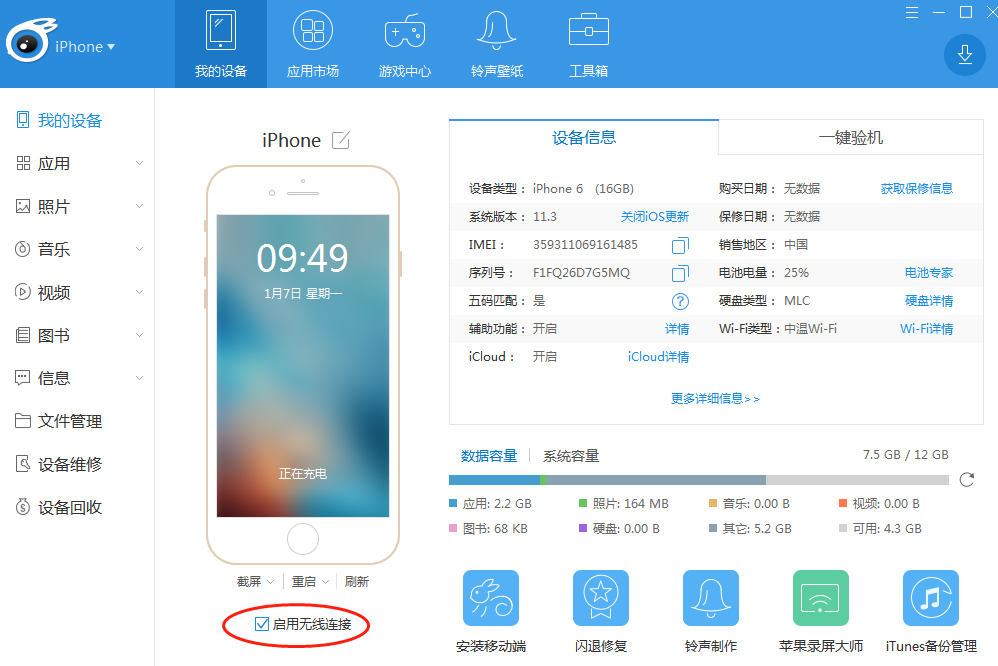
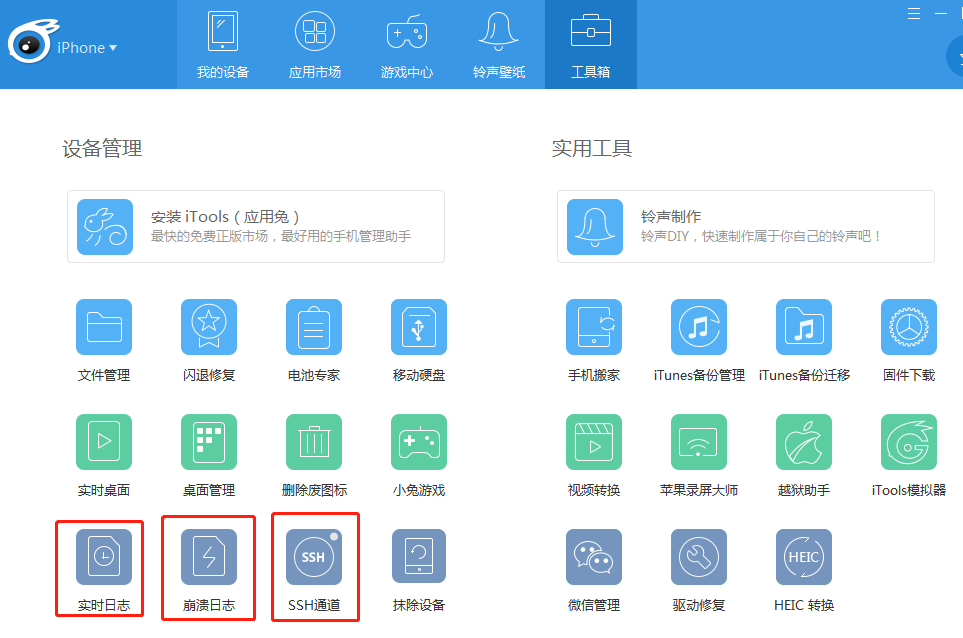
四、安装第三方工具 itoos for mac /windows/linux
iPhone安装OpenSSH和远程连接教程
Building on Ubuntu 16.04
Install development packages discovered through trial and error.
sudo apt-get install automake libtool pkg-config libplist-dev libplist++-dev python-dev libssl-dev libusb-1.0-0-dev libfuse-dev
Clone and Build
Clone the sources.
cd ~/usr/src

for x in libusbmuxd usbmuxd libimobiledevice ifuse; do git clone https://github.com/libimobiledevice/${x}.git;done
Now build in order (the order matters):
- libplist (not required on Ubuntu 16.04)
- libusbmuxd
- libimobiledevice
- usbmuxd
- ifuse
Note: (Optional) If you have a system package installed which is in the above list, then I recommend uninstalling it. However, if you can't uninstall it, then no big deal. It is mostly a precautionary measure. As long as you set the bash environment variables properly, then your compiled version should not reference your system packages. Uninstalling any system packages is by no means required.
Note 2: Removing usbmuxd was required on Debian Jessie 8.10 mentioned in comments.
Build libusbmuxd
cd ~/usr/src/libusbmuxd

./autogen.sh --prefix="$HOME/usr"

make && make install
Build libimobiledevice
cd ~/usr/src/libimobiledevice

./autogen.sh --prefix="$HOME/usr"

make && make install
Build usbmuxd
Unfortunately, sudo make install is required because it needs to write to /lib/udev/rules.d and /lib/systemd/system.
cd ~/usr/src/usbmuxd

./autogen.sh --prefix="$HOME/usr"

make && sudo make install
Build ifuse
cd ~/usr/src/ifuse

./autogen.sh --prefix="$HOME/usr"

make && make install
Connect iPhone
Create a mount point and verify the paths of the tools before executing.
$ mkdir -p ~/usr/mnt

$ type -P ifuse

/home/sam/usr/bin/ifuse

$ type -P idevicepair

/home/sam/usr/bin/idevicepair
Now attempt to mount using ifuse.
$ idevicepair pair

SUCCESS: Paired with device 37b633350ab83dc815a6a97dcd6d327b12c41968

$ ifuse ~/usr/mnt/

$ ls ~/usr/mnt/

AirFair  Books  CloudAssets  DCIM  Downloads  FactoryLogs  iTunes_Control  MediaAnalysis  PhotoData  Photos  PhotoStreamsData  PublicStaging  Purchases  Radio  Recordings  Safari  Vibrations
When you're finished. Unmount ~/usr/mnt using fusermount. For example,
fusermount -u ~/usr/mnt
Browsing Photos
The mounted iPhone has an empty Photos folder. Strangely, this has no photos. Instead, look in the DCIM folder for photos.
I have only copied photos off of my iPhone as a backup. I have not tried copying photos to my iPhone.
Browsing Music
iOS如何实时查看App运行日志的更多相关文章
- iOS实时查看App运行日志
前言: 本文讨论如何实时查看输出在console控制台的日志. 一.Xcode 通过Window->Devices打开devices界面,选择我们的手机,也能看到手机中运行的进程输出的日志.如图 ...
- linux下打开、关闭tomcat,实时查看tomcat运行日志
启动:一般是执行sh tomcat/bin/startup.sh 停止:一般是执行sh tomcat/bin/shutdown.sh脚本命令 查看:执行ps -ef |grep tomcat 输出如下 ...
- linux下重启tomcat、实时查看tomcat运行日志
在Linux系统下,重启Tomcat使用命令操作的! 首先,进入Tomcat下的bin目录 cd /usr/local/tomcat/bin 使用Tomcat关闭命令 ./shutdown.sh 查看 ...
- linux下实时查看tomcat运行日志 2017.12.4
1.先切换到:cd usr/local/tomcat5/logs 2.tail -f catalina.out 3.这样运行时就可以实时查看运行日志了
- 【Tomcat】linux下实时查看tomcat运行日志
今天在部署一个项目到linux服务器的时候一直报错,可是在日志文件中也没有记录.但是在本地测试的时候都没有错误,在windoesServer服务器上也没错误,实在找不到原因,因此想的实时查看tomca ...
- linux下实时查看tomcat运行日志
查看实时日志: tail -f catalina.out Ctrl+c 是退出tail命令
- centos6.9实时查看tomcat运行日志
1.切换到tomcat的logs目录下 cd /usr/local/apache-tomcat-/logs 2.执行命令,查看日志 tail -f catalina.out 3.退出 Ctrl+c
- Centos打开、关闭、结束tomcat,及查看tomcat运行日志
cd到tomcat目录下之后 启动:一般是执行sh bin/startup.sh 停止:一般是执行sh bin/shutdown.sh查看:执行ps -ef |grep tomcat 输出如下 *** ...
- 【转】android IDE——通过DDMS查看app运行时所占内存情况
在Android内存优化方面,我们不可能做到没有大内存的占用情况. 所以有时候要清楚我们的app到底占用了多少内存,哪一步操作占用了多少的内存. 这时候,android的ddms中提供了一个工具,是可 ...
随机推荐
- Codeforces 1107E (Vasya and Binary String) (记忆化,DP + DP)
题意:给你一个长度为n的01串,和一个数组a,你可以每次选择消除一段数字相同的01串,假设消除的长度为len,那么收益为a[len],问最大的收益是多少? 思路:前两天刚做了POJ 1390,和此题很 ...
- noi.ac day3t2 染色
传送门 分析 dp[i][j]为考虑前i个位置,[i-j+1,i]中的颜色互不相同,并且ai-j与这段区间中的某一个位置颜色相同 我们枚举第i+1个位置和[i-j+1,i]中的哪一个颜色相同或者全部不 ...
- Redis了解
1. 使用Redis有哪些好处? (1) 速度快,因为数据存在内存中,类似于HashMap,HashMap的优势就是查找和操作的时间复杂度都是O(1) (2) 支持丰富数据类型,支持string,li ...
- Redis应用(django)
自定义使用redis 创建url 定义单例模式连接池 import redis # 连接池 POOL = redis.ConnectionPool(host='10.211.55.4', port=6 ...
- plsql developer 常用配置
执行语句时间太长,关闭 plsql developer 重启 F8 执行SQL 1 设置默认执行鼠标所在sql tools->preferences->sql window->win ...
- Mat类
1.Mat类 早期的opencv中,使用IplImage和CvMat数据结构来表示图像.IplImage和 CvMat 都是c语言的结构.使用这两个结构的问题是内存需要手动管理,开发者必须清楚的知道何 ...
- STM32 CAN控制器简介
1.STM32自带了基本扩展CAN外设,又称bxCAN,bxCAN的特点如下: 2.模式:分为工作模式.测试模式.调试模式 睡眠模式主要用于降低功耗! 在静默模式下的工作原理 由图可知,它只会接受来自 ...
- 面试经常问的一个问题:final、finalize、finally
http://m.blog.csdn.net/u010980446/article/details/51493658
- 查看vim配置文件并编辑
查看vim配置文件并编辑 1 $vim 进入vim命令行 2 进入底行模式,输入 echo $VIM,能够看到vim的路径为/usr/share/vim 3 查看配置文件vimrc 4 编辑vim配置 ...
- 《Head First Servlets & JSP》-7-使用JSP
学习的知识点 JSP,最后会变成一个servlet JSP最终或变成一个完整的servlet在Web应用中运行,只不过这个servlet类会由容器写好. JSP中的scriptlet 所谓script ...