
winForm 打印预览
自己很少写技术博客,虽然已经干程序员两年多了,winform开发,web开发都干过,不论项目大小对于.net的相关技术也是了解的,如mvc,wcf,wpf,silverlight,socekt通讯,nhibernate,spring.net wp手机开发等,但是最终发现还是软件架构比所谓的单一功能更为系统化。
下面是一个小的例子 Winfom打印预览
首先是基类DocumentBase继承系统的PrintDocument
using System;

using System.Collections.Generic;

using System.Linq;

using System.Text;

using System.Threading.Tasks;

using System.Drawing;

using System.Drawing.Printing;

using System.Windows.Forms;

namespace prientDemo

{

   public class DocumentBase:PrintDocument

    {

       public DialogResult ShowPrintPreviewDialog()

       {

           PrintPreviewDialog dialog = new PrintPreviewDialog();

           dialog.Document = this;

           return dialog.ShowDialog();

       }

    }

}
然后ImageDocument再继承ImageDocument
using System;

using System.Collections.Generic;

using System.Drawing;

using System.Linq;

using System.Text;

using System.Threading.Tasks;

namespace prientDemo

{

   public class ImageDocument:ImageDocument

    {

       private Image _image;

       public Image Image

       { get { return _image; } set { _image = value; } }

       public ImageDocument()

       { }

       public ImageDocument(Image image)

       { this.Image = image; }

       protected override void OnPrintPage(System.Drawing.Printing.PrintPageEventArgs e)

       {

          if(Image==null)

          {

              throw new InvalidOperationException();

          }

          e.Graphics.DrawImage(Image, e.MarginBounds);

       }

    }

}
以上是做打印功能时需要自己写的两个类,
下面是winform窗体的代码
using System;

using System.Collections.Generic;

using System.ComponentModel;

using System.Data;

using System.Drawing;

using System.Linq;

using System.Text;

using System.Threading.Tasks;

using System.Windows.Forms;

namespace prientDemo

{

    public partial class LoadPicture : Form

    {

        public LoadPicture()

        {

            InitializeComponent();

        }

        OpenFileDialog pfd = new OpenFileDialog();

        private DocumentBase _document;

        private void Load_Click(object sender, EventArgs e)

        {

            if(pfd.ShowDialog(this)==DialogResult.OK){

                try

                {

                    pictureImage.Image = Image.FromFile(pfd.FileName);

                    _document = new ImageDocument(pictureImage.Image);

                }

                catch (Exception ex)

                {

                    MessageBox.Show("This image could not be loaded."+ex.Message);

                }

            }

        }

        private void Preview_Click(object sender, EventArgs e)

        {

            if(_document==null)

            {

                MessageBox.Show("You must load an image first");

                return;

            }

            _document.ShowPrintPreviewDialog();

        }

    }

}
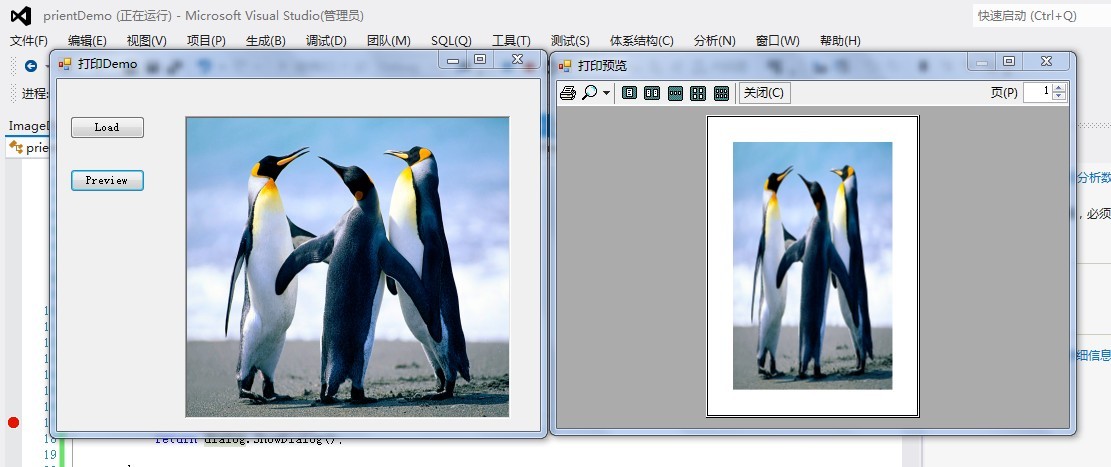
下面就完成了,运行效果:如下图
winForm 打印预览的更多相关文章
- Winform中实现ZedGraph曲线图的图像复制到剪切板、打印预览、获取图片并保存、另存为的功能
场景 Winforn中设置ZedGraph曲线图的属性.坐标轴属性.刻度属性: https://blog.csdn.net/BADAO_LIUMANG_QIZHI/article/details/10 ...
- C#教程之打印和打印预览
最近研究一了一下关于PDF打印和打印预览的功能,在此小小的总结记录一下学习过程. 实现打印和打印预览的方法,一般要实现如下的菜单项:打印.打印预览.页面设置. PrintDocument类 Print ...
- .NET环境下有关打印页面设置、打印机设置、打印预览对话框的实现
原文:.NET环境下有关打印页面设置.打印机设置.打印预览对话框的实现 我个人认为,开发MIS,首先就得解决网格的问题,而开发工具为我们提供了如DataGrid.MSHFlexGrid的控件.其次,是 ...
- 怎么在MindManager中查看打印预览
在MindManager2016思维导图中打印导图之前,可以先进行预览,MindManager和其他很多应用程序一样都带有打印预览功能,该功能提供了再次检查的机会,避免打印出错,MindManager ...
- 关闭rdlc报表打印预览后,关闭客户端,抛出异常“发生了应用程序级的异常 将退出”
问题:关闭rdlc报表打印预览后,关闭客户端,抛出异常“发生了应用程序级的异常 将退出” 办法:在容纳ReportViewer的窗体后台代码中,添加如下代码即可 protected override ...
- .NET网页打印以及使用打印需要注意的事项(可能会引起VS崩溃的现象、打印预览后关闭功能不管用)
这两天进行给网页添加打印.打印预览.页面设置的功能.遇到了以下几个问题 [1]在网上查找了一些打印方法,一开始还可以用,后来不知道动到了哪里,点击vs中拆分或者切换到另一个设计和源代码显示方式,就会引 ...
- QNDataSet打印预览自动关闭问题
问题:打印预览后,数据集自动关闭 解决: TQNDataSet = class(TFDMemTable) private protected procedure PSReset; override; ...
- 基于Metronic的Bootstrap开发框架经验总结(9)--实现Web页面内容的打印预览和保存操作
在前面介绍了很多篇相关的<Bootstrap开发框架>的系列文章,这些内容基本上覆盖到了我这个Bootstrap框架的各个主要方面的内容,总体来说基本达到了一个稳定的状态,随着时间的推移可 ...
- JS 打印功能代码可实现打印预览、打印设置等
<!DOCTYPE html PUBLIC "-//W3C//DTD XHTML 1.0 Transitional//EN" "http://www.w3.or ...
随机推荐
- 错误解决:release' is unavailable: not available in automatic reference counting mode
解决办法: You need to turn off Automatic Reference Counting. You do this by clicking on your project in ...
- 谈KVC、KVO(重点观察者模式)机制编程
一不小心,小明在<跟着贝尔去冒险>这个真人秀节目中看到了“一日警察,一世警察”的Laughing哥,整个节目除了贝尔吃牛睾丸都不用刀叉的不雅餐饮文化外,还是镜头少普通话跟小明一样烂的Lau ...
- Jquery 之 日常积累(一)
1.jquery函数在参数中传递 this,正确的写法: //页面中用 GetString(this); //脚本中定义 function GetString(obj){ var str = $(ob ...
- DNA比对
[编程题](满分27分) 脱氧核糖核酸即常说的DNA,是一类带有遗传信息的生物大分子.它由4种主要的脱氧核苷酸(dAMP.dGMP.dCMT和dTMP)通过磷酸二酯键连接而成.这4种核苷酸可以分别记为 ...
- 想学React Native?你只需要一个App!(11月5号更新)
最近有点空闲时间,顺手研究下react-native,2013年的时候在老师的指导下使用jQuery Mobile做过手机应用,那个运行速度慢呀!让我对WebApp和PhoneGap这一类的跨平台Ap ...
- c# 操作word
using System; using System.Collections.Generic; using System.Linq; using System.Web; using System.We ...
- CCScale9Sprite的使用
#include "cocos-ext.h" USING_NS_CC_EXT; //框中需要显示的label CCLabelTTF *label = CCLableTTF::cre ...
- 以前写过的一些oracle语句
这下以后用起来就方便了.可算是找到了 Orcl 数据库服务 启动项: OracleDBConsoleorcl OracleOraDb10g_home1iSQL*Plus OracleOraDb10g_ ...
- HDU 3335 Divisibility (DLX)
Divisibility Time Limit:1000MS Memory Limit:32768KB 64bit IO Format:%I64d & %I64u Submit ...
- 关于64位Linux编译hadoop2
Apache官方提供hadoop2的安装包是在32位机器下编译的,生产环境一般使用64的Linux,那么需要在64位机器下重新编译可以查看hadoop-2.2.0-src下的BUILDING.txtB ...