
winForm 打印预览
自己很少写技术博客,虽然已经干程序员两年多了,winform开发,web开发都干过,不论项目大小对于.net的相关技术也是了解的,如mvc,wcf,wpf,silverlight,socekt通讯,nhibernate,spring.net wp手机开发等,但是最终发现还是软件架构比所谓的单一功能更为系统化。
下面是一个小的例子 Winfom打印预览
首先是基类DocumentBase继承系统的PrintDocument
using System;

using System.Collections.Generic;

using System.Linq;

using System.Text;

using System.Threading.Tasks;

using System.Drawing;

using System.Drawing.Printing;

using System.Windows.Forms;

namespace prientDemo

{

   public class DocumentBase:PrintDocument

    {

       public DialogResult ShowPrintPreviewDialog()

       {

           PrintPreviewDialog dialog = new PrintPreviewDialog();

           dialog.Document = this;

           return dialog.ShowDialog();

       }

    }

}
然后ImageDocument再继承ImageDocument
using System;

using System.Collections.Generic;

using System.Drawing;

using System.Linq;

using System.Text;

using System.Threading.Tasks;

namespace prientDemo

{

   public class ImageDocument:ImageDocument

    {

       private Image _image;

       public Image Image

       { get { return _image; } set { _image = value; } }

       public ImageDocument()

       { }

       public ImageDocument(Image image)

       { this.Image = image; }

       protected override void OnPrintPage(System.Drawing.Printing.PrintPageEventArgs e)

       {

          if(Image==null)

          {

              throw new InvalidOperationException();

          }

          e.Graphics.DrawImage(Image, e.MarginBounds);

       }

    }

}
以上是做打印功能时需要自己写的两个类,
下面是winform窗体的代码
using System;

using System.Collections.Generic;

using System.ComponentModel;

using System.Data;

using System.Drawing;

using System.Linq;

using System.Text;

using System.Threading.Tasks;

using System.Windows.Forms;

namespace prientDemo

{

    public partial class LoadPicture : Form

    {

        public LoadPicture()

        {

            InitializeComponent();

        }

        OpenFileDialog pfd = new OpenFileDialog();

        private DocumentBase _document;

        private void Load_Click(object sender, EventArgs e)

        {

            if(pfd.ShowDialog(this)==DialogResult.OK){

                try

                {

                    pictureImage.Image = Image.FromFile(pfd.FileName);

                    _document = new ImageDocument(pictureImage.Image);

                }

                catch (Exception ex)

                {

                    MessageBox.Show("This image could not be loaded."+ex.Message);

                }

            }

        }

        private void Preview_Click(object sender, EventArgs e)

        {

            if(_document==null)

            {

                MessageBox.Show("You must load an image first");

                return;

            }

            _document.ShowPrintPreviewDialog();

        }

    }

}
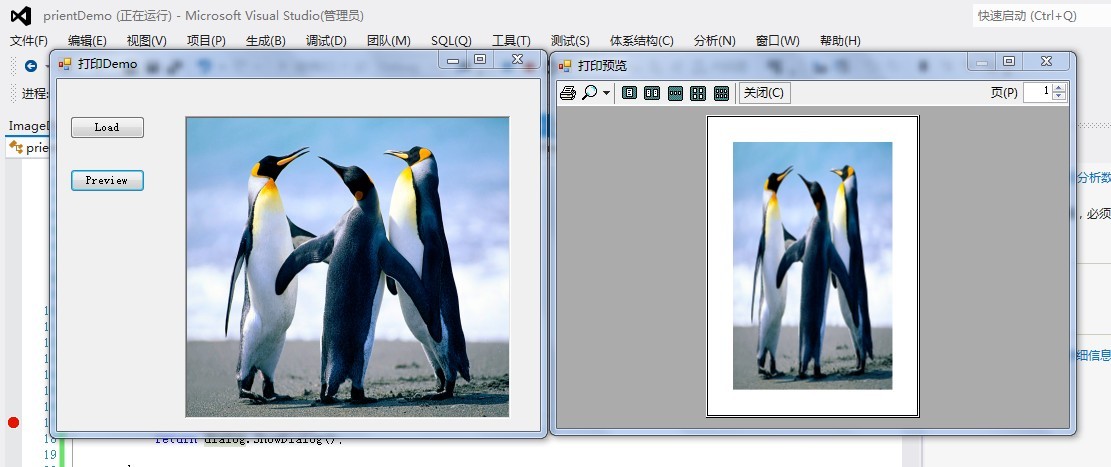
下面就完成了,运行效果:如下图
winForm 打印预览的更多相关文章
- Winform中实现ZedGraph曲线图的图像复制到剪切板、打印预览、获取图片并保存、另存为的功能
场景 Winforn中设置ZedGraph曲线图的属性.坐标轴属性.刻度属性: https://blog.csdn.net/BADAO_LIUMANG_QIZHI/article/details/10 ...
- C#教程之打印和打印预览
最近研究一了一下关于PDF打印和打印预览的功能,在此小小的总结记录一下学习过程. 实现打印和打印预览的方法,一般要实现如下的菜单项:打印.打印预览.页面设置. PrintDocument类 Print ...
- .NET环境下有关打印页面设置、打印机设置、打印预览对话框的实现
原文:.NET环境下有关打印页面设置.打印机设置.打印预览对话框的实现 我个人认为,开发MIS,首先就得解决网格的问题,而开发工具为我们提供了如DataGrid.MSHFlexGrid的控件.其次,是 ...
- 怎么在MindManager中查看打印预览
在MindManager2016思维导图中打印导图之前,可以先进行预览,MindManager和其他很多应用程序一样都带有打印预览功能,该功能提供了再次检查的机会,避免打印出错,MindManager ...
- 关闭rdlc报表打印预览后,关闭客户端,抛出异常“发生了应用程序级的异常 将退出”
问题:关闭rdlc报表打印预览后,关闭客户端,抛出异常“发生了应用程序级的异常 将退出” 办法:在容纳ReportViewer的窗体后台代码中,添加如下代码即可 protected override ...
- .NET网页打印以及使用打印需要注意的事项(可能会引起VS崩溃的现象、打印预览后关闭功能不管用)
这两天进行给网页添加打印.打印预览.页面设置的功能.遇到了以下几个问题 [1]在网上查找了一些打印方法,一开始还可以用,后来不知道动到了哪里,点击vs中拆分或者切换到另一个设计和源代码显示方式,就会引 ...
- QNDataSet打印预览自动关闭问题
问题:打印预览后,数据集自动关闭 解决: TQNDataSet = class(TFDMemTable) private protected procedure PSReset; override; ...
- 基于Metronic的Bootstrap开发框架经验总结(9)--实现Web页面内容的打印预览和保存操作
在前面介绍了很多篇相关的<Bootstrap开发框架>的系列文章,这些内容基本上覆盖到了我这个Bootstrap框架的各个主要方面的内容,总体来说基本达到了一个稳定的状态,随着时间的推移可 ...
- JS 打印功能代码可实现打印预览、打印设置等
<!DOCTYPE html PUBLIC "-//W3C//DTD XHTML 1.0 Transitional//EN" "http://www.w3.or ...
随机推荐
- 日志管理 rsyslog服务浅析
http://www.xiaomastack.com/2014/11/13/rsyslog/
- Ruby on Rails Tutorial 第六章 用户模型
1.用户模型(1)数据库迁移Rails默认使用关系数据库存储数据,数据库中的表有数据行组成,每一行都有相应的列,对应数据属性.把列名命名为相应的名字后,ActiveRecord会自动把他们识别为用户对 ...
- 网卡及MAC和PHY的区别
转载:http://blog.sina.com.cn/s/blog_53d7350f0100mudb.html 一块以太网网卡包括OSI(开方系统互联)模型的两个层.物理层和数据链路层.物理层定义了数 ...
- android 几个小技巧
1.如果打开模拟器,不同程序打开了不同的模拟器.可能是某个某个模拟器的target版本过低,修改一下4.2,应该都可以用了 2.找不到R.id.的错误,不妨删除menu文件夹下的xml文件 3.act ...
- python读取文本、配对、插入数据脚本
#在工作中遇见了一个处理数据的问题,纠结了很久,写下记录一下.#-*- coding:UTF-8 -*- #-*- author:ytxu -*- import codecs, os, sys, pl ...
- BootStrap2学习日记2--将固定布局换成响应式布局
概要:响应式页面是指页面根据浏览平台(尺寸)的不同显示不同的CSS. 原理:在Html的的头加入代码 <style> /*当浏览器宽度大于767是 采用括号里面的CSS样式*/ @medi ...
- mysql颠覆实战笔记(二)-- 用户登录(一):唯一索引的妙用
版权声明:笔记整理者亡命小卒热爱自由,崇尚分享.但是本笔记源自www.jtthink.com(程序员在囧途)沈逸老师的<web级mysql颠覆实战课程 >.如需转载请尊重老师劳动,保留沈逸 ...
- C#动态引用DLL的方法
C#编程中,使用dll调用是经常的事,这样做的好处是非常多的,比如把某些功能封装到一个dll中,然后主程序动态调用这个dll. 废话不多说,举例说明如下. 首先,我们需要封装一个dll,vs2008下 ...
- Linux 修改swap虚拟内存大小
swap是内存的交换区:换句话说,如果内存不够用了,那么系统会在硬盘上存储一些内存中不常用的数据,之后将这部分数据在存储中析构掉:这样内存就又有剩余空间可以运行东东啦,这个过程也就是所谓的 ...
- ceph运维命令合集
一.集群 1.启动一个ceph进程 启动mon进程 [root@ceph-adm ~]#203.109 service ceph start mon.ceph-mon1 启动msd进程 [root@c ...