
day9-数据库操作与Paramiko模块
堡垒机前戏
开发堡垒机之前,先来学习Python的paramiko模块,该模块机遇SSH用于连接远程服务器并执行相关操作
SSHClient
用于连接远程服务器并执行基本命令
基于用户名密码连接:
|
1
2
3
4
5
6
7
8
9
10
11
12
13
14
15
16
|
import paramiko # 创建SSH对象ssh = paramiko.SSHClient()# 允许连接不在know_hosts文件中的主机ssh.set_missing_host_key_policy(paramiko.AutoAddPolicy())# 连接服务器ssh.connect(hostname='c1.salt.com', port=22, username='wupeiqi', password='123') # 执行命令stdin, stdout, stderr = ssh.exec_command('df')# 获取命令结果result = stdout.read() # 关闭连接ssh.close() |
 import paramiko

 transport = paramiko.Transport(('hostname', 22))

 transport.connect(username='wupeiqi', password='')

 ssh = paramiko.SSHClient()

 ssh._transport = transport

 stdin, stdout, stderr = ssh.exec_command('df')

 print stdout.read()

 transport.close()
SSHClient 封装 Transport
|
1
2
3
4
5
6
7
8
9
10
11
12
13
14
15
16
17
18
|
import paramikoprivate_key = paramiko.RSAKey.from_private_key_file('/home/auto/.ssh/id_rsa')# 创建SSH对象ssh = paramiko.SSHClient()# 允许连接不在know_hosts文件中的主机ssh.set_missing_host_key_policy(paramiko.AutoAddPolicy())# 连接服务器ssh.connect(hostname='c1.salt.com', port=22, username='wupeiqi', key=private_key)# 执行命令stdin, stdout, stderr = ssh.exec_command('df')# 获取命令结果result = stdout.read()# 关闭连接ssh.close() |
 import paramiko

 private_key = paramiko.RSAKey.from_private_key_file('/home/auto/.ssh/id_rsa')

 transport = paramiko.Transport(('hostname', 22))

 transport.connect(username='wupeiqi', pkey=private_key)

 ssh = paramiko.SSHClient()

 ssh._transport = transport

 stdin, stdout, stderr = ssh.exec_command('df')

 transport.close()
SSHClient 封装 Transport
 import paramiko

 from io import StringIO

 key_str = """-----BEGIN RSA PRIVATE KEY-----

 MIIEpQIBAAKCAQEAq7gLsqYArAFco02/55IgNg0r7NXOtEM3qXpb/dabJ5Uyky/8

 NEHhFiQ7deHIRIuTW5Zb0kD6h6EBbVlUMBmwJrC2oSzySLU1w+ZNfH0PE6W6fans

 H80whhuc/YgP+fjiO+VR/gFcqib8Rll5UfYzf5H8uuOnDeIXGCVgyHQSmt8if1+e

 7hn1MVO1Lrm9Fco8ABI7dyv8/ZEwoSfh2C9rGYgA58LT1FkBRkOePbHD43xNfAYC

 tfLvz6LErMnwdOW4sNMEWWAWv1fsTB35PAm5CazfKzmam9n5IQXhmUNcNvmaZtvP

 c4f4g59mdsaWNtNaY96UjOfx83Om86gmdkKcnwIDAQABAoIBAQCnDBGFJuv8aA7A

 ZkBLe+GN815JtOyye7lIS1n2I7En3oImoUWNaJEYwwJ8+LmjxMwDCtAkR0XwbvY+

 c+nsKPEtkjb3sAu6I148RmwWsGncSRqUaJrljOypaW9dS+GO4Ujjz3/lw1lrxSUh

 IqVc0E7kyRW8kP3QCaNBwArYteHreZFFp6XmtKMtXaEA3saJYILxaaXlYkoRi4k8

 S2/K8aw3ZMR4tDCOfB4o47JaeiA/e185RK3A+mLn9xTDhTdZqTQpv17/YRPcgmwz

 zu30fhVXQT/SuI0sO+bzCO4YGoEwoBX718AWhdLJFoFq1B7k2ZEzXTAtjEXQEWm6

 01ndU/jhAasdfasdasdfasdfa3eraszxqwefasdfadasdffsFIfAsjQb4HdkmHuC

 OeJrJOd+CYvdEeqJJNnF6AbHyYHIECkj0Qq1kEfLOEsqzd5nDbtkKBte6M1trbjl

 HtJ2Yb8w6o/q/6Sbj7wf/cW3LIYEdeVCjScozVcQ9R83ea05J+QOAr4nAoGBAMaq

 UzLJfLNWZ5Qosmir2oHStFlZpxspax/ln7DlWLW4wPB4YJalSVovF2Buo8hr8X65

 lnPiE41M+G0Z7icEXiFyDBFDCtzx0x/RmaBokLathrFtI81UCx4gQPLaSVNMlvQA

 539GsubSrO4LpHRNGg/weZ6EqQOXvHvkUkm2bDDJAoGATytFNxen6GtC0ZT3SRQM

 WYfasdf3xbtuykmnluiofasd2sfmjnljkt7khghmghdasSDFGQfgaFoKfaawoYeH

 C2XasVUsVviBn8kPSLSVBPX4JUfQmA6h8HsajeVahxN1U9e0nYJ0sYDQFUMTS2t8

 RT57+WK/0ONwTWHdu+KnaJECgYEAid/ta8LQC3p82iNAZkpWlGDSD2yb/8rH8NQg

 9tjEryFwrbMtfX9qn+8srx06B796U3OjifstjJQNmVI0qNlsJpQK8fPwVxRxbJS/

 pMbNICrf3sUa4sZgDOFfkeuSlgACh4cVIozDXlR59Z8Y3CoiW0uObEgvMDIfenAj

 98pl3ZkCgYEAj/UCSni0dwX4pnKNPm6LUgiS7QvIgM3H9piyt8aipQuzBi5LUKWw

 DlQC4Zb73nHgdREtQYYXTu7p27Bl0Gizz1sW2eSgxFU8eTh+ucfVwOXKAXKU5SeI

 +MbuBfUYQ4if2N/BXn47+/ecf3A4KgB37Le5SbLDddwCNxGlBzbpBa0=

 -----END RSA PRIVATE KEY-----"""

 private_key = paramiko.RSAKey(file_obj=StringIO(key_str))

 transport = paramiko.Transport(('10.0.1.40', 22))

 transport.connect(username='wupeiqi', pkey=private_key)

 ssh = paramiko.SSHClient()

 ssh._transport = transport

 stdin, stdout, stderr = ssh.exec_command('df')

 result = stdout.read()

 transport.close()

 print(result)
基于私钥字符串进行连接
SFTPClient
用于连接远程服务器并执行上传下载
基于用户名密码上传下载
|
1
2
3
4
5
6
7
8
9
10
11
12
|
import paramikotransport = paramiko.Transport(('hostname',22))transport.connect(username='wupeiqi',password='123')sftp = paramiko.SFTPClient.from_transport(transport)# 将location.py 上传至服务器 /tmp/test.pysftp.put('/tmp/location.py', '/tmp/test.py')# 将remove_path 下载到本地 local_pathsftp.get('remove_path', 'local_path')transport.close() |
基于公钥密钥上传下载
|
1
2
3
4
5
6
7
8
9
10
11
12
13
14
|
import paramikoprivate_key = paramiko.RSAKey.from_private_key_file('/home/auto/.ssh/id_rsa')transport = paramiko.Transport(('hostname', 22))transport.connect(username='wupeiqi', pkey=private_key )sftp = paramiko.SFTPClient.from_transport(transport)# 将location.py 上传至服务器 /tmp/test.pysftp.put('/tmp/location.py', '/tmp/test.py')# 将remove_path 下载到本地 local_pathsftp.get('remove_path', 'local_path')transport.close() |
 #!/usr/bin/env python

 # -*- coding:utf-8 -*-

 import paramiko

 import uuid

 class Haproxy(object):

     def __init__(self):

         self.host = '172.16.103.191'

         self.port = 22

         self.username = 'wupeiqi'

         self.pwd = ''

         self.__k = None

     def create_file(self):

         file_name = str(uuid.uuid4())

         with open(file_name,'w') as f:

             f.write('sb')

         return file_name

     def run(self):

         self.connect()

         self.upload()

         self.rename()

         self.close()

     def connect(self):

         transport = paramiko.Transport((self.host,self.port))

         transport.connect(username=self.username,password=self.pwd)

         self.__transport = transport

     def close(self):

         self.__transport.close()

     def upload(self):

         # 连接,上传

         file_name = self.create_file()

         sftp = paramiko.SFTPClient.from_transport(self.__transport)

         # 将location.py 上传至服务器 /tmp/test.py

         sftp.put(file_name, '/home/wupeiqi/tttttttttttt.py')

     def rename(self):

         ssh = paramiko.SSHClient()

         ssh._transport = self.__transport

         # 执行命令

         stdin, stdout, stderr = ssh.exec_command('mv /home/wupeiqi/tttttttttttt.py /home/wupeiqi/ooooooooo.py')

         # 获取命令结果

         result = stdout.read()

 ha = Haproxy()

 ha.run()
Demo
堡垒机的实现
实现思路:
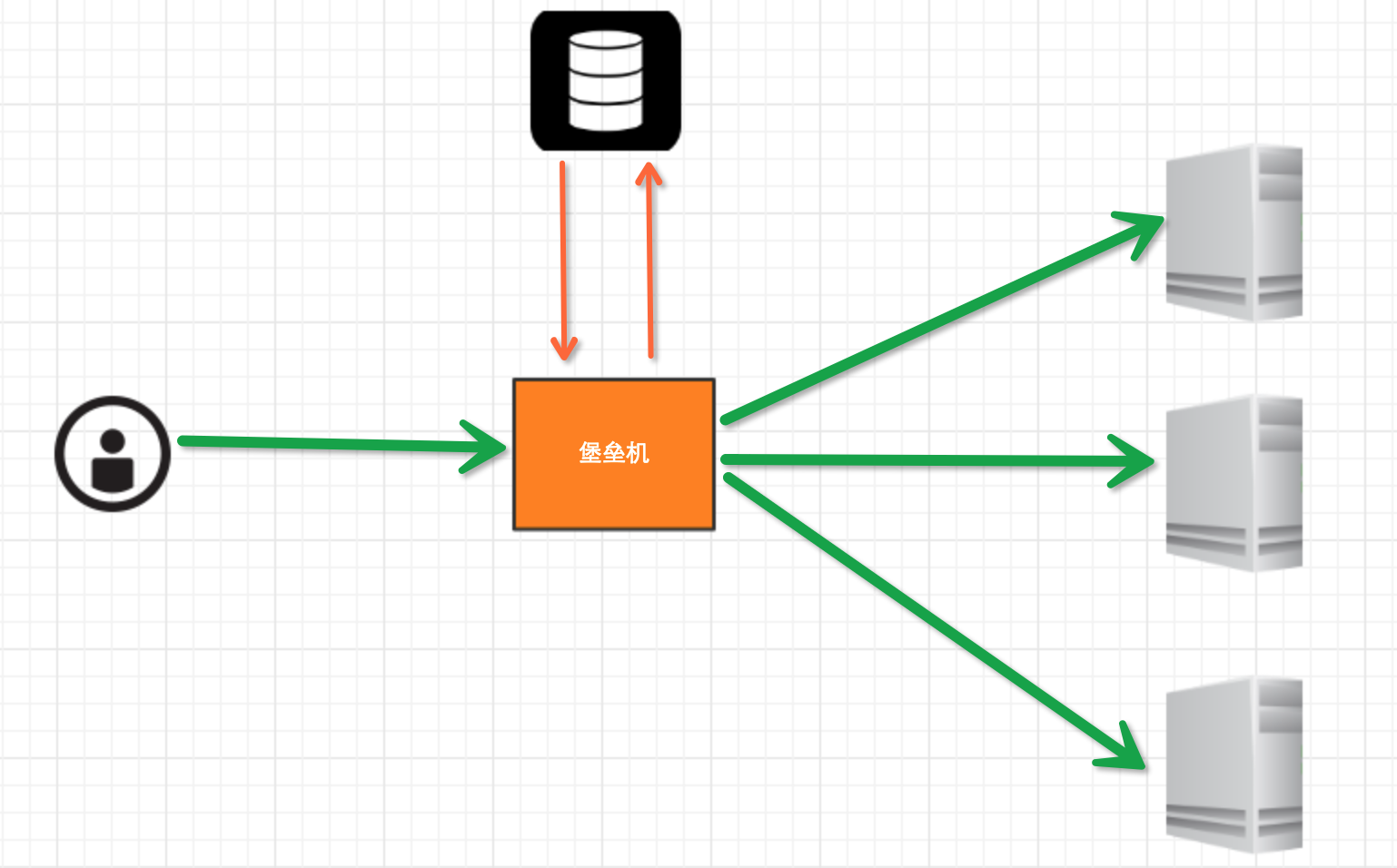
堡垒机执行流程:
- 管理员为用户在服务器上创建账号(将公钥放置服务器,或者使用用户名密码)
- 用户登陆堡垒机,输入堡垒机用户名密码,现实当前用户管理的服务器列表
- 用户选择服务器,并自动登陆
- 执行操作并同时将用户操作记录
注:配置.brashrc实现ssh登陆后自动执行脚本,如:/usr/bin/python /home/wupeiqi/menu.py
实现过程
步骤一,实现用户登陆
|
1
2
3
4
5
6
7
8
|
import getpassuser = raw_input('username:')pwd = getpass.getpass('password')if user == 'alex' and pwd == '123': print '登陆成功'else: print '登陆失败' |
步骤二,根据用户获取相关服务器列表
|
1
2
3
4
5
6
7
8
9
10
11
12
13
14
15
16
17
18
19
20
21
|
dic = { 'alex': [ '172.16.103.189', 'c10.puppet.com', 'c11.puppet.com', ], 'eric': [ 'c100.puppet.com', ]}host_list = dic['alex']print 'please select:'for index, item in enumerate(host_list, 1): print index, iteminp = raw_input('your select (No):')inp = int(inp)hostname = host_list[inp-1]port = 22 |
步骤三,根据用户名、私钥登陆服务器
|
1
2
3
4
5
6
7
8
9
10
11
12
13
14
15
16
17
18
19
20
21
22
|
tran = paramiko.Transport((hostname, port,))tran.start_client()default_path = os.path.join(os.environ['HOME'], '.ssh', 'id_rsa')key = paramiko.RSAKey.from_private_key_file(default_path)tran.auth_publickey('wupeiqi', key)# 打开一个通道chan = tran.open_session()# 获取一个终端chan.get_pty()# 激活器chan.invoke_shell()########## 利用sys.stdin,肆意妄为执行操作# 用户在终端输入内容,并将内容发送至远程服务器# 远程服务器执行命令,并将结果返回# 用户终端显示内容#########chan.close()tran.close() |
 while True:

     # 监视用户输入和服务器返回数据

     # sys.stdin 处理用户输入

     # chan 是之前创建的通道,用于接收服务器返回信息

     readable, writeable, error = select.select([chan, sys.stdin, ],[],[],1)

     if chan in readable:

         try:

             x = chan.recv(1024)

             if len(x) == 0:

                 print '\r\n*** EOF\r\n',

                 break

             sys.stdout.write(x)

             sys.stdout.flush()

         except socket.timeout:

             pass

     if sys.stdin in readable:

         inp = sys.stdin.readline()

         chan.sendall(inp)
肆意妄为方式一
 # 获取原tty属性

 oldtty = termios.tcgetattr(sys.stdin)

 try:

     # 为tty设置新属性

     # 默认当前tty设备属性:

     #   输入一行回车,执行

     #   CTRL+C 进程退出,遇到特殊字符,特殊处理。

     # 这是为原始模式,不认识所有特殊符号

     # 放置特殊字符应用在当前终端,如此设置,将所有的用户输入均发送到远程服务器

     tty.setraw(sys.stdin.fileno())

     chan.settimeout(0.0)

     while True:

         # 监视 用户输入 和 远程服务器返回数据(socket)

         # 阻塞,直到句柄可读

         r, w, e = select.select([chan, sys.stdin], [], [], 1)

         if chan in r:

             try:

                 x = chan.recv(1024)

                 if len(x) == 0:

                     print '\r\n*** EOF\r\n',

                     break

                 sys.stdout.write(x)

                 sys.stdout.flush()

             except socket.timeout:

                 pass

         if sys.stdin in r:

             x = sys.stdin.read(1)

             if len(x) == 0:

                 break

             chan.send(x)

 finally:

     # 重新设置终端属性

     termios.tcsetattr(sys.stdin, termios.TCSADRAIN, oldtty)
肆意妄为方式二
 def windows_shell(chan):

     import threading

     sys.stdout.write("Line-buffered terminal emulation. Press F6 or ^Z to send EOF.\r\n\r\n")

     def writeall(sock):

         while True:

             data = sock.recv(256)

             if not data:

                 sys.stdout.write('\r\n*** EOF ***\r\n\r\n')

                 sys.stdout.flush()

                 break

             sys.stdout.write(data)

             sys.stdout.flush()

     writer = threading.Thread(target=writeall, args=(chan,))

     writer.start()

     try:

         while True:

             d = sys.stdin.read(1)

             if not d:

                 break

             chan.send(d)

     except EOFError:

         # user hit ^Z or F6

         pass
肆意妄为方式三
注:密码验证 t.auth_password(username, pw)
详见:paramiko源码demo
数据库操作
Python 操作 Mysql 模块的安装
|
1
2
3
4
5
|
linux: yum install MySQL-pythonwindow: http://files.cnblogs.com/files/wupeiqi/py-mysql-win.zip |
SQL基本使用
1、数据库操作
|
1
2
3
|
show databases;use [databasename];create database [name]; |
2、数据表操作
|
1
2
3
4
5
6
7
8
9
10
|
show tables;create table students ( id int not null auto_increment primary key, name char(8) not null, sex char(4) not null, age tinyint unsigned not null, tel char(13) null default "-" ); |
 CREATE TABLE `wb_blog` (

     `id` smallint(8) unsigned NOT NULL,

     `catid` smallint(5) unsigned NOT NULL DEFAULT '',

     `title` varchar(80) NOT NULL DEFAULT '',

     `content` text NOT NULL,

     PRIMARY KEY (`id`),

     UNIQUE KEY `catename` (`catid`)

 ) ;
3、数据操作
|
1
2
3
4
5
6
7
|
insert into students(name,sex,age,tel) values('alex','man',18,'151515151')delete from students where id =2;update students set name = 'sb' where id =1;select * from students |
4、其他
|
1
2
3
|
主键外键左右连接 |
Python MySQL API
一、插入数据
|
1
2
3
4
5
6
7
8
9
10
11
12
13
14
15
|
import MySQLdb conn = MySQLdb.connect(host='127.0.0.1',user='root',passwd='1234',db='mydb') cur = conn.cursor() reCount = cur.execute('insert into UserInfo(Name,Address) values(%s,%s)',('alex','usa'))# reCount = cur.execute('insert into UserInfo(Name,Address) values(%(id)s, %(name)s)',{'id':12345,'name':'wupeiqi'}) conn.commit() cur.close()conn.close() print reCount |
 import MySQLdb

 conn = MySQLdb.connect(host='127.0.0.1',user='root',passwd='',db='mydb')

 cur = conn.cursor()

 li =[

      ('alex','usa'),

      ('sb','usa'),

 ]

 reCount = cur.executemany('insert into UserInfo(Name,Address) values(%s,%s)',li)

 conn.commit()

 cur.close()

 conn.close()

 print reCount
批量插入数据
注意:cur.lastrowid
二、删除数据
|
1
2
3
4
5
6
7
8
9
10
11
12
13
14
|
import MySQLdbconn = MySQLdb.connect(host='127.0.0.1',user='root',passwd='1234',db='mydb')cur = conn.cursor()reCount = cur.execute('delete from UserInfo')conn.commit()cur.close()conn.close()print reCount |
三、修改数据
|
1
2
3
4
5
6
7
8
9
10
11
12
13
|
import MySQLdbconn = MySQLdb.connect(host='127.0.0.1',user='root',passwd='1234',db='mydb')cur = conn.cursor()reCount = cur.execute('update UserInfo set Name = %s',('alin',))conn.commit()cur.close()conn.close()print reCount |
四、查数据
|
1
2
3
4
5
6
7
8
9
10
11
12
13
14
15
16
17
18
19
20
21
22
23
24
25
26
27
28
29
30
31
32
33
34
35
36
37
38
39
40
41
42
43
44
|
# ############################## fetchone/fetchmany(num) ##############################import MySQLdbconn = MySQLdb.connect(host='127.0.0.1',user='root',passwd='1234',db='mydb')cur = conn.cursor()reCount = cur.execute('select * from UserInfo')print cur.fetchone()print cur.fetchone()cur.scroll(-1,mode='relative')print cur.fetchone()print cur.fetchone()cur.scroll(0,mode='absolute')print cur.fetchone()print cur.fetchone()cur.close()conn.close()print reCount# ############################## fetchall ##############################import MySQLdbconn = MySQLdb.connect(host='127.0.0.1',user='root',passwd='1234',db='mydb')#cur = conn.cursor(cursorclass = MySQLdb.cursors.DictCursor)cur = conn.cursor()reCount = cur.execute('select Name,Address from UserInfo')nRet = cur.fetchall()cur.close()conn.close()print reCountprint nRetfor i in nRet: print i[0],i[1] |
day9-数据库操作与Paramiko模块的更多相关文章
- python数据库操作之pymysql模块和sqlalchemy模块(项目必备)
pymysql pymsql是Python中操作MySQL的模块,其使用方法和MySQLdb几乎相同. 1.下载安装 pip3 install pymysql 2.操作数据库 (1).执行sql #! ...
- Python之MySQL操作及Paramiko模块操作
一.MySQL简介 MySQL是一个关系型数据库管理系统,由瑞典MySQL AB 公司开发,目前属于 Oracle 旗下公司.MySQL 最流行的关系型数据库管理系统,在 WEB 应用方面MySQ ...
- Python Paramiko模块与MySQL数据库操作
Paramiko模块批量管理:通过调用ssh协议进行远程机器的批量命令执行. 要使用paramiko模块那就必须先安装这个第三方模块,仅需要在本地上安装相应的软件(python以及PyCrypto), ...
- python--第十一天总结(paramiko 及数据库操作)
堡垒机前戏 开发堡垒机之前,先来学习Python的paramiko模块,该模块机遇SSH用于连接远程服务器并执行相关操作 实现思路 堡垒机执行流程: 管理员为用户在服务器上创建账号(将公钥放置服务器, ...
- 第三百零九节,Django框架,models.py模块,数据库操作——F和Q()运算符:|或者、&并且——queryset对象序列化
第三百零九节,Django框架,models.py模块,数据库操作——F()和Q()运算符:|或者.&并且 F()可以将数据库里的数字类型的数据,转换为可以数字类型 首先要导入 from dj ...
- 第三百零八节,Django框架,models.py模块,数据库操作——链表结构,一对多、一对一、多对多
第三百零八节,Django框架,models.py模块,数据库操作——链表结构,一对多.一对一.多对多 链表操作 链表,就是一张表的外键字段,连接另外一张表的主键字段 一对多 models.Forei ...
- 第三百零七节,Django框架,models.py模块,数据库操作——表类容的增删改查
Django框架,models.py模块,数据库操作——表类容的增删改查 增加数据 create()方法,增加数据 save()方法,写入数据 第一种方式 表类名称(字段=值) 需要save()方法, ...
- 第三百零六节,Django框架,models.py模块,数据库操作——创建表、数据类型、索引、admin后台,补充Django目录说明以及全局配置文件配置
Django框架,models.py模块,数据库操作——创建表.数据类型.索引.admin后台,补充Django目录说明以及全局配置文件配置 数据库配置 django默认支持sqlite,mysql, ...
- 第二百八十九节,MySQL数据库-ORM之sqlalchemy模块操作数据库
MySQL数据库-ORM之sqlalchemy模块操作数据库 sqlalchemy第三方模块 sqlalchemysqlalchemy是Python编程语言下的一款ORM框架,该框架建立在数据库API ...
随机推荐
- jquery.i18n.properties.js hacking
/****************************************************************************** * jquery.i18n.proper ...
- js之简易计算器
<!DOCTYPE html PUBLIC "-//W3C//Dli XHTML 1.0 Transitional//EN" "http://www.w3.org/ ...
- Python timedelta
datetime.timedelta对象代表两个时间之间的的时间差,两个date或datetime对象相减时可以返回一个timedelta对象. 构造函数: class datetime.time ...
- Java并发--ConcurrentModificationException(并发修改异常)异常原因和解决方法
在前面一篇文章中提到,对Vector.ArrayList在迭代的时候如果同时对其进行修改就会抛出java.util.ConcurrentModificationException异常.下面我们就来讨论 ...
- 《DSP using MATLAB》示例Example 8.24
代码: %% ------------------------------------------------------------------------ %% Output Info about ...
- SpringMVC传递数据的流线图
流程含义解释:(1)HTTP请求到达web服务器,web服务器将其封装成一个httpServletRequest对象(2)springMVC框架截获这个httpServletRequest对象(3)s ...
- caddy server 默认https && http2的验证
1. 下载 https://caddyserver.com/ 注意选择应该包含的模块,此次包含了git 插件 2. 配置 使用 Caddyfile 内容如下: ro ...
- 7个GIF动图帮你瞬间理解三角函数
7个GIF动图帮你瞬间理解三角函数 蝌蚪五线谱 百家号04-2120:53 图片来源:IMGUR 三角函数是数学中研究三角形的一个分支,专门阐述三角形的角度和对应边的关系. 有趣的是,定义边角关系的三 ...
- Dev-C++ 小问题锦集
C++ project cann't debug Your project does not have debugging information, do you want to enable deb ...
- 执行npm install报错:npm ERR! code EINTEGRITY
命令行执行npm install报错如下: D:\frontend\viewsdev>npm install npm ERR! code EINTEGRITY npm ERR! sha512-8 ...