
Elasticsearch 监控插件安装(elasticsearch-head与Kibana)
摘要
安装Elasticsearch插件Head与Kibana
版本
elasticsearch版本: elasticsearch-2.3.4
elasticsearch-head版本: 2.x(支持elasticsearch 2.x)
Kibana版本: 4.5(支持elasticsearch 2.3 later)
内容
ElasticSearch-Head
关于ElasticSearch-Head官方介绍比较简单,只有一句话:
ElasticSearch-Head 是一个与Elastic集群(Cluster)相交互的Web前台。
ES-Head的主要作用
- 它展现ES集群的拓扑结构,并且可以通过它来进行索引(Index)和节点(Node)级别的操作
- 它提供一组针对集群的查询API,并将结果以json和表格形式返回
- 它提供一些快捷菜单,用以展现集群的各种状态
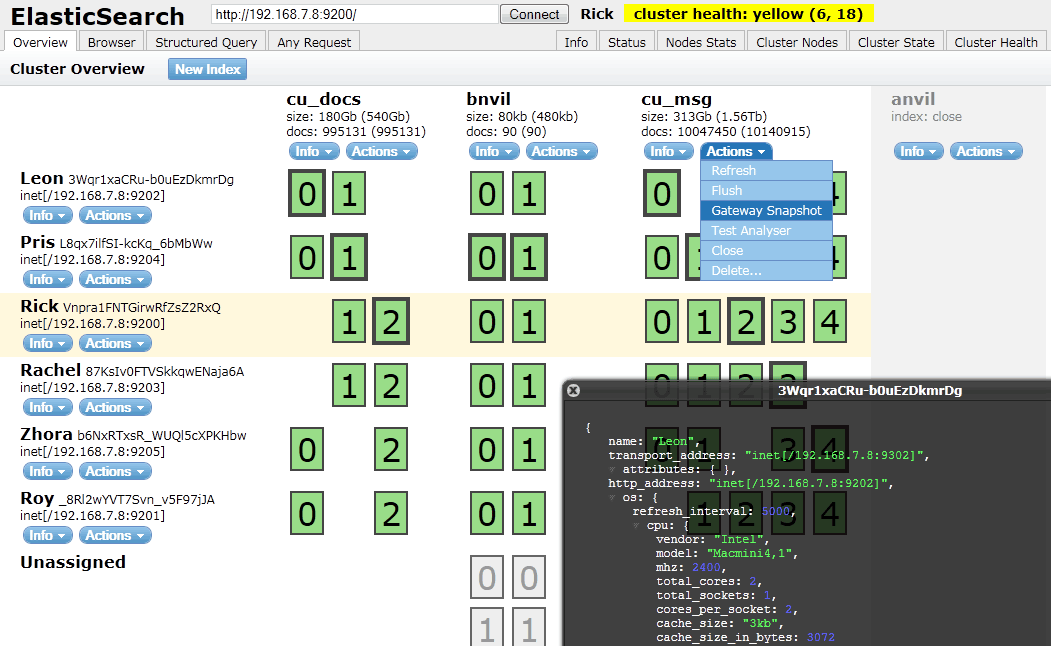
安装
在线安装
针对ElasticSearch,我们可以直接通过命令行进行在线插件安装
⇒ sudo elasticsearch/bin/plugin install mobz/elasticsearch-head
但是可能会出现SSLHandshakeException错误
参考https://github.com/mobz/elasticsearch-head/issues/190给出的解决方法。
例如:
bin/plugin --install knapsack --url file:///Full/Path/To/elasticsearch-knapsack-2.1.2.zip手动安装
先到github下载文件 elasticsearch-head-master.zip
然后通过指定文件路径来安装
⇒ sudo ./plugin install file:///Users/Richard/Downloads/elasticsearch-head-master.zip
在2.x之前版本的命令行格式为:
bin/plugin --install head --url file:///Full/Path/To/elasticsearch-head-master.zip
Kibana
Kibana 是一个ElasticSearch的管理工具,它也提供了对ES集群操作的API。

Installing Kibana with yum

The repositories set up in this procedure are not compatible with distributions using version 3 of rpm, such as CentOS version 5.
Download and install the public signing key:
rpm --import https://packages.elastic.co/GPG-KEY-elasticsearch
Create a file named
kibana.repoin the/etc/yum.repos.d/directory with the following contents:[kibana-4.5]
name=Kibana repository for 4.5.x packages
baseurl=http://packages.elastic.co/kibana/4.5/centos
gpgcheck=1
gpgkey=http://packages.elastic.co/GPG-KEY-elasticsearch
enabled=1Install Kibana by running the following command:
yum install kibana
Configure Kibana to automatically start during bootup. If your distribution is using the System V version of
init(check withps -p 1), run the following command:chkconfig --add kibana
If your distribution is using
systemd, run the following commands instead:sudo /bin/systemctl daemon-reload
sudo /bin/systemctl enable kibana.service
That’s it! Kibana is now running on port 5601.
Install and Start Kibana local
To get Kibana up and running:
- Download the Kibana 4 binary package for your platform.
- Extract the
.ziportar.gzarchive file. - Run Kibana from the install directory:
bin/kibana(Linux/MacOSX) orbin\kibana.bat(Windows).
On Unix, you can instead run the package manager suited for your distribution.
关于如何配置,请参考:
http://kibana.logstash.es/content/kibana/v4/setup.html
参考:
elasticsearch-head:
https://github.com/mobz/elasticsearch-head
http://mobz.github.io/elasticsearch-head/
ElasticSearch 2 (6) - 插件安装Head、Kopf与Bigdesk
Kibana:
Elasticsearch 监控插件安装(elasticsearch-head与Kibana)的更多相关文章
- Elasticsearch入门教程(一):Elasticsearch及插件安装
原文:Elasticsearch入门教程(一):Elasticsearch及插件安装 版权声明:本文为博主原创文章,遵循CC 4.0 BY-SA版权协议,转载请附上原文出处链接和本声明. 本文链接:h ...
- ELK 学习笔记之 elasticsearch head插件安装
elasticsearch head插件安装: 准备工作: 安装nodejs和npm https://nodejs.org/en/download/ node-v6.11.2-linux-x64.ta ...
- 【windows环境下】RabbitMq的安装和监控插件安装
RabbitMq的安装: RabbitMQ是基于Erlang的,所以必须先配置Erlang环境. 下载Erlang,地址:http://www.erlang.org/download/otp_win3 ...
- 新版elasticsearch的插件安装
安装 yum localinstall elasticsearch-6.1.1.rpm -y mkdir -p /elk/{data,logs} && chown -R elastic ...
- ElasticSearch head 插件安装
head 客户端可以很方便在上面创建索引,类型,文档,还有查询,使用它管理elasticsearch 提高效率. 在安装head 客户端之前必须安装node.js 环境,因为它是用node.js 编写 ...
- Elasticsearch安装(四), elasticsearch head 插件安装和使用。
安装方式如下: 一.安装Elasticsearch-Head 1.插件安装方式(推荐) #在Elasticsearch目录下 $/bin/plugin -install mobz/elasticsea ...
- ElasticSearch及其插件安装配置
elasticsearch安装使用 .安装步骤: 1.下载elasticsearch的rpm包: wget https://artifacts.elastic.co/downloads/elastic ...
- 【linux环境下】RabbitMq的安装和监控插件安装
[注意安装过程中,提示某些命令not found,直接yum isntall一下就好了] 以下是我在CentOS release 6.4下亲测成功的. RabbitMq的安装: RabbitMQ是 ...
- Elasticsearch -- Head插件安装
安装Head插件 由于head插件本质上还是一个nodejs的工程,因此需要安装node,使用npm来安装依赖的包. <1>安装Node.js 下载解压 wget https://node ...
随机推荐
- location [=|$|最长原则|^~](nginx-1.4.4)
优先级由上到下依次递减: location =/a/1.png { return 400; } } location ~* \.png$ { return 403; } location /a/1.p ...
- 0067 MySQL的日期字段的取值用单引号
这两天在做sql练习题http://www.cnblogs.com/zxx193/p/4000467.html的时候,涉及到下面的建表+插数据操作 CREATE TABLE t1( s_no VARC ...
- [转]C++中的三种继承public,protected,private
链接:http://www.cnblogs.com/BeyondAnyTime/archive/2012/05/23/2514964.html
- linux超级终端minicom的使用方法
===== 一.Minicom介绍 ===== Linux下的Minicom的功能与Windows下的超级终端功能相似,可以通过串口控制外部的硬件 设备.适于在linux通过超级终端对 ...
- dp之完全背包poj3181(高精度背包)
这个题目要用到大数的加法,其他的,我没有感觉到有什么难想的......比较水的背包题,掠过..... #include<iostream> #include<stdio.h> ...
- keepalived管理LVS文件详解
#全局设置,只设置一个 全局路由就可以,全局路由不能重复唯一标识. global_defs { router_id LVS_01 #全局路由ID,唯一不能重复 } #实例 vrrp_instance ...
- 1.1.18 zabbix监控NFS
1.1.1 zabbix监控NFS 第一步创建脚本: 添加执行权限 chmod +x cat /server/scripts/nfs_check.sh [root@web02 scripts]# ...
- 关于Unity中场景视图的使用
1.在任何状态下,按下鼠标中键可以切换到手掌的那个状态,可以移动当前场景 2.在手掌的那个状态,按住鼠标左键是移动场景视图,右键是视角绕着摄像机移动,按住alt+鼠标左键,是绕着指定物体旋转视角 3. ...
- 学习shader之前必须知道的东西之计算机图形学(一)渲染管线
引言 shader到底是干什么用的?shader的工作原理是什么? 其实当我们对这个问题还很懵懂的时候,就已经开始急不可耐的要四处搜寻有关shader的资料,恨不得立刻上手写一个出来.但看了一些资料甚 ...
- 查看linux系统外网ip命令
终端中输入 curl ipinfo.io 或者 curl ifconfig.me 即可通过IP地址检测网站提供的api获得取本机的外网IP,或者以 JSON 格式返回全部结果.