
XFire搭建WebService和客户端访问程序
开发环境:myeclipse8.6+jdk1.6.0_29+tomcat6.0.37
JAX-WS搭建webservice:http://www.cnblogs.com/gavinYang/p/3525287.html
一、搭建WebService
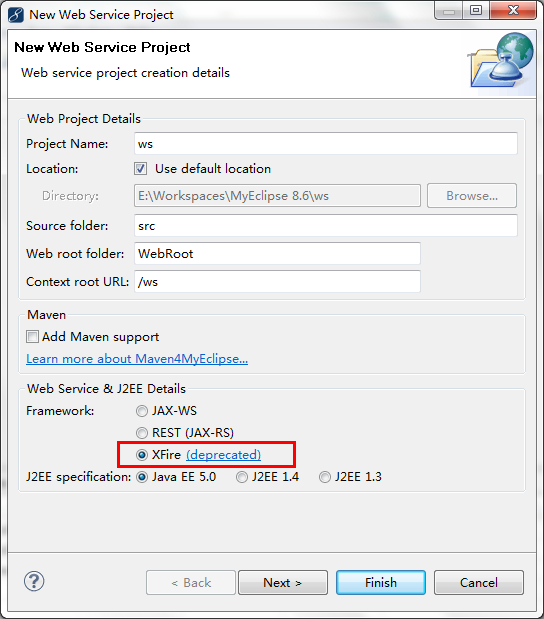
1.新建一个Web Service Project
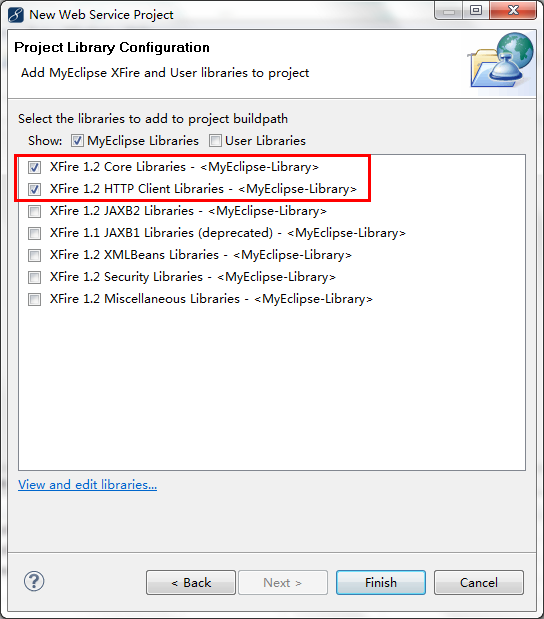
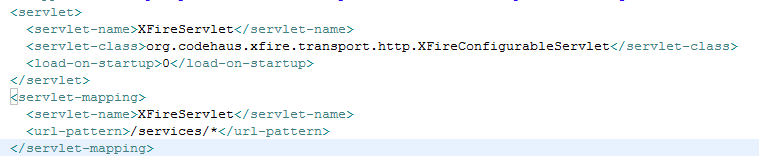
做完上述步骤后会发现项目中多了一个WebServices目录和WebServices目录下services.xml文件,web.xml会多一个Servlet配置
指明了当遇到/services/*请求时,将选用XFireConfigurableServlet来处理

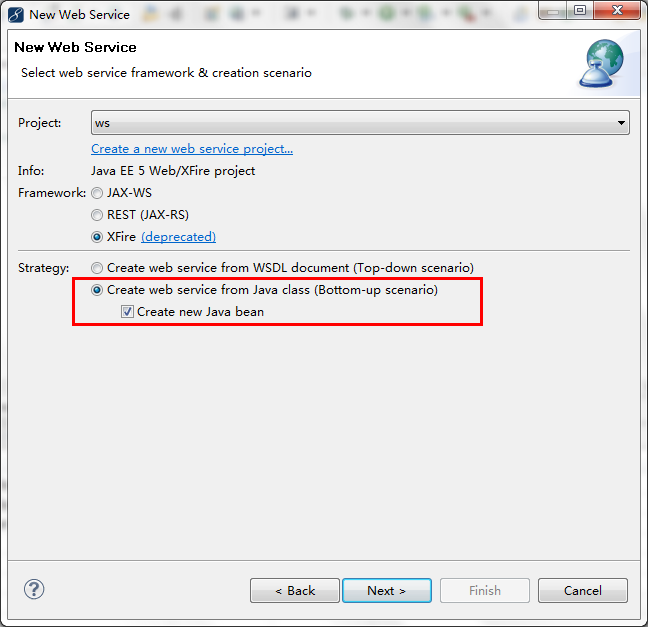
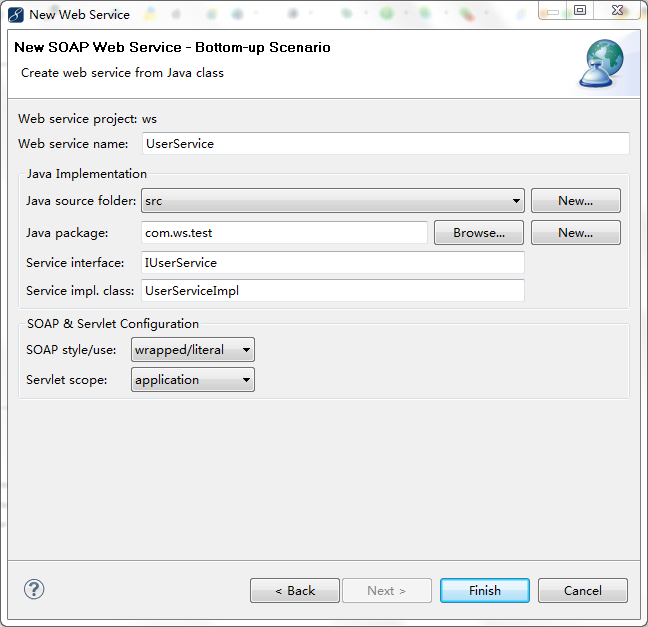
2.New Web Service
做完上述步骤后会发现WebServices目录下services.xml文件多了如下内容
src目录下自动生成了两个类(我们也可以写上自己的接口方法)
UserServiceImpl.java

package com.ws.test;

//Generated by MyEclipse

public class UserServiceImpl implements IUserService {

    public String example(String message) {

        return message;

    }

}
IUserService.java
package com.ws.test;

//Generated by MyEclipse

public interface IUserService {

    public String example(String message);

}
3.部署项目到tomcat,访问url:http://localhost:8080/ws/services/UserService?wsdl
  <?xml version="1.0" encoding="UTF-8" ?>

- <wsdl:definitions targetNamespace="http://test.ws.com" xmlns:soapenc12="http://www.w3.org/2003/05/soap-encoding" xmlns:tns="http://test.ws.com" xmlns:wsdl="http://schemas.xmlsoap.org/wsdl/" xmlns:xsd="http://www.w3.org/2001/XMLSchema" xmlns:soap11="http://schemas.xmlsoap.org/soap/envelope/" xmlns:wsdlsoap="http://schemas.xmlsoap.org/wsdl/soap/" xmlns:soapenc11="http://schemas.xmlsoap.org/soap/encoding/" xmlns:soap12="http://www.w3.org/2003/05/soap-envelope">

- <wsdl:types>

- <xsd:schema xmlns:xsd="http://www.w3.org/2001/XMLSchema" attributeFormDefault="qualified" elementFormDefault="qualified" targetNamespace="http://test.ws.com">

- <xsd:element name="example">

- <xsd:complexType>

- <xsd:sequence>

  <xsd:element maxOccurs="1" minOccurs="1" name="in0" nillable="true" type="xsd:string" />

  </xsd:sequence>

  </xsd:complexType>

  </xsd:element>

- <xsd:element name="exampleResponse">

- <xsd:complexType>

- <xsd:sequence>

  <xsd:element maxOccurs="1" minOccurs="1" name="out" nillable="true" type="xsd:string" />

  </xsd:sequence>

  </xsd:complexType>

  </xsd:element>

  </xsd:schema>

  </wsdl:types>

- <wsdl:message name="exampleRequest">

  <wsdl:part name="parameters" element="tns:example" />

  </wsdl:message>

- <wsdl:message name="exampleResponse">

  <wsdl:part name="parameters" element="tns:exampleResponse" />

  </wsdl:message>

- <wsdl:portType name="UserServicePortType">

- <wsdl:operation name="example">

  <wsdl:input name="exampleRequest" message="tns:exampleRequest" />

  <wsdl:output name="exampleResponse" message="tns:exampleResponse" />

  </wsdl:operation>

  </wsdl:portType>

- <wsdl:binding name="UserServiceHttpBinding" type="tns:UserServicePortType">

  <wsdlsoap:binding style="document" transport="http://schemas.xmlsoap.org/soap/http" />

- <wsdl:operation name="example">

  <wsdlsoap:operation soapAction="" />

- <wsdl:input name="exampleRequest">

  <wsdlsoap:body use="literal" />

  </wsdl:input>

- <wsdl:output name="exampleResponse">

  <wsdlsoap:body use="literal" />

  </wsdl:output>

  </wsdl:operation>

  </wsdl:binding>

- <wsdl:service name="UserService">

- <wsdl:port name="UserServiceHttpPort" binding="tns:UserServiceHttpBinding">

  <wsdlsoap:address location="http://localhost:8080/ws/services/UserService" />

  </wsdl:port>

  </wsdl:service>

  </wsdl:definitions>
二、调用WebServices
1.新建一个Java Project
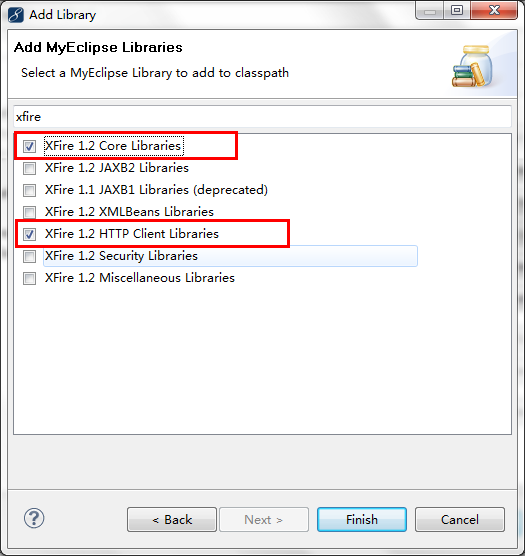
2.添加XFire类库至构建路径
3.我们新建一个Java类来测试调用webservice
package com.wsc.test;

import java.net.URL;

import org.codehaus.xfire.client.Client;

public class TestWs {

    public static void main(String[] args) {

        try{

            Client client = new Client(new URL("http://localhost:8080/ws/services/UserService?wsdl"));

            Object[] results = client.invoke("example", new Object[] {"Gavin"});

            System.out.println((String) results[0]);

        }catch (Exception e) {

            // TODO: handle exception

            e.printStackTrace();

        }

    }

}
输出结果为:Gavin
XFire搭建WebService和客户端访问程序的更多相关文章
- JAX-WS搭建WebService和客户端访问程序
开发环境:myeclipse8.6+jdk1.6.0_29+tomcat6.0.37 XFire搭建webservice: http://www.cnblogs.com/gavinYang/p/352 ...
- Linux Samba目录服务搭建与Java客户端访问
前言: 本文比较简略,只求快速入门,若要了解详情,推荐一篇文章:http://www.cnblogs.com/mchina/archive/2012/12/18/2816717.html 1,安装sa ...
- 使用xfire搭建webService服务
后边有个项目需要接入4A,要用到webService服务,暂时还不确定是不是会有我的事,但为了有备无患,还是抽时间学习了以下相关的知识. 本来我所了解到的发布webService服务有用cxf和xfi ...
- C++客户端访问WebService VS2008
VS2008及之后的版本已经不支持使用C++开发WEBService服务了,如果要在VS上开发WEBService,需要使用C#开发语言. 一.gSOAP简介 gSOAP编译工具提供了一个基于SOAP ...
- cxf开发webservice服务器+客户端(各种类型的参数传递返回)
开发环境:eclipse3.7+jdk1.6.0_29+tomcat6.0.37 XFire搭建webservice: http://www.cnblogs.com/gavinYang/p/35253 ...
- 搭建QQ聊天通信的程序:(1)基于 networkcomms.net 创建一个WPF聊天客户端服务器应用程序 (1)
搭建QQ聊天通信的程序:(1)基于 networkcomms.net 创建一个WPF聊天客户端服务器应用程序 原文地址(英文):http://www.networkcomms.net/creating ...
- 关于搭建webservice以及无法通过URL访问的简易解决办法
之前工作天天在用webservice,但是从没有自己独立的搭建一个全新的项目,今天好不容易自己搭了一个webservice,报错不少,记录下来免得以后又忘了. 一.搭建webservice需要做的几点 ...
- 问题-XE8客户端访问Webservice时报“no selected dom vendor”
问题现象:XE8做的客户端访问XE8做的Webservice时,客户端报“no selected dom vendor”. 问题原因:原因不明,应该是用到了XML转换等方法吧.有高手了解的,请M我. ...
- centos7 搭建svn服务器&客户端的访问&备份迁移
当今用于版本控制的软件程序主要的有svn和git,其它软件咱不熟悉,今天记录下搭建svn服务器和svn客户端使用: 使用环境:虚拟机为centos7系统,svn服务器安装在centos7系统平台上,s ...
随机推荐
- windows64系统下安装 redis服务 (详细)
Linux下Redis安装链接 : 转到 redis是一个key-value存储系统.和Memcached类似,它支持存储的value类型相对更多,包括string(字符串).list(链表) ...
- 利用box-shadow制作loading图
我们见过很多利用css3做的loading图,像下面这种应该是很常见的.通常制作这种loading,我们会一个标签对应一个圆,八个圆就要八个标签.但是这种做法很浪费资源.我们可以只用一个标签,然后利用 ...
- 【线段树求区间第一个不大于val的值】Lpl and Energy-saving Lamps
https://nanti.jisuanke.com/t/30996 线段树维护区间最小值,查询的时候优先向左走,如果左边已经找到了,就不用再往右了. 一个房间装满则把权值标记为INF,模拟一遍,注意 ...
- s2sh乱码一个小处理(新手按流程走)
解决乱码几小点: 1.配置过滤器,可以选择自己写,既然你用的SSH框架就更简单了,直接用Spring的过滤器,web.xml里配置一下即可. 2.Jsp页面设置编码,所有地方都要相同,我习惯用GBK ...
- POJ 1971 Parallelogram Counting
题目链接: http://poj.org/problem?id=1971 题意: 二维空间给n个任意三点不共线的坐标,问这些点能够组成多少个不同的平行四边形. 题解: 使用的平行四边形的判断条件:对角 ...
- Java中int与String间的类型转换
int -> String int i=12345;String s=""; 除了直接调用i.toString();还有以下两种方法第一种方法:s=i+"" ...
- vue shorthands
vue shorthands : & @ https://vuejs.org/v2/guide/syntax.html#Shorthands v-for https://vuejs.org/v ...
- js中如何获取页面的Url,域名和端口号
有时候通过获取上个页面的Url来做一个跳转,获取域名防止非正常访问 获取上一个页面的一个URL,这个URL一般做一个页面的跳转 window.location.href <script>w ...
- 【bzoj3774】最优选择 网络流最小割
题目描述 小N手上有一个N*M的方格图,控制某一个点要付出Aij的代价,然后某个点如果被控制了,或者他周围的所有点(上下左右)都被控制了,那么他就算是被选择了的.一个点如果被选择了,那么可以得到Bij ...
- C++解析(30):关于指针判别、构造异常和模板二义性的疑问
0.目录 1.指针的判别 2.构造中的异常 2.1 如果构造函数中抛出异常会发生什么? 2.2 如果析构函数中抛出异常会发生什么? 3.令人迷惑的写法 3.1 模板中的二义性 3.2 函数异常声明 4 ...